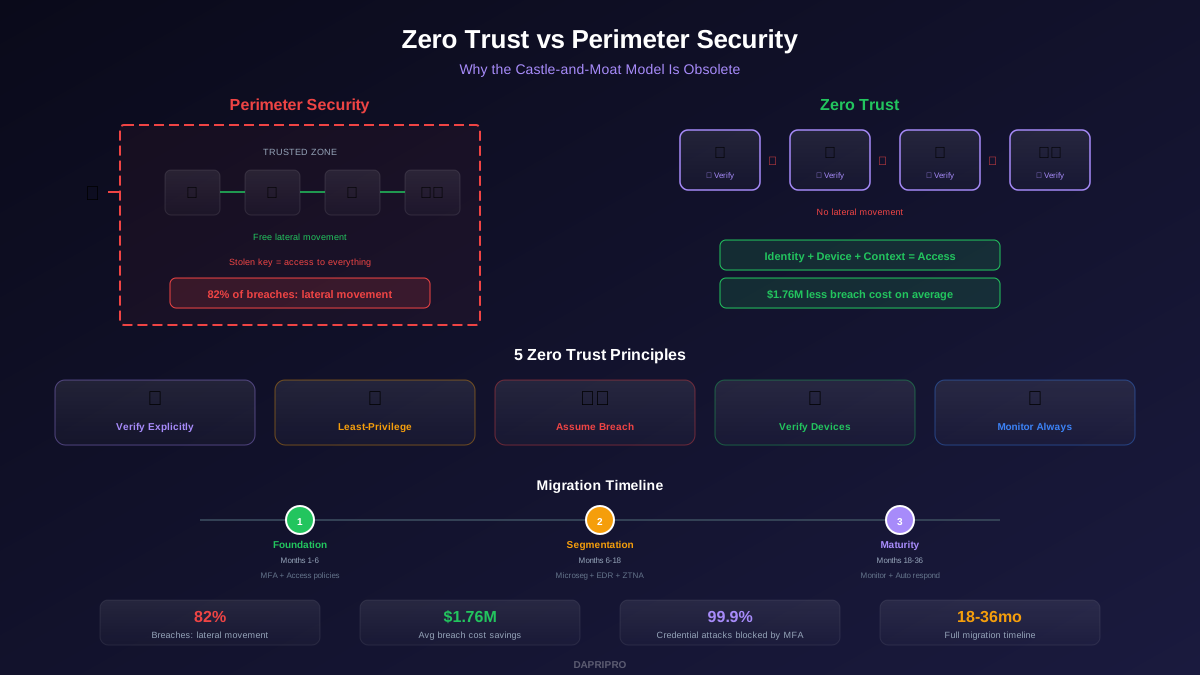
Imagine you live in a castle with a big wall around it. Once someone gets past the wall, they can go anywhere — the kitchen, the treasure room, the king's bedroom. That is how traditional network security works. One login, and you are in.
Now imagine an airport instead. You show your ID at check-in, again at security, again at the gate, and again when you board the plane. Every single step checks who you are and whether you belong there. That is zero trust security.
The idea is simple: never trust anyone automatically, always verify. Even if someone is already inside your network, they still have to prove they should be there — every single time they access something. This guide explains how zero trust architecture works, why businesses everywhere are adopting it, and how you can implement it step by step.
What Is Zero Trust Architecture?
Zero trust architecture is a security model built on one core rule: no user, device, or application is trusted by default. Traditional security builds a strong perimeter (like a castle wall) and assumes everything inside is safe. Zero trust throws that assumption away.
Instead, zero trust:
- Verifies every request — who is asking, what device are they using, where are they, and is their request normal?
- Gives minimum access — users only get permission to do exactly what their job requires, nothing more (this is called the "principle of least privilege")
- Assumes breach — the system is designed as if hackers are already inside, so even a break-in stays contained
- Monitors continuously — access is not a one-time check; it is re-evaluated constantly based on behavior and risk signals
The concept was created by NIST (National Institute of Standards and Technology) and has become the standard security model recommended by governments and enterprises worldwide.
To understand why zero trust beats traditional perimeter security, see our detailed comparison in Zero Trust vs. Traditional Perimeter Security.
Why Companies Are Switching to Zero Trust in 2026
The old castle-and-moat approach worked when everyone sat in the same office and used the same network. But that world is gone. Here is why zero trust implementation is now urgent:
- Remote work is permanent. Employees work from home, coffee shops, airports, and coworking spaces. There is no single "inside" anymore. You need security that follows the user, not the building.
- Cloud is everywhere. Your apps and data live in AWS, Azure, Google Cloud, and dozens of SaaS tools. A traditional firewall cannot protect what it cannot see.
- Breaches are devastating. The average data breach costs $4.88 million (IBM, 2024). Organizations with a zero trust framework cut that cost by roughly 50%.
- Regulations demand it. The U.S. government's Executive Order on Cybersecurity requires federal agencies to adopt zero trust. Industries like healthcare and finance are following.
- Attackers move fast. Once inside a network, hackers typically take only 2 hours to move laterally to other systems. Zero trust's microsegmentation stops that movement cold.
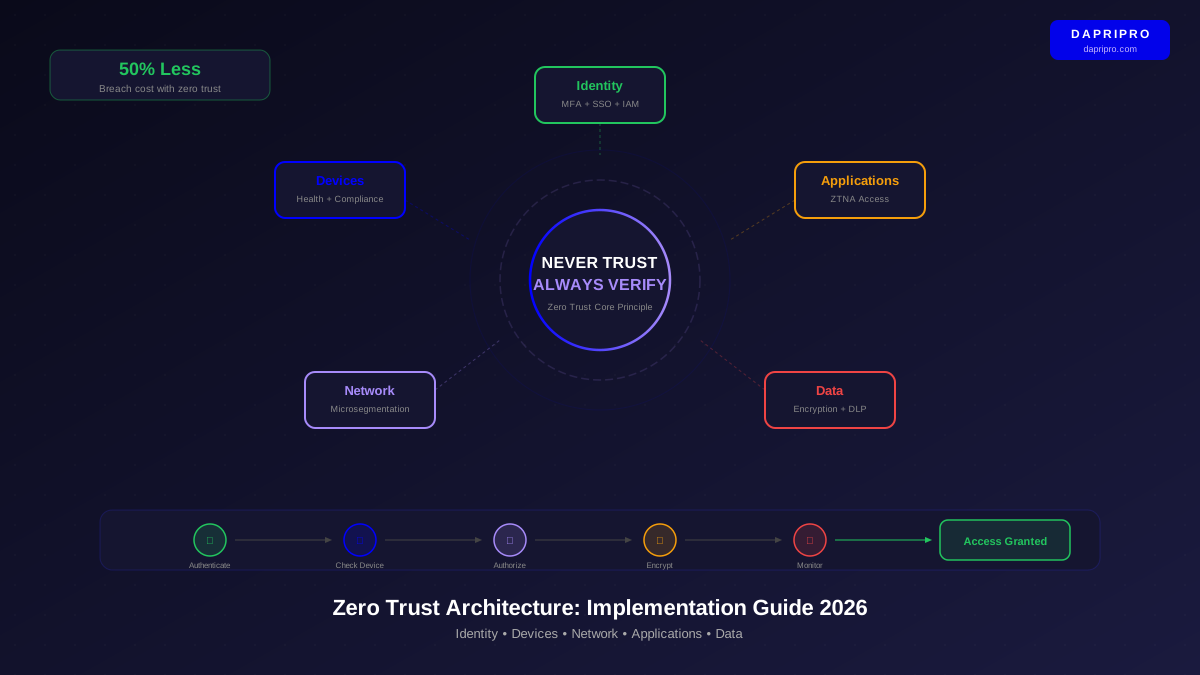
The 5 Pillars of Zero Trust Architecture
A complete zero trust framework stands on five pillars. Each one protects a different part of your technology stack:
Pillar 1: Identity
Identity is the starting point of zero trust. Before anything happens, the system must know who is making the request. This means strong identity and access management (IAM) — multi-factor authentication (MFA), single sign-on (SSO), and risk-based conditional access policies.
For example, if someone logs in from their usual laptop in the office, they get normal access. If the same person logs in at 3 AM from a country they have never visited, the system challenges them with extra verification — or blocks the attempt entirely.
Our Identity-Centric Security and IAM Guide covers this pillar in full detail.
Pillar 2: Devices
Even a legitimate user should not be trusted if their device is compromised. Zero trust checks the health of every device: Is the operating system up to date? Is the antivirus running? Is the hard drive encrypted? A device that fails these checks gets restricted or blocked — even if the user's password is correct.
This ties directly into endpoint security. Your zero trust solutions need visibility into every laptop, phone, and tablet that connects to your resources.
Pillar 3: Network
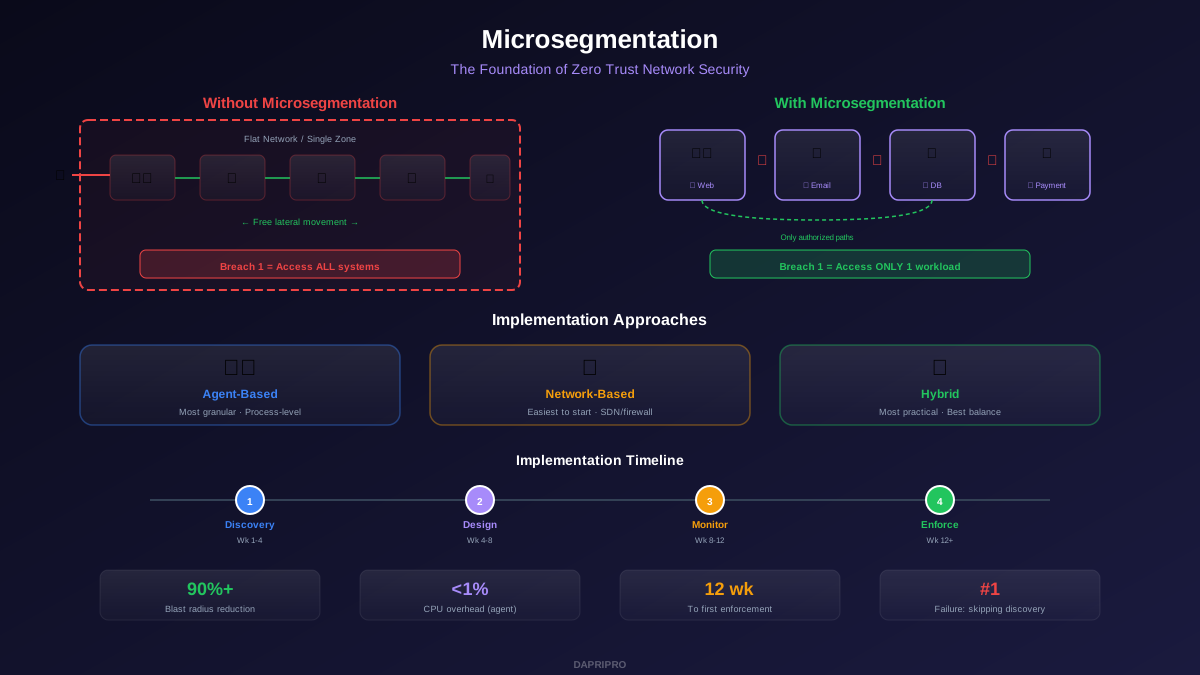
Network segmentation — especially microsegmentation — is what stops hackers from moving around after they get in. Instead of one flat network where everything can talk to everything, you divide it into tiny segments. Each segment has its own access rules.
Think of it like a submarine. If one compartment floods, the watertight doors keep the rest of the ship dry. Our Microsegmentation Guide explains how to build these digital watertight doors.
Pillar 4: Applications
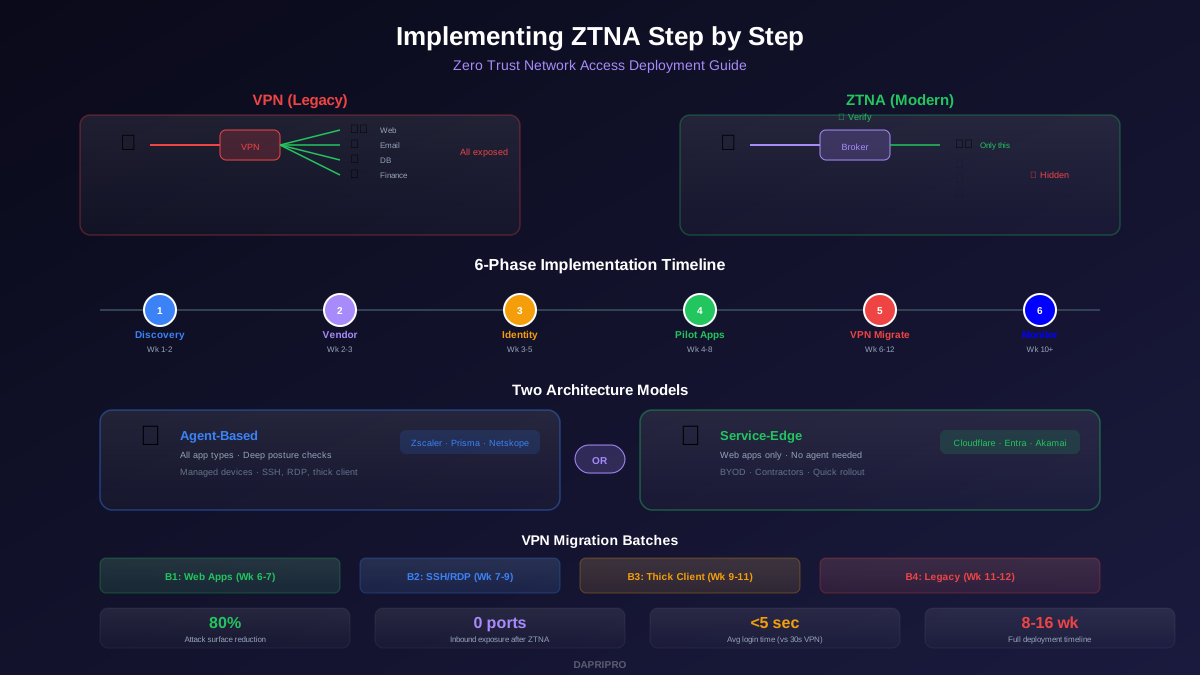
Zero Trust Network Access (ZTNA) replaces traditional VPNs. Instead of giving a remote worker full network access, ZTNA shows them only the specific applications they are authorized to use. Everything else is invisible. A hacker who compromises a ZTNA user cannot even see the other applications on the network, let alone attack them.
Learn how to deploy this in our ZTNA Step-by-Step Implementation Guide.
Pillar 5: Data
Data is ultimately what attackers want. Zero trust protects data through classification (labeling what is sensitive), encryption (scrambling it so stolen copies are useless), and data loss prevention (blocking unauthorized transfers). Even if an attacker gets through every other layer, encrypted, classified data is worthless to them.
Zero Trust Tools Compared: 2026 Edition
Choosing zero trust solutions can feel overwhelming because the market is huge. Here is a practical breakdown of the top tools by category:
ZTNA (Zero Trust Network Access)
| Solution | Best For | Price Range | Standout Feature |
|---|---|---|---|
| Zscaler Private Access | Large enterprises | $6-$12/user/mo | Largest global edge network |
| Cloudflare Access | Small-medium businesses | Free-$7/user/mo | Free tier for up to 50 users |
| Palo Alto Prisma Access | Complex multi-cloud | $8-$15/user/mo | Integrated SASE platform |
| Google BeyondCorp | Google Workspace users | $6-$10/user/mo | Context-aware access policies |
Identity Providers (IAM)
| Solution | Best For | Price Range | Standout Feature |
|---|---|---|---|
| Okta | Multi-cloud environments | $2-$15/user/mo | 7,000+ app integrations |
| Microsoft Entra ID | Microsoft 365 shops | Free-$9/user/mo | Built into Windows and Azure |
| Ping Identity | Hybrid IT environments | $3-$12/user/mo | Strong on-premises support |
Microsegmentation
| Solution | Best For | Price Range | Standout Feature |
|---|---|---|---|
| Illumio | Data center workloads | Custom pricing | Real-time app dependency mapping |
| Akamai Guardicore | Ransomware containment | Custom pricing | Process-level segmentation |
| VMware NSX | VMware environments | Custom pricing | Native hypervisor integration |
"Zero trust is not a product you buy. It is a strategy you build. Pick the right tools for each pillar and connect them with policies and monitoring."
— John Kindervag, Creator of Zero Trust
Step-by-Step: How to Implement Zero Trust
Zero trust is a journey, not a switch you flip. Here is a practical roadmap that works for organizations of any size:
Phase 1: Know What You Have (Weeks 1-4)
You cannot protect what you do not know exists. Start by inventorying:
- All users and their access levels
- Every device that connects to your network
- All applications (cloud and on-premises)
- Where your sensitive data lives
- How traffic flows between systems
Phase 2: Lock Down Identity (Weeks 5-10)
Deploy MFA everywhere — not just for admins, for everyone. Set up SSO so users have one strong login instead of dozens of weak passwords. Create conditional access policies that consider location, device health, and time of day.
Phase 3: Replace VPN with ZTNA (Weeks 11-18)
Pick a ZTNA solution from the comparison above. Start with one department or application. Once it works smoothly, expand. Your users will actually prefer ZTNA because it is faster than traditional VPN connections.
Phase 4: Segment Your Network (Weeks 19-30)
Deploy microsegmentation starting with your most sensitive systems (financial databases, customer records, intellectual property). Create policies that define exactly which systems can talk to each other. Block everything else.
Phase 5: Monitor Everything (Ongoing)
Set up continuous monitoring with a SIEM (Security Information and Event Management) tool. Watch for anomalies: unusual login times, large data transfers, lateral movement attempts. The data you collect feeds back into your policies, making them smarter over time.
To measure your progress, use our Zero Trust Maturity Assessment to score your organization against industry benchmarks.
Zero Trust for Remote Workers
Remote work is the biggest reason companies adopt zero trust. When employees work from home or travel, they connect from untrusted networks (home Wi-Fi, hotel networks, airport hotspots). Traditional VPNs try to solve this by tunneling all traffic through the office — but they are slow, expensive to scale, and give too much access once connected.
ZTNA for remote workers solves all of these problems:
- Users connect directly to the app they need — no slow VPN tunnel
- Access is limited to specific apps, not the entire network
- Device health is checked before and during every session
- If a device gets compromised, access is revoked automatically
For a deep dive into securing your distributed team, see our Zero Trust for Remote Workers Guide.
Common Zero Trust Mistakes to Avoid
Organizations that stumble on their zero trust implementation usually make one of these errors:
- Trying to do everything at once. Zero trust is a multi-year journey. Trying to deploy all five pillars simultaneously leads to burnout, budget overruns, and half-finished projects.
- Forgetting about user experience. If your zero trust controls make it impossible for people to do their jobs, they will find workarounds — and workarounds create new security holes.
- Buying a "zero trust product" and thinking you are done. No single vendor provides complete zero trust. You need tools across identity, network, applications, and data — plus policies that tie them together.
- Ignoring legacy systems. Older applications that do not support modern authentication still need to be protected. Micro-segmenting them is often the best approach.
- Skipping microsegmentation. Identity verification alone is not enough. Without network segmentation, a compromised account can still reach systems it should not.
Conclusion: Start Small, Think Big
Zero trust architecture is not optional anymore — it is the security model that works in a world of remote work, cloud computing, and relentless cyberattacks. The old castle-and-moat approach is broken, and every day you wait increases your risk.
The good news? You do not need to overhaul everything overnight. Start with identity: deploy MFA and SSO. Then replace your VPN with ZTNA for one team. Add microsegmentation around your most sensitive data. Keep going.
Every step you take reduces your attack surface and brings you closer to a security posture where breaches are contained, not catastrophic.
For hands-on implementation details, explore our cluster guides: ZTNA Implementation, Microsegmentation, and Identity-Centric Security. To protect the endpoints connecting to your zero trust network, see our Endpoint Security Guide. And to secure the email flowing through your organization, check our Email Security Guide.
Trust nothing. Verify everything. Start today.