Imagine your company network is a medieval castle. You build thick walls (firewalls), dig a moat (DMZ), and post guards at the gate (intrusion detection). Everyone inside the walls is trusted. Visitors show a badge (VPN credentials) and once inside, they can walk anywhere.
For decades, this worked. Then three things happened: your data moved to the cloud (outside the castle), your employees started working from home (outside the castle), and attackers learned to steal badges instead of breaking walls. Suddenly, the castle-and-moat model protects nothing.
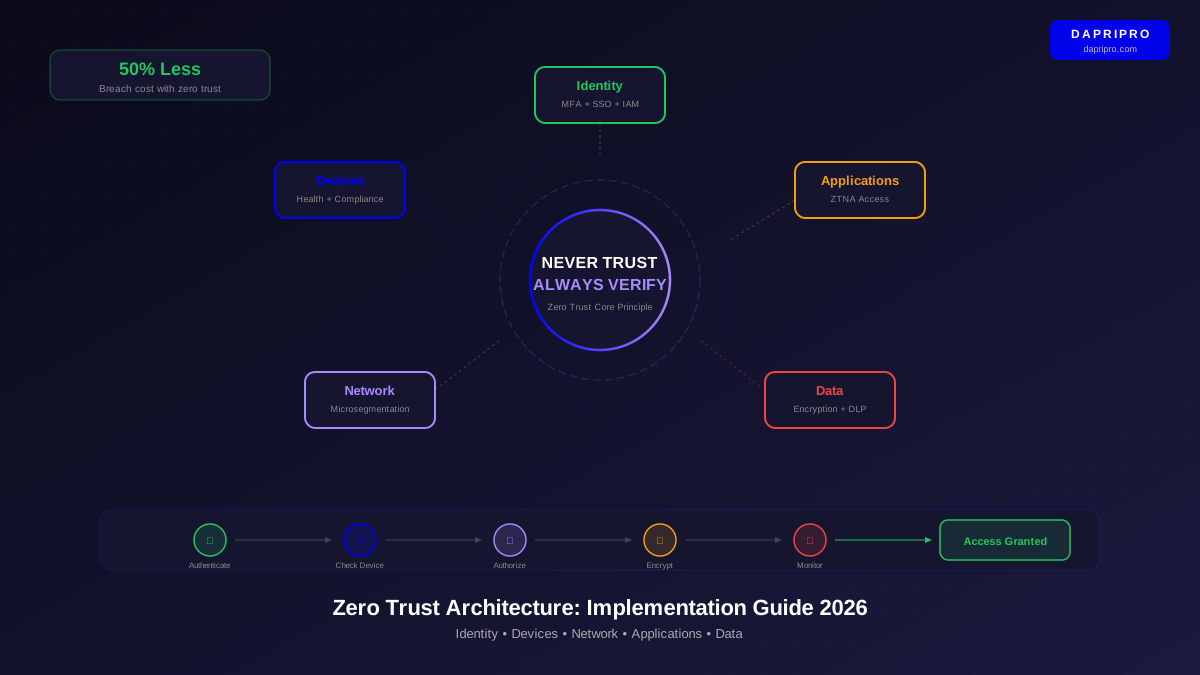
This is why every major security framework — NIST, CISA, the White House Executive Order on Cybersecurity — now mandates zero trust architecture. Not because zero trust is trendy, but because the alternative is defending a perimeter that no longer exists.
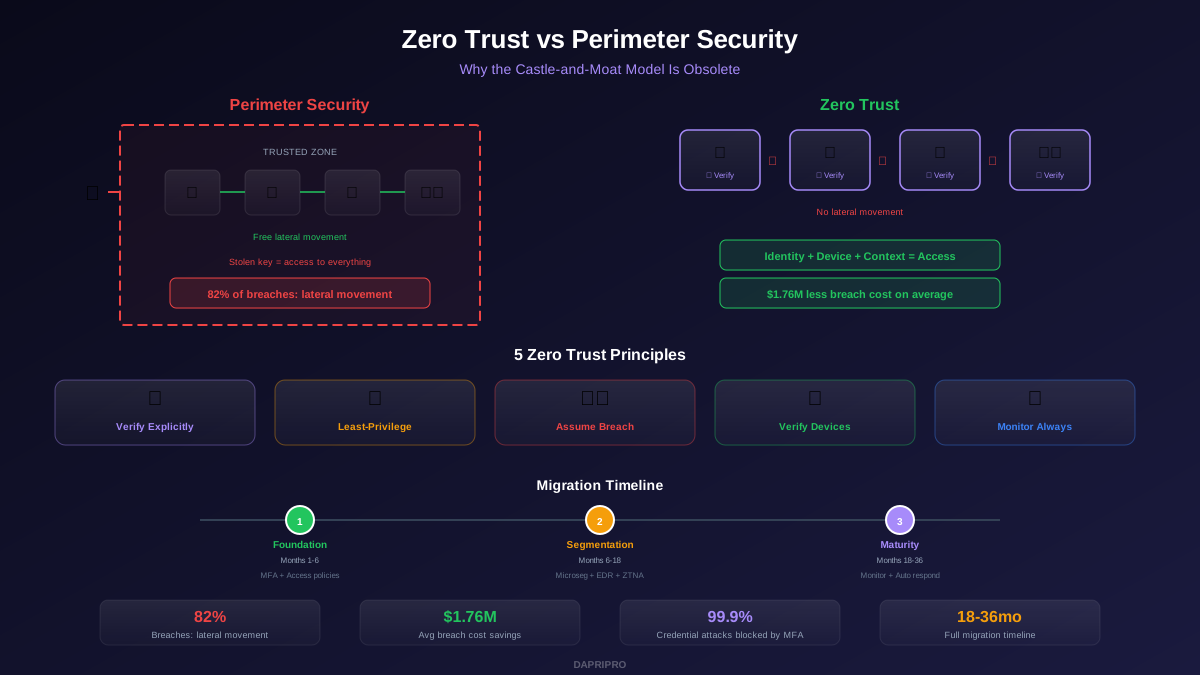
Two Models Compared
| Aspect | Perimeter Security | Zero Trust |
|---|---|---|
| Trust Model | Trust everything inside the network | Trust nothing, verify everything |
| Access Control | Network-based (IP, VLAN) | Identity-based (user + device + context) |
| Authentication | At the gate (VPN login) | Continuous, per-resource |
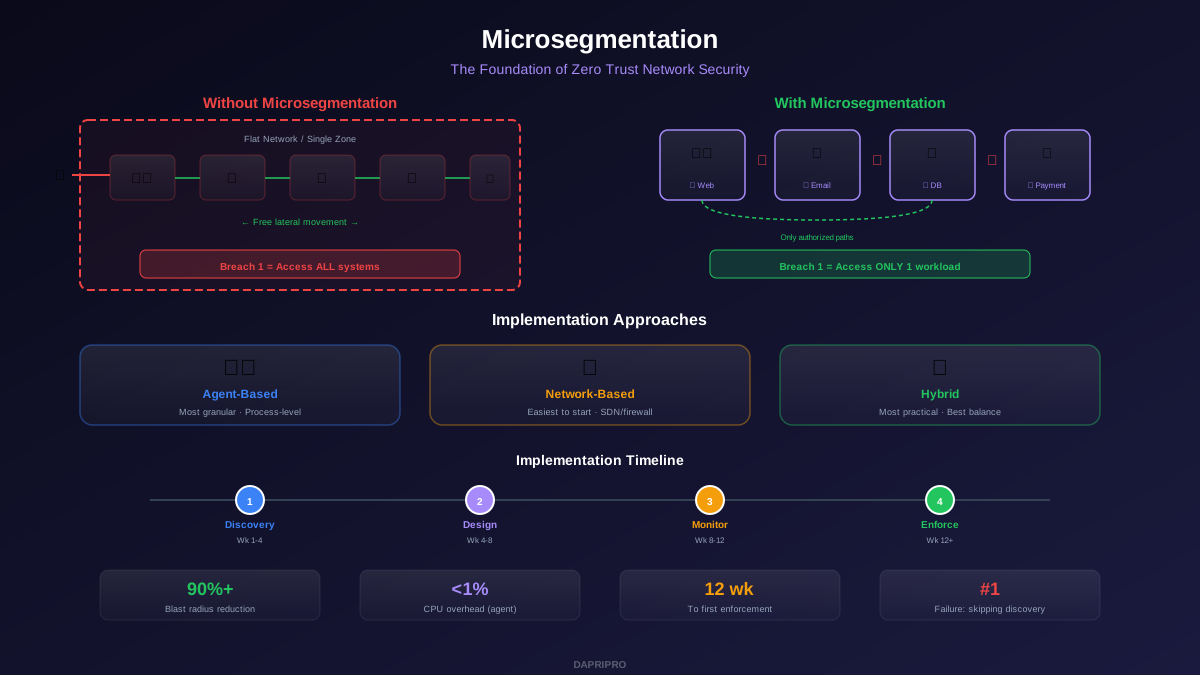
| Lateral Movement | Free once inside | Blocked by microsegmentation |
| Data Location | Assumes data is inside the network | Protects data wherever it lives |
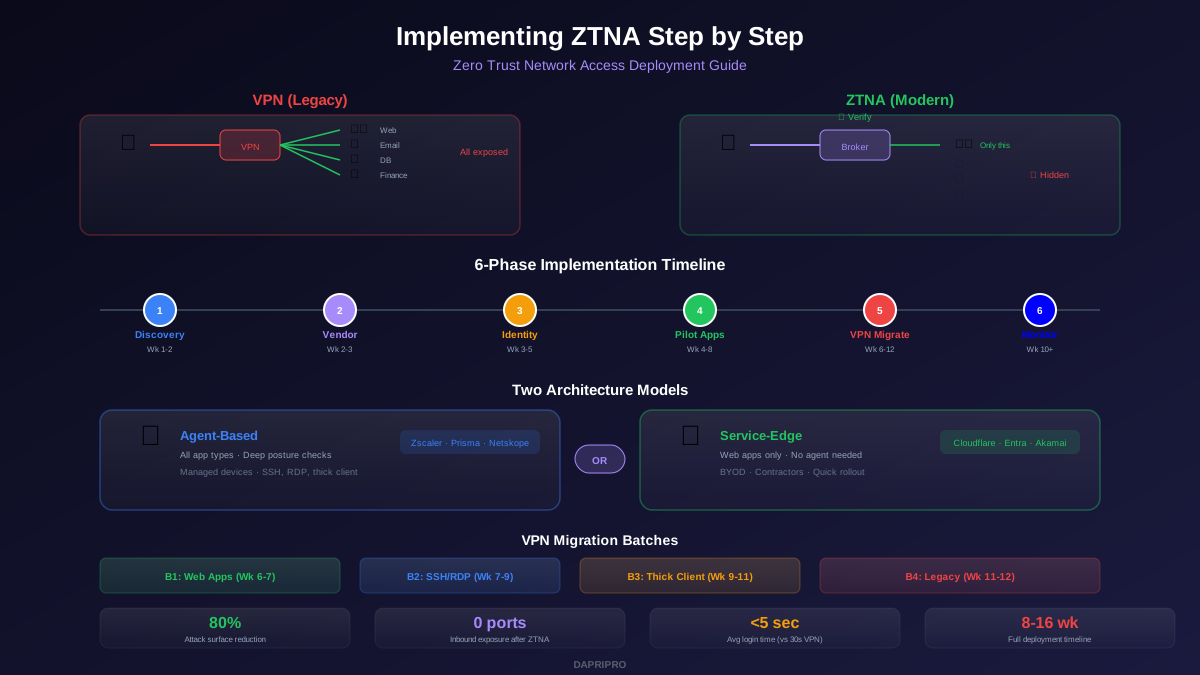
| Remote Access | VPN tunnel to network | Direct-to-app via ZTNA |
| Breach Impact | Full network exposed | Limited to single segment |
Why Perimeter Security Failed
1. The Perimeter Dissolved
In 2010, the average enterprise ran 80% of applications on-premises. In 2026, that number is inverted — 80% of workloads run in public cloud, SaaS platforms, or hybrid environments. When your email is Office 365, your CRM is Salesforce, your files are on Google Drive, and your infrastructure is on AWS, there is no "inside the network" to protect. The perimeter is everywhere and nowhere.
2. VPNs Became a Liability
VPNs were designed to extend the trusted network to remote users. The problem: once a VPN user authenticates, they typically have broad access to the entire internal network. This turns every remote employee into a potential attack vector. VPN credentials are stolen through phishing, and the attacker gets the same access as the legitimate user — including lateral movement to servers, databases, and systems they should never touch.
In 2025, Ivanti, Fortinet, and Palo Alto VPN appliances were all exploited through zero-day vulnerabilities, giving attackers direct access to corporate networks. The tools meant to protect the perimeter became entry points.
3. Attackers Walk Through the Front Door
The castle-and-moat model assumes attackers will try to breach the walls. Modern attackers do not. They phish an employee, steal their credentials, and log in through the front door as a legitimate user. Once inside, the perimeter security model trusts them completely. The attacker can move laterally to financial systems, exfiltrate data, and deploy ransomware — all while appearing as a trusted insider.
The 5 Core Principles of Zero Trust
1. Verify Explicitly. Always authenticate and authorize based on all available data points: identity, location, device health, service or workload, data classification, and anomalies. A username and password alone are never sufficient.
2. Use Least-Privilege Access. Grant users only the minimum access they need for their specific task. Use just-in-time (JIT) and just-enough-access (JEA) policies. An accountant needs access to financial systems — not to engineering servers, HR databases, or the CEO's email.
3. Assume Breach. Design your architecture assuming that an attacker is already inside. Minimize the blast radius of breaches by microsegmenting the network, encrypting all traffic (even internal), and implementing continuous monitoring for anomalous behavior.
4. Verify Every Device. A trusted user on a compromised device is still a threat. Check device health (patched OS, active EDR, disk encryption, compliance status) before granting access. An unpatched laptop connecting from a coffee shop should receive restricted access compared to a compliant corporate device in the office.
5. Monitor Continuously. Trust is not a one-time decision. Continuously evaluate user behavior, device state, and access patterns throughout the session. If a user authenticates normally but then accesses 50 files in a department they have never touched, trigger a re-authentication or access block.
Realistic Migration Path
| Phase | Timeline | Key Actions | Impact |
|---|---|---|---|
| 1. Foundation | Months 1-6 | MFA everywhere, asset inventory, conditional access policies | Blocks 99.9% of credential attacks |
| 2. Segmentation | Months 6-18 | Microsegment critical assets, deploy EDR, replace VPN with ZTNA | Eliminates lateral movement to high-value targets |
| 3. Maturity | Months 18-36 | Continuous monitoring, automated response, full encryption | Real-time threat detection and containment |
Quick Wins You Can Implement This Week
You do not need to wait for a full zero trust implementation to start reducing risk. These actions take the most dangerous assumptions out of your perimeter model immediately:
- Enable MFA on all accounts. Phishing-resistant MFA (FIDO2 keys or passkeys) is ideal, but even SMS-based MFA blocks 99.9% of automated credential attacks. Start with admin accounts, then all employees, then all external access.
- Implement conditional access. Block access from unmanaged devices to sensitive applications. Require compliant devices for finance and HR systems. Azure AD Conditional Access and Google Context-Aware Access can do this with your existing identity provider.
- Disable legacy authentication protocols. IMAP, POP3, and SMTP basic auth bypass MFA entirely. Disable these protocols in your email system — they are the most common path attackers use to avoid MFA.
- Segment admin networks. At minimum, separate admin workstations and jump servers from the general network. Administrative access to servers, cloud consoles, and network equipment should require a dedicated device or PAM solution.
- Encrypt all internal traffic. TLS everywhere — not just external-facing services. Internal traffic encryption prevents attackers who breach one segment from sniffing credentials and data in transit to other segments.
The shift from perimeter to zero trust is not optional — it is inevitable. Every cloud migration, every remote worker, and every SaaS application you adopt makes your perimeter less meaningful. The question is not whether to adopt zero trust, but how quickly you can get the foundational elements in place to stop trusting your network and start verifying everything.