What ZTNA Actually Does (And Why VPNs Fall Short)
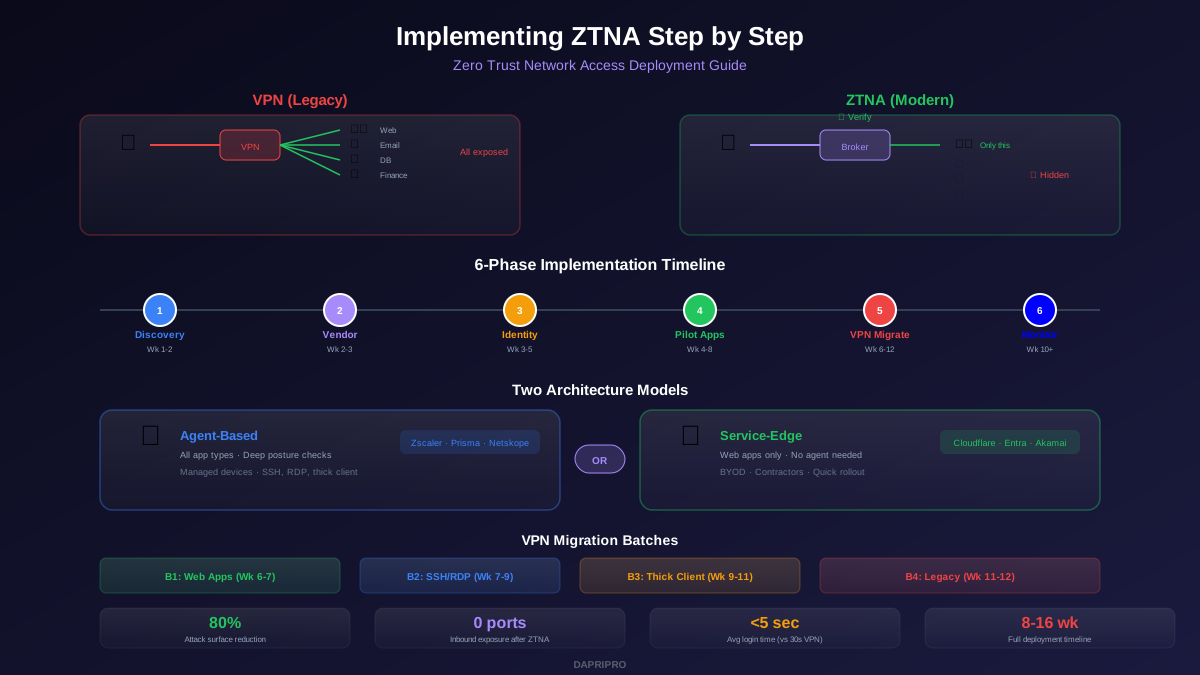
Zero Trust Network Access fundamentally changes how users connect to internal applications. Instead of punching a hole into your network with a VPN tunnel and hoping your firewall rules are tight enough, ZTNA creates individual, encrypted connections between a specific user and a specific application. Nothing else on the network is reachable or even visible.
This matters because VPNs were designed in the 1990s for a world where every employee worked from the office and the number of remote connections was small. In 2026, remote and hybrid work is the default. VPNs create three problems that ZTNA solves:
- Excessive access: VPN users land on a network segment with access to dozens or hundreds of systems they never need. One compromised credential exposes everything.
- Performance bottleneck: All traffic routes through a central VPN concentrator, even when the application lives in the cloud. Users experience latency and the concentrator becomes a single point of failure.
- Invisible attack surface: VPN-connected devices are trusted at the network level. If a device is compromised, the attacker inherits full network access without triggering additional authentication.
ZTNA eliminates all three. Users never touch the network. The application broker verifies identity, device posture, and context for every connection attempt. If verification fails, the connection is denied and the application remains invisible.
ZTNA Architecture Types: Agent vs Service-Edge
Before choosing a vendor, you need to understand the two ZTNA architecture models. Most organizations end up deploying both for different use cases.
| Feature | Agent-Based ZTNA | Service-Edge (Agentless) ZTNA |
|---|---|---|
| How it works | Software agent on endpoint creates secure tunnel | Browser-based access through reverse proxy |
| Device types | Managed laptops, desktops | Any device with a browser (BYOD, contractor) |
| Posture checks | Deep: OS version, EDR status, disk encryption, patches | Basic: browser version, geolocation, risk signal |
| App compatibility | All apps (web, SSH, RDP, thick client) | Web apps only (HTTP/HTTPS) |
| Deployment complexity | Medium — requires agent rollout via MDM | Low — no client software needed |
| Best for | Full-time employees on corporate devices | Contractors, vendors, BYOD, quick rollout |
| Example vendors | Zscaler ZPA, Palo Alto Prisma, Netskope | Cloudflare Access, Akamai EAA, Entra Private Access |
The 6-Phase Implementation Guide
This sequence is based on dozens of real-world ZTNA deployments across mid-size and enterprise organizations. Each phase has clear deliverables and a realistic timeline.
Phase 1: Discovery and Planning (Week 1-2)
Before you touch any ZTNA product, you need a complete inventory of what you are protecting.");
Map every internal application users access today. For each app, document: the application name, the URL or IP and port, the protocol (HTTP, HTTPS, SSH, RDP), current access method (VPN, direct, jump server), user count, and criticality level. Most organizations discover 30 to 50 percent more internal apps than they expected during this phase.
Simultaneously, document your current identity infrastructure. Which identity provider do you use? Is MFA already deployed? Do you have SSO for internal apps or only cloud apps? ZTNA is only as strong as the identity layer underneath it.
Phase 2: Vendor Selection (Week 2-3)
Choose your ZTNA platform based on your environment and priorities. Here is how the top vendors compare in 2026:
| Vendor | Deployment Model | Starting Price | Best For | IdP Integration |
|---|---|---|---|---|
| Zscaler ZPA | Agent + Service-Edge | ~$15/user/mo | Large enterprise, full SASE stack | Okta, Entra, Ping, any SAML |
| Cloudflare Access | Service-Edge + Agent | Free (50 users) | SMB, developer teams, web apps | All major IdPs + social |
| Palo Alto Prisma | Agent-based | ~$12/user/mo | Palo Alto firewall customers | Okta, Entra, Ping |
| Twingate | Agent-based (P2P) | $5/user/mo | Small teams, easy deployment | Okta, Entra, Google, OneLogin |
| Entra Private Access | Agent + Service-Edge | Included in E5 | Microsoft-centric environments | Entra ID (native) |
| Netskope Private Access | Agent-based | ~$14/user/mo | Data-centric security needs | Okta, Entra, Ping |
Request proof-of-concept access from your top 2 to 3 vendors. Test with a single internal web app and 10 pilot users. Evaluate setup complexity, user experience, and admin console usability. The best product is the one your team will actually manage consistently, not the one with the longest feature list.
Phase 3: Identity and Device Integration (Week 3-5)
This is the foundation phase. Every ZTNA decision depends on reliable identity and device signals.
Identity integration: Connect your ZTNA platform to your identity provider via SAML 2.0 or OIDC. Configure group synchronization so ZTNA policies can reference your existing AD or IdP groups (Engineering, Finance, IT-Admin, etc.). Enable MFA at the IdP level — do not rely on ZTNA for primary authentication.
Device trust integration: If using agent-based ZTNA, define your minimum device posture requirements. At minimum, check for: operating system version (block unpatched devices), EDR agent running, disk encryption enabled, and firewall active. Most ZTNA platforms integrate with CrowdStrike, Microsoft Defender, SentinelOne, and Jamf for real-time posture signals.
Risk signal federation: Advanced deployments feed risk signals from your SIEM or XDR into ZTNA policies. A device with an active threat detected by EDR should automatically lose access to sensitive apps until the threat is remediated, without waiting for manual intervention.
Phase 4: App Onboarding — Start Small (Week 4-8)
Onboard your first 3 to 5 applications. Choose apps that are low-risk, web-based, and have a small user group. Good candidates include internal wikis, development dashboards, staging environments, and IT admin portals.
For each app, configure:
- App connector: Deploy a lightweight connector in the same network as the application. This creates an outbound-only tunnel to the ZTNA cloud — no inbound firewall rules required.
- Access policy: Define who can access this app. Start with a specific group (e.g., "Engineering") plus MFA required plus managed device required. Deny everything else.
- Session controls: Set session duration (4 to 8 hours for standard apps, 1 hour for admin tools), idle timeout, and re-authentication requirements.
Test each app with pilot users for at least one week before opening access to the full user group. Collect feedback on login experience, performance, and any broken functionality. Fix issues before moving to the next app batch.
Phase 5: VPN Migration (Week 6-12)
Once your pilot apps are working, begin migrating apps from VPN to ZTNA in batches. The recommended order:
| Batch | App Types | Timeline | Migration Notes |
|---|---|---|---|
| Batch 1 | Web-based internal apps | Week 6-7 | Easiest — most work through service-edge with no agent |
| Batch 2 | SSH/RDP admin access | Week 7-9 | Requires agent-based ZTNA or browser-rendered terminal |
| Batch 3 | Thick client apps (ERP, database tools) | Week 9-11 | Most complex — test thoroughly, may need app-specific tunnels |
| Batch 4 | Legacy systems, special protocols | Week 11-12 | Some may remain on VPN permanently with compensating controls |
Keep VPN running throughout migration. Decommission VPN access per-app-group only after 2 weeks of stable ZTNA operation for that group. This dual-stack approach lets you roll back instantly if issues arise. Most organizations retire VPN for 80 to 90 percent of users and keep it only for a handful of legacy applications that cannot run through ZTNA.
Phase 6: Monitoring, Tuning, and Expansion (Week 10+)
ZTNA generates rich telemetry that your VPN never provided. Every access attempt is logged with user identity, device posture at time of access, application accessed, source location, time of access, and session duration. Use this data to refine policies.
Key monitoring activities:
- Access anomaly detection: Flag users accessing apps they have never used before, logging in from new geolocations, or accessing apps outside business hours. Investigate before blocking — these might be legitimate changes in work patterns.
- Policy hit analysis: Review which policies trigger denials. High denial rates on a specific policy might indicate it is too restrictive. Zero denials might mean it is too permissive or not being tested.
- Device posture trends: Track the percentage of devices failing posture checks over time. A declining trend validates your device management program. A rising trend signals patch management or compliance issues.
Policy Design Best Practices
ZTNA policies are essentially allow-list rules. Unlike firewalls that often start with "allow all" and add blocks, ZTNA starts with "deny all" and adds explicit allows. This is a fundamental mindset shift for many network teams.
Policy Structure
Every ZTNA policy answers four questions: who (identity), what (application), where (device and location), and when (time and context). Here is how to structure them:
| Policy Element | Example: Engineering Wiki | Example: Finance ERP | Example: IT Admin Console |
|---|---|---|---|
| Who | Engineering group | Finance group + CFO | IT-Admin group only |
| What | wiki.internal.company.com | erp.internal:8443 | admin.internal:443 |
| Device | Any managed device | Managed + encrypted + EDR | Managed + hardened only |
| MFA | Standard MFA | Phishing-resistant MFA | Hardware key required |
| Location | Any | Approved countries only | Corporate IP or VDI |
| Session | 8 hours, re-auth daily | 4 hours, re-auth per session | 1 hour, continuous verification |
Tiered Access Levels
Not every app needs the same security level. Categorize apps into tiers:
- Tier 1 — Public-facing internal: Low-sensitivity apps like wikis, HR portals, and company directories. Standard MFA + managed device is sufficient.
- Tier 2 — Business-critical: ERP, CRM, financial systems. Require phishing-resistant MFA + compliant device + approved location.
- Tier 3 — Privileged access: Admin consoles, database management tools, infrastructure. Require hardware key MFA + hardened device + just-in-time access approval + session recording.
This tiered approach prevents over-restricting low-risk apps (which kills user adoption) while providing strong controls on high-risk apps (which reduces actual breach risk).
Common Implementation Mistakes
These mistakes derail more ZTNA deployments than technical issues:
Mistake 1 — Migrating all apps at once. Organizations try to move 50+ apps from VPN to ZTNA in a single weekend. Result: broken workflows, helpdesk overwhelm, and executive pressure to revert. Migrate in batches of 5 to 10 apps, with 1 to 2 week validation between batches.
Mistake 2 — Ignoring thick client apps. Web-based apps are easy to move. But thick client apps (database management tools, ERP clients, custom software) often require specific tunneling configurations. Test these thoroughly in a lab before moving production users.
Mistake 3 — Deploying without identity maturity. ZTNA without proper MFA and SSO is just a fancier VPN. If your identity infrastructure uses shared accounts, lacks MFA, or has no automated deprovisioning, fix those first. ZTNA amplifies your identity posture — good or bad.
Mistake 4 — No fallback plan. Always maintain VPN access as a fallback during migration. If ZTNA fails for a critical app during a board meeting or month-end close, you need users back online in minutes, not hours.
Mistake 5 — Ignoring the user experience. If ZTNA is significantly slower or more friction-filled than VPN, users will find workarounds. Test latency, measure login steps, and compare side-by-side with your current VPN experience. Good ZTNA should be faster than VPN for cloud-hosted apps because traffic does not hairpin through your data center.
Measuring ZTNA Success
Track these metrics after deployment to validate that ZTNA is delivering the security and operational improvements you expected:
| Metric | Pre-ZTNA Baseline | Target (3 months post) | What to Do If Off-Track |
|---|---|---|---|
| Attack surface (exposed ports) | 50-200 open ports via VPN | 0 inbound ports | Audit connector configs, close legacy VPN rules |
| Avg. login time | 15-30 sec (VPN connect) | <5 sec (seamless SSO) | Check IdP integration, optimize MFA flow |
| VPN helpdesk tickets | 20-50/month | <5/month (ZTNA issues) | Improve self-service docs, review denied access logs |
| Lateral movement capability | Full network access | Single-app access only | Verify app connectors are isolated, no network-level access |
| Policy exceptions | N/A (no policies) | <5% of app access | Review exceptions quarterly, tighten or add new policies |
The strongest signal that your ZTNA deployment is working: your security team can answer exactly which users accessed which applications, from which devices, at what time, and whether the device was compliant at the moment of access. That level of visibility is impossible with traditional VPNs and is precisely what makes ZTNA the foundation of zero trust architecture.