Identity Is the New Perimeter
In a world without network boundaries — where employees work from home, data lives in multiple clouds, and applications span SaaS, on-premises, and hybrid environments — the one constant in every access request is identity. Who is asking for access? Can we verify they are who they claim to be? Do they have the right to access this specific resource right now?
Those three questions are the foundation of identity-centric zero trust. Unlike network-based security that trusts anyone inside the perimeter, identity-centric security trusts no one until they prove their identity, demonstrate their device is compliant, and meet the contextual requirements for that specific access request.
The numbers make the case clearly. In 2025, 80 percent of breaches involved compromised credentials or identity-based attacks. Phishing remains the top initial access vector. And the average organization has 3.5x more identity-related security incidents than network-based ones. Fixing identity is not just one part of zero trust — it is the prerequisite that makes every other pillar effective.
The Four Pillars of Identity-Centric Zero Trust
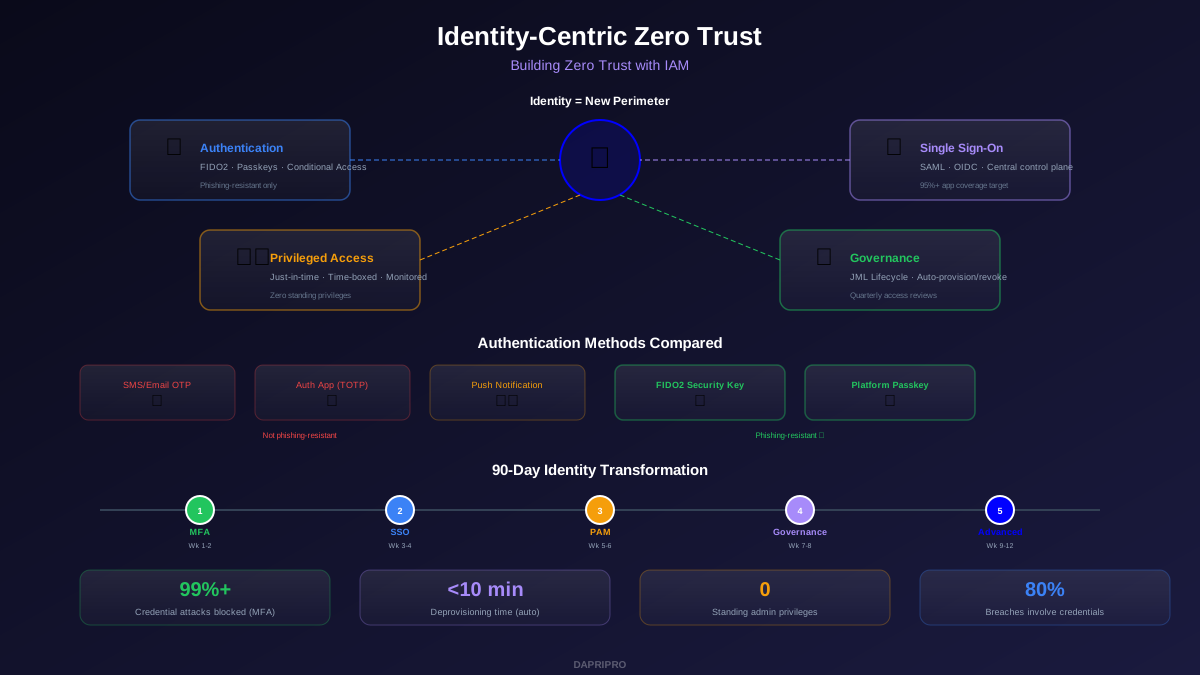
Building zero trust with IAM requires four interconnected capabilities. Each one addresses a different aspect of the identity lifecycle, and weak links in any pillar create exploitable gaps.
| Pillar | What It Does | Without It | Key Technologies |
|---|---|---|---|
| Strong Authentication | Verifies user identity with phishing-resistant methods | Credential theft remains trivial | FIDO2, passkeys, conditional access |
| Single Sign-On (SSO) | Centralizes authentication for all applications | Shadow IT and password reuse proliferate | SAML 2.0, OIDC, Entra ID, Okta |
| Privileged Access Management | Controls and monitors admin-level access | Compromised admin = full environment compromise | CyberArk, Delinea, JIT access |
| Identity Governance | Manages the full lifecycle: join, move, leave | Orphaned accounts and privilege creep accumulate | SailPoint, Saviynt, automated workflows |
Pillar 1: Phishing-Resistant Authentication
Traditional MFA is no longer enough. Attackers have developed three reliable methods to bypass SMS codes, email OTPs, and push notifications:
- Adversary-in-the-middle (AiTM) attacks: The attacker sets up a proxy between the user and the real login page. The user enters their password and MFA code on what looks like the real site, and the proxy captures both in real time. This defeats all knowledge-based second factors.
- SIM swapping: The attacker social-engineers the mobile carrier into transferring the victim's phone number to their SIM card, intercepting all SMS codes.
- MFA fatigue: The attacker sends repeated push notifications to the victim's phone until they accidentally or frustratedly approve one. This is how the Uber breach in 2022 succeeded and remains effective in 2026.
Phishing-resistant MFA eliminates all three vectors. FIDO2 security keys (like YubiKey 5 series) and platform-bound passkeys (like Windows Hello and Apple Touch/Face ID) use public-key cryptography bound to the specific legitimate domain. The key literally will not work on a phishing site because the domain does not match the one registered during enrollment.
Authentication Method Comparison
| Method | Phishing Resistant? | AiTM Resistant? | User Experience | Cost per User |
|---|---|---|---|---|
| SMS/Email OTP | No | No | Familiar but slow | $0-$1/mo |
| Authenticator App (TOTP) | No | No | Better, still manual | Free |
| Push Notification | No (MFA fatigue) | No | Fast, one-tap | $2-$5/mo |
| Number Matching Push | Partial | No | Good, reduces fatigue | $2-$5/mo |
| FIDO2 Security Key | Yes | Yes | Fastest — tap and done | $25-$55 one-time |
| Platform Passkey | Yes | Yes | Seamless — biometric | Free (built-in) |
The deployment path for most organizations: start by requiring number matching on push notifications immediately (this stops MFA fatigue with zero hardware cost), then roll out platform passkeys to all employees over 3 to 6 months (zero cost, built into modern OS), and deploy FIDO2 hardware keys to privileged users and high-value targets (IT admins, executives, finance staff) within the first month.
Pillar 2: SSO as Your Identity Control Plane
Single sign-on is not just about user convenience. It is your identity control plane — the single point through which all application authentication flows. Without SSO, you have no centralized visibility into who is accessing what, no ability to enforce consistent MFA policies across apps, and no way to revoke access to all applications simultaneously when an account is compromised.
SSO Coverage Goals
Target these milestones for SSO adoption:
- Month 1: All SaaS apps with SAML/OIDC support connected to your IdP. Most major SaaS platforms (Salesforce, Slack, Jira, AWS, GCP, etc.) support SSO natively. This alone captures 60 to 70 percent of application logins.
- Month 3: Internal web apps integrated via reverse proxy or ZTNA with SSO passthrough. This captures another 15 to 20 percent of logins.
- Month 6: Legacy apps that do not support modern authentication wrapped with application proxy solutions (Entra Application Proxy, Cloudflare Access) or replaced. This covers the remaining 10 to 15 percent.
For every app connected to SSO, enable conditional access policies that evaluate risk signals before granting access: Is the device managed? Is MFA satisfied? Is the user's risk score elevated? Is the location expected? These checks happen silently in the background and only interrupt the user when something is abnormal.
Pillar 3: Privileged Access Management
Privileged accounts — domain admins, cloud admins, database admins, root/sudo — are the ultimate target for attackers. A compromised privileged account can disable security controls, exfiltrate data at scale, deploy ransomware across the entire environment, and create backdoor accounts for persistent access.
Zero trust demands that no one has permanent privileged access. This concept is called zero standing privileges (ZSP), and it works through a simple cycle:
- Request: Admin requests elevated access to a specific system for a specific task
- Approve: Manager or automated policy approves based on role and business justification
- Grant: Temporary credentials are provisioned for a fixed time window (typically 1 to 4 hours)
- Monitor: All actions during the privileged session are logged and optionally recorded
- Revoke: Access is automatically removed when the time window expires, regardless of session state
PAM Solutions for 2026
| Solution | Deployment | Best Feature | Best For | Starting Price |
|---|---|---|---|---|
| CyberArk | Self-hosted or SaaS | Session recording + credential vaulting | Enterprise with strict compliance | ~$15/user/mo |
| Delinea (Thycotic) | SaaS | Ease of deployment | Mid-market getting started | ~$10/user/mo |
| BeyondTrust | Self-hosted or SaaS | Endpoint privilege management | Removing local admin rights | ~$12/user/mo |
| Entra PIM | Cloud (Azure) | Native Azure/M365 integration | Microsoft-centric orgs | Included in P2 |
| HashiCorp Vault | Self-hosted or HCP | Dynamic secrets for DevOps | Cloud-native, developer teams | Free (open source) |
For organizations just starting with PAM, Entra Privileged Identity Management (PIM) is the fastest path if you are already on Microsoft 365. It provides just-in-time access, approval workflows, and audit logging for Azure and M365 admin roles with zero additional infrastructure. Expand to a full PAM platform like CyberArk or Delinea when you need to cover on-premises servers, databases, and network devices.
Pillar 4: Identity Governance and Lifecycle
Identity governance ensures that the right people have the right access at the right time — and crucially, that access is revoked when it is no longer needed. Without governance, organizations accumulate orphaned accounts (former employees with active credentials), privilege creep (employees retaining access from previous roles), and shadow access (permissions granted outside of approved workflows).
The Joiner-Mover-Leaver (JML) Lifecycle
Joiner: When a new employee starts, automated workflows should provision access to all required applications based on their role, department, and location within minutes — not days. Define role-based access packages that bundle the typical set of applications for each job function. A new marketing analyst automatically receives access to the CRM, analytics platform, content management system, and email — nothing more.
Mover: When an employee changes roles, departments, or locations, their access must be updated to match their new position. This is where most organizations fail. The employee gets access to their new team's resources but keeps everything from their previous role. Over 3 to 5 role changes, they accumulate permissions that no single role should have — a classic privilege escalation vector.
Leaver: When an employee departs, all access must be revoked within minutes — not hours, not days. Automated deprovisioning triggered by HR system changes (Workday, BambooHR, etc.) ensures no orphaned accounts remain active. The industry average for manual deprovisioning is 7 days. Automated workflows reduce this to under 10 minutes.
Quarterly Access Reviews
Even with automated JML workflows, access drifts over time. Quarterly access reviews (also called certification campaigns) ensure that every user's permissions are still appropriate. The review process works best when it is manager-driven — each manager reviews the access their direct reports have and either certifies or revokes each permission.
Modern identity governance platforms (SailPoint, Saviynt, Entra ID Governance) automate this by sending review requests to managers, providing AI-powered recommendations based on peer group comparison (this user has access that 95 percent of their peers do not — should they keep it?), and automatically revoking access that is not certified within the review window.
Conditional Access: Tying It All Together
Conditional access policies are where identity signals become access decisions. Instead of static rules (this group can access this app), conditional access evaluates real-time signals to make dynamic decisions:
| Signal | Low Risk Action | Medium Risk Action | High Risk Action |
|---|---|---|---|
| Location | Corporate network = allow | Known country = allow + MFA | Unknown location = block |
| Device | Managed + compliant = allow | Managed + outdated = allow + limit | Unmanaged = browser-only |
| User risk | No alerts = allow | Suspicious sign-in = MFA | Confirmed compromise = block + reset |
| App sensitivity | Low = standard auth | Medium = MFA required | High = MFA + compliant device + JIT |
| Sign-in behavior | Normal pattern = allow | New device = step-up MFA | Impossible travel = block |
The power of conditional access is that most users never experience friction. In typical deployments, 85 to 90 percent of sign-ins meet all low-risk criteria and proceed with seamless SSO. Only abnormal conditions trigger additional verification, and truly suspicious activity is blocked outright. This creates better security and better user experience simultaneously.
Implementation Roadmap: 90-Day Identity Transformation
This roadmap prioritizes quick wins that deliver the most risk reduction first, then builds toward full identity-centric zero trust.
| Week | Focus | Actions | Expected Outcome |
|---|---|---|---|
| 1-2 | MFA everywhere | Enable MFA for all users on all apps. Use number matching push immediately. Order FIDO2 keys for admins. | 99%+ of credential attacks blocked |
| 3-4 | SSO consolidation | Connect top 20 SaaS apps to IdP via SAML/OIDC. Enable conditional access for location + device checks. | Centralized auth, consistent policies |
| 5-6 | Privileged access | Implement JIT access for cloud admin roles. Deploy FIDO2 keys to all admins. Eliminate shared accounts. | No standing admin privileges in cloud |
| 7-8 | Governance basics | Connect HR system to IdP for automated provisioning. Set up automated deprovisioning. Run first access review. | Automated JML, clean access baseline |
| 9-12 | Advanced controls | Deploy passkeys to all users. Extend JIT access to on-prem. Implement risk-based conditional access. | Full identity-centric zero trust |
Organizations that follow this sequence consistently report that weeks 1 through 4 deliver 80 percent of the total risk reduction. MFA and SSO are the highest-impact, lowest-cost changes you can make. Everything after that builds on the foundation they create.
Measuring Identity Security Maturity
Track these metrics to validate your identity security improvement:
- MFA coverage: Percentage of authentications protected by MFA. Target 100 percent, with phishing-resistant methods covering all privileged and sensitive access.
- SSO coverage: Percentage of application logins flowing through your IdP. Target 95 percent or higher. Applications not behind SSO are shadow IT risks.
- Standing privileges: Count of users with permanent admin access. Target zero for cloud environments, minimize for on-premises with compensating controls.
- Deprovisioning time: Average time to revoke all access after employee departure. Target under 10 minutes with automated workflows.
- Access review completion: Percentage of reviews completed on time each quarter. Target 100 percent. Incomplete reviews mean uncertified access remains active.
- Identity-related incidents: Count of credential-based attacks, account takeovers, and privilege abuse incidents. Target 80 percent reduction within 6 months of implementation.
Identity is not just one pillar of zero trust — it is the pillar that enables every other pillar to function. Device trust policies require knowing which user owns the device. Network segmentation rules reference user groups. Data access controls depend on authenticated identity. Get identity right, and the rest of your zero trust architecture has a solid foundation to build on. Get it wrong, and every other investment is undermined by the weakest link in the chain.