If there is one thing that determines whether your healthcare organization will survive an OCR audit, it is this: your risk assessment. Not your firewall configuration. Not your encryption implementation. Not even your breach history. The single most cited deficiency in HIPAA enforcement actions is failure to conduct an adequate, organization-wide risk assessment.
And yet, the majority of small and mid-size healthcare practices either skip their risk assessment entirely, treat it as a checkbox exercise, or use a template that misses critical systems. The result? When OCR comes knocking — or when a breach exposes patient records — these organizations face penalties not because they lacked antivirus software, but because they never systematically identified where their risks actually were.
This guide walks you through the complete HIPAA risk assessment process, step by step, using the same methodology OCR auditors expect. Whether you are a small dental practice, a multi-location hospital system, or a health tech startup handling ePHI, this is the process you need to follow.
Why the Risk Assessment Is the Foundation of All HIPAA Compliance
The HIPAA Security Rule at 45 CFR 164.308(a)(1)(ii)(A) requires covered entities and business associates to "conduct an accurate and thorough assessment of the potential risks and vulnerabilities to the confidentiality, integrity, and availability of electronic protected health information held by the covered entity or business associate."
This is not optional. It is not "recommended." It is the first implementation specification under the Security Management Process standard — meaning it is literally the foundation on which every other HIPAA safeguard is supposed to be built.
Here is why that matters practically:
- Every safeguard decision should flow from your risk assessment. The Security Rule uses a concept called "addressable" specifications — meaning you do not have to implement every control exactly as described, but you must document why your alternative is reasonable. That rationale comes from your risk assessment.
- OCR expects your risk assessment to justify your security choices. If an auditor asks why you did not implement encryption on a particular system, the answer "we assessed the risk and determined compensating controls were adequate because [documented reason]" is acceptable. The answer "we didn't think about it" is not.
- Penalty calculations consider whether you conducted a risk assessment. Organizations that demonstrate proactive risk management receive lower penalties. Those that did not bother are placed in higher culpability tiers.
The Enforcement Evidence
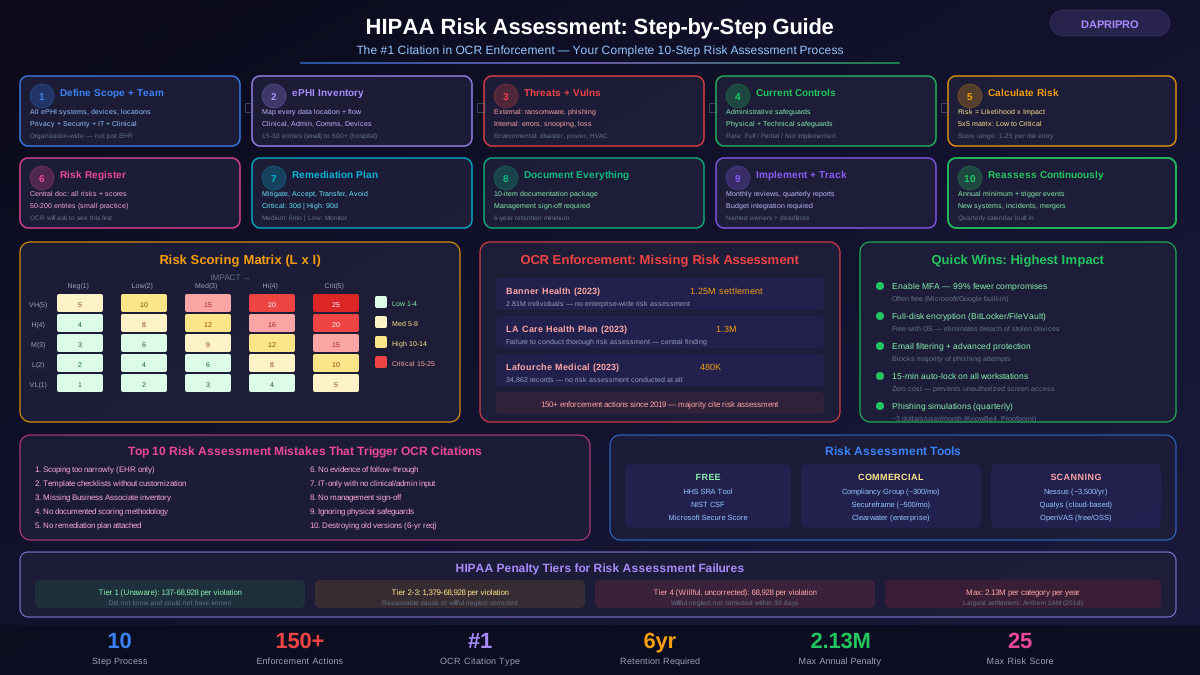
Between 2019 and 2025, OCR settled or imposed penalties in over 150 enforcement actions. In the vast majority, failure to conduct a risk assessment was either the primary or a contributing citation. Some examples:
- Banner Health (2023): 1.25 million dollar settlement — OCR cited failure to conduct an enterprise-wide risk assessment after a breach affecting 2.81 million individuals
- Doctors' Management Services (2023): 100,000 dollar settlement plus corrective action plan — the ransomware attack was bad, but the penalty was driven by inadequate risk assessment
- Lafourche Medical Group (2023): 480,000 dollars — a phishing attack compromised approximately 34,862 records, and OCR found no risk assessment had been conducted
- LA Care Health Plan (2023): 1.3 million dollars — failure to conduct a thorough risk assessment was the central finding, even though the organization was massive and had resources
Step 1: Define the Scope and Assemble Your Team
The biggest mistake organizations make is scoping their risk assessment too narrowly. They assess their EHR system but forget about the fax machines, personal cell phones, voicemail systems, and paper-to-digital scanning workflows that also touch ePHI.
Scoping Requirements
Your risk assessment must cover every system, device, medium, and process that creates, receives, maintains, or transmits ePHI. This includes:
- Clinical systems: EHR/EMR platforms, lab information systems, radiology PACS, pharmacy management, patient portals
- Administrative systems: billing software, claims processing, scheduling systems, correspondence management
- Communication tools: email, messaging apps, telehealth platforms, fax machines, voicemail systems, paging systems
- Physical devices: workstations, laptops, tablets, smartphones, USB drives, portable storage, medical devices with data storage
- Network infrastructure: servers, routers, switches, wireless access points, VPN configurations, firewall rules
- Third-party systems: cloud storage, backup services, clearinghouse connections, health information exchanges, IoT medical devices
- Physical locations: server rooms, workstation locations, file storage areas, reception desks, shared printers
Assembling the Team
A solo IT person cannot conduct an adequate risk assessment. You need input from people who actually know how ePHI flows through your organization:
- HIPAA Privacy Officer — understands what data is collected and disclosed
- HIPAA Security Officer — coordinates the technical assessment (can be the same person in small practices)
- IT staff or MSP representative — knows the actual technical infrastructure
- Clinical staff representative — understands real-world workflows (not just documented procedures)
- Administrative staff representative — knows billing, scheduling, and communication workflows
- Executive sponsor — ensures findings get resources and attention
For small practices with fewer than 10 employees, two or three people can cover these roles. The point is not headcount — it is ensuring you have the right perspectives.
Step 2: Create a Complete ePHI Inventory
Before you can assess risks, you need to know exactly where ePHI lives in your organization. This is your ePHI inventory — also called a data map or asset inventory.
What to Document for Each ePHI Location
For every system, device, or location that contains ePHI, document:
- System/device name and description — specific product, version, and purpose
- Type of ePHI stored — clinical records, billing data, insurance information, lab results, imaging
- Volume of records — approximate number of patient records affected
- How ePHI enters the system — user input, HL7 interface, API, file upload, scanned documents
- How ePHI leaves the system — printed reports, exported files, transmitted to other systems, displayed on screen
- Who has access — which roles, which specific individuals, what level of access
- Where data is physically/logically stored — on-premises server, cloud instance, backup location
- Current security controls in place — encryption, access controls, logging, backup configuration
Common ePHI Locations People Miss
During assessments, these are the locations that catch organizations off guard:
- Office voicemail systems — patients leave messages with symptoms, medication refill requests, and appointment details
- Personal cell phones — staff texting about patients, photos of wounds for referrals, patient callback numbers in call logs
- Print servers and MFP hard drives — multifunction printers store copies of every document printed, scanned, or faxed
- Legacy systems — the old billing system that "nobody uses anymore" but still has data from 2012
- Spreadsheet trackers — clinical staff maintaining patient lists, schedule notes, or tracking spreadsheets on local drives
- Cloud collaboration tools — Teams or Slack messages containing patient discussions, shared Google Docs with clinical notes
Step 3: Identify Threats and Vulnerabilities
For each ePHI location in your inventory, you need to identify what could go wrong. HIPAA uses two distinct concepts:
- Threat: any potential cause of an unwanted event. Examples include hackers, ransomware, disgruntled employees, natural disasters, hardware failures, and human error.
- Vulnerability: a weakness that a threat could exploit. Examples include unpatched software, weak passwords, lack of encryption, insufficient access controls, and untrained staff.
Threat Categories for Healthcare
Organize your threat identification by category:
External and intentional:
- Ransomware attacks (responsible for 72% of healthcare breaches in 2024)
- Phishing and social engineering targeting clinical staff
- Nation-state attacks targeting healthcare infrastructure
- Unauthorized physical access to facilities
- Third-party vendor compromises (supply chain attacks)
Internal and unintentional:
- Employee mistakes — sending records to the wrong patient, misconfigured permissions
- Lost or stolen devices — laptops left in vehicles, phones lost at conferences
- Improper disposal — hard drives not wiped, paper records in regular trash
- Snooping — staff accessing records of celebrities, family members, or coworkers out of curiosity (this is surprisingly common)
Environmental:
- Natural disasters — flooding, fire, earthquakes affecting server rooms
- Power outages — UPS failures, generator malfunctions during extended outages
- HVAC failures — server overheating in a room where climate control failed
Vulnerability Assessment Methods
Use multiple methods to identify vulnerabilities:
- Technical scanning: Run vulnerability scanners (Nessus, Qualys, OpenVAS) against your network, servers, and workstations
- Configuration review: Check actual settings against HIPAA requirements — access controls, audit logging, encryption settings, password policies
- Staff interviews: Ask clinical and administrative staff about their actual workflows, not just documented procedures
- Physical inspection: Walk through the facility looking for exposed screens, unlocked server rooms, shared workstations without auto-lock
- Policy review: Compare your written policies against actual practice — significant gaps indicate vulnerabilities
Step 4: Assess Your Current Security Controls
Before calculating risk, document what controls you already have in place. For each ePHI system or location, catalog your existing safeguards across all three HIPAA categories:
Administrative Safeguards (Policies and Procedures)
- Security management process and assigned security officer
- Workforce security — background checks, termination procedures, access authorization
- Information access management — role-based access definitions
- Security awareness training — program existence, frequency, content covered
- Security incident response procedures
- Contingency/disaster recovery plans
- Business associate agreements on file and current
- Sanctions policy for violations
Physical Safeguards
- Facility access controls — badge systems, visitor logs, locked areas
- Workstation use policies — screen positioning, auto-lock settings
- Device and media controls — encryption on portable devices, media disposal procedures
- Server room security — restricted access, environmental monitoring
Technical Safeguards
- Access controls — unique user IDs, role-based access, automatic logoff
- Audit controls — logging enabled, logs reviewed, retention period
- Integrity controls — mechanisms to detect unauthorized data alteration
- Transmission security — encryption for data in transit (TLS, VPN)
- Authentication — password policies, MFA implementation
For each control, assess its effectiveness: is it fully implemented, partially implemented, or not implemented? Partially implemented controls still leave residual risk that must be accounted for.
Step 5: Calculate Risk Levels Using a Risk Matrix
This is where many organizations fall apart. They list threats and vulnerabilities but never actually calculate and rank the risks. OCR expects a systematic methodology for determining risk levels.
The Standard Formula
Risk = Likelihood x Impact
Both likelihood and impact should be scored on a consistent scale. The most common approach uses a 5-level scale:
Likelihood Scale:
- 1 — Very Low: Threat source is not motivated or capable; controls are very effective
- 2 — Low: Possible but unlikely given current controls
- 3 — Medium: Threat source is motivated and capable; controls provide moderate protection
- 4 — High: Threat is highly likely; controls are insufficient or only partially effective
- 5 — Very High: Threat is near-certain; controls are absent or ineffective
Impact Scale:
- 1 — Negligible: Minor inconvenience, no patient harm, no regulatory exposure
- 2 — Low: Limited exposure, few records affected, minor operational disruption
- 3 — Medium: Significant exposure, breach notification likely, moderate financial impact
- 4 — High: Major breach, substantial patient harm, significant fines likely, operational disruption
- 5 — Critical: Catastrophic breach, large-scale patient harm, potential organizational shutdown, criminal penalties possible
Applying the Matrix
For each threat-vulnerability pair identified in Step 3, calculate the risk score. Here are some practical examples:
Example 1: Ransomware attack on EHR system
- Threat: Ransomware delivered via phishing email
- Vulnerability: No email filtering, staff not trained on phishing recognition
- Likelihood: 5 (Very High — healthcare is the number one ransomware target)
- Impact: 5 (Critical — total operational shutdown, mass breach notification)
- Risk Score: 25 — Critical. Immediate remediation required.
Example 2: Lost unencrypted laptop
- Threat: Theft or loss of portable device
- Vulnerability: Full-disk encryption not enabled on all laptops
- Likelihood: 3 (Medium — happens regularly in healthcare)
- Impact: 4 (High — could contain thousands of patient records)
- Risk Score: 12 — High. Prioritize encryption deployment.
Example 3: Staff snooping in EHR
- Threat: Insider unauthorized access (curiosity-driven)
- Vulnerability: Access logging enabled but no proactive monitoring or alerts
- Likelihood: 4 (High — this happens at every healthcare organization)
- Impact: 2 (Low — typically few records, limited patient harm per incident)
- Risk Score: 8 — Medium. Implement proactive audit log monitoring.
Step 6: Build Your Risk Register
Your risk register is the central document that captures every identified risk, its score, current controls, and planned remediation. This is the document OCR auditors will ask to see.
What the Risk Register Should Contain
Each entry in your risk register should include:
- Risk ID: unique identifier for tracking
- ePHI system/asset affected: which system from your inventory
- Threat description: specific threat scenario
- Vulnerability description: specific weakness being exploited
- Current controls: what safeguards are already in place
- Likelihood score: 1-5 with justification
- Impact score: 1-5 with justification
- Risk score: likelihood multiplied by impact
- Risk level: low, medium, high, or critical
- Risk response: mitigate, accept, transfer, or avoid
- Remediation action: specific step to reduce the risk
- Responsible person: who owns this remediation action
- Target completion date: when remediation should be done
- Status: not started, in progress, completed
A properly maintained risk register typically has 50 to 200 entries for a small practice and 500 or more for a hospital system. If your risk register has fewer than 30 entries, you almost certainly missed significant risk areas.
Step 7: Develop Your Remediation Plan
Your remediation plan prioritizes risk responses based on the risk register. Not every risk requires immediate action — but every risk requires a documented response.
Four Risk Response Options
- Mitigate: Implement controls to reduce the likelihood or impact. This is the most common response. Example: Deploy email filtering and phishing training to reduce ransomware risk from 25 to 10.
- Accept: Acknowledge the risk and document why it is acceptable given the cost and probability. Example: The risk of a meteor destroying the server room (score 2) is accepted because the likelihood is negligible and disaster recovery plans exist.
- Transfer: Shift the financial impact to another party, typically through cyber insurance or outsourcing to a managed service provider. This does not eliminate the risk — it shifts the financial burden. You still need controls.
- Avoid: Eliminate the risk entirely by removing the activity or system. Example: Stop using unencrypted USB drives entirely — policy prohibits them, ports are disabled.
Prioritization Framework
Prioritize remediation using this hierarchy:
- Critical risks (15-25): Address within 30 days. These represent imminent threats to ePHI. Escalate to executive leadership immediately.
- High risks (10-14): Address within 90 days. Allocate budget and resources in the current quarter.
- Medium risks (5-9): Address within 6 months. Include in next planning cycle.
- Low risks (1-4): Monitor and reassess annually. Document acceptance rationale if no action is planned.
Quick Wins That Dramatically Reduce Risk
Some remediation actions have outsized impact relative to their cost:
- Enable MFA everywhere — reduces account compromise risk by over 99%, often free or low cost
- Deploy full-disk encryption — BitLocker (Windows) and FileVault (Mac) are included in the operating system, eliminate breach notification for lost/stolen devices
- Enable email filtering — Microsoft Defender for Office 365 or Google Workspace advanced protection, blocks most phishing
- Implement automatic logoff — 15-minute screensaver lock on all workstations, zero cost
- Run quarterly phishing simulations — tools like KnowBe4 or Proofpoint start around 3 dollars per user per month
Step 8: Document Everything (The Audit Trail)
If you did not document it, you did not do it. This is the OCR auditor's mindset. Your risk assessment documentation must be comprehensive enough that an auditor can understand your process, methodology, findings, and decisions without you explaining it verbally.
Required Documentation
Your risk assessment documentation package should include:
- Risk assessment policy: Your organization's policy describing the risk assessment process, methodology, frequency, and responsibilities
- Scope definition: What was included in the assessment, any exclusions with justification
- Team composition: Who participated, their roles, qualifications
- ePHI inventory: Complete listing of all ePHI systems and locations
- Threat and vulnerability analysis: How threats were identified, what sources were used
- Risk scoring methodology: The scales and formula you used
- Risk register: Complete listing of all identified risks with scores
- Remediation plan: Prioritized actions with timelines and responsible parties
- Management sign-off: Executive signature approving the findings and remediation plan
- Evidence of previous assessments and progress: Showing this is an ongoing program, not a one-time exercise
Document Retention
HIPAA requires you to retain risk assessment documentation for at least 6 years from the date of creation or the date it was last in effect, whichever is later. This means you should keep every version of your risk assessment, not just the current one. Auditors want to see the progression — that risks identified in previous assessments were actually addressed.
Step 9: Implement and Track Remediation
A risk assessment without follow-through is worthless — and OCR knows it. Auditors do not just check that you conducted the assessment. They check that you acted on the findings.
Tracking Remediation Progress
Establish a process for tracking remediation:
- Monthly reviews: Security officer checks status of all open remediation items
- Quarterly reports: Summary of risk posture changes, completed remediations, new risks identified, delivered to leadership
- Budget integration: Critical and high-risk remediation items must be in the budget, not just on the wish list
- Accountability: Each remediation item has a named responsible person and a deadline
When Remediation Is Delayed
Sometimes remediation takes longer than planned. When this happens:
- Document the reason for the delay — budget constraints, vendor dependencies, technology limitations
- Document interim compensating controls — what you are doing in the meantime to reduce risk
- Reassess and set a new target date — do not leave the item with a "past due" status indefinitely
- Escalate if needed — if leadership is not providing resources for critical risks, document that escalation
Step 10: Reassess and Maintain Continuously
A risk assessment is not a project with an end date. It is an ongoing program.
When to Reassess
Conduct a full or partial reassessment when:
- Annual cycle: At minimum once per year, even if nothing has changed
- New systems: Any new EHR, billing system, patient portal, or other ePHI system
- Security incidents: After any breach, near-miss, or significant security event
- Organizational changes: Mergers, acquisitions, new locations, significant staff changes
- Regulatory updates: New HIPAA guidance, state law changes, OCR enforcement trends
- Technology changes: Cloud migration, new medical devices, telehealth expansion
- Vendor changes: New business associates or changes in how existing BAs handle ePHI
Building a Risk Assessment Calendar
Create an annual calendar that spreads risk assessment activities throughout the year:
- Q1: Full annual risk assessment — update ePHI inventory, identify new threats, recalculate all risk scores
- Q2: Remediation progress review — verify Q1 findings are being addressed, adjust timelines
- Q3: Focused assessment of highest-risk areas — deep dive into critical and high risks, test controls
- Q4: Year-end review and planning — summarize progress, set priorities for next year, present to leadership
Risk Assessment Tools and Resources
Free and Low-Cost Options
- HHS SRA Tool (free): The official OCR Security Risk Assessment Tool. Downloadable application that walks you through each Security Rule requirement. Best for practices with fewer than 10 providers.
- NIST Cybersecurity Framework (free): Not HIPAA-specific but provides an excellent risk assessment methodology that maps well to HIPAA requirements.
- HITRUST CSF (varies): Comprehensive framework that combines HIPAA, NIST, ISO 27001, and other standards. Popular with larger organizations and health plans.
Commercial Platforms
- Compliancy Group: All-in-one HIPAA compliance platform with guided risk assessment workflow. Includes BA management, policy templates, and employee training tracking. Pricing starts around 300 dollars per month for small practices.
- HIPAA One (Intraprise Health): Automated risk analysis with gap identification and remediation tracking. Includes vulnerability scanning integration. Enterprise pricing.
- Clearwater Compliance: Enterprise-grade risk assessment platform used by large hospital systems. Includes IRM|Analysis software for systematic risk quantification. Premium pricing.
- Secureframe: Compliance automation platform supporting HIPAA, SOC 2, and ISO 27001. Includes continuous monitoring and evidence collection. Starting around 500 dollars per month.
- Vanta: Automated compliance platform with HIPAA risk assessment templates, continuous monitoring, and vendor management. Similar pricing tier to Secureframe.
Technical Scanning Tools
- Nessus Professional: Vulnerability scanner widely used in healthcare. Identifies missing patches, misconfigurations, and known vulnerabilities. Around 3,500 dollars per year per scanner.
- Qualys: Cloud-based vulnerability management platform. Scales well for multi-location healthcare organizations.
- OpenVAS (free): Open-source vulnerability scanner. Good for organizations with in-house technical expertise but limited budget.
- Microsoft Secure Score: Free for Microsoft 365 users. Provides security posture assessment and recommendations specific to your Microsoft environment.
Common Risk Assessment Mistakes That Trigger OCR Citations
Avoid these errors that regularly show up in enforcement actions:
- Scoping too narrowly: Only assessing the EHR system while ignoring email, phones, fax machines, billing systems, and physical locations
- Using a template without customization: Downloading a generic risk assessment checklist and checking boxes without actually evaluating your specific environment
- Missing the business associate inventory: Not identifying and assessing all third parties that handle ePHI on your behalf
- No documented methodology: Listing risks without explaining how you determined likelihood and impact scores
- No remediation plan: Identifying risks but having no plan to address them
- No evidence of follow-through: Having a remediation plan from three years ago with nothing marked as completed
- Treating it as IT-only: Not involving clinical, administrative, and leadership staff in the process
- No management sign-off: The assessment exists but leadership never reviewed or approved it
- Ignoring physical safeguards: Focusing entirely on technical controls while ignoring facility access, workstation positioning, and device security
- Not retaining previous versions: Destroying old risk assessments instead of keeping the 6-year audit trail
Small Practice vs. Large Organization: Scaling the Process
Small Practice (1-10 Providers)
- Use the free HHS SRA Tool as your primary framework
- ePHI inventory will likely have 15-30 entries
- Risk register will typically have 40-80 entries
- Security Officer and Privacy Officer can be the same person
- Assessment can be completed in 2-4 weeks of part-time effort
- Consider a compliance platform like Compliancy Group for guided workflow
- Budget 2,000 to 5,000 dollars annually for the assessment process if outsourcing
Large Organization (Hospital System, Health Plan)
- Use enterprise tools like Clearwater, HITRUST, or a combination
- ePHI inventory may exceed 500 entries
- Risk register will have hundreds to thousands of entries
- Dedicated compliance and security teams
- Assessment is continuous, not periodic — with formal annual milestones
- Include regular penetration testing and red-team exercises
- Budget 50,000 to 200,000 dollars or more annually depending on scope
Real-World Scenario: Walking Through a Risk Assessment
Let us walk through a simplified risk assessment for a fictional 5-provider family medicine practice — "Riverside Family Health."
Environment
- 5 providers, 12 total staff including front desk, nursing, and billing
- One office location with 8 workstations and a small server room
- Cloud-based EHR (eClinicalWorks) with local backup
- Practice management and billing through Kareo
- Standard internet connection, no dedicated IT staff, uses local MSP
Key Findings
Critical Risk: The local backup server has no encryption. If the server or its drives were stolen, thousands of patient records would be exposed in readable form. Risk score: 20 (likelihood 4 x impact 5). Remediation: Enable BitLocker encryption on the backup server immediately.
High Risk: Staff members use personal cell phones to call patients back. Call logs, voicemails, and sometimes text messages contain patient information, but no MDM (mobile device management) solution is in place. Risk score: 12 (likelihood 4 x impact 3). Remediation: Implement a HIPAA-compliant communication app or MDM policy.
Medium Risk: The practice has a BAA with eClinicalWorks and Kareo, but not with their shredding service, cleaning company (which has key access after hours), or their answering service. Risk score: 9 (likelihood 3 x impact 3). Remediation: Identify all BAs and execute BAAs within 60 days.
Low Risk: The server room is locked, but the key hangs on a hook behind the front desk that is visible to patients. Risk score: 4 (likelihood 2 x impact 2). Remediation: Move the key to a secure location and implement a key log.
Complete HIPAA Risk Assessment Checklist
Use this checklist to verify your risk assessment covers all required elements:
Preparation
- Risk assessment policy documented and approved
- Assessment team assembled with appropriate roles represented
- Scope defined to cover all ePHI systems and locations
- Methodology documented (scoring scales, formula, risk levels)
- Previous assessment reviewed for open items and trends
Asset Inventory
- All systems that create, receive, maintain, or transmit ePHI identified
- All physical locations with ePHI access documented
- All portable devices that may contain ePHI inventoried
- All business associate relationships identified
- All data flows mapped (how ePHI moves between systems)
Threat and Vulnerability Analysis
- External threats identified (ransomware, phishing, unauthorized access)
- Internal threats identified (employee error, insider misuse, device loss)
- Environmental threats identified (disaster, power failure, equipment malfunction)
- Technical vulnerabilities assessed (scanning results, configuration review)
- Administrative vulnerabilities assessed (policy gaps, training deficiencies)
- Physical vulnerabilities assessed (facility security, device security)
Risk Evaluation
- Current controls documented for each ePHI system
- Control effectiveness evaluated (fully, partially, or not implemented)
- Likelihood scored for each threat-vulnerability pair
- Impact scored for each threat-vulnerability pair
- Risk scores calculated and risk levels assigned
- All risks entered into the risk register
Remediation Planning
- Risk response determined for each risk (mitigate, accept, transfer, avoid)
- Remediation actions defined for risks being mitigated
- Responsible persons assigned
- Target dates set based on risk priority
- Budget allocated for remediation activities
- Acceptance rationale documented for accepted risks
Documentation and Approval
- Complete documentation package assembled
- Management review conducted
- Executive sign-off obtained
- Previous assessment documentation retained (6-year requirement)
- Reassessment schedule established (annual minimum)
- Trigger events defined for interim reassessments
What Happens After Your Risk Assessment
Completing the risk assessment is not the finish line — it is the starting line. Here is what should happen next:
- Begin critical remediation immediately. Do not wait for the next budget cycle to address critical risks. MFA enablement, encryption deployment, and basic email filtering can be done quickly and cheaply.
- Update your HIPAA policies. Your risk assessment findings should drive policy updates. If you identified text messaging as a risk, create a mobile device policy.
- Train your staff. Share relevant findings with employees. If phishing was identified as a critical threat, invest in awareness training and simulations.
- Review your Business Associate inventory. Execute or update BAAs based on your BA risk assessment.
- Schedule quarterly reviews. Put standing meetings on the calendar to review remediation progress.
- Prepare for the next assessment. Start a running log of changes throughout the year — new systems, incidents, organizational changes — so your next assessment does not start from zero.
The organizations that get HIPAA right treat risk assessment as a continuous business process — not an annual chore to check off a compliance list. When OCR comes knocking, the difference is obvious.