Telehealth went from a niche convenience to a core healthcare delivery model practically overnight during COVID-19. In 2019, telehealth accounted for roughly 1% of outpatient visits. By 2020, that number surged past 40%. And while the pandemic rush has settled, telehealth has permanently established itself — about 20-25% of outpatient visits now include a virtual component, and remote patient monitoring is growing even faster.
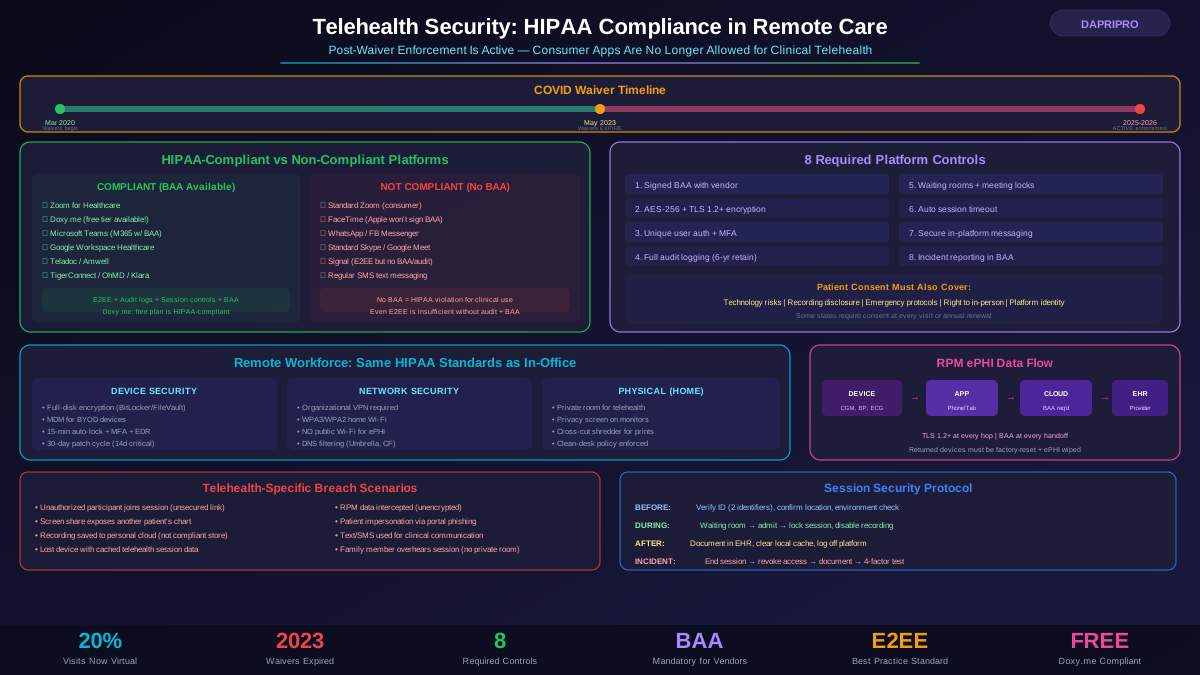
Here is the critical problem: during the pandemic, the HHS Office for Civil Rights (OCR) issued enforcement discretion waivers that temporarily allowed healthcare providers to use consumer-grade communication apps — FaceTime, Skype, WhatsApp, standard Zoom — for telehealth without facing HIPAA penalties. Those waivers expired in May 2023. Full HIPAA enforcement is now back in effect.
Yet many practices still operate on pandemic-era habits. They use platforms without BAAs, let staff take telehealth calls from personal devices without safeguards, and store session recordings without proper encryption. Each of these is a potential HIPAA violation — and OCR has signaled that telehealth compliance is a priority enforcement area.
This guide covers everything you need to secure your telehealth operations under current HIPAA requirements.
The Pandemic Waivers Are Gone: What Changed
Understanding what OCR temporarily allowed — and what is now required again — is essential for any practice that expanded telehealth during COVID-19.
What the Waivers Permitted (March 2020 - May 2023)
- Use of non-HIPAA-compliant consumer apps (FaceTime, WhatsApp, Skype, Facebook Messenger video, Google Hangouts) for telehealth
- No requirement for a BAA with communication technology vendors
- Reduced enforcement of certain Privacy Rule requirements for telehealth-specific interactions
- Providers were still expected to use "good faith" efforts to protect patient privacy
What Is Required Now (Post-May 2023)
- All telehealth platforms must fully comply with HIPAA Security Rule requirements
- Signed BAAs required with every platform vendor that handles ePHI
- Full audit logging, access controls, encryption, and automatic timeout must be implemented
- Consumer apps without BAAs cannot be used for routine telehealth (FaceTime, WhatsApp, standard Zoom, etc.)
- Remote workforce policies must enforce the same safeguards as in-office environments
- Patient consent must specifically address telehealth technology risks
The Enforcement Reality
OCR has explicitly stated that telehealth compliance is a 2025-2026 enforcement priority. This is not theoretical — OCR has already begun investigating telehealth-related complaints. The first wave of enforcement actions is expected to establish precedent for penalties, and organizations still using non-compliant platforms will be the easiest targets.
Choosing a HIPAA-Compliant Telehealth Platform
Not all "telehealth platforms" are created equal. Here is what to look for and what to avoid.
Minimum HIPAA Requirements for Any Platform
A telehealth platform must provide all of the following to be HIPAA-compliant:
- Business Associate Agreement (BAA): Written agreement signed before any ePHI is transmitted
- End-to-end encryption: AES-256 for stored data, TLS 1.2+ for data in transit, ideally true E2EE for video sessions
- Access controls: Unique user authentication, role-based permissions, automatic session timeout
- Audit logging: Records of who accessed what, when, and from where — retained for at least 6 years
- Secure messaging: Encrypted text/chat within the platform, not SMS
- Session controls: Waiting rooms, meeting locks, host controls, ability to remove participants
- Data residency: Clear information about where ePHI is stored and processed (US vs. international)
- Incident reporting: Vendor must notify you of security incidents that may affect ePHI
Platform Comparison
What About Free Platforms?
Doxy.me deserves special mention because it offers a free tier that is HIPAA-compliant. It provides a signed BAA, end-to-end encryption, waiting room functionality, and basic session management — making it the go-to recommendation for solo practitioners and small practices that need a no-cost starting point. The paid tiers add features like screen sharing, group calls, and custom branding.
No other mainstream free video platform currently offers HIPAA compliance out of the box. If a platform is free and not Doxy.me, assume it is not HIPAA-compliant until you verify BAA availability and check technical controls against Security Rule requirements.
Securing Video Telehealth Sessions
Even with a compliant platform, improper configuration and provider habits can create HIPAA violations. Here is how to secure the actual telehealth encounter.
Before the Session
- Verify patient identity. Use at least two identifiers (name plus date of birth, name plus patient ID). Do not rely solely on the fact that the patient logged in.
- Confirm patient location. Document which state the patient is physically in (this affects both licensing and emergency response if needed).
- Patient environment check. Ask if the patient is in a private location. Recommend headphones if they are in a shared space.
- Provider environment. Conduct sessions from a private, enclosed space. Not a shared office, not a coffee shop, not a car with passengers.
- Close unnecessary applications. Screen sharing during telehealth can accidentally expose other patient records if you have multiple charts open.
During the Session
- Use waiting rooms. Do not let patients auto-join — admit them individually and verify identity.
- Lock the session after all participants have joined. This prevents unauthorized participants from entering.
- Disable recording by default. If you must record, get explicit written consent, inform the patient recording is active, and store recordings in an encrypted, access-controlled location.
- Use in-platform messaging for sharing documents, not email or SMS. If the patient needs to share a photo (wound, rash, etc.), use the platform's secure file-sharing feature.
- Never screenshot patient video. Clinical photos should be taken through approved EMR camera workflows, not screenshots of a telehealth session.
After the Session
- Document the encounter in the EHR, not in separate notes that live outside the system.
- Clear local cache/downloads. If any files were shared during the session, ensure they are saved to the EHR and removed from local device storage.
- Log off the platform. Do not leave sessions or the platform logged in unattended.
Securing Your Remote Healthcare Workforce
Telehealth does not just mean video visits — it means providers, schedulers, billers, and support staff working remotely and accessing ePHI from home offices, apartments, and sometimes kitchen tables. HIPAA applies equally regardless of work location.
Device Security Requirements
- Organization-provided devices preferred. If staff must use personal devices (BYOD), implement a Mobile Device Management (MDM) solution that can enforce encryption, remote wipe, and minimum security standards.
- Full-disk encryption required. BitLocker (Windows) or FileVault (Mac) must be enabled on every device that accesses ePHI.
- Automatic screen lock: Maximum 15 minutes of inactivity before the device locks and requires re-authentication.
- Strong authentication: Complex password or biometric plus MFA for all systems containing ePHI.
- Endpoint protection: Antivirus/EDR software actively running and receiving updates.
- Patch management: OS and application updates applied within 30 days of release (14 days for critical patches).
Network Security Requirements
- VPN required for accessing any organizational system containing ePHI from a remote location. Consumer VPNs (NordVPN, ExpressVPN) are not sufficient — use an organizational VPN that routes through secured infrastructure.
- Home Wi-Fi standards: WPA3 or WPA2 encryption, unique strong password (not the default), router firmware updated, guest network enabled for non-work devices.
- No public Wi-Fi for ePHI access, even with VPN. The risk of evil twin attacks and network monitoring is too high.
- DNS filtering: Block known malicious domains at the network level using solutions like Cisco Umbrella or Cloudflare Gateway.
Physical Security at Home
This is where many remote workers fail compliance:
- Dedicated workspace: Telehealth calls must be conducted from a room where the screen and audio cannot be observed by unauthorized individuals (family members, roommates, visitors)
- Screen privacy: Use a privacy screen filter on monitors in shared living spaces
- Paper PHI: If the remote worker prints anything containing ePHI, they need a locking file cabinet and access to a cross-cut shredder
- Secure disposal: Do not put PHI in household recycling or trash. Shred first.
- Clean desk policy: When not actively working, no ePHI should be visible on screens or surfaces
Patient Consent for Telehealth
Telehealth consent is not the same as general treatment consent. It requires additional disclosures about technology risks that do not exist in in-person care.
What Telehealth Consent Must Cover
- Nature of telehealth: Explanation that the visit will use electronic communications technology
- Technology used: Which platform will be used and its basic security features
- Privacy limitations: Acknowledgment that electronic communications carry inherent risks including potential interception, even with encryption
- Technical requirements: What the patient needs (internet connection, camera, microphone, browser or app)
- Alternative options: That in-person care is available as an alternative
- Recording disclosure: Whether sessions may be recorded and for what purpose (if applicable)
- Emergency protocols: What will happen if the patient needs emergency care during a virtual visit (local emergency services will be contacted)
- Right to withdraw: Patient can end the telehealth session and request in-person care at any time
Consent Documentation
Consent should be obtained and documented before the first telehealth visit. Options include:
- Electronic signature through the patient portal (most efficient, creates automatic documentation)
- Verbal consent documented in the medical record (acceptable but harder to prove later)
- Signed paper form mailed, faxed, or uploaded
State laws may impose additional telehealth consent requirements beyond HIPAA. Check your state medical board's telehealth regulations — some states require consent to be renewed annually or at every visit.
Remote Patient Monitoring (RPM) Security Challenges
RPM is one of the fastest-growing segments of telehealth — devices that continuously monitor vital signs, glucose levels, blood pressure, cardiac rhythms, sleep patterns, and more, transmitting data back to the provider in real time. This creates unique HIPAA challenges.
RPM Device Types and ePHI Risks
- Wearable monitors: Continuous glucose monitors (CGMs), cardiac monitors, pulse oximeters, blood pressure cuffs — all generate ePHI that is transmitted wirelessly
- Smart scales and connected devices: Weight data combined with patient ID becomes ePHI
- Mobile apps: Patient-facing apps that collect symptoms, medication adherence, mood tracking — data stored on the patient's phone and in the cloud
- Home hub devices: Some RPM systems use a central home device that aggregates data from multiple sensors before transmitting
HIPAA Requirements for RPM
- Device inventory: Every RPM device type must be included in your ePHI asset inventory and risk assessment
- Encryption in transit: Data transmitted from RPM devices to servers must be encrypted (TLS 1.2+, Bluetooth LE with pairing, or equivalent)
- Encryption at rest: Data stored on devices and in cloud platforms must be encrypted
- BAAs with RPM vendors: The device manufacturer, the cloud platform, the data analytics provider — each may be a separate Business Associate requiring its own BAA
- Patient access: Patients have the right to access their own RPM data under HIPAA's right of access provisions
- Data retention and disposal: When RPM devices are returned or decommissioned, all ePHI must be securely wiped
Secure Messaging and Patient Communication
Telehealth extends beyond video visits. Secure messaging, patient portal communications, and asynchronous "store-and-forward" consultations all involve ePHI and must comply with HIPAA.
Secure Messaging Rules
- Standard SMS and text messaging is NOT HIPAA-compliant — texts pass through carrier servers in unencrypted form, can be stored on devices without encryption, and cannot be audited or access-controlled
- Patient portal messaging is compliant when the portal meets Security Rule requirements — use your EHR's built-in messaging whenever possible
- HIPAA-compliant messaging apps exist — TigerConnect, OhMD, Klara, Spruce Health — designed specifically for clinical communication with BAAs, encryption, and audit logging
- Email can be compliant with proper encryption — Microsoft 365 Message Encryption or Google Workspace Confidential Mode with organization-managed keys — but only if the patient has been informed of the risks and consented to email communication
The Minimum Necessary Rule in Messaging
The HIPAA Minimum Necessary standard applies to all clinical messaging. Providers should share only the minimum ePHI needed for the communication's purpose. Avoid sending entire patient histories in a message when only a specific lab result is relevant. This is especially important in group messages — never include patient-identifying information in group chats or channels where not all participants need to know.
Cross-State Telehealth: Additional Compliance Layers
HIPAA is federal law and applies uniformly regardless of state boundaries. However, telehealth across state lines adds complexity:
- State medical licensing: Providers generally need a license in the state where the patient is physically located during the visit. The Interstate Medical Licensure Compact (IMLC) simplifies this for member states but does not cover all states or all license types.
- State privacy laws: Some states have privacy requirements that exceed HIPAA. California's CMIA (Confidentiality of Medical Information Act) imposes additional requirements on telehealth. Other states regulate specific categories like mental health records, substance abuse treatment, or reproductive health differently.
- State prescribing laws: Rules about prescribing controlled substances via telehealth vary significantly by state. The DEA's temporary COVID-era allowances for telehealth prescribing of controlled substances are being phased out with new rules in 2025.
- State telehealth consent: Some states require telehealth-specific consent beyond what HIPAA mandates, including provisions for informed consent to be obtained at specific intervals.
Incident Response for Telehealth-Specific Breaches
Telehealth introduces breach scenarios that do not exist in traditional in-person care:
Telehealth-Specific Breach Scenarios
- Unauthorized participant joins a session — an improperly secured meeting link allows a non-patient to view or hear the encounter
- Screen sharing exposes other patient data — a provider accidentally shares their entire screen instead of a specific window, revealing another patient's chart
- Recording saved to non-compliant location — session recording saves to a personal computer or consumer cloud drive instead of the compliant platform
- Lost device with telehealth cache — a provider's laptop with cached session data is lost or stolen
- RPM data intercepted — unencrypted data transmission from a patient's monitoring device is intercepted
- Phishing through patient portal — a staff member clicks a malicious link in what appears to be a patient message
Breach Response Steps
- Contain immediately: End the compromised session, revoke unauthorized access, isolate the affected system
- Document: Record what happened, what ePHI was exposed, how many patients may be affected, and what actions were taken
- Investigate: Determine the scope using audit logs, session recordings (if available), and device forensics
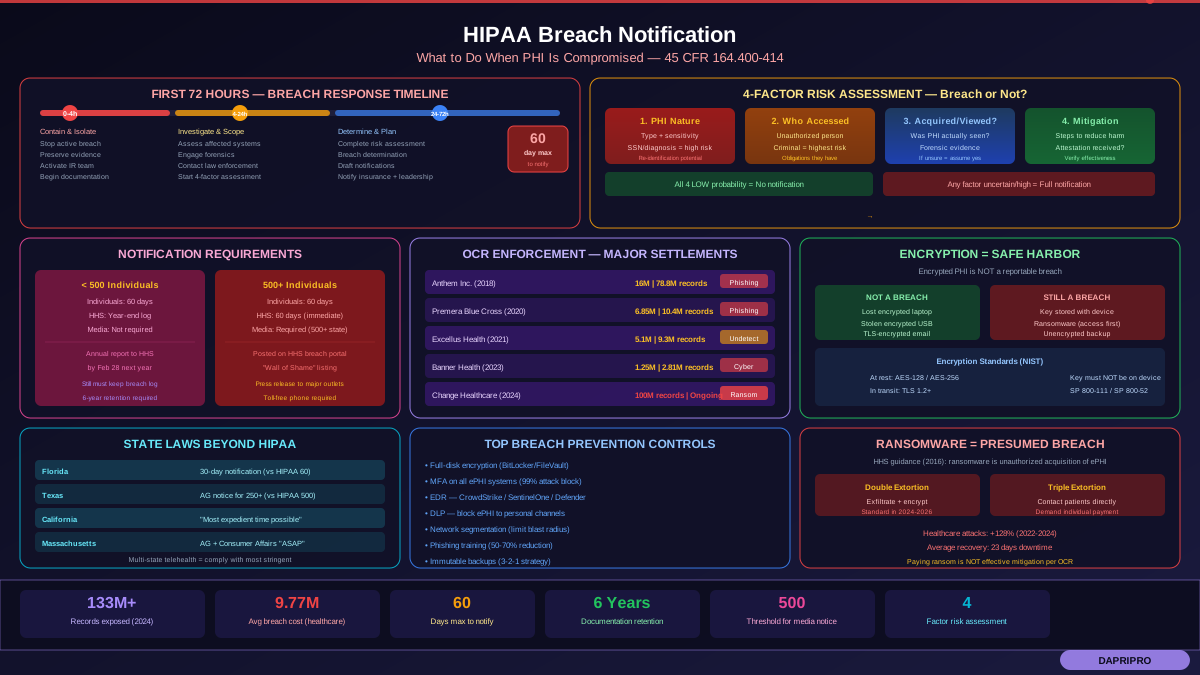
- Risk assessment: Apply the four-factor test to determine if breach notification is required (nature of PHI, unauthorized person, PHI acquired/viewed, mitigation extent)
- Notify if required: Individuals within 60 days, HHS within 60 days (if 500+ affected), media (if 500+ in a single state)
- Remediate: Fix the vulnerability that allowed the breach, update policies and training
Building a Complete Telehealth Compliance Program
Essential Telehealth Policies
Your HIPAA policy manual should include telehealth-specific policies covering:
- Approved platforms: List of authorized telehealth platforms with BAA status
- Remote work requirements: Device encryption, VPN use, workspace requirements, acceptable-use policy
- Patient consent procedures: Template consent forms and documentation workflows
- Session security protocol: Pre-session verification, in-session controls, post-session cleanup
- RPM device management: Provisioning, monitoring, return, and disposal procedures
- Incident response: Telehealth-specific breach scenarios and response procedures
- BYOD policy: If personal devices are allowed, MDM requirements, acceptable use, and wipe authorization
- Training requirements: Annual telehealth security training + onboarding for new remote staff
Staff Training Requirements
Telehealth training should cover these topics specifically:
- How to properly verify patient identity in a virtual visit
- How to use the approved telehealth platform's security features (waiting rooms, locks, screen sharing controls)
- Physical workspace requirements for remote telehealth sessions
- What to do if an unauthorized person joins a session
- How to handle and share patient images/files securely
- Recognizing social engineering attempts through the telehealth medium (patient impersonation, phishing via portal messages)
- Reporting procedures for suspected telehealth security incidents
Telehealth HIPAA Compliance Checklist
Platform and Technology
- HIPAA-compliant telehealth platform selected and configured
- Signed BAA on file with platform vendor
- End-to-end or transport encryption verified (TLS 1.2+, AES-256)
- Audit logging enabled and retention policy configured
- Waiting rooms and meeting locks enabled by default
- Recording disabled by default (enabled only with documented consent)
- Platform access requires MFA for all staff accounts
Remote Workforce
- Full-disk encryption on all devices accessing ePHI remotely
- VPN required for all remote ePHI access
- MDM deployed on any personal devices (BYOD) used for work
- Automatic screen lock set to 15 minutes maximum
- Remote workspace requirements communicated and attested to by staff
- Home network security standards defined and verified
Patient-Facing
- Telehealth-specific consent form developed and approved by legal
- Consent obtained and documented before first telehealth visit
- Patient verification procedure defined (two identifiers minimum)
- Emergency protocols established for each patient's location
- Patient education materials available explaining the technology
Policies and Training
- Telehealth security policies written and distributed
- Initial telehealth security training completed by all remote staff
- Annual refresher training scheduled and tracked
- Incident response plan includes telehealth-specific scenarios
- Risk assessment updated to include all telehealth systems and workflows
The Future of Telehealth Security: What Is Coming
Several developments will shape telehealth HIPAA compliance over the next few years:
- AI in telehealth: AI-powered screening tools, chatbot triage, and automated documentation create new ePHI processing points that need BAAs and security controls
- HIPAA Security Rule update (proposed 2024-2025): HHS has proposed significant updates to the Security Rule that would make many currently "addressable" safeguards mandatory — including encryption. This would directly impact telehealth platforms and remote access configurations
- Interoperability requirements: CMS and ONC interoperability rules require more data sharing between systems, creating additional data flows that telehealth security programs must account for
- Expanded RPM coverage: As Medicare and private payers expand RPM reimbursement, the volume and variety of ePHI-generating devices in patients' homes will increase dramatically
- State telehealth parity laws: More states are passing laws requiring insurance coverage of telehealth equal to in-person visits, which will increase telehealth volume and regulatory scrutiny
The organizations that build strong telehealth security programs now will be well-positioned as these changes take effect. Those that continue on pandemic-era habits will face increasing enforcement risk — and the first major telehealth-specific OCR settlement will likely accelerate compliance urgency across the entire industry.