Your company sends its first phishing simulation. The click rate comes back at 31%. Leadership is alarmed. The security team promises to "fix it with training." Three months later, the click rate is still 28%.
What went wrong? The simulation was not the problem — the execution was. Running phishing simulations is easy. Running them in a way that actually changes behavior requires a specific methodology: the right templates, the right frequency, the right difficulty curve, and the right response when someone clicks.
This guide covers the complete lifecycle of a phishing simulation program — from designing your first campaign to analyzing results and coaching repeat clickers.
Designing Your Campaign
Step 1: Establish Your Baseline
Your first simulation is diagnostic, not training. Send a moderately difficult template to the entire organization without any prior training or warnings. This gives you an honest baseline click rate. Most companies land between 25-35% on their first simulation.
Record three numbers from this baseline:
- Click rate: Who clicked the link (your vulnerability measure)
- Report rate: Who used the phish report button (your detection measure)
- Data entry rate: Who entered credentials on the fake landing page (your exposure measure)
Step 2: Choose Your Template Strategy
The templates you send determine what employees learn to detect. Use a mix of these 5 categories, rotating throughout the year:
| Category | Avg Click Rate | Example Template | Difficulty |
|---|---|---|---|
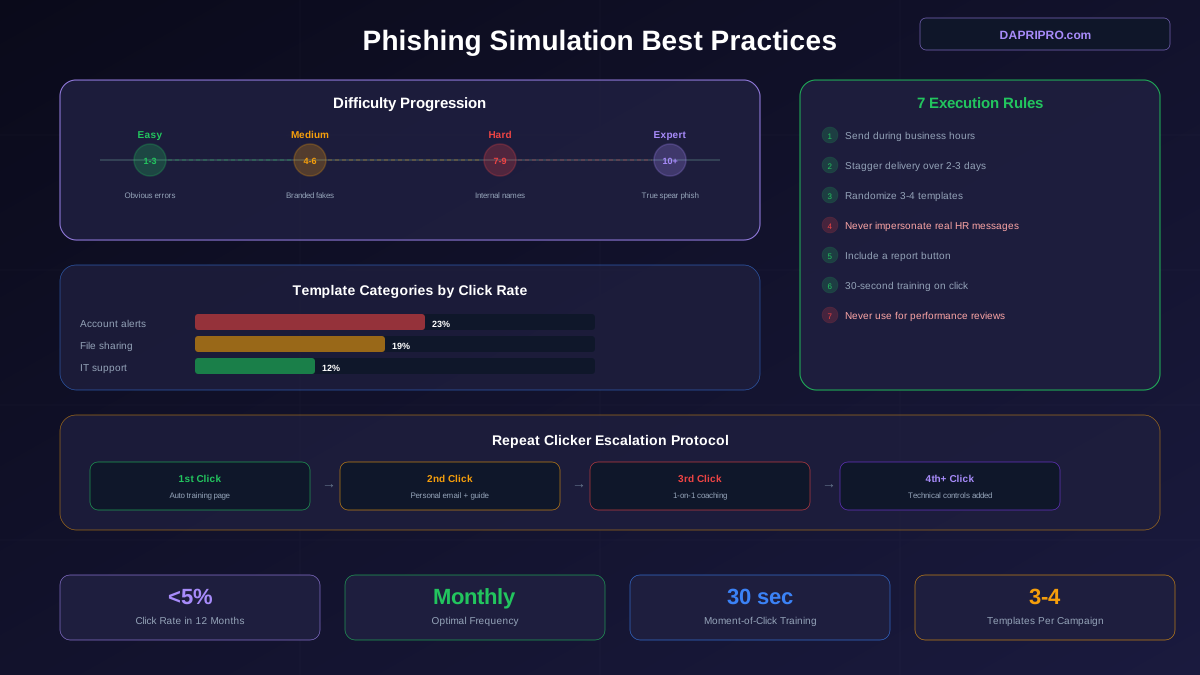
| Account alerts | 23% | Password reset required | Easy-Medium |
| File sharing | 19% | Document shared via OneDrive | Medium |
| Delivery | 17% | Package delivery notification | Easy |
| Meeting | 15% | Calendar invite from manager | Hard |
| IT support | 12% | MFA token expiring | Hard |
Step 3: Set the Difficulty Curve
Start easy. Increase difficulty gradually. If you send a perfectly crafted spear phish as your first simulation and 60% of the company clicks, you have not taught anything — you have demoralized everyone.
Campaign Execution Rules
The 7 Rules of Simulation Execution
- Send during business hours. 9am to 4pm local time. Sending at 3am is not realistic and will skew your results.
- Stagger delivery. Do not send to all 500 employees at once. Spread over 2-3 days to prevent word-of-mouth warnings from skewing data.
- Randomize templates. Use 3-4 different templates per campaign. If everyone gets the same email, one person who spots it will Slack the entire company.
- Never impersonate real HR communications about payroll, benefits enrollment, or healthcare. Employees who learn to distrust HR emails will delete legitimate ones.
- Include a report button. If employees do not have a one-click way to report suspicious emails, you are measuring the wrong thing. Install the Phish Alert Button (KnowBe4) or equivalent.
- Create a landing page for clicks. When someone clicks the link, show a 30-second training page: "This was a simulation. Here are the 3 red flags you missed." Do not redirect to a lengthy training module.
- Never use simulation results for performance reviews. The moment clicking a simulation affects someone's job, the program becomes surveillance. Employees will stop trusting internal emails entirely.
Templates That Avoid Backlash
Some simulation templates cause anger instead of learning. Avoid these:
| Do Not Send | Why It Backfires | Use Instead |
|---|---|---|
| "Your bonus has been approved" | Employees feel manipulated and angry | External invoice notification |
| "COVID test results ready" | Exploits genuine health anxiety | Package delivery update |
| "Layoffs scheduled — check list" | Creates real panic, HR complaints | Shared document notification |
| "Benefits enrollment deadline" | Erodes trust in real HR messages | Password expiration notice |
The Moment-of-Click Training Page
The 30 seconds after an employee clicks a simulated phishing link is the most teachable moment in security training. The brain is activated — the employee knows they made a mistake — and they are primed to absorb corrective feedback.
Your landing page should include exactly three things:
- This was a simulation. Remove anxiety immediately. "This was a phishing simulation. No real damage occurred."
- What you missed. Show a screenshot of the email with red flags circled: the sender address, the suspicious link, the urgency language.
- What to do next time. One concrete action: "Hover over links before clicking. If the URL does not match the expected domain, report it."
Do not link to a 30-minute training module. The employee will close the tab. Keep the training page to a single screen that takes 30 seconds to read.
Analyzing Campaign Results
After each simulation, analyze these 5 data points:
- Click rate by department. Are certain departments consistently higher? Finance, HR, and customer support typically click more because they deal with high volumes of external emails.
- Click rate by template difficulty. Are employees improving on easy templates but still struggling with medium ones? This tells you where to focus training.
- Report rate trend. Is reporting increasing month over month? If click rate drops but report rate stays flat, employees are learning to ignore suspicious emails rather than report them.
- Time-to-click. How quickly did clickers click? Clicks within 60 seconds indicate impulsive, habitual clicking. Clicks after 5+ minutes suggest the employee tried to evaluate but was fooled.
- Repeat clickers. Who has clicked on 3+ simulations in 6 months? These individuals need targeted coaching.
Handling Repeat Clickers
About 4-8% of your workforce will click on multiple simulations despite training. These are not bad employees — they are employees whose job requires them to click links all day. Customer support, sales, recruiting, and PR teams open dozens of external emails daily. Their clicking habit is strong, and it needs targeted intervention.
The coaching protocol for repeat clickers:
- First repeat click: Automated moment-of-click training (same as everyone). No escalation.
- Second repeat click: Personal email from security team with additional context: "You have clicked on two simulations this quarter. Here is a quick guide to checking links before clicking."
- Third repeat click: 15-minute 1-on-1 coaching session. Walk through the specific emails they clicked. Practice checking sender addresses and hovering over links together.
- Fourth+ repeat clicks: Technical controls. Implement SafeLinks for their account, add extra filtering rules, or require 2FA for external link navigation. This is not punishment — it is additional protection for someone who needs it.
Simulation Platform Options
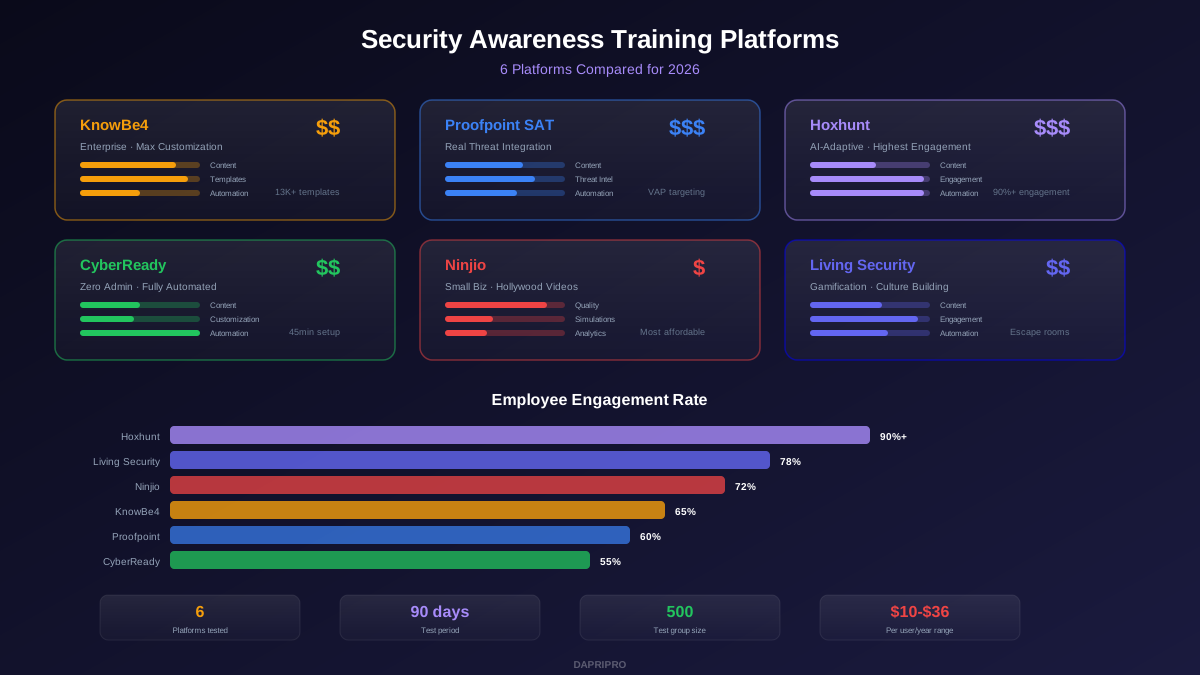
| Platform | Price/User/Mo | Templates | Standout Feature |
|---|---|---|---|
| KnowBe4 | $2-6 | 15,000+ | Largest template library, Phish Alert Button |
| Cofense | $3-7 | 5,000+ | Real-threat-based templates from SOC data |
| Hoxhunt | $3-6 | Auto-generated | AI-adaptive difficulty per user |
| GoPhish | Free | Custom | Open source, full control |
| Microsoft Attack Sim | Included (E5) | 100+ | Native M365 integration, no extra cost with E5 |
For companies under 200 employees on a tight budget, start with GoPhish. It is free, open source, and gives you full control over templates and landing pages. The trade-off: you manage everything yourself. For companies over 200 employees, KnowBe4 or Hoxhunt save significant admin time with pre-built templates, automated campaigns, and one-click reporting integration.
The best phishing simulation program is not the one with the most templates — it is the one that runs consistently every month, starts easy and gets harder, trains at the moment of click, and never punishes people for learning. Build that program and your click rate will be below 5% within a year.