Can You Actually Trust a Free Password Manager?
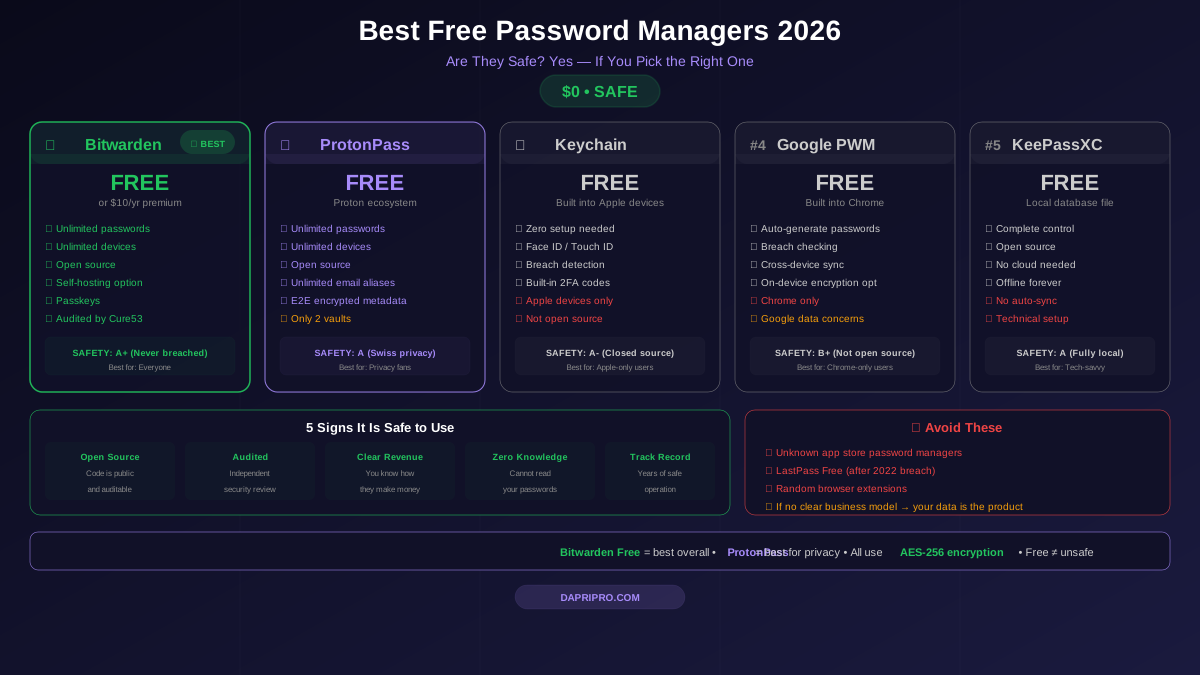
Here is the truth that most people get wrong: free password managers from reputable companies are just as secure as paid ones. The encryption is the same. The zero-knowledge architecture is the same. Your passwords are just as protected.
The difference between free and paid is features, not security. Think of it like a bank account. A free checking account keeps your money just as safe as a premium account. You just do not get the extra perks like higher interest or travel insurance.
But there is one big warning: not all free password managers are trustworthy. Some unknown apps on the app store are data collection tools wearing a security costume. Stick with the ones I recommend below — they have all been tested, audited, and proven safe.
The 5 Best Free Password Managers in 2026
| Rank | Password Manager | Passwords | Devices | Open Source | Best For |
|---|---|---|---|---|---|
| 🥇 #1 | Bitwarden Free | Unlimited | Unlimited | ✅ Yes | Everyone |
| 🥈 #2 | ProtonPass Free | Unlimited | Unlimited | ✅ Yes | Privacy fans |
| 🥉 #3 | Apple Keychain | Unlimited | Apple only | ❌ No | Apple users |
| #4 | Google Password Manager | Unlimited | Chrome only | ❌ No | Chrome users |
| #5 | KeePassXC | Unlimited | Unlimited | ✅ Yes | Tech-savvy |
#1: Bitwarden Free — The Best Free Password Manager, Period
Bitwarden is the clear winner. No other free password manager gives you unlimited passwords on unlimited devices while being completely open source. That combination is unmatched.
What You Get for Free
- Unlimited passwords — store as many logins as you need, no caps
- Unlimited devices — sync across your phone, laptop, tablet, and work computer
- Password generator — create strong, random passwords instantly
- Autofill — works on all major browsers and mobile platforms
- Secure notes — store Wi-Fi passwords, software licenses, and other text
- Two-factor authentication — protect your vault with an authenticator app or email
- Passkey support — use the new passwordless login technology
What You Do NOT Get for Free
- Advanced 2FA options (YubiKey, FIDO2 hardware keys)
- Emergency access (letting someone access your vault if you cannot)
- 1 GB encrypted file storage
- Built-in TOTP authenticator (2FA code generator)
- Password health reports
Honestly, the free features are enough for most people. The missing features are nice-to-haves, not must-haves. And if you ever want them, the premium plan is just $10 per year — less than a dollar a month.
Why Bitwarden Is Trustworthy
Open source code. Every line of Bitwarden's code is public on GitHub. Security researchers examine it constantly. If there was a hidden backdoor or vulnerability, the community would find it.
Independent security audits. Bitwarden is regularly audited by Cure53 and Insight Risk Consulting. The audit reports are published publicly so anyone can read them.
Never been breached. While competitors like LastPass have suffered major breaches, Bitwarden has a clean security record.
#2: ProtonPass Free — Privacy-First and Generous
ProtonPass is the newest player on this list, built by the team behind ProtonMail — the most popular encrypted email service. If you already use Proton products, this is a natural fit.
What Makes ProtonPass Stand Out
Unlimited email aliases. This is ProtonPass's killer feature. It generates unique email addresses for every website you sign up for. If one gets spammed or leaked in a breach, you just turn off that alias. Your real email stays hidden.
For example, instead of giving Netflix your real email, ProtonPass creates something like random123@proton.me that forwards to your inbox. Netflix gets breached? Turn off that alias. Done. Your real email is never exposed.
Built for privacy. ProtonPass uses end-to-end encryption for everything — not just passwords, but also usernames, URLs, and notes. Some other password managers only encrypt the password field, leaving metadata visible. ProtonPass encrypts it all.
Free Plan Includes
- Unlimited passwords and devices
- Unlimited email aliases (hide-my-email)
- 2 vaults (for organizing passwords)
- Passkey support
- Password generator
- Autofill on all platforms
What Is Limited on Free
- Only 2 vaults (paid gets unlimited)
- No integrated 2FA authenticator
- Limited sharing features
- No dark web monitoring
#3: Apple Keychain — Best for Apple-Only Households
If you have an iPhone, a Mac, and an iPad, Apple Keychain Just Works with a capital J and W. It is built right into iOS and macOS, which means there is nothing to download, nothing to set up, and nothing to remember.
When you create a new account on a website, Safari automatically suggests a strong password, saves it, and syncs it across all your Apple devices through iCloud. Next time you visit that site, it fills it in automatically. If you use Face ID or Touch ID, you do not even need to type your master password.
Why Apple Keychain Works
- Zero effort setup — it is already on your iPhone and Mac
- Passkey support — Apple was one of the first to support passwordless logins
- Breach detection — warns you if your saved passwords appear in known data breaches
- Sharing via AirDrop — share passwords with family members nearby
- Verification codes — built-in 2FA code generator
Why Apple Keychain Falls Short
- Apple-only ecosystem — does not work well on Windows or Android
- No secure notes or document storage
- Limited password sharing options
- Cannot export passwords easily to switch to another manager
- No web vault — you cannot access your passwords from a random computer
If your whole family uses Apple devices, Keychain is perfectly fine. But if anyone uses a Windows PC or Android phone, you will need something that works everywhere — like Bitwarden.
#4: Google Password Manager — Good for Chrome Users
Google's built-in password manager lives inside Chrome and Android. If Chrome is your life — and for millions of people, it is — this does the job without you installing anything extra.
What Google Does Well
- Automatic password generation when you sign up for new accounts
- Breach checking through Google's Password Checkup tool
- Cross-device sync via your Google account
- On-device encryption option (optional — encrypts passwords so even Google cannot read them)
- Passkey support built into Android and Chrome
What Google Lacks
- Only works in Chrome — useless if you use Firefox, Safari, or Brave
- Tied to your Google account — Google already has a lot of your data
- No secure notes, no document storage
- No password sharing features
- No offline access without Chrome
Privacy note: Google's business model is advertising, which means they profit from knowing things about you. While Google says they cannot see your passwords (especially with on-device encryption enabled), privacy-conscious users may prefer options from companies whose only business is security.
#5: KeePassXC — For People Who Trust Nobody
KeePassXC is different from every other password manager on this list. Your passwords are stored in an encrypted file on YOUR device. Not on a server. Not in a cloud. An actual file on your hard drive that you control completely.
There is no account to create, no servers to trust, and no company that can be hacked to expose your data. The encrypted database file never leaves your computer unless you choose to put it somewhere.
Why Tech-Savvy People Love KeePassXC
- Complete control — your password database is a local file you own
- Open source — fully auditable code
- No cloud dependency — works offline forever
- Free forever — no paid tier exists because there is no company hosting anything
- Plugin ecosystem — extend it with community add-ons
Why Most People Should NOT Use KeePassXC
- No automatic sync — you have to manually move the database file between devices (or set up your own sync via Dropbox/Google Drive)
- No mobile app from KeePassXC — you need third-party apps like KeePassDX (Android) or Strongbox (iOS)
- Setup requires technical knowledge — it is not plug-and-play
- No browser autofill without extra configuration
KeePassXC is fantastic for people who understand how file encryption works and want maximum control. For everyone else, Bitwarden gives you similar security with far less effort.
Free Password Managers You Should AVOID
Not all free password managers are created equal. Some are actively dangerous. Here are the ones to stay away from:
| Avoid This | Why It Is Risky |
|---|---|
| Unknown apps on the app store | Some free password manager apps are actually data collection tools. They grab your passwords and sell them or send them to hackers. |
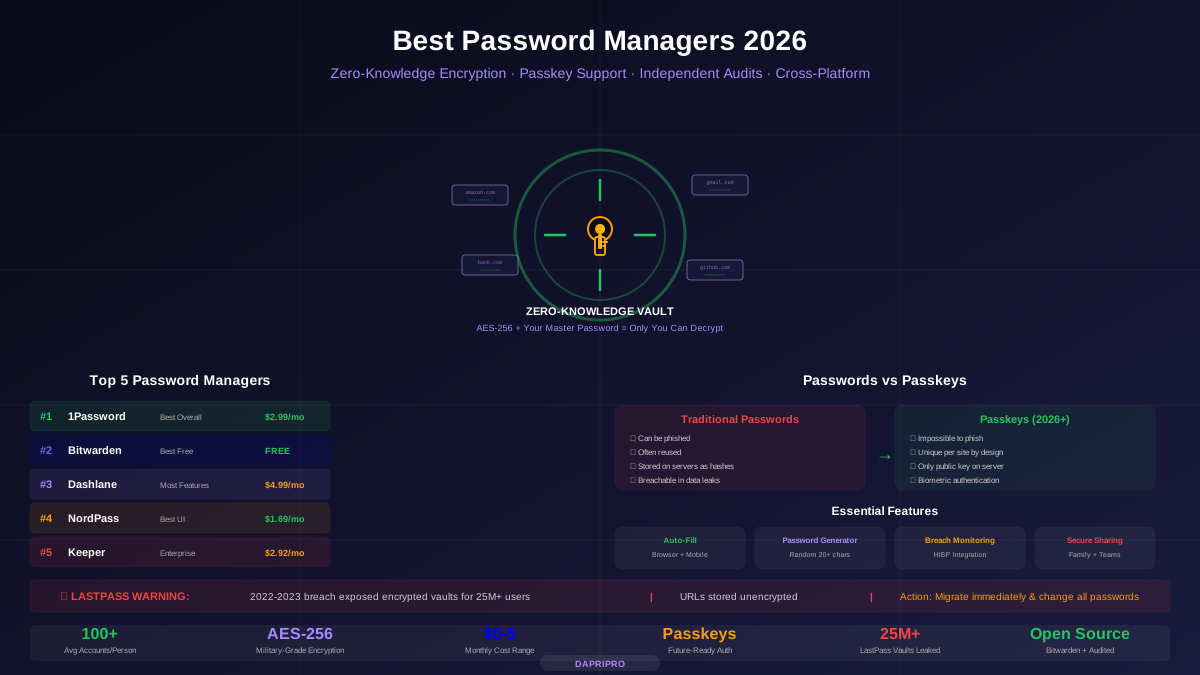
| LastPass Free (after the breach) | LastPass suffered a massive breach in 2022-2023. Encrypted vaults were stolen. While strong master passwords are likely safe, weak ones may have been cracked. |
| Browser-only managers (except Chrome/Safari) | Random browser extensions claiming to manage passwords may steal your data instead. Only use built-in browser managers from Google, Apple, or Mozilla. |
| VPN companies offering free password managers | Some VPN companies bundle a free password manager that is poorly built and exists mainly to up-sell you. Use a dedicated password manager instead. |
The golden rule: If a free password manager does not tell you how they make money, YOU are the product. Bitwarden makes money from paid plans and business subscriptions. ProtonPass makes money from the broader Proton ecosystem. Apple and Google make money from their platforms. The business model is clear. When the business model is unclear, your data may be the product.
Do You Really Need to Pay? Free vs Paid Comparison
Here is an honest breakdown of when free is enough and when paying makes sense.
| Situation | Free Is Enough | Consider Paying |
|---|---|---|
| Personal use, basic passwords | ✅ Yes | |
| Family sharing needed | ✅ Family plan | |
| Hardware security keys (YubiKey) | ✅ Premium | |
| Emergency access (in case you are unable to access) | ✅ Premium | |
| Storing sensitive files (tax docs) | ✅ Premium | |
| Student or budget-conscious | ✅ Yes |
My advice: Start with Bitwarden Free. If after a few months you find yourself wanting the premium features, upgrade for $10 per year. That is less than a single fast food meal. But if the free version does everything you need, there is absolutely no shame in staying free. Your passwords are equally secure either way.
How to Set Up Bitwarden Free in 5 Minutes
If you are ready to start using a free password manager, here is how to get set up with Bitwarden in under 5 minutes:
- Go to bitwarden.com and click "Get Started" — create an account with your email
- Choose a strong master password — this is the ONE password you need to remember, so make it good. Use a passphrase like "correct-horse-battery-staple" that is long but easy to remember
- Install the browser extension for Chrome, Firefox, Safari, or Edge
- Install the mobile app on your phone (iOS or Android)
- Start saving passwords — when you log into a website, Bitwarden will offer to save your password automatically
That is it. From this point forward, Bitwarden generates, saves, and fills passwords for you. You only need to remember your master password. Everything else is automatic.
Final Recommendation
Use Bitwarden Free. It is the safest, most feature-complete free password manager available in 2026. It is open source, independently audited, and gives you unlimited passwords on unlimited devices for $0.
If you are already in the Apple ecosystem and do not use any non-Apple devices, Keychain is fine. If you are a ProtonMail user, ProtonPass makes sense. If you are a Chrome-only person with simple needs, Google's built-in manager works.
But for everyone else? Bitwarden Free is the answer. And remember — a free password manager you actually use is infinitely better than a paid one you never set up. Start today.