Your company has 200 employees. Each one uses about 80 different work accounts. That is 16,000 passwords floating around your organization right now.
Some are written on sticky notes. Some are saved in shared Google Docs. Some are "CompanyName123!" on every single account. Sound familiar?
An enterprise password manager fixes all of this. It is like a super-secure digital vault that stores every password your team needs, shares them safely, and makes sure nobody uses "password123" ever again.
We tested the 6 biggest enterprise password managers with real teams. Here is exactly which one your company should pick — and how to get everyone actually using it.
Quick Verdict: Which Enterprise Password Manager Should You Pick?
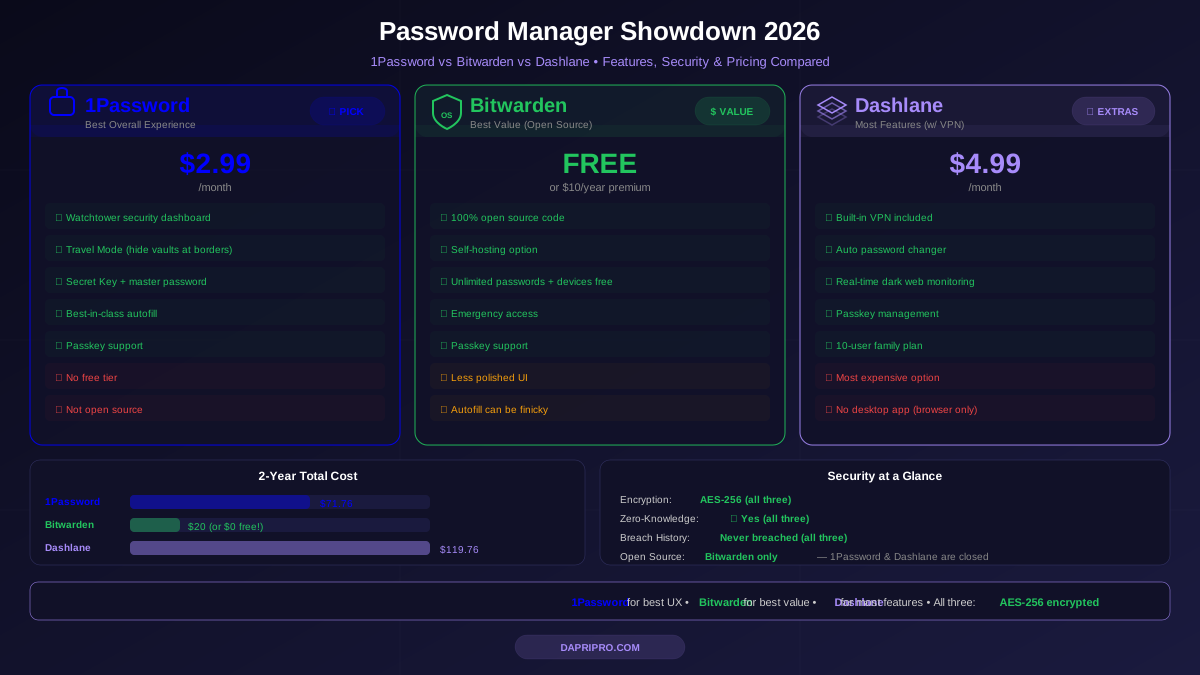
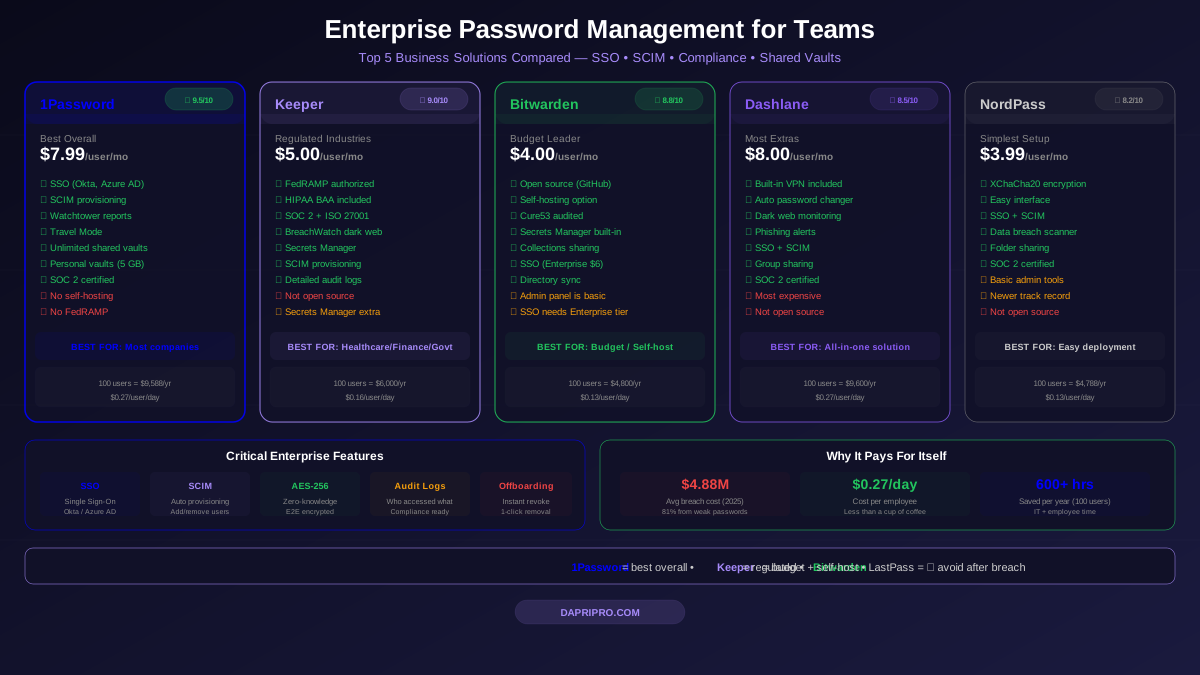
| Solution | Best For | Price/User/Month | SSO | SCIM | Our Rating |
|---|---|---|---|---|---|
| 1Password Business | Best overall | $7.99 | ✅ | ✅ | ⭐ 9.5/10 |
| Keeper Enterprise | Regulated industries | $5.00 | ✅ | ✅ | ⭐ 9.0/10 |
| Bitwarden Teams | Budget-friendly | $4.00 | ✅ | ✅ | ⭐ 8.8/10 |
| Dashlane Business | Built-in VPN + Dark web | $8.00 | ✅ | ✅ | ⭐ 8.5/10 |
| NordPass Business | Simple deployment | $3.99 | ✅ | ✅ | ⭐ 8.2/10 |
| LastPass Business | ⚠ Use with caution | $7.00 | ✅ | ✅ | ⭐ 6.5/10 |
Bottom line: 1Password Business wins for most companies. Bitwarden Teams wins if budget is tight. Keeper wins for healthcare, finance, and government.
Why Your Company Absolutely Needs an Enterprise Password Manager
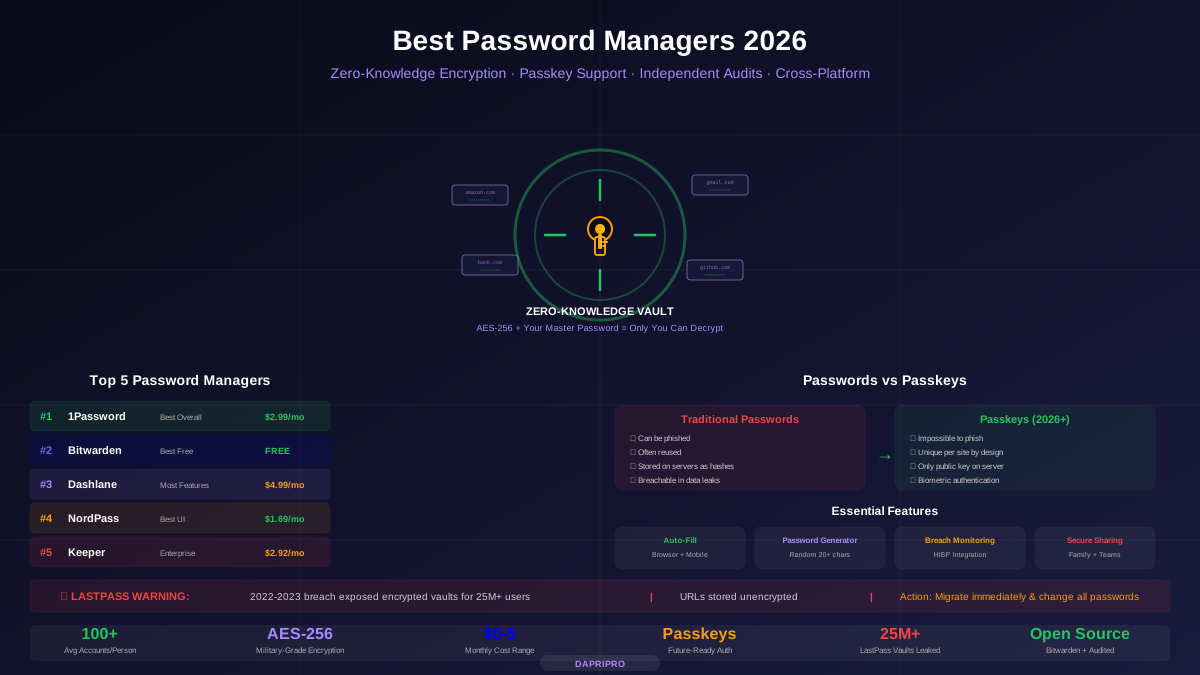
Here is the scary math. The average data breach costs $4.88 million. And 81% of breaches happen because of weak or stolen passwords.
An enterprise password manager costs about $5 per employee per month. For a 100-person company, that is $6,000 per year to protect against a $4.88 million disaster. That is like paying $6 for car insurance that covers a $4,880 crash.
What Makes Enterprise Different from Personal?
A personal password manager is like a personal safe in your bedroom. An enterprise password manager is like a bank vault with security cameras, access logs, and a guard who checks IDs.
Enterprise password managers add these critical business features:
- Admin dashboard — See who is using the tool, who is not, and who has weak passwords
- SSO integration — Employees log in with their company Microsoft or Google account
- SCIM provisioning — Automatically add new employees and remove departing ones
- Shared vaults — Teams share passwords securely (marketing shares social media accounts, IT shares server credentials)
- Security policies — Force minimum password length, require 2FA, block weak passwords
- Activity logs — See who accessed what, when, for compliance and investigation
- Offboarding — Instantly revoke all access when someone leaves the company
1Password Business — Best Overall (9.5/10)
1Password Business is like an iPhone — it works beautifully, everyone figures it out quickly, and the security is rock-solid underneath. It is our top pick for most companies.
What Makes It Great for Teams
Admin controls are excellent. The admin dashboard shows you a security score for the entire company. You can see which employees have weak passwords, who has not enabled 2FA, and which shared credentials need rotating. Think of it as a health check-up for your company's passwords.
Shared vaults work perfectly. Create a vault for each team — marketing, engineering, finance. Drop in the shared credentials. Team members see only what they need. When someone moves to a different team, move their vault access in 10 seconds.
Watchtower catches problems. 1Password's Watchtower scans all company passwords and alerts admins about:
- Passwords found in data breaches
- Weak passwords that need changing
- Websites missing 2FA that support it
- Expiring credit cards and memberships
Travel Mode is unique. Employees crossing international borders can hide sensitive vaults. Only "safe" vaults remain on their device. This is critical for companies with employees traveling to countries with aggressive border searches.
1Password SSO & SCIM
1Password integrates with Okta, Azure AD, OneLogin, JumpCloud, Google Workspace, and Duo. SCIM provisioning means when HR adds a new employee in your identity provider, they automatically get a 1Password account with the right vault access. When HR removes them, 1Password access disappears instantly.
This alone saves IT teams 5+ hours per week at companies with 200+ employees.
Pricing
$7.99/user/month (billed annually). A 100-person company pays about $9,588/year. They offer a 14-day free trial for business plans.
Keeper Enterprise — Best for Regulated Industries (9.0/10)
If your company deals with patient records, financial data, or government contracts, Keeper should be at the top of your list. It is built for compliance the way a tank is built for protection — maybe more than you need, but you will never worry about not having enough.
Compliance Powerhouse
Keeper is the only enterprise password manager that holds SOC 2 Type 2, ISO 27001, FedRAMP, and StateRAMP certifications. That matters because:
- Healthcare companies need HIPAA compliance — Keeper has a specific HIPAA BAA
- Government contractors need FedRAMP authorized solutions — Keeper has it
- Financial companies need SOX compliance — Keeper's audit logs satisfy auditors
- European companies need GDPR data processing agreements — Keeper provides them
BreachWatch Dark Web Scanning
Keeper's BreachWatch constantly scans the dark web for your company's credentials. If any employee password shows up in a data breach, the admin gets an instant alert. The employee gets forced to change that password before they can log in again.
Secrets Manager
Beyond passwords, Keeper has a Secrets Manager for DevOps teams. It stores API keys, SSH keys, database credentials, and certificates. Developers can pull secrets directly into their code without hardcoding them. This prevents one of the most common security mistakes in software development.
Pricing
$5.00/user/month (billed annually). The Secrets Manager add-on costs extra. A 100-person company pays about $6,000/year for the base plan.
Bitwarden Teams — Best Budget Option (8.8/10)
Bitwarden proves that open source can beat expensive proprietary tools. It is like buying a Toyota — reliable, affordable, and does everything you need without the luxury price tag.
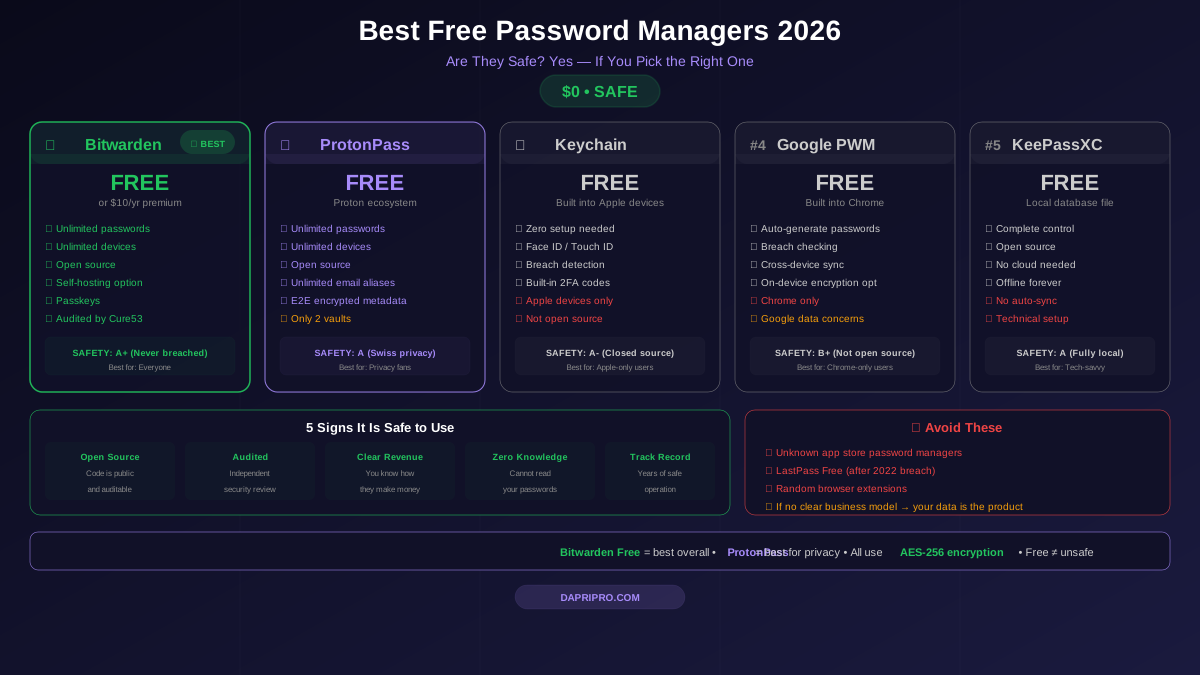
Open Source Advantage
Bitwarden's entire codebase is open source on GitHub. This means:
- Security researchers worldwide constantly audit the code
- No hidden backdoors — anyone can verify
- Professional audits by Cure53 are published publicly
- You can self-host Bitwarden on your own servers (total data control)
Self-Hosting for Maximum Control
This is Bitwarden's killer enterprise feature. If your company has strict data residency requirements — say you are a European company that must keep all data on EU servers — you can run Bitwarden on your own infrastructure.
Your passwords never touch Bitwarden's cloud servers. Your IT team controls everything. This is something no other major password manager offers at this price point.
Team Features
Bitwarden Teams includes shared collections (like vaults), user groups, event logs, directory sync, 2FA enforcement, and API access. The admin panel is not as polished as 1Password's, but it gets the job done.
Pricing
$4.00/user/month (Teams plan), $6.00/user/month (Enterprise plan with SSO). A 100-person company pays $4,800-$7,200/year. Self-hosting is free for the base product — you only pay for infrastructure costs.
Dashlane Business — Best Extra Features (8.5/10)
Dashlane throws in extras that other password managers charge separately for. It is like booking a hotel that includes breakfast, Wi-Fi, and parking while competitors charge for each.
Built-In VPN
Every Dashlane Business user gets a VPN powered by Hotspot Shield. Employees working from coffee shops or airports can secure their connection without your company buying a separate VPN service. Is it as good as a dedicated VPN like NordVPN? No. But it is included free, and it is good enough for basic protection.
Dark Web Monitoring + Auto Password Changer
Dashlane scans the dark web for compromised credentials and has a unique auto-password changer. If an employee's password is found in a breach, Dashlane can automatically log into that site and change the password — no employee action needed. This works on about 300 popular websites.
Phishing Alerts
The browser extension warns employees when they try to enter a password on a phishing site that mimics a legitimate one. If an employee clicks a fake "login.microsft.com" link, Dashlane warns them and blocks autofill.
Pricing
$8.00/user/month (billed annually). A 100-person company pays about $9,600/year. The VPN alone would cost $3-5/user/month elsewhere, so the overall value is competitive.
NordPass Business & LastPass Business — Quick Takes
NordPass Business (8.2/10)
NordPass is the newest entrant from Nord Security (the NordVPN company). Its biggest advantage is simplicity. If your team struggles with technology adoption, NordPass has the most intuitive interface. It uses XChaCha20 encryption instead of AES-256, which is technically more modern (though both are equally unbreakable in practice).
At $3.99/user/month, it is competitively priced. The downside: fewer admin controls and a shorter track record compared to 1Password or Keeper.
LastPass Business (6.5/10) — Proceed with Caution
We have to be honest about LastPass. The 2022 data breach compromised encrypted password vaults for millions of users. Attackers stole backup copies of customer vault data. While the vaults were encrypted, the metadata (website URLs) was not.
LastPass has since improved its security, but trust is earned over years and lost in moments. If you already use LastPass, read our LastPass breach analysis to decide whether to stay or migrate. For companies starting fresh, we recommend looking elsewhere.
Head-to-Head Feature Comparison
| Feature | 1Password | Keeper | Bitwarden | Dashlane | NordPass |
|---|---|---|---|---|---|
| Encryption | AES-256 | AES-256 | AES-256 | AES-256 | XChaCha20 |
| Zero-knowledge | ✅ | ✅ | ✅ | ✅ | ✅ |
| SSO (SAML) | ✅ | ✅ | ✅ Enterprise | ✅ | ✅ |
| SCIM provisioning | ✅ | ✅ | ✅ Enterprise | ✅ | ✅ |
| Admin dashboard | ⭐ Excellent | ⭐ Excellent | Good | Good | Basic |
| Shared vaults | ✅ Unlimited | ✅ Unlimited | ✅ Collections | ✅ Groups | ✅ Folders |
| Activity logs | ✅ Detailed | ✅ Detailed | ✅ Events | ✅ Activity | ✅ Basic |
| Self-hosting | ❌ | ❌ | ✅ | ❌ | ❌ |
| Open source | ❌ | ❌ | ✅ | ❌ | ❌ |
| Built-in VPN | ❌ | ❌ | ❌ | ✅ | ❌ |
| Dark web monitoring | ✅ Watchtower | ✅ BreachWatch | ✅ Reports | ✅ Built-in | ✅ Scanner |
| Secrets Manager | ❌ | ✅ Add-on | ✅ Built-in | ❌ | ❌ |
| SOC 2 certified | ✅ | ✅ | ✅ | ✅ | ✅ |
| FedRAMP | ❌ | ✅ | ❌ | ❌ | ❌ |
| Personal vaults | ✅ 5 GB | ✅ | ✅ | ✅ | ✅ |
| Travel Mode | ✅ | ❌ | ❌ | ❌ | ❌ |
How to Deploy an Enterprise Password Manager (Step by Step)
Rolling out a password manager to 100+ employees can feel overwhelming. Here is a tested deployment plan that works for companies of any size.
Phase 1: Pilot (Week 1-2)
- Pick your tool — Start a free trial of your top 2 choices
- Select 5-10 pilot users from different departments
- Set up SSO integration so pilot users log in with their company account
- Create your first shared vaults — typically "IT Shared," "Company-Wide," and one per department
- Gather feedback after 1 week — Is autofill working? Is the app easy to use?
Phase 2: Department Rollout (Week 3-4)
- Configure SCIM to automatically provision user accounts
- Set security policies — Minimum 14-character master password, require 2FA
- Roll out one department at a time — Start with IT (they will be support ambassadors)
- Run a 15-minute training session for each department
- Send a cheat sheet covering the 3 things employees need to know: how to save, how to autofill, how to share
Phase 3: Company-Wide (Week 5-8)
- Enable for all remaining employees via SCIM
- Monitor adoption in the admin dashboard — aim for 80% active usage in month 1
- Import passwords from browsers and other tools (most managers have a CSV import)
- Disable browser password saving via company policy (Chrome, Edge, Firefox all support this)
- Celebrate 100% adoption — some companies gamify it with a leaderboard
Security Architecture Deep Dive
Here is what actually happens to your passwords behind the scenes.
End-to-End Encryption
When an employee saves a password in 1Password, Bitwarden, or Keeper, here is the process:
- The password is encrypted on the employee's device using their master password
- The encrypted blob is sent to the cloud server
- The server stores only the encrypted data — it cannot read passwords
- When the employee logs in on another device, encrypted data syncs and decrypts locally
Even if hackers steal the entire server database (like the LastPass breach), they get encrypted gibberish. Without each employee's master password, the data is useless.
Zero-Knowledge Architecture
Zero-knowledge means the company running the password manager literally cannot see your passwords. Not the CEO, not the engineers, not even if the government demands it. The encryption keys exist only on employee devices.
Think of it this way: imagine sending a locked safe to a storage facility. The facility stores the safe but has no key. Even if someone breaks into the facility, they still cannot open your safe.
What Happens If an Employee Forgets Their Master Password?
This is the trade-off of zero-knowledge. Most enterprise password managers handle it through:
- SSO bypass — If you use SSO, employees never need a master password at all
- Account recovery — An admin can initiate recovery (the employee creates a new master password, old data re-encrypts)
- Emergency access — Designated recovery contacts can request access after a waiting period
Migrating from Your Current System
Moving from shared spreadsheets, sticky notes, or another password manager? Here are the paths:
| Current System | Migration Difficulty | Steps |
|---|---|---|
| Chrome saved passwords | 🟢 Easy | Export CSV → Import into new tool |
| LastPass | 🟢 Easy | Export CSV → Import (1Password has 1-click) |
| Shared Google Sheets | 🟡 Medium | Format CSV → Import → Delete the sheet |
| Sticky notes / memory | 🔴 Hard | Employees must manually enter passwords over 2-4 weeks |
| Another password manager | 🟢 Easy | Most support CSV or direct migration tools |
Critical step everyone forgets: After importing passwords into the new tool, delete the export CSV file. That unencrypted file sitting on someone's desktop is a security nightmare.
Is It Worth the Money? ROI Calculation
Let us do the math for a 100-person company using 1Password Business ($9,588/year):
| Factor | Without Password Manager | With Password Manager |
|---|---|---|
| Password reset requests/month | 50-80 | 5-10 |
| IT time on password issues/month | 20-30 hours | 2-3 hours |
| Average breach risk (annual) | High | Reduced by 80% |
| Employee time wasted on logins/day | 10-15 minutes | 1-2 minutes |
| Time saved annually | — | 600+ hours company-wide |
| Cost per employee per day | $0 | $0.27 |
The password manager pays for itself in IT time savings alone — before you even factor in breach prevention. At $0.27 per employee per day, it is cheaper than a cup of coffee.
5 Mistakes Companies Make with Enterprise Password Managers
- Not disabling browser password saving — Employees keep saving passwords in Chrome alongside the password manager, creating sync confusion and security gaps
- Skipping SCIM provisioning — Manually adding and removing users leads to orphaned accounts of former employees who still have access
- One giant shared vault — Instead, create separate vaults per team so the marketing intern cannot see production database passwords
- No master password policy — If employees use "password123" as their master password, the vault encryption means nothing
- Buying without a trial — Always test with a real team for 2 weeks before committing annual contracts
Our Final Recommendation
Here is the simple version:
- Most companies → 1Password Business — Best balance of security, usability, and admin tools
- Healthcare, finance, government → Keeper Enterprise — FedRAMP, HIPAA BAA, maximum compliance
- Budget-conscious or want self-hosting → Bitwarden Teams/Enterprise — Open source, affordable, total control
- Want extras (VPN, auto-changer) → Dashlane Business — Best value with included features
- Need simplest possible setup → NordPass Business — Easiest to deploy, decent features
Whatever you choose, any enterprise password manager is infinitely better than no password manager. The $4.88 million average breach cost makes the $5/user/month investment a no-brainer.
Ready to start? Pick your top 2 choices from our comparison, start free trials, and have your IT team test with a pilot group. Most companies are fully deployed within a month.
For more on password management best practices, explore our security tools library.