In August 2022, hackers broke into LastPass. By December 2022, they had stolen something terrifying: the encrypted password vaults of over 33 million users.
That means right now, somewhere on the internet, there is a copy of your vault — every password, every login, every secret note — sitting on a hacker's hard drive. The only thing protecting those passwords is your master password.
So here is the question everyone is asking: Is it too late? Can they crack my vault? And should I still use LastPass in 2026?
We will answer all of that with facts, not panic. Let us walk through exactly what happened, what it means for you, and what to do right now.
The Complete LastPass Breach Timeline
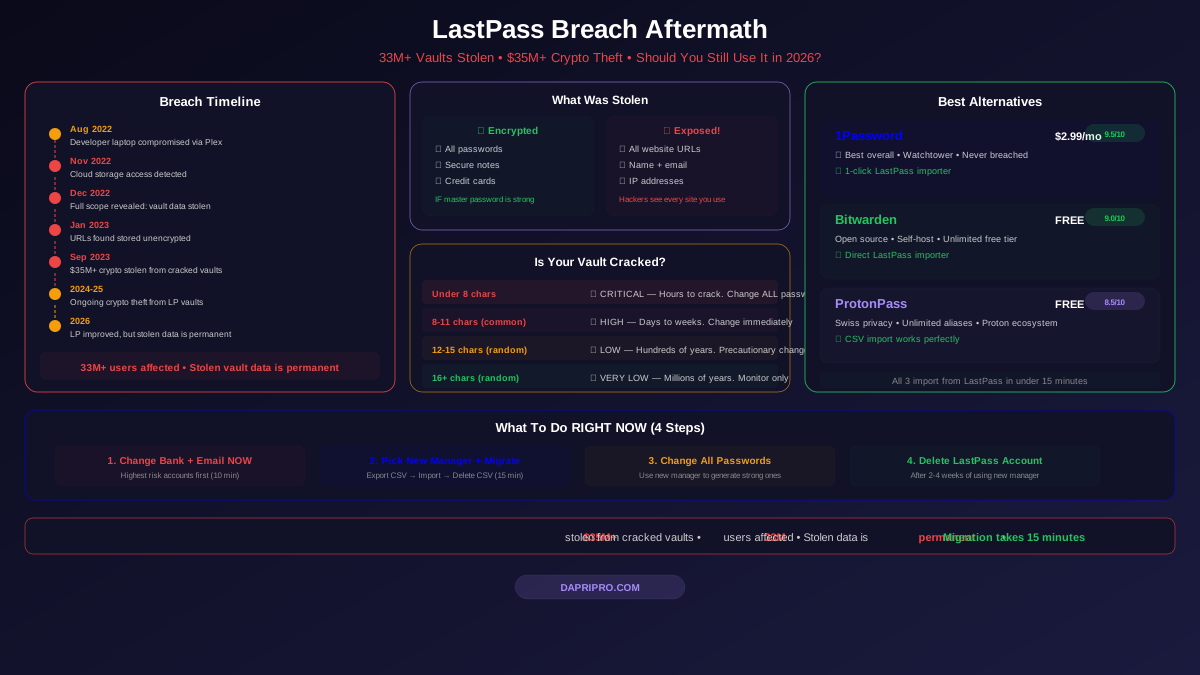
This was not a single hack. It was a slow-motion disaster that unfolded over months. Here is the full timeline:
| Date | What Happened | Severity |
|---|---|---|
| August 2022 | Hacker compromised a LastPass developer's laptop through a vulnerable Plex media server | 🟡 Medium |
| August-Oct 2022 | Attacker used stolen credentials to access LastPass cloud storage over several months | 🔴 High |
| November 2022 | LastPass detected "unusual activity" in cloud storage and notified users vaguely | 🟡 Medium |
| December 2022 | LastPass revealed the full scope: customer vault data was stolen | 🔴 Critical |
| January 2023 | Security researchers revealed that vault URLs were stored unencrypted | 🔴 Critical |
| Feb-Mar 2023 | Class-action lawsuits filed against LastPass parent company GoTo | 🟡 Medium |
| Sept 2023 | $35M+ in crypto stolen from former LastPass users — vaults being cracked | 🔴 Critical |
| Oct 2023 | LastPass revealed a SECOND breach of an employee's home computer vault | 🔴 High |
| 2024-2025 | Continued reports of crypto theft linked to cracked LastPass vaults | 🔴 Ongoing |
| 2026 | LastPass claims improved security, but stolen data is still compromised forever | 🟡 Improved |
Exactly What Was Stolen (And What Was Not)
Let us be crystal clear about what the hackers got.
STOLEN — Encrypted (Protected by Your Master Password)
- Your passwords — All of them, every site, every login
- Secure notes — Any notes you saved in your vault
- Form fill data — Addresses, phone numbers saved for autofill
- Credit card numbers stored in the vault
This data is encrypted with AES-256 using your master password. If your master password was strong (16+ characters, unique, random), cracking it would take millions of years. If it was weak... well, keep reading.
STOLEN — NOT Encrypted (Hackers Can Read This Right Now)
- Website URLs — Every site you have an account on
- Your name and email address
- Billing address
- Phone numbers
- IP addresses you logged in from
- Which devices you used LastPass on
This is huge. Even if your passwords are safe, the hackers know every single website you have an account on. They know if you use cryptocurrency exchanges, adult websites, medical portals, or government services. This is a massive privacy violation regardless of password security.
Is YOUR Vault Already Cracked?
This is what everyone wants to know. Here is the honest answer based on your master password strength:
| Your Master Password | Risk Level | Estimated Crack Time | Action Needed |
|---|---|---|---|
| Under 8 characters | 🔴 CRITICAL | Hours to days | Change ALL passwords TODAY |
| 8-11 characters (common word) | 🔴 HIGH | Days to weeks | Change all important passwords NOW |
| 8-11 characters (random) | 🟡 MEDIUM | Months to years | Change financial + email passwords |
| 12-15 characters (random) | 🟢 LOW | Hundreds of years | Change financial passwords as precaution |
| 16+ characters (random) | 🟢 VERY LOW | Millions of years | Monitor for unusual activity |
| Reused from another site | 🔴 CRITICAL | Instant (dictionary attack) | Change ALL passwords immediately |
The crypto theft proves vaults are being cracked. Security researcher Taylor Monahan tracked over $35 million in cryptocurrency stolen from wallets whose seed phrases were stored in LastPass vaults. The victims all had one thing in common: relatively weak master passwords.
How the Cracking Works
Think of it like this: your vault is a steel safe, and your master password is the combination. The hackers have a copy of the safe. Now they are trying every possible combination using powerful computers (GPUs).
- A simple 8-character password has about 200 billion combinations — a modern GPU can try those in under a day
- A 12-character random password has about 3 sextillion combinations — that takes hundreds of years
- A 16-character random password is essentially uncrackable with today's technology
But here is the catch: LastPass used to allow master passwords as short as 8 characters. They did not enforce longer passwords until AFTER the breach. So millions of users had short, crackable master passwords when their vaults were stolen.
What LastPass Has Done Since the Breach
To be fair to LastPass, they have made significant changes. But the question is: are they enough?
Security Improvements
- Mandatory 12-character minimum for master passwords (was 8)
- Increased PBKDF2 iterations to 600,000 (was as low as 5,000 for old accounts — a shocking fact that security researchers criticized heavily)
- New infrastructure — Migrated to a new cloud platform
- New security leadership — Hired new CISO and security team
- Published security transparency reports
- Mandatory MFA re-enrollment for all users
What They Cannot Fix
No matter what LastPass does going forward, these facts remain:
- The stolen vault data is permanently in hacker hands — there is no "un-stealing" data
- Users with weak master passwords from 2022 are still at risk — the stolen data does not get stronger over time
- The unencrypted metadata (website URLs, email addresses) is permanently exposed
- Trust was broken — LastPass initially downplayed the breach, took months to reveal the full scope, and had shockingly low encryption iterations on old accounts
Should You Stay or Leave? Our Honest Assessment
You Should LEAVE LastPass If:
- Your master password was shorter than 14 characters
- You reused your master password anywhere else
- You stored cryptocurrency seed phrases or private keys in your vault
- You stored sensitive business or medical information
- You had an account before 2023 (your vault backup was stolen)
- You simply do not trust them anymore (that is a valid reason)
You Could STAY on LastPass If:
- You are a new user starting fresh (no stolen vault to worry about)
- Your master password was 16+ random characters AND unique to LastPass
- You have already changed all critical passwords since the breach
- Your employer mandates it and you have no choice
Our recommendation for most people: Leave. Even if your vault is secure, the trust violation matters. Password managers require absolute trust — you are giving them access to your entire digital life. When that trust is broken this severely, moving on is the right call.
What To Do Right Now (Step by Step)
If You Are Still on LastPass:
- Change your most critical passwords FIRST — Bank, email, crypto, medical. Do not wait until after migration. Do it now, directly on those websites.
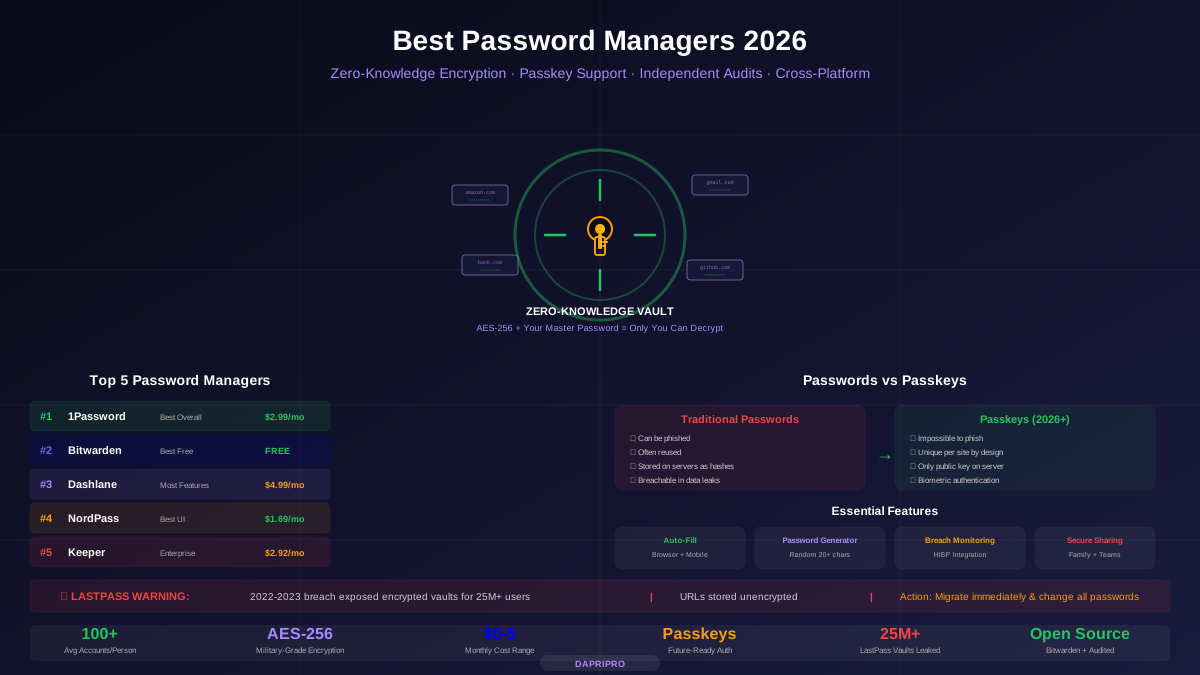
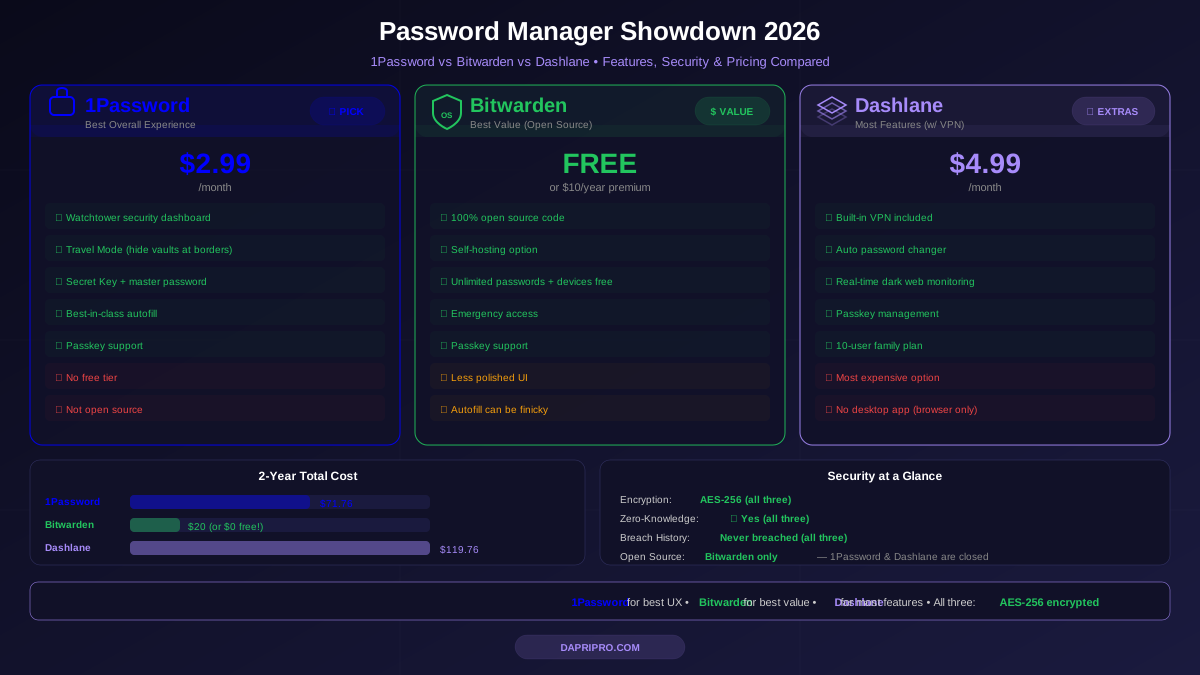
- Pick a new password manager — We recommend 1Password, Bitwarden, or ProtonPass
- Export from LastPass — Go to Advanced Options → Export → Download CSV
- Import into your new manager — Most have direct LastPass importers
- Delete the CSV file and empty your recycle bin
- Change remaining passwords over the next 2-4 weeks using your new manager to generate strong replacements
- Delete your LastPass account when you are fully migrated
For detailed migration instructions, see our complete migration guide.
Priority Password Changes
You do not need to change all 200 passwords at once. Prioritize these:
| Priority | Account Type | Why |
|---|---|---|
| 🔴 Immediate | Email accounts | Email access = reset any other password |
| 🔴 Immediate | Banking / financial | Direct monetary loss risk |
| 🔴 Immediate | Cryptocurrency | $35M+ already stolen from LP users |
| 🟡 This week | Work / employer accounts | Could affect your job and company |
| 🟡 This week | Social media | Identity theft, impersonation risk |
| 🟢 This month | Shopping sites | Saved credit cards, addresses |
| 🟢 This month | All remaining accounts | General security hygiene |
Best LastPass Alternatives in 2026
Here are the three password managers we recommend for LastPass refugees:
| Manager | Free Tier | Paid Price | Best Feature | Migration Ease |
|---|---|---|---|---|
| 1Password | ❌ No | $2.99/mo | Easiest to use, Watchtower | ⭐ 1-click LastPass importer |
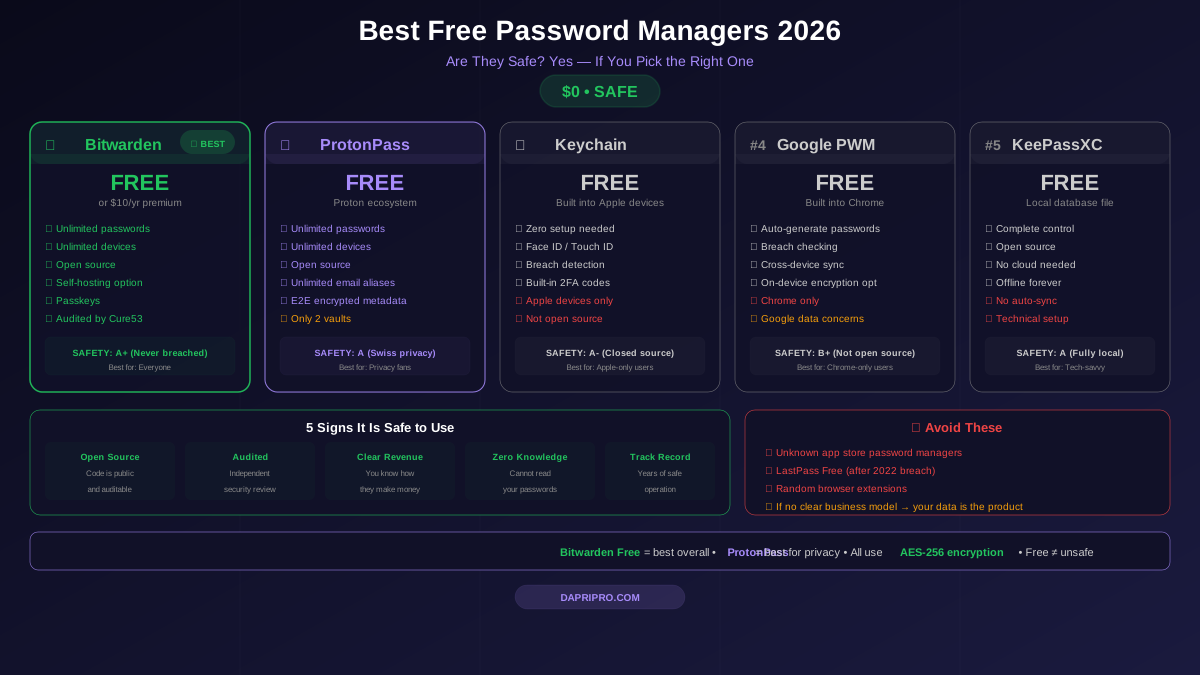
| Bitwarden | ✅ Unlimited | $10/year | Open source, self-hosting | ⭐ Direct LastPass importer |
| ProtonPass | ✅ Unlimited | $4.99/mo | Privacy, email aliases | ✅ CSV import works perfectly |
All three have direct LastPass importers that make switching take under 15 minutes. See our migration guide for step-by-step instructions.
What We All Learned From the LastPass Breach
This breach taught the entire cybersecurity world important lessons:
1. Your Master Password Is Everything
A password manager is only as strong as the master password protecting it. Use a 16+ character passphrase (like "correct-horse-battery-staple-rainbow") that you can remember but is impossible to guess.
2. Not All "Encrypted" Data Is Equal
LastPass encrypted passwords but left website URLs unencrypted. This means "encrypted" is not a magic word — you need to ask what is encrypted and what is not. Other managers like 1Password and Bitwarden encrypt everything, including URLs and metadata.
3. Iteration Count Matters
LastPass had accounts with as few as 5,000 PBKDF2 iterations. The recommended minimum today is 600,000. More iterations means it takes longer to try each password guess. Low iterations made vault cracking much faster for attackers.
4. Open Source Builds Trust
Bitwarden's open-source codebase means anyone can verify their security claims. LastPass was closed source — users had to trust their word. When that trust was broken, there was no independent verification to fall back on.
5. How a Company Handles a Breach Matters
LastPass took months to reveal the full extent of the breach. Initial statements downplayed the severity. Customers felt misled. Compare this to how the fictional "ideal" company would handle it: immediate transparency, clear communication, and proactive protection. The response to a breach says as much about a company as the breach itself.
The Bottom Line
The LastPass breach is one of the worst cybersecurity incidents in consumer software history. Not because of the technical sophistication of the attack, but because of what was at stake — the complete digital identity of 33+ million people.
If you are still on LastPass with a pre-breach account:
- Change your email and bank passwords today (10 minutes)
- Pick 1Password or Bitwarden and migrate (15 minutes)
- Gradually change all remaining passwords over the next month
- Enable 2FA on every account that offers it
The stolen vault data will exist on hacker servers forever. You cannot change that. But you can make every password in that vault worthless by changing them all.
Is LastPass safe for new users in 2026? Technically, yes. But when better alternatives exist that were never breached, why take the chance?
For more on choosing the right password manager, see our complete password manager reviews.