Your security team spent years building a fortress. Firewalls, intrusion detection systems, network monitoring, segmented VLANs. Then in 2020, the entire workforce went home — and the fortress protected empty offices.
Five years later, hybrid work is permanent. The average enterprise has 60% of employees working remotely at least part of the week. They connect from home Wi-Fi, coffee shops, airports, and co-working spaces. They use personal devices alongside corporate laptops. And most of them still connect through the same technology we used in 1999: a VPN.
Here is the problem with VPNs for a distributed workforce — and how zero trust network access (ZTNA) solves it.
Why VPN Is the Wrong Tool for Remote Work
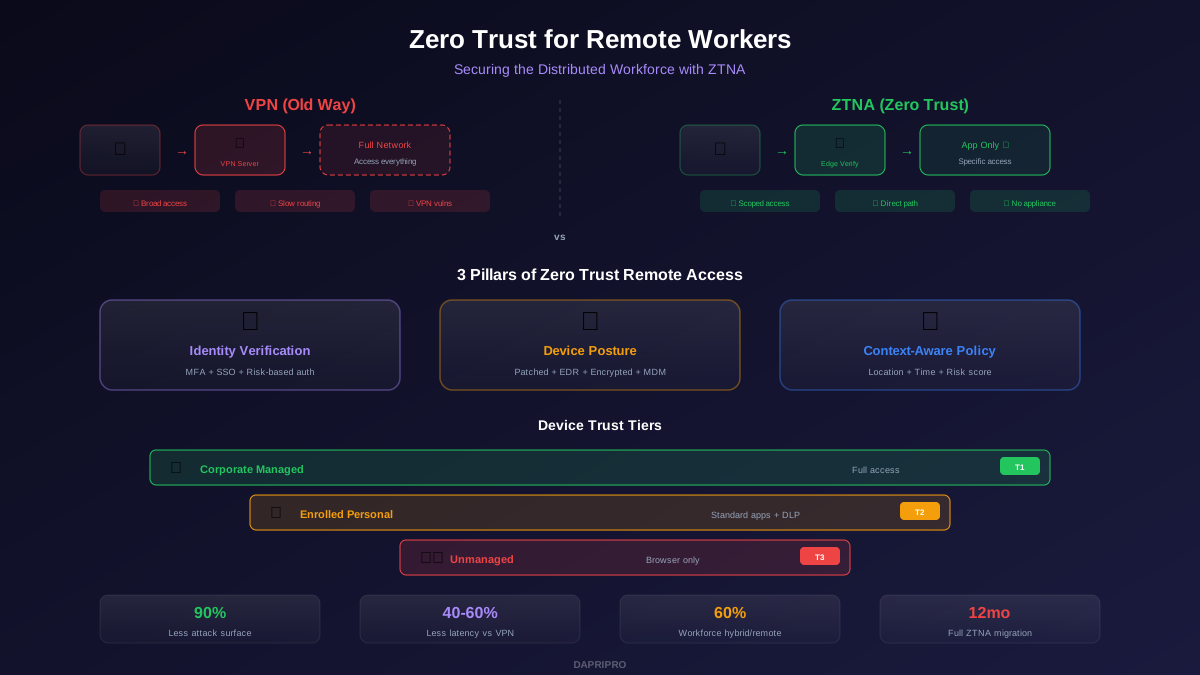
VPNs were designed for a different era. They create a secure tunnel from a remote device to the corporate network, essentially placing the remote user "inside the castle walls." This design has three critical flaws for modern remote work:
Flaw 1: Excessive access. Once a user connects to the VPN, they typically have access to the entire internal network — servers they do not need, databases they should not see, and admin consoles they have no reason to touch. If an attacker steals VPN credentials (through phishing, credential stuffing, or malware on the remote device), they inherit this full network access.
Flaw 2: Performance bottleneck. Traditional VPNs route all traffic through a central concentrator, often located in headquarters. A remote worker in Singapore accessing a SaaS application hosted in AWS Singapore must route traffic through a VPN concentrator in New York, then back to AWS Singapore. This creates 200-300ms of unnecessary latency and crushes video conferencing, cloud application performance, and productivity.
Flaw 3: The VPN itself is an attack surface. In 2024 and 2025, critical zero-day vulnerabilities were discovered in VPN appliances from Ivanti, Fortinet, Cisco, and Palo Alto — all actively exploited by attackers. The security device meant to protect remote access became the entry point.
How ZTNA Works for Remote Access
ZTNA flips the VPN model. Instead of connecting users to the network, ZTNA connects users to specific applications. The user never sees or touches the underlying network. Here is how the flow works:
- Identity verification. The user authenticates with their identity provider (Azure AD, Okta, Google Workspace). MFA is required — ideally phishing-resistant (FIDO2 key or passkey).
- Device posture check. The ZTNA agent on the device verifies: OS patched? EDR running? Disk encrypted? Device enrolled in MDM? Certificate valid? If any check fails, access is denied or restricted.
- Contextual policy evaluation. The access broker evaluates: What application is being requested? What role does the user have? Is the request coming from a known location? Is this a normal time for this user to work? Is there any anomalous behavior?
- Application-specific access. If all checks pass, the user receives access to the specific application requested — not the network. The connection is brokered through the nearest edge node for optimal performance.
- Continuous evaluation. Throughout the session, the ZTNA solution continuously re-evaluates identity, device posture, and behavior. If conditions change (device becomes non-compliant, anomalous behavior detected), access can be stepped down or revoked mid-session.
The 3 Pillars of Zero Trust Remote Access
Pillar 1: Identity Is the New Perimeter
In a remote workforce, identity replaces the network as the primary security boundary. Every access decision starts with: who is this user, and can they prove it?
- Deploy phishing-resistant MFA (FIDO2 security keys or passkeys) for all remote workers
- Implement risk-based authentication — step up verification for sensitive applications or unusual contexts
- Use single sign-on (SSO) to consolidate identity across all applications
- Deploy session timeouts and re-authentication requirements for high-risk applications
Pillar 2: Device Posture Is Non-Negotiable
A verified user on a compromised device is still a security risk. Device posture checks must happen at every access request:
- OS patched within the last 30 days
- EDR or antivirus agent active and reporting healthy
- Disk encryption enabled (BitLocker, FileVault)
- Device enrolled in MDM/UEM platform
- Valid device certificate (not expired, not revoked)
- No active indicators of compromise
Pillar 3: Context-Aware Access Policies
Access decisions should consider the full context of the request, not just identity and device:
- Location: Accessing from a new country? Require additional verification.
- Time: Logging in at 3 AM? Trigger a risk flag.
- Application sensitivity: Email might be accessible from any compliant device. Financial systems might require a corporate-managed device from an approved location.
- Risk score: If the user's device or account has elevated risk indicators, restrict access to read-only or require re-authentication.
ZTNA Solutions Compared
| Solution | Best For | Key Strength | Price Range |
|---|---|---|---|
| Zscaler ZPA | Large enterprise, hybrid | Largest edge network, app segmentation | $$-$$$ |
| Cloudflare Access | Cloud-native, fast deploy | Simple setup, generous free tier | $-$$ |
| Palo Alto Prisma | Palo Alto ecosystem | Unified SASE, deep inspection | $$$ |
| Microsoft Entra | Microsoft-centric orgs | Native Azure AD integration | $$ |
| Netskope Private | Data-centric security | Inline DLP, real-time coaching | $$-$$$ |
Handling BYOD with Zero Trust
Zero trust finally makes BYOD manageable. Instead of the binary choice of "allow personal devices on the network" or "ban them entirely," you create tiered access based on device trust level:
Tier 1 — Managed Corporate Device: Full access to all authorized applications. Device is enrolled in MDM, has EDR, is encrypted, and is fully compliant. This is the highest trust level.
Tier 2 — Enrolled Personal Device: Access to standard applications (email, collaboration tools, documents) with data loss prevention (DLP) controls. The device has a management profile and basic security requirements met, but the employee retains personal use and privacy.
Tier 3 — Unmanaged Device: Access only through a browser-based workspace or virtual desktop. No data touches the device. All work happens in an isolated cloud environment. This allows employees to work from any device — a hotel business center computer, a personal tablet, a borrowed laptop — without any security risk to corporate data.
Implementation Roadmap
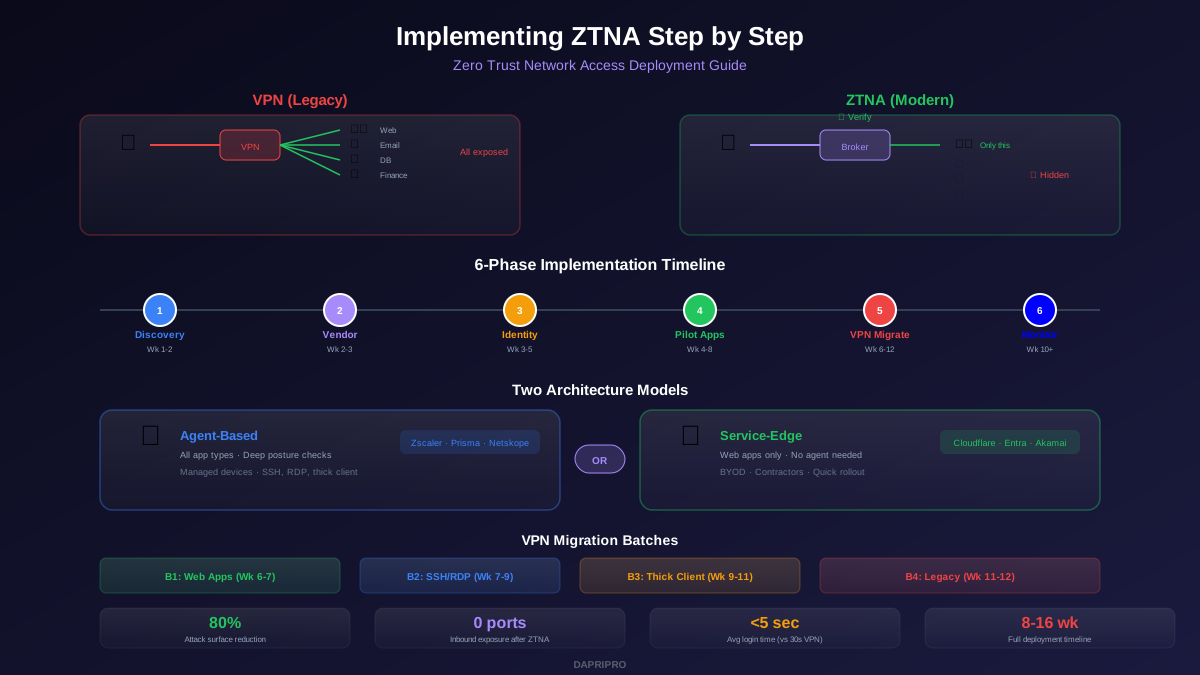
Month 1-2: Foundation. Deploy phishing-resistant MFA for all remote workers. Inventory all applications and classify by sensitivity. Choose a ZTNA solution and deploy to a pilot group of 50-100 users.
Month 3-4: High-Risk Applications. Migrate your highest-risk applications from VPN to ZTNA: admin consoles, financial systems, source code repositories, and HR systems. Implement device posture checks for these applications.
Month 5-8: Expand. Migrate remaining applications from VPN to ZTNA. Implement BYOD tiering. Deploy contextual access policies (location-based, time-based, risk-based).
Month 9-12: Mature. Decommission VPN for all users (maintain emergency backup). Implement continuous session evaluation. Deploy automated response to posture changes. Monitor and optimize policies based on access data.
The goal is simple: give every remote worker fast, secure access to exactly the applications they need — and nothing more. When an attacker compromises a remote worker's device, the damage is limited to the specific applications that user was authorized to access, not the entire corporate network. That is the difference between a minor incident and a catastrophic breach.