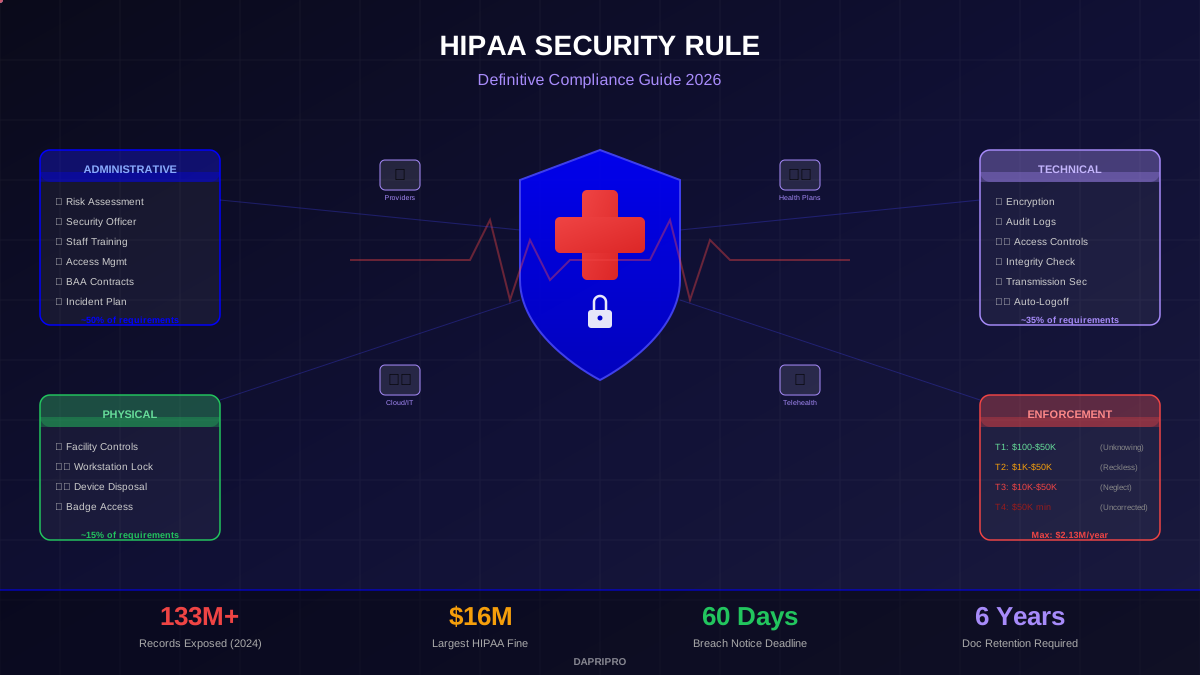
Moving Protected Health Information to the cloud is no longer a question of "should we" — it is a question of "how do we do it without violating HIPAA." In 2026, over 80% of healthcare organizations use at least one cloud service for storing or processing ePHI. But "the cloud" is not automatically compliant with anything. The responsibility for protecting ePHI does not transfer to your cloud provider — it stays with you.
The HIPAA Security Rule does not mention specific technologies or vendors. It says you must implement administrative, physical, and technical safeguards to protect ePHI — regardless of where it is stored. When you move ePHI to AWS, Azure, Google Cloud, or any other platform, you are introducing a Business Associate relationship that requires a BAA, proper configuration, ongoing monitoring, and clear documentation of who is responsible for what.
This guide compares every major cloud storage option available for HIPAA-regulated organizations in 2026. Not marketing summaries — actual requirements, specific configurations, pricing, and the compliance gaps that catch organizations during OCR audits.
What Actually Makes Cloud Storage "HIPAA-Compliant"?
No cloud service is HIPAA-compliant out of the box. Compliance is a combination of the provider's capabilities plus your configuration and policies. Both sides must fulfill their obligations.
Provider Obligations
- Sign a BAA: The provider must be willing to sign a Business Associate Agreement, accepting specific responsibilities for protecting PHI under HIPAA. Without a BAA, using that service for PHI is a HIPAA violation — period.
- Provide encryption capabilities: The platform must support encryption of data at rest (AES-128 minimum, AES-256 preferred) and data in transit (TLS 1.2 or higher).
- Offer access controls: Role-based access control (RBAC), multi-factor authentication (MFA), and the ability to restrict access by user, role, IP address, or device.
- Generate audit logs: Comprehensive logging of all access to ePHI — who, what, when, where, and what action was taken. Logs must be tamper-resistant and exportable.
- Provide availability controls: Redundancy, backup, disaster recovery capabilities to ensure ePHI is accessible when needed for patient care.
Your Obligations (the Customer)
- Configure the service properly: Default settings are almost never HIPAA-compliant. You must disable public sharing, enable encryption, configure access policies, and set up monitoring.
- Manage access: Create user accounts with minimum necessary permissions, implement MFA, deactivate accounts promptly when employees leave, conduct regular access reviews.
- Monitor and audit: Review audit logs regularly, investigate anomalies, maintain documentation of your monitoring practices.
- Train your workforce: Employees must understand which services are approved for PHI, how to use them correctly, and what constitutes a violation.
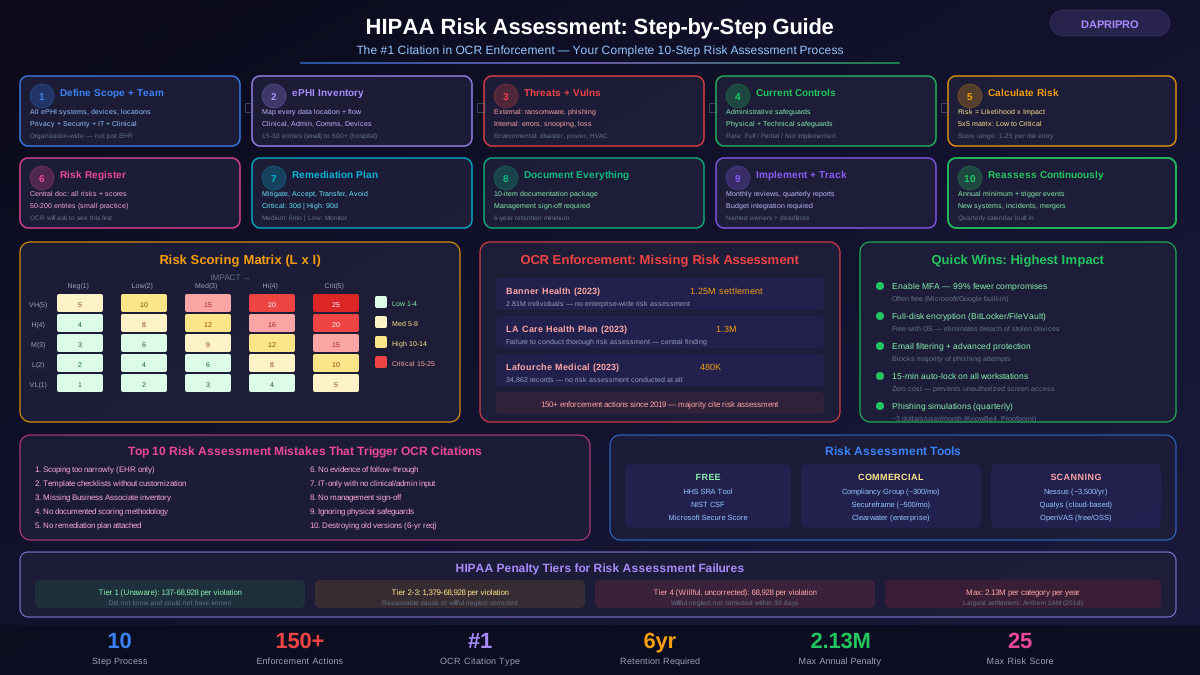
- Include in your risk assessment: Cloud services must be part of your enterprise-wide risk assessment under 45 CFR 164.308(a)(1).
The Shared Responsibility Model
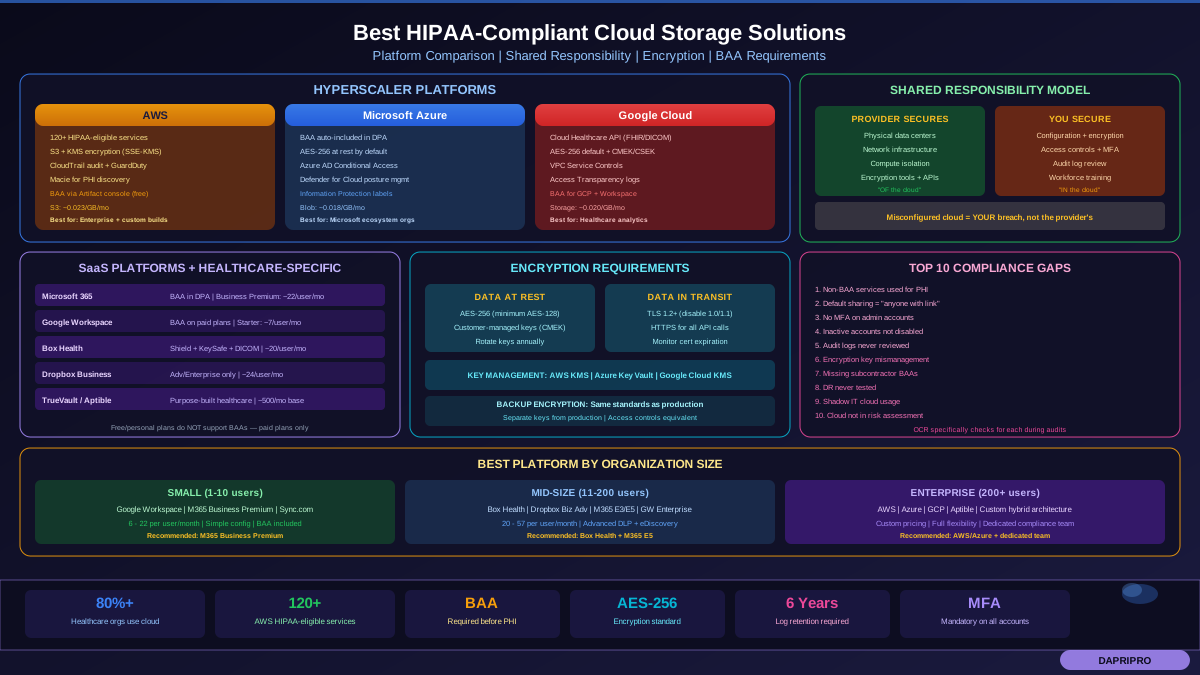
Every major cloud provider uses a shared responsibility model — they secure the infrastructure, you secure your data and configuration. This is not a suggestion; it is how cloud security works. If you misconfigure an S3 bucket on AWS and ePHI becomes publicly accessible, AWS is not at fault — you are. AWS fulfilled its obligation by providing the tools; you failed by not using them correctly.
Major Cloud Platforms: Full Comparison
Amazon Web Services (AWS)
AWS is the most widely used cloud platform in healthcare, powering everything from small practice EHR systems to enterprise health networks.
BAA availability: AWS signs BAAs at no additional cost. You request a BAA through the AWS Artifact console. The BAA is an addendum to your existing AWS Customer Agreement.
HIPAA-eligible services: Over 120 services are designated HIPAA-eligible, including S3, EC2, RDS, Lambda, ECS, EKS, DynamoDB, Redshift, CloudWatch, CloudTrail, KMS, SageMaker, and many more. AWS maintains a public list of HIPAA-eligible services — any service NOT on that list should not be used with ePHI even with a signed BAA.
Key HIPAA features:
- S3 encryption: Server-side encryption with AWS-managed keys (SSE-S3), customer-managed keys via KMS (SSE-KMS), or customer-provided keys (SSE-C). For HIPAA, SSE-KMS with customer-managed keys is recommended.
- CloudTrail: Records all API calls to your AWS account — essential for audit logging. Enable multi-region trail and store logs in a separate, restricted S3 bucket.
- AWS Config: Continuously monitors and records AWS resource configurations. Use Config rules to detect non-compliant configurations automatically.
- GuardDuty: Threat detection service that monitors for malicious activity and unauthorized behavior.
- Macie: Uses machine learning to discover, classify, and protect sensitive data including PHI in S3.
Common configuration mistakes:
- Leaving S3 buckets with public access enabled (the most common HIPAA violation on AWS)
- Not enabling CloudTrail in all regions
- Using non-HIPAA-eligible services for PHI processing
- Storing encryption keys in the same account as the encrypted data without proper key policies
Pricing: AWS uses pay-as-you-go pricing. S3 Standard storage costs approximately 0.023 dollars per GB per month. For a small practice storing 100 GB of ePHI, storage costs are roughly 2.30 dollars per month — but total costs including compute, networking, and managed services are typically 200 to 2,000 dollars per month depending on complexity.
Microsoft Azure
Azure is particularly strong for organizations already in the Microsoft ecosystem (Active Directory, Microsoft 365, Teams).
BAA availability: Microsoft includes HIPAA BAA terms in the Microsoft Online Services Data Protection Addendum (DPA), which automatically applies to all customers. You do not need to request a separate BAA — it is part of your service agreement by default for qualifying services.
HIPAA-eligible services: Azure maintains a compliance offerings page listing services covered under HIPAA. Covered services include Azure Blob Storage, Azure SQL Database, Azure Active Directory, Azure Key Vault, Azure Monitor, Azure Virtual Machines, Azure Kubernetes Service, and many others.
Key HIPAA features:
- Azure Blob Storage encryption: All data is encrypted at rest with AES-256 by default. Customer-managed keys via Azure Key Vault provide additional control.
- Azure AD + Conditional Access: Enforce MFA, device compliance, location-based access, and risk-based sign-in policies — powerful for achieving minimum necessary access requirements.
- Azure Policy: Define and enforce organizational standards. Create policies that prevent non-compliant resource configurations (e.g., block storage accounts without encryption).
- Microsoft Defender for Cloud: Cloud security posture management that identifies misconfigurations and threats across your Azure environment.
- Azure Information Protection: Classify, label, and protect documents and emails containing PHI — integrates across the Microsoft ecosystem.
Pricing: Azure Blob Storage (Hot tier) costs approximately 0.018 dollars per GB per month, slightly cheaper than AWS S3. Microsoft 365 Health plans (which include Azure AD, Teams, and compliance tools) start around 12.50 dollars per user per month for Business Premium.
Google Cloud Platform (GCP)
GCP has rapidly expanded its healthcare capabilities, particularly with the Cloud Healthcare API and BigQuery for healthcare analytics.
BAA availability: Google signs BAAs for GCP and Google Workspace. The GCP BAA covers specific services listed in their HIPAA compliance documentation.
HIPAA-eligible services: Cloud Storage, Compute Engine, BigQuery, Cloud SQL, Cloud Healthcare API, Cloud Key Management Service, Cloud Logging, Cloud Monitoring, and more. The Cloud Healthcare API is a standout — it natively supports FHIR, HL7v2, and DICOM standards.
Key HIPAA features:
- Cloud Storage encryption: All data encrypted at rest with AES-256 by default. Customer-managed encryption keys (CMEK) and customer-supplied encryption keys (CSEK) are available.
- Cloud Healthcare API: Purpose-built for healthcare data. Handles FHIR resources, DICOM medical imaging, and HL7v2 messages with built-in access controls and audit logging.
- VPC Service Controls: Creates security perimeters around GCP resources, preventing data exfiltration even by authorized users.
- Access Transparency: Logs that show when Google employees access your data — unique transparency feature for regulated industries.
Pricing: Cloud Storage Standard is approximately 0.020 dollars per GB per month. GCP frequently offers more generous free tiers and sustained-use discounts than AWS or Azure.
SaaS Platforms: Simpler but Less Flexible
Microsoft 365 (Business / Enterprise)
For many small to mid-sized healthcare organizations, Microsoft 365 is the entire technology stack — email, file storage, communication, and productivity.
BAA coverage: Microsoft includes HIPAA terms in the DPA for Business and Enterprise plans. Covered services include Exchange Online (email), SharePoint Online, OneDrive for Business, Microsoft Teams, and Office apps.
Required configuration for HIPAA:
- Enable MFA for all accounts (mandatory — not optional)
- Configure Data Loss Prevention (DLP) policies to detect and block PHI in emails and documents
- Enable audit logging in the Security and Compliance Center
- Disable external sharing in SharePoint/OneDrive or restrict to specific approved domains
- Configure retention policies to meet the 6-year HIPAA documentation requirement
- Enable sensitivity labels to classify and protect PHI-containing documents
- Configure Conditional Access policies to block unmanaged devices
Pricing: Business Basic at approximately 6 dollars per user per month (web apps only), Business Premium at approximately 22 dollars per user per month (recommended for HIPAA — includes Defender for Business and Intune). Enterprise E5 at approximately 57 dollars per user per month provides the full compliance suite including advanced DLP, eDiscovery, and Information Barriers.
Google Workspace
BAA coverage: Covers Gmail, Google Drive, Google Docs/Sheets/Slides, Google Meet, Google Chat, Google Calendar, Google Sites, Google Keep, Google Vault, and Cloud Identity. Must be on a paid plan — free Gmail accounts do NOT qualify.
Required configuration:
- Enable 2-Step Verification for all users
- Disable link sharing (set to "Restricted" by default)
- Configure Google Vault for data retention and eDiscovery
- Set up DLP rules to scan emails and Drive files for PHI patterns
- Disable consumer Google services that are not covered by the BAA
- Enable audit logging and review regularly
Pricing: Business Starter at approximately 7 dollars per user per month, Business Standard at approximately 14 dollars per user per month, Business Plus at approximately 18 dollars per user per month. Enterprise pricing is custom. For HIPAA, Business Plus or Enterprise is recommended for advanced security controls.
Dropbox Business
BAA coverage: Available ONLY on Dropbox Business Advanced, Enterprise, and Business Plus plans. Dropbox Basic, Plus, and Professional do NOT support BAAs.
HIPAA features:
- AES-256 encryption at rest, TLS 1.2+ in transit
- Granular sharing permissions and link expiration
- Comprehensive audit logging with admin console
- Remote device wipe for lost/stolen devices
- SSO and MFA support
- HIPAA and HITECH compliance documentation available
Pricing: Business Advanced at approximately 24 dollars per user per month (minimum 3 users). Enterprise pricing is custom.
Box (Box Health)
Box has made healthcare compliance a strategic priority with Box Health, a version specifically designed for healthcare organizations.
BAA coverage: Box signs BAAs for Business and Enterprise plans. Box Health provides additional healthcare-specific features.
Why Box stands out for healthcare:
- Box Shield — Machine learning-based threat detection that identifies anomalous access patterns to PHI
- Box Governance — Automated retention and disposition policies aligned with HIPAA requirements
- Box KeySafe — Customer-managed encryption keys with full control over who can decrypt your data (including preventing Box employees from accessing content)
- Watermarking — Automatic watermarks on sensitive documents to track unauthorized distribution
- DICOM/medical imaging support — Preview and annotate medical images directly in Box
- 150+ healthcare integrations — Pre-built connectors for Epic, Cerner, athenahealth, and other EHR systems
Pricing: Business plans start around 20 dollars per user per month. Enterprise and Box Health pricing is custom. Box Health typically requires a custom agreement given its specialized healthcare features.
Dedicated Healthcare Cloud Platforms
These platforms are built specifically for healthcare and handle most HIPAA compliance configuration out of the box.
TrueVault
A purpose-built HIPAA-compliant data storage API. TrueVault stores PHI separately from your application data, providing encryption, access controls, and audit logging with a simple API. Ideal for digital health startups and mobile health apps that need to store PHI without building compliance infrastructure from scratch. Pricing is usage-based starting around 500 dollars per month.
Aptible
A platform-as-a-service (PaaS) designed for regulated industries. Aptible provides Docker container hosting with HIPAA compliance built in — encryption, audit logging, intrusion detection, vulnerability scanning, and a shared responsibility model that handles most infrastructure-level requirements. Pricing starts around 500 dollars per month for the Deploy platform.
Datica (now Sansoro Health / Lyniate)
Originally built as a HIPAA-compliant hosting platform, Datica evolved into a healthcare data integration platform. While the original HIPAA hosting product has been sunset, the concept influenced platforms like Aptible and AWS/Azure healthcare-specific configurations.
The BAA: What It Must Contain
A Business Associate Agreement is not a checkbox — it is a legally binding document that defines each party's HIPAA obligations. A weak or incomplete BAA can leave you unprotected in a breach.
Required BAA Provisions (per 45 CFR 164.504(e))
- Permitted uses and disclosures: Specify exactly how the BA can use and disclose PHI. General language like "for the purposes of providing services" is insufficient — be specific about what services involve PHI.
- Prohibition on unauthorized use: The BA must agree not to use or disclose PHI except as permitted by the BAA or required by law.
- Safeguards requirement: The BA must implement appropriate safeguards to prevent unauthorized use or disclosure of PHI.
- Reporting obligations: The BA must report to the CE any use or disclosure of PHI not permitted by the BAA, any security incident, and any breach of unsecured PHI. Specify the timeframe — 30 days or less is best practice.
- Subcontractor flow-down: The BA must ensure that any subcontractors who handle PHI agree to the same restrictions and conditions. This is how cloud providers' own use of sub-processors is governed.
- Access to PHI: The BA must make PHI available to the CE to satisfy the individual's right of access.
- Amendment obligations: The BA must accommodate amendments to PHI when requested.
- Accounting of disclosures: The BA must make information available for an accounting of disclosures.
- HHS access: The BA must make its internal practices, books, and records available to HHS for compliance determination.
- Return or destruction: At termination, the BA must return or destroy all PHI. If not feasible (common with cloud services), the BAA must extend protections to retained PHI.
Red Flags in Cloud Provider BAAs
- BAA that excludes specific services you plan to use for PHI
- No breach notification timeline or timeline longer than 60 days
- Disclaimer of liability for security incidents caused by the provider
- No provision for HHS audit access
- Vague language about subcontractor obligations
- No process for return or destruction of PHI at contract termination
Encryption Requirements: What the Security Rule Actually Demands
Encryption is an "addressable" implementation specification under the HIPAA Security Rule — but "addressable" does not mean "optional." It means you must implement it unless you can document why an equivalent alternative provides equal or better protection. In practice, for cloud storage, there is no reasonable alternative to encryption.
Data at Rest
All ePHI stored in the cloud must be encrypted at rest. Technical requirements:
- Algorithm: AES-128 minimum, AES-256 recommended
- Key management: Customer-managed keys (CMEK) are preferred because they give you control over who can decrypt. Provider-managed keys are acceptable but offer less control.
- Key rotation: Rotate encryption keys at least annually. Most cloud providers offer automatic key rotation.
- Key storage: Keys must be stored separately from encrypted data. Use dedicated key management services (AWS KMS, Azure Key Vault, Google Cloud KMS).
Data in Transit
All ePHI must be encrypted during transmission:
- Protocol: TLS 1.2 or higher. TLS 1.0 and 1.1 are deprecated and should be disabled.
- Certificate management: Use certificates from trusted Certificate Authorities. Monitor for certificate expiration.
- API calls: All API interactions with cloud storage must use HTTPS — never HTTP.
Backup Encryption
Backups are often overlooked. Your backup strategy must include:
- Encrypted backup storage (same standards as primary storage)
- Encrypted backup transmission
- Access controls on backup systems equivalent to production
- Backup encryption keys managed separately from production keys
Access Controls and Audit Logging
Access Control Requirements
The HIPAA Security Rule requires four access control implementation specifications:
- Unique user identification (Required): Every person who accesses ePHI must have a unique identifier. No shared accounts, no generic logins.
- Emergency access procedure (Required): Establish procedures for obtaining access to ePHI during an emergency. Define what constitutes an emergency and how "break glass" access works.
- Automatic logoff (Addressable): Sessions must terminate after a period of inactivity. Industry standard is 15 minutes for workstations, 30 minutes for web sessions.
- Encryption and decryption (Addressable): Implement mechanisms for encrypting and decrypting ePHI — covered in the encryption section above.
Additional best practice controls:
- MFA for all accounts (most cloud providers offer this for free)
- Role-based access control with least privilege / minimum necessary
- Regular access reviews (quarterly is best practice)
- Immediate deprovisioning when employees leave (same day)
- IP restriction for admin access to cloud management consoles
- Device compliance requirements (managed devices only accessing ePHI)
Audit Logging
Every cloud storage platform used for ePHI must generate and retain audit logs that capture:
- User identification (who)
- Action performed (what — read, write, delete, share, download)
- Timestamp (when — date and time with timezone)
- Resource accessed (which file, folder, or record)
- Source information (where — IP address, device, location)
- Success or failure of the action
Log retention: HIPAA requires documentation to be retained for 6 years. Ensure your log storage has sufficient capacity — cloud audit logs can generate terabytes of data over 6 years for active organizations.
Log review: Generating logs without reviewing them provides minimal security value. Implement automated alerting for anomalous access patterns: after-hours access, bulk downloads, access from unusual locations, or access by terminated employees.
10 Cloud Compliance Gaps That Catch Organizations During Audits
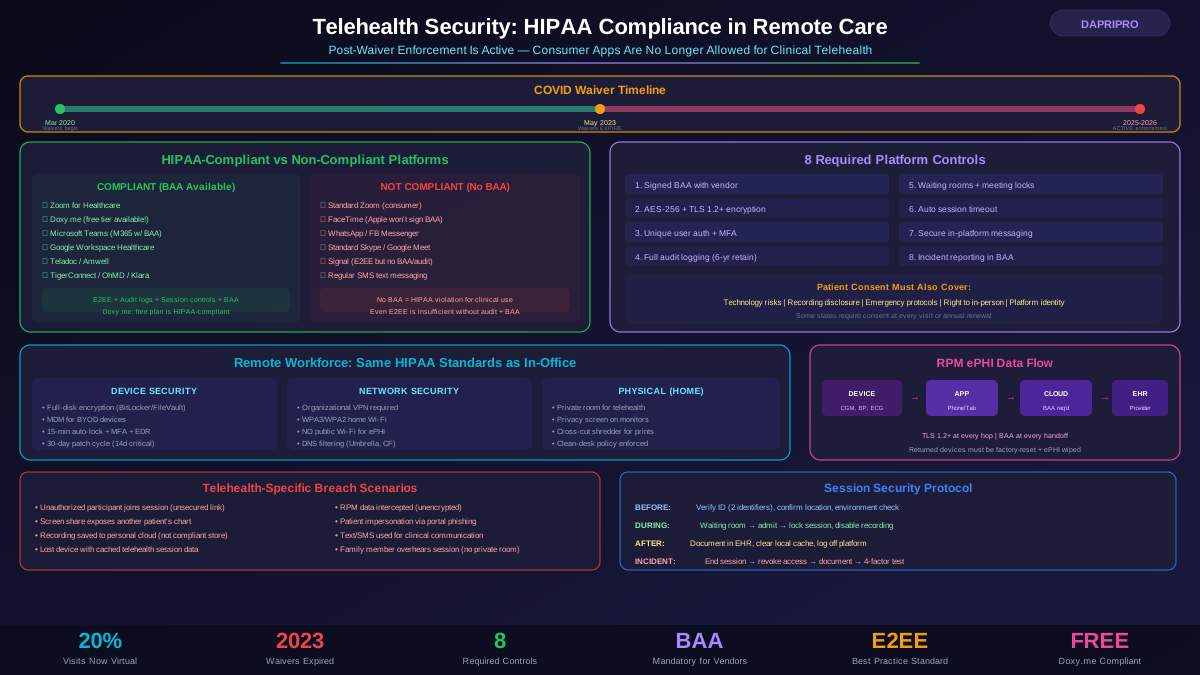
- Using non-BAA services for PHI: An employee uploads PHI to a personal Dropbox account or shares via standard (non-BAA) Zoom. No BAA = HIPAA violation.
- Default sharing settings: SharePoint or Google Drive configured with "anyone with the link" access. PHI becomes accessible to the entire internet.
- No MFA on admin accounts: Cloud admin accounts without MFA are the number one attack vector for healthcare cloud breaches.
- Inactive accounts not deactivated: Former employees' cloud accounts remaining active months after departure. This is both a security risk and a compliance violation.
- No log review process: Logs are generated but nobody reviews them. OCR specifically asks about log review procedures during audits.
- Encryption key mismanagement: Keys stored in the same location as encrypted data, or key access not logged and controlled.
- Missing subcontractor BAAs: Your cloud provider uses sub-processors (they all do), but the data flow through those sub-processors is not documented in your risk assessment.
- No disaster recovery testing: Backup and recovery procedures exist on paper but have never been tested. OCR asks for test results.
- Shadow IT cloud usage: Employees using unauthorized cloud services for convenience. DLP and CASB tools can detect and prevent this.
- Incomplete risk assessment: Cloud services not included in the enterprise-wide HIPAA risk assessment. Every system that touches ePHI must be assessed.
Cloud Migration Checklist for Healthcare Organizations
Pre-Migration
- Identify all PHI that will be stored or processed in the cloud
- Evaluate cloud provider HIPAA capabilities and BAA availability
- Sign BAA before any PHI enters the cloud environment
- Complete a risk assessment specific to the cloud migration
- Design network architecture (VPN, private connectivity, network segmentation)
- Define encryption strategy (at rest, in transit, backup, key management)
- Configure access controls (RBAC, MFA, session policies)
- Set up audit logging before migration begins
During Migration
- Encrypt all data before transmission to the cloud
- Verify encryption status of migrated data
- Test access controls with different user roles
- Validate audit logs are capturing all access
- Monitor for data loss or corruption during transfer
Post-Migration
- Decommission on-premises storage securely (NIST 800-88 destruction)
- Update policies and procedures to reflect cloud environment
- Train workforce on new cloud-based workflows
- Schedule quarterly access reviews
- Implement continuous monitoring and alerting
- Test disaster recovery and backup restoration
- Update your risk assessment to include the new cloud environment
- Document the shared responsibility model for your specific implementation
The best cloud storage solution for your organization depends on your size, technical capacity, and budget. A solo practitioner with 100 patients does not need AWS — Google Workspace with a signed BAA will work. A 500-physician health system processing millions of records needs the flexibility and scalability of AWS or Azure with a dedicated compliance team. What matters is not which cloud you choose, but whether you configure it correctly, monitor it continuously, and document everything.