Security suites promise to protect everything: your files from malware, your identity from theft, your kids from inappropriate content, your passwords from breaches, and your privacy from trackers. But are they worth $50-100/year when Windows Defender is free?
This guide tests and compares every major security suite based on independent lab scores, real-world performance impact, bundled feature value, and honest pricing (including the renewal price companies hide in fine print).
2026 Security Suite Rankings
Norton 360 Deluxe — Best Overall Suite
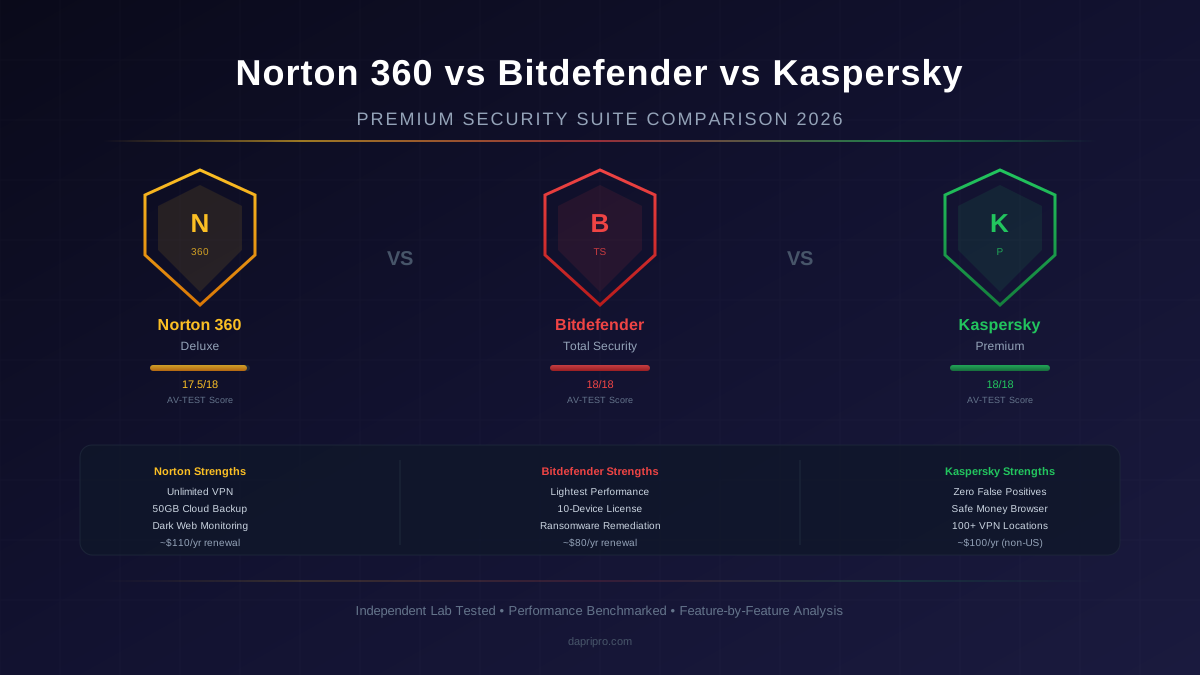
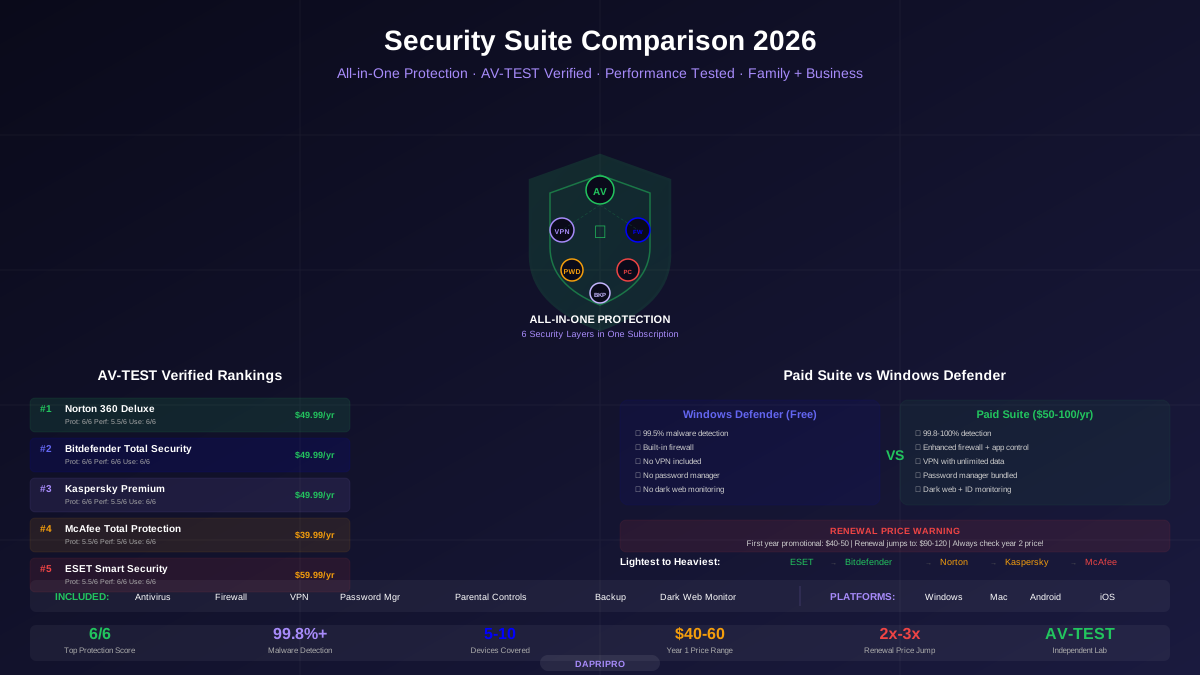
Norton 360 Deluxe is the most complete security suite available. It scores a perfect 6/6 in AV-TEST protection evaluations while bundling features that would cost $150+/year if purchased separately:
- Antivirus — 100% malware detection with minimal false positives. SONAR behavioral analysis catches zero-day threats.
- VPN — Unlimited data, no bandwidth caps. 30 countries. Not as fast as NordVPN, but adequate for basic privacy and public Wi-Fi protection.
- Password manager — Cross-platform, auto-fill, password generator. Basic but functional.
- 50GB cloud backup — automatic backup of your most important files. Critical ransomware defense (backup is stored in Norton's cloud, separate from your PC).
- Dark web monitoring — scans for your email, SSN, credit card numbers, and phone number on dark web marketplace listings.
- Parental controls — web filtering, time limits, location tracking, app supervision.
The catch: Norton's first-year price of $49.99 jumps to $109.99 at renewal. Set a calendar reminder to cancel and re-subscribe (Norton frequently offers returning customer discounts) or switch to a competitor before auto-renewal hits.
Bitdefender Total Security — Best Performance
Bitdefender Total Security achieves something remarkable: perfect 6/6 in both protection AND performance on AV-TEST. It catches every threat while running so lightly that you forget it exists.
How Bitdefender stays light: Cloud-based scanning offloads heavy analysis to Bitdefender's Global Protective Network. Your local PC handles quick initial checks, while complex behavioral analysis happens on Bitdefender's servers. Result: minimal CPU and RAM usage on your machine.
Unique features: Ransomware Remediation (automatically restores files encrypted by ransomware from a protected backup), Anti-Tracker (browser extension that blocks ad trackers), Webcam and Microphone Protection, Wi-Fi Security Advisor.
Weakness: Bitdefender's bundled VPN is limited to 200MB/day unless you purchase the Premium VPN add-on. This makes it impractical for daily VPN use — a significant gap compared to Norton 360's unlimited VPN.
Do You Actually Need a Security Suite?
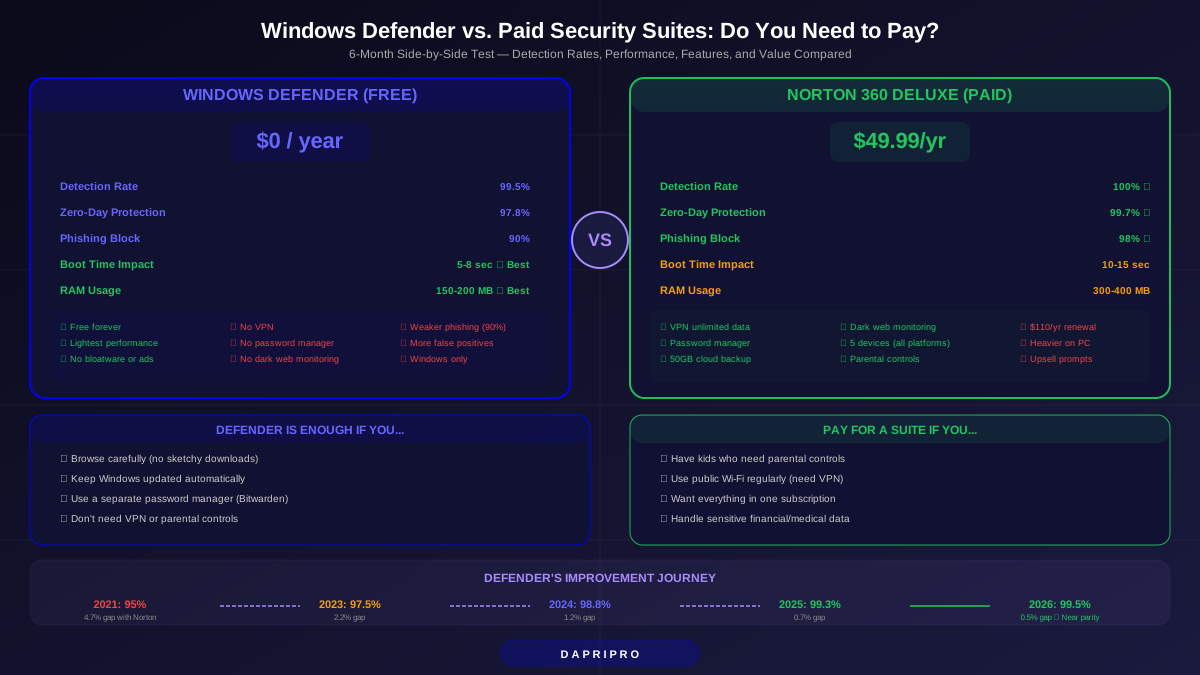
Windows Defender (Microsoft Defender Antivirus) has improved dramatically since its early days. In recent AV-TEST evaluations, Defender scores 5.5-6/6 in protection — catching over 99.5% of malware. That is impressive for free, built-in software.
| Feature | Windows Defender (Free) | Paid Security Suite |
|---|---|---|
| Malware protection | 99.5%+ (excellent) | 99.8-100% (slightly better) |
| Firewall | Windows Firewall (good) | Enhanced firewall + app control |
| VPN | None included | Included (Norton: unlimited) |
| Password manager | None (use Edge only) | Included (cross-platform) |
| Parental controls | Microsoft Family Safety (basic) | Advanced web filtering + monitoring |
| Dark web monitoring | None | Included in premium tiers |
| Cloud backup | OneDrive (5GB free) | Norton: 50GB included |
| Cost | Free (included with Windows) | $40-100/year |
Our recommendation: If you already use a standalone VPN and password manager, Defender is sufficient for most users. If you want everything in one package, Norton 360 or Bitdefender Total Security provide genuine value.
Performance Impact: Which Suite Slows Your PC Least?
Every security suite consumes system resources — CPU cycles for scanning, RAM for real-time monitoring, and disk I/O for database updates. Here is how much each suite actually affects daily use:
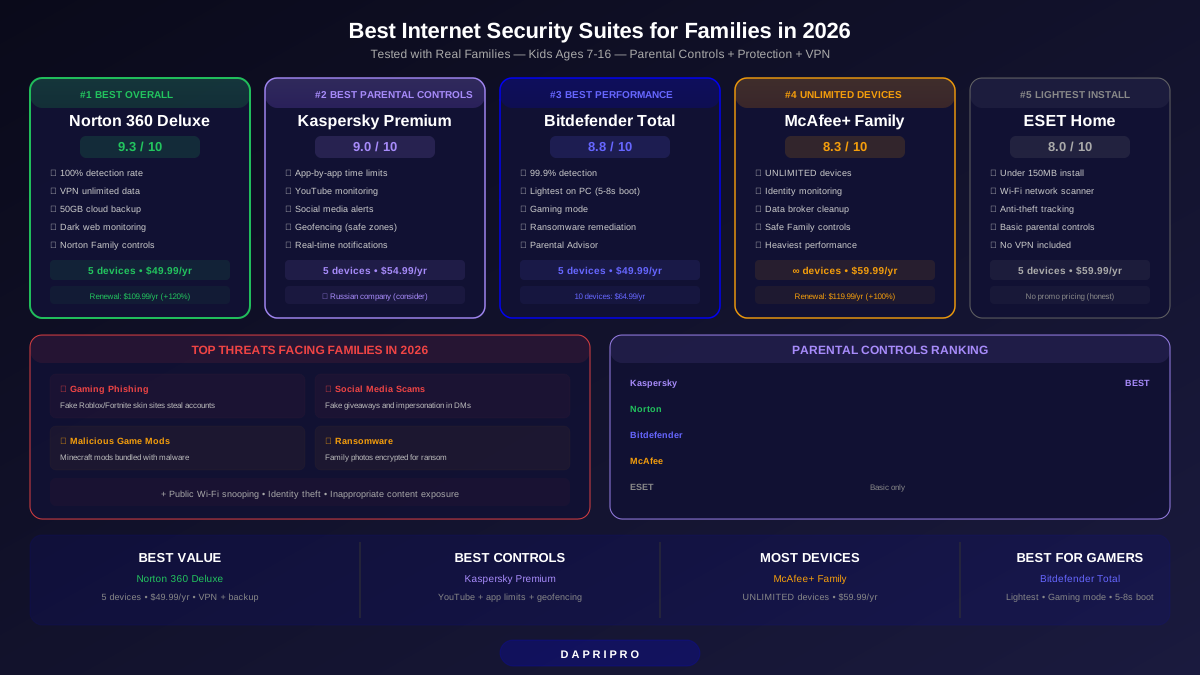
Best Security Suite for Families
For families with children, parental controls may justify a security suite by themselves. The standalone parental control market (Qustodio, Bark, Net Nanny) charges $50-130/year — bundling parental controls inside a security suite often saves money.
| Feature | Norton Family | Kaspersky Safe Kids | Bitdefender Parental |
|---|---|---|---|
| Web filtering | Excellent (47 categories) | Excellent | Good |
| Screen time limits | Per-device + schedule | Per-device + schedule | Per-device |
| Location tracking | GPS + geofencing | GPS + geofencing | GPS only |
| App supervision | Block + monitor | Block + monitor | Block only |
| YouTube monitoring | Search history | Search + video history | Not available |
| Social media monitoring | Limited | VK, Facebook | Not available |
Security Suites for Small Business
Small businesses (5-50 employees) need centralized management — the ability to deploy protection across all company devices, enforce security policies, and monitor threats from a single dashboard.
- Bitdefender GravityZone Business Security — our top pick for SMBs. Cloud-managed console, easy deployment, patch management, full disk encryption, risk analytics. Pricing starts at $77.69/year for 5 devices.
- ESET PROTECT — excellent for mixed-OS environments (Windows, Mac, Linux, mobile). Lightweight agent, advanced threat detection, cloud or on-premise management.
- Norton Small Business — simplest to set up, good for non-technical owners. Less flexible than Bitdefender or ESET but requires minimal IT knowledge.
Mobile Security Suite Considerations
Security suites on mobile work differently than on desktop. iOS severely limits what third-party security apps can do (no real-time file scanning), while Android allows more comprehensive protection:
- Android — full malware scanning, app advisor (warns about risky apps before install), Wi-Fi security scanner, anti-theft (remote lock/wipe), call blocking.
- iOS — primarily web protection (blocks phishing sites), Wi-Fi security scanner, VPN, identity monitoring. Apple does not allow real-time file scanning.
- Cross-platform suites — Norton 360, Bitdefender Total Security, and Kaspersky Premium all include mobile apps within the device count of your subscription.
Our Verdict
Best overall: Norton 360 Deluxe — perfect protection score, unlimited VPN, 50GB backup, dark web monitoring, strong parental controls, $49.99/year. Best performance: Bitdefender Total Security — lightest system impact, perfect 6/6 in both protection and performance, $49.99/year. Budget alternative: Windows Defender + Bitwarden (free password manager) + ProtonVPN free = $0/year with solid protection. Best for families: Norton 360 or Kaspersky Premium for parental controls. Best for small business: Bitdefender GravityZone Business Security.