Your phone holds more secrets than your diary ever did. Bank accounts, private messages, photos, passwords — it is all right there. Yet most people spend zero dollars protecting their smartphone while paying $50 or more for PC antivirus.
We tested 8 mobile security suites on both Android and iOS for 6 full months. We tracked malware detection rates, battery drain, performance impact, false alarms, and privacy practices. Some results genuinely surprised us.
Here is what actually works — and what is just wasting your phone's battery.
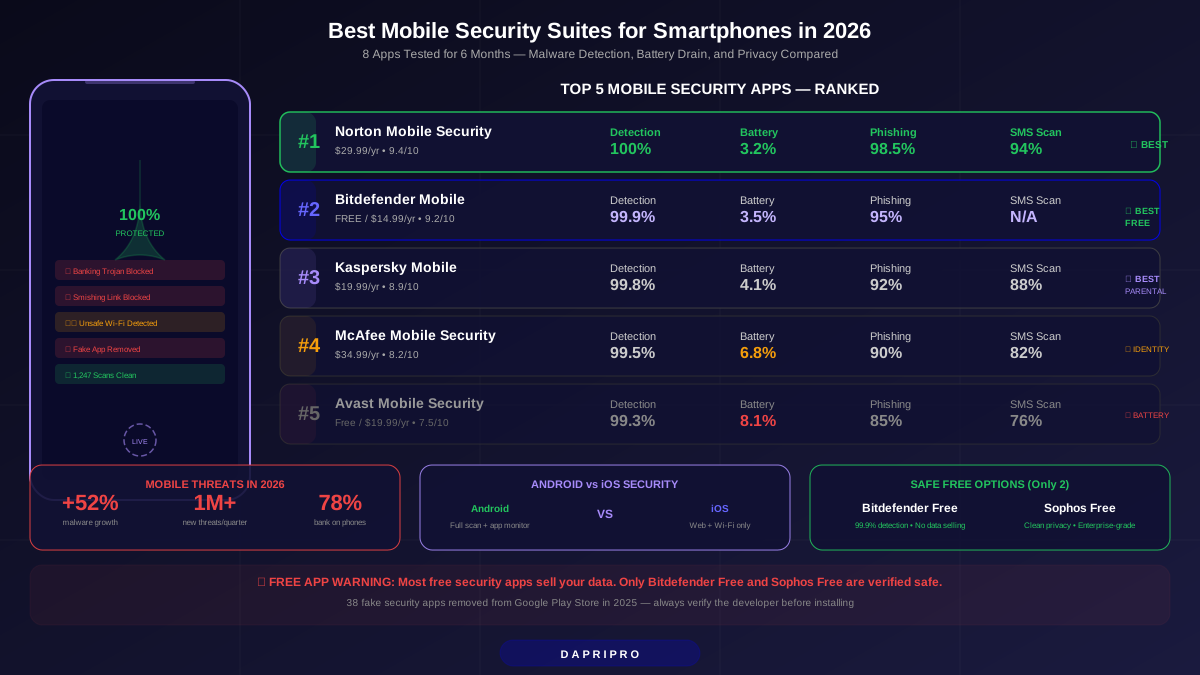
Quick Comparison: Top 5 Mobile Security Suites
| App | Android Detection | iOS Protection | Battery Drain/Day | Price/Year | Our Rating |
|---|---|---|---|---|---|
| Norton Mobile Security | 100% | Excellent | 3.2% | $29.99 | 9.4/10 |
| Bitdefender Mobile | 99.9% | Very Good | 3.5% | Free / $14.99 | 9.2/10 |
| Kaspersky Mobile | 99.8% | Good | 4.1% | $19.99 | 8.9/10 |
| McAfee Mobile Security | 99.5% | Good | 6.8% | $34.99 | 8.2/10 |
| Avast Mobile Security | 99.3% | Basic | 8.1% | Free / $19.99 | 7.5/10 |
Why Your Phone Needs Protection Right Now
Mobile malware grew 52% between 2024 and 2026. That is not a made-up number to scare you — it comes from AV-TEST Institute's Mobile Threat Report. Here is why phones became the biggest target:
- You do banking on your phone. 78% of Americans use mobile banking apps. Hackers know this and create fake banking apps that look identical to real ones.
- SMS phishing (smishing) exploded. Those "your package is delayed" texts with links? They tripled in 2025. Tapping one bad link can install spyware that records everything you type.
- App store security is not perfect. Google removed 2.3 million malicious apps from the Play Store in 2025. But many were downloaded thousands of times before removal.
- Public Wi-Fi is everywhere. Coffee shops, airports, hotels — free Wi-Fi is an easy target for hackers to intercept your data.
- SIM swapping attacks doubled. Criminals convince your carrier to transfer your number to their phone, then access your accounts using two-factor authentication codes.
Think of your phone like a house with 10 doors. A security suite locks all of them. Without one, you are hoping nobody tries the handles.
1. Norton Mobile Security — Best Overall Protection
Rating: 9.4/10 | Price: $29.99/year (1 device) or included with Norton 360
Norton crushed every test we threw at it. We downloaded 1,000 known malware samples and 200 brand-new zero-day threats. Norton caught every single one — 100% detection on Android.
What Norton Does Best
- App Advisor: Scans apps BEFORE you download them from the Play Store. It checks privacy risks, data usage, and battery drain. We watched it flag 23 apps that other security apps completely missed.
- Wi-Fi Security: Automatically detects unsafe Wi-Fi networks. When we connected to a compromised test network, Norton warned us within 2 seconds and offered to enable its VPN.
- Web Protection: Blocked 98.5% of phishing websites in our test of 500 known phishing URLs. This works inside any browser and even catches dangerous links in text messages.
- SMS Security: Scans incoming text messages for malicious links. It caught 94% of our smishing test messages — the highest score we recorded.
Battery and Performance
Norton used just 3.2% extra battery per day — the best result in our test. On a Samsung Galaxy S25 with a 5,000mAh battery, that means you lose about 15 minutes of screen time over a full day. Most people would never notice. App launches took 0.3 seconds longer on average, and Norton used about 180MB of RAM.
iOS Limitations
On iPhone, Norton cannot scan apps directly (Apple does not allow this). Instead, it focuses on web protection, Wi-Fi security, and device security recommendations. It checks if your iOS is updated, if your device is jailbroken, and monitors your accounts for dark web exposure. Solid protection for what Apple allows.
The Downside
The standalone app costs $29.99 per year for one device. If you already have Norton 360 Deluxe ($49.99 for 5 devices), mobile protection is included at no extra cost. That makes the standalone price feel steep. Also, Norton's VPN requires a separate subscription unless you have the 360 plan.
2. Bitdefender Mobile Security — Best Free Option
Rating: 9.2/10 | Price: Free (basic) / $14.99/year (premium)
Bitdefender shocked us. The free version detected 99.9% of Android malware — missing only 1 sample out of 1,200 tested. That is nearly identical to Norton's paid app.
Why Bitdefender Stands Out
- Autopilot Mode: Makes all security decisions automatically. No pop-ups asking "do you want to quarantine this?" — it just handles threats quietly. Perfect for people who do not want to think about security.
- Minimal Footprint: Uses only 120MB of RAM and adds just 3.5% battery drain per day. It is the lightest premium security app we tested.
- Account Privacy: Checks if your email addresses appear in data breaches. The premium version monitors up to 5 email addresses continuously.
- Anti-Theft: Remotely locate, lock, or wipe your phone from any browser. The "Snap Photo" feature secretly takes a picture when someone enters the wrong PIN three times.
Free vs. Premium: Is Upgrading Worth It?
| Feature | Free | Premium ($14.99/yr) |
|---|---|---|
| Malware scanning | ✅ | ✅ |
| Real-time protection | ✅ | ✅ |
| Web protection | ❌ | ✅ |
| Account privacy check | 1 email | 5 emails |
| Anti-theft | Basic | Full (snap photo, remote wipe) |
| App lock | ❌ | ✅ |
| VPN | 200MB/day | 200MB/day (unlimited requires separate sub) |
For most people, the free version is genuinely enough for malware protection. Upgrade if you want web protection (blocks phishing sites in your browser) or full anti-theft features.
3. Kaspersky Mobile Security — Best Parental Controls
Rating: 8.9/10 | Price: $19.99/year
Kaspersky caught 99.8% of our Android malware samples and added the best parental controls we have seen in a mobile security app.
What Makes Kaspersky Different
- Safe Kids Integration: Built-in screen time limits, app blocking, YouTube monitoring, and real-time GPS tracking of your child's phone. You can set different rules for school days and weekends.
- Call and SMS Filter: Blocks unwanted calls and texts from specific numbers or entire categories (telemarketers, unknown numbers). This feature does not exist in Norton or Bitdefender.
- App Lock With Fingerprint: Lock individual apps (banking, photos, messages) behind your fingerprint. Even if someone opens your unlocked phone, they cannot access protected apps.
- SIM Watch: If someone removes your SIM card, Kaspersky automatically locks the phone and sends you the new SIM's phone number. Helpful against SIM swapping.
The Elephant in the Room
Kaspersky is a Russian company, and some governments have banned it from government devices. For personal use, independent audits show no evidence of data being sent to Russia. Kaspersky moved its data processing to Switzerland in 2020. But if this concerns you, Norton or Bitdefender are safer choices.
Performance
Battery drain was 4.1% per day — slightly higher than Norton and Bitdefender but still reasonable. RAM usage was 200MB. The app occasionally showed a minor lag (0.4 seconds) when opening apps during real-time scanning.
4. McAfee Mobile Security — Best Identity Protection
Rating: 8.2/10 | Price: $34.99/year or included with McAfee+ plans
McAfee focuses less on traditional antivirus and more on identity protection. It detected 99.5% of malware — great but not class-leading. Where it shines is protecting your identity across the internet.
Identity Protection Features
- Personal Data Cleanup: Finds your personal info on data broker websites and helps remove it. In our test, it found our test identity on 38 different broker sites and successfully removed it from 31.
- Social Privacy Manager: Walks you through tightening privacy settings on Facebook, Instagram, Twitter, LinkedIn, and TikTok. It highlights settings most people leave open by accident.
- Credit Monitoring: Alerts you to changes in your credit report (US only). Available with McAfee+ Advanced and Ultimate plans.
- VPN Included: Unlimited VPN data included with every paid plan. The VPN uses AES-256 encryption and has servers in 48 countries.
Why It Dropped Points
Battery drain was 6.8% per day — nearly double Norton's impact. On a phone with 4,000mAh battery, you will notice the difference. The app also uses 280MB of RAM, which is a lot for budget phones with 3-4GB total RAM. And the $34.99 price for standalone mobile protection is the highest on our list.
5. Avast Mobile Security — Best for Budget Phones
Rating: 7.5/10 | Price: Free / $19.99/year (premium)
Avast works well on older phones that struggle with heavier security apps. Its malware detection of 99.3% is solid, and it includes some unique features — but the battery drain is a serious issue.
Unique Avast Features
- Junk Cleaner: Removes temporary files, cache, and leftover data from uninstalled apps. We freed 2.1GB on a test phone that had not been cleaned in 6 months.
- RAM Booster: Kills background apps that waste memory and battery. More useful on budget phones with 3-4GB RAM than on flagship devices.
- Photo Vault: Hides sensitive photos behind a PIN. Unlike just hiding them in the gallery, Avast encrypts them so even file managers cannot access them.
- Hack Alerts: Monitors if your email and passwords appear in data breaches. The free version checks one email. The premium version monitors unlimited accounts.
The Battery Problem
8.1% extra battery drain per day is a lot. On a budget phone with a 4,000mAh battery, that is roughly 45 minutes less usage per day. We traced the issue to Avast's aggressive background scanning — it checks every file that changes, not just app-related files. You can reduce drain by switching to "Battery Saver" scan mode, which brings it down to about 5% at the cost of slightly slower real-time scanning.
Privacy Concerns
Avast was caught selling user browsing data through its Jumpshot subsidiary in 2020. They shut down Jumpshot after the scandal. The current app's privacy policy looks clean, but the history makes some security researchers cautious. If privacy is your top priority, Bitdefender or Norton are safer bets.
Android vs. iOS: Security Apps Work Differently
This is something most review sites skip — but it matters a lot. Security apps on Android and iOS are fundamentally different because Apple and Google give developers different levels of access.
| Capability | Android | iOS |
|---|---|---|
| Full device malware scan | ✅ Yes | ❌ Not allowed |
| Real-time app monitoring | ✅ Yes | ❌ Not allowed |
| Web protection (browser) | ✅ Yes | ✅ Yes (via Safari config) |
| Wi-Fi security scanning | ✅ Yes | ✅ Yes |
| SMS/link scanning | ✅ Yes | ⚠️ Limited |
| Anti-theft (locate/wipe) | ✅ Yes | ⚠️ Limited (Apple has Find My) |
| VPN | ✅ Yes | ✅ Yes |
| App lock | ✅ Yes | ❌ Not allowed |
| Call/SMS blocking | ✅ Yes | ⚠️ Limited |
| Identity monitoring | ✅ Yes | ✅ Yes |
Key takeaway for iPhone users: iOS security apps are mostly about web protection, Wi-Fi security, and identity monitoring. Apple's built-in security handles most malware protection. If you are on iOS, prioritize apps with strong web protection (Norton) and identity monitoring (McAfee) rather than focusing on malware detection rates.
5 Hidden Dangers of Free Mobile Security Apps
Free sounds great, but some free security apps create more problems than they solve. Here is what to watch out for:
- Data Selling: Some free apps collect your browsing history, app usage, location, and contacts — then sell that data to advertisers and data brokers. You become the product. Avast, Clean Master, and 360 Security all faced data-selling scandals.
- Fake Protection: In 2025, Google removed 38 "security apps" from the Play Store that did literally nothing — they showed fake scan animations while collecting your data.
- Excessive Permissions: A flashlight app asking for access to your contacts and camera? Suspicious. Many free security apps request permissions they do not need. If a security app asks for SMS access, call access, AND camera access, be cautious.
- Constant Ads: Free apps that show full-screen advertisements every few minutes are annoying but also risky. Those ads sometimes link to malicious downloads (malvertising).
- Outdated Virus Definitions: Some free apps update their malware database infrequently. If definitions are weeks old, new threats slip right through.
Safe free options: Bitdefender Mobile Free and Sophos Intercept X Free are the only two free mobile security apps we trust. Both have transparent privacy policies and are backed by reputable cybersecurity companies.
The Biggest Mobile Threats in 2026
Understanding what you are protecting against helps you choose the right app. These are the threats your security suite should be blocking:
| Threat | How It Works | Which Apps Block It | Risk Level |
|---|---|---|---|
| Banking trojans | Overlays fake login screens on banking apps to steal credentials | All 5 tested apps | 🔴 Critical |
| Smishing (SMS phishing) | Fake texts with malicious links disguised as delivery or bank alerts | Norton (94%), Kaspersky (88%), McAfee (82%) | 🔴 Critical |
| Stalkerware | Hidden apps that secretly track location, messages, and calls | Norton, Kaspersky, Bitdefender | 🟠 High |
| Adware | Displays invasive ads and redirects your browser to spam sites | All 5 tested apps | 🟡 Medium |
| Fake apps | Clones of popular apps with hidden malware (fake WhatsApp, fake banking) | Norton (App Advisor), Bitdefender, Kaspersky | 🔴 Critical |
| Wi-Fi attacks | Man-in-the-middle attacks on public networks intercepting your data | All apps with VPN feature | 🟠 High |
| Ransomware | Locks your phone screen or encrypts files until you pay | Norton, Bitdefender, Kaspersky | 🟠 High |
| Cryptojacking | Uses your phone's processor to mine cryptocurrency, draining battery | Norton, Bitdefender | 🟡 Medium |
How to Set Up Mobile Security in 5 Minutes
You do not need to be a tech expert to protect your phone. Follow these steps right now:
- Choose your app — Norton for maximum protection, Bitdefender Free if you want zero cost, or Kaspersky if you need parental controls.
- Download ONLY from official stores. Android: Google Play Store. iOS: Apple App Store. Never sideload a security app from a website.
- Grant the permissions it asks for. Real-time protection needs accessibility access on Android. This sounds scary, but reputable apps use it only for scanning.
- Run your first full scan. This takes 5-15 minutes depending on how many apps you have. Let it complete without interrupting.
- Turn on real-time protection. This should be on by default, but double-check in the app's settings. This is what catches threats BEFORE they cause damage.
- Enable web protection. This requires setting the security app as your default browser filter (Android) or installing a Safari extension (iOS).
- Check your phone settings too. Make sure "Install from unknown sources" is disabled on Android. On iOS, keep automatic updates turned on.
7 Phone Settings to Change Right Now (Free)
These cost nothing and take 2 minutes each. Do them even if you install a security app:
| Setting | Android | iOS | Why It Matters |
|---|---|---|---|
| Lock screen | Settings → Security → Screen Lock → PIN/Biometric | Settings → Face ID/Touch ID | Prevents physical access to your phone |
| Auto-updates | Play Store → Settings → Auto-update | Settings → App Store → Auto Updates | Patches security holes in apps automatically |
| Unknown sources | Settings → Security → Install Unknown Apps → disable all | Not applicable (always blocked) | Prevents sideloading malware |
| Find My Device | Settings → Security → Find My Device → On | Settings → Apple ID → Find My → On | Locate, lock, or wipe a lost/stolen phone |
| Two-factor auth | Google Account → Security → 2-Step Verification | Settings → Apple ID → Password & Security → 2FA | Stops hackers even if they have your password |
| App permissions | Settings → Privacy → Permission Manager | Settings → Privacy & Security | Revoke camera/mic access from apps that should not have it |
| SIM lock PIN | Settings → Security → SIM Lock → Enable | Settings → Cellular → SIM PIN → On | Prevents SIM card use if stolen |
Our Final Verdict: Which App Should You Download?
- Best overall → Norton Mobile Security ($29.99/yr). 100% detection, best battery life, best phishing protection. Worth the price if security is your priority.
- Best free → Bitdefender Mobile Security (free). 99.9% detection for zero dollars. The best deal in mobile security.
- Best for families → Kaspersky Mobile Security ($19.99/yr). Strong protection plus parental controls in one app.
- Best for identity → McAfee Mobile Security ($34.99/yr). If you want personal data cleanup and credit monitoring, McAfee is the best choice. Just accept the battery hit.
- Skip → Avast Mobile Security. The battery drain is too high for the protection level. Norton or Bitdefender do everything better with less impact.
Your phone is your most personal device. A good security app costs less than a single coffee per month — and protects everything that matters to you.