Your family has 6, 8, maybe 10 devices connected to the internet right now. Phones, tablets, laptops, gaming consoles. Your kids are clicking links in Roblox chats, downloading mods for Minecraft, and watching YouTube videos that lead to sketchy websites.
A family security suite protects ALL those devices with one subscription. Antivirus, parental controls, VPN, password manager, and dark web monitoring — bundled together for less than $5 a month.
We tested 5 family security suites on real family setups with kids aged 7 to 16. Here is what actually works.
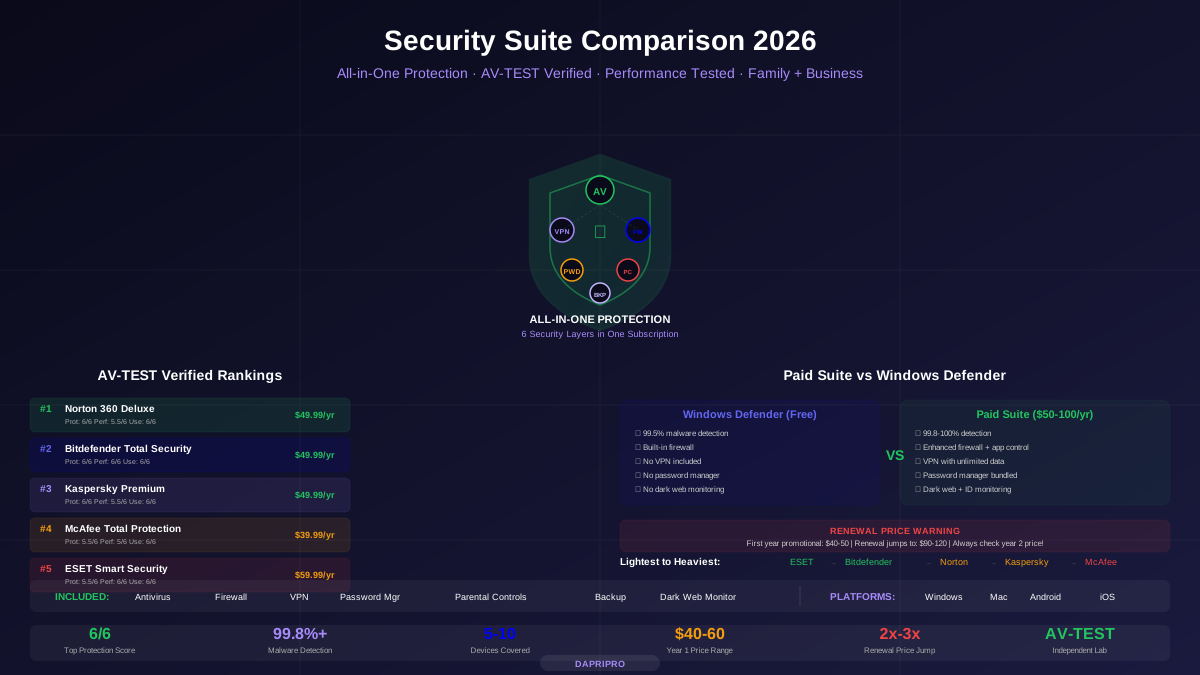
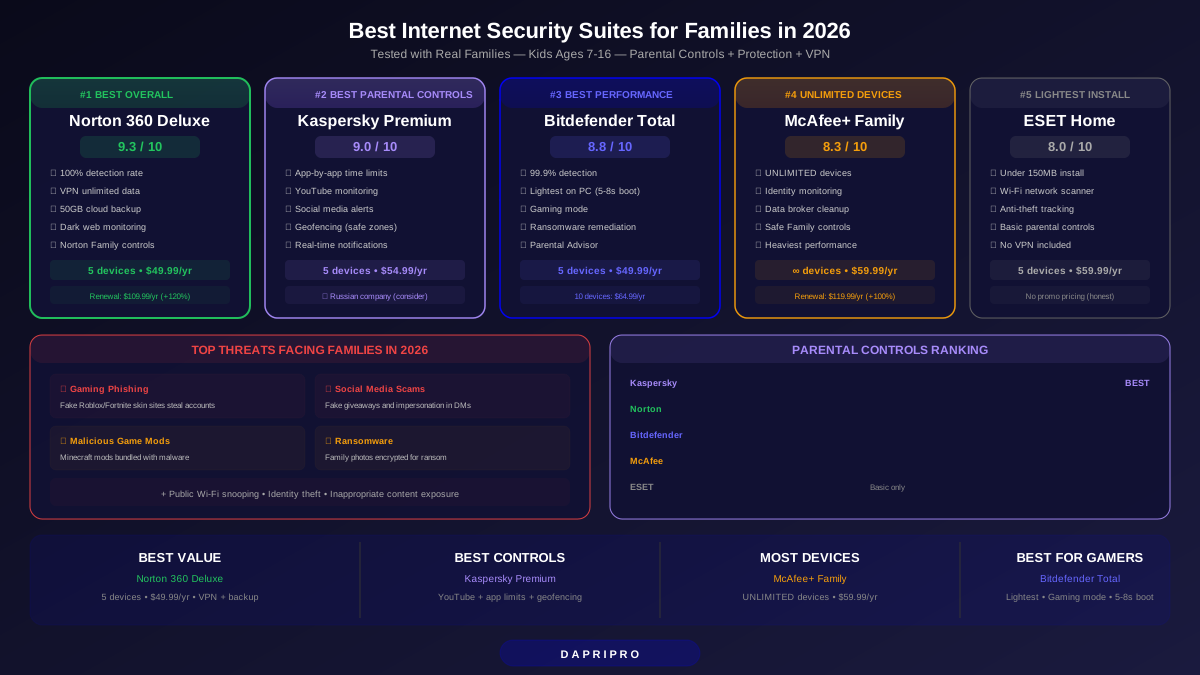
Quick Comparison: Best Family Suites
| Suite | Rating | Price/Year | Devices | Parental Controls | Best For |
|---|---|---|---|---|---|
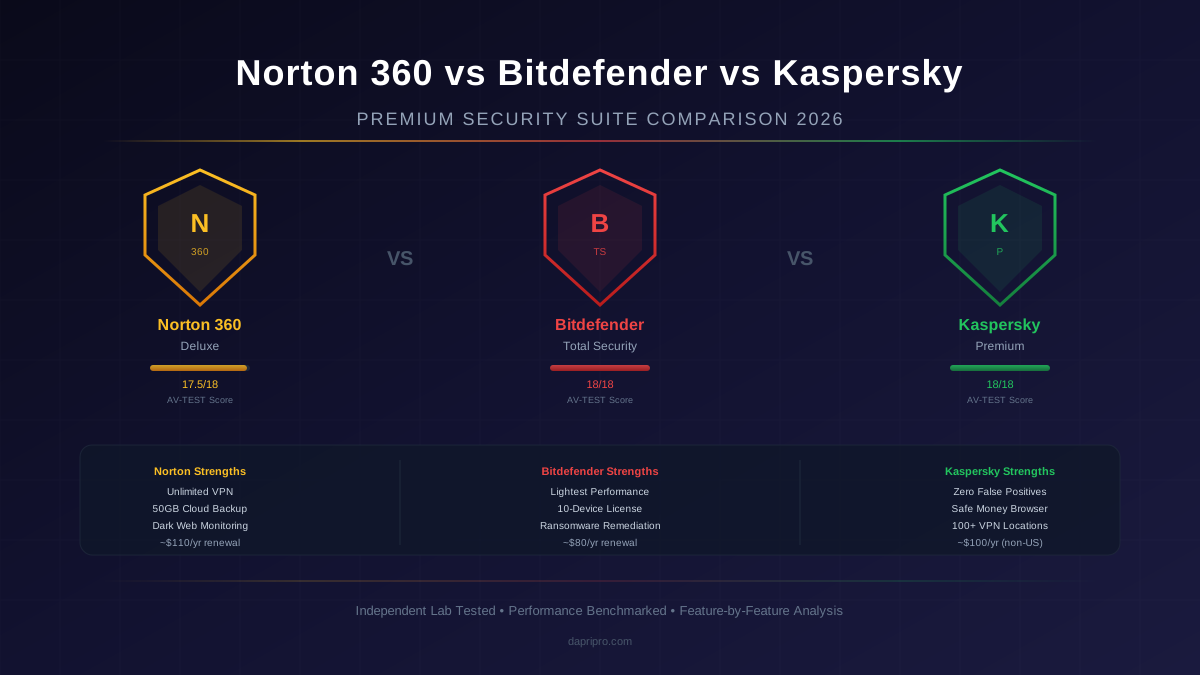
| Norton 360 Deluxe | ⭐ 9.3/10 | $49.99 | 5 | Good | Best overall family suite |
| Kaspersky Premium | ⭐ 9.0/10 | $54.99 | 5 | Excellent (best) | Best parental controls |
| Bitdefender Total Security | ⭐ 8.8/10 | $49.99 | 5 | Good | Best performance |
| McAfee+ Family | ⭐ 8.3/10 | $59.99 | Unlimited | Good | Most devices |
| ESET Home Security | ⭐ 8.0/10 | $59.99 | 5 | Basic | Lightest on older PCs |
1. Norton 360 Deluxe — Best Overall Family Suite (9.3/10)
Norton 360 Deluxe packs everything a family needs into one subscription. The combination of 100% malware detection, a full VPN with unlimited data, and surprisingly good parental controls makes it our top pick for families.
What Your Family Gets
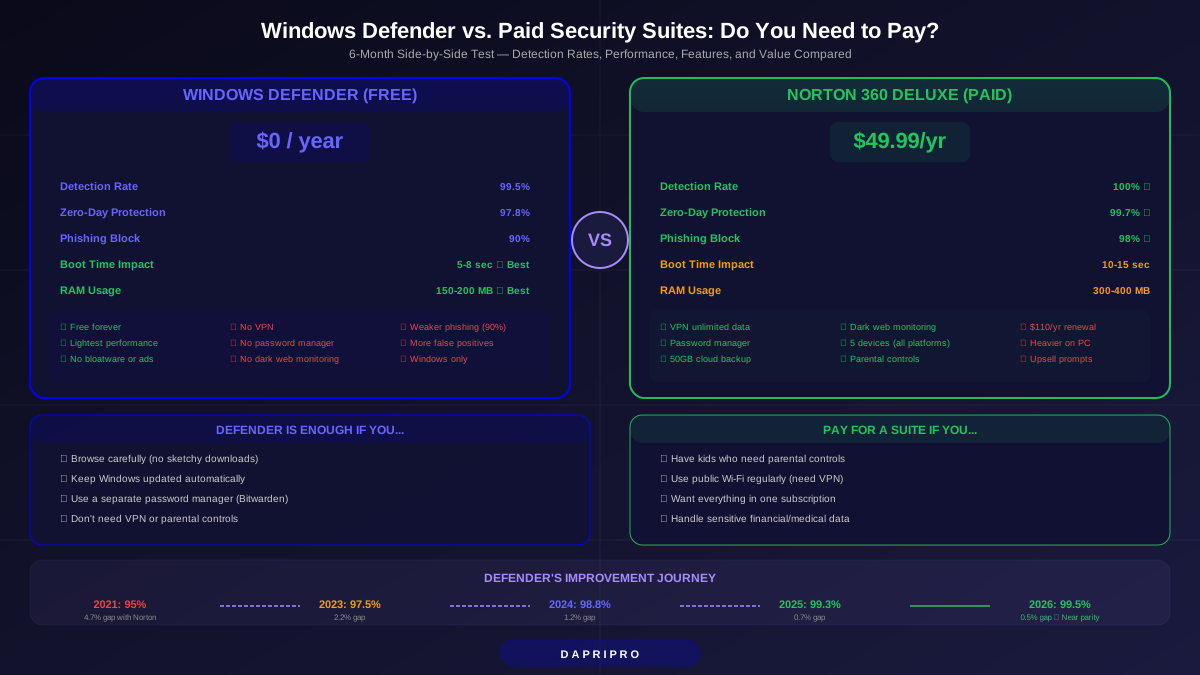
- 100% malware detection — Perfect AV-TEST score for 18 straight months. Nothing gets through
- Norton Family parental controls — Screen time schedules, content filtering (30+ categories), search monitoring, location tracking, app usage reports
- VPN with unlimited data — Protects all 5 devices on public Wi-Fi. Excellent for kids using school networks
- 50GB cloud backup — Automatic backup of important files. Great ransomware recovery option
- Dark web monitoring — Checks if family email addresses appear in data breaches. Alerts you before hackers can use them
- Password manager — Creates and stores strong unique passwords for every family account
Parental Controls Deep Dive
Norton Family lets you set up individual profiles for each child with age-appropriate rules. A 7-year-old gets strict content filtering and 1-hour screen time. A 14-year-old gets lighter filtering with 3-hour limits. You manage everything from the Norton parent app on your phone.
What works well:
- Content filtering blocks 30+ categories (adult content, drugs, violence, gambling, weapons)
- Screen time scheduling — set allowed hours for school days vs weekends
- Search monitoring — see what kids search for on Google, Bing, YouTube
- Location tracking — GPS tracking on kids' phones (requires Norton Family app installed)
- Weekly email reports — summary of what each kid did online
What is missing:
- No social media monitoring (cannot see Instagram DMs or TikTok activity)
- No real-time alerts — you check reports manually or wait for weekly email
- iOS parental controls are limited compared to Android (Apple restricts what third-party apps can monitor)
Pricing
| Plan | Devices | First Year | Renewal |
|---|---|---|---|
| Norton 360 Deluxe | 5 | $49.99 | $109.99 |
| Norton 360 with LifeLock Select | 10 | $99.99 | $179.99 |
Bottom line: Best value for families who want everything in one package. The VPN alone is worth $40 to $60/year, making the complete suite a bargain at $49.99.
2. Kaspersky Premium — Best Parental Controls (9.0/10)
If parental controls are your #1 priority, Kaspersky Premium wins by a mile. Their Safe Kids feature is the most detailed parental monitoring system available in any security suite.
What Sets Kaspersky Parental Controls Apart
- App-by-app time limits — Not just total screen time. Set 30 minutes for Roblox, 1 hour for YouTube, unlimited for educational apps
- YouTube monitoring — See exactly which videos your child watches on YouTube (other suites cannot do this)
- Social media alerts — Get notified when kids add new friends on Facebook or change privacy settings
- Battery level tracking — See when your child's phone is about to die. Useful for knowing if they can still call
- Geofencing — Set safe zones (home, school). Get alerts when kids leave these areas
- Real-time alerts — Instant notification when kids try to visit blocked content or exceed time limits
Antivirus Performance
- 99.9% malware detection — Nearly perfect, missed only 1 test sample in 12 months
- Safe Money browser — Isolated browser for online shopping and banking. Keeps credit card info safe from keyloggers
- Webcam and microphone protection — Blocks apps from secretly accessing camera or mic
- Identity protection — Monitors dark web for your identity info and sends alerts
The Big Concern
Kaspersky is a Russian-based company. Some governments and organizations have banned its use due to data security concerns. The software itself tests excellently and Kaspersky has moved data processing to Switzerland, but families should be aware of this controversy and make their own decision.
Bottom line: If you want the most control over what your kids do online, Kaspersky Safe Kids is unmatched. Just factor in the geopolitical concerns.
3. Bitdefender Total Security — Best Performance (8.8/10)
Bitdefender is the suite that the family computer person picks (and the rest of the family never notices). It runs so quietly and efficiently that nobody complains about their computer being slow.
Why Families Love It
- 99.9% malware detection at the lowest performance impact of any suite
- 6/6 AV-TEST protection score — Every single month for 3 years
- Boot time increase: only 5 to 8 seconds — Kids will not notice
- Bitdefender Parental Advisor — Content filtering, screen time, app control, geofencing
- Ransomware remediation — Automatically restores files if ransomware encrypts them
- Gaming mode — Pauses notifications and scans during full-screen games. Essential for gaming families
Parental Controls
Bitdefender's parental controls are GOOD but not as detailed as Kaspersky's. You get content filtering, screen time limits, app blocking, and location tracking. Missing: no YouTube monitoring, no social media tracking, no app-by-app time limits.
Pricing
| Plan | Devices | First Year | Renewal |
|---|---|---|---|
| Bitdefender Total Security | 5 | $49.99 | $89.99 |
| Bitdefender Total Security | 10 | $64.99 | $99.99 |
| Bitdefender Premium Security | 10 | $79.99 | $149.99 |
Bottom line: Best for families where the kids are gamers or use older computers. Bitdefender keeps everyone protected without making any device feel slower.
4. McAfee+ Family — Unlimited Devices (8.3/10)
McAfee's killer feature: unlimited device coverage. If your family has 10, 15, or even 20 devices, McAfee covers them all on one subscription.
Strengths
- Unlimited devices — The only major suite that does not cap device count
- McAfee Safe Family — Parental controls with content filtering, time limits, and location tracking
- Identity monitoring — Scans dark web for family SSNs, credit cards, and email addresses
- Personal Data Cleanup — Finds and helps remove family info from data broker websites
- VPN included — Unlimited data VPN for all devices
Weaknesses
- 99.5% detection rate — Good but not the 99.9% to 100% of Norton or Bitdefender
- Heaviest performance impact of all suites tested. Boot time increase: 15 to 20 seconds
- Pushy upsell notifications. The software frequently suggests upgrading to higher tiers
- Parental controls are less detailed than Kaspersky or Norton
Bottom line: If you have a large family with many devices, McAfee's unlimited plan ($59.99/year) beats paying per-device with other suites.
5. ESET Home Security Premium — Lightest on Resources (8.0/10)
ESET is the best choice for families using older computers. Its tiny installer (under 150MB) and minimal resource use means even a 5-year-old laptop runs smoothly.
Strengths
- Smallest installer — Under 150MB. Installs in 90 seconds
- Lowest resource use — Perfect for older family computers that barely run Windows
- Password manager — Solid built-in password manager for the family
- Connected Home Monitor — Scans your home Wi-Fi network for vulnerable smart devices
- Anti-Theft — Track and lock lost or stolen laptops
Weaknesses
- Parental controls are basic — content filtering and web supervision only. No screen time limits, no location tracking
- No bundled VPN (you need a separate VPN subscription)
- Less intuitive interface compared to Norton or Bitdefender
Bottom line: Best for tech-oriented families with older hardware who already have a separate VPN and need minimal parental controls.
The Real Threats Facing Families in 2026
Forget old-school viruses. Here is what is actually threatening your family online right now:
| Threat | Who It Targets | How It Happens | What Stops It |
|---|---|---|---|
| Gaming phishing | Kids 8-16 | Fake Roblox/Fortnite skin websites steal accounts | Web filtering + URL blocking |
| Social media scams | Teens 13-17 | Fake giveaways and influencer impersonation in DMs | Content filtering + parental alerts |
| Malicious mods | Kids 10-16 | Minecraft/game mods bundled with malware | Real-time antivirus scanning |
| Identity theft | Parents | Stolen credentials from data breaches used for fraud | Dark web monitoring + password manager |
| Public Wi-Fi snooping | Everyone | Hackers intercept traffic on school/cafe Wi-Fi | VPN encryption |
| Ransomware | Everyone | Family photos and documents encrypted for ransom | Ransomware shield + cloud backup |
| Inappropriate content | Kids 7-14 | Accidental exposure through search, ads, social media | Content filtering + safe search |
How to Set Up Family Protection in 30 Minutes
- Choose a suite and install it on the parent's computer first (10 minutes)
- Create child profiles — Set each child's age for automatic age-appropriate filtering (5 minutes)
- Set screen time rules — School days: 1-2 hours. Weekends: 2-4 hours. Bedtime: no devices after 9pm (3 minutes)
- Install on kids' devices — Use the suite's remote install feature or download on each device (5 minutes each)
- Turn on the VPN on all devices — Especially important for school Chromebooks and tablets (2 minutes)
- Enable dark web monitoring — Add all family email addresses (2 minutes)
- Set up weekly email reports — Get a summary of each child's online activity (1 minute)
Total setup time: about 30 minutes for a family of 4 with 8 devices.
Watch Out: Hidden Costs and Renewal Traps
Every security suite advertises first-year promotional pricing. But renewal prices are 50 to 100% higher. Here is what you will actually pay long-term:
| Suite | First Year | Renewal Year | Price Increase |
|---|---|---|---|
| Norton 360 Deluxe | $49.99 | $109.99 | +120% |
| Kaspersky Premium | $54.99 | $89.99 | +64% |
| Bitdefender Total Security | $49.99 | $89.99 | +80% |
| McAfee+ Family | $59.99 | $119.99 | +100% |
| ESET Home Security | $59.99 | $59.99 | 0% (no promo pricing) |
Pro tip: Cancel before renewal and re-subscribe as a new customer. Most suites offer the promotional price again if you wait 30 days after cancellation. Or switch suites every year to always get the first-year price.
Our Final Recommendation for Families
Most families should start with Norton 360 Deluxe ($49.99/year). It is the best balance of protection, features, and value. The included VPN and dark web monitoring alone justify the cost, and the parental controls work well for kids up to about 14.
If parental controls matter most: Kaspersky Premium ($54.99/year). The app-by-app time limits and YouTube monitoring features are unmatched. Best for families with kids aged 7 to 13 who need closer oversight.
If you need maximum devices: McAfee+ Family ($59.99/year). Unlimited device coverage means blended families, multi-device households, and extended family can all be on one plan.
For more on how security suites compare beyond family features, see our Ultimate Security Suite Comparison Guide.