Credit freezes and credit locks both block lenders from accessing your credit report, which prevents criminals from opening new accounts in your name. They sound identical, and credit bureaus love the confusion because it drives subscriptions to their paid lock products.
But these two tools are fundamentally different in ways that matter. One is a federally protected right that costs you nothing. The other is a commercial product governed by terms of service that a corporation can change whenever it wants. Understanding the difference could save you hundreds of dollars a year and give you stronger protection.
What Is a Credit Freeze?
A credit freeze — also called a security freeze — is a legal mechanism that restricts access to your credit report. When your file is frozen, lenders who try to pull your credit as part of a new account application receive a notification that the file is frozen and cannot proceed with the application.
Credit freezes became free for all Americans in September 2018 under the Economic Growth, Regulatory Relief, and Consumer Protection Act. Before that, bureaus charged fees of 5 to 10 dollars per freeze in most states.
How Credit Freezes Work Technically
When you place a freeze, the credit bureau assigns you a unique PIN or password (depending on the bureau). This PIN is required to temporarily lift or permanently remove the freeze. The bureau adds a flag to your credit file that tells any creditor pulling your report that the file is restricted.
- Equifax — uses a 10-digit PIN that you choose or is assigned. Freeze and unfreeze online at equifax.com/personal/credit-report-services/credit-freeze/ or by phone
- Experian — eliminated PINs in 2023, now uses account authentication (username/password plus verification). Online management at experian.com/freeze/
- TransUnion — uses account-based authentication. Manage at transunion.com/credit-freeze
Critical detail: Equifax's PIN system means if you lose your PIN, unfreezing becomes significantly harder — you may need to send notarized documents by mail. Store your Equifax PIN in your password manager immediately after creating it.
What a Credit Freeze Blocks
- New credit card applications
- New loan applications (auto, personal, mortgage)
- New cell phone contracts that require a credit check
- New utility accounts that require a credit check
- Apartment rental applications (most landlords pull credit)
- Some employment background checks (varies by employer)
What a Credit Freeze Does NOT Block
- Existing creditors checking your account
- Companies sending pre-approved credit offers (use optoutprescreen.com to stop these)
- Insurance companies checking your credit for underwriting
- Government agencies accessing your report
- Collection agencies working on your existing debts
- Your own access to your credit report
What Is a Credit Lock?
A credit lock is a commercial product offered by credit bureaus that performs a similar function to a freeze — it restricts access to your credit report. However, a lock is not governed by federal law. It is a service agreement between you and the credit bureau, controlled by their terms of service.
Credit Bureau Lock Products
- Experian CreditLock — included with Experian CreditWorks Premium (25/month). One-tap lock/unlock in the Experian app. Also offered free with limited features in the basic tier
- TransUnion TrueIdentity — free lock product with instant toggle. However, it operates under TrueIdentity terms of service, not FCRA freeze protections
- Equifax Lock and Alert — free basic lock with app-based toggling. Premium version included with Equifax Complete (20/month) adds additional monitoring
Note that TransUnion and Equifax offer free lock options while Experian bundles its lock with a paid subscription. This is an important consideration since Experian's free freeze provides the same credit-blocking protection at no cost.
The Speed Argument
The primary selling point of credit locks is convenience. Lock proponents argue:
- Locks can be toggled instantly via a mobile app
- No PIN to remember or manage
- Faster re-enabling when you need to apply for credit
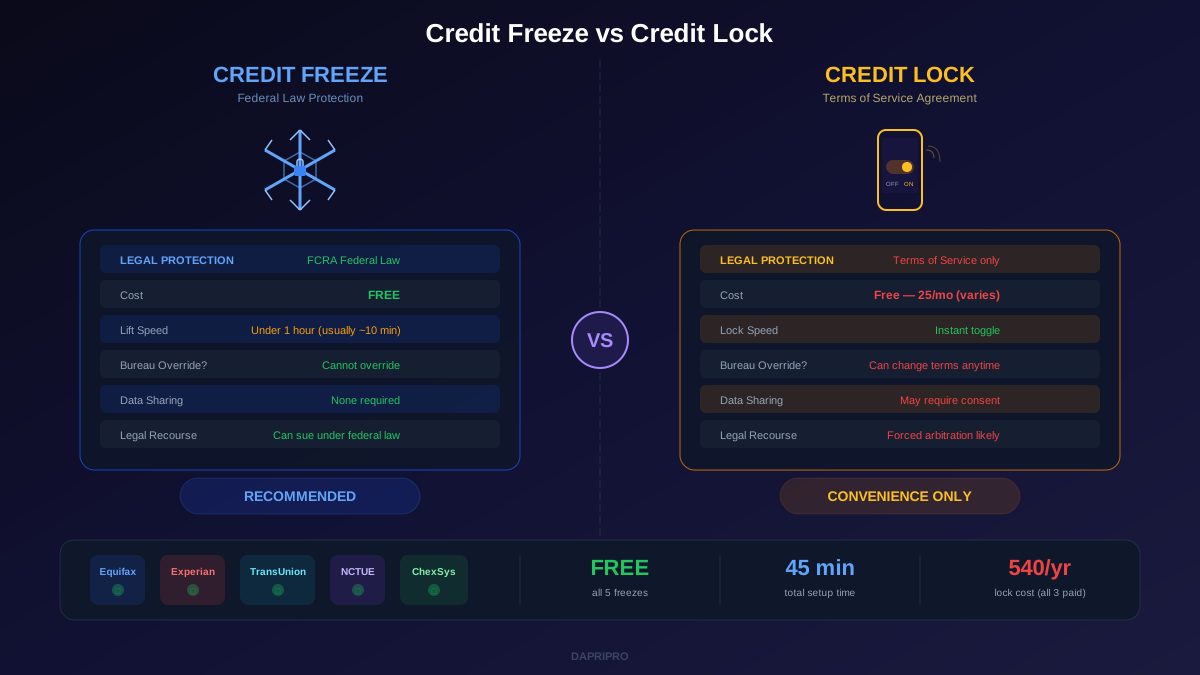
In reality, the speed difference has narrowed dramatically. Federal law requires bureaus to lift a freeze within one hour of an online or phone request. In practice, Experian and TransUnion process freeze lifts in under 10 minutes. The convenience advantage of locks is real but smaller than bureaus want you to believe.
The Legal Difference That Actually Matters
This is the most important section of this article. The difference between a freeze and a lock is not about speed or features — it is about legal standing.
Credit Freeze: Federal Law Has Your Back
Credit freezes are governed by the Fair Credit Reporting Act (FCRA) as amended by the 2018 Economic Growth Act. This means:
- Bureaus are legally required to offer freezes for free
- Bureaus must process freeze requests within one business day and lifts within one hour
- If a bureau fails to properly maintain your freeze and someone opens a fraudulent account, you have legal recourse under federal law
- The bureau cannot unilaterally decide to modify or remove your freeze
- You can sue the bureau for damages if they violate freeze requirements
Credit Lock: Terms of Service Can Change
Credit locks are contractual agreements. This means:
- The bureau can modify the terms of service at any time (usually with notice, but sometimes buried in email updates you never read)
- The bureau could theoretically discontinue the lock product entirely
- If the lock fails and someone opens a fraudulent account, your recourse is limited to what the terms of service specify — not federal consumer protection law
- Some lock agreements include data sharing clauses that allow the bureau to use your data for marketing or partner offers
- Arbitration clauses in lock agreements may prevent you from suing — you may be forced into arbitration
Read that list again. A credit bureau — a company that profits from your data — is asking you to trust their contractual promise over a federal legal guarantee. And they are charging you for the privilege.
True Cost Comparison
This is where the math gets interesting:
Credit Freeze Cost
- Equifax: free to freeze, free to lift, free to remove
- Experian: free to freeze, free to lift, free to remove
- TransUnion: free to freeze, free to lift, free to remove
- Total annual cost: zero dollars
Credit Lock Cost
- Equifax Lock & Alert: free basic tier, or 20/month for Equifax Complete Premium
- TransUnion TrueIdentity: free lock feature
- Experian CreditLock: 25/month for CreditWorks Premium (the full lock requires the paid tier)
- Total annual cost if using all three paid tiers: up to 540 dollars per year
- Total annual cost with free lock tiers where available: zero dollars (but with weaker legal protections than a freeze)
Even the free lock options come with a hidden cost: you are agreeing to terms of service that may include data sharing provisions and arbitration clauses. The freeze costs you nothing and gives up nothing.
When a Credit Lock Actually Makes Sense
Despite our strong recommendation for freezes, there are legitimate scenarios where locks offer genuine value:
- You apply for credit frequently — If you are actively shopping for apartments, applying for jobs that pull credit, or regularly opening new accounts, the true instant toggle of a lock saves real time versus freeze lifts
- You manage credit for an elderly parent — App-based lock management can be easier than managing PINs for someone who has difficulty with technology
- You want layered protection — Some security-conscious people use both: a freeze as the primary protection and a lock as an additional layer. This is belt-and-suspenders but it works
- You already pay for a service that includes it — If you subscribe to Aura, LifeLock, or another identity theft protection service that bundles credit lock functionality, you are already paying for it
How to Freeze Your Credit at All Three Bureaus (Step by Step)
This takes about 30 minutes total. Do all three — freezing only one or two bureaus leaves your credit exposed since different lenders pull from different bureaus.
Step 1: Freeze at Equifax
- Go to equifax.com/personal/credit-report-services/credit-freeze/
- Create an account or sign in
- Click "Place a Freeze" and verify your identity
- You will receive a 10-digit PIN — save this in your password manager immediately
- Confirmation displays on screen and arrives via email
Step 2: Freeze at Experian
- Go to experian.com/freeze/
- Create an account or sign in (you will need to verify with personal questions or a one-time code)
- Select "Add a Security Freeze"
- Experian uses account authentication instead of a PIN — remember your login credentials
- Confirmation displays on screen
Step 3: Freeze at TransUnion
- Go to transunion.com/credit-freeze
- Create a TrueIdentity account or sign in
- Navigate to "Credit Freeze" in your account dashboard
- Verify your identity and confirm the freeze
- TransUnion uses account authentication — save your login credentials
Bonus Step: Freeze at NCTUE and ChexSystems
Most people do not know about these two additional consumer reporting agencies:
- NCTUE (National Consumer Telecom and Utilities Exchange) — used by phone companies and utilities. Freeze at nctue.com to prevent someone from opening utility or phone accounts in your name
- ChexSystems — used by banks when you open checking and savings accounts. Freeze at chexsystems.com to prevent fraudulent bank account openings
How to Temporarily Lift a Freeze When You Need Credit
When you legitimately need to apply for credit, you have three lift options:
Option 1: Temporary Lift (Recommended)
Lift the freeze for a specific time period (usually 1-30 days). The freeze automatically re-engages when the period expires. This is the safest approach because you cannot forget to re-freeze.
Option 2: Creditor-Specific Lift
Some bureaus let you lift the freeze for a specific creditor only. This is ideal when you know exactly who will pull your credit — for example, a mortgage lender who tells you they use Experian. Ask your lender which bureau they pull from before lifting.
Option 3: Permanent Removal
Completely removes the freeze until you re-freeze. Only use this if you plan to apply for multiple credit products over an extended period. Re-freeze as soon as you are done.
Pro tip: When applying for a mortgage, your lender will need to pull all three bureaus. Ask them for the exact dates they will pull, and set temporary lifts for a 3-day window around those dates. Most mortgage applications are pulled within 24 hours of the loan officer submitting the request.
What Neither Freeze Nor Lock Protects Against
Both credit freezes and credit locks only block new credit applications. They do not protect you from:
- Medical identity theft — Someone using your insurance information to receive medical care, which can corrupt your medical records with wrong blood types, allergies, or conditions
- Tax identity theft — Someone filing a fraudulent tax return using your SSN to claim your refund (get an IRS Identity Protection PIN to prevent this)
- Criminal identity theft — Someone giving your name and information during a traffic stop or arrest, creating a criminal record under your name
- Employment identity theft — Someone using your SSN to pass employment verification, which can trigger IRS issues when their income is reported under your number
- Existing account takeover — Someone gaining access to your current bank accounts, credit cards, or investment accounts
- Synthetic identity fraud — Criminals combining your SSN with a different name and address to create a wholly new identity that passes credit checks
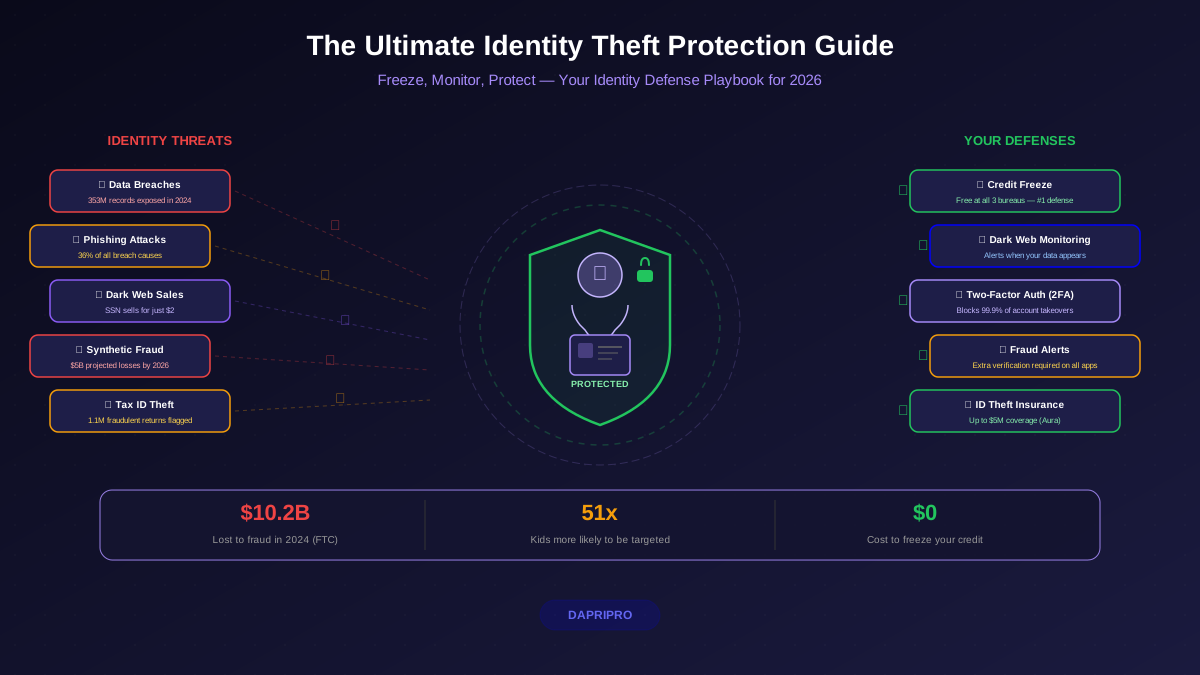
This is why identity theft protection is not a single tool — it is a layered approach. A credit freeze is the strongest single action you can take, but it needs to be combined with strong passwords, two-factor authentication, credit monitoring, and awareness of these other attack vectors.
Our Recommendation
Freeze your credit at all three bureaus plus NCTUE and ChexSystems. It costs nothing, provides the strongest legal protection available, and takes less than an hour. The minor inconvenience of a 10-minute temporary lift when you need credit is worth the peace of mind.
Only consider a lock instead if you apply for credit multiple times per month and genuinely need instant toggles throughout the day. Even then, you can use a freeze at two bureaus and a lock at the one your frequent creditors typically pull.
Do not pay for a lock from a credit bureau when you can get the same protection for free with a freeze. The 300 to 540 dollars per year you save can go toward an identity theft protection service that actually covers the threats a freeze cannot — dark web monitoring, medical identity theft detection, and restoration support.