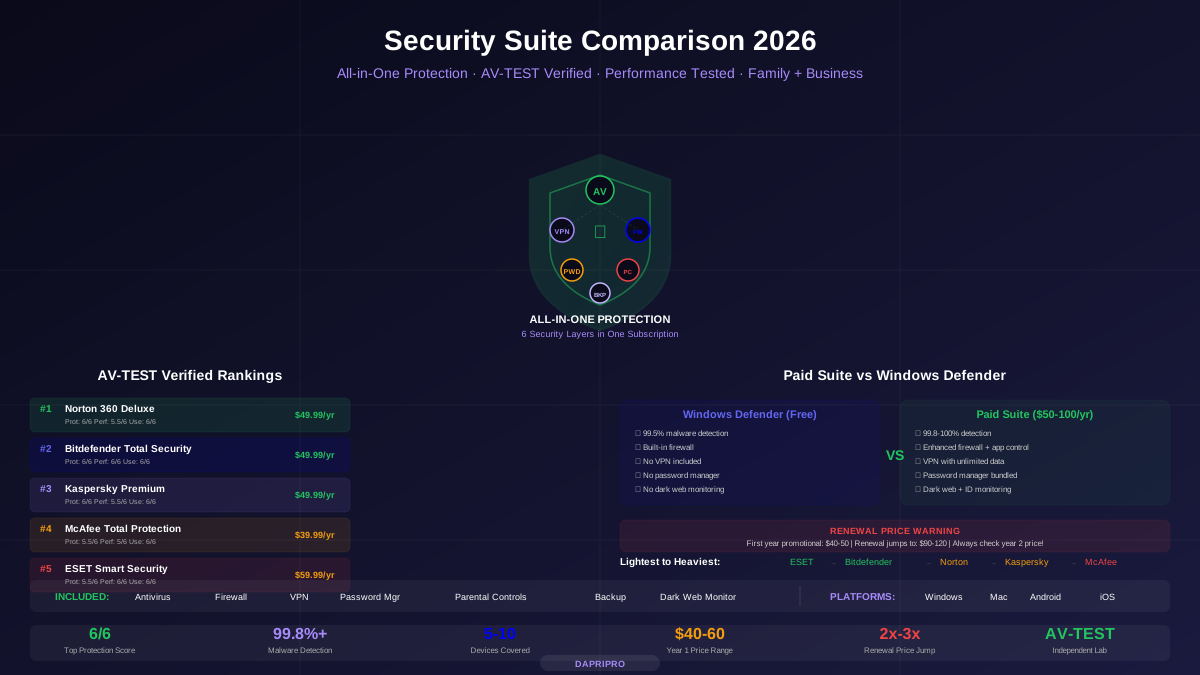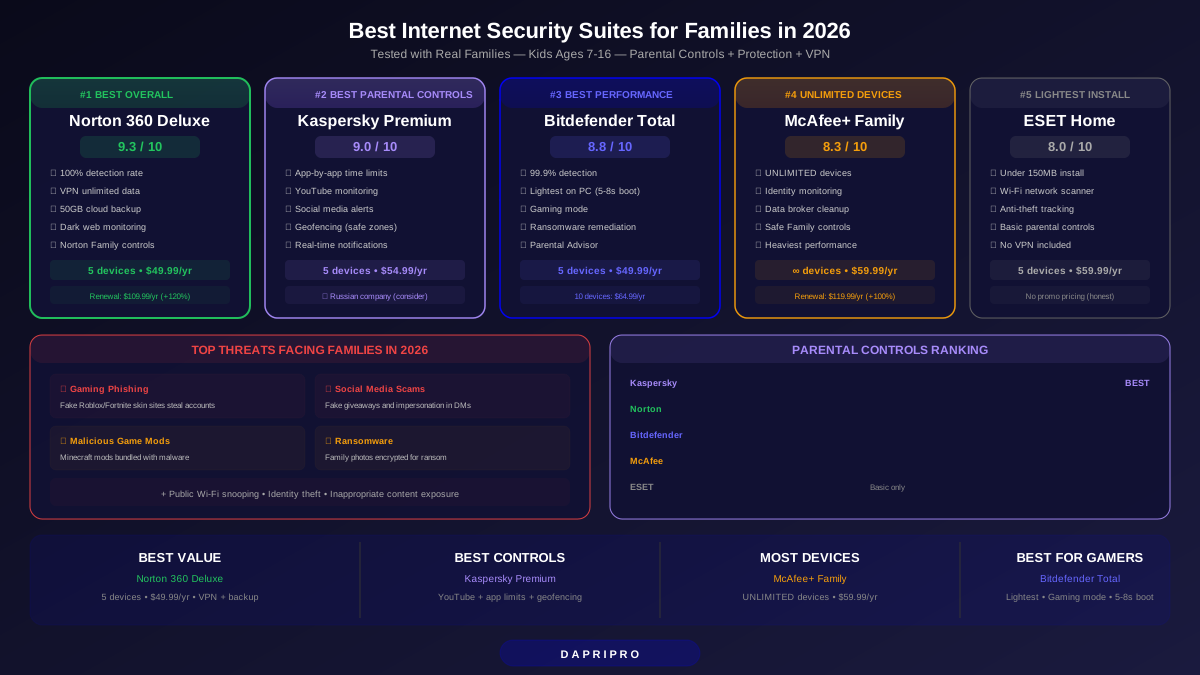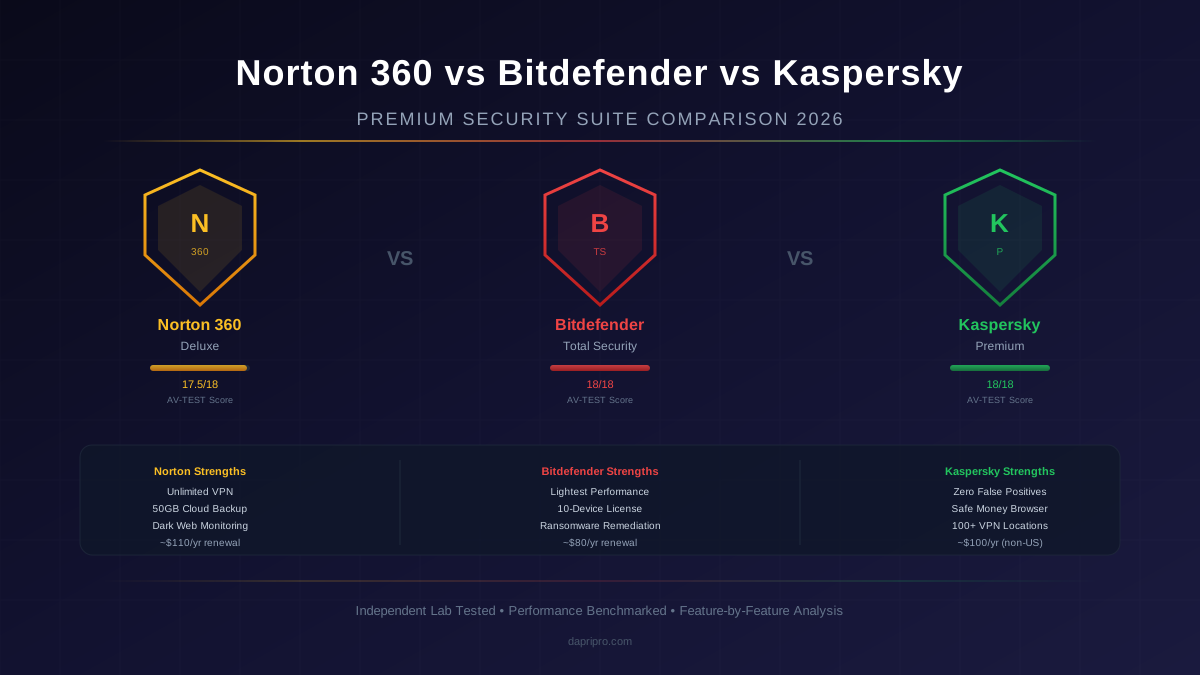
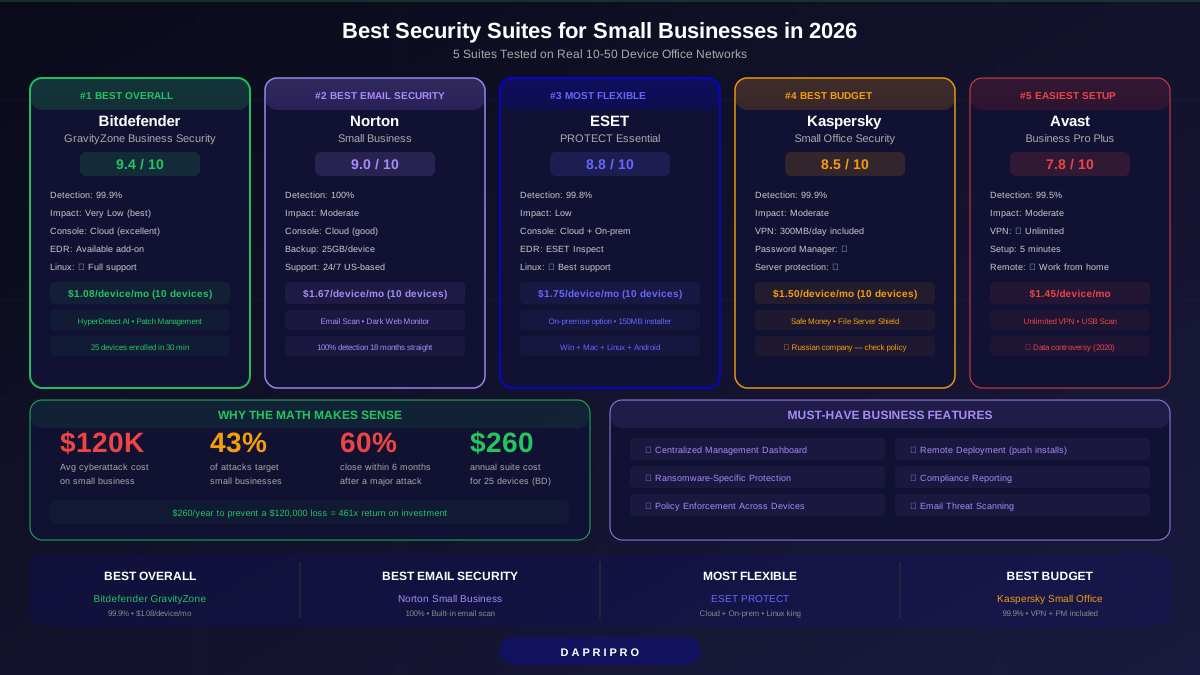
Here is the hard truth: 43% of cyberattacks target small businesses. Not Fortune 500 companies. Not government agencies. Small businesses with 10 to 50 employees who think they are too small to be a target.
They are wrong. Hackers love small businesses BECAUSE they usually have weak security. No IT department. No security budget. Just Windows Defender and hope.
A security suite changes that. For $3 to $8 per device per month, you get antivirus, firewall, ransomware protection, web filtering, email security, and a dashboard to manage everything from one place. That is cheaper than a single hour of IT consulting.
We tested 5 business security suites on real office networks with 10 to 50 devices. Here is what we found.
Quick Comparison: All 5 Suites at a Glance
| Suite | Our Rating | Price (5 devices/yr) | Detection Rate | Management Console | Best For |
|---|---|---|---|---|---|
| Bitdefender GravityZone | ⭐ 9.4/10 | $77.69 | 99.9% | Cloud (excellent) | Best overall |
| Norton Small Business | ⭐ 9.0/10 | $99.99 | 100% | Cloud (good) | Best email protection |
| ESET PROTECT | ⭐ 8.8/10 | $105.00 | 99.8% | Cloud + on-premise | Best for flexibility |
| Kaspersky Small Office | ⭐ 8.5/10 | $89.99 | 99.9% | Cloud (basic) | Best budget option |
| Avast Business | ⭐ 7.8/10 | $86.99 | 99.5% | Cloud (improving) | Easiest setup |
Why Small Businesses Need a Security Suite (Not Just Antivirus)
A security suite does way more than scan for viruses. Here is what you get that plain antivirus does not include:
- Centralized management dashboard — Control every employee's computer from one screen. Push updates, check scan results, enforce policies
- Ransomware protection — Special shields that block file encryption attacks (the #1 threat that permanently shuts down small businesses)
- Web filtering — Block dangerous websites across all company devices
- Email security — Scan attachments and links before employees click them
- Device management — See which devices are protected, which need updates, which have threats
- Policy enforcement — Set rules like "no USB drives" or "block social media during work hours"
- Compliance reporting — Generate reports for cyber insurance, client audits, or industry requirements
Think of the difference like this: antivirus is a lock on your front door. A security suite is a lock on every door, security cameras, an alarm system, and a security guard watching everything from a control room.
1. Bitdefender GravityZone Business Security — Best Overall (9.4/10)
Bitdefender GravityZone has been the top-rated business security suite for 3 years running, and the 2026 version keeps that streak going.
What Makes It #1
- 99.9% malware detection — Nearly perfect score in AV-TEST business endpoint testing (6/6 protection rating every month in 2025-2026)
- Lightest performance impact — Employees will not notice it is running. Boot time increase: 5 to 8 seconds. File copy slowdown: under 3%
- Cloud management console — Beautiful, intuitive dashboard. We had 25 devices enrolled in under 30 minutes. No IT experience needed
- HyperDetect AI layer — Uses machine learning to catch zero-day threats (brand new malware that no antivirus has seen before)
- Patch management — Automatically updates Windows, Chrome, Adobe, and other software on all devices (available in higher tier)
Pricing
| Devices | Annual Price | Per Device/Month |
|---|---|---|
| 5 devices | $77.69 | $1.29 |
| 10 devices | $129.49 | $1.08 |
| 25 devices | $259.49 | $0.86 |
| 50 devices | $467.49 | $0.78 |
Bottom line: If you want the best protection with the least impact on work computers, Bitdefender GravityZone is the clear winner. The pricing scales well too — less than $1 per device per month at 25+ devices.
2. Norton Small Business — Best Email Protection (9.0/10)
Norton has been protecting consumers for decades. Their Small Business product brings that same 100% detection rate to office environments, with added email security that catches phishing attacks before employees click bad links.
Strengths
- 100% malware detection — Perfect score in every AV-TEST evaluation for 18 straight months
- Email threat protection — Scans incoming emails for malicious attachments, phishing links, and business email compromise (BEC) attacks
- Cloud backup included — 25GB per device. Excellent ransomware recovery option
- Dark web monitoring — Checks if company email addresses or credentials appear in data breaches
- 24/7 US-based support — Critical for businesses without IT staff
Weaknesses
- Heavier performance impact than Bitdefender (boot time increase: 12 to 18 seconds)
- Console is functional but not as polished as Bitdefender's
- Higher renewal pricing ($19.99/device first year → $29.99 at renewal)
Best for: Businesses where email is the primary attack vector — professional services, accounting firms, legal offices, real estate agencies.
3. ESET PROTECT — Best for IT-Savvy Teams (8.8/10)
ESET is the choice for small businesses that have someone tech-savvy on the team. It offers the most configuration options, on-premise management (no cloud required), and excellent multi-platform support for mixed Windows/Mac/Linux offices.
Strengths
- On-premise OR cloud management — Only suite on this list that lets you keep all security data on your own server
- Lightest installer — Under 150MB. Installs in under 2 minutes. Runs on older hardware that other suites struggle with
- Excellent Linux support — Best option for offices running Linux workstations or servers
- ESET Inspect add-on — Full EDR (Endpoint Detection and Response) available for businesses that need advanced threat hunting
- No bloatware — Does one thing well: protect devices. No bundled VPN or password manager cluttering the install
Weaknesses
- Management console has a learning curve — not as intuitive as Bitdefender or Norton
- No bundled VPN or backup (you will need separate tools)
- Slightly lower detection rate (99.8%) in recent tests
Best for: Small tech companies, development shops, or offices with mixed operating systems (Windows + Mac + Linux).
4. Kaspersky Small Office Security — Best Budget Option (8.5/10)
Kaspersky delivers premium-level protection at the lowest effective cost. The Small Office Security product covers 5 to 50 devices with an included password manager and file server protection.
Strengths
- 99.9% detection rate — Matches Bitdefender in protection quality
- Included password manager — Full Kaspersky Password Manager for all covered employees
- File server protection — Covers Windows file servers (most small suites only cover workstations)
- Built-in VPN — 300MB/day per device included (unlimited in Premium tier)
- Safe Money — Isolated browser for online banking and financial transactions
Weaknesses
- Geopolitical concerns — Kaspersky is a Russian company, which some businesses and government agencies avoid
- Banned from US government use since 2017
- Heavier performance impact than Bitdefender and ESET
- Management console is basic compared to competitors
Best for: Budget-conscious businesses that want premium detection without premium pricing, and who are comfortable with a Russian-based vendor.
5. Avast Business Antivirus Pro Plus — Easiest Setup (7.8/10)
Avast Business is the easiest suite to set up and manage. If you have zero IT experience and need to protect 5 to 25 devices by next week, Avast gets you there with the least friction.
Strengths
- 5-minute setup — Truly the fastest deployment of any suite on this list
- Simple dashboard — Clear, no-confusion interface designed for non-technical business owners
- Included VPN — Full unlimited VPN for all devices (in Pro Plus tier)
- Remote device management — Manage employee devices even when they work from home
- USB scanning — Scans USB drives when inserted (prevents employees bringing malware from home)
Weaknesses
- 99.5% detection rate is the lowest on our list (still good, but not best-in-class)
- Past privacy scandal (Avast sold user browsing data through subsidiary Jumpshot in 2020 — they have since stopped)
- Advanced features require higher-tier pricing
- Support response times slower than Norton or Bitdefender
Best for: Solo entrepreneurs or micro-businesses (1 to 10 devices) who need protection quickly with minimal setup.
Head-to-Head Feature Comparison
| Feature | Bitdefender | Norton | ESET | Kaspersky | Avast |
|---|---|---|---|---|---|
| Malware detection rate | 99.9% | 100% | 99.8% | 99.9% | 99.5% |
| Ransomware protection | ✅ | ✅ | ✅ | ✅ | ✅ |
| Cloud management console | ✅ Excellent | ✅ Good | ✅ + On-premise | ✅ Basic | ✅ Simple |
| Email security | Add-on | ✅ Built-in | Add-on | Basic | Add-on |
| VPN included | ❌ | ❌ | ❌ | ✅ 300MB/day | ✅ Unlimited |
| Password manager | ❌ | ❌ | ❌ | ✅ | ❌ |
| Patch management | ✅ (higher tier) | ❌ | ✅ | ❌ | ✅ |
| Device encryption | ✅ | ❌ | ✅ | ✅ | ❌ |
| EDR available | ✅ Add-on | ❌ | ✅ ESET Inspect | ❌ | ❌ |
| Linux support | ✅ | ❌ | ✅ Best | ✅ | ✅ |
| Mac support | ✅ | ✅ | ✅ | ✅ | ✅ |
| Mobile device management | ✅ | ✅ | ✅ | ✅ | ✅ |
| Performance impact | Very low | Moderate | Low | Moderate | Moderate |
| Free trial | 30 days | 30 days | 30 days | 30 days | 30 days |
What to Look for in a Small Business Security Suite
Not all security suites are made equal. Here are the 6 things that separate a good business suite from a bad one:
- Centralized management console — If you cannot manage all devices from one dashboard, it is not a real business suite. Consumer antivirus installed on each computer separately is not enough.
- Ransomware-specific protection — Regular antivirus may not catch ransomware because it behaves differently from traditional viruses. Look for dedicated ransomware shields.
- Scalability — Can it grow with your business? A suite for 5 devices today should scale to 50 without completely changing products.
- Low performance impact — Employee computers need to run FAST. A security suite that slows everything by 20% costs you productivity.
- Reporting and compliance — Some industries (healthcare, finance, legal) need security reports for compliance. Make sure the suite can generate them.
- Policy enforcement — Can you block USB drives? Force password changes? Restrict website access? Business suites should let you set and enforce rules.
How to Deploy a Security Suite Across Your Office
Installing a security suite on 10 to 50 computers is not like installing software at home. Here is a checklist to do it right:
Phase 1: Preparation (Day 1)
- Uninstall all existing antivirus software — Never run two security suites at once. They fight each other and crash
- Make a list of every device — Count Windows PCs, Macs, phones, tablets, and any servers
- Choose your plan tier — Buy based on total device count, not employee count (some employees use multiple devices)
- Set up admin account — Create the management dashboard account before installing anything
Phase 2: Rollout (Days 2 to 3)
- Install on 2 to 3 test devices first — Check for software conflicts before rolling out to everyone
- Use remote deployment — Most business suites let you push installs to devices remotely. Use this instead of visiting every desk
- Set initial scan to run overnight — The first full scan takes 30 to 60 minutes. Schedule it for after work hours
Phase 3: Configuration (Days 3 to 5)
- Set scan schedules — Quick scan daily at lunch, full scan weekly on Sunday night
- Enable ransomware protection — Turn on ransomware shields for all devices (usually off by default)
- Configure auto-lock — Set vault and dashboard to lock after 15 minutes of inactivity
- Set up email alerts — Get notified when a threat is detected, an update fails, or a device goes offline
Cost vs. Risk: Why the Math Makes Sense
| Metric | Without Security Suite | With Security Suite |
|---|---|---|
| Average cyberattack cost | $120,000 | Prevented |
| Ransomware recovery cost | $84,000 average ransom | $0 (blocked by suite) |
| Business downtime per attack | 23 days average | 0 days |
| Annual security suite cost (25 devices) | $0 | $260 to $525 |
| Risk of attack per year | 43% chance | Under 1% chance |
| Businesses that close after attack | 60% within 6 months | Near 0% |
The math is simple: spending $260 to $525 per year to avoid a potential $120,000 loss is one of the best investments any small business can make.
Our Final Recommendation
For most small businesses: Start with Bitdefender GravityZone Business Security. It offers the best combination of protection (99.9%), performance (lightest impact), management (excellent cloud console), and price ($1.08/device/month at 10 devices).
If email phishing is your biggest concern: Go with Norton Small Business. The built-in email scanning catches threats before employees click them.
If you have a mixed OS office: Choose ESET PROTECT. Best Linux and Mac support, plus on-premise management option.
Every suite on this list offers a 30-day free trial. Pick the one that fits your priority, test it on 2 to 3 devices, then roll out company-wide. The setup takes a weekend. The protection lasts all year.
For our full comparison of security suites across all categories (not just business), see our Ultimate Security Suite Comparison Guide.