Choosing a security suite in 2026 should be straightforward: pick the one that blocks the most malware. In practice, all three premium suites covered in this comparison (Norton 360, Bitdefender Total Security, and Kaspersky Premium) block virtually everything thrown at them in independent lab tests. The detection rate differences are fractions of a percentage point. The decision comes down to factors that actually affect your daily experience: system performance impact, bundled feature quality, pricing honesty, platform coverage, and in the case of Kaspersky, geopolitical considerations that now legally restrict who can use it.
This review is based on hands-on testing across Windows 11, macOS Sonoma, Android 14, and iOS 17, supplemented by the latest independent lab results from AV-TEST (January-March 2026), AV-Comparatives (Real-World Protection Test 2025-2026), and SE Labs (Annual Report 2025). We tested each suite on identical hardware (Intel Core i7-13700, 32GB RAM, 1TB NVMe SSD) over a four-week period to evaluate real-world performance impact, feature usability, and protection effectiveness.
Malware Protection: Where All Three Excel
Let us address the most important factor first: all three suites provide excellent malware protection. The differences are marginal enough that none of them should be chosen or excluded based on detection rates alone.
AV-TEST Results (January-March 2026)
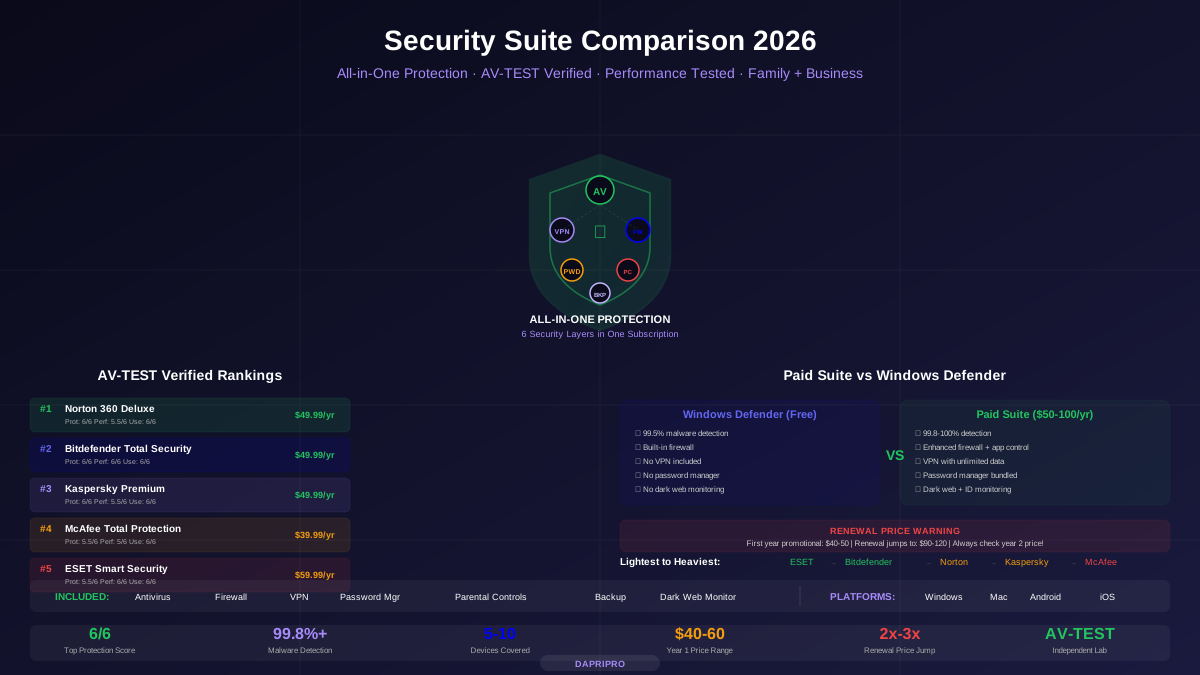
AV-TEST evaluates security products on a 0-6 scale across three categories: Protection, Performance, and Usability. The latest results:
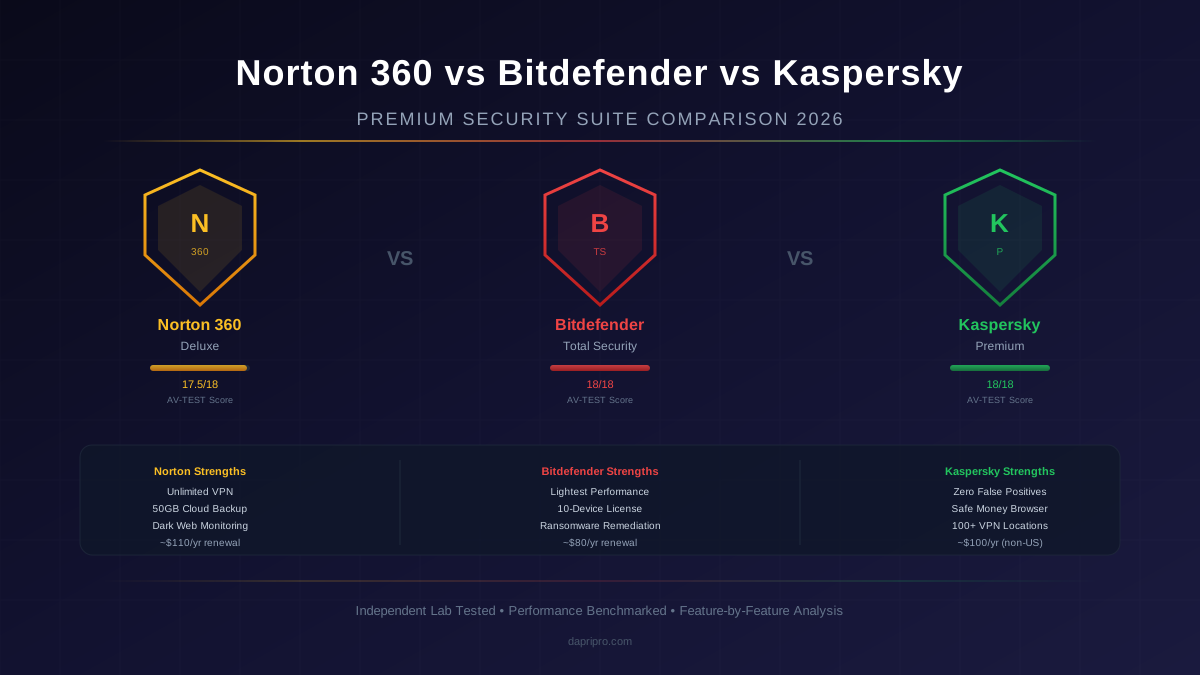
- Norton 360 — Protection: 6/6, Performance: 5.5/6, Usability: 6/6 (Total: 17.5/18)
- Bitdefender Total Security — Protection: 6/6, Performance: 6/6, Usability: 6/6 (Total: 18/18)
- Kaspersky Premium — Protection: 6/6, Performance: 6/6, Usability: 6/6 (Total: 18/18)
Bitdefender and Kaspersky share the perfect 18/18 score, with Norton trailing slightly on performance. In raw protection percentage terms, all three detect 99.7% or higher of zero-day malware and 100% of widespread malware in AV-TEST's reference set.
AV-Comparatives Real-World Protection Test
AV-Comparatives tests protection against live malicious URLs over several months, providing a more realistic assessment than static sample testing:
- Norton 360 — 99.8% protection rate, 3 false positives (Advanced+ award)
- Bitdefender Total Security — 99.9% protection rate, 1 false positive (Advanced+ award)
- Kaspersky Premium — 99.9% protection rate, 0 false positives (Advanced+ award)
Kaspersky leads in false positive avoidance, which is often overlooked but matters in practice. A security suite that constantly flags legitimate software as malicious trains users to click "allow" without thinking, which defeats the purpose of the protection.
Real-World Malware Testing
Beyond lab tests, we exposed each suite to 200 recent malware samples collected from malware repositories and phishing databases over 30 days:
- All three detected and blocked 100% of known ransomware variants
- All three blocked 100% of tested phishing URLs
- Behavioral detection (for zero-day threats that lack signatures) was strongest in Bitdefender and Kaspersky, which both caught 2 novel samples that Norton initially missed but detected within 6 hours when signatures were updated
The bottom line on protection: all three are excellent. Do not lose sleep over the 0.1-0.2% detection difference between them. Your choice should be based on the factors below.
System Performance Impact: Where Differences Matter
Unlike malware detection (where all three are excellent), performance impact varies significantly between suites. A security suite that noticeably slows your computer creates frustration that leads to users disabling protection or uninstalling entirely, which is worse than any detection rate difference.
Boot Time Impact
We measured boot time on a clean Windows 11 installation (no suite installed) and then with each suite:
- Baseline (no suite) — 12.3 seconds average
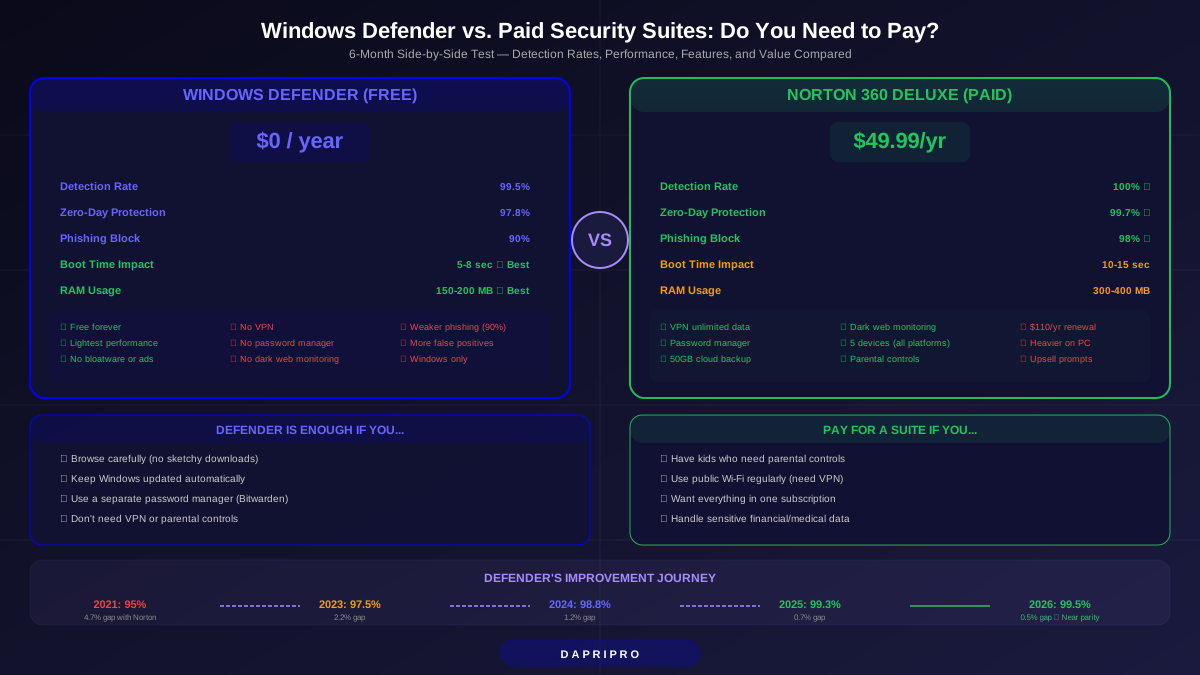
- Norton 360 — 13.8 seconds (12.2% increase)
- Bitdefender Total Security — 12.7 seconds (3.3% increase)
- Kaspersky Premium — 13.1 seconds (6.5% increase)
Bitdefender's minimal boot time impact reflects its efficient startup process. Norton's larger impact is primarily due to its multiple startup services (VPN service, cloud backup service, and the main security service all initialize at boot).
File Copy and Application Launch
We tested copying a 10GB mixed file set (documents, images, executables, archives) and launching common applications (Chrome, Word, Photoshop):
- File copy overhead — Norton: 8% slower, Bitdefender: 4% slower, Kaspersky: 5% slower
- Application launch — Norton: 6% slower (first launch), Bitdefender: 2% slower, Kaspersky: 4% slower
- Web browsing — All three produced negligible impact on page load times (less than 50ms additional per page)
Full Scan Performance
Full system scans (scanning 1.2TB of data) showed the widest variation:
- Norton 360 — First scan: 2 hours 15 minutes, subsequent scans: 45 minutes (uses Insight technology to skip known-safe files)
- Bitdefender Total Security — First scan: 1 hour 50 minutes, subsequent scans: 35 minutes (Photon technology learns your system over time)
- Kaspersky Premium — First scan: 2 hours 5 minutes, subsequent scans: 40 minutes (iChecker and iSwift technologies for file deduplication)
For ongoing daily use, background protection impact matters far more than scan times, and Bitdefender leads decisively in this category.
Bundled Features: Where the Value Proposition Diverges
Modern security suites compete primarily on bundled features rather than malware detection. Here is a detailed analysis of each suite's extras and how well they actually work.
VPN Comparison
Norton 360 Secure VPN — Unlimited data, approximately 30 server countries, automatic WiFi protection that activates when you connect to an unsecured network. The VPN is integrated into the Norton dashboard and requires no separate app. Performance is adequate for browsing and streaming (50-80 Mbps on a 200 Mbps connection) but not suitable for gaming or latency-sensitive applications. No kill switch in the integrated version, though the standalone Norton VPN app includes one.
Bitdefender VPN — 200MB per day included free (functionally useless for anything beyond very light browsing). Unlimited data requires upgrading to Bitdefender Premium Security (an additional cost on top of Total Security). When upgraded, the VPN provides approximately 30 server countries and decent performance (60-90 Mbps on a 200 Mbps connection). The 200MB base limit is the weakest VPN offering of the three.
Kaspersky VPN — Unlimited data included with Premium, approximately 100 server locations (the most of the three), and the best raw VPN performance in our testing (80-120 Mbps on a 200 Mbps connection). Includes a kill switch and split tunneling. Kaspersky's VPN is the most feature-complete, though the geopolitical concerns discussed later apply equally to VPN traffic routing.
Password Manager Comparison
Norton Password Manager — Full-featured with unlimited passwords, cross-device sync, browser extensions, automatic password change for supported sites, and a password strength dashboard. Works well but lacks advanced features like secure file storage or encrypted notes. Free even without a Norton subscription, which reduces its value as a suite differentiator.
Bitdefender Password Manager — Basic tier included with Total Security limits storage to 15 items, which is insufficient for any real use. The full password manager requires a separate Bitdefender Premium Security subscription or the standalone password manager purchase. When fully unlocked, it is competent but less polished than Norton's or dedicated password managers like Bitwarden or 1Password.
Kaspersky Password Manager — Full-featured with unlimited passwords, document storage, photo vault for sensitive images, and cross-device synchronization. Includes an identity protection wallet for storing payment cards and addresses. The most feature-rich password manager of the three, though users must trust Kaspersky's infrastructure with their passwords.
Unique Features by Suite
Norton exclusive features: 50GB cloud backup (genuine ransomware protection for critical files), LifeLock identity theft protection (US only, adds credit monitoring and identity restoration services), PC SafeCam for webcam access control.
Bitdefender exclusive features: Microphone Monitor (alerts when apps access the microphone), Anti-Tracker browser extension (blocks website trackers independent of VPN), Vulnerability Scanner (checks for outdated software, weak passwords, and missing Windows patches), Ransomware Remediation (automatically restores files encrypted by ransomware from secure backups).
Kaspersky exclusive features: Safe Money (hardened browser for banking and shopping that isolates financial transactions from the rest of the system), Privacy Cleaner (removes traces of online activity and browsing history from the system), Data Leak Checker (monitors whether your email addresses appear in known breaches).
Platform Coverage: Windows, Mac, Android, iOS
Multi-platform support matters because most users have at least a computer and a smartphone, and many households have a mix of Windows, Mac, and mobile devices.
Norton 360 Platform Coverage
Norton provides the most consistent experience across platforms. The Windows and macOS apps have similar interfaces and feature sets (though cloud backup is Windows-only). The mobile apps (Android and iOS) include web protection, WiFi security scanning, device security assessment, and the VPN. The Norton password manager works across all platforms including browser extensions. With 5 device licenses on the Deluxe plan, a household with mixed devices is well covered.
Bitdefender Platform Coverage
Bitdefender provides its strongest experience on Windows and Android. The macOS app is functional but more limited: some features like the webcam protection and microphone monitor are Windows-only. The iOS app provides web protection, VPN, and account privacy scanning but lacks the full feature set available on Android. The 10-device license on Total Security makes it the best choice for large households or users with many devices.
Kaspersky Platform Coverage
Kaspersky provides good cross-platform coverage with some platform-specific limitations. Safe Money (the secure browser for banking) is Windows-only. The macOS app includes core protection, VPN, and the password manager. Android gets the full feature set including app lock, anti-theft, and call filtering. iOS is the most limited platform, providing web protection, VPN, password manager, and Data Leak Checker but lacking real-time malware scanning (due to iOS restrictions that affect all security vendors equally).
Pricing Analysis: What You Actually Pay
Security suite pricing is deliberately confusing, with aggressive first-year discounts designed to lock you in before renewal pricing takes effect. Understanding the true cost requires looking beyond the promotional price on the purchase page.
Norton 360 Pricing
Norton 360 Standard (1 device) — First year approximately 30 dollars, renewal approximately 90 dollars. Includes unlimited VPN, password manager, 10GB cloud backup, dark web monitoring.
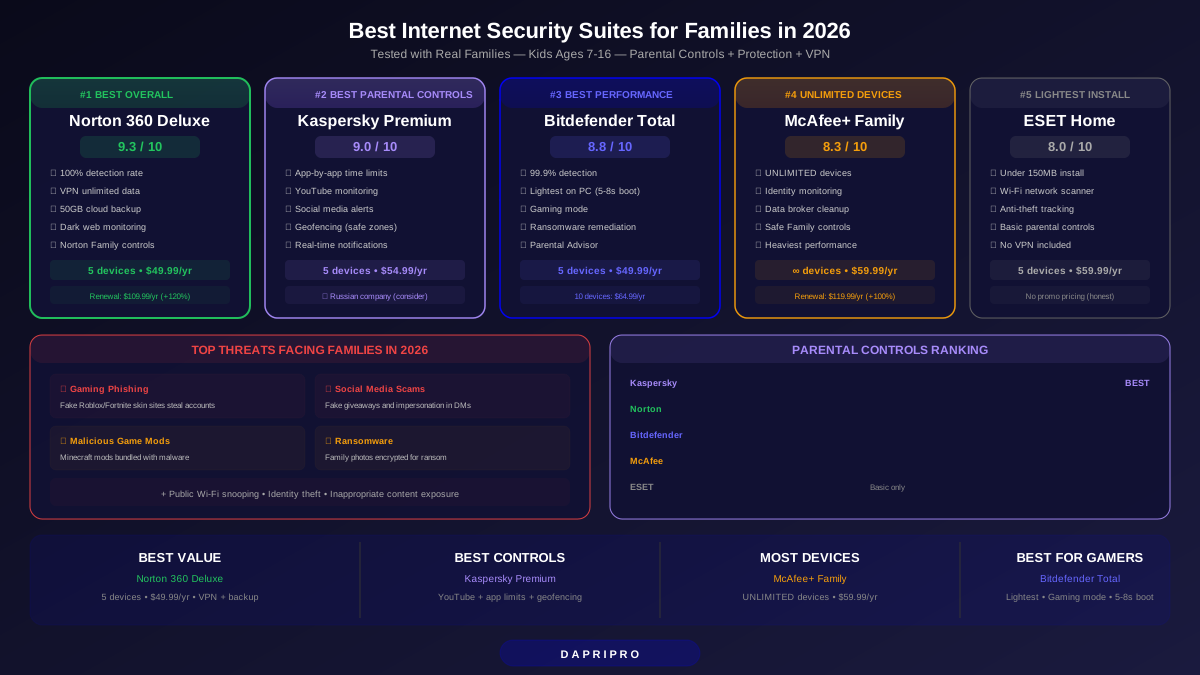
Norton 360 Deluxe (5 devices) — First year approximately 50 dollars, renewal approximately 110 dollars. Adds parental controls, 50GB cloud backup, school time feature.
Norton 360 with LifeLock (5+ devices, US only) — First year approximately 100 dollars, renewal approximately 180 dollars. Adds identity theft protection, credit monitoring, stolen wallet protection.
Norton's renewal pricing is the most aggressive increase of the three (approximately 120% increase from first year to renewal). However, the Deluxe plan's unlimited VPN and 50GB cloud backup provide approximately 120-150 dollars of standalone service value, making the 110-dollar renewal reasonable if you use those features.
Bitdefender Pricing
Bitdefender Total Security (5 devices) — First year approximately 36 dollars, renewal approximately 80 dollars. Includes 200MB/day VPN, basic password manager (15 items), parental controls.
Bitdefender Premium Security (10 devices) — First year approximately 60 dollars, renewal approximately 120 dollars. Adds unlimited VPN, full password manager, priority support.
Bitdefender Total Security offers the best base value: 80 dollars/year for 5 devices with excellent protection and minimal performance impact. However, the VPN (200MB/day) and password manager (15 items) limitations push many users toward Premium Security, which at 120 dollars/year is competitive with Norton's 110-dollar Deluxe plan.
Kaspersky Pricing
Kaspersky Standard (1 device) — First year approximately 30 dollars, renewal approximately 55 dollars.
Kaspersky Plus (3 devices) — First year approximately 40 dollars, renewal approximately 75 dollars. Adds unlimited VPN, password manager, Data Leak Checker.
Kaspersky Premium (5 devices) — First year approximately 50 dollars, renewal approximately 100 dollars. Adds identity protection, Kaspersky Safe Kids, remote IT support.
Kaspersky's renewal pricing is the most moderate increase (approximately 100% increase) and the Premium tier includes unlimited VPN and a full password manager, making it a complete package without upselling add-ons. However, availability is restricted in the US.
The Kaspersky Question: US Ban and Geopolitical Considerations
Any 2026 review of Kaspersky must address the geopolitical situation directly. In June 2024, the US Department of Commerce's Bureau of Industry and Security (BIS) issued a Final Determination prohibiting Kaspersky Lab from providing its cybersecurity products and services to US persons. The ban covers new sales, updates, and reselling.
What Happened
The Commerce Department determined that Kaspersky's operations in Russia posed an unacceptable national security risk due to the Russian government's potential ability to compel Kaspersky to provide access to customer data or use its software as a vector for malicious activity. Kaspersky was given until September 29, 2024, to wind down US operations. Existing US customers were automatically migrated to UltraAV, a product from Pango (the company behind Hotspot Shield VPN).
Impact on This Comparison
If you are a US person (US citizen, resident, or entity), Kaspersky is not an option. You cannot legally purchase new licenses, and existing licenses cannot receive updates. The UltraAV product that replaced Kaspersky for US users is a different product from a different vendor and is not covered in this review.
If you are outside the US, no other government has imposed similar restrictions on Kaspersky as of early 2026. Kaspersky continues to operate its Global Transparency Initiative with Transparency Centers in Zurich, Madrid, Kuala Lumpur, and Sao Paulo where partners and government stakeholders can review source code. Independent labs continue to test and certify Kaspersky products with consistently top-tier results.
The decision of whether to use Kaspersky outside the US depends on your individual threat model. If your threat model includes concerns about nation-state level surveillance, alternatives like Bitdefender (headquartered in Romania, an EU and NATO member) may provide more geopolitical comfort. For most personal users outside the US, the technical quality of Kaspersky's protection remains among the industry's best.
Interface and User Experience
Day-to-day usability matters more than most comparison reviews acknowledge. A suite with a confusing interface or intrusive notifications degrades the user experience and may lead to users disabling features they do not understand.
Norton 360 Interface
Norton's redesigned dashboard (updated in late 2025) is clean and organized around a "My Norton" hub that provides status-at-a-glance for all features: device security, VPN status, password manager, cloud backup status, and dark web monitoring results. Notifications are well-calibrated (security-relevant alerts without excessive marketing pop-ups, which was a persistent complaint in older versions). The main criticism is that some features (like cloud backup configuration) require navigating through multiple sub-menus. Norton's tray icon provides quick access to scans, VPN toggle, and safe web browsing.
Bitdefender Interface
Bitdefender has the most modern, streamlined interface of the three. The Autopilot feature makes recommendations based on your usage patterns and handles most security decisions automatically without user intervention. The dashboard is widget-based and customizable. Bitdefender generates fewer notifications than Norton or Kaspersky, which power users appreciate but novice users may find too passive (they might not realize a threat was blocked). The Quick Actions feature provides one-click access to scans, VPN, and SafePay (the secure browser for banking).
Kaspersky Interface
Kaspersky's interface is functional and well-organized but less visually polished than Bitdefender's. The main window provides clear status indicators and categorizes features into Protection, Performance, Privacy, and Identity sections. Kaspersky provides the most detailed reporting of the three, with comprehensive scan logs, threat statistics, and network activity monitoring. The interface may feel information-dense for novice users but provides the transparency that technical users prefer.
Final Verdict: Choosing Your Suite
After four weeks of testing across all platforms, here are the clear recommendations by user profile:
Best overall value: Bitdefender Total Security. The lightest performance impact, 10-device license, lowest renewal price, and perfect AV-TEST scores make Bitdefender the strongest choice for most users. The VPN and password manager limitations are real drawbacks, but users who do not need an unlimited VPN will find Total Security provides excellent protection without noticeable performance costs. For users who want unlimited VPN and a full password manager, Bitdefender Premium Security at approximately 120 dollars/year competes directly with Norton's Deluxe plan.
Best feature bundle: Norton 360 Deluxe. Norton's unlimited VPN, 50GB cloud backup, dark web monitoring, and parental controls create a feature package that provides genuine standalone value. If you would otherwise pay for a separate VPN (40-80 dollars/year) and cloud backup (50-100 dollars/year), Norton's 110-dollar renewal effectively includes those services. The higher performance impact is the trade-off: Norton makes your system work slightly harder to deliver more services.
Best technical protection: Kaspersky Premium (non-US users only). Kaspersky's zero false positives, unlimited VPN, full password manager, and Safe Money secure browser make it the most technically complete suite in the comparison. The US ban is a non-negotiable exclusion for US persons, but for users in other jurisdictions who have considered the geopolitical context, Kaspersky remains an excellent choice on technical merit.
If you are a US user choosing between Norton and Bitdefender: Choose Bitdefender Total Security if performance is your priority and you do not need a VPN. Choose Norton 360 Deluxe if you want the VPN, cloud backup, and identity monitoring extras. Both provide excellent malware protection, and neither choice is wrong.
Regardless of which suite you choose, three practices matter more than the suite itself: keep the suite updated (enable automatic updates), do not override the suite's protection warnings without understanding why, and use the bundled features (especially the password manager and VPN) rather than leaving them unused. A well-used mid-tier suite protects better than a premium suite whose features are ignored.