Imagine your school had 500 doors, and anyone could walk in through any of them. Scary, right? That is exactly what a business network looks like without endpoint security. Every laptop, phone, tablet, and desktop is a door — and hackers are always looking for the one that is left unlocked.
In 2026, with people working from home, coffee shops, and airports, there are more doors than ever. This guide will teach you what endpoint security is, why it matters, and how to set it up so every device on your network stays safe.
What Is Endpoint Security?
An "endpoint" is any device that connects to a network. Your laptop? That is an endpoint. Your phone? Endpoint. Even a smart printer or a security camera counts.
Endpoint security is the set of tools and rules that protect all these devices from hackers, viruses, and other cyber threats. It is not just one program — it is a whole system that works together.
Here is what makes modern endpoint security different from the antivirus software your parents might have used:
- Endpoint Detection and Response (EDR) — watches everything that happens on your devices in real time, like a security camera for your computer
- Next-generation antivirus — uses artificial intelligence to catch brand-new threats, not just ones it already knows about
- Device control — decides which USB drives, Bluetooth gadgets, and other accessories can connect
- Data loss prevention (DLP) — stops sensitive files from being copied, emailed, or uploaded to the wrong places
- Automated response — can instantly cut off an infected device from the network before a virus spreads
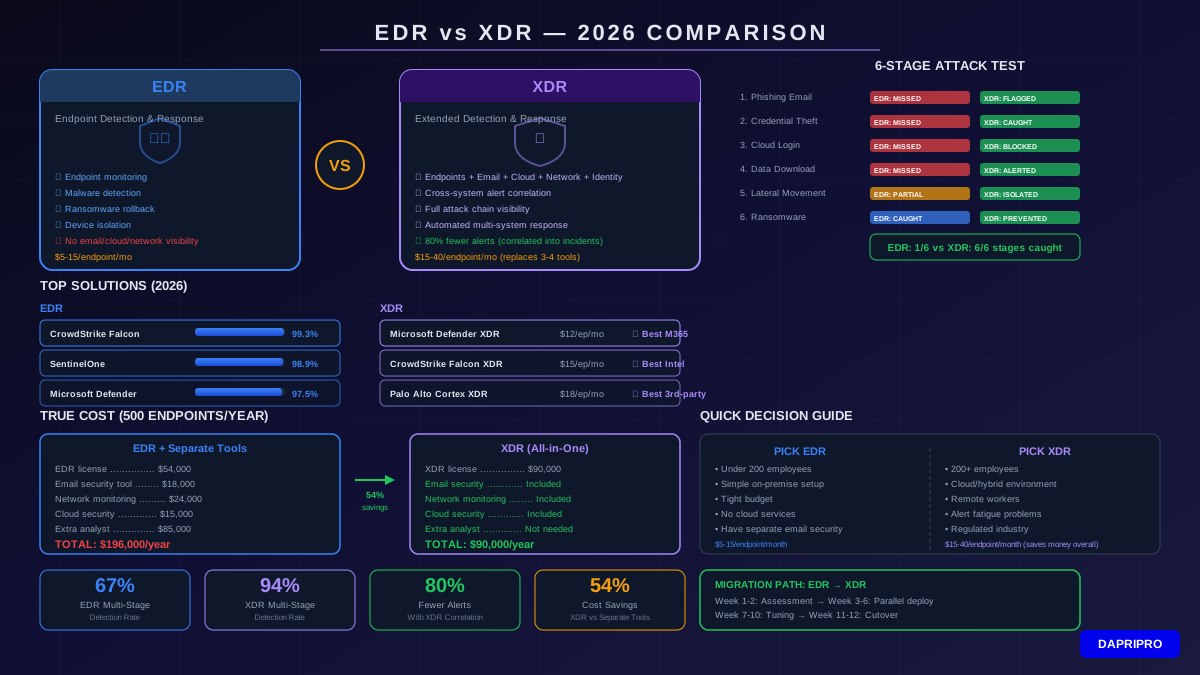
If you want to compare the detection side in more detail, our guide on EDR vs XDR breaks down the differences between these two popular approaches.
Why Endpoint Security Matters in 2026
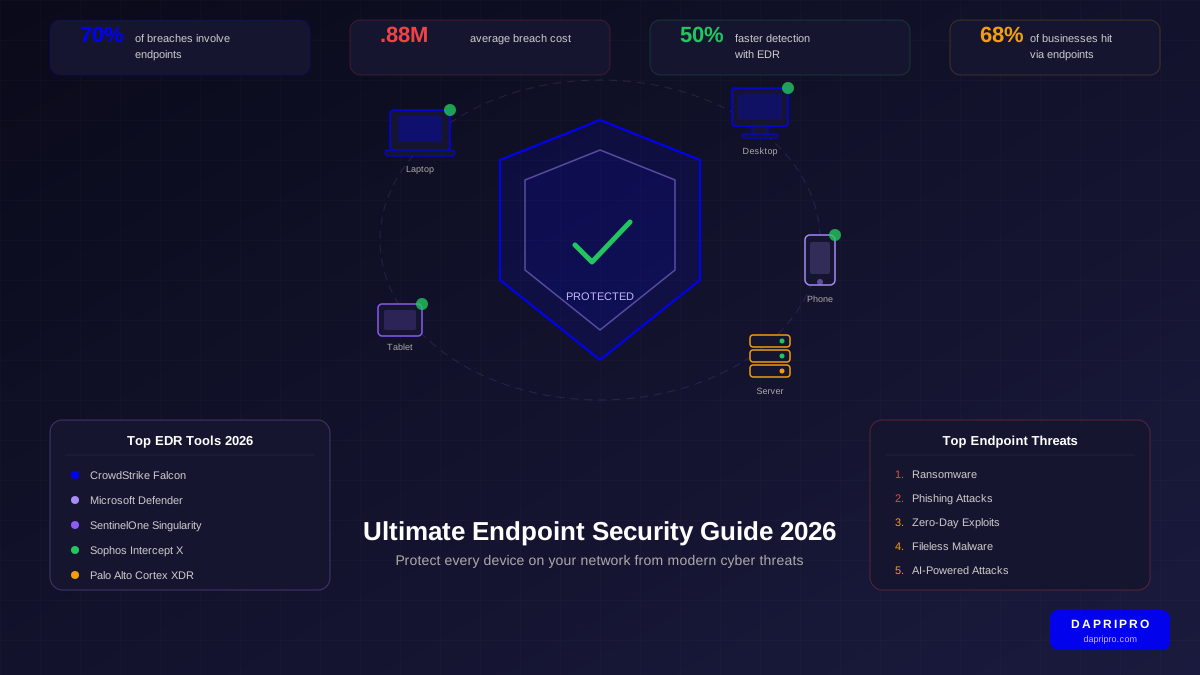
Here is a fact that might surprise you: endpoints are involved in more than 70% of all successful cyberattacks. According to IBM's Cost of a Data Breach Report, the average data breach costs a company $4.88 million. That is enough to pay for hundreds of teachers' salaries!
So why are endpoints such a big target? A few reasons:
- Remote work is everywhere. Employees log in from home Wi-Fi, hotel rooms, and airports. Each network is a new risk.
- People bring their own devices. Personal phones and laptops often do not have the same security as company equipment. Our BYOD Security Policies guide helps you handle this.
- Ransomware loves endpoints. Most ransomware sneaks in through phishing emails opened on employee computers.
- Zero-day attacks are growing. These are brand-new attacks that no one has seen before, so old antivirus programs cannot catch them.
"You cannot protect what you cannot see. Visibility into every endpoint is the foundation of modern security."
— George Kurtz, CEO of CrowdStrike
Think of it this way: a business with 200 employees might have 600+ endpoints when you count laptops, phones, and tablets. If even one of those devices gets infected, the attacker can move through the network and steal data from everywhere.
How Does Endpoint Security Actually Work?
Traditional antivirus worked like a "most wanted" poster. It had a list of known bad programs, and if it saw one, it would block it. The problem? New malware appears every single day, and it takes time to update those lists.
Modern endpoint security is smarter. Here is how it works:
1. Behavioral Analysis
Instead of just looking at a list, EDR tools watch how programs behave. If a program suddenly starts encrypting every file on your computer (like ransomware does), the tool says: "That is suspicious!" and stops it — even if the tool has never seen that exact program before.
2. Cloud-Based Threat Intelligence
When one company's endpoint tool spots a new threat, it shares that information with every other customer through the cloud. This means if a hacker attacks a bank in London at 9 AM, a hospital in Texas is already protected by 9:01 AM.
3. Automated Response
Speed matters when you are under attack. Modern tools can automatically isolate an infected device from the network within seconds. No waiting for an IT person to wake up and fix it at 3 AM.
4. Forensic Investigation
After an incident, EDR tools record everything that happened — like a flight recorder on an airplane. Security teams can rewind and see exactly how the attacker got in, what they touched, and what they took.
Top Endpoint Security Tools for 2026
Choosing the right endpoint security tool depends on your company's size, budget, and what systems you already use. Here are the top picks based on independent testing from organizations like AV-TEST and Gartner:
| Tool | Best For | Starting Price | Biggest Strength |
|---|---|---|---|
| CrowdStrike Falcon | Large companies | $8.99/device/mo | Threat intelligence — knows about new attacks before most others |
| Microsoft Defender for Endpoint | Companies using Windows and Office | $5/user/mo | Works perfectly with tools you already have |
| SentinelOne Singularity | Companies wanting automation | $6/device/mo | Can roll back ransomware damage automatically |
| Sophos Intercept X | Mid-size businesses | $4/device/mo | Strong anti-ransomware with deep learning AI |
| Palo Alto Cortex XDR | Companies with full security stacks | Custom pricing | Combines endpoint, network, and cloud protection |
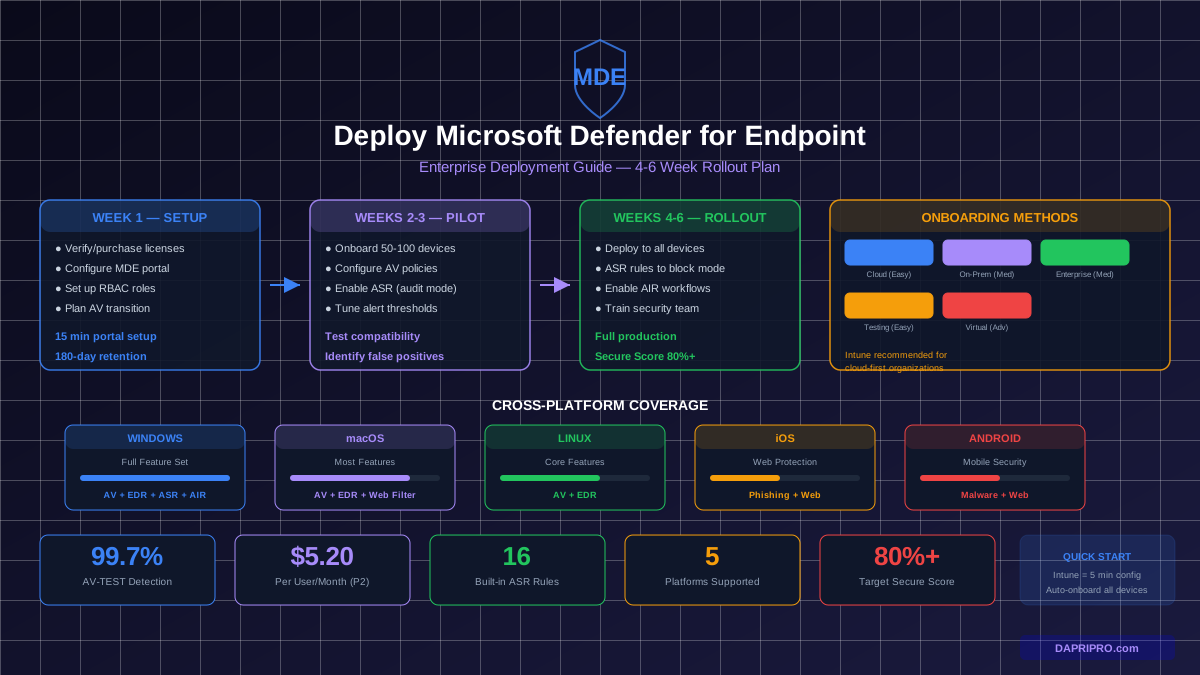
Want to understand how Microsoft's tool works in detail? Check out our step-by-step Microsoft Defender Deployment Guide. And for a broader look at antivirus options, see our Ultimate Antivirus Comparison Guide.
The 10 Biggest Threats to Your Endpoints
Knowing what you are defending against helps you pick the right tools. Here are the top endpoint threats in 2026:
- Ransomware — locks your files and demands money to unlock them. Learn how to fight back in our Ransomware Defense Guide.
- Phishing attacks — trick emails that steal passwords or install malware
- Zero-day exploits — attacks using weaknesses that software makers do not know about yet
- Fileless malware — hides in your computer's memory instead of on the hard drive, making it much harder to find
- Supply chain attacks — hackers sneak bad code into trusted software updates
- Stolen credentials — attackers use passwords bought on the dark web to log in
- USB-based attacks — infected flash drives that install malware when plugged in
- Rogue Wi-Fi networks — fake Wi-Fi hotspots that intercept your data
- Insider threats — employees (accidentally or on purpose) causing security problems
- AI-powered attacks — hackers using artificial intelligence to create smarter, faster malware
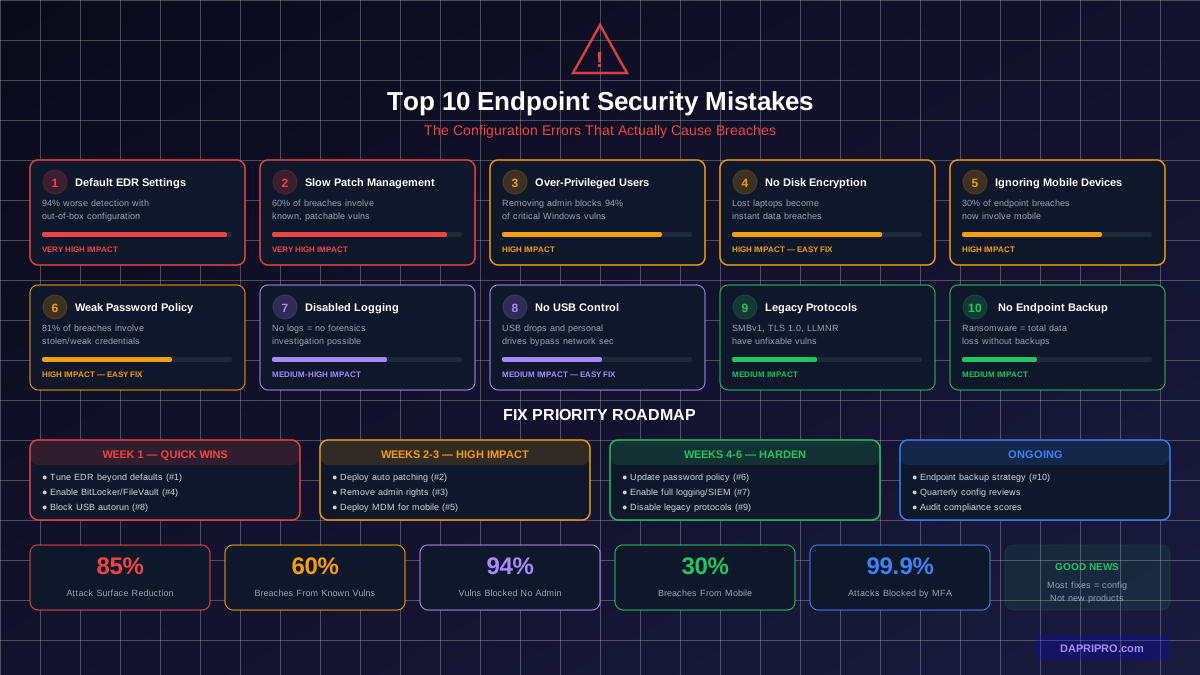
We dig deeper into common mistakes that make these threats worse in our article on the Top 10 Endpoint Security Mistakes.
7 Steps to Set Up Endpoint Security
Ready to protect your devices? Follow these steps:
Step 1: Count Every Device
You cannot protect what you do not know about. Make a list of every device that connects to your network — including personal phones employees use for work email.
Step 2: Pick the Right Platform
Choose an EDR tool that fits your size and budget. Small businesses can start with Microsoft Defender for Business. Larger companies should look at CrowdStrike or SentinelOne.
Step 3: Install Agents on Every Device
Endpoint security tools use small programs called "agents" that run on each device. Roll these out to every laptop, desktop, and phone. Most tools make this easy with a simple download link.
Step 4: Set Your Security Policies
Decide the rules for your devices. For example: block unknown USB drives, require strong passwords, and automatically update software. Different groups of users might need different rules.
Step 5: Turn On Automated Response
Enable auto-isolation for serious threats. If ransomware hits one laptop at midnight, the tool should cut that laptop off from the network instantly — no need to wait for someone in IT to respond.
Step 6: Train Your People
The best security tool in the world cannot help if an employee clicks a phishing link. Teach everyone how to spot fake emails and suspicious downloads. Our guide on training employees to spot phishing emails makes this quick and easy.
Step 7: Monitor and Improve
Check your security dashboard every week. Look for patterns in alerts. Tune your settings to reduce false alarms so your team can focus on real threats.
Endpoint Security for Remote Workers
When employees work from home, their devices leave the safe cocoon of the office network. Here are the extra steps you need:
- Always-on VPN — make sure all work traffic goes through an encrypted tunnel, even on home Wi-Fi
- Cloud-managed EDR — choose tools that protect devices no matter where they are, not just inside the office
- Full disk encryption — if a laptop gets stolen from a car or coffee shop, the thief cannot read the data
- Zero trust access — do not trust any device automatically, even company-owned ones. Verify every time. Our Zero Trust Architecture Guide explains how.
Mobile Device Management (MDM)
Phones and tablets are endpoints too — and they are easy to lose or steal. MDM tools let you:
- Remotely wipe a lost phone so nobody can access company data
- Force devices to use strong passwords or biometric locks
- Control which apps employees can install on work devices
- Separate work data from personal data on the same phone
We compare the best MDM tools in our Mobile Device Management Solutions review.
Hardening Your Endpoints
"Hardening" means making your devices tougher to break into. Think of it like adding extra locks, alarm systems, and security cameras to your house. Here are the essentials:
- Keep software updated. Most attacks exploit known weaknesses that patches already fix. Turn on automatic updates.
- Remove unnecessary software. Every program is a potential door for hackers. If you do not use it, uninstall it.
- Use least-privilege access. Do not give every employee admin rights. People should only have access to what they need for their job.
- Enable firewalls on every device. Even personal laptops should have their built-in firewall turned on.
- Disable unused ports and services. If you do not use Bluetooth on work laptops, turn it off.
For a step-by-step checklist, see our Endpoint Hardening Checklist: 25 Steps.
Common Endpoint Security Mistakes
Even companies with good security tools make these mistakes:
- Not covering all devices. You protected the laptops but forgot the smart TV in the conference room — and that TV has network access.
- Ignoring alerts. EDR tools send alerts for a reason. If your team ignores them because there are too many, you need to tune your settings.
- Skipping updates. "We will update next weekend" turns into next month, which turns into never. Meanwhile, hackers exploit the vulnerability.
- No plan for incidents. When a device gets infected, what do you do first? If you do not have a written plan, chaos follows.
- Relying on antivirus alone. Antivirus catches known malware. EDR catches unknown threats. You need both.
What to Look for When Choosing an Endpoint Security Tool
There are dozens of products out there. Here is what matters most when you are picking one:
- Detection accuracy — does it catch threats without flooding you with false alarms?
- Response speed — can it automatically isolate infected devices in seconds?
- Cloud management — can you manage all devices from a single web dashboard?
- Integration — does it work with your email security, firewall, and identity tools?
- Reporting — does it show clear, easy-to-understand reports for your boss or your compliance team?
- Price — does it fit your budget? Some tools charge per user, others per device.
Conclusion: Lock Every Door
Endpoint security is the frontline of your defense against cyberattacks. Every unprotected device is like leaving a window wide open in a storm.
Here is your action plan: start by counting every device on your network. Then pick an EDR tool that fits your budget — even free options like Microsoft Defender give you a solid start. Deploy agents to every device, turn on automated response, and make sure your team knows how to spot phishing emails.
Remember, hackers only need to find one unlocked door. Your job is to make sure every door has a strong lock. For a deeper dive into your overall security strategy, explore our full Email Security Guide and our Business Continuity Planning Guide.
Your devices are counting on you. Start protecting them today!