You've heard the acronyms. EDR. XDR. MDR. SIEM. It feels like the cybersecurity industry invents a new abbreviation every week just to confuse people. But the EDR vs XDR question actually matters — picking the wrong one could mean you're either overpaying for features you don't need, or you're leaving massive blind spots in your security.
Here's the simplest way to think about it: EDR is a security camera for your computers. XDR is a security camera system for your entire building — computers, network, email, cloud, and everything in between.
This guide will help you decide which one your business actually needs based on your size, budget, and threat landscape. No vendor BS, just data and honest comparisons.
What EDR Actually Does (And What It Misses)
EDR stands for Endpoint Detection and Response. "Endpoints" means any device that connects to your network — laptops, desktops, servers, phones, tablets, even IoT devices. EDR watches what happens on these devices and responds when something suspicious occurs.
Think of EDR like a really smart bodyguard assigned to each device. The bodyguard watches every process that runs, every file that's created, every network connection made. When something sketchy happens — like a PowerShell script trying to dump passwords — the bodyguard steps in.
What EDR is great at:
- Detecting malware that traditional antivirus misses (fileless attacks, living-off-the-land techniques)
- Recording everything that happens on an endpoint (forensics)
- Automatically isolating infected devices from the network
- Rolling back ransomware encryption to a clean state
- Threat hunting — proactively searching for hidden threats
What EDR can't see:
- Attacks that move through email (phishing that doesn't touch the endpoint yet)
- Network-level attacks (DNS tunneling, lateral movement between devices)
- Cloud account compromises (someone logging into your Azure AD from Russia)
- Identity-based attacks (stolen credentials used from a new device)
EDR's blind spot is anything that hasn't reached an endpoint yet, or anything that moves between systems without touching the endpoint's file system. In a modern attack, only about 30% of the malicious activity happens on any single endpoint. The rest happens in email, the network, cloud services, and identity systems.
How XDR Fills EDR's Blind Spots
XDR stands for Extended Detection and Response. The "Extended" part means it extends beyond just endpoints to include email, network traffic, cloud workloads, identity systems, and more — all in one platform.
If EDR is a bodyguard for each device, XDR is the entire security operations center watching everything at once. It sees the phishing email arrive, the user click the link, the malware download, the lateral movement to the server, and the data exfiltration attempt — all as one connected attack story.
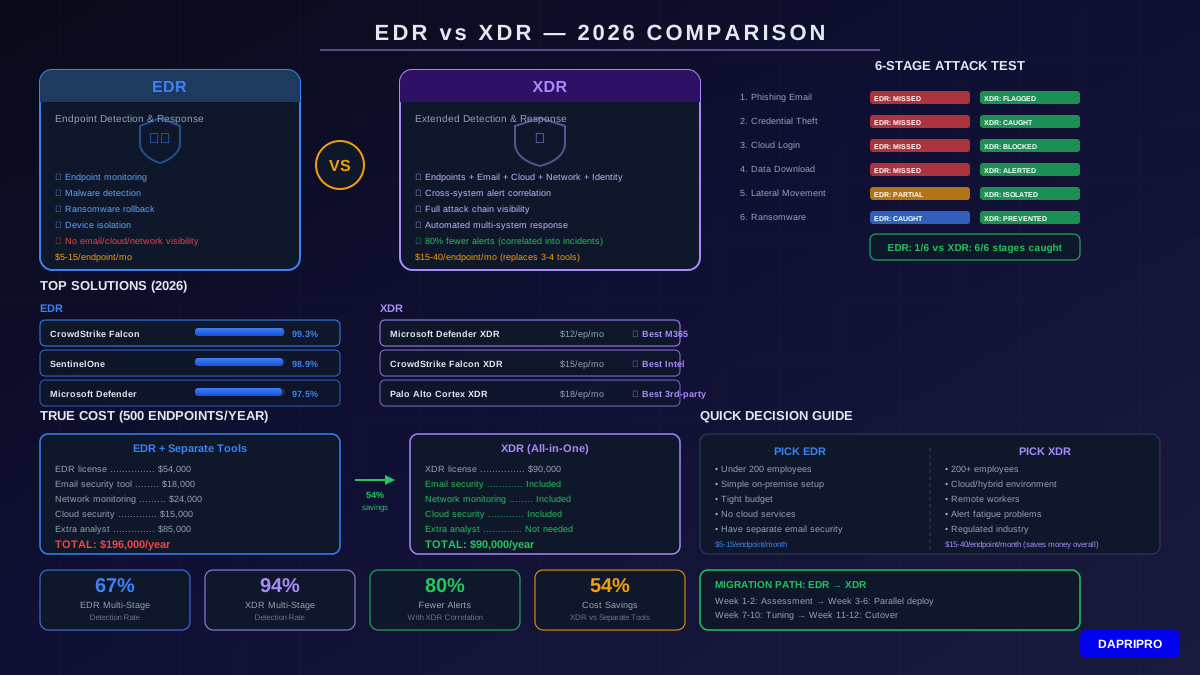
| Feature | EDR | XDR |
|---|---|---|
| Data sources | Endpoints only | Endpoints + email + network + cloud + identity |
| Alert correlation | Per-endpoint alerts | Cross-system correlated incidents |
| Multi-stage attack detection | 67% detection rate | 94% detection rate |
| Alert volume | High (many separate alerts) | Low (correlated into incidents) |
| Mean time to detect | Hours to days | Minutes to hours |
| Automated response | Isolate endpoint, kill process | Disable accounts, block IPs, quarantine email, isolate endpoint |
| Investigation | Endpoint-focused timeline | Full attack story across all systems |
| Price per endpoint/month | $5 - $15 | $15 - $40 |
| Team needed | 1-2 security analysts | 1-3 security analysts (fewer alerts to chase) |
| Best for | SMBs, simple environments | Mid-size to enterprise, hybrid/cloud environments |
The biggest XDR advantage isn't any single feature — it's alert correlation. A typical EDR might generate 50 separate alerts during one attack. An analyst has to manually connect them to understand what happened. XDR automatically connects all those alerts into one incident with a clear attack timeline. That reduces investigation time by up to 80%.
Real-World Attack Test: EDR vs XDR Head-to-Head
To show the actual difference, let's walk through a realistic phishing-to-ransomware attack and see what each solution catches:
The Attack Scenario
An employee receives a phishing email with a link to a fake SharePoint login page. They enter their credentials. The attacker uses those credentials to log into the company's real Microsoft 365 account, downloads sensitive files, moves laterally to a file server, and deploys ransomware.
What EDR Catches
- ❌ Phishing email arrives — EDR doesn't monitor email
- ❌ User enters credentials — Happened in a browser, EDR might see the URL but may not flag it
- ❌ Attacker logs into M365 — EDR doesn't monitor cloud logins
- ❌ Files downloaded from cloud — EDR doesn't monitor cloud file access
- ⚠️ Lateral movement to file server — EDR might detect unusual RDP or SMB connections
- ✅ Ransomware execution — EDR catches this, but by now the attacker has been inside for hours
What XDR Catches
- ⚠️ Phishing email arrives — XDR flags the suspicious URL and sender
- ✅ User enters credentials — XDR correlates the suspicious URL with the credential entry
- ✅ Attacker logs into M365 — XDR detects impossible travel (login from two locations in 5 minutes)
- ✅ Files downloaded from cloud — XDR alerts on unusual bulk download pattern
- ✅ Lateral movement — XDR sees the full chain and auto-isolates the compromised account
- 🛡️ Ransomware execution — Prevented because XDR already blocked the attacker at step 3
This is why XDR's 94% multi-stage attack detection rate crushes EDR's 67%. It's not that EDR is bad — it's that modern attacks don't happen on just one device anymore.
Top EDR and XDR Solutions Compared (2026)
The market has three clear tiers. Here's how the major players stack up based on independent testing, customer reviews, and MITRE ATT&CK evaluations:
Top EDR Solutions
| EDR Solution | MITRE Score | Price/Endpoint/Mo | Best Feature |
|---|---|---|---|
| CrowdStrike Falcon Insight | 99.3% | $8.99 | Lightweight agent, fast detection |
| SentinelOne Singularity | 98.9% | $6.00 | Autonomous response, Storyline |
| Microsoft Defender for Endpoint | 97.5% | $5.20 (P2) | Built into Windows, easy M365 integration |
| Sophos Intercept X | 96.7% | $5.00 | Anti-ransomware rollback |
Top XDR Solutions
| XDR Solution | Data Sources | Price/Endpoint/Mo | Best Feature |
|---|---|---|---|
| Microsoft Defender XDR | Endpoint, email, identity, cloud, apps | $12 (E5 Security) | Best M365 integration, Copilot AI |
| CrowdStrike Falcon XDR | Endpoint, network, identity, cloud | $15 | Threat intelligence, Charlotte AI |
| Palo Alto Cortex XDR | Endpoint, network, cloud, third-party | $18 | Best third-party integration |
| Trend Micro Vision One | Endpoint, email, network, cloud | $14 | Risk visibility dashboard |
The Real Cost Comparison (Not Just License Fees)
License pricing tells only part of the story. The total cost of ownership includes tools, people, and incident costs. Here's what it actually looks like for a 500-employee company:
| Cost Category | EDR Only | XDR Platform |
|---|---|---|
| EDR/XDR license (500 endpoints) | $54,000/year | $90,000/year |
| Separate email security tool | $18,000/year | Included |
| Network monitoring tool | $24,000/year | Included |
| Cloud security posture tool | $15,000/year | Included |
| Additional analysts needed | +1 (alert fatigue) | 0 (automated correlation) |
| Extra analyst salary | $85,000/year | $0 |
| Total annual cost | $196,000 | $90,000 |
Wait — XDR is actually cheaper? For a 500-endpoint company, yes. XDR replaces 3-4 separate tools and reduces alert volume so much that you might not need that extra analyst. The break-even point is usually around 300-400 endpoints. Below that, EDR alone is more cost-effective.
The Decision Framework: EDR or XDR?
Don't overthink this. Answer these five questions and the answer reveals itself:
How to Migrate from EDR to XDR (Without Breaking Everything)
If you've decided XDR is right for you, here's the migration playbook:
Phase 1: Assessment (Week 1-2)
- Inventory all current security tools (EDR, email security, SIEM, etc.)
- Document which tools XDR will replace and which will remain
- Check integration compatibility with your existing infrastructure
- Get budget approval showing total cost savings
Phase 2: Parallel Deployment (Week 3-6)
- Deploy XDR alongside existing EDR — don't rip and replace
- Connect email, network, and identity data sources to XDR
- Run both systems in parallel to validate XDR detection quality
- Compare alert volumes and detection rates side by side
Phase 3: Tuning (Week 7-10)
- Adjust detection rules to reduce false positives
- Configure automated response playbooks
- Train your security team on the XDR platform
- Set up custom dashboards and reports
Phase 4: Cutover (Week 11-12)
- Disable old separate tools one at a time
- Verify all data sources are flowing into XDR correctly
- Remove old EDR agents (if switching vendors)
- Document the new incident response workflow
The whole migration typically takes 8-12 weeks. The most common mistake is trying to do it in 2 weeks — that leads to gaps in coverage and frustrated analysts.
What About MDR? (When You Don't Have a Security Team)
MDR stands for Managed Detection and Response. It's basically EDR or XDR run by someone else's security team. If you don't have in-house security analysts — and most companies under 1,000 employees don't — MDR is worth considering.
With MDR, a vendor's security operations center (SOC) monitors your endpoints 24/7, investigates alerts, and responds to threats for you. You get the detection capability without hiring a team.
MDR pricing: $15-50 per endpoint/month (includes the EDR/XDR license plus the human analysts). That sounds expensive, but compare it to hiring two security analysts at $85,000 each plus benefits — MDR is usually cheaper for companies under 1,000 endpoints.
Top MDR providers: CrowdStrike Falcon Complete, SentinelOne Vigilance, Sophos MDR, Arctic Wolf. If you're already using one of these EDR platforms, their MDR service is the easiest upgrade — same agent, same console, just add human monitoring.
The Bottom Line: Your Decision Checklist
Here's the simplest way to decide:
- Under 200 employees, simple environment, tight budget: EDR (CrowdStrike Falcon Insight or SentinelOne)
- 200-1,000 employees, cloud-heavy, some remote workers: XDR (Microsoft Defender XDR if on M365, CrowdStrike Falcon XDR otherwise)
- 1,000+ employees, multi-cloud, regulated industry: XDR with MDR services (Palo Alto Cortex XDR or CrowdStrike Falcon Complete)
- Any size, no security team at all: MDR (outsourced XDR with human analysts)
Whatever you choose, make sure you actually use the tool's features. The most expensive EDR or XDR platform in the world is worthless if nobody's looking at the alerts. Configure automated responses for common threats, review weekly incident reports, and run a detection test at least once a quarter to make sure everything's working.