Ransomware is the most financially devastating cyber threat facing organizations today. The average ransomware attack costs $4.5 million — and that number includes organizations that had backups and did not pay the ransom. For those who paid, the average ransom alone was $1.5 million, with total costs (downtime, recovery, legal, reputational damage) far exceeding the ransom itself.
In 2026, ransomware is a billion-dollar criminal industry powered by Ransomware-as-a-Service (RaaS) platforms that let anyone with criminal intent launch sophisticated attacks. The good news: ransomware is also one of the most preventable threats. Organizations with strong backup strategies, network segmentation, and incident response plans recover in days instead of months.
How Ransomware Attacks Work
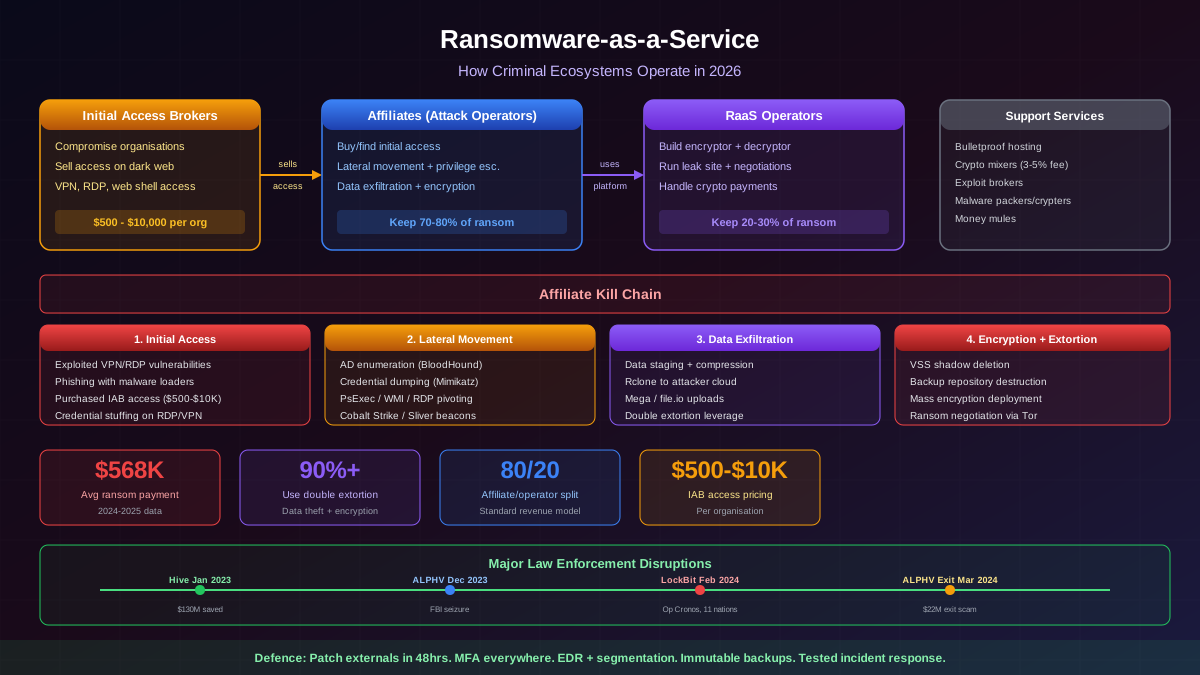
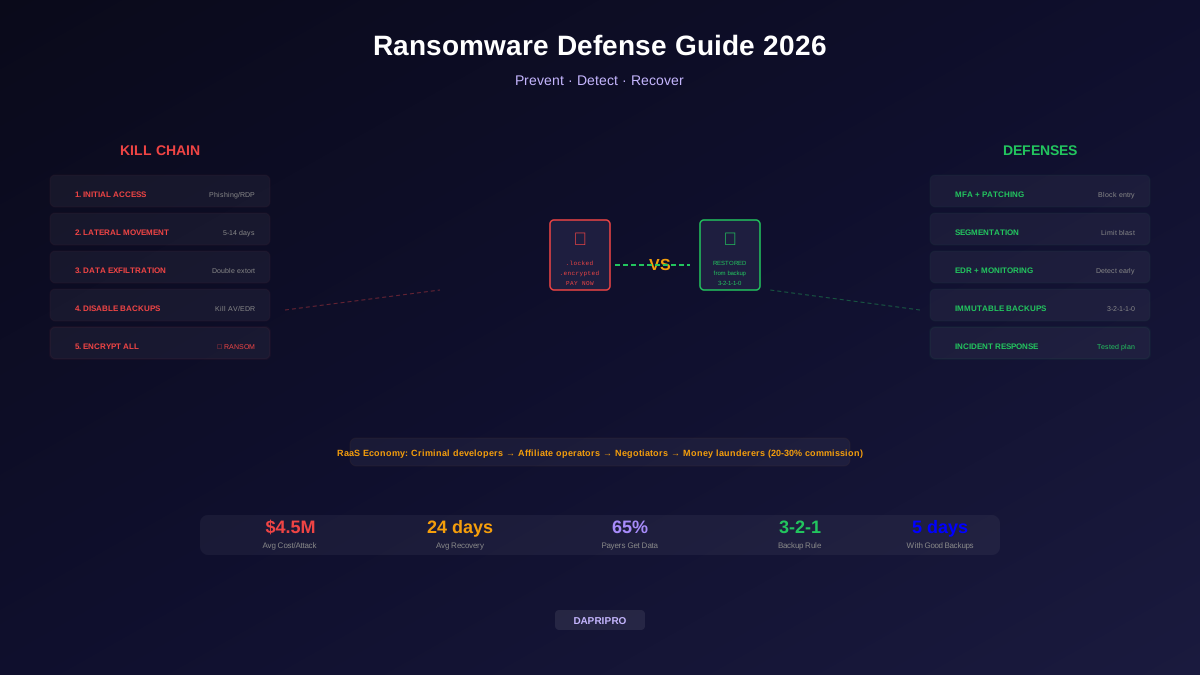
Ransomware attacks do not happen instantly. Attackers typically spend 5-14 days inside your network before encrypting anything. Understanding this kill chain gives you multiple opportunities to detect and stop the attack:
Ransomware-as-a-Service: The Criminal Ecosystem
Ransomware-as-a-Service (RaaS) has industrialized cybercrime. RaaS platforms work like legitimate SaaS businesses — developers create the ransomware toolkit, and "affiliates" (other criminals) use it to carry out attacks. The developers take 20-30% of every ransom payment.
RaaS platforms provide affiliates with:
- Ready-made ransomware with encryption, exfiltration, and ransom note capabilities
- Admin dashboards to manage victims, track payments, and generate decryption keys
- Negotiation chat portals for communicating with victims
- Leak sites on the dark web to publish stolen data from victims who do not pay
- Technical support — yes, some RaaS providers offer customer support to their criminal affiliates
This model means that technical skill is no longer required to launch ransomware attacks. A criminal can rent sophisticated ransomware for a percentage of profits, just like a franchise restaurant.
Backup Strategy: Your Last Line of Defense
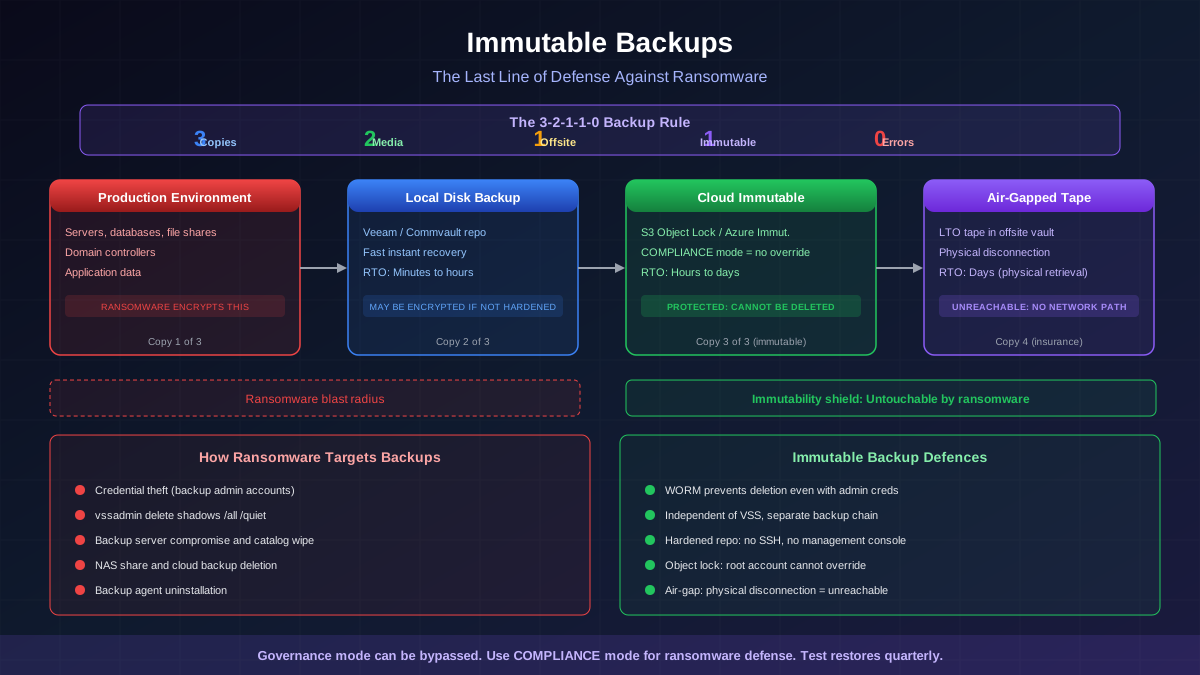
Immutable backups are the single most important ransomware defense. Even if every other defense fails and attackers encrypt your entire network, proper backups let you recover without paying.
The 3-2-1-1-0 Backup Rule
| Component | Rule | Why It Matters |
|---|---|---|
| 3 | 3 copies of your data | Redundancy — if one fails, you have two more |
| 2 | 2 different media types | Diversity — local NAS + cloud storage protects against single-technology failures |
| 1 | 1 copy offsite | Disaster recovery — protects against physical events (fire, flood) and network-wide encryption |
| 1 | 1 immutable copy | Ransomware-proof — Write-Once-Read-Many (WORM) storage that CANNOT be modified or deleted, even by admins |
| 0 | 0 errors in restore testing | Verification — automated restore tests prove your backups actually work. An untested backup is not a backup. |
Immutable Backup Options
- Cloud object lock — AWS S3 Object Lock, Azure Immutable Blob Storage, GCP Bucket Lock create WORM-compliant storage that even administrators cannot delete during the retention period.
- Air-gapped backups — physically disconnected storage (tape, removable drives) that ransomware cannot reach because there is no network connection.
- Veeam Hardened Repository — Linux-based immutable backup storage with no SSH access and operating system-level immutability.
- Cohesity DataLock — software-defined immutable backups with DataLock policy enforcement.
Network Segmentation to Contain Ransomware
Network segmentation limits the blast radius of a ransomware attack. Without segmentation, ransomware can spread from a single infected workstation to every system on the network. With proper segmentation:
- Critical systems are isolated — domain controllers, backup servers, financial systems, and databases should be in separate, heavily protected segments.
- Least privilege network access — workstations should only be able to reach the specific servers and services they need. A marketing department workstation should never be able to contact the backup server directly.
- Micro-segmentation — in modern zero trust architectures, every workload is its own segment with deny-all-by-default policies. Tools like VMware NSX, Illumio, and Akamai Guardicore provide micro-segmentation without redesigning your network.
The First 24 Hours: Ransomware Incident Response
When ransomware strikes, the first 24 hours determine whether you recover in days or months:
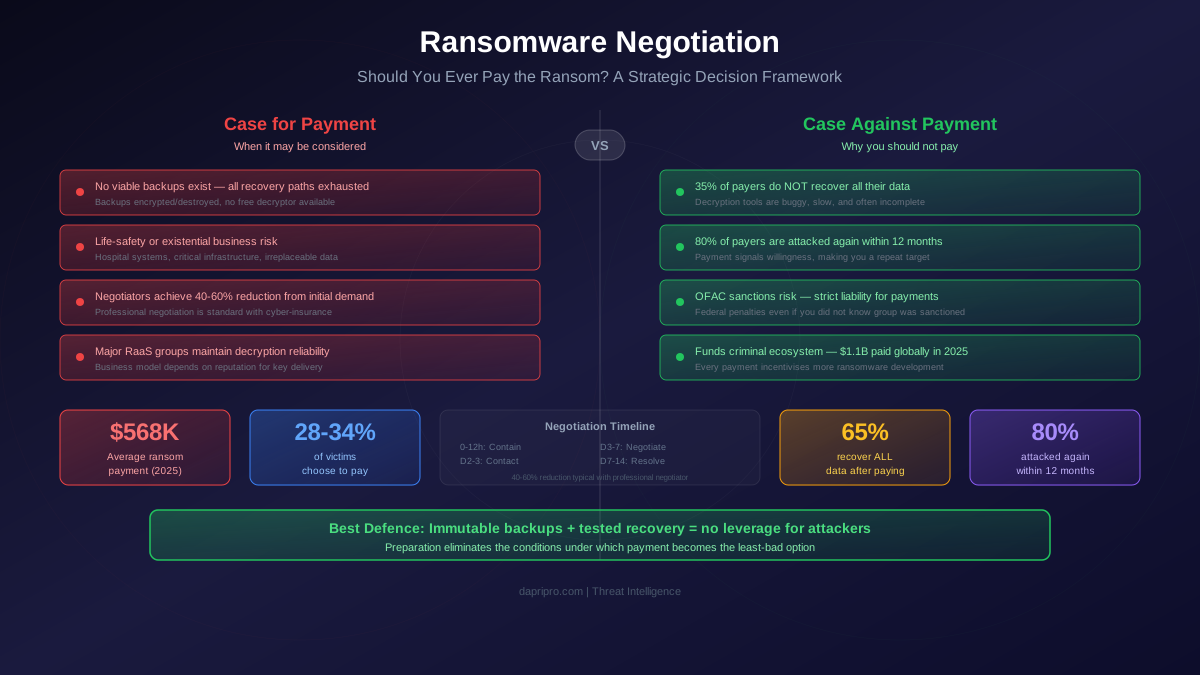
To Pay or Not to Pay
The ransom payment decision is complex. Here are the facts:
- Only 65% of payers get all data back — decryptors are often buggy, slow, or incomplete.
- 80% of payers are attacked again — paying marks you as a willing payer.
- Average ransom in 2025 was $1.5 million — but total costs (downtime, recovery, legal, reputation) average $4.5 million regardless of payment.
- OFAC sanctions risk — paying a group on the U.S. Treasury's sanctions list can result in penalties up to $20 million.
- Insurance complications — many cyber insurance policies now require evidence that you have basic security controls (MFA, backups, EDR) before covering ransomware costs.
Free Decryption Tools
Before considering payment, check the No More Ransom project (nomoreransom.org) — a collaboration between Europol, the Dutch National Police, and security companies. They provide free decryption tools for 170+ ransomware variants. Upload a ransom note or encrypted file sample to identify the variant and check if a free decryptor is available.
Ransomware Prevention Checklist
- Implement MFA everywhere — especially on VPN, RDP, email, and admin portals. MFA blocks 99.9% of credential-based attacks.
- Patch aggressively — prioritize internet-facing systems (VPN, firewall, web applications). Most ransomware exploits known vulnerabilities with available patches.
- Deploy EDR — Endpoint Detection and Response tools detect ransomware behavior (mass file encryption, shadow copy deletion, security tool tampering) and can automatically contain infected endpoints.
- Segment your network — isolate critical systems, backup infrastructure, and domain controllers.
- Implement 3-2-1-1-0 backups — with at least one immutable copy and regular automated restore testing.
- Disable RDP on the internet — if remote access is needed, use VPN + MFA, not exposed RDP.
- Train employees — phishing is the #1 ransomware delivery method. Monthly simulated phishing campaigns reduce click rates dramatically.
- Restrict PowerShell and macro execution — use AppLocker or WDAC to control which scripts and applications can run.
- Monitor for early warning signs — unusual login times, Cobalt Strike beacons, Mimikatz use, shadow copy deletion, and security tool tampering.
- Test your IR plan — run tabletop exercises quarterly. An untested plan is just a document.
Build Ransomware Resilience
Ransomware defense is about resilience, not perfection. You cannot prevent every attack, but you can ensure that when an attack happens, you recover quickly without paying. The formula is simple: immutable backups + network segmentation + EDR + trained employees + tested incident response plan.
Organizations that invest in these fundamentals reduce their average recovery time from 24+ days to under 5 days and avoid ransom payments entirely. The cost of prevention is a fraction of the cost of recovery.