Your web application is under attack right now. Automated scanners are probing your login forms for SQL injection. Bots are testing every URL parameter for cross-site scripting. Credential stuffing tools are hammering your authentication endpoint with stolen username-password pairs. This is not hypothetical — it is the baseline reality for every public-facing web application in 2026.
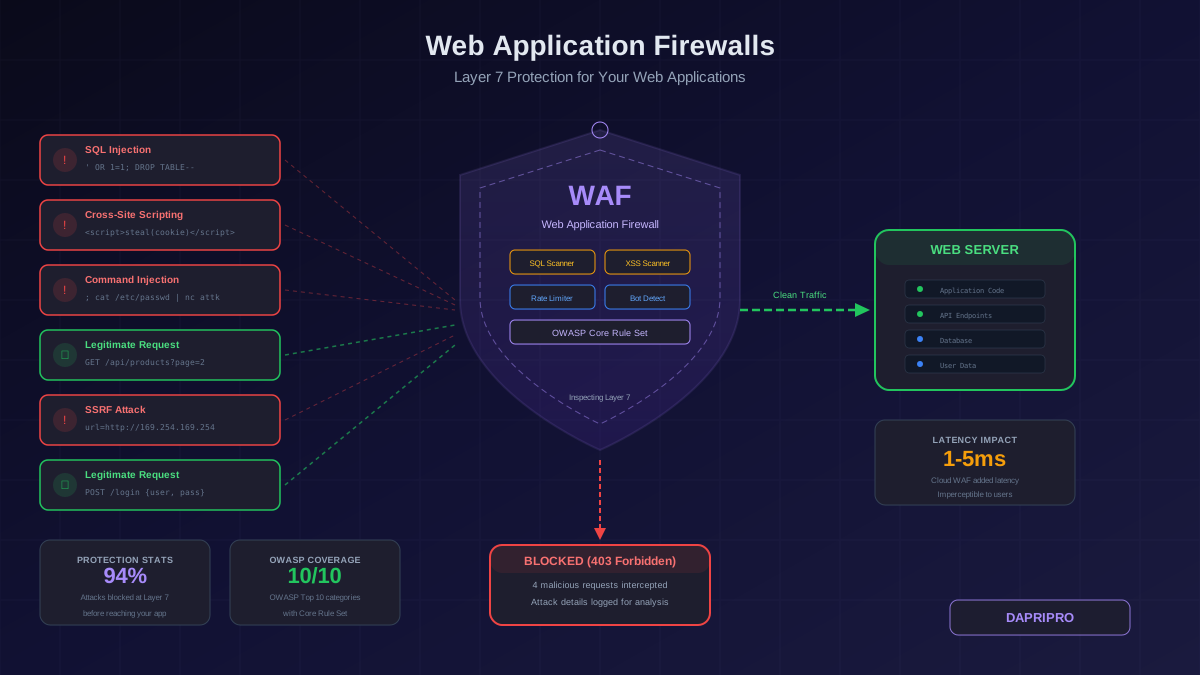
A web application firewall sits between the internet and your application, inspecting every HTTP request for malicious patterns and blocking attacks before they reach your server. Unlike network firewalls that operate at the IP and port level, WAFs understand the application layer — they can read form submissions, parse JSON payloads, and distinguish between a legitimate search query and a SQL injection attempt.
How WAFs Actually Work
Layer 7 Inspection
Every HTTP request that reaches your web application contains data that could be malicious: URL parameters, POST body content, HTTP headers, cookies, and uploaded files. A WAF parses each of these components and compares them against a set of rules designed to detect attack patterns.
The three primary detection methods:
- Signature-based (negative security model): The WAF maintains a database of known attack patterns — SQL keywords in unexpected places, script tags in form fields, shell commands in parameters. Any request matching a signature is blocked. This is how most WAFs detect OWASP Top 10 attacks out of the box
- Allowlist-based (positive security model): Instead of defining what is bad, you define what is good — which parameters each endpoint accepts, what data types are valid, what length ranges are acceptable. Anything outside the allowed patterns is blocked. This is more secure but requires significantly more configuration work
- Behavioral and ML-based: Modern WAFs use machine learning to build a baseline of normal traffic patterns and flag anomalies — unusual request rates, abnormal parameter distributions, or access patterns that deviate from learned norms. This catches zero-day attacks that signature-based detection misses
Deployment Modes
WAFs deploy in three configurations, each with different trade-offs:
- Reverse proxy (most common): All traffic flows through the WAF before reaching your web server. The WAF terminates the SSL/TLS connection, inspects the decrypted traffic, and forwards clean requests to your server. This provides full visibility but makes the WAF a single point of failure
- Transparent bridge: The WAF sits inline on the network without requiring DNS or routing changes. Traffic passes through it transparently. Easier to deploy but harder to manage SSL/TLS inspection
- Out-of-band / tap mode: The WAF receives a copy of traffic (via port mirroring or network tap) and analyzes it without sitting in the data path. This is detection-only — it can alert on attacks but cannot block them. Useful for initial evaluation and forensics
WAF Protection Against the OWASP Top 10
The OWASP Top 10 represents the most critical web application security risks. Here is how a properly configured WAF addresses each one:
SQL Injection (A03:2021)
WAFs detect SQL injection by scanning request parameters, headers, and body content for SQL syntax patterns — single quotes followed by SQL keywords, UNION SELECT statements, boolean-based blind injection markers, and time-based payloads. The OWASP Core Rule Set includes hundreds of patterns covering MySQL, PostgreSQL, MSSQL, Oracle, and SQLite injection variants.
Common false positive: Legitimate search queries or blog posts containing words like "SELECT," "DROP," or "INSERT" can trigger SQL injection rules. Tune these by whitelisting specific parameters on specific endpoints (for example, exclude the blog content editor's body parameter from SQL injection scanning).
Cross-Site Scripting / XSS (A03:2021)
WAFs scan for script tags, event handlers (onload, onerror, onclick), javascript: URIs, and encoded variants in all input fields. Modern WAFs also detect DOM-based XSS patterns in URL fragments and mutation XSS techniques that bypass HTML sanitizers.
Common false positive: Rich text editors (TinyMCE, CKEditor, Quill) and markdown editors legitimately submit HTML content. Create exclusion rules for the specific endpoints and parameters that handle rich text input, while keeping XSS protection active everywhere else.
Broken Access Control (A01:2021)
WAFs can enforce path-based access restrictions (blocking requests to /admin from non-internal IPs), detect forced browsing attempts (sequential ID enumeration), and block parameter tampering (modifying user IDs in API requests). However, WAFs cannot fully replace application-level authorization — they can catch the obvious patterns but cannot understand complex business logic authorization rules.
Other Injection Attacks
Beyond SQL injection, WAFs protect against command injection (detecting shell metacharacters like semicolons, pipes, and backticks in parameters), LDAP injection (detecting LDAP filter syntax), XML External Entity (XXE) attacks (blocking DTD declarations in XML payloads), and Server-Side Request Forgery (blocking requests that attempt to access internal network ranges like 169.254.x.x or 10.x.x.x).
Cloud WAF Comparison
Cloud-based WAFs are the most practical choice for most organizations. They deploy in minutes, scale automatically, and include DDoS protection as a baseline feature.
Cloudflare WAF
- Strengths: Largest global network (300+ data centers), free tier with basic WAF rules, managed OWASP and Cloudflare-specific rule sets, excellent bot management, integrated DDoS protection
- Best for: Small to medium businesses, websites, and APIs that need fast deployment with minimal configuration
- Pricing: Free tier (limited rules), Pro at 20/month, Business at 200/month, Enterprise custom pricing
- Limitation: Custom rule complexity is limited on lower tiers; advanced bot management requires Enterprise
AWS WAF
- Strengths: Deep integration with AWS services (CloudFront, ALB, API Gateway, AppSync), AWS Managed Rules for common threats, highly customizable rule groups, pay-per-use pricing
- Best for: Organizations running workloads on AWS that want native integration
- Pricing: 5/month per web ACL + 1/month per rule + 0.60 per million requests inspected
- Limitation: Requires AWS infrastructure knowledge to configure properly; no built-in CDN (requires pairing with CloudFront)
Azure Front Door with WAF
- Strengths: Native Azure integration, managed OWASP 3.2 rule set, bot protection, geo-filtering, custom rules with rate limiting
- Best for: Azure-centric organizations and hybrid deployments
- Pricing: Standard tier includes basic WAF; Premium adds managed rule sets and bot protection
- Limitation: Rule customization is less flexible than AWS WAF; dashboard and alerting require Azure Monitor configuration
ModSecurity (Open Source / On-Premise)
- Strengths: Free and open source, runs as a module in Apache/Nginx/IIS, OWASP Core Rule Set is community-maintained and comprehensive, unlimited customization, no traffic leaves your infrastructure
- Best for: Organizations with compliance requirements restricting traffic routing, teams with strong Linux/web server skills, budget-constrained deployments
- Pricing: Free (open source); cost is operational (staff time for configuration, tuning, and maintenance)
- Limitation: Requires significant expertise to tune, no built-in DDoS protection, scaling is manual
Deploying a WAF Without Breaking Your Application
The biggest risk with WAF deployment is blocking legitimate traffic. Follow this sequence to deploy safely:
Phase 1: Detection Only (Weeks 1-2)
- Deploy the WAF in detection/log-only mode — it inspects all traffic and logs what it would block, but does not actually block anything
- Enable the OWASP Core Rule Set (or your cloud WAF's equivalent managed rule set) at its default paranoia level
- Monitor the logs daily. Identify false positives — legitimate requests that the WAF flags as malicious
- Catalog every false positive: which rule triggered, which endpoint and parameter, and why the request is legitimate
Phase 2: Rule Tuning (Week 2-3)
- Create exclusion rules for each documented false positive. Be as specific as possible — exclude a specific rule ID on a specific parameter on a specific endpoint, not broad wildcard exclusions
- Increase the paranoia level one step and repeat the detection-only monitoring. Higher paranoia levels catch more attacks but generate more false positives
- Test all critical user flows: login, registration, checkout, search, form submissions, file uploads, API calls. Verify none trigger WAF blocks
Phase 3: Active Blocking (Week 3+)
- Switch the WAF to blocking mode on one endpoint at a time, starting with the most attack-targeted endpoints (login, API, admin)
- Monitor error rates and user complaints. A spike in 403 errors or support tickets about "blocked" pages means a false positive was missed
- Gradually expand blocking to all endpoints over 1-2 weeks
- Set up automated alerting for unusual block rate increases — this can indicate either a new attack or a newly deployed application feature that conflicts with WAF rules
Advanced WAF Configuration
Rate Limiting and Bot Protection
Beyond attack detection, modern WAFs provide rate limiting that protects against credential stuffing, brute force attacks, and API abuse:
- Set per-IP rate limits on authentication endpoints (10-20 requests per minute is typical for login pages)
- Implement progressive challenges — CAPTCHA after 5 failed logins, temporary block after 20
- Use session-based rate limiting for authenticated endpoints to prevent API abuse from legitimate accounts
- Deploy bot detection rules that analyze browser fingerprints, TLS fingerprints (JA3/JA4), and JavaScript execution patterns to distinguish real browsers from automated tools
API-Specific Protection
APIs require different WAF rules than traditional web pages:
- Validate JSON and XML schemas at the WAF level — reject requests with unexpected fields or data types before they reach your API
- Enforce Content-Type headers (reject requests claiming to be JSON that contain form-encoded data)
- Apply stricter rate limits on API endpoints than on page requests
- Block requests with missing or invalid authentication tokens at the WAF rather than passing them to your API for rejection
Virtual Patching
When a vulnerability is discovered in your application and a code fix will take days or weeks to deploy, a WAF rule can block exploitation immediately:
- Analyze the vulnerability to determine the attack vector (which parameter, which payload pattern)
- Write a targeted WAF rule that blocks the specific attack pattern
- Deploy the rule immediately — this is your temporary fix until the real patch is deployed
- Remove the rule after the application code fix is in production
Virtual patching is one of the most valuable WAF capabilities for organizations that cannot deploy application patches quickly due to release cycle constraints or change management processes.
WAF Monitoring and Alerting
A WAF with no one watching the logs is barely better than no WAF at all. Essential monitoring:
- Block rate dashboard: Monitor the percentage of requests being blocked over time. Sudden spikes indicate either an attack or a false positive caused by a new application deployment
- Top blocked rules: Track which rules fire most frequently. A single rule generating thousands of blocks per day may indicate a persistent attacker or a misconfigured rule
- Geographic anomalies: Alert when significant traffic appears from countries your application does not serve
- Attack type distribution: Track the ratio of SQL injection versus XSS versus bot traffic versus other attack types. Shifts in distribution can signal a targeted campaign
- False positive tracking: Maintain a log of confirmed false positives and the exclusion rules created for them. Review quarterly to remove exclusions that are no longer needed
The Bottom Line
A WAF is the most impactful single security control you can deploy for web application protection. Start with a cloud-based WAF if you need to deploy quickly (Cloudflare for simplicity, AWS WAF for AWS-native infrastructure), or ModSecurity if you need full control and have the expertise. Deploy in detection-only mode first, tune aggressively for false positives, and expand to blocking gradually. And remember — a WAF catches attacks at the perimeter, but every SQL injection it blocks is a reminder that your application code also needs to validate and parameterize its inputs.