![GDPR for Small Businesses: Simplified Compliance Checklist [2026]](/images/sections/data-privacy-compliance/gdpr-compliance/gdpr-for-small-businesses-simplified-compliance-checklist.svg)
If you run a small business in 2026, GDPR compliance probably feels like something designed for corporations with entire legal departments. Hundreds of pages of regulation, data protection impact assessments, records of processing activities — it reads like a framework built for organizations with thousands of employees and millions of data subjects.
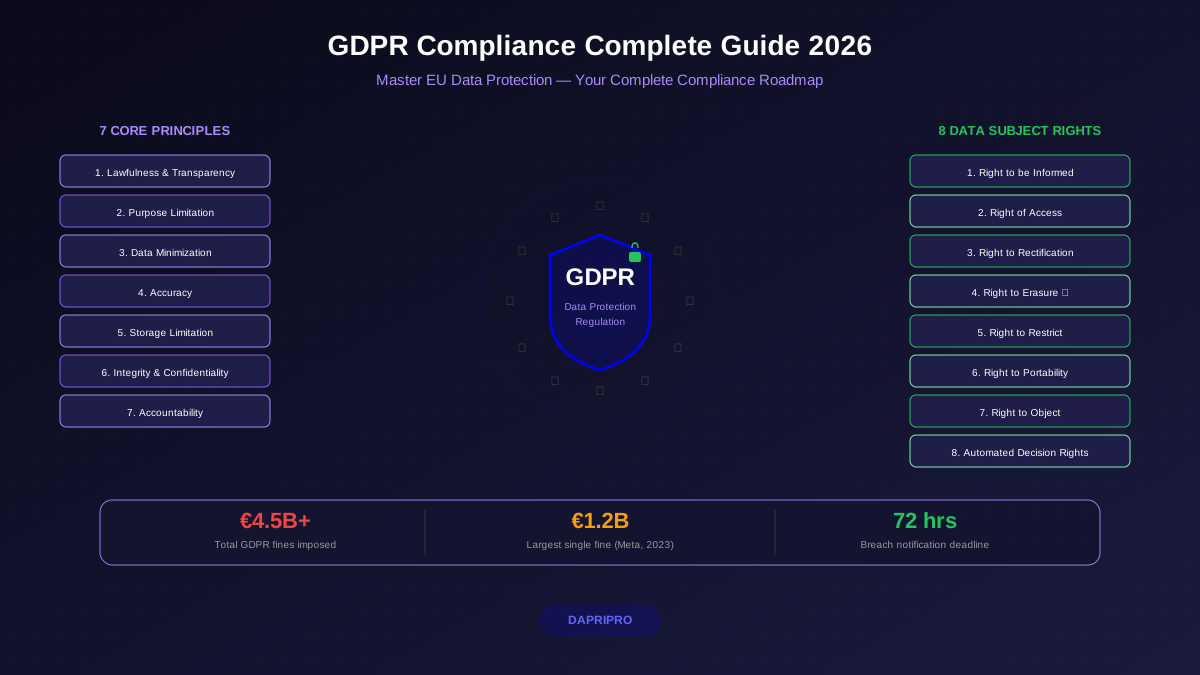
Here is the reality: GDPR applies to your five-person marketing agency just as much as it applies to Amazon. The regulation contains no blanket exemption for small businesses. What it does contain are proportionality principles and specific derogations — like the Article 30(5) record-keeping relief for organizations under 250 employees — that make compliance achievable without enterprise budgets.
This guide breaks down GDPR compliance into a practical, step-by-step checklist specifically for small businesses. No corporate jargon, no unnecessary complexity — just the actions you need to take, the tools you can use (many of them free), and the documentation that will keep supervisory authorities satisfied if they come knocking.
Does GDPR Actually Apply to Your Small Business?
GDPR applies to any organization that processes personal data of individuals in the European Economic Area, regardless of the organization's size or location. If you have a single EU customer whose email address sits in your CRM, GDPR applies to you.
The common misconceptions that lead small businesses into trouble:
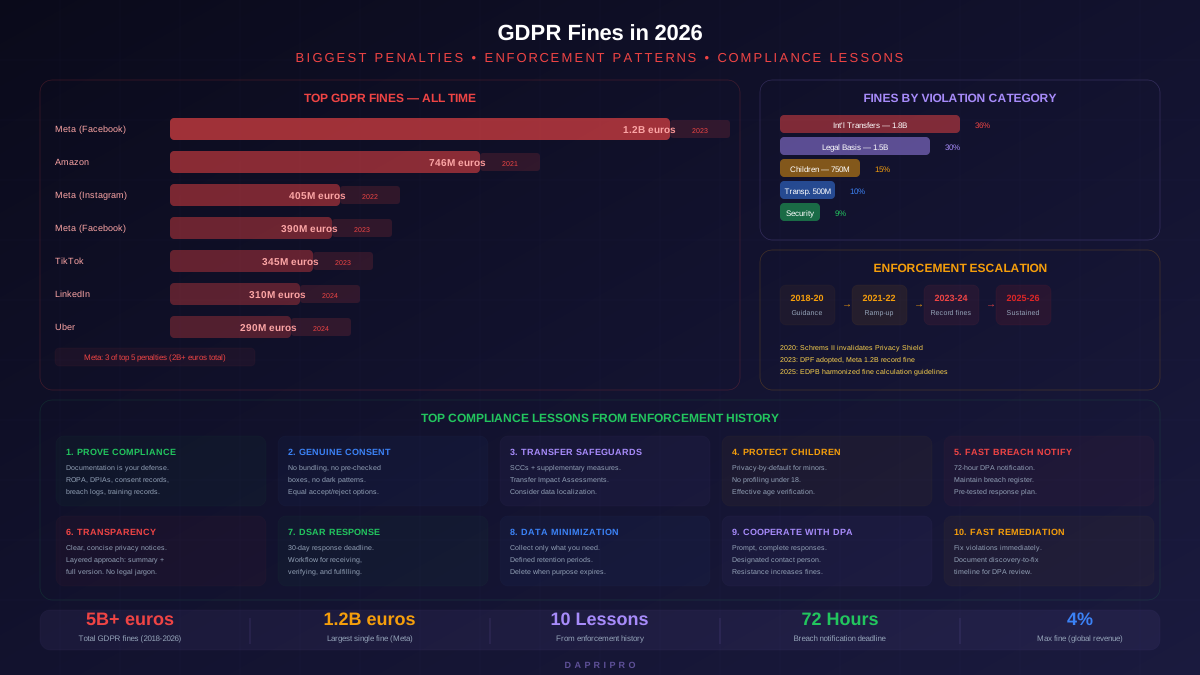
- "We are too small to be noticed" — The Spanish AEPD issued over 600 fines in 2024-2025, with hundreds targeting businesses under 50 employees. Fines ranged from 1,000 euros for inadequate privacy notices to 70,000 euros for processing without lawful basis.
- "We only process employee data" — Employee data is personal data under GDPR. Your payroll spreadsheets, performance reviews, and HR emails all qualify. GDPR covers all personal data processing, not just customer-facing activities.
- "We do not process data — we just send newsletters" — Email addresses are personal data. Sending newsletters is electronic direct marketing. You need either valid consent under the ePrivacy Directive or a legitimate interest assessment under GDPR. "We have always done it this way" is not a lawful basis.
- "GDPR is only for EU businesses" — Article 3(2) extends GDPR to any business worldwide that offers goods or services to EU residents, or monitors their behavior. Your US-based Shopify store shipping to Germany is subject to GDPR.
The Article 30(5) derogation does provide some relief: organizations with fewer than 250 employees do not need to maintain Records of Processing Activities (ROPA) unless their processing is likely to result in a risk to data subjects, is not occasional, or includes special categories of data. In practice, most businesses that process customer data regularly — which is basically every business — still need ROPA. But the standard can be a simple spreadsheet rather than an enterprise GRC platform.
The 12-Step GDPR Compliance Checklist for Small Businesses
This checklist covers every mandatory requirement in priority order. Complete steps one through four first — they form the foundation that every other compliance activity depends on.
Step 1: Conduct a Data Mapping Exercise
Data mapping answers four questions: what personal data do you collect, where does it go, who can access it, and how long do you keep it. Without these answers, you cannot complete any other GDPR requirement.
For a small business, data mapping does not require specialized software. Open a spreadsheet with these columns:
- Data category — Customer names, email addresses, payment details, employee records, website visitor IPs
- Collection method — Contact form, checkout page, email subscription, employment contract, cookies
- Storage location — Mailchimp, Shopify, Google Workspace, local hard drive, paper files
- Access — Who in your organization can view this data, and do they need to?
- Retention period — How long do you keep it, and what justifies that duration?
- Transfer — Does data leave the EEA? If Mailchimp stores data on US servers, yes it does.
Walk through every tool your business uses — your CRM, email marketing platform, analytics, payment processor, accounting software, HR tools. Each one processes personal data. A typical small business with 10 employees discovers 15 to 25 data processing activities during this exercise.
The most common blind spot: shadow processing. Employees sharing customer spreadsheets via personal Gmail accounts, WhatsApp groups with client details, paper order forms stuffed in desk drawers. Your data map needs to capture these informal channels too.
Step 2: Identify Your Lawful Basis for Each Processing Activity
GDPR requires a lawful basis for every processing activity you document in Step 1. Article 6 provides six options, but small businesses typically use three:
- Contract (Article 6(1)(b)) — Processing necessary to fulfill a contract with the data subject. Your e-commerce store processing a shipping address to deliver a purchased product? That is contract performance. No consent needed.
- Consent (Article 6(1)(a)) — The data subject freely, specifically, and unambiguously agreed to the processing. Best suited for marketing emails, analytics cookies, and newsletter subscriptions. Must meet all seven GDPR consent criteria — freely given, specific, informed, unambiguous, prior, withdrawable, and documented.
- Legitimate interest (Article 6(1)(f)) — Processing necessary for a legitimate purpose that does not override the data subject's rights. Suitable for fraud prevention, network security, and direct marketing to existing customers (the soft opt-in under Recital 47). Requires a documented Legitimate Interest Assessment (LIA).
The critical rule: you cannot retroactively switch lawful bases. If you start processing newsletter subscriptions under consent and realize you should have used legitimate interest, you cannot simply relabel it. The EDPB has confirmed that once a lawful basis is selected and communicated to data subjects through your privacy notice, changing it requires re-evaluation and potentially re-consenting affected individuals.
For each row in your data mapping spreadsheet, add a column for lawful basis and document your reasoning. The Spanish AEPD fined a dental clinic 10,000 euros in 2024 specifically because they could not demonstrate which lawful basis applied to their patient reminder texts.
Step 3: Create Layered Privacy Notices
GDPR Articles 13 and 14 require you to inform data subjects about your processing activities at the point of collection. The challenge for small businesses: these articles mandate disclosing over a dozen information elements, from controller identity to international transfer safeguards. Cramming all of that into a checkout page pop-up would destroy conversion rates.
The layered approach solves this problem. You create two tiers of notices:
Short-form notice (at collection point): A concise statement that identifies who you are, what data you are collecting, why you need it, and links to the full privacy policy. Two to four sentences, visible before the user submits data.
Comprehensive privacy policy (linked from short-form): The full Article 13/14 disclosure covering all required elements — controller details, DPO contact (if applicable), lawful bases, recipients, international transfers, retention periods, data subject rights, right to lodge a complaint, automated decision-making details, and source of data (for Article 14 cases).
The ICO provides a privacy notice template generator that walks you through each required field. For most small businesses, completing the generator and hosting the output on a /privacy-policy page takes under two hours.
Key mistakes small businesses make with privacy notices:
- Using a template copied from another website that references processing activities you do not actually perform
- Failing to update the notice when you add new tools — installing a new analytics platform without adding it to your notice is a transparency violation
- Burying the cookie notice so deep in the privacy policy that users cannot find consent withdrawal mechanisms
- Listing "legitimate interest" as the lawful basis for marketing when you actually need consent
Step 4: Set Up Records of Processing Activities (ROPA)
Article 30 requires controllers to maintain written records of processing activities. Your data mapping spreadsheet from Step 1 is essentially 80% of your ROPA. Add these additional columns to complete it:
- Controller name and contact details
- Purpose of processing — Why you process each data category
- Categories of data subjects — Customers, employees, website visitors, suppliers
- Categories of recipients — Payment processor, email platform, accountant, hosting provider
- International transfers — Countries and transfer mechanisms (Standard Contractual Clauses, adequacy decisions)
- Retention periods — Specific timeframes, not "as long as necessary"
- Technical and organizational security measures — Encryption, access controls, backup procedures
The CNIL provides a free ROPA template in spreadsheet format that small businesses can download and populate in an afternoon. The key is keeping it updated — add a calendar reminder for monthly reviews.
Step 5: Implement Proper Consent Mechanisms
Every processing activity where you rely on consent as your lawful basis needs a mechanism that meets GDPR standards. For most small businesses, this means two things: cookie consent banners and email marketing opt-in forms.
Cookie consent requirements under GDPR combined with the ePrivacy Directive:
- No cookies (except strictly necessary) before the user makes a choice
- A Reject All button with equal visual prominence to Accept All
- Granular category toggles — analytics and marketing must be separately selectable
- No pre-ticked boxes, no implied consent from scrolling, no cookie walls that block access
- Consent records stored with timestamp, choices made, and banner version
For budget-conscious small businesses, Cookiebot offers a free tier for sites under 50 pages, and CookieYes provides a free plan with basic GDPR compliance features. Both support Google Consent Mode v2, which became mandatory for Google Ads remarketing in March 2024.
Email marketing consent: use a double opt-in process where the subscriber confirms their email address before being added to your list. Store the opt-in timestamp, the IP address, and the exact wording of the consent text they agreed to. Mailchimp, ConvertKit, and Brevo all support this natively.
Step 6: Audit Your Data Processors and Sign DPAs
Every third-party tool that processes personal data on your behalf is a "data processor" under GDPR, and Article 28 requires a Data Processing Agreement (DPA) with each one. Your list probably includes:
- Email marketing — Mailchimp, ConvertKit, Brevo, ActiveCampaign
- Hosting — AWS, Google Cloud, Vercel, Netlify
- Payment processing — Stripe, PayPal, Square
- Analytics — Google Analytics, Plausible, Matomo
- CRM — HubSpot, Salesforce, Pipedrive
- Accounting — QuickBooks, Xero, FreshBooks
The good news: most major SaaS providers already have GDPR-compliant DPAs available on their websites. Stripe, Mailchimp, and HubSpot all offer click-to-sign DPAs. Your job is to locate each DPA, sign it (or confirm acceptance through your account settings), and store a copy. Create a folder — physical or digital — labeled "Data Processing Agreements" and file each one.
The common gap: smaller, local vendors. Your freelance bookkeeper, your IT support contractor, your local printing company that handles your customer mailing list. These relationships often lack formal DPAs. Draft a simple agreement using the ICO processor contract template, or ask your accountant to review a basic template covering the Article 28 requirements.
Step 7: Build a Data Subject Access Request (DSAR) Process
GDPR gives individuals the right to access their personal data, and you have 30 calendar days to respond. For small businesses, the challenge is not legal complexity — it is the practical task of finding all data about an individual across multiple systems.
Create a simple DSAR workflow:
- Intake — Accept requests through a dedicated email address (privacy@yourbusiness.com) or a simple web form. Log the date received immediately — this starts your 30-day clock.
- Verify identity — Request a copy of government-issued ID if you cannot verify the requester through existing account authentication. Ask only for enough information to confirm identity, not additional personal data.
- Search — Check every system in your data map: CRM, email marketing platform, email archives, spreadsheets, paper files, backup systems. Document each system searched and results found.
- Compile and review — Gather all personal data into a single document. Redact any third-party personal data (other people's names, email addresses) that appears in the same records.
- Respond — Provide the data in a commonly used electronic format (PDF or structured export). Include the categories of data processed, the purposes, any recipients, and the source of the data if not collected directly from the individual.
The 30-day deadline is strict. Extensions of up to 60 additional days are available only for complex or high-volume requests, and you must inform the requester of the extension within the initial 30-day period with reasons for the delay.
Step 8: Prepare a Breach Notification Plan
Article 33 requires you to notify your supervisory authority within 72 hours of becoming aware of a personal data breach that poses a risk to individuals. Article 34 requires direct notification to affected individuals when the risk is high. Having a documented plan before a breach occurs is the difference between meeting the deadline and missing it.
Your breach response plan should cover:
- Detection — How will you discover breaches? Monitor email accounts for suspicious activity, enable login alerts on all business tools, check for unauthorized file access in cloud storage.
- Assessment — A template for evaluating breach severity: what data was compromised, how many individuals were affected, what is the likely impact on those individuals, was the data encrypted?
- Notification decision tree — If the breach is unlikely to result in risk to individuals (e.g., an encrypted laptop was stolen but the attacker cannot access the data), document your reasoning and file it. If risk exists, notify the supervisory authority. If risk is high, notify affected individuals directly.
- Supervisory authority contact details — Know which authority to contact (based on your main establishment in the EEA) and bookmark their online notification form. The ICO, CNIL, and BfDI all provide online breach reporting portals.
- Internal documentation — Article 33(5) requires you to document all breaches, regardless of whether you report them. Maintain a breach register with date, nature, effects, and remedial actions.
Run a tabletop exercise once a year. Pick a scenario — a staff member emails a customer spreadsheet to the wrong recipient — and walk through your plan. You will discover gaps that are much cheaper to fix before a real incident.
Step 9: Conduct Data Protection Impact Assessments (Where Required)
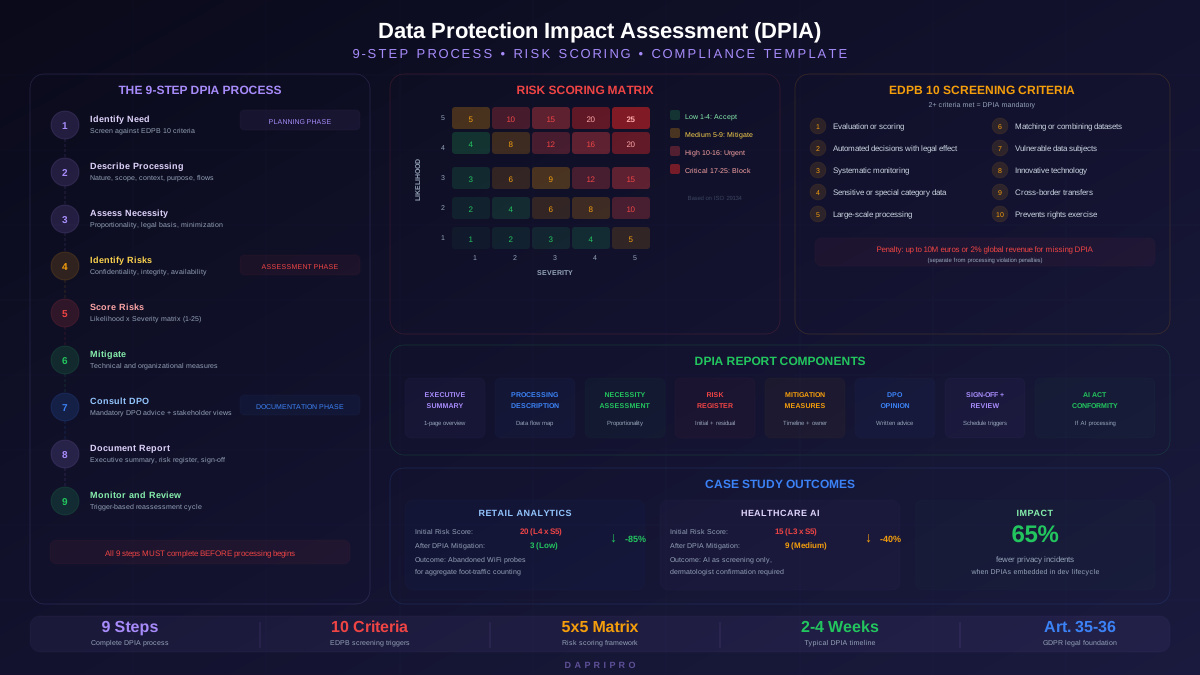
DPIAs are mandatory under Article 35 when processing is likely to result in a high risk to individuals. Most small businesses do not need full DPIAs for routine operations like payroll processing or customer order fulfillment.
You likely need a DPIA if your small business does any of the following:
- Systematic monitoring of publicly accessible areas (CCTV in a retail store covering the street outside)
- Processing special categories of data at scale (a small health clinic's patient records)
- Automated decision-making with legal or similarly significant effects (automated credit scoring for customers)
- Large-scale profiling of customers (behavioral analytics across an e-commerce site with personalized pricing)
- Using new technologies in ways that have not been previously assessed (deploying AI-powered customer service bots)
For processing activities that fall below the DPIA threshold, consider conducting a lightweight privacy risk assessment — a simplified version that documents the processing, identifies potential risks, and records your mitigation measures. This demonstrates accountability even when a full DPIA is not legally required, and supervisory authorities view this positively during investigations.
The CNIL provides a free DPIA tool (PIA software) that walks you through the methodology step by step. It is available in multiple languages and specifically designed to be accessible for small organizations without dedicated privacy teams.
Step 10: Implement a Data Retention Schedule
GDPR's storage limitation principle (Article 5(1)(e)) requires that personal data be kept no longer than necessary for the purposes for which it was collected. "We keep everything forever in case we need it" is not compliant.
Create a retention schedule linked to your data map. Common retention periods for small businesses:
- Customer purchase records — Typically 6 years for tax and accounting obligations in most EU jurisdictions
- Marketing consent records — For the duration of the consent plus 3 years as evidence (in case of disputes)
- Employee records — Duration of employment plus the applicable statutory limitation period (often 3-6 years)
- Website analytics data — Google Analytics retains data for 14 months by default; consider whether you need longer
- Customer support tickets — 2 years after resolution is common, unless the ticket contains information relevant to ongoing obligations
- CCTV footage — Most DPAs recommend 30 days maximum unless an incident requires longer retention
Set up automated deletion where possible. Most CRM and email marketing platforms allow you to configure automatic purging of inactive contacts. For data stored in spreadsheets and local files, add a recurring calendar task for manual review and deletion.
Step 11: Train Your Team
GDPR compliance fails at the human layer more often than the technical one. The most common small business breaches are not sophisticated cyberattacks — they are emails sent to the wrong recipient, customer data shared on personal devices, or password reuse across business and personal accounts.
Effective training for a small team does not require a formal program. Cover these essentials in a 90-minute session:
- What counts as personal data (it is broader than most people think — IP addresses, cookie identifiers, and location data all qualify)
- How to recognize and handle data subject requests
- The breach reporting procedure — who to tell internally, and how quickly
- Safe data handling practices — no customer data on personal devices, no sharing via messaging apps, lock screens on unattended computers
- Email discipline — BCC for bulk recipient fields, double-check attachment contents before sending
Document that training occurred. A simple register showing names, dates, and topics covered serves as evidence of your organizational security measures under Article 32.
Step 12: Schedule Quarterly Reviews
Compliance is not a one-time project. Your data processing activities change constantly as you add new tools, hire employees, launch marketing campaigns, and expand into new markets. A quarterly mini-audit keeps your documentation current and catches gaps before a supervisory authority does.
Your quarterly review checklist (two to four hours per quarter):
- Review and update your ROPA — have you added new tools or data processing activities?
- Check your processor list — new vendors need DPAs, and expired contracts need renewal
- Test your cookie banner — run a new scan with your CMP to detect undeclared cookies
- Verify consent records — spot-check that your consent logs contain timestamps, choices, and banner versions
- Review retention schedule — delete data that has passed its retention period
- Check for regulatory updates — EDPB guidelines evolve, national DPAs issue new guidance, and enforcement priorities shift
Free and Low-Cost GDPR Tools for Small Businesses
You do not need a five-figure compliance platform. These free and affordable tools cover the core compliance requirements:
| Requirement | Free Tool | Paid Alternative | What It Does |
|---|---|---|---|
| Cookie consent | CookieYes Free / Cookiebot Free | Cookiebot Premium (from 12 EUR/mo) | Cookie scanning, consent banners, Consent Mode v2 |
| Privacy notice | ICO Privacy Notice Generator | Termageddon (from 10 USD/mo) | Guided template creation for compliant notices |
| ROPA | CNIL ROPA Template (spreadsheet) | OneTrust Small Business (custom pricing) | Records of Processing Activities documentation |
| DPIA | CNIL PIA Software | OneTrust DPIA module | Step-by-step DPIA methodology and documentation |
| Consent management | Double opt-in via Mailchimp Free | Brevo (from 7 EUR/mo) | Email consent with timestamp and proof of opt-in |
| Self-assessment | ICO GDPR Self-Assessment | TrustArc Assessment Manager | Gap analysis against GDPR requirements |
| Breach register | Spreadsheet template | DPOrganizer (from 45 EUR/mo) | Incident documentation and notification tracking |
Start with the free tier of each category. Most small businesses processing standard customer and employee data can achieve solid compliance without any paid tools. Move to paid solutions when your processing activities grow in complexity or volume — typically when you exceed 100 data subjects across multiple jurisdictions or start processing special category data.
Common GDPR Mistakes Small Businesses Make
After reviewing enforcement actions across EU member states from 2023 through 2025, clear patterns emerge in how small businesses attract regulatory attention:
Mistake 1: Copy-pasting another company's privacy policy. A restaurant in Italy was fined 15,000 euros because their privacy policy referenced "automated profiling algorithms" and "cross-border data transfers to 47 countries" — processing activities that a 12-table pizzeria clearly does not perform. Supervisory authorities treat mismatched privacy notices as evidence of non-compliance with the accountability principle because it proves you did not actually assess your own processing.
Mistake 2: Treating consent as a formality. A German fitness studio collected consent for marketing emails through a pre-ticked box during membership sign-up. The BayLDA (Bavarian DPA) ordered them to stop processing and delete all data collected through the invalid consent mechanism. They lost their entire email marketing list — two years of subscriber acquisition gone because of a checkbox default value.
Mistake 3: Ignoring data subject requests. The most common enforcement trigger for small businesses is not responding to access requests. The AEPD fined a small property management company 20,000 euros for failing to respond to a tenant's access request within 30 days. The company had the data — they just did not have a process for handling the request and it sat in a general inbox for three months.
Mistake 4: No processor contracts. Using Mailchimp without a signed DPA, sharing customer data with a freelance designer without a processor agreement, or letting your IT support access systems without contractual safeguards. Each of these is an Article 28 violation that is straightforward for a supervisory authority to verify during an investigation.
Mistake 5: Keeping data forever "just in case." A French e-commerce business was fined 8,000 euros by the CNIL for retaining customer data for seven years beyond the last transaction, with no documented justification. Their defense — "we might need it for customer service" — was rejected because GDPR requires specific, documented retention periods tied to concrete purposes.
When to Get Professional Help
Most small businesses can handle routine GDPR compliance internally using the tools and templates described in this guide. However, certain situations warrant professional support from a data protection consultant or privacy lawyer:
- Processing special category data — Health data, biometric data, genetic data, or data about racial or ethnic origin, political opinions, religious beliefs, trade union membership, or sexual orientation. The requirements are significantly stricter and the risks of getting it wrong are higher.
- International data transfers — If your data flows to countries without an EU adequacy decision (notably the US before the EU-US Data Privacy Framework, and countries like India, Brazil, or China), you need proper transfer mechanisms and potentially Transfer Impact Assessments.
- AI and automated decision-making — If you use AI tools that make decisions about individuals (automated credit scoring, AI-powered hiring tools, dynamic pricing algorithms), GDPR's Article 22 requirements and the interaction with the EU AI Act create compliance complexity best handled with expert guidance.
- Responding to a supervisory authority inquiry — If a DPA contacts you about a complaint or opens an investigation, engage a privacy lawyer before responding. Your initial response shapes how the investigation proceeds.
- A significant data breach has occurred — When the breach involves sensitive data, large numbers of individuals, or potential identity theft, professional incident response guidance is worth the cost.
For small businesses in the UK, the ICO offers free guidance through their SME web hub and telephone helpline. In France, the CNIL provides free compliance workshops for small businesses several times per year. Check your national DPA's website for similar resources — many are specifically designed for organizations without dedicated legal teams.
Building a Compliance Culture Without Bureaucracy
The difference between small businesses that maintain GDPR compliance and those that fall behind is usually not budget or expertise — it is habit. Organizations that embed data protection into daily operations stay compliant naturally. Those that treat it as a separate project inevitably let documentation drift out of date.
Three habits that sustain compliance:
The "new tool question" before adopting any new software or service, ask: does this process personal data? If yes, add it to your ROPA, check for a DPA, and update your privacy notice. Make this the standard procedure for any purchase decision. It takes five minutes and prevents the most common compliance drift.
The monthly deletion reminder on the first of each month, spend 30 minutes reviewing data that has reached its retention limit and deleting it. This prevents the "we kept everything forever" penalty and keeps your data inventory clean.
The incident debrief after any privacy-related incident — even a near-miss like an email almost sent to the wrong person — spend 15 minutes documenting what happened, what prevented it (or did not), and whether your processes need adjustment. This is accountability in practice, and it is exactly the behavior supervisory authorities look for when deciding whether to issue a warning or a fine.
GDPR compliance for small businesses is not about perfection. It is about demonstrating that you take personal data seriously, that you have documented your decisions, and that you are making reasonable efforts to protect the individuals whose data you process. Supervisory authorities consistently distinguish between organizations that tried and missed a detail versus organizations that never engaged with the regulation at all. The checklist in this guide puts you firmly in the first category.
For further guidance on specific GDPR topics, explore our GDPR compliance resources, including our detailed guides on GDPR fines and enforcement trends, conducting DPIAs, and handling data subject access requests.