85% of data breaches start with a phishing email. Not a sophisticated zero-day exploit. Not an advanced persistent threat. A phishing email that an employee clicked because it looked legit.
The good news? Phishing is the most preventable form of cyberattack. The bad news? Most phishing training programs fail because they are boring hour-long videos that employees sit through once a year and immediately forget.
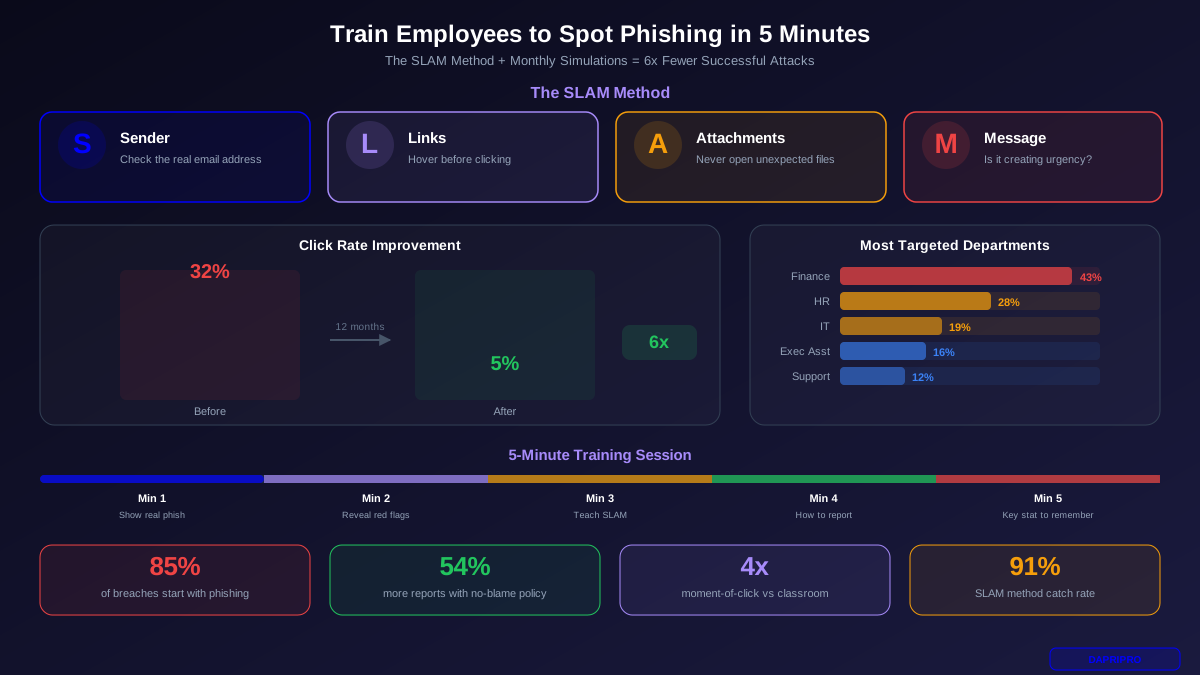
This guide gives you a 5-minute framework that employees can actually remember and use every day. Companies that follow this approach reduce their phishing click rates from 32% to under 5% within 12 months.
Why Most Phishing Training Fails
Traditional phishing training has three problems:
- It is too long. A 45-minute training video becomes background noise. Employees tune out after the first 5 minutes and retain almost nothing.
- It is too infrequent. Annual training means employees forget what they learned within 2-3 months. By month 6, click rates are back to pre-training levels.
- It is too theoretical. Slides about "social engineering tactics" do not prepare employees for the moment they receive a convincing email from what looks like their CEO asking them to review an urgent document.
Effective training needs to be short (under 5 minutes), frequent (monthly), and practical (using real simulations, not slides).
The SLAM Method: 4 Checks in 30 Seconds
SLAM is a 4-step framework employees can apply to any suspicious email. It takes less than 30 seconds and catches 91% of phishing attempts:
S — Sender. Check the actual email address, not the display name. Hover over the sender name to reveal the real address. Does "Amazon Support" really come from @amazon.com, or is it @amaz0n-support.net?
L — Links. Hover over every link before clicking. Does the URL match the company it claims to be from? Look for typos in domains, extra subdomains (login.microsoft.secure-verify.com), and shortened URLs that hide the real destination.
A — Attachments. Never open unexpected attachments, especially .exe, .zip, .js, or Office files with macros. If a supplier "sends an invoice" you were not expecting, call them to verify before opening anything.
M — Message. Does the message create urgency or pressure? "Your account will be suspended in 24 hours" or "Process this payment immediately" are classic pressure tactics. Legitimate companies rarely threaten you with deadlines measured in hours.
Real Phishing Examples Employees Should See
Show these during training so employees know what real phishing looks like:
1. Password Reset Phishing
Subject: "Your Microsoft 365 password expires in 24 hours." The email looks exactly like a Microsoft notification with proper branding. But hover over the "Reset Password" button and it goes to mïcrosoft-365-login.com (notice the special character in "microsoft"). Red flags: Microsoft never emails you about password expiry. The domain uses a special character.
2. Shared Document Phishing
Subject: "Sarah Johnson shared 'Q3 Budget Review.docx' with you." Appears to come from OneDrive or Google Drive. Clicking "Open Document" goes to a fake login page. Red flags: Was Sarah supposed to share this with you? Check by messaging Sarah directly — not by replying to the email.
3. CEO Impersonation
Subject: "Quick favor." Body: "Are you at your desk? I need you to handle something for me urgently." The display name shows your CEO's name. Red flags: Vague request designed to start a conversation. The email address is from Gmail, not your company domain.
4. Invoice/Payment Phishing
Subject: "Invoice #4892 — Past Due." Includes a PDF attachment or download link. Appears to come from a supplier your company actually uses. Red flags: Were you expecting this invoice? Is the sending domain exactly right? Call the supplier using the number in your records — not the number in the email.
5. IT Support Phishing
Subject: "Your mailbox is 95% full — action required." Claims IT needs you to click a link to upgrade storage. Red flags: Your real IT team would never ask you to click an external link. Real storage warnings come from within your email client, not from an email.
Building a Phishing Simulation Program
Choosing a Platform
| Platform | Price/User/Mo | Templates | Best For |
|---|---|---|---|
| KnowBe4 | $2-6 | 15,000+ | Largest template library |
| Proofpoint SAT | $3-8 | 1,000+ | Integrated with Proofpoint gateway |
| Cofense PhishMe | $4-10 | 3,000+ | Phishing response automation |
| GoPhish (free) | $0 | Custom only | Budget / technical teams |
| Microsoft Attack Sim | $0* | 100+ | M365 E5 users (*included) |
12-Month Simulation Calendar
| Month | Simulation Theme | Difficulty | Target Click Rate |
|---|---|---|---|
| 1-2 | Password reset emails | Easy | <25% |
| 3-4 | Shipping / delivery notifications | Easy | <20% |
| 5-6 | Shared document / file sharing | Medium | <15% |
| 7-8 | Invoice / payment requests | Medium | <10% |
| 9-10 | Internal IT impersonation | Hard | <8% |
| 11-12 | CEO / executive impersonation | Hard | <5% |
What Happens When Someone Clicks
The moment an employee clicks a simulated phishing link, they should immediately see a training page that:
- Shows them the exact email they clicked
- Highlights the red flags they missed (with arrows pointing to the fake sender, suspicious link, etc.)
- Takes less than 2 minutes to review
- Has a "Got it" acknowledgment button
This moment-of-click training is 4x more effective than pre-scheduled classroom sessions because the employee learns while the mistake is fresh in their mind.
The No-Blame Policy: Why Punishment Backfires
Some companies write up employees who click simulated phishing emails. This is counterproductive.
When employees fear punishment, they stop reporting suspicious emails. They worry that reporting means admitting they almost clicked something dangerous. So they ignore phishing emails instead of flagging them — which means the security team never learns about real attacks targeting the organization.
Companies with no-blame policies see 54% more voluntary phishing reports than companies that punish clickers. More reports mean faster detection of real attacks.
Instead of punishment, use positive reinforcement:
- Publicly recognize employees or departments with the lowest click rates
- Give small rewards (gift cards, extra break time) for reporting real phishing
- Track and celebrate department improvement over time
- Make "phishing champion" a badge of honor, not a mark of shame
Tailor Training to High-Risk Departments
Not all employees face the same phishing attacks. Target your simulations:
| Department | Attack Rate | Most Common Attack | Training Focus |
|---|---|---|---|
| Finance | 43% | Fake invoices, payment redirects | Wire verification procedures |
| HR | 28% | Fake resumes, W-2 requests | Data handling procedures |
| IT | 19% | Fake service alerts, admin cred theft | Verify through internal channels |
| Executive Assistants | 16% | CEO impersonation, gift card scams | Out-of-band verification |
| Customer Service | 12% | Fake customer complaints with links | URL inspection awareness |
The 5-Minute Training Plan
Here is the exact 5-minute session you can run in a team meeting or email:
Minute 1: Show one real phishing email screenshot. Ask the group: "Would you click this?" Get verbal responses. No judgment.
Minute 2: Reveal the red flags. Circle the fake sender address, the suspicious link URL, the urgent language. Point out what makes this phishing, not a real email.
Minute 3: Teach the SLAM method. Sender, Links, Attachments, Message. Give everyone a printed desk card with these 4 checks.
Minute 4: Show what to do when they spot phishing. Click the "Report Phishing" button (show where it is in Outlook/Gmail). Forward to security@yourcompany.com. Do NOT forward to coworkers — that spreads the phishing email.
Minute 5: One stat to remember. "85% of breaches start with phishing. Reporting one email can stop an entire attack. You are the first line of defense."
Run this 5-minute session once a month with a different phishing example each time. Combined with monthly simulations, this approach is more effective than annual hour-long training programs — and employees actually pay attention because it is short, relevant, and immediately applicable.