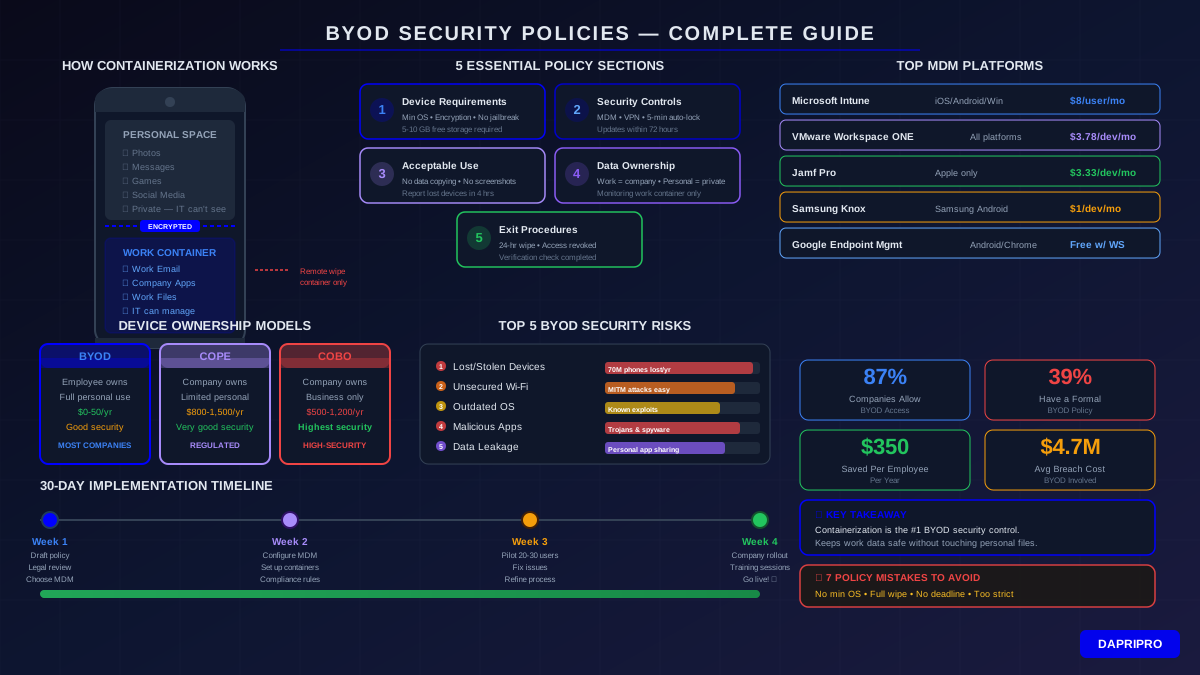
Here's a wild stat: 87% of companies now let employees use personal phones and laptops for work. But here's the scary part — only 39% of those companies have a real security policy for it. That's like letting everyone drive company trucks without checking if they have a license.
BYOD (Bring Your Own Device) saves companies money. Employees love it because they get to use devices they already know. But without the right security rules, one lost phone could leak every customer's data. One sketchy app could open a backdoor into your entire network.
This guide shows you exactly how to build a BYOD policy that actually works — one that keeps data safe without making employees want to throw their phones out the window.
Why BYOD Is Everywhere (And Why That's Both Good and Risky)
BYOD exploded because of three things: remote work, employee preferences, and cost savings. When everyone started working from home in 2020, companies realized they couldn't buy laptops fast enough. Employees started using personal devices. And honestly? It worked pretty well.
But the security risks are real. Here's what the numbers show:
| BYOD Stat | Number | Why It Matters |
|---|---|---|
| Companies allowing BYOD | 87% | Nearly everyone does it |
| Have a formal BYOD policy | 39% | Most companies are winging it |
| Data breaches involving personal devices | 60% | More than half of breaches |
| Avg. cost savings per employee/year | $350 | Real budget impact |
| Employees who prefer using own devices | 78% | Helps with recruitment |
| Avg. breach cost when BYOD involved | $4.7M | Way more expensive |
The bottom line? BYOD isn't going away. You need a policy that embraces it safely instead of pretending it's not happening.
The 5 Biggest BYOD Security Risks
Before writing your policy, you need to understand what you're protecting against. Think of these as the five ways things go wrong:
1. Lost or Stolen Devices
This is the most common BYOD disaster. Someone leaves their phone at a restaurant. A laptop gets stolen from a car. If that device has company email, Slack, or file access — congratulations, a stranger now has your corporate data. About 70 million smartphones are lost every year, and only 7% get recovered.
2. Unsecured Wi-Fi Connections
Employees connect to coffee shop Wi-Fi, airport networks, and hotel hotspots all the time. These networks are like fishing ponds for hackers. Without a VPN, everything an employee sends — emails, passwords, files — can be intercepted. It's called a man-in-the-middle attack, and it's embarrassingly easy to do.
3. Outdated Operating Systems
Your IT team updates company computers on a schedule. But personal devices? People ignore update notifications for months. That phone running Android 12 when Android 16 is out? It has unpatched security holes that any script kiddie can exploit.
4. Malicious Apps and Sideloading
On personal devices, people install whatever they want. Game mods with hidden malware. "Free" VPN apps that actually spy on them. Cracked software with trojans. One bad app can steal credentials, record keystrokes, or open a reverse shell to your network.
5. Data Leakage Through Personal Apps
An employee copies a customer list into their personal Notes app. Someone shares a confidential document through their personal Gmail. A contractor screenshots a blueprint and it syncs to their personal iCloud. None of these are "hacking" — but they're all data breaches.
Containerization: The Secret Weapon of BYOD Security
Containerization is the single most important technology for BYOD security. Think of it like building a vault inside someone's house. The house is theirs (personal device), but the vault belongs to the company (work data). Nobody can move stuff between the vault and the house without a key.
Here's how it works in practice:
Without containerization: Work emails, personal photos, company documents, and TikTok all live in the same space. If malware infects the device, it can access everything. If IT wipes the device, personal photos go too.
With containerization: Work apps and data live inside an encrypted container. Personal apps can't reach in. Malware on the personal side can't touch work data. And when IT does a remote wipe, only the container gets erased.
The major MDM platforms handle containerization differently:
| MDM Platform | Container Method | Platforms | Starting Price |
|---|---|---|---|
| Microsoft Intune | App Protection Policies | iOS, Android, Windows | $8/user/month |
| VMware Workspace ONE | Managed Open-In | iOS, Android, Windows, Mac | $3.78/device/month |
| Jamf Pro | Managed Apple ID + Profiles | iOS, macOS | $3.33/device/month |
| Samsung Knox | Knox Container + Vault | Samsung Android devices | $1/device/month |
| Google Endpoint Management | Work Profile | Android, Chrome OS | Included with Workspace |
| Citrix Endpoint Management | Micro-VPN + MDX | iOS, Android, Windows | Contact for pricing |
If your company already uses Microsoft 365 or Google Workspace, you've got containerization tools built right in. Intune comes with many Microsoft 365 plans, and Google Workspace has endpoint management included. Start there before buying something new.
Building Your BYOD Policy: The 5 Essential Sections
A BYOD policy doesn't need to be a 40-page legal document nobody reads. It needs to be clear, specific, and fair. Here are the five sections every policy must include:
Section 1: Device Requirements
Spell out exactly which devices are allowed and what condition they need to be in:
- Minimum OS versions: iOS 17 or later, Android 14 or later, Windows 11, macOS Ventura or later
- Required security features: Screen lock enabled, biometric authentication, device encryption active
- Prohibited devices: Jailbroken/rooted devices, devices no longer receiving security patches
- Hardware standards: Minimum storage for work container (usually 5-10 GB free)
Section 2: Security Controls
These are the non-negotiable security rules every BYOD device must follow:
- MDM enrollment: Installing the company's MDM profile or app
- Screen lock timeout: Maximum 5 minutes before auto-lock
- Password complexity: Minimum 6-digit PIN or alphanumeric password
- VPN requirement: Always-on VPN for accessing company resources
- Automatic updates: OS and app updates must be installed within 72 hours
- Remote wipe consent: Agreement to let IT wipe the work container remotely
Section 3: Acceptable Use Rules
What employees can and can't do with work data on personal devices:
- No copying files from work apps to personal apps
- No screenshots of confidential information
- No connecting to work resources from shared or public computers
- No sharing work credentials with family members
- Report lost or stolen devices within 4 hours
Section 4: Data Ownership
This is where most BYOD policies fail — they don't clearly say who owns what:
- All work-related data belongs to the company, even on personal devices
- Personal data belongs to the employee and won't be accessed by IT
- The company can monitor work container activity (but not personal use)
- Work data must be removed when employment ends
Section 5: Exit Procedures
What happens when employees leave, change roles, or lose devices:
- Work container wipe within 24 hours of departure
- Return of any physical company accessories (chargers, docks, etc.)
- Verification that all company data has been removed
- Revocation of access to all company apps and services
Setting Up MDM for BYOD: Step-by-Step Guide
MDM (Mobile Device Management) is the technology that enforces your BYOD policy automatically. Without it, your policy is just a piece of paper people signed once and forgot about. Here's how to set it up using Microsoft Intune (the most popular option for businesses already on Microsoft 365):
Step 1: Enable Intune in Your Microsoft 365 Admin Center
Go to your Microsoft 365 admin center, navigate to Settings → Org settings → Mobile Device Management. Turn on automatic MDM enrollment. If you have Microsoft 365 Business Premium, E3, or E5, Intune is already included in your plan.
Step 2: Create App Protection Policies
This is where containerization happens. In the Intune admin center, go to Apps → App protection policies. Create separate policies for iOS and Android. Set rules like:
- Require PIN to access work apps
- Block copy/paste from work apps to personal apps
- Encrypt work data at rest
- Block screenshots in work apps
- Require minimum OS version
Step 3: Configure Conditional Access
Conditional access is like a bouncer at a club — it checks if a device meets your rules before letting it access company data. Set up rules like:
- Device must be enrolled in MDM
- Device must be compliant (encryption on, OS updated, no jailbreak)
- Require multi-factor authentication from new devices
- Block access from high-risk countries
Step 4: Set Up Compliance Policies
Compliance policies define the minimum security standards a device must meet. If a device falls out of compliance (like turning off encryption or rooting), it automatically loses access to company resources. Configure:
- Minimum OS version requirements
- Device encryption must be active
- No jailbroken or rooted devices
- Screen lock required
- Grace period: 24 hours to fix non-compliant devices before access is revoked
Step 5: Deploy and Onboard
Send enrollment instructions to employees. Make it simple — a QR code and a 5-step guide work best. Most employees can enroll their device in under 10 minutes. Have IT available for the first week to help with any issues.
BYOD vs. COPE vs. COBO: Which Model Is Right for You?
BYOD isn't the only option. Companies actually have three choices for how employees use devices:
| Feature | BYOD | COPE | COBO |
|---|---|---|---|
| Full name | Bring Your Own Device | Corporate-Owned, Personally Enabled | Corporate-Owned, Business Only |
| Who buys the device | Employee | Company | Company |
| Personal use allowed | Full personal use | Limited personal use | No personal use |
| IT control level | Work container only | Full device + personal partition | Complete control |
| Cost per employee/year | $0 - $50 (MDM only) | $800 - $1,500 | $500 - $1,200 |
| Employee satisfaction | High (own device) | Medium (company device, some freedom) | Low (restricted) |
| Security level | Good (with containerization) | Very good | Highest |
| Best for | Most businesses | Regulated industries | High-security environments |
Our recommendation: Most companies should start with BYOD for general employees and use COPE for roles that handle sensitive data (finance, HR, executive leadership). COBO is really only necessary for ultra-high-security environments like defense contractors or intelligence agencies.
7 BYOD Policy Mistakes That Get Companies Hacked
I've seen the same mistakes over and over when reviewing BYOD policies. Here's what to avoid:
Mistake 1: No Minimum OS Version Rule
Without this, employees use devices running 3-year-old operating systems with known exploits. Fix: Require the current major version minus one (e.g., if iOS 18 is current, require iOS 17 minimum).
Mistake 2: Full Device Wipe Instead of Container Wipe
If your policy says IT can wipe the entire device, employees won't enroll. Nobody wants to risk losing their personal photos. Fix: Use containerization and only wipe the work container.
Mistake 3: No Lost Device Reporting Deadline
Some employees wait days before reporting a lost phone. Fix: Require reporting within 4 hours. Make it easy — a short IT helpdesk number or a one-click form.
Mistake 4: Blocking Too Many Apps
Some policies block social media, games, and personal email on BYOD devices. But it's the employee's device — they'll just stop using it for work and find workarounds. Fix: Block only known-malicious apps and focus on preventing data transfer between work and personal apps.
Mistake 5: No Reimbursement for Data Plans
If employees use personal data plans for work email, Teams calls, and VPN connections, consider a monthly stipend ($25-50). It builds goodwill and increases BYOD participation. Not reimbursing makes employees feel used.
Mistake 6: One Policy for All Roles
The CEO accessing board documents needs different rules than a warehouse worker checking schedules. Fix: Create risk tiers based on data sensitivity: Standard (most employees), Elevated (managers with sensitive data), High (executives and finance).
Mistake 7: Set-It-and-Forget-It Mentality
Technology changes. New attack methods appear. That policy you wrote in 2024 doesn't cover AI-generated phishing or deepfake voice attacks. Fix: Review your BYOD policy every 6 months and after any security incident.
Balancing Security and Employee Privacy
This is where most companies mess up the relationship with employees. Push too hard on security, and nobody will enroll their devices. Be too relaxed, and you'll get breached. Here's how to find the sweet spot:
What IT should be able to see:
- Whether the device meets compliance requirements (OS version, encryption status)
- Which work apps are installed
- Work container encryption status
- Device model and operating system
What IT should absolutely NOT see:
- Personal messages, emails, or chat history
- Personal photos and videos
- Browsing history outside of work apps
- Location tracking (unless for lost device recovery only)
- Personal app usage
Put this in writing. Add it to the BYOD agreement employees sign. Transparency builds trust. Some companies even give employees a "Privacy Bill of Rights" that lists exactly what IT can and cannot access on personal devices.
Implementation Timeline: From Zero to Secure in 30 Days
You don't need to build your BYOD security program all at once. Here's a realistic 30-day timeline:
| Week | Tasks | Who's Involved |
|---|---|---|
| Week 1 | Draft BYOD policy, get legal review, choose MDM platform | IT, Legal, HR |
| Week 2 | Configure MDM, set up containerization, create compliance policies | IT Security team |
| Week 3 | Pilot with 20-30 employees, fix issues, refine enrollment process | IT + volunteer testers |
| Week 4 | Company-wide rollout, training sessions, helpdesk ready | Everyone |
Pro tip: Start with voluntary enrollment for the first 60 days. Employees who try it first become advocates who help convince everyone else. Then make it mandatory for anyone accessing company data on personal devices.
How to Know Your BYOD Policy Is Working
Track these metrics monthly to make sure your BYOD program is actually protecting the company:
- Enrollment rate: What percentage of eligible employees have enrolled? Target: 80%+ within 90 days
- Compliance rate: How many enrolled devices meet all security requirements? Target: 95%+
- Lost device response time: How quickly are lost devices reported? Target: under 4 hours
- Incident rate: Number of security incidents involving personal devices per quarter. Target: decreasing trend
- Employee satisfaction: Run a short survey after enrollment. Are people finding it easy to use? Target: 4/5 satisfaction rating
- Help desk tickets: BYOD-related support requests should decrease after the first month
If your enrollment rate is below 60%, the policy is probably too restrictive or the enrollment process is too painful. If your compliance rate is below 90%, your grace periods might be too generous, or employees need reminders to update their devices.
Your BYOD Action Plan (Start Today)
BYOD security isn't about locking everything down — it's about being smart with what you protect and how you protect it. Here's your quick-start plan:
- Audit what's happening now. Find out how many personal devices already access company data. You'll be surprised.
- Pick your MDM platform. If you're on Microsoft 365, start with Intune. Google Workspace? Use Google Endpoint Management. Apple-heavy? Look at Jamf.
- Write a 3-page policy. Cover device requirements, security controls, acceptable use, data ownership, and exit procedures. Keep it simple.
- Enable containerization. This is the single biggest thing you can do. It protects company data without invading employee privacy.
- Start a pilot. Get 20-30 volunteers to test the enrollment process. Fix problems before the company-wide launch.
The companies that do BYOD right save money, keep employees happy, and stay secure. The ones that ignore it end up in the news for a data breach that started with one lost phone.