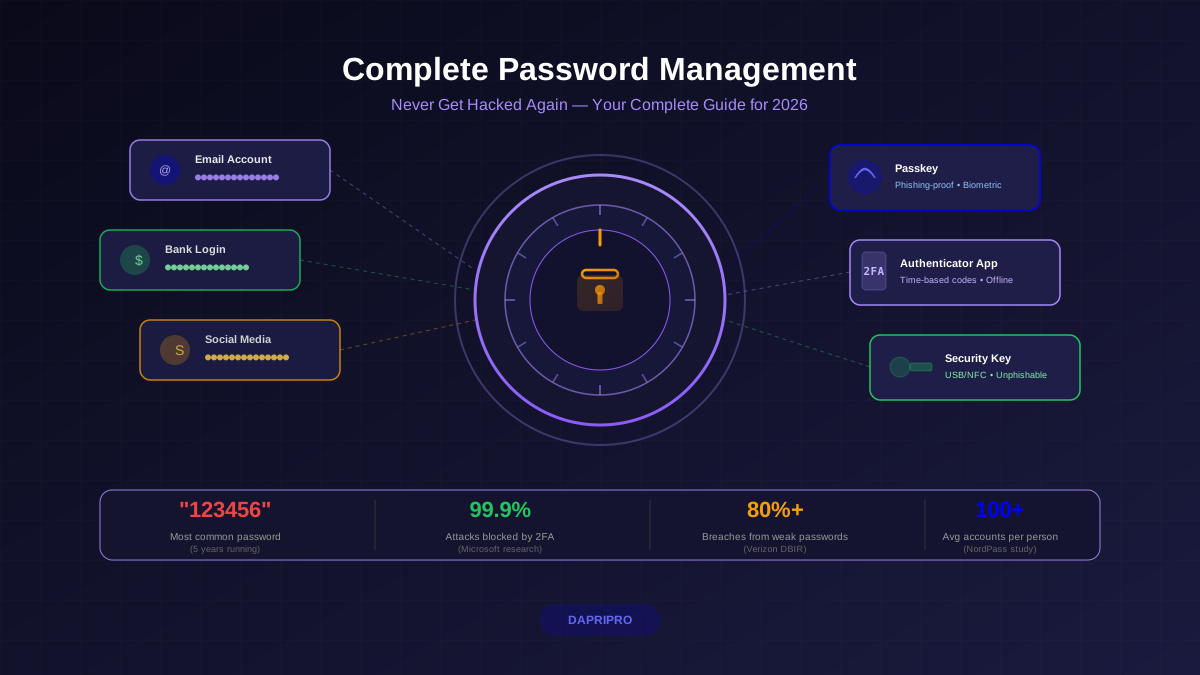
You are trusting a single app with every credential you own — your bank, your email, your medical records, your social media, everything. That should make you a little uncomfortable. Healthy skepticism is exactly the right starting point when evaluating password manager security.
The good news: modern password managers are engineered to protect your data even from themselves. The architecture is genuinely clever. But "trust us, it is encrypted" is not good enough. You deserve to understand exactly how the encryption works, what happened when major managers got breached, and where the real vulnerabilities actually live.
This is not a product comparison. This is a technical breakdown of how password managers protect (and sometimes fail to protect) your stored credentials — so you can make an informed decision about which one earns your trust.
How Password Managers Actually Encrypt Your Data
Every reputable password manager follows the same fundamental security model. Understanding this architecture is the key to evaluating any manager's security claims.
The Zero-Knowledge Architecture
Zero-knowledge means the company operating the password manager has zero ability to read your data. This is not a marketing term — it describes a specific cryptographic architecture where encryption and decryption happen entirely on your device.
Here is the actual process that runs every time you unlock your vault:
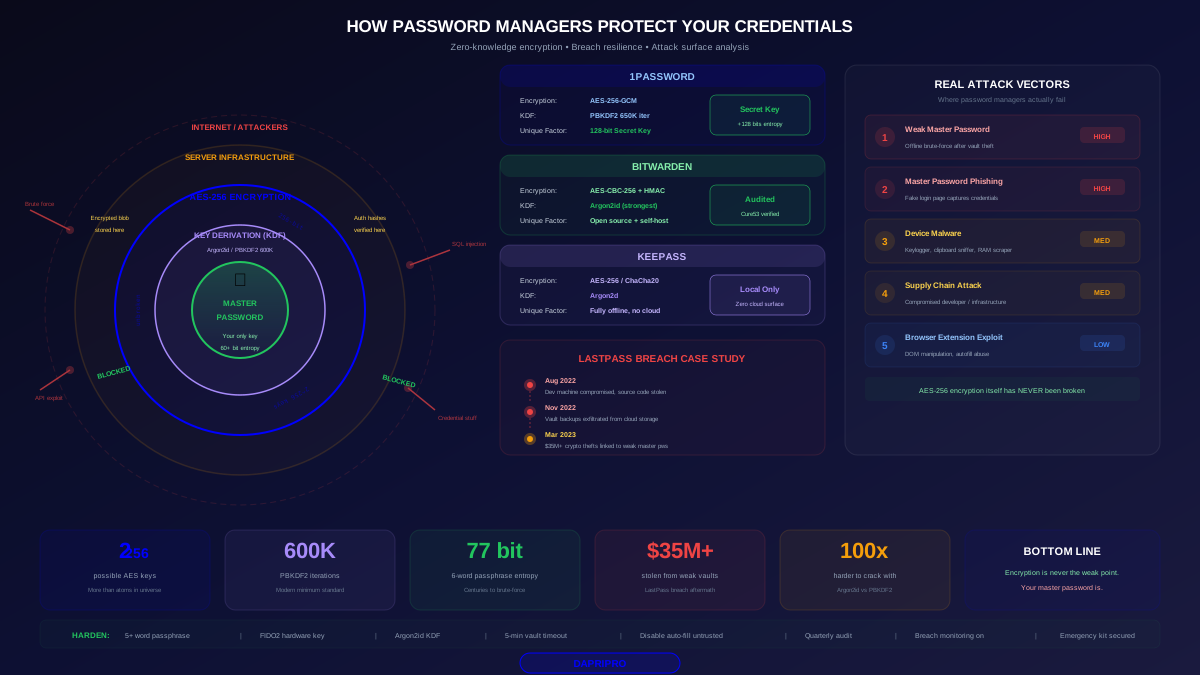
- Key derivation — Your master password is fed through a Key Derivation Function (KDF) like PBKDF2 or Argon2 to produce an encryption key. This is intentionally slow (100,000-600,000 iterations for PBKDF2, or memory-hard for Argon2) to make brute-force attacks impractical.
- Vault decryption — The derived key decrypts your vault using AES-256 encryption. This is the same encryption standard the US government uses for classified information.
- Local operation — Your master password and encryption key never leave your device. The server only ever sees the encrypted vault blob.
- Authentication — A separate authentication hash (derived differently from the same master password) proves your identity to the server without revealing the encryption key.
The critical detail: the encryption key and the authentication hash are derived using different processes from the same master password. Knowing the authentication hash does not reveal the encryption key. Even if an attacker steals the authentication hash from the server, they cannot decrypt your vault with it.
AES-256: What It Actually Means
AES-256 sounds impressive in marketing copy, but what does that strength actually translate to in practice?
AES-256 uses a 256-bit key, which means there are 2256 possible keys. That number is approximately 1.16 × 1077 — more than the estimated number of atoms in the observable universe. Even if you could check one trillion keys per second, checking all possible keys would take longer than the age of the universe multiplied by itself.
No one has ever publicly broken AES-256. Current quantum computing research suggests that Grover's algorithm could theoretically reduce the effective key space to 2128, which is still astronomically large and computationally infeasible. Your encrypted vault is not going to be brute-forced through the encryption itself.
The weakness is never the encryption algorithm. It is always the key — which means it is always your master password.
Key Derivation Functions: Your Real Security Layer
The KDF is where the practical security of your vault lives. It transforms your human-memorizable master password into a cryptographically strong encryption key.
The two major KDFs used by password managers in 2026:
- PBKDF2-SHA256 — Used by LastPass (historically 100,100 iterations, increased to 600,000 after the breach), 1Password (650,000 iterations). Proven and well-understood, but purely CPU-bound so attackers can accelerate with GPUs.
- Argon2id — Used by Bitwarden (default since 2023), KeePass. Memory-hard by design, meaning attacks require not just processing time but also large amounts of RAM, making GPU and ASIC attacks far more expensive.
Argon2id is objectively stronger against hardware-accelerated attacks. If your password manager offers it, switch to it. The difference matters: cracking the same master password costs approximately 100x more with Argon2id than with PBKDF2 when using GPU clusters.
What the LastPass Breach Actually Taught Us
The LastPass breach of 2022-2023 is the most important case study in password manager security because it tested the zero-knowledge model under real-world attack conditions. Here is what actually happened, step by step.
The Timeline
In August 2022, an attacker compromised a LastPass developer's home computer by exploiting a vulnerable third-party media software package. They installed a keylogger that captured the developer's master password, giving them access to LastPass's corporate development environment and source code repository.
Using knowledge gained from the source code, the attacker accessed LastPass's cloud storage backups in November 2022. They downloaded customer vault data — including encrypted vault blobs, unencrypted metadata (website URLs, account emails), and other customer information.
LastPass disclosed the breach in December 2022, initially downplaying the severity. The full scope emerged in March 2023 when blockchain investigators linked over $35 million in cryptocurrency thefts to vault data stolen in the breach.
What Was Protected and What Was Not
The breach revealed a critical architectural detail: while password fields were AES-256 encrypted, significant metadata was stored unencrypted. Attackers could see which websites each user had accounts on, when entries were created, and in some cases, the usernames — even without cracking the vault encryption.
For the encrypted password data itself, the protection came down to master password strength:
- Users with strong master passwords (16+ characters, high entropy) — Vaults remain effectively uncrackable. The math works out to centuries of compute time even with GPU clusters.
- Users with moderate master passwords (12-15 characters, mixed complexity) — Vaults are likely safe but with decreasing margins as hardware improves.
- Users with weak master passwords (under 12 characters, dictionary words, common patterns) — Vulnerable to brute-force cracking. The $35M+ cryptocurrency thefts are attributed to this group.
- Users who created accounts before 2018 — Many had only 5,000 PBKDF2 iterations (vs. 100,100+ for newer accounts), making brute-force significantly faster.
The Lesson
The zero-knowledge model actually worked. The encryption held. The vaults with strong master passwords remained sealed. But the breach exposed two real weaknesses: unencrypted metadata is a privacy leak, and the entire model collapses if your master password is weak. The encryption is only as strong as the key you feed into it.
Comparing Password Manager Security Architectures
Not all password managers implement zero-knowledge the same way. The differences in their security architectures create meaningful differences in your actual protection level.
1Password: The Secret Key Model
1Password adds a unique 128-bit "Secret Key" that is generated locally on your first device and combined with your master password during key derivation. This means cracking your vault requires both your master password AND your Secret Key — even a weak master password gets significantly more entropy from the Secret Key.
The tradeoff: if you lose your Secret Key and all your devices, you permanently lose access to your vault. 1Password cannot recover it. This is not a bug — it is the security model working as designed. Store your Emergency Kit (which contains the Secret Key) in a physically secure location.
Bitwarden: Open-Source and Auditable
Bitwarden's entire codebase is open-source on GitHub. This means any security researcher can review the encryption implementation, verify zero-knowledge claims, and identify vulnerabilities. The codebase has passed multiple independent security audits including by Cure53 and Insight Risk Consulting.
Bitwarden uses end-to-end encryption with AES-CBC-256 for vault items and HMAC-SHA256 for integrity verification. They adopted Argon2id as the default KDF in 2023, putting them ahead of competitors using PBKDF2. The self-hosting option also lets security-conscious users keep encrypted vaults on their own infrastructure.
KeePass: Fully Offline
KeePass stores your encrypted database as a local file. There is no cloud sync, no server, no company infrastructure to breach. The attack surface is limited to your own device and wherever you store the database file. If you sync via Dropbox or Google Drive, the encrypted file is visible to those services, but they cannot decrypt it without your master password and optional key file.
KeePass uses AES-256 or ChaCha20 encryption with Argon2d for key derivation. The lack of a polished UI and cross-platform sync is the cost of this minimal attack surface.
Apple and Google: Ecosystem Managers
Apple Keychain uses AES-256-GCM encryption with keys derived from your device passcode and Apple ID. iCloud Keychain uses end-to-end encryption — Apple cannot read your passwords even when synced through iCloud. The notable limitation: it works best (or only) within the Apple ecosystem.
Google Password Manager encrypts passwords in transit and at rest, and added on-device encryption as an option in 2022. With on-device encryption enabled, Google cannot access your passwords. Without it enabled (still the default for many users), Google technically has the ability to decrypt your stored passwords.
Where Password Managers Are Actually Vulnerable
The encryption is not getting broken. Here is where attacks actually succeed.
1. Weak Master Passwords
This is the primary real-world attack vector. When LastPass vaults were stolen, the encrypted data was intact. But attackers could run offline brute-force attacks against the master password, and weak master passwords (dictionary words, short passwords, predictable patterns) fell quickly.
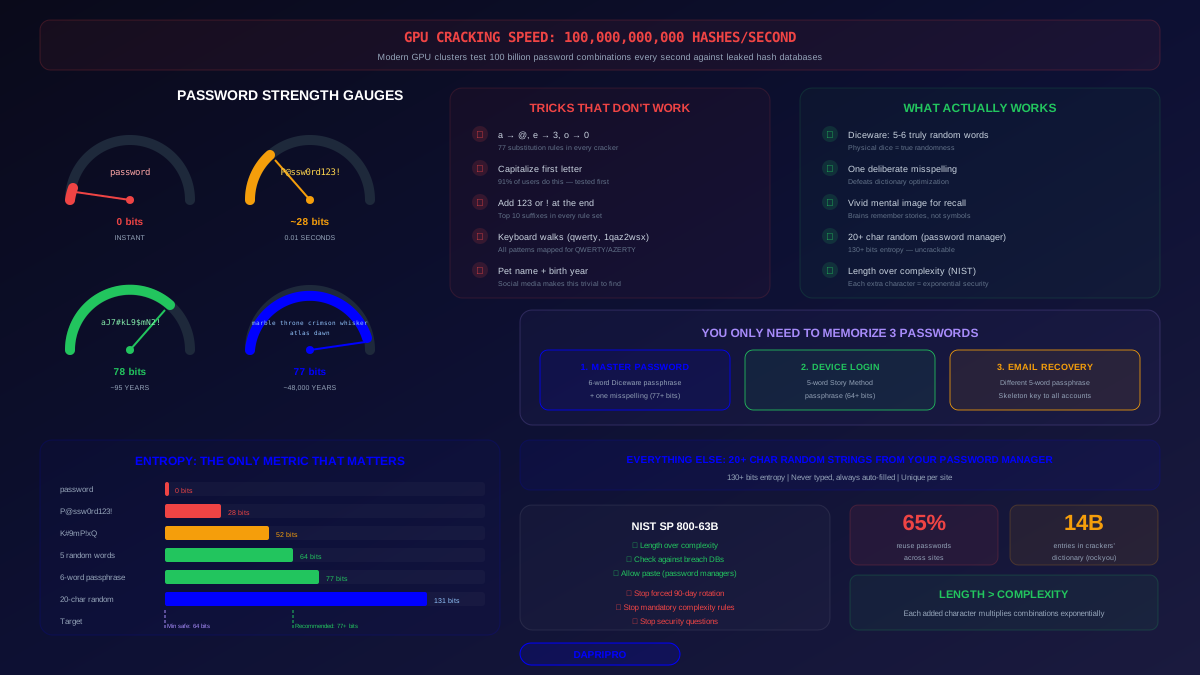
A 6-word Diceware passphrase provides approximately 77 bits of entropy. At current GPU cracking speeds, brute-forcing that takes longer than the expected lifetime of the sun. A password like "Monkey123!" provides about 28 bits and falls in seconds.
2. Phishing the Master Password
Fake login pages for password managers exist. An attacker who captures your master password for a cloud-synced manager gets everything. This is why password managers that support hardware security keys for account login (separate from vault decryption) add meaningful protection — the phishing attack gets the password but not the hardware key.
3. Device Compromise
If malware is running on your device, the password manager's encryption is irrelevant. A keylogger captures your master password as you type it. A clipboard sniffer grabs passwords as you copy them. A memory scraper reads the decrypted vault data from RAM while it is unlocked.
This is why device security is not separate from password manager security — it is a prerequisite. Keep your OS updated, run endpoint protection, and be cautious about software you install.
4. Supply Chain and Infrastructure Attacks
The LastPass breach started with a developer's compromised home computer. The Okta breach of 2023 similarly targeted employee access. Even if the encryption is perfect, the humans and infrastructure around it create attack opportunities.
This is where open-source and self-hosted options provide genuine advantages: smaller attack surface, no centralized cloud target, and community-verified code.
5. Browser Extension Vulnerabilities
Password manager browser extensions have wide access to web page content by necessity — they need to read login forms and inject credentials. This broad access has been exploited. Researchers have demonstrated attacks where malicious web pages extract credentials from password manager extensions through DOM manipulation, iframe tricks, and autofill abuse.
Mitigation: disable autofill on untrusted sites, keep extensions updated, and consider using the manager's standalone app for sensitive credential entry rather than the browser extension.
Your Master Password: The Single Point of Everything
Your master password is not "one of your passwords." It is the cryptographic key to your entire digital identity. Treat it accordingly.
Minimum Requirements for 2026
Based on current GPU cracking capabilities and cost trends:
- Length — 16+ characters minimum, 20+ recommended. Each additional character multiplies the brute-force difficulty exponentially.
- Entropy — Target 60+ bits. A 5-word Diceware passphrase achieves 64 bits. A 6-word passphrase achieves 77 bits.
- Uniqueness — Your master password must not be used anywhere else. Not a variation of another password. Not "your regular password plus some characters." Completely unique.
- Memorability — It must be something you genuinely will not forget, because recovery options are intentionally limited. Write it down and store it in a physically secure location until you have it memorized.
The Passphrase Advantage
A master password like correct-horse-battery-staple-horizon-quantum is both more secure and more memorable than P@$$w0rd!2026#Xk. The passphrase has approximately 77 bits of entropy from six random words. The "complex" password has roughly 50 bits because most of its character choices are predictable patterns (@ for a, 0 for o, ! at the end).
Use Diceware or a similar random word generation method. Do not pick words yourself — humans are predictably bad at being random.
Security Layers Beyond the Master Password
The best password managers offer additional protections that meaningfully raise the bar for attackers.
Two-Factor Authentication for Manager Login
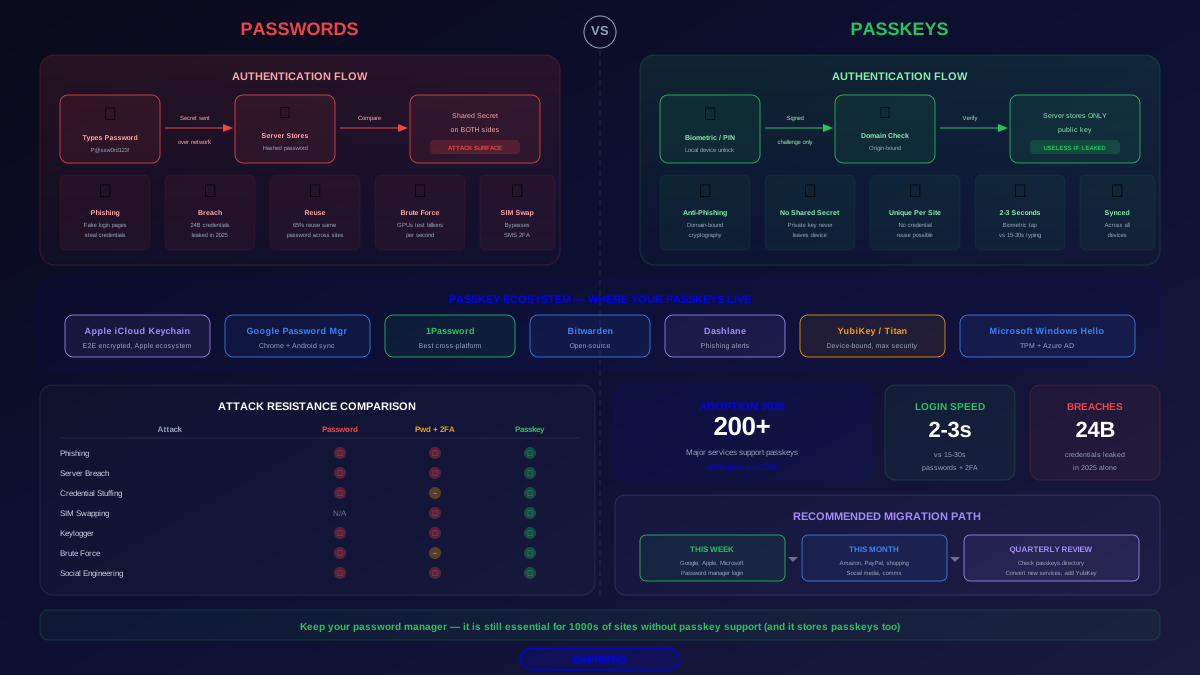
2FA on your password manager account protects against remote access if your master password is compromised. The attacker has your password but cannot log in without your second factor. For highest security, use a FIDO2 hardware key (YubiKey, Google Titan) rather than TOTP or SMS.
Important distinction: 2FA protects the login process, not the vault encryption. If an attacker has a copy of your encrypted vault (as in the LastPass breach), 2FA does not help — the vault is encrypted with your master password, not your 2FA token.
Emergency Access and Account Recovery
Most managers offer emergency access features (trusted contacts who can request access after a waiting period) and account recovery options. Understand exactly how these work for your manager — some create potential access paths that an attacker could exploit through social engineering.
1Password's Emergency Kit and Bitwarden's emergency access feature both use time-delayed approval, giving you a window to deny unauthorized requests. Test your recovery process now, before you need it.
Vault Timeout Settings
How long your vault stays unlocked after authentication directly determines your exposure window if your device is compromised while the vault is open. Set an aggressive timeout — 5 minutes of inactivity for most use cases. Require full master password re-entry (not just biometrics) for sensitive operations like viewing stored passwords or exporting data.
Making Your Decision
There is no single "most secure" password manager. The best choice depends on your threat model.
If you prioritize verifiable security: Bitwarden. Open-source, externally audited, Argon2id KDF, self-hosting option. You can read every line of code that handles your data.
If you prioritize defense against weak master passwords: 1Password. The Secret Key means even a mediocre master password is protected by 128 additional bits of entropy. The tradeoff is no self-hosting and no open-source client code.
If you prioritize minimal attack surface: KeePass. No cloud, no server, no company to breach. Your security depends entirely on your own device security and backup practices.
If convenience matters most and you are in one ecosystem: Apple Keychain or Google Password Manager with on-device encryption enabled. Fewer features, but deeply integrated and backed by significant security engineering.
Any of these options is dramatically more secure than reusing passwords or keeping them in a spreadsheet. The important thing is to pick one and use it consistently.
Hardening Your Password Manager Setup
Regardless of which manager you use, these steps maximize your protection:
- Set a strong master passphrase — 5-6 random Diceware words, 60+ bits of entropy.
- Enable 2FA on your manager account — FIDO2 hardware key preferred, authenticator app acceptable.
- Switch to Argon2id if your manager supports it. If using PBKDF2, ensure iteration count is 600,000+.
- Set a 5-minute vault timeout — Shorter is better. Re-enter master password after timeout.
- Disable autofill on untrusted sites — Use manual fill or the manager's overlay instead.
- Keep your manager updated — Security patches matter. Enable auto-update.
- Secure your recovery method — Store your Emergency Kit or recovery key in a physically secure location separate from your devices.
- Audit your vault quarterly — Check for breached, reused, and weak passwords using the built-in health tools.
- Enable breach monitoring — Most managers now check your stored credentials against known breach databases automatically.
- Keep your devices secure — Updated OS, endpoint protection, and cautious software installation habits are prerequisites for password manager security.
Your password manager is the most important security tool you own. A carefully configured manager with a strong master passphrase gives you protection that no amount of password memorization can match. Understand the architecture, choose a manager that fits your threat model, and invest the 30 minutes it takes to configure it properly. Future you will be grateful.