Here is a wild fact: 91% of all cyberattacks start with one thing — an email. That means your inbox is the biggest target hackers aim for. Not your firewall. Not your server. Your email.
But do not panic! Protecting your email is totally doable. This guide walks you through every layer of email security — from the invisible ID checks that verify senders, to the smart gateways that filter out danger, to the training that helps your team spot scams. By the end, you will know exactly how to lock down your organization's email in 2026.
What Is Email Security and Why Should You Care?
Email security is the collection of tools, rules, and habits that protect your organization's email from threats like phishing, malware, spoofing, and scams. Think of it like a security system for your mailbox — except this mailbox handles thousands of messages a day, and some of them are traps.
Why does email security matter so much? Because email is how businesses communicate. Contracts, invoices, passwords, customer data — it all flows through email. If a hacker gets in, they can steal money, lock your files, or spy on your conversations.
According to CISA, email-based attacks remain the number one way hackers break into organizations of every size. That makes email threat protection the single highest-impact investment you can make.
The 5 Biggest Email Threats in 2026
Before we talk about solutions, let us understand what you are fighting. These are the top email threats hitting businesses right now:
1. Phishing Attacks
Phishing is when someone sends a fake email pretending to be a trusted person or company. The email might ask you to click a link, download a file, or enter your password on a fake website. Over 3.4 billion phishing emails are sent every single day. Anti-phishing software catches most of them — but the clever ones look very real.
2. Business Email Compromise (BEC)
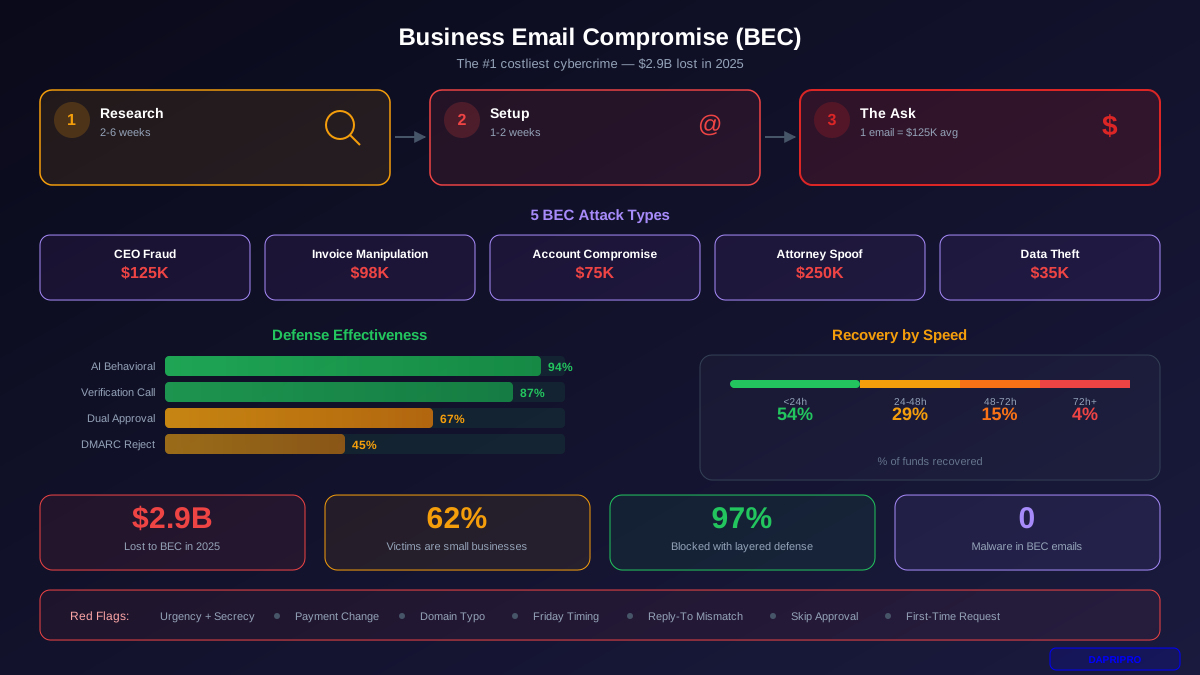
BEC is the sneakiest type of email attack. The hacker pretends to be your boss, a coworker, or a vendor and asks for a wire transfer or sensitive information. There is no malware, no suspicious link — just a convincing message. BEC prevention requires both technology and training because these emails often look completely normal. Learn the details in our BEC Detection and Prevention Guide.
3. Malware and Ransomware Attachments
Some emails carry dangerous files — Word documents, PDFs, or ZIP files that contain viruses. When someone opens the attachment, the malware installs itself and can lock your files (ransomware) or steal your data. A good secure email gateway scans every attachment before it reaches your inbox.
4. Email Spoofing
Spoofing is when a hacker forges the "From" address on an email so it looks like it comes from someone you trust — your bank, your IT department, or even yourself. Without email authentication protocols like DMARC, DKIM, and SPF, there is no way for the receiving server to tell the difference.
5. Account Takeover
When a hacker steals an employee's email password (through phishing or a data breach), they can log in and read, send, and delete emails as that person. This is terrifying because it comes from a real account, so nobody suspects anything until the damage is done.
Email Authentication: The Three-Part ID Check
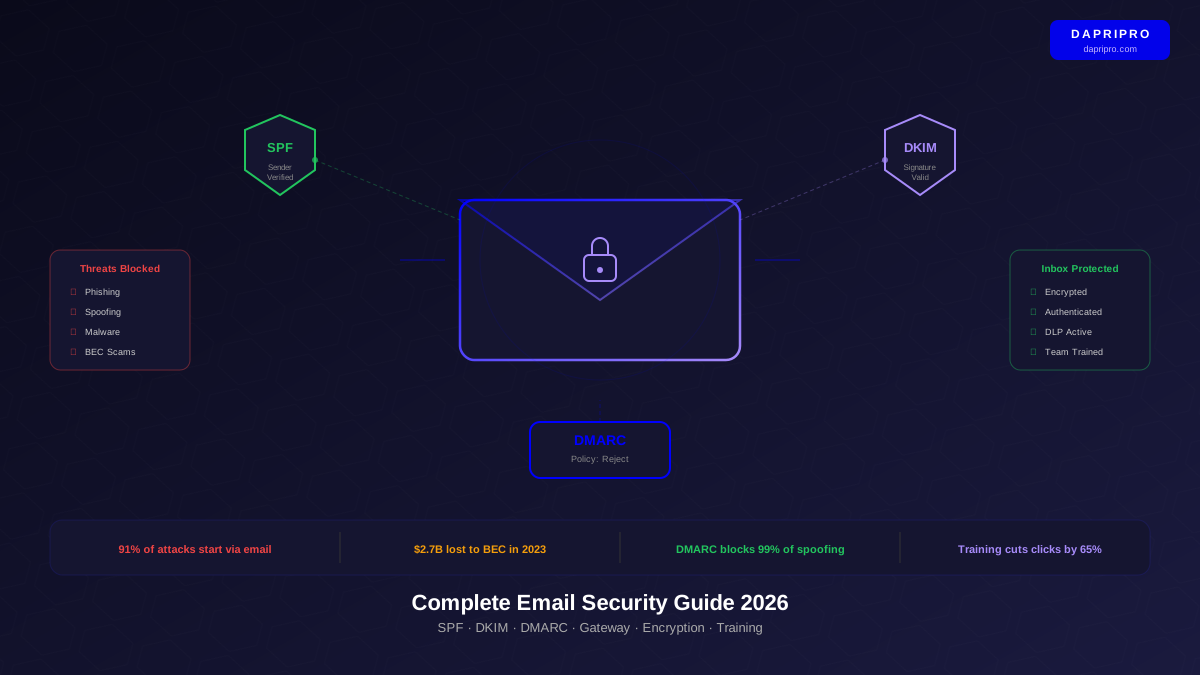
Imagine someone sends a letter using your company's name, but they are not from your company. How would the post office know it is fake? In the email world, three protocols work together to solve this problem: SPF, DKIM, and DMARC. Setting up these three is the foundation of modern email security solutions.
SPF (Sender Policy Framework)
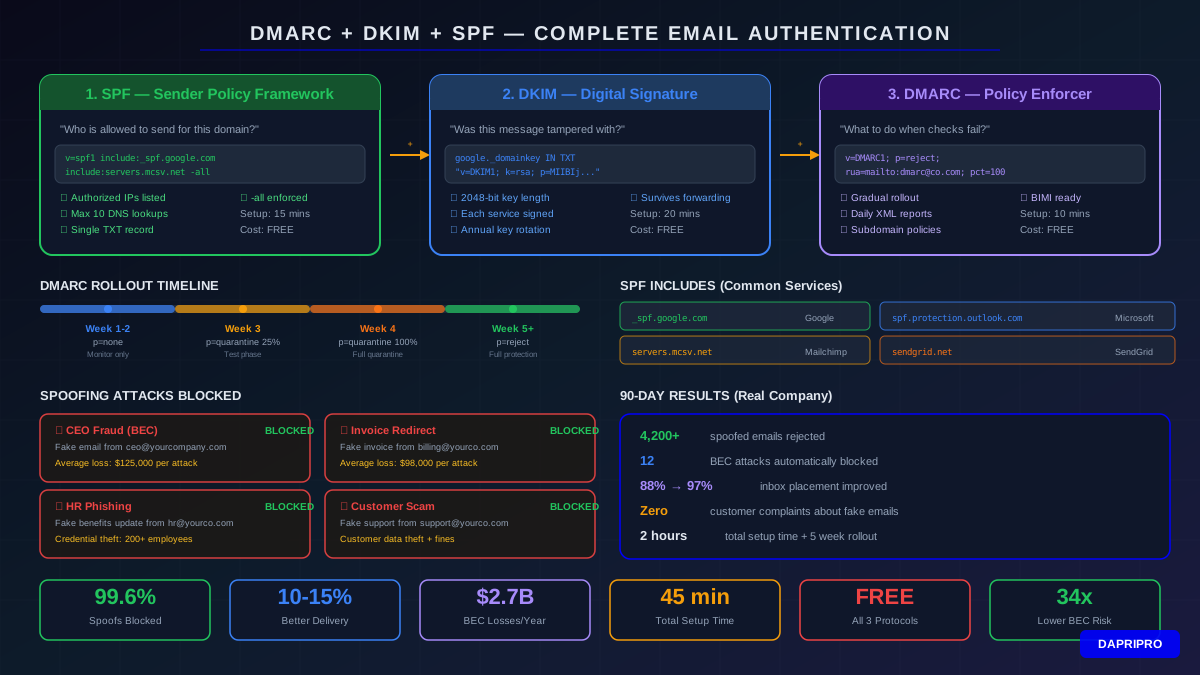
SPF is like a guest list for your email domain. You publish a list of servers that are allowed to send email on behalf of your company. When another server gets an email claiming to be from you, it checks that list. If the sending server is not on the list, the email fails the check.
Setting up SPF means adding a special text record (called a TXT record) to your domain's DNS settings. It looks something like this:
v=spf1 include:_spf.google.com include:servers.mcsv.net -allThat line says: "Only Google and Mailchimp can send emails for us. Reject everything else."
DKIM (DomainKeys Identified Mail)
DKIM works like a wax seal on a letter. Your email server adds a hidden digital signature to every message it sends. The receiving server checks that signature against a public key published in your DNS. If the signature matches, the email is genuine and has not been tampered with during delivery.
DMARC (Domain-based Message Authentication)
DMARC is the boss that tells SPF and DKIM what to do when something fails. You set a policy that says: "If an email fails both SPF and DKIM, reject it (or quarantine it)." DMARC also sends you reports so you can see who is trying to send fake emails using your domain.
For a full step-by-step setup walkthrough, see our DMARC, DKIM, and SPF Implementation Guide.
Email Security Gateways: Your First Line of Defense
An email security gateway sits between the internet and your inbox. Every email passes through it first. The gateway scans for spam, phishing links, malware attachments, and suspicious patterns — all before anyone on your team sees the message.
Think of it like airport security for your email. Every message goes through the scanner. Safe ones pass through. Dangerous ones get stopped.
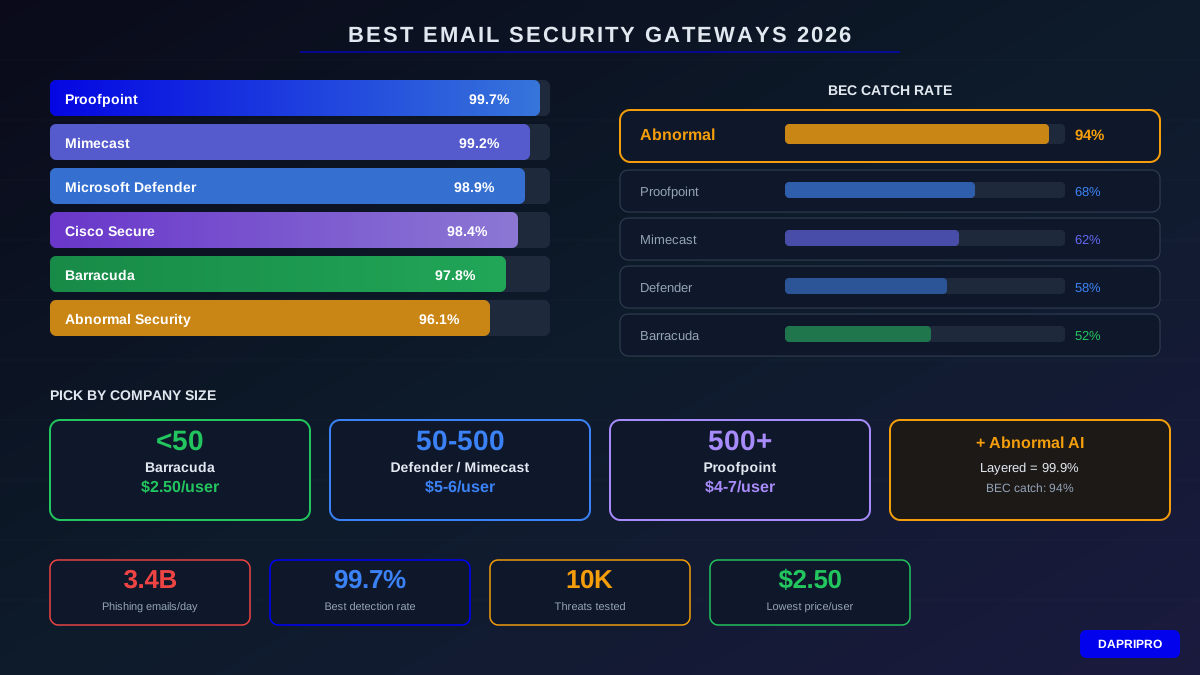
Here is how the best email security solutions compare in 2026:
| Gateway | Best For | Price Range | Standout Feature |
|---|---|---|---|
| Microsoft Defender for Office 365 | Microsoft 365 users | $2–$5/user/mo | Built into Office — zero extra setup |
| Proofpoint Essentials | Medium and large companies | $3–$6/user/mo | Best-in-class phishing detection |
| Mimecast | Companies needing email archiving too | $4–$7/user/mo | All-in-one email management |
| Barracuda Email Gateway | Small businesses on a budget | $1–$3/user/mo | Simple setup, strong value |
| Abnormal Security | Stopping BEC and impersonation | Custom pricing | AI that reads email behavior patterns |
For detailed reviews and head-to-head comparisons, see our Best Email Security Gateways for 2026 guide. If you use Microsoft 365, our Microsoft 365 Email Security Configuration Guide walks you through every setting.
Email Encryption: Scramble Your Secrets
What if someone intercepts your email while it is traveling across the internet? Without email encryption, they can read everything — contracts, passwords, financial data, customer information.
Email encryption scrambles your message into unreadable code while it travels. Only the intended recipient has the key to unscramble it. There are two main types:
- TLS (Transport Layer Security) — encrypts the connection between email servers. Think of it as a secure tunnel. Most emails already use TLS, but it only protects messages in transit, not at rest.
- End-to-end encryption (E2EE) — encrypts the actual message content so only the sender and recipient can read it. Even your own email provider cannot see what is inside. Tools like S/MIME and PGP provide this level of protection.
If your business handles medical records, financial data, or personal information, email data loss prevention and encryption are not optional — laws like HIPAA and GDPR require them.
How to Train Your Team to Spot Email Scams
Even the best technology cannot catch everything. The last line of defense is your people. If an employee clicks a phishing link or replies to a BEC email, all your email security tools cannot undo the damage.
Here is how to build a team that spots scams:
- Run phishing simulations. Send fake phishing emails to your own team and see who clicks. Do not punish people — use it as a teaching moment. Our Phishing Simulation Guide shows you how.
- Teach the red flags. Urgency ("Act NOW!"), weird sender addresses, unexpected attachments, and requests for money or passwords are classic warning signs.
- Create a reporting button. Make it easy for employees to flag suspicious emails with one click. The faster you know about a threat, the faster you can respond.
- Train regularly. One training session per year is not enough. Short monthly reminders keep security top of mind. Check out our 5-Minute Phishing Training Guide for a quick approach.
- Verify unusual requests. If someone emails asking for a wire transfer or sensitive data, pick up the phone and confirm. Never rely on email alone for high-value actions.
"The best email security gateway in the world only stops 99% of threats. Your people handle the other 1% — and that 1% is usually the most dangerous."
— Ryan Kalember, Chief Strategy Officer, Proofpoint
Step-by-Step: Set Up Email Security for Your Organization
Ready to protect your company email? Follow these steps in order:
Step 1: Set Up SPF, DKIM, and DMARC
Start with email authentication. Add SPF and DKIM records to your domain's DNS. Then set up DMARC with a "none" policy first (just monitoring) so you can see what is happening without blocking legitimate emails. Once you are confident, move to "quarantine" and then "reject."
Step 2: Deploy an Email Security Gateway
Choose a gateway that fits your email system. If you use Microsoft 365, Defender for Office 365 is the easiest choice. If you use Google Workspace, look at Proofpoint or Barracuda. Turn on malware scanning, link protection, and attachment sandboxing.
Step 3: Enable Email Encryption
At minimum, enforce TLS for all outgoing email. For sensitive industries, set up S/MIME or PGP for end-to-end encryption on messages containing financial, medical, or personal data.
Step 4: Set Up Data Loss Prevention (DLP)
Email data loss prevention rules automatically detect and block emails that contain sensitive information like credit card numbers, Social Security numbers, or medical records. Most email security gateways include DLP features — you just need to turn them on and configure the rules.
Step 5: Train Everyone
Roll out phishing awareness training to every employee. Run simulations monthly. Make it easy to report suspicious emails. Celebrate people who catch test phishing emails instead of punishing those who miss them.
Step 6: Monitor and Improve
Check your DMARC reports weekly. Review your gateway's dashboard for trends. Are phishing attempts increasing? Are certain employees clicking more often? Use data to keep improving your defenses.
Email Security Mistakes That Get Businesses Hacked
Avoid these common errors:
- Leaving DMARC on "none" forever. Monitoring mode does not block anything. Move to "reject" once you know your legitimate email sources are authorized.
- Ignoring personal email on work devices. An employee's personal Gmail can introduce malware to your network even if your work email is perfectly secured.
- Not scanning internal emails. Most gateways only scan emails coming from outside. But if an insider account is compromised, the attacker sends malicious emails from within.
- Skipping mobile devices. Emails on phones are harder to inspect because you cannot easily hover over links to check them. Make sure your security policies cover mobile email apps.
- One-time training. A single security training session loses its effect within months. Regular refreshers make the difference.
Conclusion: Your Inbox Is Your Front Door
Email is how your business talks to the world — and it is the number one way hackers try to break in. The good news? You can close that door with the right combination of email authentication (SPF, DKIM, DMARC), a solid email security gateway, email encryption, and people who know how to spot a scam.
Start today: check if your domain has DMARC set up (you can test it free at DMARC Analyzer). Then pick a gateway that fits your email system. Train your team. Monitor your results.
For more on keeping your business safe, explore our Endpoint Security Guide to protect the devices where people read those emails, and our Zero Trust Architecture Guide to build security into every layer of your network.
Your inbox is your front door. Lock it tight.