You send an email with a client contract, financial report, or employee social security number. You assume it is private because it is email. But standard email is about as private as a postcard — anyone who handles it along the way can read it.
Email was invented in 1971 and was never designed with security in mind. Without encryption, your message travels across the internet in plain text, passing through multiple servers where it can be intercepted, copied, or read by anyone with access.
Email encryption solves this by scrambling your message so only the intended recipient can read it. But not all encryption is equal. The type of encryption you use determines who can read your emails and when.
TLS vs End-to-End Encryption: The Critical Difference
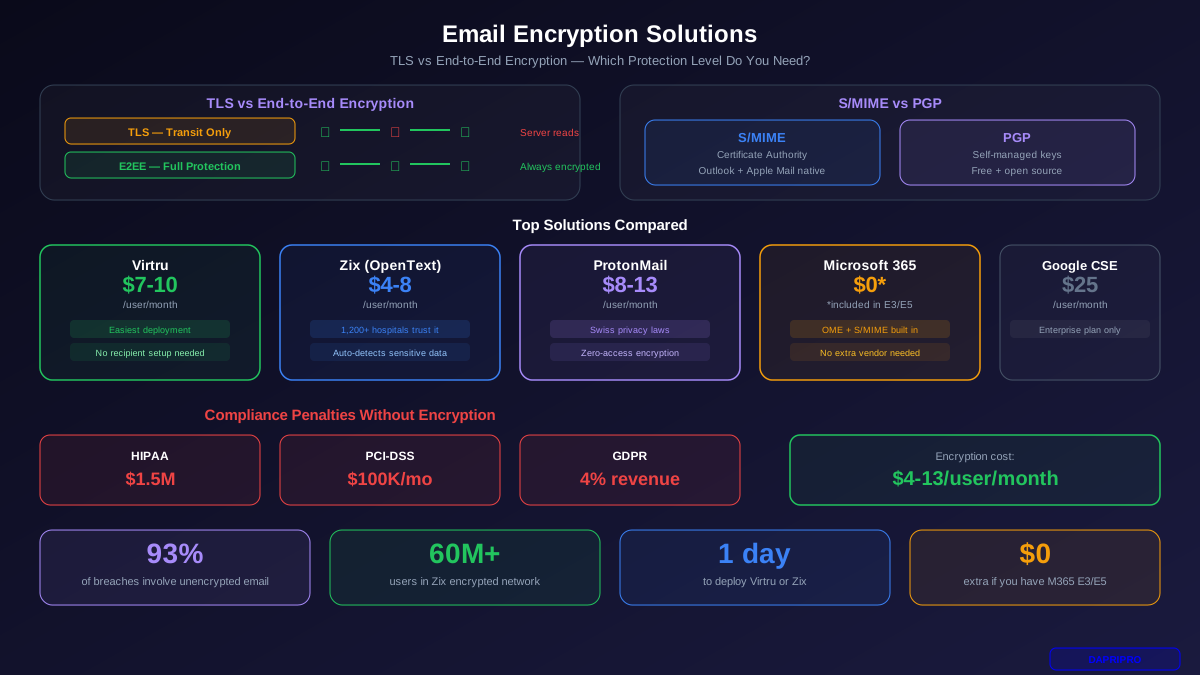
Most people think their email is already encrypted. And they are partly right — most email providers now use TLS (Transport Layer Security) to encrypt emails while they travel between servers. Gmail, Outlook, and Yahoo all use TLS by default.
But TLS only protects the delivery path, not the message itself. Think of it like an armored truck delivering a package — the package is safe during transit, but once it arrives at the warehouse, anyone with warehouse access can open it.
End-to-end encryption (E2EE) works differently. It encrypts the actual message content with a key that only the recipient has. Even if someone hacks the email server, breaks into the admin account, or intercepts the message mid-delivery, they get meaningless scrambled text. Only the person with the decryption key can read it.
S/MIME vs PGP: The Two Standards
There are two main standards for email encryption. Both provide end-to-end encryption, but they work differently:
| Feature | S/MIME | PGP (GPG) |
|---|---|---|
| Trust Model | Certificate Authority | Self-managed keys |
| Setup Difficulty | Easy (built into Outlook/Apple Mail) | Moderate (requires plugins) |
| Cost | $10-25/user/year for certificates | Free (open source) |
| Best For | Corporate environments | Technical users, open source |
| Email Client Support | Outlook, Apple Mail, Thunderbird | Thunderbird, plugins for others |
| Key Management | Centralized (IT manages certs) | Decentralized (users manage keys) |
| Recipient Setup | Needs certificate installed | Needs public key exchanged |
For most businesses, S/MIME is the better choice. IT can manage certificates centrally, it works out of the box in Outlook and Apple Mail, and employees do not need any technical knowledge. PGP is powerful but the key management burden makes it impractical for companies with more than a handful of users.
Top Email Encryption Solutions Compared
| Solution | Price/User/Mo | Encryption Type | Recipient Needs Account? | Best For |
|---|---|---|---|---|
| Virtru | $7-10 | E2EE (TDF) | No | Easiest deployment |
| Zix (OpenText) | $4-8 | TLS + Portal | No (web portal) | Healthcare / HIPAA |
| ProtonMail Business | $8-13 | E2EE (PGP) | No (password link) | Maximum privacy |
| Microsoft 365 E5 | $57 (full suite) | OME + S/MIME | No (web portal) | Existing M365 users |
| Google Workspace CSE | $25 (Enterprise) | E2EE (S/MIME) | S/MIME cert needed | Google Workspace orgs |
| Mailfence | $3.50-8 | PGP + S/MIME | No (password link) | Budget option (EU) |
Virtru — Best for Easy Deployment
Virtru works as a browser extension for Gmail and a plugin for Outlook. It adds a toggle button — click it, and your email is encrypted. Recipients click a link to read the message in a secure reader, no account needed. Virtru uses the Trusted Data Format (TDF), which lets you revoke access to emails after sending them. Ideal for companies that want encryption without changing their email provider.
Zix (OpenText) — Best for Regulated Industries
Zix has been encrypting healthcare and financial services email for over 20 years. It automatically scans outgoing email for sensitive data patterns (SSNs, credit card numbers, PHI) and encrypts matching messages without the sender doing anything. The ZixDirectory connects over 60 million encrypted email users, enabling seamless encrypted communication between Zix customers. Over 1,200 hospitals use Zix.
ProtonMail Business — Best for Privacy-First Companies
ProtonMail is a full email provider with encryption built into every message. Based in Switzerland (strong privacy laws), they use zero-access encryption — even ProtonMail staff cannot read your emails. For recipients without ProtonMail, you can send password-protected messages. Downside: you must migrate your entire email system to ProtonMail, which is a bigger commitment than adding a plugin.
Microsoft 365 Message Encryption
If you already pay for Microsoft 365 E3 or E5, you have email encryption included. Office Message Encryption (OME) lets you send encrypted emails to anyone — recipients open messages through a web portal. You can also deploy S/MIME if you purchase user certificates. This is the most cost-effective option for companies already in the Microsoft ecosystem.
Compliance Requirements for Email Encryption
| Regulation | Encryption Requirement | Penalty for Non-Compliance |
|---|---|---|
| HIPAA | PHI must be encrypted in transit and at rest | Up to $1.5M per violation category |
| PCI-DSS | Cardholder data encrypted when sent over open networks | $5,000-100,000/month in fines |
| GDPR | Encryption is a recommended safeguard for personal data | Up to 4% of annual global revenue |
| SOX | Financial data must use adequate security controls | Up to $5M fine + 20 years prison |
| CMMC | CUI must be encrypted using FIPS 140-2 validated crypto | Loss of government contracts |
The key takeaway: if your business handles health data, financial data, personal data, or government data, email encryption is not optional — it is a legal requirement. And a $50/month encryption tool is dramatically cheaper than a $1.5 million compliance fine.
How to Deploy Email Encryption (Step by Step)
Option A: Add-on encryption (Virtru, Zix)
- Choose your solution based on the comparison table above. Request a trial.
- Deploy to a pilot group of 5-10 users in your finance or legal team for 2 weeks.
- Configure DLP rules to automatically encrypt emails containing sensitive patterns (SSNs, account numbers, medical terms).
- Train users on how to manually trigger encryption for sensitive messages.
- Roll out company-wide with automatic encryption policies as the default.
Option B: Native encryption (Microsoft 365, Google Workspace)
- Verify your license includes encryption (M365 E3/E5 or Google Enterprise).
- Enable OME or CSE in your admin console.
- Create mail flow rules that automatically encrypt messages based on keywords, recipients, or sensitivity labels.
- Purchase S/MIME certificates from a trusted CA (DigiCert, Sectigo) if you need true end-to-end encryption.
- Deploy certificates via MDM (Intune, JAMF) or Active Directory.
Option C: Full migration (ProtonMail)
- Set up your ProtonMail Business account with your company domain.
- Migrate mailboxes using ProtonMail's import tool (supports IMAP migration).
- Update MX records to point to ProtonMail servers.
- Train employees on ProtonMail's interface and how to send password-protected messages to external contacts.
5 Email Encryption Mistakes to Avoid
- Encrypting everything. When every email is encrypted, employees start ignoring encryption warnings because they see them constantly. Encrypt only sensitive messages — contracts, financial data, personal information, and legally protected data.
- Forgetting the subject line. Most encryption solutions encrypt the body and attachments but leave the subject line in plain text. Never put sensitive information in the subject. Use generic subjects like "Secure: Monthly Report" instead of "Q3 Revenue: $4.2M."
- No key recovery plan. If an employee leaves the company and you do not have their encryption keys or certificate, you permanently lose access to every encrypted email they sent or received. Set up centralized key escrow from day one.
- Relying on TLS alone for compliance. TLS satisfies the "encryption in transit" requirement but most regulations also require "encryption at rest." A gateway that only provides TLS does not meet HIPAA, PCI-DSS, or CMMC requirements.
- Ignoring the recipient experience. If your encrypted emails are too complicated for recipients to open, they will ask you to resend without encryption. Test the recipient experience with external contacts before rolling out. Choose a solution with a simple web portal for non-encrypted recipients.
Email encryption does not have to be expensive or complicated. If you use Microsoft 365 or Google Workspace, you likely already have encryption capabilities built in. Turn them on. If you need stronger protection, Virtru and Zix can be deployed in a single afternoon. The question is not whether you can afford email encryption — it is whether you can afford the compliance fines, legal liability, and data breach costs of not having it.