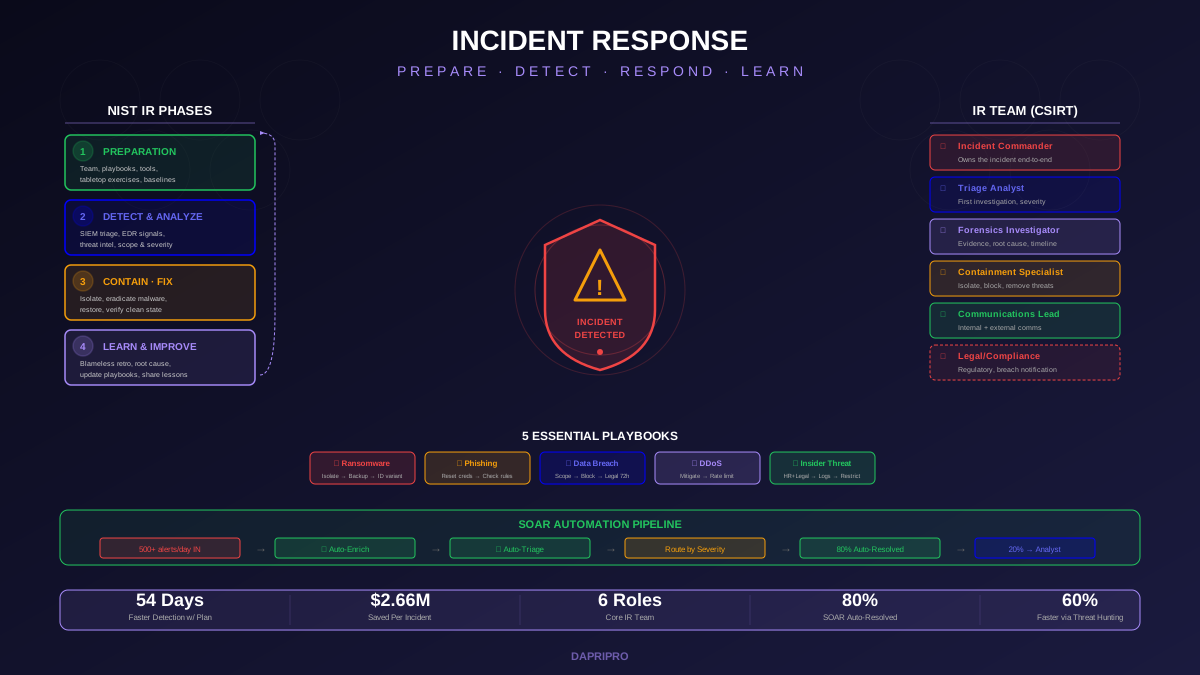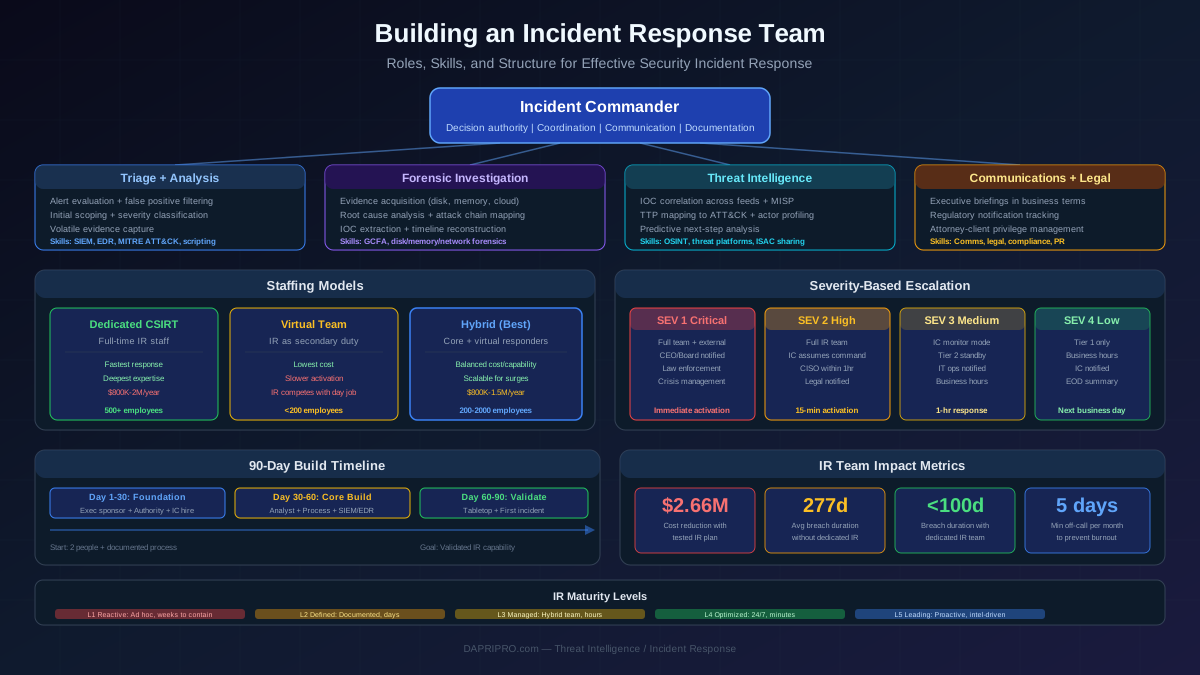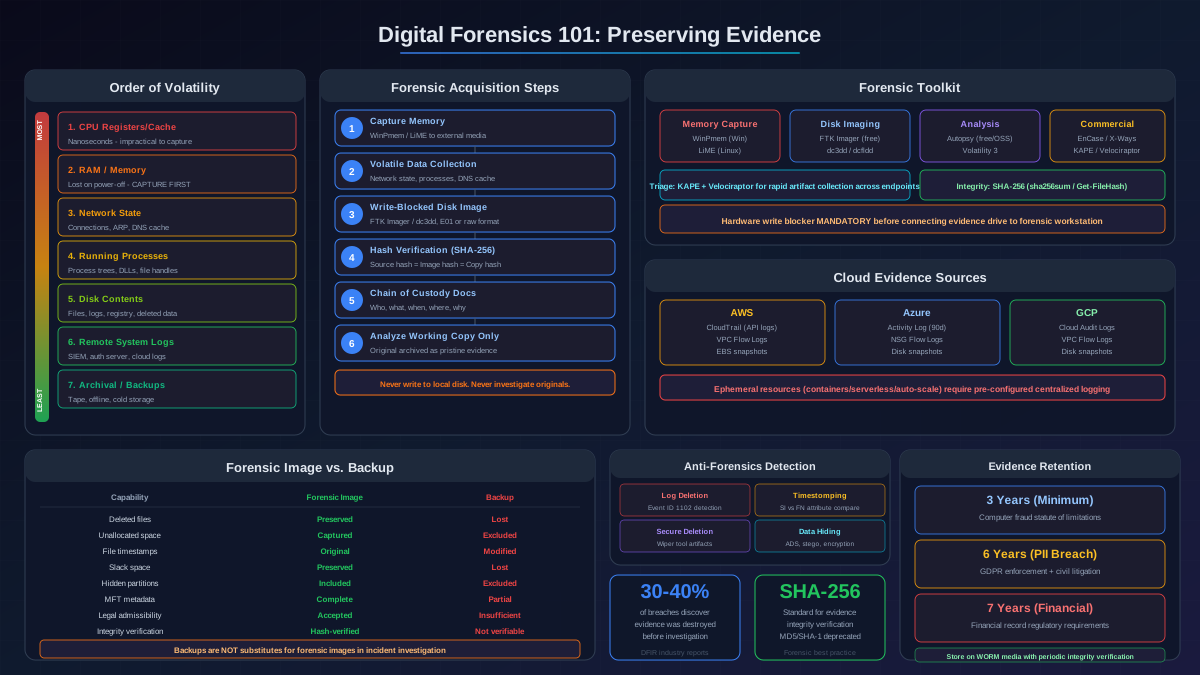
Your SIEM fires alerts. Your EDR blocks known malware. Your email gateway catches phishing. And sophisticated adversaries operate inside your network for weeks or months, carefully avoiding every automated tripwire you have deployed. This is not a failure of your security tools. It is the fundamental limitation of reactive, signature-based detection: it catches threats that match patterns you have already defined, while adversaries design their operations to avoid those exact patterns.
Threat hunting addresses this gap through proactive, human-driven investigation. Instead of waiting for automated systems to detect anomalies, threat hunters form hypotheses about adversary behavior and actively search for evidence of compromise in the data. The approach is fundamentally different from alert triage: hunters assume the adversary is already present and search for the evidence that proves or disproves that assumption.
The distinction matters because the threats that threat hunting finds are the ones that cause the most damage. The Mandiant M-Trends report consistently shows that dwell time (the period between initial compromise and detection) correlates directly with incident severity and cost. Threats detected through automated alerting within hours or days tend to cause limited damage. Threats that evade detection for weeks or months allow adversaries to achieve their objectives: data exfiltration, persistent access establishment, supply chain compromise, or positioning for destructive attacks.
This guide covers how to build and operate a threat hunting capability that systematically identifies the threats your automated defenses miss.
Threat Hunting vs. Automated Detection: Complementary Disciplines
Understanding the relationship between hunting and automated detection is essential because the two disciplines serve different purposes, require different skills, and produce different outputs.
What Automated Detection Does Well
Automated detection excels at scale, speed, and consistency. A well-tuned SIEM processes millions of events per day and evaluates every one against hundreds of correlation rules. EDR agents monitor process execution, file activity, and network connections on every endpoint continuously. These systems catch a large volume of threats reliably: known malware signatures, common attack patterns, policy violations, and anomalies that match statistical baselines.
Automated detection is also reproducible. Once a detection rule is written and validated, it fires consistently whenever the matching conditions appear. The detection does not depend on an analyst's attention, expertise, or workload.
What Automated Detection Misses
Automated detection has structural limitations that create exploitable blind spots:
- Known-pattern dependency — Detection rules match patterns defined by their authors. Adversaries who understand common detection logic (which is often published in open-source repositories and vendor documentation) design their techniques to avoid those patterns.
- Living-off-the-land blindness — Attacks that use legitimate system tools (PowerShell, WMI, certutil, msiexec, rundll32) generate activity that looks similar to normal administrative operations, making automated distinction difficult without deep contextual analysis.
- Low-and-slow evasion — Adversaries who spread their activity over days or weeks, generating only small amounts of suspicious activity in each time window, stay below the volume thresholds that trigger most correlation rules.
- Novel technique gaps — New attack techniques have no signatures. The period between a new technique appearing in the wild and detection vendors creating coverage for it is the detection gap window. During this window, automated detection is blind.
- Context limitations — Automated systems evaluate individual events or short event sequences. They rarely have the contextual understanding to identify a series of individually benign actions that, when combined across multiple systems over time, reveal coordinated adversary activity.
How Hunting Fills the Gap
Threat hunting leverages human analytical capabilities that complement automated systems: hypothesis formation based on threat intelligence, contextual reasoning across multiple data sources and time periods, creative adversary emulation thinking ("if I were targeting this organization, how would I avoid these specific detections?"), and the ability to recognize subtle patterns that are difficult to express as automated rules.
The relationship between hunting and detection should be circular: threat intelligence informs hunt hypotheses, successful hunts produce new detection rules, detection alerts identify patterns worth deeper hunting investigation, and hunt results refine threat intelligence priorities.
Hypothesis-Driven Hunting: A Structured Methodology
Effective threat hunting follows a structured methodology. Undirected data exploration ("let me look at the logs and see if anything looks weird") occasionally produces findings but is inconsistent, unmeasurable, and unrepeatable. Hypothesis-driven hunting provides structure, focus, and accountability.
The Hunt Cycle
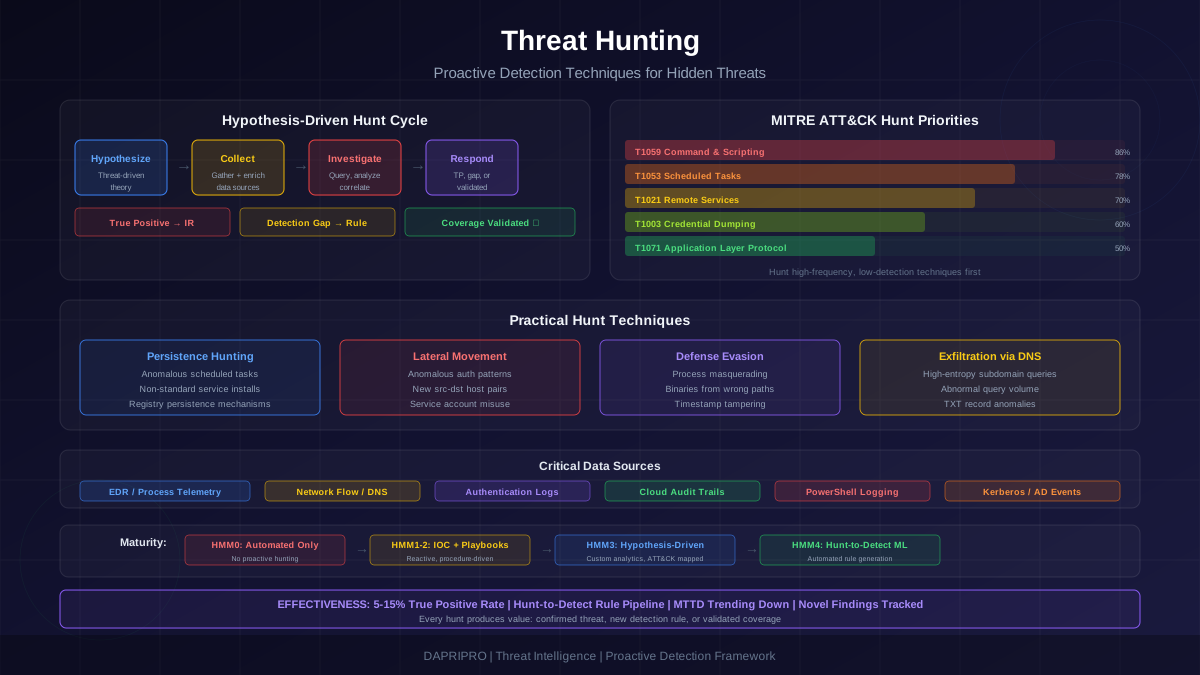
Every structured hunt follows five phases:
Phase 1: Hypothesis Formation — Develop a specific, testable hypothesis about adversary behavior in your environment. A good hypothesis has four components: the threat actor behavior being investigated, the expected evidence in your data, the data sources required, and the expected baseline of normal activity.
Example: "Advanced threat groups are using DNS tunneling for data exfiltration. Evidence would appear as DNS queries with abnormally high subdomain entropy, unusually long subdomain strings, or high query volume to low-reputation domains. We will analyze DNS query logs from our resolvers over the past 30 days, comparing query patterns against known baseline statistics for subdomain length and query frequency."
Phase 2: Data Collection and Preparation — Gather the required data and prepare it for analysis. This includes verifying data completeness (are all expected data sources actually logging?), normalizing data formats, enriching data with context (GeoIP, threat intelligence, asset classification), and establishing baselines for comparison.
Phase 3: Investigation — Execute the hunt by querying, filtering, and analyzing the data to test the hypothesis. Use a combination of automated queries (to identify statistical outliers), manual review (to evaluate context and intent), and visualization (to identify patterns across time and entities). Document the investigation steps, queries used, and intermediate findings.
Phase 4: Response or Tuning — Every hunt produces one of three outcomes: a confirmed finding (true positive adversary activity requiring incident response), a detection gap (no adversary found, but the investigation revealed that the data or detection logic would not have caught this technique if it were present), or validated coverage (no adversary found, and the investigation confirmed that existing data and detections are adequate for this technique).
Phase 5: Documentation and Automation — Document the hunt methodology, queries, findings, and any new detection rules created. Successful hunt techniques should be converted into repeatable automated detections when possible. Hunt reports feed the hypothesis backlog for future hunts.
MITRE ATT&CK as the Hunting Foundation
The MITRE ATT&CK framework provides the structural backbone for a systematic hunting program. ATT&CK catalogs adversary techniques organized by tactical objectives (Initial Access, Execution, Persistence, Privilege Escalation, Defense Evasion, Credential Access, Discovery, Lateral Movement, Collection, Command and Control, Exfiltration, Impact), and maps each technique to the data sources needed to detect it.
ATT&CK Coverage Mapping
The first step in building a hunt program is mapping your current detection coverage against ATT&CK techniques. For each technique in ATT&CK:
- Determine relevance: Is this technique used by threat actors targeting your industry and geography? Threat intelligence reports from CrowdStrike, Mandiant, Recorded Future, and industry ISACs identify which threat groups target specific sectors and which techniques they favor.
- Assess current detection: Do your existing SIEM rules, EDR policies, or other automated detections cover this technique? Score each technique as fully covered, partially covered, or not covered.
- Verify data availability: Do you collect the data sources ATT&CK specifies for detecting this technique? If Process Creation and Windows Event 4688 is required but you are not logging command-line arguments, you cannot detect the technique regardless of your detection logic.
The result is a prioritized matrix: techniques that are highly relevant to your threat profile but have weak detection coverage and available data sources are your highest-priority hunt targets. Techniques with weak detection and missing data sources require data collection improvements before hunting is productive.
Technique-Based Hunt Libraries
Build hunt playbooks organized by ATT&CK technique. Each playbook documents:
- The ATT&CK technique ID and description
- The specific hypothesis being tested
- Required data sources with field-level specifications (not just "Windows Security logs" but "Event ID 4688 with command-line arguments, Event ID 4624 with logon type and source network address")
- Baseline queries that establish normal behavior for the activity being investigated
- Hunt queries that identify anomalous instances of the technique
- Known false positive sources and how to filter them
- Response playbook reference if the technique is confirmed
Data Requirements: You Cannot Hunt What You Cannot See
Data quality and coverage determine hunting effectiveness more than any other factor. The most skilled hunter with the best tools produces no results if the relevant data is not being collected, centralized, and retained.
Critical Data Sources by ATT&CK Tactic
Execution detection requires process creation events with full command-line arguments, PowerShell script block logging (Event ID 4104), WMI event tracing, and Windows Script Host execution logs. Without command-line logging, you cannot distinguish between legitimate PowerShell usage and malicious encoded commands.
Persistence detection requires scheduled task creation and modification events, registry modification logs (Run/RunOnce keys, services, WMI subscriptions), startup folder monitoring, and service installation logs. Many organizations log process execution but not the persistence mechanisms that ensure the process runs on reboot.
Lateral movement detection requires authentication logs with source address and logon type, remote service access logs (RDP, SMB, WinRM, SSH), network flow data between internal systems, and Kerberos ticket events (for detecting pass-the-ticket and golden ticket attacks).
Credential access detection requires LSASS process access events (Event ID 4663 or Sysmon Event ID 10), NTDS.dit file access logs, Kerberos TGS requests (Event ID 4769 for Kerberoasting detection), and Active Directory replication events (for DCSync detection).
Defense evasion detection requires process injection monitoring (Sysmon Event ID 8), timestamp modification detection, security log clearing events (Event ID 1102), and file masquerading detection (processes running from unexpected directories with system binary names).
Command and control detection requires DNS query logs with full query content, HTTP/HTTPS proxy logs with URL and user-agent, network flow data with connection duration and bytes transferred, and certificate transparency data for domain analysis.
Data Quality Audit
Before starting a hunting program, audit your data sources:
- Coverage — What percentage of your endpoints, servers, and network segments are sending logs to your centralized platform? Gaps allow adversaries to operate in unmonitored zones.
- Completeness — Are critical log fields populated? Event logs without command-line arguments, authentication logs without source IP, or network logs without full URLs reduce hunting effectiveness dramatically.
- Retention — How long is data retained? Many advanced threats have dwell times exceeding 30 days. If your log retention is 14 days, you cannot investigate activity older than two weeks even after detecting the compromise.
- Normalization — Are equivalent events from different sources mapped to common field names? Hunting across EDR, SIEM, and cloud logs requires consistent field names for source IP, destination IP, username, hostname, and process name.
Practical Hunt Techniques by Category
The following hunt techniques represent high-value, repeatable hunts that can be adapted to most enterprise environments. Each technique includes the hypothesis, data requirements, and analytical approach.
Persistence Hunting: Scheduled Tasks and Services
Adversaries frequently use scheduled tasks and services for persistence because they survive reboots, can execute with SYSTEM privileges, and blend in with legitimate system tasks.
Hypothesis: Unauthorized scheduled tasks have been created for persistence, identifiable by non-standard creation patterns such as tasks created outside of change windows, tasks with execution paths pointing to temporary directories, user-writable locations, or renamed system utilities, and tasks created by processes other than the standard administrative tools.
Hunt approach: Extract all scheduled task creation events (Event ID 4698 or Sysmon Event ID 1 with schtasks.exe). Baseline the normal task creation pattern: which accounts create tasks, what directories do legitimate tasks execute from, and what naming conventions are used. Flag anomalies: tasks created by non-administrative accounts, tasks executing binaries from user profile directories or temp folders, tasks with encoded command arguments, and tasks with names that do not match organizational naming conventions.
Lateral Movement Hunting: Anomalous Authentication
Lateral movement generates authentication events. Hunting for anomalous authentication patterns identifies adversaries moving between systems, even when they use legitimate credentials.
Hypothesis: Compromised credentials are being used for lateral movement, identifiable by authentication patterns that deviate from the user's normal behavior: logins from new source hosts, logins at unusual times, logins to systems the user has never previously accessed, multiple systems accessed in rapid succession, or administrative logons to non-standard workstations.
Hunt approach: Build authentication baselines per user: typical source hosts, typical destination hosts, typical logon times, and typical logon types (interactive, network, remote interactive). Identify authentication events that fall outside these baselines. Focus on logon type 3 (network) and logon type 10 (remote interactive) events with service account credentials, as these often indicate credential theft and lateral movement via PsExec, WMI, or RDP.
Defense Evasion Hunting: Process Masquerading
Adversaries frequently name their tools to match legitimate system binaries or run processes from unexpected locations to avoid detection. Process masquerading is one of the most commonly used defense evasion techniques.
Hypothesis: Adversary processes are masquerading as legitimate system binaries by running from non-standard directories. Legitimate system processes have expected execution paths (svchost.exe runs from System32, explorer.exe runs from Windows), and processes with those names running from other locations are suspicious.
Hunt approach: Create a whitelist of critical Windows system binaries and their expected paths: svchost.exe should only run from C:/Windows/System32/, explorer.exe from C:/Windows/, lsass.exe from C:/Windows/System32/, etc. Query process creation events for any instance of these binary names executing from paths that do not match the expected directories. Every match is suspicious and warrants investigation.
Exfiltration Hunting: DNS Tunneling
DNS tunneling encodes data in DNS queries, using the DNS protocol as a covert channel for command and control or data exfiltration. Because DNS traffic is rarely inspected, this technique evades many network-based detections.
Hypothesis: DNS tunneling is being used for data exfiltration, identifiable by DNS queries with abnormally high entropy in subdomain names, unusually long query strings, high query volume to single domains, or TXT record queries to domains not associated with legitimate email or other services.
Hunt approach: Analyze DNS query logs for statistical anomalies. Calculate the Shannon entropy of subdomain components, where encoded data produces high-entropy random-looking strings compared to human-readable normal subdomains. Flag queries exceeding typical subdomain lengths (legitimate subdomains rarely exceed 30 characters, while DNS tunneling subdomains approach the 63-character label limit). Identify domains receiving an abnormally high volume of unique subdomain queries from internal hosts.
Threat Hunting Tools and Platform Comparison
The choice of hunting platform affects analysis capability, data access, and workflow efficiency. The following comparison covers the major platforms used for threat hunting operations.
Elastic Security
Elastic Security (built on the Elastic Stack) provides a flexible, open-source-friendly hunting platform. Strengths include powerful KQL and ES|QL query languages, extensive community-contributed detection rules through the Detection Rules repository, built-in timeline investigation for correlating events across data sources, and low per-GB indexing costs compared to commercial SIEM platforms. Limitations include significant cluster management overhead at scale, limited built-in case management, and a steeper learning curve for complex queries.
Splunk Enterprise Security
Splunk remains the most widely deployed SIEM for threat hunting. Strengths include SPL query language flexibility for complex data manipulation, extensive marketplace of threat hunting apps including the Hunting app and MLTK for machine learning, large data volume handling with distributed search, and strong integration with threat intelligence platforms. The primary limitation is cost: Splunk licensing based on data ingestion volume makes it expensive for the comprehensive logging that hunting requires.
CrowdStrike Falcon OverWatch
CrowdStrike combines an EDR platform with a managed threat hunting service. The Falcon platform provides rich endpoint telemetry (process trees, file modifications, network connections, registry changes) accessible through the Event Search and Investigate interfaces. OverWatch adds CrowdStrike's own hunting team conducting hunts across all customer environments. Strengths include deep endpoint visibility and managed hunting expertise. Limitations include network-layer visibility gaps and dependency on the CrowdStrike agent being deployed on all endpoints.
Microsoft Sentinel with KQL
Microsoft Sentinel provides cloud-native SIEM with strong hunting capabilities for organizations invested in the Microsoft ecosystem. KQL (Kusto Query Language) is powerful for time-series analysis and statistical operations. Built-in hunting queries and notebooks, integration with Microsoft 365 Defender telemetry, and Jupyter notebook support for advanced analytics are strengths. The primary limitation is that hunting across non-Microsoft data sources requires additional data connectors and may have field mapping inconsistencies.
Velociraptor
Velociraptor is an open-source tool purpose-built for endpoint forensics and threat hunting. It deploys lightweight agents that execute VQL (Velociraptor Query Language) queries directly on endpoints, collecting live forensic artifacts without requiring centralized log forwarding. Strengths include the ability to hunt across endpoints without prior log collection, live endpoint interrogation, and artifact collection for deep forensic analysis. Limitations include the frontend management overhead for large deployments and the learning curve for VQL.
Building a Sustainable Threat Hunting Program
A sustainable hunting program requires organizational structure, consistent execution, and integration with the broader security operation. Without deliberate program design, hunting efforts are inconsistent, unmeasurable, and eventually abandoned.
Team Structure and Roles
Threat hunting requires dedicated personnel. Splitting hunting time with SOC alert triage results in hunting being consistently deprioritized because alerts create immediate accountability (an unacknowledged alert is a visible gap) while hunting does not (a delayed hunt has no visible consequence until a breach occurs).
Dedicated hunt team model — Larger organizations (10,000+ employees) benefit from a dedicated hunting team of 3-5 analysts reporting to a hunt lead. This structure provides consistent hunting output, specialization development, and institutional knowledge. The hunt lead manages the hypothesis backlog, coordinates with threat intelligence, and ensures findings are integrated into detection engineering.
Embedded hunter model — Smaller organizations embed 1-2 hunters within the SOC with protected hunting time (minimum 60% of their working hours). During their hunting hours, hunters are not available for alert triage. This requires SOC staffing levels that can absorb the reduced triage coverage.
Rotational model — Some organizations rotate senior SOC analysts through hunting duties on 2-4 week rotations. This builds hunting skills across the team and prevents knowledge silos. The downside is that rotational hunters invest significant time reorienting each rotation and rarely develop deep hunting expertise.
Hunt Cadence and Scheduling
Establish a regular hunting cadence:
- Scheduled hunts — 2-4 structured hunts per month, each spanning 2-5 analysis days. Pull hypotheses from the prioritized backlog based on ATT&CK coverage gaps and current threat intelligence.
- Reactive hunts — Rapid hunts (1-2 hours) triggered by new threat intelligence, industry incidents, or vulnerability disclosures relevant to your environment. These hunts search for specific indicators or techniques identified in the intelligence report.
- Quarterly reviews — Evaluate hunt results, update the hypothesis backlog, review detection rules created from hunts, and adjust priorities based on changes to the threat landscape and organizational infrastructure.
Measuring Hunt Effectiveness
Measure the hunting program against four outcome metrics:
True positive rate — What percentage of hunts identify confirmed adversary activity? A very low rate may indicate poor hypothesis quality or that the environment is genuinely clean. A very high rate may indicate that automated detections need significant improvement. Typical mature programs find confirmed adversary activity in 5-15% of hunts.
Detection rule generation — How many new automated detection rules are created from hunt findings per quarter? Successful hunt techniques that identify real adversary behavior should be converted into automated rules that catch the same technique without requiring a manual hunt. Track the number of production detection rules that originated from hunting activity.
MTTD improvement — Are incidents being detected faster over time as hunt-derived detection rules supplement existing coverage? Compare MTTD trends before and after hunting program implementation for incidents of the same type.
Novel finding count — How many findings represent previously unknown threats or techniques? This measures the unique value of hunting beyond what automated detection provides. Novel findings include previously unknown malware variants, undocumented adversary infrastructure, insider threat indicators, and misconfigurations that create exploitable attack paths.
Common Threat Hunting Mistakes and How to Avoid Them
Threat hunting programs fail for predictable reasons. Understanding these failure modes helps avoid them during program design and execution.
Mistake 1: Hunting Without Sufficient Data
The most common hunting failure is attempting to hunt for techniques when the required data is not being collected or is incomplete. A hunt for lateral movement when Windows authentication logs do not include source IP addresses produces no useful results. A hunt for DNS tunneling when DNS query logs are not centralized wastes hunting time entirely.
Prevention: Conduct the data quality audit described above before beginning any hunts. Maintain a data source inventory that maps each ATT&CK technique to its required data sources and tracks whether those sources are collected, complete, and retained for sufficient duration. Only add hunts to the backlog when the required data is confirmed available.
Mistake 2: Unfocused Exploration Instead of Hypothesis-Driven Hunts
Open-ended data exploration feels productive because the hunter is actively working with data, but it rarely produces consistent results. Without a hypothesis to test, the hunter has no framework for determining what is anomalous, no criteria for declaring the hunt complete, and no way to measure effectiveness.
Prevention: Require every hunt to start with a written hypothesis that specifies the technique being investigated, the expected evidence, the data sources being analyzed, and the success criteria. Review hypotheses before hunts begin to ensure they are specific and testable.
Mistake 3: Not Converting Findings into Automated Detections
A hunt that identifies a technique but does not produce an automated detection rule means the same technique must be found manually every time. This does not scale. The most valuable hunt output is not the finding itself but the automated detection rule that catches the same activity continuously.
Prevention: Require every successful hunt (true positive or detection gap identified) to produce at least one detection rule candidate. Maintain a tracking system that connects hunt findings to the detection rules created from them. Include "detection rules generated" as a hunt program effectiveness metric.
Mistake 4: Insufficient Documentation
Hunts that are not thoroughly documented cannot be repeated, refined, or used to train new team members. When the original hunter leaves the organization, their techniques, queries, and institutional knowledge leave with them.
Prevention: Use standardized hunt playbook templates that capture the hypothesis, data sources, queries, baseline methodology, findings, false positive sources, and resulting detection rules. Store playbooks in a shared repository (Git, wiki, or knowledge base) that the entire team can access and improve.
Mistake 5: Treating Hunting as a Part-Time Activity
Assigning hunting to SOC analysts who are also responsible for alert triage guarantees that hunting is deprioritized whenever alert volume increases (which is most of the time). Alert triage creates immediate accountability (unacknowledged alerts are visible to management), while delayed hunting has no visible consequence until a breach occurs.
Prevention: Protect hunting time formally. Whether using dedicated hunters, embedded hunters, or a rotational model, hunting time must be blocked and respected. If the organization cannot commit to protected hunting time, it should not claim to have a hunting program.
Threat hunting transforms security operations from a purely reactive posture to one that actively seeks out sophisticated adversaries. The investment in hunting pays dividends through earlier detection of advanced threats, systematic improvement of automated detection coverage, and organizational learning about adversary techniques and your own defensive gaps. Start with a data quality audit, build hypothesis-driven hunt playbooks mapped to ATT&CK techniques relevant to your threat profile, and track effectiveness through true positive rates, detection rule generation, and MTTD improvement trends.