Your operating system is the most privileged software on your computer. It sees every keystroke you type, every file you open, every network connection you make, and every byte of data on your storage. If your OS is compromised — or if it is designed to report on you — no application-level privacy tool can protect you. A VPN is meaningless when your OS logs your activity before encrypting it. An encrypted messaging app is useless when your OS takes screenshots of your conversations. Privacy that does not start at the operating system level is privacy theater.
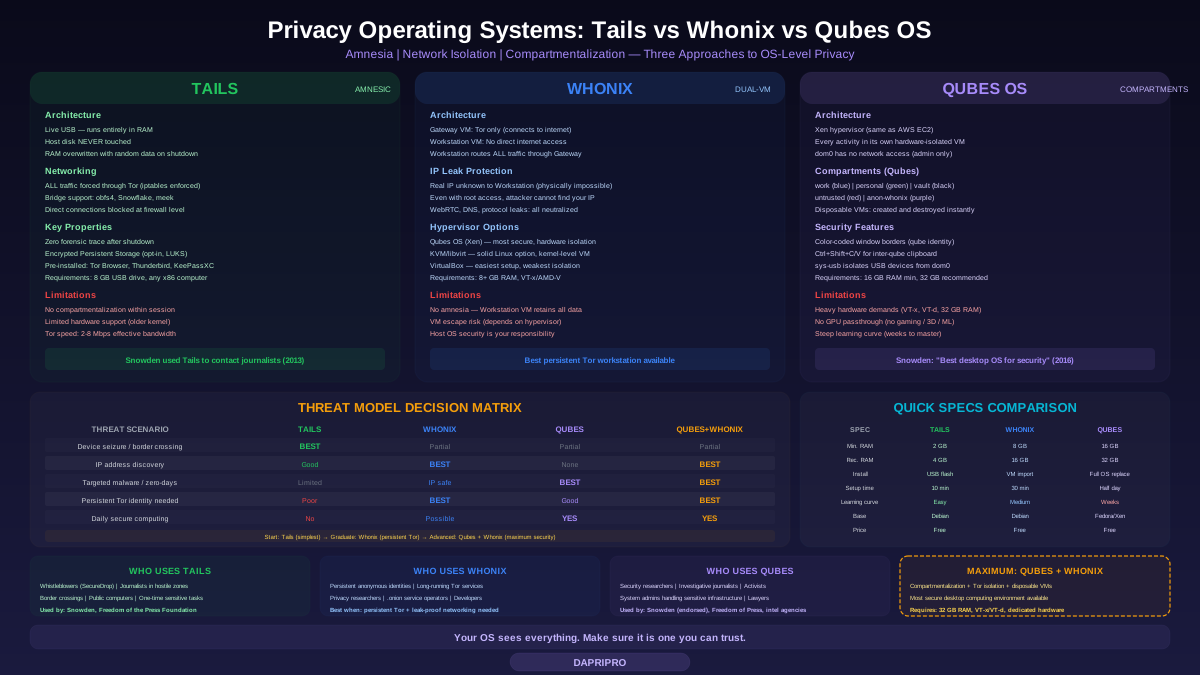
Three operating systems have emerged as serious answers to this problem, each with a fundamentally different approach. Tails solves it through amnesia — it forgets everything the moment you shut down. Whonix solves it through network isolation — even fully compromised software cannot discover your real IP. Qubes OS solves it through compartmentalization — a breach in one activity cannot spread to another. Understanding which approach matches your threat model is the difference between genuine security and false confidence.
Tails: The Amnesic Incognito Live System
Tails (The Amnesic Incognito Live System) is a portable operating system built on Debian that boots from a USB drive, routes all network traffic through Tor, and leaves absolutely no trace on the host computer. When you shut down Tails, it overwrites the entire RAM contents and vanishes as if it never existed. The host machine's internal storage is never touched — not for temporary files, not for swap, not for anything.
How Tails Achieves Amnesia
Tails runs entirely in RAM. The USB drive contains the read-only operating system image, but all runtime data — open files, browser state, application memory — exists only in volatile memory. When power is cut, RAM decays within seconds. Tails accelerates this by actively overwriting RAM contents with random data during shutdown, a process visible as a progress bar before the system powers off.
This design means that even if someone physically seizes the computer immediately after you used Tails, forensic analysis reveals nothing. The internal hard drive shows whatever operating system was there before — Windows, macOS, Linux — with no evidence that Tails was ever booted. The USB drive shows only the read-only Tails image, with no session data. The RAM is cleared. There is literally nothing to find.
Tails Networking: Tor Everything
Tails forces all outbound network connections through Tor. Not just the browser — every application, every DNS query, every background process. Applications that attempt direct connections are blocked at the firewall level. Tails configures iptables rules that drop all traffic not destined for the Tor SOCKS proxy. There is no way for any software running inside Tails to connect to the internet without going through Tor, even if that software is malicious.
If the network you are connected to blocks Tor, Tails includes bridge support. During boot, you can configure obfs4, Snowflake, or meek bridges and Tails will use them for the entire session. The Tor connection screen appears before the desktop loads, ensuring no unprotected traffic ever leaves the machine.
Persistent Storage: Controlled Exceptions
Pure amnesia is powerful but impractical for some use cases. You might need to keep GPG keys, specific documents, or Wi-Fi passwords between sessions. Tails addresses this with encrypted Persistent Storage — a LUKS-encrypted partition on the USB drive that you unlock with a passphrase at boot.
Persistent Storage is opt-in and granular. You choose which categories of data persist: Personal Documents, GPG keys, SSH keys, Wi-Fi passwords, browser bookmarks, Thunderbird email, additional software packages. Everything not explicitly enabled is still amnesia by default. If you boot without unlocking Persistent Storage, Tails behaves as if it does not exist.
Who Edward Snowden Used It To Contact Journalists
In 2013, Edward Snowden used Tails to communicate with journalists Glenn Greenwald and Laura Poitras while exposing the NSA's mass surveillance programs. His operational security depended on Tails' core properties: no trace left on any computer he used, all communications routed through Tor, and GPG encryption for every message. Tails was purpose-built for exactly this scenario — high-stakes communication where physical device seizure is a realistic threat.
Tails Limitations
Tails is deliberately limited. It offers no persistence by default — you cannot install software permanently without configuring Persistent Storage. Hardware compatibility is restricted because Tails uses a relatively old Linux kernel and cannot support the newest hardware. Performance is constrained by running entirely in RAM and routing through Tor (expect 2-8 Mbps effective bandwidth). There is no support for running virtual machines inside Tails. The browser is locked down with Tor Browser's Safest security level equivalent, which disables JavaScript on non-HTTPS sites.
Most importantly, Tails provides amnesia, not compartmentalization. While Tails is running, all your activities exist in the same session. If malware compromises Tor Browser within a Tails session, it can access anything else you have open in that same session. The amnesia protects you after shutdown, not during operation.
Whonix: Dual-VM Tor Isolation Architecture
Whonix takes a fundamentally different approach from Tails. Instead of amnesia, Whonix provides persistent Tor usage with IP leak protection through a dual-VM architecture that makes it physically impossible for the Workstation to access the network directly.
The Gateway-Workstation Architecture
Whonix consists of two virtual machines that run simultaneously:
- Whonix-Gateway — A stripped-down Debian VM that runs Tor and nothing else. It connects to the internet through the host's network adapter. All traffic entering or leaving the Gateway passes through Tor. The Gateway has a single purpose: be a Tor proxy.
- Whonix-Workstation — A full Debian desktop environment where you do all your work. The Workstation is connected to an internal virtual network that can access only the Gateway. It has no physical or virtual network adapter connected to the internet. Its entire networking consists of a single connection to the Gateway's internal interface.
This architecture creates a guarantee that no software-based approach can defeat: the Workstation cannot discover your real IP address because it has no network path to the real internet. Even if an attacker gains full root access to the Workstation, runs arbitrary code, and achieves code execution in the kernel, the only network the Workstation can see is the internal virtual network to the Gateway. Any traffic it sends goes through Tor, period.
What Whonix Protects Against
Whonix's architecture specifically defeats these attacks:
- IP leaks from applications — WebRTC, Java applets, Flash, DNS leaks, and misconfigured applications cannot reveal your IP because the Workstation genuinely does not have access to your real IP. It cannot leak what it does not know.
- Malware IP discovery — Trojans, keyloggers, and rootkits running on the Workstation cannot phone home with your real IP. They can only see the internal virtual network address.
- Protocol leaks — Applications that use protocols other than TCP (which Tor supports) are either blocked or stream-isolated through Tor.
- Tor configuration errors — Users cannot accidentally bypass Tor because the Workstation has no non-Tor network path.
Whonix on Qubes vs KVM vs VirtualBox
Whonix can run on three hypervisor platforms, each with different security properties:
Qubes OS — The most secure option. Running Whonix on Qubes uses the Xen hypervisor, which provides hardware-level VM isolation. Qubes creates the Whonix Gateway as sys-whonix and the Workstation as anon-whonix, with separate disposable Workstation instances available through right-click menus. This combination (Qubes + Whonix) is widely considered the most secure desktop computing environment available.
KVM/libvirt — A solid option for Linux users who do not want to run Qubes. KVM uses kernel-level virtualization with hardware VT-x/AMD-V support. The attack surface is smaller than VirtualBox because KVM is a kernel module with a minimal codebase. Recommended for serious use.
VirtualBox — The easiest to set up but the least secure. VirtualBox has a large attack surface, a history of VM escape vulnerabilities, and runs as a userspace application. Acceptable for learning and low-risk use cases but not recommended for high-stakes privacy scenarios.
Whonix Limitations
Whonix does not provide amnesia. Your Workstation VM retains all data between sessions — browser history, downloaded files, installed software. If someone accesses your host machine and opens the Workstation VM, your data is there. You need to separately encrypt the VM disk images and handle operational security around the host OS.
Whonix depends on the security of the underlying hypervisor. A VM escape vulnerability in VirtualBox, KVM, or Xen would allow an attacker to break out of the Workstation and access the host — including your real network configuration. VM escapes are rare but not theoretical: CVE-2024-21111 (VirtualBox privilege escalation), CVE-2020-2674 (VirtualBox 3D acceleration escape), and Xen advisories have been published historically.
Performance overhead is significant. You are running two full VMs plus any other qubes. Expect to dedicate at least 4 GB to the Gateway, 4-8 GB to the Workstation, and whatever the host OS needs. A machine with 16 GB RAM is the practical minimum; 32 GB is comfortable.
Qubes OS: Security Through Compartmentalization
Qubes OS approaches security from a fundamentally different angle than Tails or Whonix. Instead of trying to make one environment perfectly secure, Qubes assumes that any environment will eventually be compromised — and prevents that compromise from spreading to anything else.
The Xen Foundation
Qubes runs directly on the Xen hypervisor — the same technology that powers AWS's EC2 infrastructure. Xen sits between the hardware and all operating systems, providing hardware-level isolation between virtual machines. Unlike VirtualBox or VMware (which run as applications on top of a host OS), Xen is the host. The "dom0" administrative domain is minimal and has no network access. This architecture means that compromising a guest VM does not grant access to dom0, other VMs, or the hardware.
Qubes leverages Intel VT-x (processor virtualization) and VT-d (I/O virtualization) to ensure that VMs are isolated at the hardware level, not just the software level. A malicious VM cannot use DMA attacks to access memory belonging to other VMs because VT-d enforces hardware-level memory isolation through the IOMMU.
Qubes: Everything Is a Compartment
In Qubes, every activity runs in its own isolated virtual machine called a "qube." A typical Qubes setup includes:
- work — A qube for your professional activities. Contains documents, email client, office applications.
- personal — A separate qube for personal browsing, social media, entertainment.
- vault — An offline qube with no network access. Stores GPG keys, password databases, sensitive files.
- untrusted — A qube for opening suspicious files, clicking untrusted links, testing unknown software.
- anon-whonix — A Whonix Workstation qube for Tor-routed activities.
- sys-net — The only qube with physical network hardware access. All other qubes route through it.
- sys-firewall — Sits between sys-net and application qubes, enforcing per-qube firewall rules.
- sys-usb — Isolates USB devices in a separate VM to prevent USB-based attacks from reaching dom0.
Each qube is color-coded: red for untrusted, orange for less trusted, yellow for somewhat trusted, green for trusted, blue for work, purple for custom. The window borders display the qube's color, so you always know which security domain a window belongs to. Opening a PDF from your email in the "work" qube displays a blue border. Opening a link from an unknown source in "untrusted" displays a red border. You cannot accidentally type your banking password into a red-bordered window thinking it is a blue-bordered one.
Disposable VMs: One-Time-Use Security
Qubes allows any qube template to spawn disposable VMs — temporary instances that are completely destroyed when closed. The most common use case: right-click a file in any qube and select "Open in Disposable VM." Qubes spins up a fresh VM from a clean template, opens the file, and when you close the window, the entire VM and all its contents are permanently deleted.
This is extraordinarily powerful for handling untrusted content. Received a suspicious PDF? Open it in a disposable VM. If it contains an exploit, the exploit is trapped in a VM that will cease to exist in seconds. Want to visit a sketchy website? Open it in a disposable Tor browser. The browsing session, any cookies, any tracking, any potential malware — all destroyed when you close the tab.
Inter-Qube Communication
Qubes carefully controls how information moves between compartments. You cannot simply copy-paste between qubes — you must use a deliberate, user-approved mechanism:
- Clipboard — Copy text in one qube, then press Ctrl+Shift+C to move it to the inter-qube clipboard, then switch to the destination qube and press Ctrl+Shift+V to paste. This prevents clipboard-based data exfiltration.
- File transfer — Right-click a file and select "Move to VM" or "Copy to VM." The file is transferred through a secure channel with user approval required at each step.
- Firewalling — Each qube can have individual firewall rules. A "vault" qube with no network access physically cannot exfiltrate data because sys-firewall drops all its traffic.
Qubes Limitations
Qubes demands serious hardware. The minimum is 16 GB RAM, but running five qubes simultaneously (sys-net, sys-firewall, personal, work, and one disposable) consumes 8-10 GB easily. Running Whonix adds another 4-6 GB. 32 GB is the practical recommendation for comfortable daily use.
Hardware compatibility is limited. Qubes uses Xen, which has narrower driver support than a standard Linux kernel. GPU passthrough to VMs is not supported by default (you get basic 2D acceleration). Gaming, video editing, 3D modeling, and GPU-accelerated machine learning are not practical on Qubes. The project maintains a Hardware Compatibility List (HCL) that users should check before purchasing hardware.
The learning curve is steep. Even experienced Linux users need several weeks to become comfortable with the compartmentalized workflow. Moving files between qubes requires deliberate steps. Installing software requires understanding template VMs versus app VMs. Network configuration involves understanding sys-net, sys-firewall, and net qube assignments.
Qubes provides compartmentalization, not anonymity. By default, all qubes route through your normal internet connection. Your ISP sees all your traffic (encrypted, but still sees connection metadata). For anonymity, you run Whonix inside Qubes — which gives you the best of both worlds but increases resource requirements further.
Matching Your Threat Model to the Right OS
Choosing between these operating systems requires honest assessment of your actual threats. Using the wrong one wastes resources and may create false confidence.
Use Tails When:
- You need to use a computer that is not yours (library, internet cafe, borrowed laptop) and leave zero evidence
- Physical device seizure is a realistic threat (border crossing, protest, authoritarian regime)
- You need to communicate with a specific individual or organization and then destroy all evidence of the interaction
- You are working with SecureDrop or similar whistleblower platforms
- You need maximum simplicity — Tails boots into a working environment with no configuration required
Use Whonix When:
- You need persistent access to Tor-routed services (long-running projects, ongoing pseudonymous identity)
- Your primary threat is IP address discovery — government surveillance, tracking by hostile actors
- You regularly work with applications beyond the web browser that need Tor routing
- You already have a trusted host system (encrypted, physically secure) and need Tor compartmentalization
- You cannot afford the learning curve or hardware requirements of Qubes
Use Qubes OS When:
- You handle multiple security contexts daily (personal, work, sensitive research, untrusted content)
- Your threat model includes sophisticated targeted attacks — malware, spear phishing, zero-day exploits
- You are willing to invest weeks in learning the system and own hardware with 32 GB RAM
- You need the maximum security configuration available (Qubes + Whonix + disposable VMs)
- You are a journalist, security researcher, system administrator, or activist whose work involves routine exposure to hostile content
The Qubes + Whonix + Disposable Stack
The most secure desktop computing configuration available in 2026 combines all three concepts: Qubes OS provides compartmentalization through Xen. Whonix VMs inside Qubes provide Tor routing with IP leak protection. Disposable VMs provide Tails-like amnesia for individual tasks. A journalist might run their everyday browsing in a "personal" qube, conduct source communication through anon-whonix, open suspicious documents in disposable VMs, and store sensitive files in an offline vault qube. Each compartment is hardware-isolated from every other.
Installation and Getting Started
Tails Installation
Tails requires a USB drive of at least 8 GB. Download the Tails USB image from tails.net (verify the GPG signature or use the JavaScript verification on the download page). Flash it to the USB drive using Etcher, dd, or the Tails Installer. Boot from the USB by entering your BIOS/UEFI boot menu (typically F12 or Escape at startup). Tails boots in approximately 60 seconds and presents you with a working desktop, Tor connection dialog, and pre-installed applications including Tor Browser, Thunderbird, LibreOffice, and the KeePassXC password manager.
Whonix Installation
Download both the Gateway and Workstation VM images from whonix.org (verify signatures). Import them into your hypervisor. On VirtualBox: File → Import Appliance for each image. On KVM: use virt-manager import. Start the Gateway first, let it establish a Tor connection, then start the Workstation. The Workstation automatically routes through the Gateway. First boot runs the Whonix setup wizard for timezone configuration and update checks. Total setup time: approximately 30 minutes.
Qubes OS Installation
Qubes installation replaces your existing operating system (dual-booting is not supported). Download the Qubes ISO from qubes-os.org, verify the signature, and flash it to a USB drive. Boot from the USB and follow the Anaconda-based installer. Qubes will install Xen, configure dom0, and create default qubes including sys-net, sys-firewall, personal, and work. If you select the Whonix option during installation, it also creates sys-whonix and anon-whonix. First boot takes 5-10 minutes as templates initialize. Plan for a full afternoon to configure your qube layout, install applications in templates, and learn the workflow.
Common Operational Security Mistakes
The operating system is only one layer. These mistakes defeat the purpose of any privacy OS:
- Logging into personal accounts on Tails — If you log into your real Gmail on Tails, Google now associates your Tor exit node with your identity. Tails protects against the computer remembering, not against the service you log into identifying you.
- Running untrusted VMs without Qubes — Opening malware in a VirtualBox VM on a standard host OS provides weaker isolation than Qubes. VirtualBox VM escapes have been demonstrated. If you are analyzing malware, use Qubes disposable VMs.
- Using Whonix Workstation as if it were fully isolated — Whonix protects your IP. It does not protect files inside the Workstation from malware that has already compromised the Workstation. Store sensitive files in a separate qube or encrypted volume, not alongside your active browsing session.
- Ignoring host OS security with Whonix — If you run Whonix on an unencrypted Windows host, anyone who accesses that machine can open the Workstation VM and see your data. Encrypt the host disk and maintain strong host security.
- Assuming Qubes protects against all attacks — Qubes isolates qubes from each other, not from the hardware. A compromised BIOS/UEFI, Intel ME exploit, or hardware implant bypasses Qubes entirely. Qubes is a software security layer, not a magic shield.
Other Privacy-Focused Distributions Worth Knowing
Beyond the big three, several other distributions serve specific privacy needs:
Kicksecure — Developed by the Whonix team, Kicksecure is a hardened Debian derivative designed for everyday use without the Tor routing requirement. It includes kernel hardening, memory corruption defenses (ASLR, NX support), MAC randomization, secure network time synchronization, and automated security updates. Think of it as "Whonix without the forced Tor" — suitable for users who want a hardened daily driver without anonymity features.
Parrot OS (Home Edition) — A Debian-based distribution with privacy tools pre-installed but designed for daily use rather than strict anonymity. Includes AnonSurf (Tor routing), pre-configured firewall, and full-disk encryption. Lower learning curve than Qubes but less isolation.
Kodachi — A live USB distribution similar to Tails but with a VPN + Tor + DNS encryption chain. Routes traffic through a VPN first, then through Tor, which hides Tor usage from your ISP. More user-friendly than Tails but with a smaller development team and less auditing.
The Practical Recommendation
Most people reading this do not need Qubes OS. If your threat model is an employer monitoring your network, an ISP selling your browsing data, or advertising companies tracking you across the web, a properly configured VPN plus Firefox with uBlock Origin provides adequate protection. Privacy operating systems are for significantly higher threat levels.
If your situation demands a privacy OS, start with Tails. It requires no installation on the host machine, no configuration beyond connecting to Tor, and no ongoing maintenance. Keep a Tails USB drive for situations that require it — buying it for everyday use is like wearing a hazmat suit to the grocery store.
If you need persistent anonymous access — an ongoing pseudonymous identity, long-running Tor services, or regular interaction with .onion sites — use Whonix on KVM. The setup takes 30 minutes and the dual-VM architecture provides genuine IP leak protection that no amount of browser configuration can match.
If you are a journalist, activist, security researcher, or anyone handling multiple sensitive contexts simultaneously — and you are willing to invest serious time in learning the system — Qubes OS with Whonix integration is the most secure desktop computing environment available. Snowden endorsed it. The Freedom of the Press Foundation uses it. Multiple intelligence agencies have reportedly adopted it internally. It works, but it demands commitment.
For more privacy tools and approaches, explore our Privacy Tools section. For network-level protections, see our guide on DNS Privacy and Encrypted DNS.