Every time you type a website address into your browser, your device sends a DNS query — a request to translate that human-readable domain name (like google.com) into the IP address your browser actually needs to connect. This query is sent in complete plaintext, unencrypted, unauthenticated, and visible to every device between you and the DNS resolver. Your ISP sees it. Your Wi-Fi operator sees it. Anyone on your network capable of packet capture sees it. And in most cases, your ISP logs it.
This is not a theoretical privacy problem. ISPs in the United States (Comcast, AT&T, Verizon) have been caught selling aggregated browsing data derived from DNS queries. The UK Investigatory Powers Act requires ISPs to retain 12 months of "internet connection records" — which includes DNS query data. Australia's mandatory data retention law requires ISPs to keep 2 years of metadata including DNS lookups. Your DNS queries are a complete record of every website you visit, every service you use, and every app that phones home — served on a plaintext platter to your ISP.
Encrypted DNS fixes this specific problem. It encrypts the DNS query so that only you and your chosen DNS resolver can see which domain you are looking up. Here is how the major encrypted DNS protocols work, which providers to trust, how to set them up on every platform, and — critically — what encrypted DNS does and does not protect you from.
The DNS Privacy Problem in Detail
How standard DNS exposes you
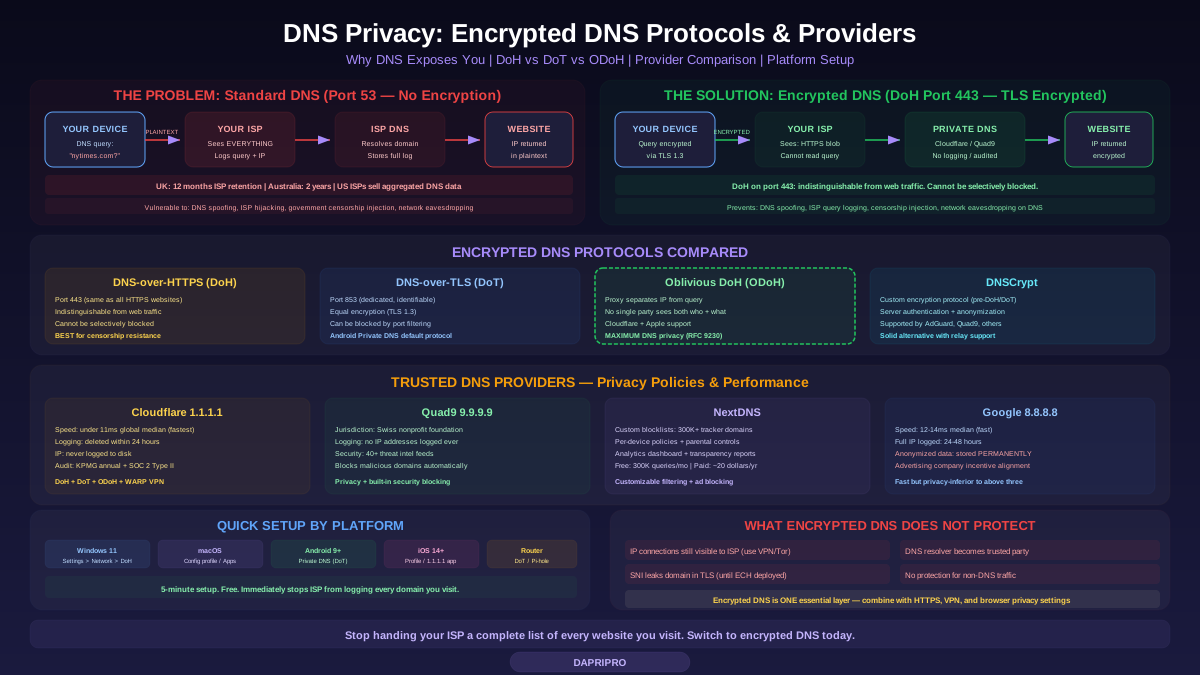
Standard DNS uses UDP on port 53 with no encryption. When you visit a website, the following happens: your device sends a DNS query containing the full domain name (e.g., "What is the IP address for nytimes.com?") to your configured DNS resolver (typically your ISP's resolver, assigned automatically via DHCP). This query travels across your local network and the internet in plaintext. Any device in the network path — your router, your ISP's infrastructure, transit networks, and the DNS resolver itself — can read the full domain name, the query type, and your IP address.
Your ISP does not merely have the ability to see DNS queries — in most cases, they actively log them. ISPs use DNS data for advertising (building browsing profiles), network management (identifying heavy users), legal compliance (responding to government surveillance requests), and content filtering (parental controls, court-ordered blocks). When you use your ISP's default DNS resolver, you are giving them a complete, real-time log of every domain you access.
Beyond privacy, unencrypted DNS has security problems. DNS spoofing (returning fake IP addresses for domain queries) is trivial on unencrypted connections — attackers on your network can redirect you to phishing sites without changing the URL in your browser. DNS hijacking (your ISP silently redirecting DNS queries to their own servers) is common — Comcast, AT&T, and many other ISPs have been documented doing this. Government censors use DNS manipulation as the primary censorship mechanism — the Great Firewall of China injects false DNS responses for blocked domains.
What DNS queries reveal about you
DNS query logs reveal far more than "which websites someone visits." They reveal health information (searches for medical conditions, visits to health provider portals, telehealth services), financial activity (banking sites, investment platforms, cryptocurrency exchanges), political interests (news sites, political organizations, activism tools), sexual orientation and interests (dating sites, specific content categories), religious practice (religious organizations, prayer apps, streaming services), substance use (dispensary sites, harm reduction resources), employment status (job boards, recruitment sites, company career pages), and location patterns (local businesses, restaurants, transit apps). A DNS query log is, in many ways, more intimate than a browsing history because it includes every app, IoT device, and background service query — not just browser activity.
Encrypted DNS Protocols Compared
DNS-over-HTTPS (DoH)
DoH (RFC 8484) encapsulates DNS queries inside standard HTTPS connections on port 443. From a network perspective, a DoH query is indistinguishable from any other HTTPS request — an observer sees an encrypted connection to the DoH resolver's IP address on port 443, identical to visiting a website. This makes DoH extremely resistant to blocking because blocking port 443 would break the entire web.
DoH is supported natively in: Firefox (Settings > Privacy & Security > DNS over HTTPS), Chrome/Edge/Brave (Settings > Privacy > Use secure DNS), Windows 11 (Settings > Network > DNS server assignment > DNS over HTTPS), macOS Ventura and later (via configuration profiles), iOS 14+ (via configuration profiles or apps like 1.1.1.1), and Android 9+ (Settings > Private DNS, which technically uses DoT but Android also supports DoH through apps).
DNS-over-TLS (DoT)
DoT (RFC 7858) wraps DNS queries in TLS encryption on dedicated port 853. The encryption is identical in strength to DoH (TLS 1.3), but the dedicated port means network administrators can identify and potentially block DNS-over-TLS traffic without affecting other services. This makes DoT less suitable for censorship-resistant environments but allows enterprises to enforce DNS policies more granularly.
Android's "Private DNS" feature (Settings > Network & Internet > Private DNS) uses DNS-over-TLS. Enter the hostname of your preferred DoT resolver (e.g., 1dot1dot1dot1.cloudflare-dns.com for Cloudflare, dns.quad9.net for Quad9). This encrypts all DNS queries from your Android device system-wide, including all apps.
Oblivious DNS-over-HTTPS (ODoH)
ODoH (RFC 9230) solves the remaining privacy gap in DoH: with standard DoH, the DNS resolver can see both your IP address and your DNS query. ODoH introduces a proxy between you and the resolver. Your device encrypts the DNS query with the resolver's public key, then sends it to a proxy. The proxy knows your IP address but cannot decrypt the query (it is encrypted for the resolver). The proxy forwards the encrypted query to the resolver. The resolver decrypts and resolves the query but only sees the proxy's IP address, not yours. The result: no single entity knows both who you are and what you queried.
ODoH is supported by Cloudflare (1.1.1.1 with ODoH), Apple Private Relay (uses a similar split architecture), and Firefox (experimental support). ODoH is the strongest DNS privacy protocol currently available but requires both a compatible proxy and resolver.
DNSCrypt
DNSCrypt predates DoH and DoT, using its own encryption protocol to authenticate and encrypt DNS queries. It provides encryption, prevents DNS spoofing, and supports features like server authentication and query anonymization. DNSCrypt is supported by AdGuard DNS, Quad9, and several other providers. While less widely adopted than DoH/DoT, DNSCrypt remains a solid option, especially when used with the DNSCrypt-proxy client that supports anonymized DNS (routing queries through multiple relays, similar to ODoH).
DNS Provider Comparison: Who to Trust
Cloudflare 1.1.1.1: Fastest public resolver (under 11ms global median response time, consistently ranked first on DNSPerf.com). Cloudflare's privacy commitment: no query logging to disk (logs deleted within 24 hours), no selling data, no using data for advertising, no logging querying IP addresses to disk. These claims are audited annually by KPMG with public reports. Supports DoH, DoT, ODoH, and WARP (a VPN layer). Cloudflare is a commercial company — their DNS service is partly a trust-building measure for their paid CDN and security products.
Quad9 9.9.9.9: Operated by the Quad9 Foundation, a Swiss nonprofit. Swiss jurisdiction provides strong legal privacy protection (Swiss Federal Act on Data Protection). Quad9 does not log IP addresses and does not share data with third parties. Unique feature: Quad9 integrates threat intelligence from 40+ cybersecurity partners to block known-malicious domains automatically — queries for phishing sites, malware command-and-control servers, and other threats return NXDOMAIN (domain not found). This provides built-in security alongside privacy. Performance is good (global median around 18-22ms). Supports DoH and DoT.
NextDNS: A customizable DNS resolver that combines privacy, security, and content filtering. NextDNS supports per-device configuration, custom blocklists (300,000+ known tracker/ad domains), parental controls, analytics dashboards, and logging controls (you choose whether to log, and can delete logs on demand). Free tier: 300,000 queries per month. Paid: unlimited queries for approximately 20 dollars per year. NextDNS is transparent about its operations and publishes regular transparency reports. Supports DoH, DoT, and DNSCrypt. Ideal for users who want ad/tracker blocking at the DNS level without running their own hardware.
Google Public DNS 8.8.8.8: Fast (global median around 12-14ms), reliable, and widely deployed. However, Google logs the full IP address of the querying device for 24-48 hours and stores anonymized query data (with IP removed) permanently for internal analytics. Google is an advertising company — while they commit to not selling DNS data, the incentive alignment is less clear than with nonprofits like Quad9 or privacy-focused companies like Cloudflare. Use Google DNS for performance; use Cloudflare or Quad9 for privacy.
Platform Setup Guides
Windows 11
Windows 11 supports DoH natively. Open Settings, go to Network & Internet, click on your active connection (Wi-Fi or Ethernet), click "DNS server assignment" and click Edit. Switch to Manual, enable IPv4, and enter your preferred DNS server (1.1.1.1 for Cloudflare primary, 1.0.0.1 for secondary, or 9.9.9.9 for Quad9 primary, 149.112.112.112 for secondary). Under the IP address you entered, select "On (automatic template)" or "On (manual template)" for DNS over HTTPS. For manual template, enter the DoH template URL (https://cloudflare-dns.com/dns-query for Cloudflare). Repeat for IPv6 if applicable. Save. All DNS queries from this Windows device are now encrypted.
macOS Ventura and later
macOS does not have a simple UI toggle for encrypted DNS. You need a configuration profile (a .mobileconfig XML file) that specifies your encrypted DNS settings. Cloudflare, NextDNS, and Quad9 provide pre-built configuration profiles on their websites. Download the profile, open it, and macOS will prompt you to install it in System Settings > Privacy & Security > Profiles. Alternatively, install the Cloudflare 1.1.1.1 app or the NextDNS app from the Mac App Store, which handle configuration automatically.
Android (9+)
Android's "Private DNS" feature supports DNS-over-TLS natively. Go to Settings > Network & Internet > Private DNS (location varies by manufacturer). Select "Private DNS provider hostname" and enter: 1dot1dot1dot1.cloudflare-dns.com (Cloudflare), dns.quad9.net (Quad9), or your NextDNS hostname (available in your NextDNS dashboard). Tap Save. All DNS queries from all apps on your Android device are now encrypted via DoT.
iOS (14+)
Like macOS, iOS uses configuration profiles for encrypted DNS. Download a DoH/DoT profile from your provider's website (Cloudflare, Quad9, NextDNS all provide them). Go to Settings > General > VPN & Device Management and install the profile. Alternatively, install the Cloudflare 1.1.1.1 app or NextDNS app from the App Store — both configure encrypted DNS system-wide with a single toggle.
Router-level configuration
Configuring encrypted DNS on your router protects every device on your network — including IoT devices, smart TVs, and guest devices that you cannot configure individually. Routers with native DoT support include Asus RT-AX series (built-in DoT configuration), Ubiquiti UniFi (custom DNS with DoT support), pfSense and OPNsense (install Unbound with DoT forwarding), and OpenWrt-based routers (install stubby or dnscrypt-proxy). For routers without DoT support, run Pi-hole or AdGuard Home on a Raspberry Pi and set it as your network's DNS server. Configure Pi-hole's upstream DNS to use Cloudflare or Quad9 via DoH.
What Encrypted DNS Does NOT Protect You From
Encrypted DNS is an important privacy layer, but it is not a privacy solution on its own. Understanding its limitations prevents false confidence:
IP address connections are still visible: After your DNS query resolves a domain to an IP address, your device connects to that IP address — and this connection is visible to your ISP and network observers. If you resolve "journalism-whistleblower-site.com" via encrypted DNS, your ISP cannot see the DNS query, but they can see you connecting to the IP address that domain resolves to. For websites on shared hosting (many sites on one IP), the IP alone may not identify the specific site. For websites on dedicated IPs, the ISP can trivially map the IP back to the domain.
Server Name Indication (SNI) leaks: When your browser establishes a TLS connection to a website, it sends the domain name in the SNI field of the TLS handshake — in plaintext. This allows the server to present the correct TLS certificate when hosting multiple sites on one IP. Even with encrypted DNS, your ISP can see the domain name in the SNI field. Encrypted Client Hello (ECH) is the solution — it encrypts the SNI field — but ECH deployment is still limited (Cloudflare supports it, but most websites and CDNs do not yet).
The DNS resolver is a trusted party: Encrypted DNS shifts your DNS query visibility from your ISP to your chosen DNS resolver. You are still trusting someone — the question is whether you trust Cloudflare or Quad9 more than your ISP. For most people, the answer is yes (privacy-focused DNS providers have better incentives and audited commitments than ISPs). For maximum paranoia, use ODoH (no single party sees both your identity and your query) or run a local recursive resolver like Unbound that queries authoritative nameservers directly without any third-party resolver.
No protection for non-DNS traffic: Encrypted DNS protects DNS queries only. It does not encrypt your web traffic (HTTPS does that), protect against browser fingerprinting, prevent cookie tracking, or anonymize your IP address. For comprehensive privacy, encrypted DNS should be combined with HTTPS (which is now default on most sites), a VPN or Tor (for IP anonymization), and browser privacy settings or extensions (for fingerprinting and cookie protection).
Advanced: Self-Hosted DNS for Maximum Control
Pi-hole + Unbound: The most privacy-focused home DNS setup is running Pi-hole (for ad/tracker blocking by domain) with Unbound (a recursive DNS resolver) on a Raspberry Pi or any Linux system. In this configuration, Pi-hole blocks domains on your blocklist and forwards all other queries to Unbound. Unbound resolves domains by querying root and authoritative nameservers directly — no third-party DNS resolver involved at all. Your DNS queries never touch Cloudflare, Google, or any public resolver. The tradeoff: slightly slower resolution (no caching from large resolvers) and you are responsible for maintaining the system.
AdGuard Home: Similar to Pi-hole but with a more polished web interface, native DoH/DoT support for both incoming (devices on your network can use DoH/DoT to reach AdGuard Home) and outgoing (AdGuard Home uses DoH/DoT to query upstream resolvers) connections, and built-in DHCP server. AdGuard Home is easier to set up than Pi-hole + Unbound but equally effective.
Encrypted DNS is one of the simplest and highest-impact privacy improvements you can make. It takes 5 minutes to configure, costs nothing, and immediately stops your ISP from logging every domain you visit. It is not a complete privacy solution — but combined with HTTPS, a VPN for sensitive browsing, and sensible browser privacy settings, it eliminates one of the most egregious and unnecessary privacy exposures in the modern internet.