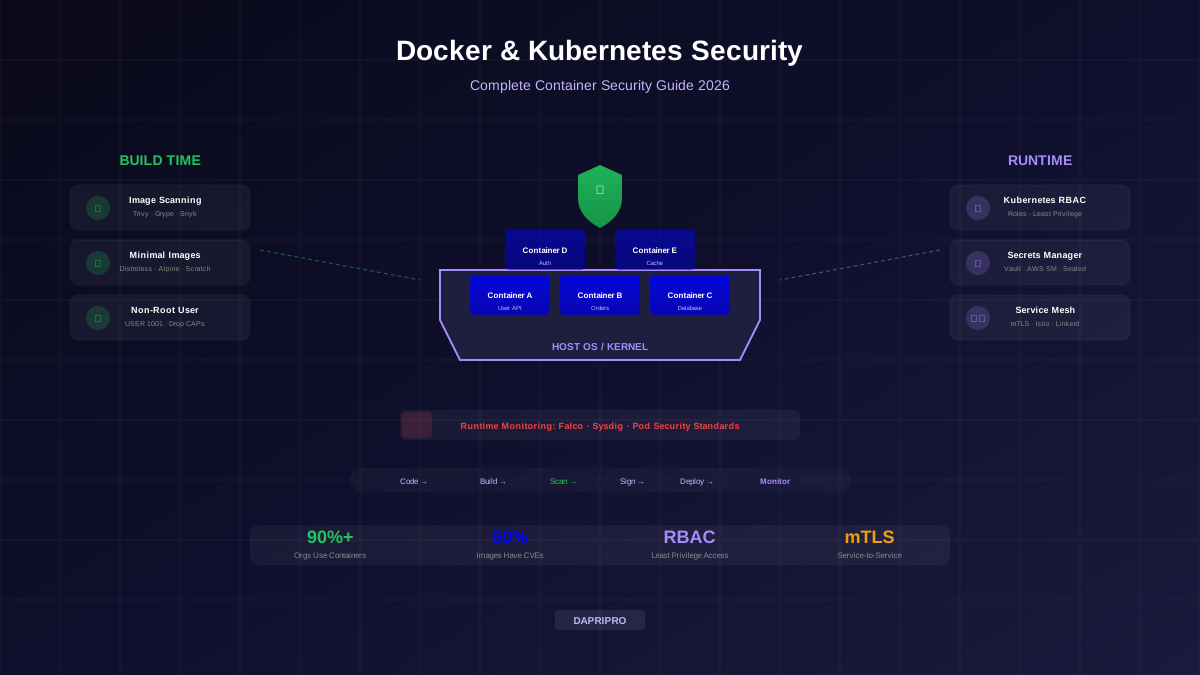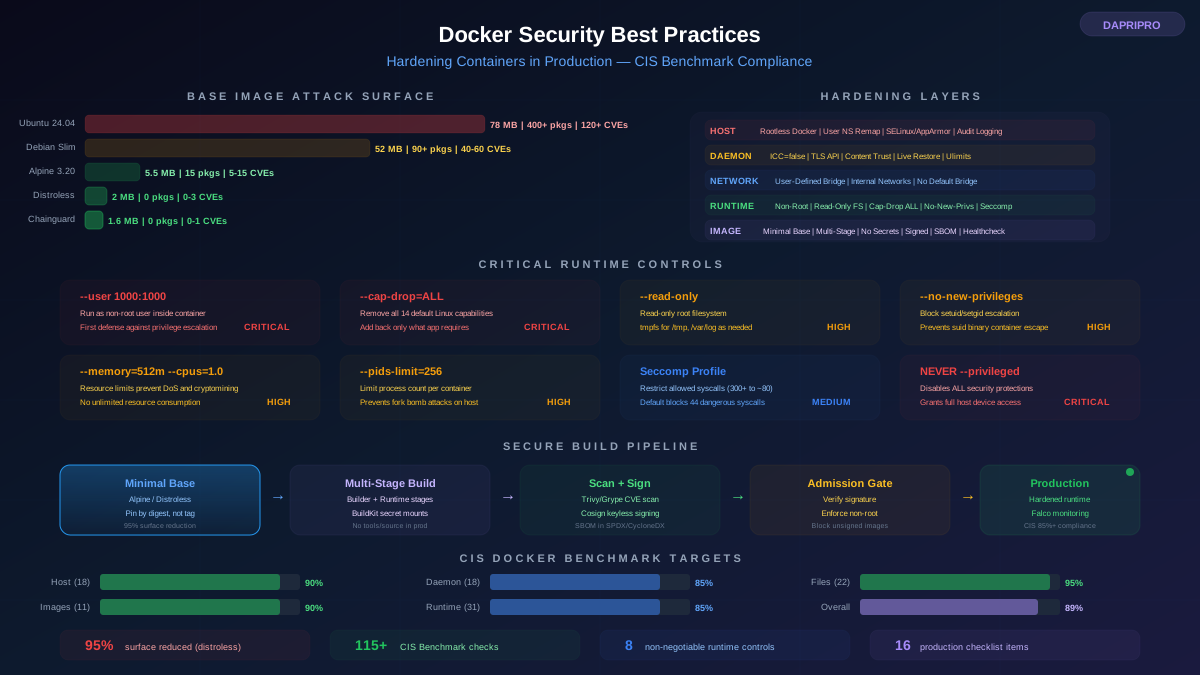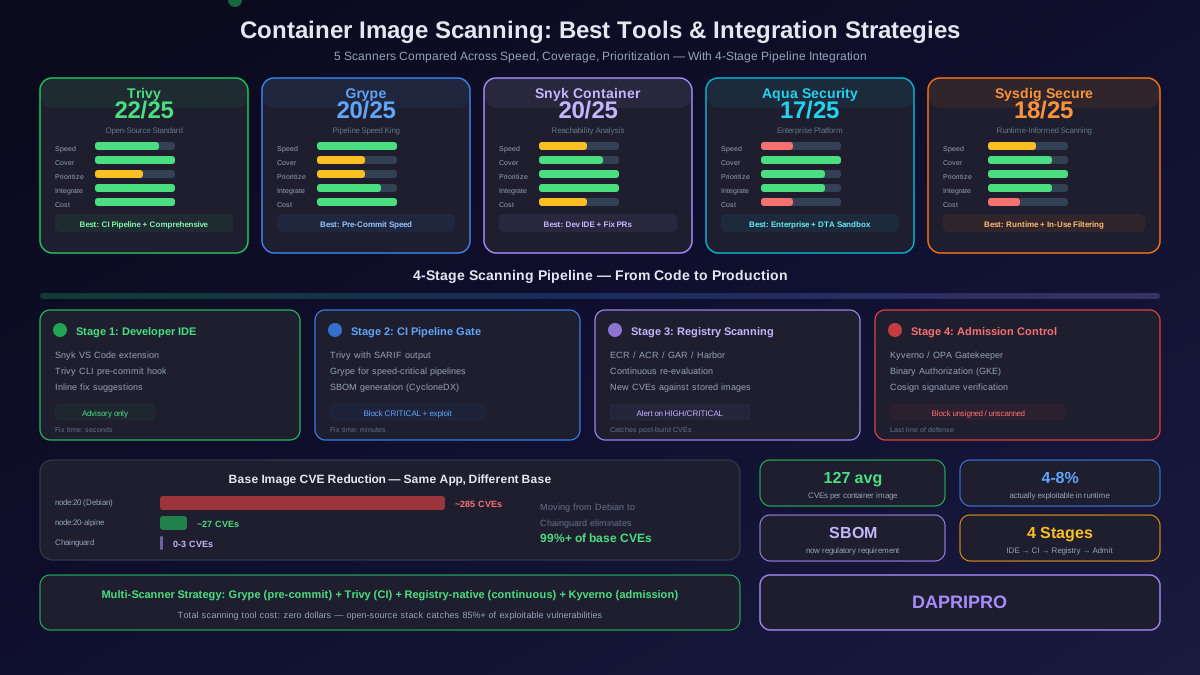
A default Kubernetes cluster is not secure. The default configuration allows every pod to talk to every other pod, grants broad permissions to service accounts, does not encrypt secrets at rest, and does not enforce any pod security standards. Every one of these defaults must be changed before running production workloads.
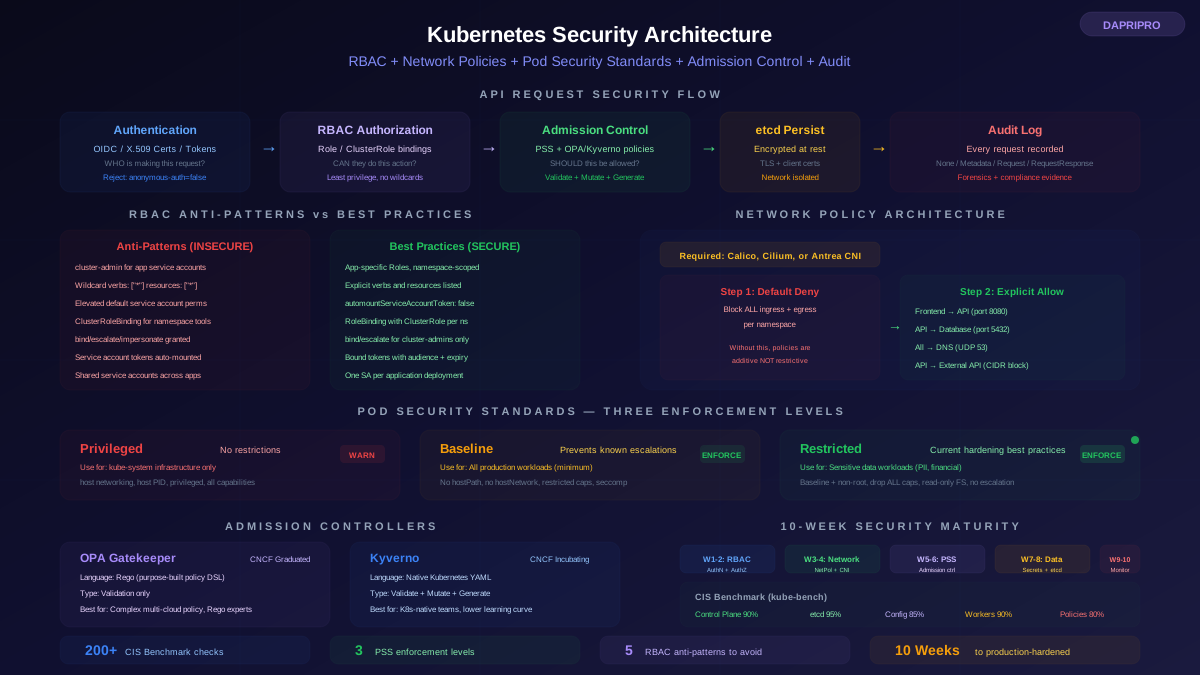
Kubernetes security operates at four distinct layers: the API server (authentication, authorization, admission control), the cluster infrastructure (etcd encryption, node security, network segmentation), the workload configuration (pod security contexts, resource limits, service account bindings), and the runtime environment (container security, monitoring, incident response). This guide covers the three most impactful security mechanisms — RBAC, Network Policies, and Pod Security Standards — plus the admission controllers and audit logging that tie them together.
RBAC: Controlling Who Can Do What
Role-Based Access Control (RBAC) is the authorization mechanism that determines which users, groups, and service accounts can perform which actions on which Kubernetes resources. RBAC is enabled by default on all modern Kubernetes versions (1.8+) and all managed platforms (EKS, AKS, GKE).
The RBAC Model
Kubernetes RBAC has four key objects:
| Object | Scope | Purpose | When to Use |
|---|---|---|---|
| Role | Single namespace | Defines a set of permissions (verbs on resources) within one namespace | Application service accounts, namespace-scoped operators, developer access within specific namespaces |
| ClusterRole | Cluster-wide or all namespaces | Defines permissions on cluster-scoped resources or grants namespace permissions across all namespaces | Platform tools (monitoring, logging), cluster-scoped resources (nodes, PVs), aggregated roles |
| RoleBinding | Single namespace | Binds a Role or ClusterRole to users/groups/service accounts within one namespace | Granting application permissions within its own namespace |
| ClusterRoleBinding | Cluster-wide | Binds a ClusterRole to users/groups/service accounts across the entire cluster | Platform operators, monitoring tools — use with extreme caution |
RBAC Antipatterns That Cause Breaches
These are the RBAC configurations that have led to real-world Kubernetes compromises:
| Antipattern | Why It Is Dangerous | Correct Pattern |
|---|---|---|
| cluster-admin for applications | A compromised pod can create, modify, or delete any resource in any namespace — including creating new ClusterRoleBindings to maintain persistence | Create application-specific Roles with only the verbs and resources the application actually needs, scoped to its own namespace |
| Wildcards in Role rules (verbs: ["*"], resources: ["*"]) | Equivalent to full access — wildcards include future resources added to the API server. Violates least privilege completely | Explicitly list each verb (get, list, watch, create, update, delete) and each resource (pods, services, configmaps) |
| Default service account with elevated permissions | If the default service account in a namespace has permissions, every pod in that namespace inherits them unless explicitly overridden | Create dedicated service accounts for each application. Set automountServiceAccountToken: false on the default service account |
| ClusterRoleBinding where RoleBinding would suffice | ClusterRoleBinding grants permissions across all namespaces. A monitoring tool in the monitoring namespace can now access secrets in every namespace | Use RoleBinding to grant the ClusterRole in specific namespaces. Use ClusterRoleBinding only when the tool genuinely needs access to all namespaces |
| Escalation permissions (bind, escalate, impersonate verbs) | A user with the bind verb can create RoleBindings that grant more permissions than they have. The escalate verb allows modifying Roles to add new permissions. The impersonate verb allows acting as any other user | Never grant bind, escalate, or impersonate to application service accounts. Reserve these for cluster administrators only |
Service Account Hardening
Kubernetes automatically mounts a service account token into every pod at /var/run/secrets/kubernetes.io/serviceaccount/token. This token grants API server access with whatever permissions the service account has. If a pod does not need to call the Kubernetes API, this token is an unnecessary credential that an attacker can use for lateral movement.
Hardening steps:
- Disable auto-mount — set automountServiceAccountToken: false on every service account that does not need API access. Also set it on the pod spec as a defense-in-depth measure.
- Use bound service account tokens — Kubernetes 1.22+ uses projected volumes for service account tokens with automatic rotation, audience binding, and expiry. These tokens are more secure than the legacy static tokens.
- One service account per application — never share service accounts between different applications. A security breach in one application should not grant the attacker permissions of a different application.
- Audit token usage — use Kubernetes audit logs to identify which service accounts are actually making API calls. Remove permissions for service accounts that have tokens but never use them.
Network Policies: Implementing Microsegmentation
By default, Kubernetes allows every pod to communicate with every other pod across all namespaces. There are no network restrictions whatsoever. This means a compromised pod in one namespace can scan and connect to every pod in the cluster — including databases, internal APIs, and control plane components.
Network Policies are the Kubernetes mechanism for implementing microsegmentation. They define which pods can communicate with which other pods, on which ports, using which protocols. Network Policies are deny-by-default once applied — any traffic not explicitly allowed by a Network Policy is blocked.
Critical Prerequisite: CNI Plugin Support
Network Policies are only enforced if your CNI plugin supports them. The default kubenet does not enforce Network Policies — you can create them, but they have no effect. This is the most dangerous Kubernetes networking misconception, because teams believe they have network segmentation when they actually have none.
| CNI Plugin | Network Policy Support | Extended Features | Enforcement Method |
|---|---|---|---|
| kubenet (default) | None — policies are silently ignored | None | N/A |
| Calico | Full Kubernetes NetworkPolicy + Calico GlobalNetworkPolicy | DNS-based policies, L7 filtering, global policies, host endpoint protection | iptables or eBPF |
| Cilium | Full Kubernetes NetworkPolicy + CiliumNetworkPolicy | L7 (HTTP/gRPC/Kafka) filtering, FQDN policies, transparent encryption, Hubble observability | eBPF |
| Antrea | Full Kubernetes NetworkPolicy + Antrea-specific policies | Tiered policy precedence, ClusterNetworkPolicy, multicast support | OVS (Open vSwitch) |
| Canal (Calico + Flannel) | Full Kubernetes NetworkPolicy | Same as Calico for policy, Flannel for overlay networking | iptables |
The Default-Deny Architecture
The most important Network Policy pattern is the default-deny policy. This policy blocks all ingress and egress traffic to and from all pods in a namespace. Once applied, you then create specific policies that allow only the traffic flows your application requires.
This is the same principle as a firewall default-deny rule — block everything, then allow only what is needed. Without a default-deny policy, Network Policies are additive — they only add allow rules on top of the default allow-all. With a default-deny policy, they become the only way traffic can flow.
Network Policy Design Patterns
| Pattern | What It Controls | Example |
|---|---|---|
| Default deny all | Block all traffic in namespace until explicitly allowed | Apply empty ingress and egress policy selecting all pods in the namespace |
| Allow same-namespace only | Pods can communicate within their namespace but not across namespaces | Allow ingress/egress with namespaceSelector matching own namespace labels |
| Tier-based isolation | Frontend pods only reach API tier, API tier only reaches database tier | Separate policies for each tier with podSelector matching tier labels |
| DNS egress only | Allow pods to resolve DNS but block all other egress | Egress policy allowing UDP port 53 to kube-dns pods, blocking everything else |
| External allowlist | Pods can only reach specific external IPs or CIDR ranges | Egress policy with ipBlock specifying allowed external destinations |
| Cross-namespace service access | Allow specific pods in one namespace to reach specific pods in another | Ingress policy with namespaceSelector and podSelector targeting the source namespace and pod labels |
Pod Security Standards: Enforcing Workload Configuration
Pod Security Standards (PSS) define three progressively restrictive security profiles that control which security-sensitive fields can be set in a pod specification. They replaced PodSecurityPolicies, which were removed in Kubernetes 1.25.
The Three Security Levels
| Level | Purpose | Key Restrictions | Use Case |
|---|---|---|---|
| Privileged | No restrictions whatsoever | None — any pod configuration is allowed | System namespaces (kube-system) running infrastructure components that genuinely need elevated privileges |
| Baseline | Prevents known privilege escalations | No privileged containers, no hostNetwork/hostPID/hostIPC, no hostPath volumes, restricted capabilities (no SYS_ADMIN, NET_RAW), restricted seccomp profiles, no procMount control | General workloads — the minimum security standard for production |
| Restricted | Follows current hardening best practices | Everything in Baseline + must run as non-root, must drop ALL capabilities, must set seccomp profile, read-only root filesystem required, no privilege escalation allowed (allowPrivilegeEscalation: false) | Sensitive workloads — applications handling PII, financial data, authentication services |
Enforcement Modes
Pod Security Admission supports three enforcement modes that can be combined:
- enforce — reject pods that violate the policy. The pod is not created.
- warn — allow the pod but display a warning to the user who created it. Useful for migration and awareness.
- audit — allow the pod but record the violation in the audit log. Useful for tracking compliance without blocking deployments.
The recommended migration approach: start with warn + audit for all namespaces, review the violations, fix non-compliant workloads, then enable enforce. This prevents breaking existing deployments during rollout.
Admission Controllers: OPA Gatekeeper vs Kyverno
Pod Security Standards provide three fixed security levels. When you need more granular policies — requiring specific labels, enforcing image registries, mandating resource limits, or requiring specific annotations — you need a policy admission controller.
| Dimension | OPA Gatekeeper | Kyverno |
|---|---|---|
| Policy language | Rego — a purpose-built declarative policy language. Powerful but has a learning curve | Native Kubernetes YAML — policies look like Kubernetes resources. Lower learning curve for platform teams |
| Architecture | Separate OPA engine + Gatekeeper controller. Policies compiled and cached. | Single controller. Policies are Kubernetes CRDs processed directly. |
| Policy types | Validation (reject non-compliant resources) | Validation, mutation (modify resources to comply), generation (create resources automatically) |
| Community maturity | CNCF graduated (OPA). Large ecosystem of pre-built policies. Used by many enterprises | CNCF incubating. Growing rapidly. Simpler policies attract Kubernetes-native teams |
| Best for | Organizations with complex multi-cloud policy requirements, teams with Rego experience, centralized policy teams | Kubernetes-native teams, organizations that want YAML-based policies, teams that need mutation and generation capabilities |
Essential Admission Policies for Production
| Policy | What It Enforces | Why It Matters |
|---|---|---|
| Trusted registry only | Images must come from approved registries (your private ECR/GCR/ACR, not Docker Hub) | Prevents pulling arbitrary images from public registries. Blocks typosquatting and unauthorized images. |
| No latest tag | Image references must use a specific version tag or digest, not :latest | Ensures reproducible deployments and prevents supply chain attacks through tag mutation. |
| Resource limits required | All containers must have CPU and memory requests and limits set | Prevents resource exhaustion, enables fair scheduling, and limits blast radius of compromised containers. |
| Labels required | All pods must have specified labels (team, environment, app) | Enables Network Policy targeting, cost allocation, and incident response (which team owns this pod?). |
| No privileged containers | Pods cannot set privileged: true or capabilities beyond the allowlist | Prevents container escape through excessive privileges. Overlaps with PSS but provides more granular control. |
| External secrets only | Pods cannot use environment variables for secrets — must use volume mounts from external secret stores | Prevents secret sprawl in pod specs and enforces centralized secret management. |
API Server and etcd Security
The Kubernetes API server is the most critical component in the cluster. Every kubectl command, every controller action, every pod scheduling decision goes through the API server. Compromising the API server means compromising the entire cluster.
API Server Hardening Checklist
| Control | Configuration | Risk If Missing |
|---|---|---|
| Disable anonymous authentication | --anonymous-auth=false | Unauthenticated users can make API calls, potentially accessing cluster information |
| Enable audit logging | --audit-policy-file and --audit-log-path | Zero forensic capability during incident investigation. Cannot determine what attacker accessed. |
| Enable RBAC authorization | --authorization-mode=RBAC (default on modern clusters) | Without RBAC, authorization is not enforced |
| Disable insecure port | --insecure-port=0 (deprecated and removed in 1.24+) | The insecure port bypasses all authentication and authorization |
| Enable admission controllers | --enable-admission-plugins includes NodeRestriction, PodSecurity, and others | Without NodeRestriction, a compromised node can modify any pod in the cluster, not just its own |
| Restrict profiling | --profiling=false | Profiling endpoints expose internal performance data that can reveal cluster architecture |
etcd Security
etcd stores all Kubernetes state including Secrets, ConfigMaps, RBAC policies, and pod specifications. An attacker with direct access to etcd can read every secret in the cluster, modify RBAC policies to grant themselves admin access, and alter workload configurations.
Critical etcd hardening controls:
- Encryption at rest — enable Kubernetes encryption at rest for Secrets using the EncryptionConfiguration API. Without this, Secrets are stored in etcd as base64-encoded plaintext (base64 is encoding, not encryption).
- TLS for client-server communication — all communication between the API server and etcd must use mutual TLS with client certificates.
- Network isolation — etcd should only be accessible from API server nodes. Place etcd on a separate network segment or use firewall rules to restrict access.
- Regular backups — encrypted backups of etcd allow disaster recovery. Store backups in a separate security boundary from the cluster itself.
Kubernetes Audit Logging
Audit logging records every request to the Kubernetes API server — who made the request (user/service account), what resource they accessed, what action they performed (verb), and whether the request was allowed or denied. Without audit logging, you have no forensic capability to investigate a cluster compromise.
Audit Policy Design
Audit policies define which events are recorded and at what detail level. The four audit levels are:
| Level | What Is Logged | Use For |
|---|---|---|
| None | Nothing — event is not recorded | High-volume, low-risk events (health checks, get status) |
| Metadata | Request metadata (user, resource, verb, timestamp) but not request or response body | Most API operations — provides who/what/when without overwhelming log volume |
| Request | Metadata + request body | Write operations on sensitive resources (secrets, RBAC) — shows what was created or modified |
| RequestResponse | Metadata + request body + response body | Critical operations for forensics — shows both what was requested and what the server returned |
CIS Kubernetes Benchmark Implementation
The CIS Kubernetes Benchmark defines security best practices across control plane components, worker nodes, policies, and managed services. The benchmark contains 200+ checks organized into sections for the API server, etcd, controller manager, scheduler, worker nodes, and policies.
Automated Compliance with kube-bench
kube-bench is an open-source tool that automates CIS Benchmark checks for Kubernetes clusters. It runs the applicable checks based on your Kubernetes version and cluster type (self-managed or managed service) and produces a scored compliance report.
Key benchmark sections and target compliance:
| Section | Area | Checks | Target | Common Failures |
|---|---|---|---|---|
| 1 | Control Plane Components | API Server, Controller Manager, Scheduler config | 90%+ | Anonymous auth enabled, profiling enabled, audit logging missing |
| 2 | etcd | Encryption, TLS, access controls | 95%+ | Encryption at rest not enabled, client cert auth not enforced |
| 3 | Control Plane Configuration | RBAC, service account, admission controllers | 85%+ | PSS not enforced, no admission controller beyond defaults |
| 4 | Worker Nodes | kubelet config, file permissions | 90%+ | Anonymous kubelet auth, read-only port enabled, file perms too open |
| 5 | Policies | RBAC, Network Policies, Secrets, Pods | 80%+ | No network policies, secrets not encrypted, wildcard RBAC rules |
For managed Kubernetes services (EKS, AKS, GKE), many control plane checks are managed by the cloud provider. Focus your audit effort on sections 3 (control plane configuration), 4 (worker nodes), and 5 (policies) — these are the areas you directly control.
Putting It Together: The Kubernetes Security Maturity Path
Security is not deployed all at once. Here is the recommended sequence for bringing a Kubernetes cluster from default configuration to production-hardened:
| Phase | Focus | Actions | Timeline |
|---|---|---|---|
| 1 — Foundation | Authentication and Authorization | Enable OIDC authentication, configure RBAC with least-privilege roles, disable anonymous auth, harden service accounts, enable audit logging | Week 1-2 |
| 2 — Network | Microsegmentation | Deploy a CNI that supports Network Policies (Calico/Cilium), implement default-deny in all namespaces, create specific allow policies per application tier | Week 3-4 |
| 3 — Workload | Pod Security | Enable Pod Security Standards (Baseline enforce, Restricted warn), deploy admission controller (Gatekeeper/Kyverno), enforce image policies | Week 5-6 |
| 4 — Data | Secrets and Encryption | Enable etcd encryption at rest, deploy external secrets manager, rotate service account tokens, enable TLS for all internal communication | Week 7-8 |
| 5 — Monitoring | Detection and Response | Deploy Falco or commercial runtime security, configure audit log pipeline, run kube-bench and remediate findings, establish incident response playbook | Week 9-10 |
Each phase builds on the previous one. Do not skip to monitoring before implementing RBAC and network segmentation — you will generate massive alert volumes from normal traffic that should have been blocked at a lower layer. The goal is prevention first (RBAC, Network Policies, PSS), detection second (audit logging, runtime security), and response third (incident playbooks, forensic capture).