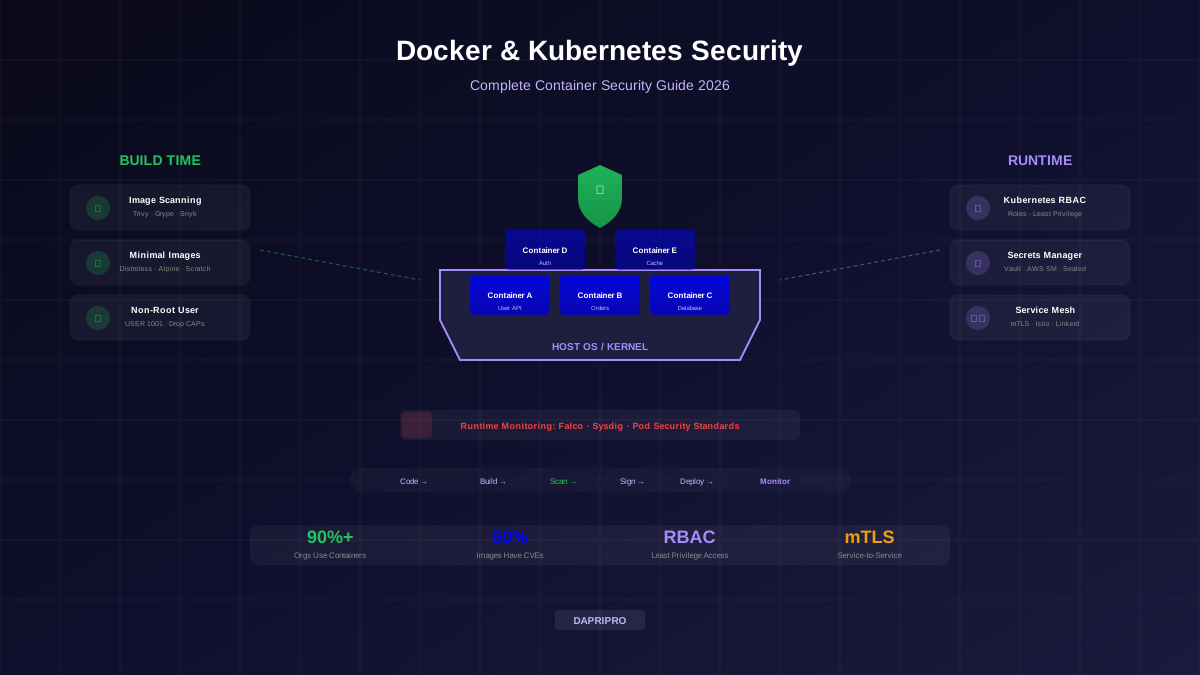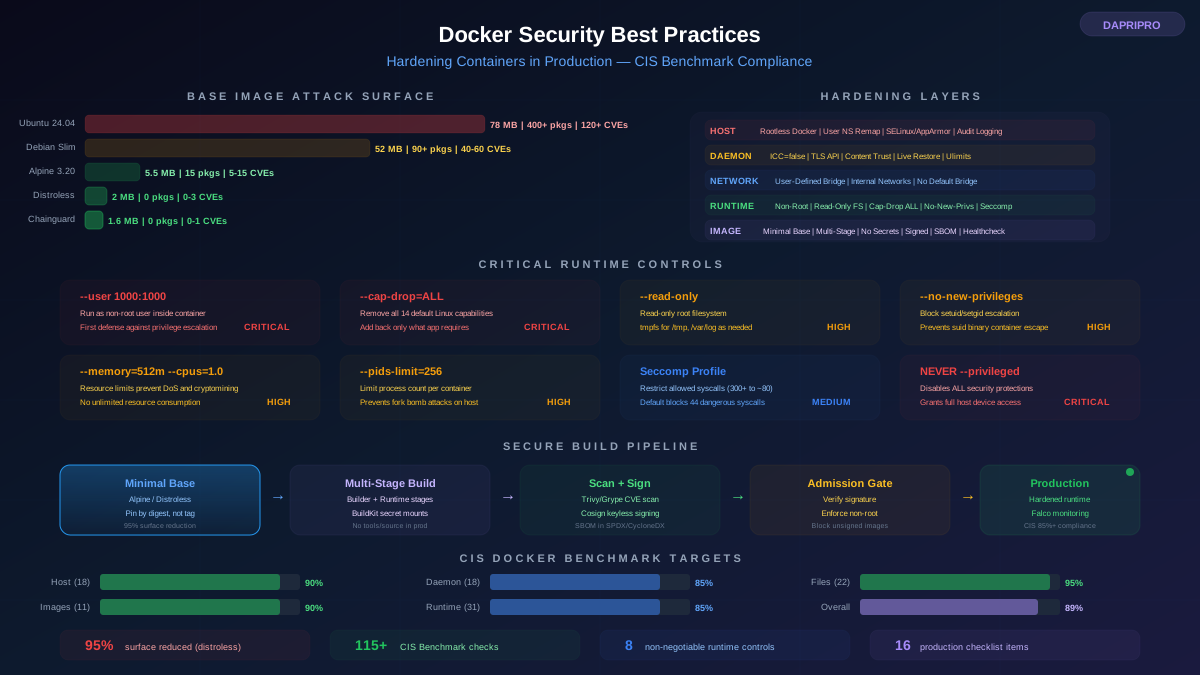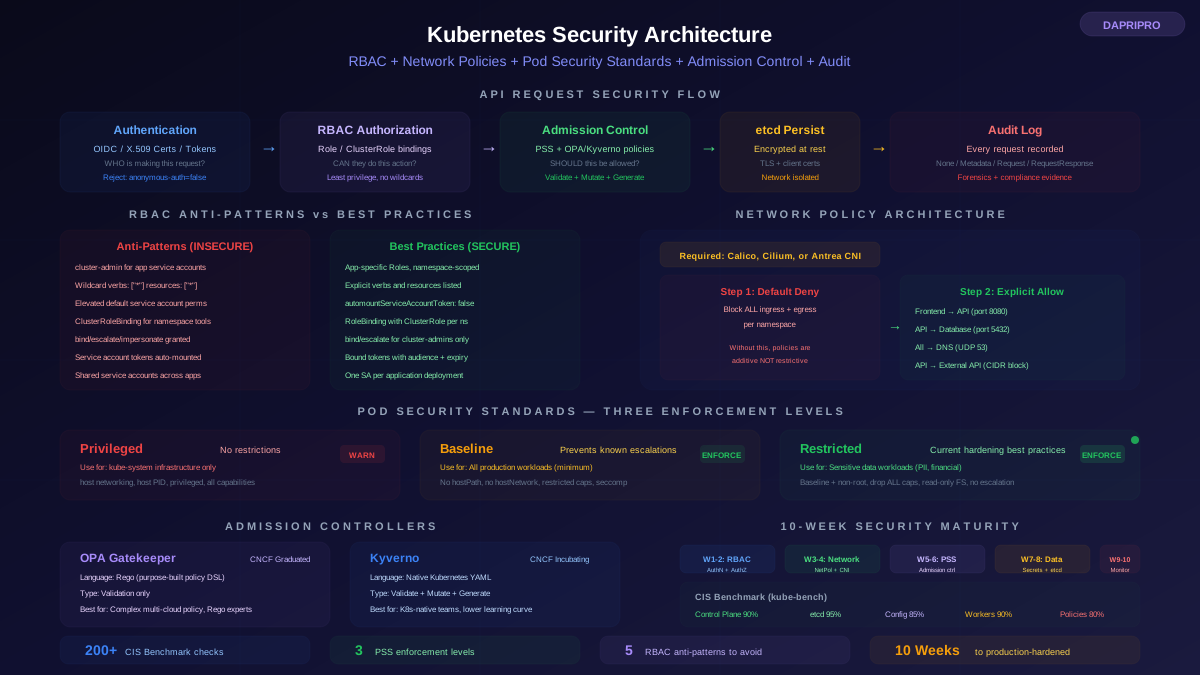
Secrets in containers — API keys, database credentials, TLS certificates, encryption keys, service account tokens — are the most targeted assets in any container environment. A leaked secret does not just compromise one container. It compromises every system that secret can access. A database credential leak exposes your entire database. A cloud IAM key leak exposes your cloud account. An encryption key leak renders all your encrypted data accessible.
The challenge with container secrets is that containers are ephemeral, horizontally scaled, and deployed through automated pipelines. Traditional secret management approaches (storing credentials in configuration files, passing them as environment variables, hard-coding them in application code) do not work in environments where containers are created and destroyed hundreds of times per day across multiple clusters.
This guide covers every major approach to container secrets management: Kubernetes native Secrets (and their limitations), HashiCorp Vault (the full-featured platform), SOPS and Sealed Secrets (GitOps-compatible encryption), the External Secrets Operator (multi-cloud synchronization), and the operational practices that prevent credential leaks.
Kubernetes Secrets: Understanding the Reality
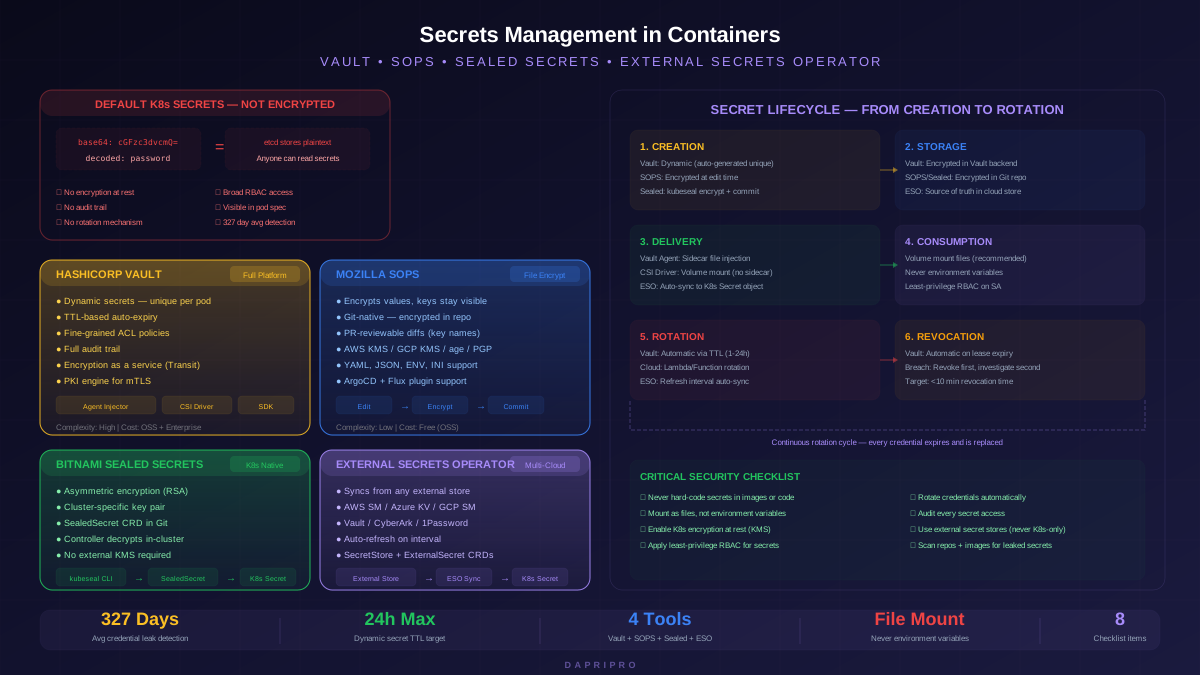
Kubernetes Secrets are the built-in mechanism for managing sensitive data. They are commonly misunderstood — many teams believe Kubernetes Secrets are encrypted. They are not. By default, Kubernetes Secrets are stored in etcd as base64-encoded plaintext. Base64 is an encoding format, not an encryption algorithm. Anyone with access to etcd can decode every secret instantly.
The Five Problems with Default Kubernetes Secrets
| Problem | Details | Impact |
|---|---|---|
| Not encrypted at rest | Stored as base64 in etcd. Decoding requires no key or password | etcd backup files contain all secrets in readable form. Any etcd compromise exposes all cluster secrets. |
| Broad RBAC access | Any user or service account with get permission on Secrets can read all secrets in the namespace | A compromised pod with secret read access can harvest credentials for every service in its namespace. |
| No audit trail by default | Kubernetes audit logging records secret access, but audit logging is often not enabled or not monitored | No visibility into who accessed which secrets or when. Cannot detect credential theft after a breach. |
| No rotation mechanism | Kubernetes provides no built-in secret rotation. Secrets are static until manually updated | Leaked credentials remain valid indefinitely until someone manually rotates them. Average time to detect a credential leak: 327 days. |
| Visible in pod spec and env | Secrets injected as environment variables appear in pod definitions, docker inspect output, and process listings | Secrets leak through debugging tools, crash dumps, log aggregation, and kubectl describe output. |
Enabling Encryption at Rest
The minimum security improvement for Kubernetes Secrets is enabling encryption at rest via the EncryptionConfiguration API. This encrypts Secrets before writing them to etcd using AES-CBC or AES-GCM encryption with a key you manage (or a KMS provider like AWS KMS, Azure Key Vault, or GCP KMS).
With KMS provider integration, the encryption key itself is never stored in the Kubernetes cluster — the API server sends the data encryption key (DEK) to the KMS provider for wrapping/unwrapping. This means even a complete etcd compromise does not expose secrets if the attacker does not also have access to the KMS provider.
HashiCorp Vault: The Complete Platform
Vault is the most feature-rich secrets management platform available. It goes far beyond storing and retrieving static secrets — Vault generates dynamic credentials on-demand, manages PKI certificate issuance, provides encryption as a service, and maintains a detailed audit log of every secret access.
Vault's Key Capabilities
| Capability | How It Works | Why It Matters for Containers |
|---|---|---|
| Dynamic secrets | Vault generates unique credentials (database users, cloud IAM keys, certificates) on-demand with automatic TTL-based expiration | Every pod gets a unique database credential that expires automatically. No shared credentials, no manual rotation, no persistent secrets to leak. |
| Secret leasing and renewal | Every secret has a TTL (time-to-live). Applications renew leases or receive new credentials before expiry | Leaked credentials are automatically invalidated when the TTL expires. Maximum blast radius is limited to the lease duration. |
| Fine-grained policies | Vault policies specify which authentication identities can access which secret paths with which operations | The web application can only read its own database credential, not the payment service credential. Policies follow least privilege. |
| Audit logging | Every secret read, write, renewal, and revocation is logged with the requesting identity, timestamp, and operation | Complete forensic trail showing who accessed which secret and when. Detects unauthorized access patterns. |
| Encryption as a service (Transit) | Applications send plaintext to Vault's transit engine, receive ciphertext back. Applications never handle encryption keys. | Simplifies application-level encryption without managing keys in application code or environment variables. |
| PKI engine | Issues X.509 certificates for service-to-service TLS. Short-lived certificates with automatic renewal | mTLS for container communication without managing a separate PKI infrastructure. Certificates expire in hours, not years. |
Vault in Kubernetes: Delivery Methods
There are three ways to deliver Vault secrets to Kubernetes pods:
| Method | How It Works | Pros | Cons |
|---|---|---|---|
| Vault Agent Injector | Mutating webhook injects a Vault Agent init container and sidecar container into annotated pods. Agent authenticates to Vault, retrieves secrets, writes them as files in a shared volume | No application code changes. Secrets rendered as files. Automatic rotation via sidecar. Mature and battle-tested | Adds sidecar container to every pod (memory/CPU overhead). Requires Vault annotations on pod specs |
| Vault CSI Provider | Uses the Kubernetes Secrets Store CSI Driver to mount Vault secrets as volumes. No sidecar required | No sidecar overhead. Standard CSI volume interface. Can sync to native K8s Secrets for env var consumption | No automatic rotation without periodic polling. Requires CSI driver installation |
| Application-direct (SDK) | Application uses Vault SDK/API to authenticate and retrieve secrets directly | Full control over secret lifecycle. Access to all Vault features. No middleware components | Requires application code changes. Must implement retry, caching, and renewal logic |
SOPS: Encrypted Secrets for GitOps
SOPS (Secrets OPerationS) takes a fundamentally different approach from Vault. Instead of running a separate secret management server, SOPS encrypts secret values directly within your configuration files. The encrypted files can be committed to Git, reviewed in pull requests (you can see which keys changed but not the values), and decrypted at deployment time.
How SOPS Works
SOPS encrypts only the values in a structured file (YAML, JSON, ENV, INI) while leaving keys, comments, and structure visible. The encryption keys come from cloud KMS providers (AWS KMS, GCP KMS, Azure Key Vault), age keys, or PGP keys.
A SOPS-encrypted file looks like this: the keys (database_host, database_password, api_key) are visible in plaintext, but the values are replaced with encrypted ciphertext. This visibility is intentional — it allows code review of which secrets are being changed without exposing the actual values.
SOPS in Practice
| Workflow Step | What Happens | Who Has Access |
|---|---|---|
| Developer edits secrets | Developer uses sops edit to decrypt file in-memory, make changes, and re-encrypt on save | Developer needs access to the KMS key (IAM-controlled) |
| Commit to Git | Encrypted file is committed. PR review shows which keys changed | Anyone can see the file structure, no one can read values |
| CI/CD pipeline | Pipeline decrypts SOPS file using KMS credentials, creates Kubernetes Secret | Pipeline service account needs KMS key access |
| Deployment | Decrypted secret is applied to the cluster as a native Kubernetes Secret | Only pods with RBAC access can read the secret |
SOPS works well with ArgoCD and Flux (popular GitOps controllers) through plugins that decrypt SOPS-encrypted manifests before applying them to the cluster.
Sealed Secrets: Kubernetes-Native Encryption
Sealed Secrets (by Bitnami) is a Kubernetes controller that encrypts Secret manifests using asymmetric cryptography. You encrypt a Kubernetes Secret using the cluster's public key (via the kubeseal CLI), producing a SealedSecret custom resource. Only the Sealed Secrets controller running in the target cluster has the private key to decrypt it.
How Sealed Secrets Differ from SOPS
| Dimension | Sealed Secrets | SOPS |
|---|---|---|
| Scope | Kubernetes Secrets only | Any YAML, JSON, ENV, or INI file |
| Encryption backend | Cluster-specific RSA key pair (controller generates and stores the private key) | Cloud KMS (AWS, GCP, Azure), age, PGP |
| Multi-cluster | Each cluster has its own key pair. Secrets encrypted for one cluster cannot be decrypted by another | Same KMS key can be used across clusters and environments |
| Key management | Controller manages keys automatically. Must backup the private key for disaster recovery | KMS provider manages key lifecycle, rotation, and access control |
| Diff visibility | Entire encrypted blob changes — diffs are not human-readable | Only changed values differ — keys remain visible for review |
| GitOps compatibility | Native — SealedSecret CRD is committed to Git, controller decrypts in-cluster | Requires plugin (kustomize-sops, argocd-vault-plugin) for GitOps controller integration |
External Secrets Operator: Multi-Cloud Sync
The External Secrets Operator (ESO) synchronizes secrets from external secret management systems into native Kubernetes Secrets. It supports all major secret stores: AWS Secrets Manager, Azure Key Vault, GCP Secret Manager, HashiCorp Vault, CyberArk, 1Password, and more.
Why ESO Is Becoming the Standard
ESO solves the multi-cloud secret management problem. Instead of modifying applications to use each cloud provider's SDK, ESO pulls secrets from the external store and creates standard Kubernetes Secrets. Your applications consume secrets through the same Kubernetes API regardless of whether the underlying store is AWS, Azure, GCP, or Vault.
Key ESO concepts:
- SecretStore / ClusterSecretStore — defines the connection to the external secret management system (provider, authentication, endpoint). SecretStore is namespace-scoped, ClusterSecretStore is cluster-scoped.
- ExternalSecret — defines which secrets to synchronize from the external store, how to map them into the Kubernetes Secret, and the refresh interval for automatic synchronization.
- Refresh interval — ESO polls the external store at the configured interval (default: 1 hour) and updates the Kubernetes Secret if the external value has changed. This provides automatic rotation without application changes.
Architecture Patterns with ESO
| Pattern | Architecture | Best For |
|---|---|---|
| Cloud-native direct | ESO syncs directly from AWS Secrets Manager / Azure Key Vault / GCP Secret Manager | Single-cloud Kubernetes deployments. Simplest architecture, leverages existing cloud IAM. |
| Vault hub with ESO | Vault serves as the central authority. ESO syncs from Vault to Kubernetes Secrets in each cluster | Multi-cloud deployments. Vault provides unified policy and dynamic secrets, ESO handles delivery. |
| Vault + cloud-native hybrid | Dynamic secrets from Vault, static config from cloud-native store, both synced via ESO | Organizations migrating to Vault. Allows gradual adoption without disrupting existing workflows. |
Secret Rotation: Where Most Programs Fail
Having a secrets manager is necessary but not sufficient. The value of secrets management diminishes dramatically if credentials are never rotated. A leaked credential that is rotated within 24 hours affects one day of operations. A leaked credential that is never rotated affects everything from the moment of creation until someone discovers the leak — which takes an average of 327 days.
Rotation Strategies
| Strategy | How It Works | Tools | Complexity |
|---|---|---|---|
| Vault dynamic secrets | Every credential request generates a new, unique credential with a TTL. Expired credentials are automatically revoked. No rotation needed because credentials are never reused | Vault database secrets engine, AWS secrets engine, PKI engine | Medium — requires Vault deployment but rotation is inherent |
| Cloud-native rotation | AWS Secrets Manager and Azure Key Vault offer built-in rotation using Lambda functions or Azure Functions that generate new credentials and update the store | AWS Secrets Manager rotation, Azure Key Vault rotation policies | Low to medium — managed service handles rotation, you write the Lambda/Function |
| External Secrets Operator refresh | ESO polls the external store at a configurable interval. When the external value changes (after rotation in the store), ESO updates the Kubernetes Secret | ESO with refreshInterval: 5m or similar | Low — rotation happens in the external store, ESO propagates the change |
| Manual rotation with automation | Automation script generates new credentials, updates the secret store, and triggers rolling restarts of dependent deployments | Custom scripts, Ansible, Terraform | High — error-prone, needs scheduling, must handle dual-credential window |
Operational Practices for Container Secrets
The Secret Security Checklist
Apply these practices to every containerized environment:
| Practice | Priority | Implementation |
|---|---|---|
| Never hard-code secrets in images or code | Critical | Use pre-commit hooks (detect-secrets, git-secrets) to scan for credentials before they reach Git. Run Trivy or gitleaks in CI to catch secrets that bypass hooks. |
| Mount as files, not environment variables | Critical | Use volumeMounts for Kubernetes Secrets. Environment variables appear in process listings, container inspect, and crash dumps. Files are only visible to processes that read them. |
| Enable Kubernetes encryption at rest | Critical | Configure EncryptionConfiguration with AES-GCM or KMS provider. Verify with etcdctl that secrets are encrypted. |
| Apply least-privilege RBAC for secrets | High | Only service accounts that need specific secrets should have RBAC access. Never grant wildcard access to secrets in a namespace. |
| Rotate credentials automatically | High | Use Vault dynamic secrets (preferred) or cloud-native rotation. Target maximum credential lifetime: 24 hours for dynamic, 90 days for static. |
| Audit secret access | High | Enable Kubernetes audit logging at Request level for secrets. Forward to SIEM. Alert on unexpected secret reads. |
| Use external secret stores | High | Deploy ESO or Vault Agent. Never treat Kubernetes Secrets as the source of truth — they should be synchronized from an external store. |
| Scan for leaked secrets | Medium | Run secret scanning tools against Git repositories, container images, and deployment manifests. Tools: detect-secrets, gitleaks, Trivy secret scanning. |
Secret Breach Response
When a secret is leaked or suspected to be compromised, follow this response sequence:
- Revoke immediately — disable the leaked credential at the source (revoke API key, disable database user, rotate TLS certificate). Do not wait for investigation.
- Issue new credentials — generate replacement credentials and update the secret store. If using ESO or Vault Agent, the new credentials propagate automatically.
- Audit access — review Kubernetes audit logs and Vault audit logs to determine if the leaked credential was used maliciously. Check access patterns (unusual times, unusual source IPs, bulk data access).
- Determine root cause — how did the secret leak? Code commit? Log entry? Environment variable exposure? Container image layer? This determines which preventive control needs strengthening.
- Implement prevention — add the specific detection pattern to pre-commit hooks and CI scanning. If the leak vector was a systemic issue (all env vars), fix the delivery mechanism (migrate to file mounts).
The key principle: credential rotation is faster than investigation. Revoke first, investigate second. A 10-minute delay in revoking a compromised credential while you investigate can result in significantly more damage than the temporary disruption of rotating the credential.