

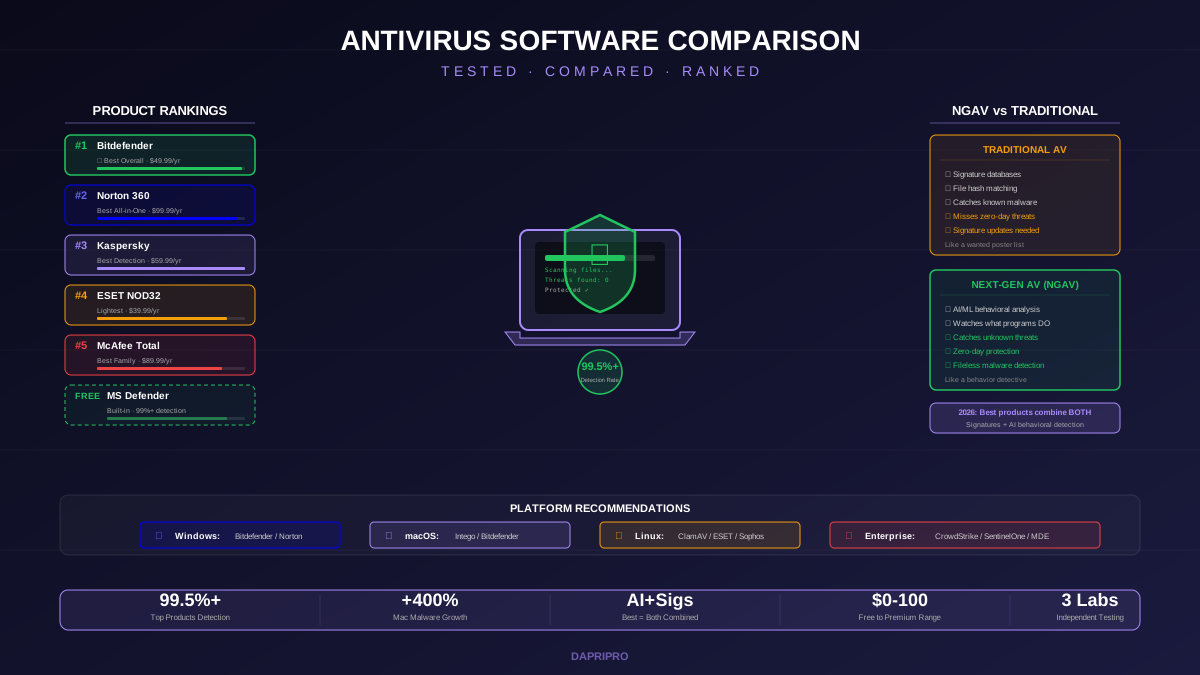
Choosing antivirus software in 2026 is harder than it should be. Every product claims "best protection" with "99.9% detection rates." Marketing materials look identical. So how do you actually pick the right one?
This guide cuts through the marketing by comparing antivirus products using independent lab test results (AV-TEST, AV-Comparatives, SE Labs), real-world performance benchmarks, feature analysis, and honest platform-specific recommendations.
How Antivirus Products Are Tested
Independent testing labs evaluate antivirus products across three dimensions:
- Protection — detection rate against known malware, zero-day threats, and real-world attack scenarios.
- Performance — impact on system speed: boot time, file copy speed, app launch time, browsing speed.
- Usability — false positive rate (legitimate files incorrectly flagged as malware) and user experience.
The three most trusted independent labs are AV-TEST (Germany), AV-Comparatives (Austria), and SE Labs (UK). Products that score consistently high across all three labs — not just one — are genuinely top-tier.
Top Antivirus Products Compared
Detailed Product Reviews
Bitdefender Total Security — Best Overall
Bitdefender consistently wins "Product of the Year" from AV-Comparatives. Its cloud-based scanning engine keeps your system fast because most of the analysis happens on Bitdefender's servers, not your computer. This means scans use minimal CPU and RAM.
Standout features: Ransomware Remediation (automatically restores encrypted files), Photon technology (adapts to your usage patterns to reduce impact), SafePay (hardened browser for banking), microphone and webcam protection.
Best for: Users who want premium protection without paying premium prices. At $49.99/year for up to 5 devices, it is the best value in the market.
Norton 360 — Best All-in-One Security Suite
Norton 360 is more than antivirus — it is a complete security ecosystem. The subscription includes unlimited VPN, password manager, dark web monitoring, identity theft protection with $1M insurance, and up to 250GB cloud backup.
Standout features: LifeLock identity monitoring (US), Norton Secure VPN (included, no data caps), cloud backup, Smart Firewall, parental controls (Norton Family).
Best for: Users who want one subscription to cover antivirus, VPN, password manager, and identity protection instead of buying each separately.
ESET NOD32 — Lightest System Impact
If your computer is older or has limited resources, ESET is the answer. It consistently ranks as the lightest antivirus in performance tests. ESET uses a tiny memory footprint (~50-80MB RAM) and its scans barely affect system responsiveness.
Standout features: UEFI scanner (detects threats in firmware before Windows boots), advanced machine learning engine, gamer mode (suppresses notifications and background tasks during games and presentations).
Best for: Gamers, users with older hardware, and anyone who values system speed above extra features.
Free Antivirus: Is It Enough?
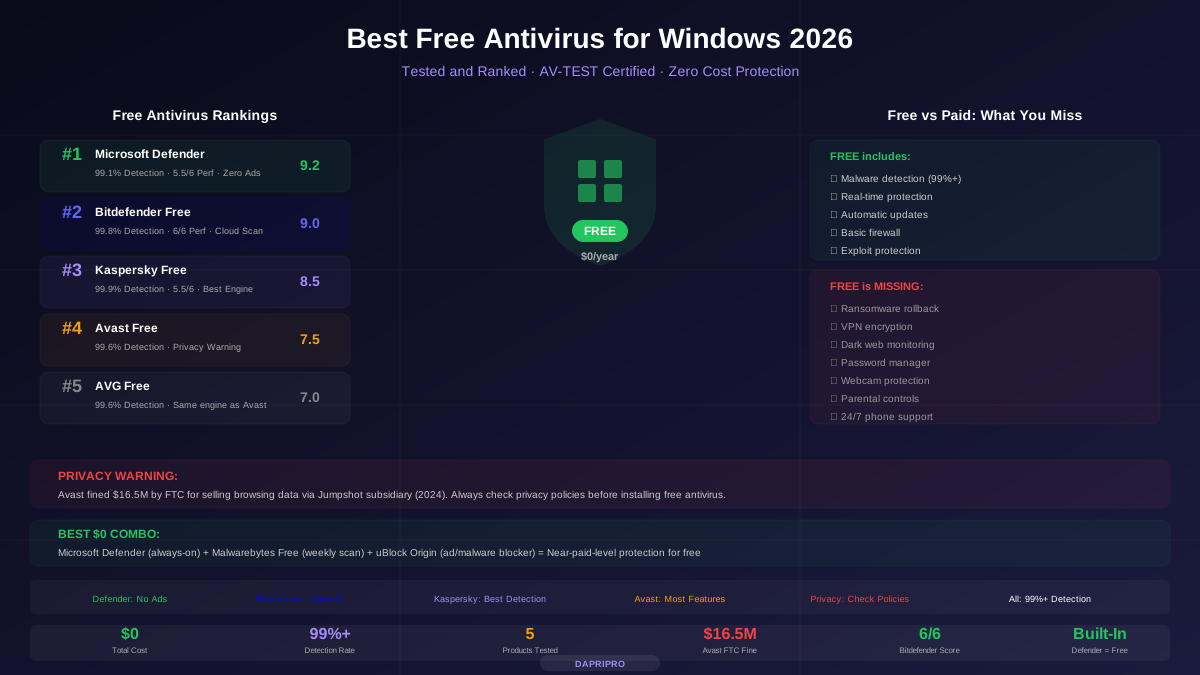
Free antivirus has improved dramatically. Microsoft Defender, built into Windows 10 and 11, now scores above 99% in AV-TEST detection tests. For many users, especially those with safe browsing habits, free antivirus is genuinely sufficient.
| Feature | Free Antivirus | Paid Antivirus |
|---|---|---|
| Known malware detection | 99%+ (Defender, Bitdefender Free) | 99.5%+ with zero-day |
| Ransomware protection | Basic (Controlled Folder Access) | Advanced (behavior-based + rollback) |
| Phishing/URL filtering | Browser-level only | OS-level real-time filtering |
| VPN included | No | Yes (Norton, Bitdefender, McAfee) |
| Password manager | No | Yes (most suites) |
| Identity monitoring | No | Yes (Norton LifeLock, McAfee) |
| Customer support | Community forums only | 24/7 phone, chat, email |
| Multi-device | Per-device only | 5-unlimited devices per license |
NGAV vs Traditional Antivirus
Next-Generation Antivirus (NGAV) represents a fundamental shift in how malware is detected:
- Traditional AV works like a wanted poster — it has a database of known malware "fingerprints" (signatures) and checks every file against that database. If a file matches, it is blocked. Problem: if the malware is new (not yet in the database), it gets through.
- NGAV works like a suspicious behavior detector — it watches what programs do, not just what they look like. If a program tries to encrypt hundreds of files, inject code into other processes, or establish hidden network connections, NGAV blocks it even if that specific malware has never been seen before.
In 2026, the best consumer antivirus products (Bitdefender, Norton, Kaspersky) already include NGAV-style behavioral detection alongside traditional signatures. Enterprise products like CrowdStrike Falcon and SentinelOne are pure NGAV — they do not use signature databases at all.
Mac Antivirus: Yes, You Need It
macOS malware increased 400% between 2019 and 2025. While macOS has excellent built-in protections (XProtect scans for known malware, Gatekeeper blocks unsigned apps, System Integrity Protection prevents system modifications), they are not foolproof:
- Adware and PUPs (Potentially Unwanted Programs) are the most common Mac threats — and XProtect does not always catch them.
- Phishing attacks target the user, not the operating system. macOS cannot protect you from entering your password on a fake banking site.
- Cross-platform threats — you may not get infected, but you can unknowingly pass Windows malware to colleagues via shared files.
Best Mac antivirus: Intego Mac Internet Security (Mac-specific), Bitdefender for Mac, Norton 360 for Mac.
Linux Server Antivirus
Linux servers need antivirus not because Linux malware is common, but because servers often store and serve files to Windows and Mac clients. A Linux file server can unknowingly distribute malware to users across the network.
Best Linux AV solutions: ClamAV (free, open-source, mail server scanning), ESET NOD32 for Linux, Sophos Antivirus for Linux (free for single server).
Test Your Antivirus
How do you know your antivirus is actually working? Use the EICAR test file — a harmless text file specifically designed to trigger antivirus detection. Every legitimate antivirus product should detect and quarantine the EICAR file. If yours does not, something is wrong.
Our Verdict
Best overall: Bitdefender Total Security — unbeatable combination of detection, performance, and price. Best all-in-one: Norton 360 — if you want VPN, password manager, identity protection, and cloud backup in one subscription. Best free: Microsoft Defender — already on your PC, scores 99%+ in lab tests, zero cost. Best for speed: ESET NOD32 — the lightest antivirus for gamers and older hardware.
The most important rule: the best antivirus is one that stays turned on. A product with 99.5% detection that runs quietly in the background is better than a product with 99.9% detection that you disable because it annoys you or slows your computer.
![Norton vs McAfee vs Bitdefender: Head-to-Head Antivirus Comparison [2026]](/images/sections/security-tools-reviews/antivirus-software/norton-vs-mcafee-vs-bitdefender-head-to-head-antivirus-comparison.svg)
![Mac Antivirus: Do You Really Need It? Best Options Tested [2026]](/images/sections/security-tools-reviews/antivirus-software/mac-antivirus-do-you-really-need-it-best-options-tested.svg)