

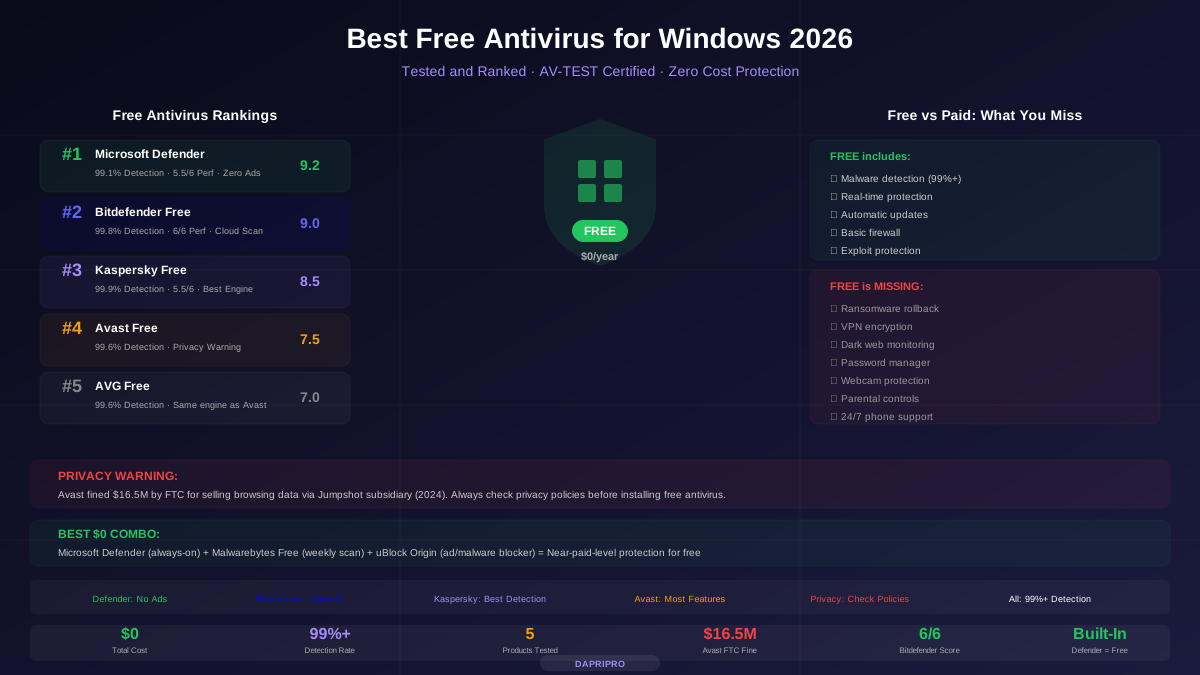
You do not have to spend money to protect your computer from viruses. Free antivirus software has gotten so much better that even the built-in Windows Defender now catches over 99% of malware.
But not all free antivirus is created equal. Some are genuinely great. Others are basically ads disguised as security software. And a few have been caught selling your personal data.
We tested every major free antivirus product for Windows in 2026 to find the ones that are actually worth installing.
Top Pick: Microsoft Defender (Already on Your Computer)
Here is a surprise: the best free antivirus might already be running on your computer. Microsoft Defender comes pre-installed with Windows 10 and Windows 11, and it has quietly become one of the best antivirus products available — free or paid.
Five years ago, Defender was a joke. Security experts recommended replacing it immediately. But Microsoft invested heavily, and now it scores 6/6 in protection on AV-TEST — the same perfect score as Norton and Bitdefender.
| Feature | Microsoft Defender Details |
|---|---|
| AV-TEST Protection Score | 6/6 (99.1% detection) |
| AV-TEST Performance Score | 5.5/6 |
| Real-Time Protection | Yes (always on) |
| Cloud Analysis | Yes (sends suspicious files to Microsoft) |
| Firewall | Yes (built-in Windows Firewall) |
| Exploit Protection | Yes (hardware-based) |
| Ransomware Shield | Basic (Controlled Folder Access) |
| Ads or Upselling | None |
| Privacy Concerns | Sends telemetry to Microsoft (can be reduced) |
| Price | Free (included with Windows) |
Why Defender wins: Zero ads, zero pop-ups, zero nagging to upgrade. It just works quietly in the background. Every other free antivirus constantly tries to sell you the paid version with pop-ups. Defender never does.
Defender's weakness: It lacks a dedicated phishing URL database, dedicated ransomware rollback, VPN, password manager, and webcam protection. These are the extras that paid antivirus charges for.
All Free Antivirus Products Compared
Here is how every major free antivirus stacks up in independent lab tests and real-world use:
Runner-Up: Bitdefender Antivirus Free
If you want something beyond Defender, Bitdefender Free is the best third-party option. It has the highest detection rate of any free antivirus at 99.8% and the lightest system impact thanks to cloud-based scanning.
The catch? Bitdefender discontinued its free version for new users in 2024. If you already have it installed, you can keep using it. If not, you may need to search for the direct download link — it is still available but not advertised on their website.
What makes Bitdefender Free special:
- Cloud scanning — files are analyzed on Bitdefender's servers, so your computer barely notices it running
- Autopilot mode — makes all security decisions automatically with no pop-ups
- Anti-phishing — blocks known malicious and phishing websites
- Anti-fraud — warns you about scam websites
What it lacks: no ransomware shield, no VPN, no webcam protection, no password manager. And it does show occasional (not constant) prompts to upgrade to the paid version.
Best Detection: Kaspersky Free
Kaspersky Free has the highest detection rate of any free antivirus: 99.9%. The company's malware research team is one of the best in the world, and it shows in the detection numbers.
The controversy: Kaspersky is a Russian company. The US government banned Kaspersky from government systems in 2017 over concerns about potential Russian government influence. In 2024, the US issued a broader ban affecting consumer sales.
Should you worry? For average home users, there is no evidence that Kaspersky has ever misused consumer data. Their products consistently top independent lab tests. But if you work with sensitive information or are concerned about geopolitical risks, use a different product.
Avast and AVG: Good Protection, Privacy Warning
Avast and AVG are the same product. Avast bought AVG in 2016, and they now use the same scanning engine with different user interfaces.
Both provide solid malware detection (99.6%) and the most features of any free antivirus: Wi-Fi inspector, password manager, browser cleanup, and software updater.
But there is a big problem: privacy.
In 2020, journalists discovered that Avast's subsidiary Jumpshot was collecting and selling detailed browsing data from millions of users. Every website visited, every search query, every click — sold to companies including Google, Microsoft, and Pepsi.
Avast shut down Jumpshot and paid a \$16.5 million FTC fine in 2024. They claim data collection has stopped completely. But once trust is broken, it is hard to rebuild.
If you use Avast or AVG, go to Menu > Settings > General > Personal Privacy and turn OFF all data sharing options.
What Does Paid Antivirus Give You That Free Does Not?
Free antivirus catches malware. Paid antivirus catches malware AND protects you from everything else. Here is exactly what you miss out on with free:
The honest truth: if you are a careful internet user who avoids sketchy downloads, keeps Windows updated, and uses strong passwords, free antivirus is usually enough. But if you shop online, bank online, or have kids using the computer, the paid extras are worth the \$30-50 per year.
The Best Free Protection Combo (\$0 Total Cost)
Want the strongest protection possible without paying a penny? Use this combination:
- Microsoft Defender — keep it running as your primary, always-on antivirus. Do not disable it.
- Malwarebytes Free — install it but do NOT enable real-time protection (leave that to Defender). Run a manual scan once a week. Malwarebytes catches different threats than Defender, so together they cover more ground.
- uBlock Origin — install this free browser extension. It blocks malicious ads (malvertising), tracking scripts, and known phishing domains. Many malware infections start with a malicious ad, and uBlock stops them before they load.
- Windows Firewall — already on by default. Just make sure you have not turned it off.
This combination gives you protection that is nearly as comprehensive as a \$50/year paid suite — for \$0.
Common Free Antivirus Mistakes to Avoid
People make the same mistakes over and over with free antivirus. Avoid these:
Mistake 1: Installing two antivirus programs. Two real-time antivirus products will fight each other, scanning the same files twice, sometimes flagging each other as threats, and slowing your computer to a crawl. Use ONE real-time antivirus plus one on-demand scanner (like Malwarebytes Free).
Mistake 2: Clicking "Skip" on everything. When your antivirus warns you about a file or website, do not just click through the warning. Read it. If it says "Threat detected" or "Phishing site blocked," that warning just saved you from real trouble.
Mistake 3: Downloading antivirus from random websites. Only download antivirus from the official company website. Fake antivirus downloads are one of the oldest tricks hackers use to infect your computer. If you Google "free antivirus download" and click the first ad, you might be installing malware.
Mistake 4: Thinking free antivirus makes you invincible. No antivirus — free or paid — catches 100% of threats. The best protection is still common sense: do not open email attachments from strangers, do not download cracked software, and think before you click.
Mistake 5: Ignoring updates. Your antivirus is only as good as its latest virus definitions. If you pause updates or ignore restart prompts, your protection gets weaker every day. Turn on automatic updates and let them run.
When You Should Upgrade to Paid Antivirus
Free antivirus is not enough if any of these apply to you:
- You regularly shop or bank online and want phishing protection and identity monitoring
- You have important files (photos, documents, schoolwork) that you cannot afford to lose to ransomware
- You want a VPN to browse privately on public Wi-Fi (coffee shops, airports, school networks)
- You have younger siblings or children who use the same computer and need parental controls
- You need customer support when something goes wrong (free antivirus offers forums only)
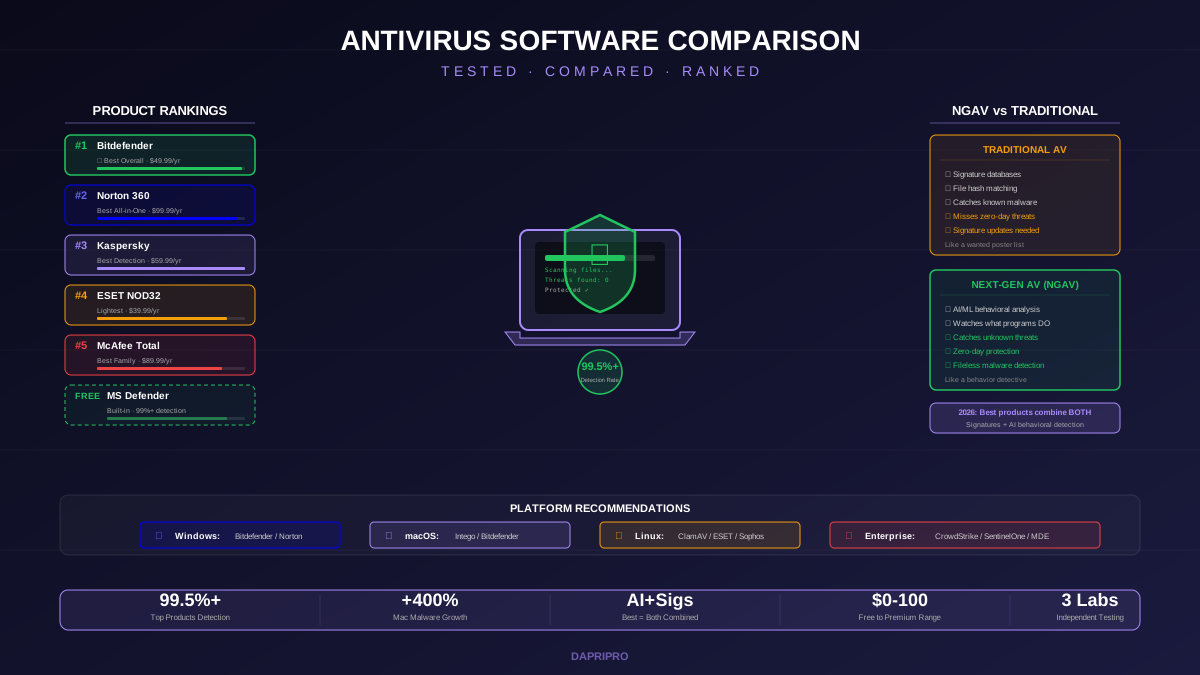
If you decide to upgrade, check out our Norton vs McAfee vs Bitdefender comparison to find the best paid option. You can also browse our complete antivirus guide for more detailed reviews and our NGAV vs traditional antivirus guide to understand the latest protection technology.
![Norton vs McAfee vs Bitdefender: Head-to-Head Antivirus Comparison [2026]](/images/sections/security-tools-reviews/antivirus-software/norton-vs-mcafee-vs-bitdefender-head-to-head-antivirus-comparison.svg)
![Mac Antivirus: Do You Really Need It? Best Options Tested [2026]](/images/sections/security-tools-reviews/antivirus-software/mac-antivirus-do-you-really-need-it-best-options-tested.svg)