Security Operations Centers face a fundamental scalability problem. Alert volumes grow 25-30% annually. Analyst hiring cannot keep pace with either the volume growth or the skills requirements. The average SOC generates 10,000 to 50,000 alerts daily, but analyst teams can manually investigate only 10-25% of them. The rest are either ignored, auto-closed, or triaged based on incomplete information. Every uninvestigated alert is a potential missed breach.
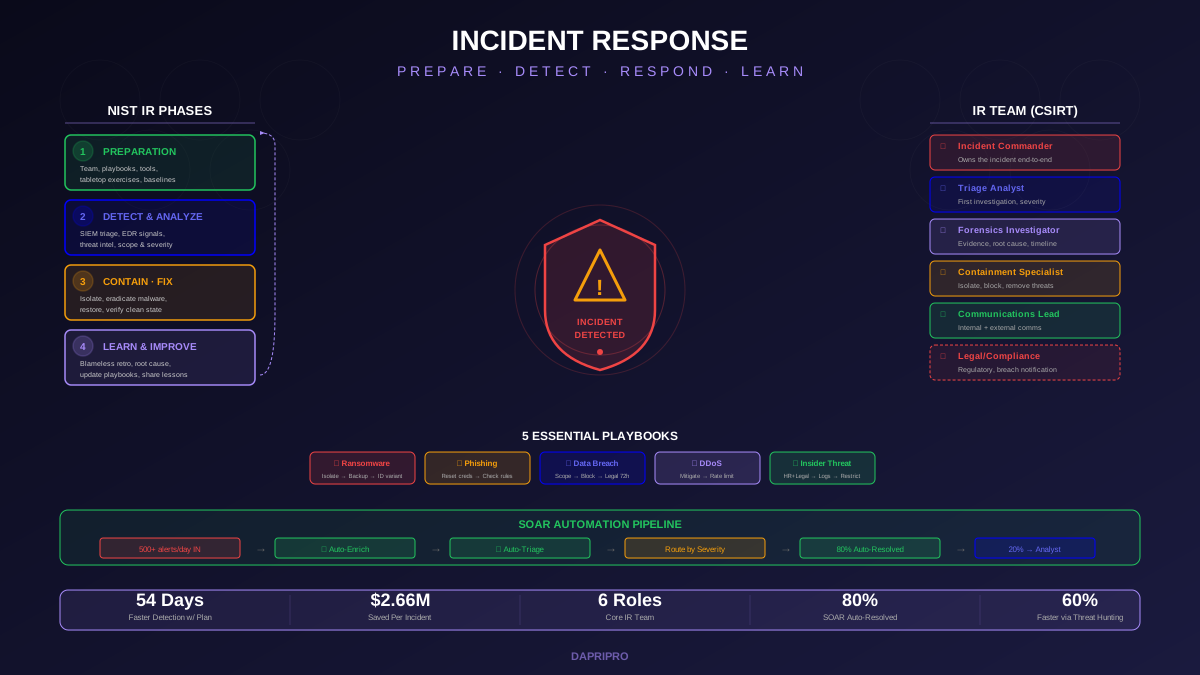
Security Orchestration, Automation, and Response (SOAR) platforms address this gap by automating the repetitive, rules-based work that consumes 60-80% of analyst time: alert enrichment, IOC lookups, evidence collection, containment actions, and ticket management. The goal is not to replace analysts but to multiply their effectiveness. A three-person team with well-implemented SOAR can achieve the alert coverage of a team two to three times its size.
This guide covers the complete SOAR landscape: what these platforms actually do versus marketing claims, how to evaluate and select a platform for your environment, how to design playbooks that deliver measurable value, how to integrate SOAR into your existing security stack, how to avoid the common implementation pitfalls that stall most deployments, and how to measure ROI in terms executives understand.
Understanding SOAR: The Three Pillars
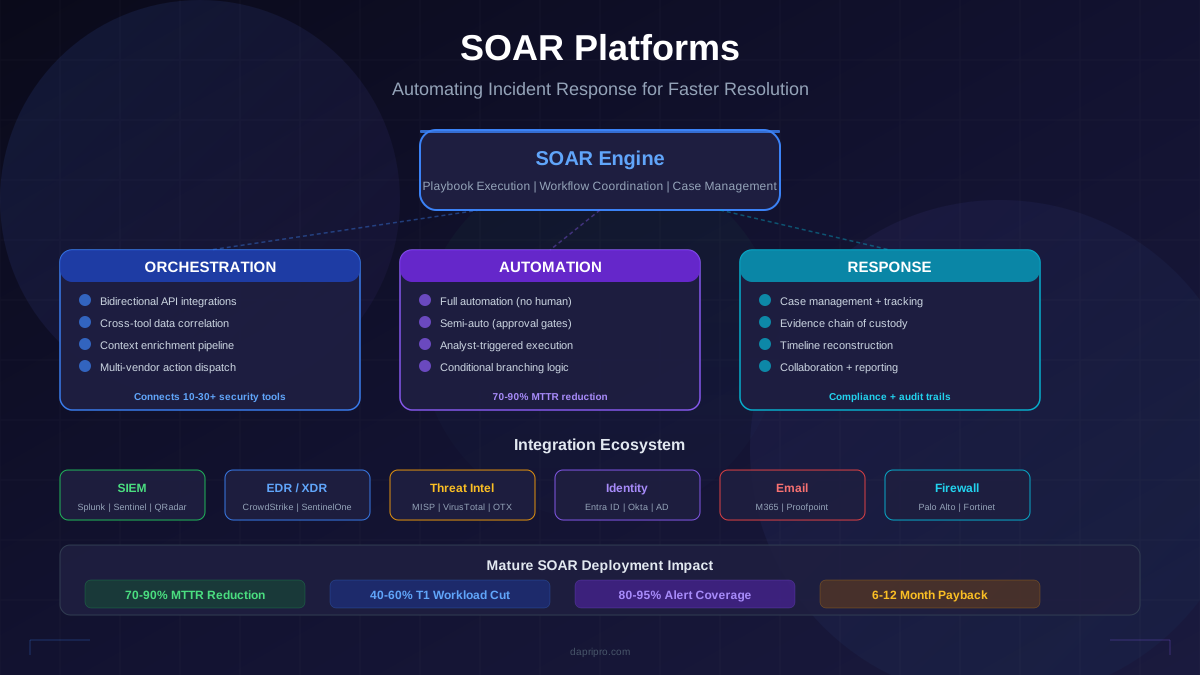
SOAR is an acronym that bundles three distinct capabilities. Understanding each pillar separately explains why some organizations deploy SOAR and see massive value while others deploy the same platform and achieve little.
Orchestration: The Integration Layer
Orchestration is the ability to connect and coordinate actions across multiple security tools through a single platform. Your SIEM detects a suspicious login. Your SOAR platform queries your identity provider for account details, checks the source IP against threat intelligence feeds, pulls recent endpoint telemetry from your EDR, and compiles everything into a single investigation context, all without an analyst opening five separate console tabs.
Orchestration value depends entirely on integration depth. A SOAR platform may advertise 500+ integrations, but what matters is whether it deeply integrates with YOUR specific tools. Deep integration means bidirectional API connectivity: the SOAR platform can both query data from and execute actions in the connected tool. Shallow integration means read-only access or limited action capabilities, which provides enrichment value but not response automation.
The critical integrations for most SOC environments include:
- SIEM — Alert ingestion, log queries, correlation rule context. This is the primary alert source for most playbooks.
- EDR/XDR — Endpoint telemetry, process details, file analysis, host isolation, file quarantine. This is the primary response tool for endpoint incidents.
- Threat intelligence platforms — IOC enrichment, reputation scoring, threat actor context. Multiple TI sources (MISP, VirusTotal, OTX, commercial feeds) provide diverse perspectives.
- Identity providers — Active Directory, Azure AD/Entra ID, Okta. Account lookup, password resets, account disabling, MFA verification status.
- Ticketing systems — Jira, ServiceNow, PagerDuty. Ticket creation, assignment, SLA tracking, escalation workflows.
- Email security — Email gateway, Microsoft 365, Google Workspace. Message trace, quarantine, sender analysis, phishing report processing.
- Firewall/network security — Block IP addresses, update ACLs, isolate network segments. Perimeter response actions.
Automation: Executing Without Humans
Automation executes predefined actions based on trigger conditions without requiring human intervention. The distinction from orchestration is important: orchestration connects tools, automation runs the workflow. You can have orchestration without automation (analyst manually triggers enrichment queries through the SOAR interface) or automation without deep orchestration (automated actions limited to a single tool).
Automation operates on a spectrum of human involvement:
Full automation (no human touch) — The playbook ingests the alert, performs all enrichment, makes the triage decision, executes the response action, documents the investigation, and closes the ticket. Appropriate for high-confidence, low-impact scenarios: blocking a known-malicious IP, quarantining a file that matches multiple threat intelligence hits, closing an alert confirmed as a false positive pattern.
Semi-automation (human-in-the-loop) — The playbook performs enrichment and prepares a response recommendation, but pauses for analyst approval before executing high-impact actions like disabling a user account, isolating a production server, or blocking an IP range. Appropriate for medium-confidence or high-impact scenarios where automated enrichment is valuable but the response decision requires human judgment.
Analyst-triggered automation — The analyst reviews the alert and manually triggers automation for specific tasks: "run enrichment playbook," "isolate this host," "block this IOC across all perimeter devices." The analyst makes all decisions but uses automation to execute faster than manual console-hopping.
Response: Case Management and Collaboration
The response pillar provides the framework for managing incidents as structured cases rather than loose collections of alerts and tickets. This includes evidence tracking (attaching artifacts, screenshots, IOCs to the case), timeline reconstruction (building an attack timeline from collected data), collaboration (multiple analysts working on the same case with shared context), documentation (recording investigation steps, decisions, and rationale), and reporting (generating post-incident reports, metrics dashboards, and compliance documentation).
Case management is often the least glamorous SOAR capability but delivers critical value for several reasons. During an incident, multiple analysts need shared context. Without case management, investigation details live in individual analyst notes, chat messages, and memory. Case management centralizes everything. Post-incident, the documented case provides the raw material for post-incident reviews, metrics calculation, and compliance evidence.
SOAR Platform Landscape: Evaluation Framework
The SOAR market has consolidated significantly since 2020. Most standalone SOAR vendors have been acquired by SIEM or XDR companies, creating integrated platforms where SOAR is one capability within a broader security operations suite. This consolidation affects selection strategy: choosing a SOAR platform increasingly means choosing an entire security operations ecosystem.
Major Platform Profiles
Palo Alto XSOAR (formerly Demisto) — The market-share leader in standalone SOAR. Strengths include the largest integration marketplace (700+ integrations), a mature visual playbook builder, strong community-contributed content packs, and flexible deployment options (cloud, on-premises, hybrid). Weaknesses include complexity for small teams, premium pricing, and a learning curve for advanced playbook development. Best suited for mid-to-large enterprises with dedicated SOC teams and diverse multi-vendor security stacks.
Splunk SOAR (formerly Phantom) — Deeply integrated with Splunk Enterprise and Splunk Cloud for organizations already invested in the Splunk ecosystem. Strengths include native Splunk data integration (no SIEM-to-SOAR translation layer), strong playbook automation capabilities, and a Python-based app framework for custom integrations. Weaknesses include heavy dependence on Splunk licensing, less mature standalone deployment, and steeper pricing when purchased separately from Splunk Enterprise Security. Best suited for Splunk-centric security organizations.
Microsoft Sentinel (with built-in SOAR) — Microsoft's cloud-native SIEM includes SOAR capabilities through Logic Apps and automation rules. Strengths include native integration with the Microsoft 365 Defender ecosystem, Azure AD/Entra ID, and the broader Microsoft security stack, consumption-based pricing that scales with usage, and no separate SOAR licensing for Sentinel customers. Weaknesses include limited integration depth with non-Microsoft security tools, Logic Apps-based playbook design that is less intuitive than dedicated SOAR visual builders, and Azure dependency. Best suited for Microsoft-centric environments that have already adopted Sentinel as their SIEM.
Google Chronicle SOAR (formerly Siemplify) — Google Cloud's security operations platform combines SIEM and SOAR with Google-scale data analytics. Strengths include strong threat intelligence integration through Google Threat Intelligence and VirusTotal, modern cloud architecture, and competitive pricing against legacy vendors. Weaknesses include smaller integration marketplace compared to XSOAR, newer platform with less community content, and Google Cloud dependency. Best suited for organizations moving to Google Cloud or evaluating next-generation security operations platforms.
IBM QRadar SOAR (formerly Resilient) — Focus on incident response case management with strong compliance and regulatory framework support. Strengths include the most mature case management capabilities, built-in privacy breach response workflows (GDPR, CCPA, HIPAA), strong audit trail documentation, and integration with IBM X-Force threat intelligence. Weaknesses include less advanced playbook automation compared to XSOAR, aging UI, and IBM ecosystem dependency. Best suited for regulated industries (financial services, healthcare, government) where compliance documentation and breach response workflows are primary requirements.
Open-Source Alternatives
Shuffle SOAR — Open-source SOAR platform with a visual workflow builder, 200+ app integrations, and deployment via Docker. Provides core SOAR functionality at zero licensing cost. Suitable for small teams, budget-constrained organizations, and proof-of-concept deployments that may migrate to commercial platforms later.
TheHive + Cortex — Open-source incident response platform (TheHive) paired with an automated analysis engine (Cortex). Strong case management, observable analysis through Cortex analyzers, and MISP integration for threat intelligence. Less playbook automation than commercial SOAR but excellent for incident-centric workflows.
Playbook Design: From Manual Process to Automated Workflow
The most common reason SOAR deployments underperform is poor playbook design. Organizations rush to automate without first documenting, standardizing, and optimizing their manual processes. Automating a bad process produces bad results faster.
Step 1: Document the Manual Process
Before building any playbook, document exactly how analysts currently handle the alert type. Shadow two or three analysts handling the same alert type and record every step. You will find that different analysts follow different procedures, skip steps, and use different tools for the same task. This variability is exactly what SOAR should eliminate.
Document the "golden path" that represents the ideal investigation procedure for each alert type: what data sources to query, what enrichment to perform, what decision criteria to use, what response actions to take, and what documentation to create. This becomes the playbook specification.
Step 2: Identify Automation Candidates
Not every step in a manual process should be automated. Classify each step:
- Automate immediately — Data lookups, IOC enrichment, reputation queries, hash checks, WHOIS lookups, geolocation. These are deterministic, low-risk, and consume significant analyst time when performed manually.
- Automate with approval gates — Account disabling, host isolation, IP blocking, email quarantine. High-impact response actions that should be automated for speed but require analyst confirmation to prevent false-positive impact on legitimate users.
- Keep manual — Severity escalation decisions, executive communication, legal notification, evidence preservation for potential litigation. These require human judgment, organizational context, or legal significance that automation cannot provide.
Step 3: Design for Failure
Production playbooks encounter failures constantly: APIs time out, integrations return errors, external services are unavailable, data formats change. Every automated step needs error handling:
- If the threat intelligence lookup fails, do not mark the IOC as clean. Flag it as "unable to enrich" and route to an analyst.
- If the EDR isolation command fails, alert an analyst immediately because the compromised host may be actively being used for lateral movement.
- If the playbook encounters unexpected data (null values, unexpected formats, missing fields), fail gracefully with descriptive error logging rather than crashing silently.
Step 4: Start with Enrichment, Graduate to Response
New playbooks should automate enrichment first and response actions later. An enrichment-only playbook that gathers all relevant context and presents it to an analyst in a structured format delivers immediate value with zero risk of automated false-positive response actions. Once the enrichment logic is validated and tuned (typically 2-4 weeks of production use), add semi-automated response actions with analyst approval gates. After the approval gates demonstrate consistent accuracy (low false-positive rate on recommended actions), consider promoting high-confidence actions to full automation.
Five High-Value Playbooks Every SOC Should Deploy First
1. Phishing Email Triage
Phishing alerts represent 30-40% of SOC alert volume. An automated phishing playbook processes user-reported phishing emails and email gateway alerts through: header analysis (SPF, DKIM, DMARC verification, sending infrastructure analysis), URL extraction and detonation (sandbox each URL, check against URL reputation databases), attachment analysis (submit to sandbox, check file hash against VirusTotal and internal IOC database), sender reputation (first-time sender, domain age, historical email volume from this sender), and verdict determination (confirmed phishing, suspicious, benign). For confirmed phishing, the playbook auto-quarantines the email from all recipient mailboxes, blocks the sender domain, adds extracted IOCs to the blocklist, and notifies affected users. This single playbook typically saves 2-4 analyst hours per day.
2. Endpoint Malware Alert Enrichment
When EDR generates a malware alert, the playbook automatically collects: file hash and VirusTotal analysis, process tree and parent process context, network connections from the endpoint during the detection window, user account context (privileged account? service account? VIP?), recent authentication activity for the same user account, and endpoint inventory data (OS, patch level, installed software). All enrichment is compiled into a structured investigation card presented to the analyst, who can then make an informed decision and trigger response actions (isolate host, disable account, initiate forensic collection) through the SOAR interface.
3. Suspicious Authentication Playbook
Brute force, credential stuffing, and impossible travel alerts follow consistent investigation patterns. The playbook collects: source IP reputation and geolocation, authentication history for the target account, concurrent sessions for the same user, VPN and MFA status, and comparison against baseline authentication patterns. For confirmed credential compromise (successful login from a known-malicious IP, impossible travel confirmed), the playbook can auto-reset the password, force MFA re-enrollment, and revoke active sessions with analyst approval.
4. IOC Sweep and Block
When threat intelligence identifies new IOCs (malicious IPs, domains, file hashes) from threat feeds or internal investigations, this playbook searches across the environment for historical exposure: checks SIEM logs for past connections to malicious IPs/domains, scans EDR telemetry for malicious file hashes, queries DNS logs for domain resolutions, and queries proxy logs for URL access. If historical exposure is found, escalate to investigation. Simultaneously, the playbook deploys blocks across perimeter devices (firewall, proxy, DNS) and endpoint tools (EDR blocklist) to prevent future contact.
5. Vulnerability Notification Triage
When critical CVEs are published (CISA KEV additions, vendor emergency advisories, zero-day disclosures), this playbook automatically: queries the asset inventory for affected software, assesses exposure (Internet-facing? Internal only? Development?), checks vulnerability scanner results for confirmed instances, creates prioritized remediation tickets with asset owner assignment, and tracks patch deployment status. This playbook bridges vulnerability management and incident response, ensuring critical vulnerabilities receive rapid attention through the SOC workflow.
Integration Architecture: Building the Connected SOC
SOAR integration architecture determines the platform's operational ceiling. Poor integration design creates bottlenecks, data quality issues, and playbook failures that undermine the entire deployment.
API-First Integration Design
Every integration should be bidirectional: the SOAR platform can both query data from and execute actions in the connected tool. Read-only integrations provide enrichment value but prevent response automation. When evaluating integrations, test the specific API actions your playbooks require, not just whether the integration exists in the marketplace.
Common integration issues to test during evaluation:
- Rate limiting — External threat intelligence APIs often impose rate limits (VirusTotal free tier allows 4 requests per minute). Playbooks processing hundreds of alerts per hour will hit these limits. Design playbooks with rate-limiting awareness: batch lookups, cache results, and implement backoff logic.
- API versioning — When connected tools update their APIs, integrations can break. Evaluate how the SOAR vendor handles API version changes: automatic updates, manual maintenance, or integration-breaking surprises.
- Authentication management — API keys, OAuth tokens, and service accounts used by SOAR integrations require lifecycle management: rotation schedules, least-privilege scoping, and monitoring for unauthorized use.
- Data format normalization — Different tools represent the same data differently. An IP address might be a string, an integer, or an object depending on the tool. The SOAR platform should normalize data formats to prevent playbook failures from format mismatches.
Event Ingestion Architecture
Design your alert ingestion to prevent both overload and blind spots:
SIEM-mediated ingestion — All alerts flow through the SIEM, which performs initial correlation and deduplication before forwarding to SOAR. This is the most common architecture and ensures the SIEM's correlation logic reduces raw alert volume before SOAR processes it. The drawback is added latency and SIEM dependency.
Direct tool ingestion — EDR, email security, and identity tools send alerts directly to SOAR, bypassing the SIEM for time-sensitive alert types. This reduces latency but requires SOAR to handle deduplication and correlation that the SIEM would normally perform.
Hybrid ingestion — Most mature deployments use both: SIEM-mediated ingestion for correlated alerts and direct ingestion for high-priority alert types where response latency matters (ransomware detection, active exploitation, compromised credential alerts).
Measuring SOAR ROI: Metrics That Matter
SOAR investments require quantifiable justification. The following metrics framework translates operational improvements into business value that executives and budget owners understand.
Primary Operational Metrics
Mean Time to Respond (MTTR) — The most important SOAR metric. Measure MTTR for each automated alert type before and after playbook deployment. Fully-automated playbooks typically reduce MTTR from 30-60 minutes (manual investigation) to 2-5 minutes (automated enrichment + response). Semi-automated playbooks reduce MTTR by 30-50% by eliminating enrichment time and presenting analysts with pre-investigated cases.
Mean Time to Detect (MTTD) — SOAR indirectly reduces MTTD by increasing the percentage of alerts that receive investigation. When analysts manually triage 25% of alerts, the mean detection time for threats hiding in the other 75% is infinite (they are never detected). SOAR automation that investigates 90% of alerts closes this gap.
Alert coverage rate — Percentage of alerts that receive at least enrichment-level investigation. Pre-SOAR baseline is typically 10-25%. Target 80-95% after mature SOAR deployment. This metric directly correlates with breach risk: uninvestigated alerts are undetected threats.
Analyst time allocation — Track how analysts spend their time before and after SOAR. The goal is shifting analyst hours from repetitive tasks (manual enrichment, copy-pasting IOCs between tools, creating tickets) to high-value activities (threat hunting, playbook development, detection engineering, incident response leadership). Mature SOAR deployments typically recover 2-4 FTE equivalent hours per day from automation.
Financial ROI Calculation
Translate operational metrics into financial terms:
- Analyst time savings — If SOAR automation saves the equivalent of 3 FTE hours daily across your team, multiply by fully-loaded analyst cost (typically $55-75/hour for Tier 1, $75-100/hour for Tier 2) to calculate annual labor savings.
- Breach risk reduction — Faster MTTR and higher alert coverage reduce the probability and impact of successful breaches. While difficult to quantify precisely, industry benchmarks (Ponemon Cost of a Data Breach) show that organizations with security automation save an average of $3.05 million per breach compared to those without automation.
- Avoided hiring — SOAR automation that provides the capacity equivalent of 2-3 additional analysts defers hiring costs of $150,000-$200,000 per analyst per year (salary + benefits + training + tooling).
The median payback period for SOAR investments, including platform licensing, implementation services, and internal staff time, is 6-12 months for organizations that prioritize high-volume alert types in their initial playbook development.
Common SOAR Implementation Pitfalls
Pitfall 1: Automating Before Standardizing
The most common failure mode is attempting to automate processes that are not yet standardized. If three analysts handle the same alert type three different ways, you cannot build a single playbook that captures the correct procedure. Before building playbooks, document and standardize the manual process. Get analysts to agree on the golden path for each alert type.
Pitfall 2: Overambitious Initial Scope
Organizations that try to build 30 playbooks simultaneously in month one achieve none of them well. Start with the top 3 alert types by volume. Build, test, tune, and validate those playbooks before expanding. Each playbook takes 2-4 weeks to develop, test in staging, deploy to production, and tune through real-world operation.
Pitfall 3: Neglecting Error Handling
Playbooks that work perfectly in testing fail in production because production environments generate edge cases: null values, API timeouts, rate limiting, service outages, unexpected data formats. Every automated step needs error handling that either retries, falls back to an alternative, or escalates to a human. A playbook that crashes silently is worse than no playbook at all because it creates a false sense of coverage.
Pitfall 4: Insufficient Integration Testing
Integration marketplace listings do not guarantee production-quality connectivity. Before committing to a platform, test your specific integrations with your specific tool versions and configurations. Common surprises: the integration requires a specific API version your tool does not support, the integration lacks the specific action your playbook needs, or the integration works but performance is inadequate for production alert volumes.
Pitfall 5: Treating SOAR as a Project Instead of a Program
SOAR is not a deploy-and-done project. It is an ongoing program that requires continuous playbook development, integration maintenance, tuning based on false positive and false negative feedback, expansion to new alert types, and adaptation to changing threat landscape and tool stack evolution. Budget for ongoing operational investment, not just initial deployment.
Scaling SOAR: From Pilot to SOC Transformation
The transition from a successful SOAR pilot to a fully-automated SOC requires intentional scaling across three dimensions:
Playbook Portfolio Scaling
Expand playbook coverage methodically. After the initial 3-5 playbooks are stable, add 2-3 new playbooks per month. Prioritize by alert volume (automate the alerts that consume the most analyst time), automation potential (alert types with deterministic investigation procedures), and business impact (alert types related to critical assets or compliance requirements). A mature SOC operates 30-50+ playbooks covering 80-95% of alert volume.
Automation Confidence Scaling
Graduate playbooks from enrichment-only to semi-automated to fully-automated based on demonstrated accuracy. Track the false positive rate for each playbook's recommended actions. When a playbook consistently recommends correct actions with under 2% false positive rate over a 4-week period, promote the low-risk actions to full automation. Keep high-impact actions (account disabling, network isolation) at semi-automated with analyst approval until the false positive rate over a 12-week period is under 1%.
Organizational Integration Scaling
Expand SOAR beyond the SOC to adjacent teams. IT operations can use SOAR playbooks for automated remediation of vulnerability findings. The identity team can use SOAR for automated access review workflows. The compliance team can use SOAR for automated evidence collection during audits. Each expansion multiplies the platform's organizational value and strengthens the ROI case for continued investment.
SOAR platforms are force multipliers, not magic solutions. Their value is directly proportional to the quality of playbook design, the depth of tool integration, and the maturity of the processes they automate. Organizations that invest in standardizing their manual procedures before automating them, that prioritize integration quality over quantity, and that treat SOAR as an ongoing operational program rather than a deployment project achieve the promised benefits: analysts spending time on high-value security work instead of copy-pasting IOCs between console tabs, 70-90% faster response times for common alert types, and measurable risk reduction that justifies continued investment.