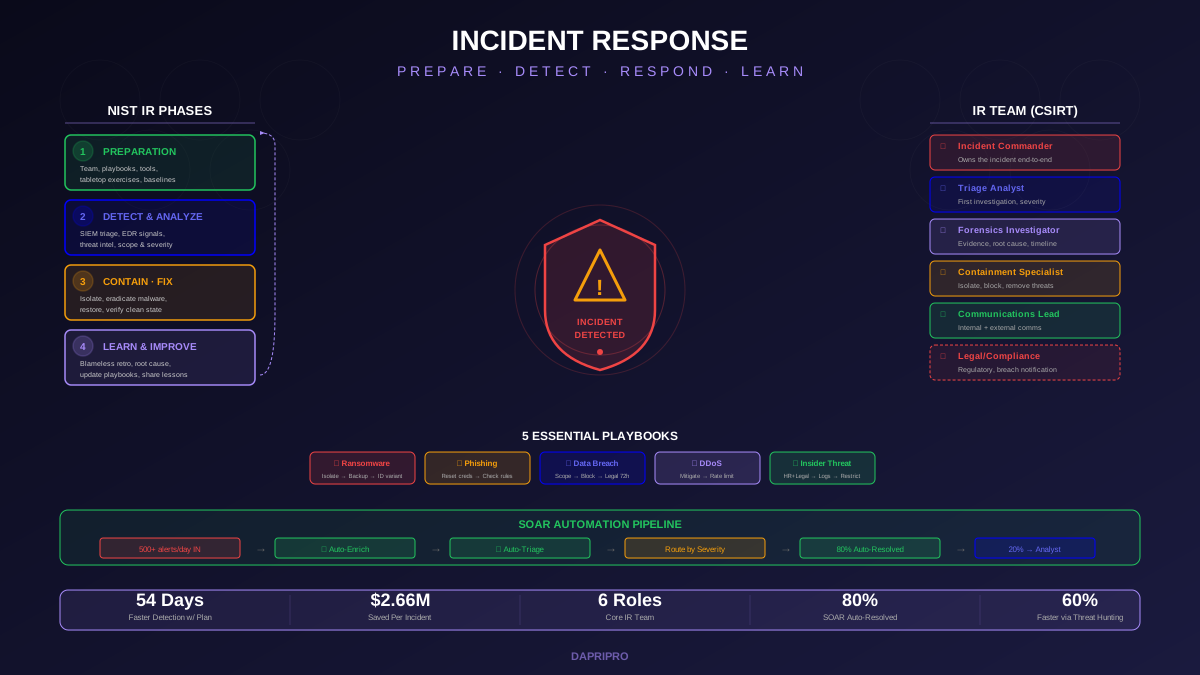
When a security incident begins, the response team faces immediate pressure to act quickly while making high-stakes decisions under incomplete information. Without a documented playbook, response quality depends entirely on individual analyst experience and judgment. The analyst who has handled twenty ransomware incidents responds differently from the analyst handling their first. Playbooks eliminate this variability by codifying the organization's best response procedures into repeatable, measurable workflows that any qualified team member can execute consistently.
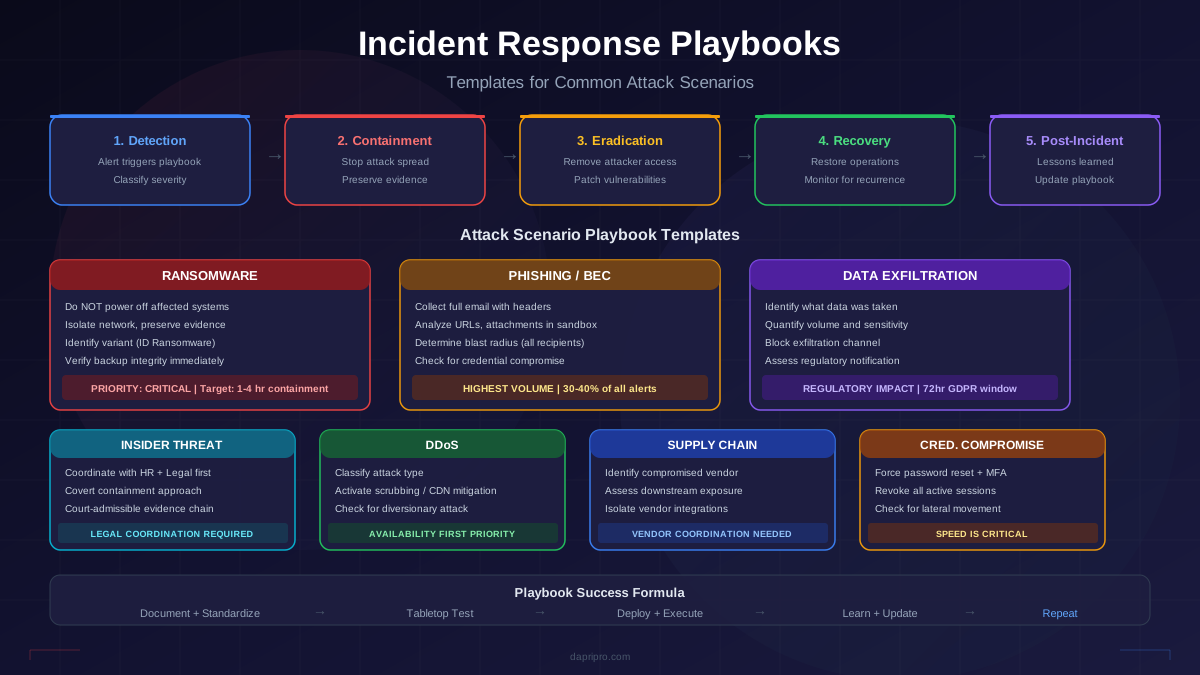
This guide provides actionable playbook templates for the seven most common attack scenarios, structured around the NIST SP 800-61 incident response lifecycle. Each template includes detection triggers, analysis procedures, containment options with decision criteria, eradication and recovery steps, communication templates, evidence collection checklists, and SOAR automation integration points. These templates are starting points that you must customize for your specific environment, tools, team structure, and organizational policies.
Playbook Structure: The Universal Framework
Every playbook, regardless of attack type, follows the same structural framework. This consistency ensures that analysts can navigate any playbook quickly, even under pressure, because the format is familiar.
Section 1: Playbook Metadata
The metadata section establishes context and ownership:
- Playbook ID and version — A unique identifier and version number for change tracking. Use semantic versioning (v2.1 means major revision 2, minor update 1).
- Attack type and scope — What this playbook covers and explicitly what it does not cover. A ransomware playbook handles ransomware encryption events but may not cover ransomware data exfiltration (which might fall under the data breach playbook).
- Owner and reviewers — Primary owner responsible for maintenance, reviewers who validate changes, and approval authority for the playbook.
- Last reviewed date — The date of the most recent review. If this date is more than 6 months old, the playbook requires immediate review before relying on it during an incident.
- Related playbooks — Cross-references to playbooks this one may escalate to or overlap with. Ransomware often triggers the data breach playbook. Phishing may escalate to the compromised credentials playbook.
- MITRE ATT&CK mapping — Relevant MITRE ATT&CK techniques and tactics for the attack type, helping analysts understand the adversary perspective and anticipate lateral movement or persistence.
Section 2: Detection and Triggers
Define the specific alerts, indicators, and conditions that activate this playbook. Explicit triggers prevent ambiguity about when to use which playbook:
- Primary triggers — SIEM alerts, EDR detections, or user reports that directly indicate this attack type. Example: "Ransomware note file detected on file server" or "EDR alerts for mass file encryption behavior."
- Secondary triggers — Less definitive indicators that may represent this attack type. Example: "Unusual volume of SMB traffic to file shares during off-hours" requires investigation before confirming ransomware.
- Severity classification — Criteria for classifying the incident severity (Critical, High, Medium, Low) which determines response urgency, escalation requirements, and communication obligations.
Section 3: RACI Matrix
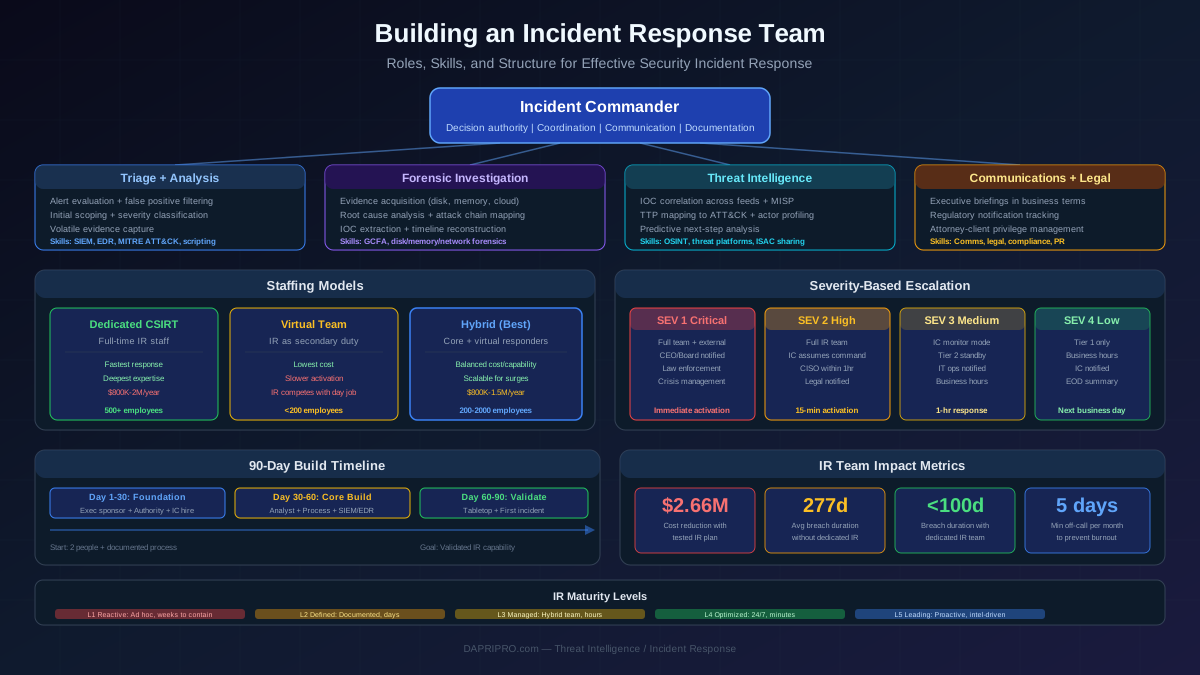
The RACI matrix defines who is Responsible, Accountable, Consulted, and Informed for each major playbook action. This prevents the "who is supposed to do this?" confusion that wastes critical minutes during incidents. Every playbook action should have exactly one Responsible person (executes the action) and one Accountable person (authorizes the action). Common RACI participants include: Tier 1 Analyst (initial triage), Tier 2/3 Analyst (investigation and response), IR Team Lead (coordination and escalation), SOC Manager (resource allocation), CISO (executive decisions), Legal (regulatory notification), Communications (public/customer notification), and IT Operations (system recovery).
Section 4: Response Procedures
The core of the playbook. Detailed step-by-step procedures organized by phase:
Phase 1: Initial Analysis (first 30 minutes) — Confirm the incident is real, determine initial scope, classify severity, document the initial timeline, and notify the appropriate people. The output is a confirmed incident with initial classification.
Phase 2: Containment (first 1-4 hours) — Stop the attack from spreading while preserving forensic evidence. Containment decisions often involve tradeoffs between stopping the attacker and maintaining business operations. Document containment options with their tradeoffs so analysts do not have to make these decisions under pressure.
Phase 3: Eradication (hours to days) — Remove the attacker's access, tools, and persistence mechanisms from the environment. This requires understanding the full scope of the compromise, which may require forensic investigation that runs parallel to containment.
Phase 4: Recovery (days to weeks) — Restore affected systems and data to normal operations. Recovery procedures vary significantly by attack type: ransomware recovery may involve restoring from backups, while credential compromise recovery involves password resets and access reviews.
Phase 5: Post-Incident (1-2 weeks after resolution) — Conduct a blameless post-incident review, document lessons learned, update the playbook based on gaps discovered during the incident, calculate response metrics, and generate compliance documentation.
Ransomware Playbook Template
Ransomware remains the most consequential incident type for most organizations because it combines data loss, operational disruption, and extortion pressure with compressed decision timelines.
Detection Triggers
- EDR alert for mass file encryption behavior or known ransomware binary execution
- Ransomware note files detected on file shares or endpoints (e.g., README.txt, DECRYPT_FILES.html)
- Unusual volume of file modifications on network shares during off-hours
- Shadow copy deletion commands (vssadmin delete shadows, wmic shadowcopy delete)
- User reports of inaccessible files or strange file extensions
Immediate Actions (First 15 Minutes)
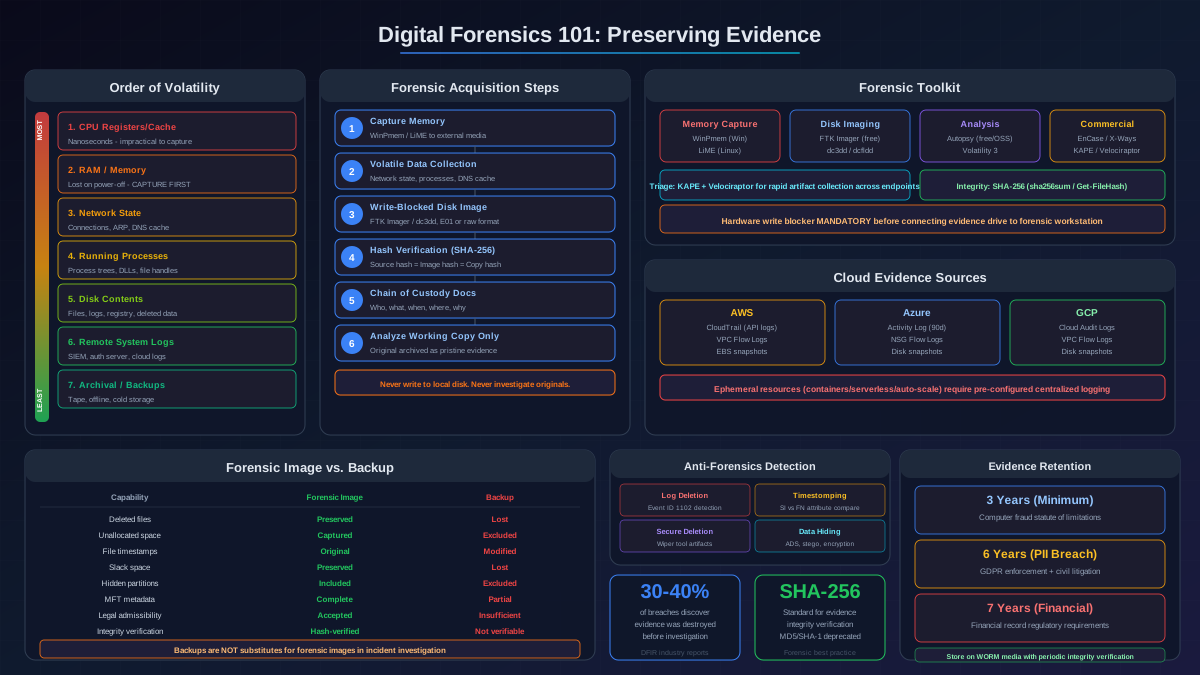
Do NOT power off affected systems. Powering off destroys volatile memory evidence (encryption keys, active network connections, running processes) that forensic analysts need. Instead:
- Isolate affected systems from the network — Disconnect from the network (disable NIC, remove from VLAN, or use EDR network isolation) but keep systems powered on. If the scope is unclear, consider isolating the entire affected network segment rather than individual endpoints.
- Preserve the ransomware note — Screenshot and record all ransom note content including payment addresses, communication channels, and any threat actor identification. This information helps identify the ransomware variant and may inform decryption options.
- Identify the ransomware variant — Submit encrypted file samples and the ransom note to ID Ransomware (id-ransomware.malwarehunterteam.com) or No More Ransom (nomoreransom.org) to identify the variant. Some variants have known decryptors available.
- Check encryption scope — Determine what has been encrypted (local drives, network shares, cloud storage) and what remains unaffected. Check backup systems immediately to verify they are intact and not connected to compromised networks.
Containment Decisions
The containment decision tree for ransomware involves several critical choices that should be pre-authorized by leadership:
Network isolation scope — Isolate individual hosts (if encryption is limited to a few endpoints) or entire network segments (if encryption is spreading across file shares). The decision depends on the encryption spread rate versus business impact of segment isolation. If encryption is actively spreading, broader isolation prevents further damage even at the cost of business disruption.
Backup verification — Immediately verify that backup systems are isolated from the attacker. If backups are online and accessible from compromised systems, disconnect them immediately. Check backup integrity: are the most recent backups encrypted or corrupted? Determine the most recent clean backup for each affected system.
Law enforcement notification — Report to the FBI IC3 (ic3.gov) or local law enforcement. Law enforcement agencies sometimes have decryption keys from previous operations against the same ransomware group. Early notification also satisfies regulatory requirements in many jurisdictions.
Eradication
Eradication requires understanding the full attack chain, not just removing the ransomware binary:
- Identify the initial access vector (phishing email, RDP exposure, VPN exploitation, supply chain compromise)
- Determine if the attacker established persistence mechanisms beyond the ransomware itself (backdoors, additional user accounts, scheduled tasks, registry modifications)
- Assess whether data was exfiltrated before encryption (double extortion). Check for large outbound data transfers in the days preceding encryption
- Close the initial access vector before beginning recovery to prevent re-compromise
- Reset all credentials for accounts that were accessible from compromised systems
Recovery
Recovery options in order of preference:
- Restore from backups — The preferred option if clean backups exist. Restore to clean/rebuilt systems, not the compromised systems. Verify restored data integrity before returning to production.
- Use a known decryptor — If the ransomware variant has a publicly available decryptor (check No More Ransom project), use it. Verify decryptor authenticity before execution.
- Rebuild without data — If no backups exist and no decryptor is available, rebuild systems from scratch and accept data loss. This is the worst case but preferable to paying ransom in most situations.
- Ransom payment — Last resort. Note that payment does not guarantee decryption, may violate OFAC sanctions, funds criminal organizations, and marks the organization as a willing payer for future attacks. If considering payment, engage legal counsel, a ransomware negotiation firm, and law enforcement before proceeding.
Phishing and BEC Playbook Template
Phishing and Business Email Compromise represent the highest-volume incident types and the most common initial access vector for more severe attacks.
Detection Triggers
- User-reported suspicious email through the phishing report button
- Email gateway alert for phishing indicators (suspicious URLs, known-bad sender infrastructure, credential harvesting page)
- SIEM correlation: user clicked a URL in a flagged email followed by credential submission to an external site
- Finance or HR department reports unusual wire transfer request, payroll change, or vendor payment modification from a known executive email
- Identity provider alert for credential use from a new location shortly after a phishing report
Phishing Triage Procedure
- Collect the email — Obtain the full email with headers (not a forwarded copy, which strips header data). Most email clients support "View Original" or "Download as .eml" options.
- Analyze headers — Check SPF, DKIM, and DMARC authentication results. A sender claiming to be your CEO but failing all authentication checks is an obvious impersonation. Examine the sending infrastructure: mail server IP, relay path, originating domain age.
- Analyze URLs — Extract all URLs from the email body and HTML source. Check URLs against reputation databases (VirusTotal, URLscan.io). Detonate URLs in a sandbox to capture the landing page content without exposing production systems.
- Analyze attachments — Submit attachments to a sandbox environment (Any.Run, Joe Sandbox, Hybrid Analysis) for behavioral analysis. Check file hashes against VirusTotal. Never open attachments on a production system.
- Determine blast radius — Use email gateway logs to identify all recipients who received the same email. Determine which recipients opened the email, clicked links, or downloaded attachments.
If Credentials Were Compromised
If analysis confirms a user submitted credentials to a phishing page:
- Force immediate password reset for the affected account
- Revoke all active sessions and refresh tokens
- Force MFA re-enrollment if the phishing page captured MFA tokens
- Review recent email forwarding rules and mailbox delegation changes (attackers often add forwarding rules to maintain access after password reset)
- Review recent authentication logs for the account: has the attacker already logged in using the stolen credentials?
- Check for lateral movement from the compromised account to other systems
- If the compromised account has privileged access, escalate to the compromised credentials playbook
BEC-Specific Procedures
Business Email Compromise adds financial fraud risk to the phishing scenario:
- If a fraudulent wire transfer was initiated, contact the receiving bank immediately to request a recall. Speed is critical: recall success drops significantly after 24 hours.
- Determine whether the attacker compromised a real internal email account or is spoofing/using a look-alike domain
- Review all financial transactions initiated by the compromised account or requested via the compromised email in the past 30 days
- Notify finance department leadership of the compromise and implement out-of-band verification for all pending wire transfers
Data Exfiltration Playbook Template
Detection Triggers
- DLP alert for sensitive data transmitted to external destinations (email, cloud storage, USB)
- Unusually large outbound data transfers from database servers or file shares
- Cloud access security broker (CASB) alert for bulk data download from cloud applications
- DNS tunneling detection (unusually long DNS queries, high query volume to a single domain)
- Proxy logs showing large uploads to file sharing services (Mega, Dropbox, personal Google Drive)
- Unusual data access patterns: user accessing files outside their normal scope, accessing high volumes of records during off-hours
Analysis Priorities
Data exfiltration investigation focuses on three questions: What data was taken? How much? Who took it (external attacker or insider)?
- Identify the data — Determine what data was accessed and potentially exfiltrated. Was it PII, financial records, intellectual property, credentials, or customer data? The data classification determines notification obligations and regulatory impact.
- Quantify the volume — Network flow data, proxy logs, and DLP logs help estimate the volume of data transmitted. Large volumes do not necessarily mean sensitive data (could be log files or backups), but small volumes can contain highly sensitive records.
- Determine the method — How was data exfiltrated? Common methods include email to external addresses, upload to cloud storage, USB drives, DNS tunneling, steganography, or encrypted channels that bypass DLP inspection. The method informs containment actions.
- Identify the actor — Is this an external attacker who has compromised an account, or an insider (employee, contractor) exfiltrating data deliberately? The answer changes the response strategy significantly: external attackers require technical containment while insider threats may require coordination with HR and legal.
Containment
- Block the exfiltration channel (firewall rule, proxy block, DLP policy enforcement) to stop ongoing data loss
- If the actor is an external attacker, follow the compromised account playbook to revoke access
- If the actor is a potential insider, coordinate with HR and legal before taking any action that alerts the insider, as premature confrontation can lead to evidence destruction
- Preserve all evidence: network captures, access logs, DLP alerts, email records, and any data transfer logs
Regulatory Assessment
Data exfiltration triggers regulatory notification obligations depending on the data type and jurisdiction. Engage legal counsel immediately to assess: GDPR 72-hour notification requirement if EU personal data is involved, state breach notification laws (all 50 US states have requirements, timelines vary), HIPAA breach notification if protected health information is involved, PCI DSS if payment card data is involved, and contractual notification obligations to customers, partners, or vendors.
Insider Threat Playbook Template
Detection Triggers
- User behavior analytics (UBA) alert for anomalous access patterns: accessing files outside normal scope, downloading unusually large volumes, accessing systems at unusual times
- HR notification of employee termination, resignation, or performance action combined with unusual system activity
- DLP alert for sensitive data sent to personal email or storage
- Badge access anomalies: accessing areas outside normal pattern, unusual after-hours access
- Privileged account activity outside change windows
Critical Differences from External Threat Response
Insider threat investigations require fundamentally different handling than external attacks:
Legal and HR coordination is mandatory. Before monitoring an employee's activity, taking any containment action visible to the employee, or accessing the employee's communications, coordinate with legal counsel and HR. Employment law, privacy regulations, and union agreements may constrain what monitoring and response actions are permissible.
Evidence preservation is paramount. Insider threat cases may result in termination, civil litigation, or criminal prosecution. Evidence must be collected and preserved with a documented chain of custody that meets legal standards. Do not use tools or methods that modify the evidence.
Containment must be covert when possible. Unlike external attacks where speed of containment is the primary concern, insider threat containment must balance speed against alerting the insider. An insider who realizes they are under investigation may destroy evidence, accelerate data exfiltration, or take other destructive actions. Containment actions (reducing access, monitoring activity) should be designed to appear routine.
DDoS Playbook Template
Detection Triggers
- Network monitoring alerts for traffic volume exceeding baseline thresholds
- Web application firewall (WAF) alerts for volumetric attack patterns
- User reports of application slowness or unavailability
- CDN or ISP notification of upstream attack traffic
- Synthetic monitoring alerts for availability check failures
Response Priorities
DDoS response prioritizes availability over investigation:
- Classify the attack type — Volumetric (bandwidth saturation), protocol (SYN floods, reflection attacks), or application-layer (HTTP floods, slowloris). The attack type determines the mitigation approach.
- Engage DDoS mitigation — If you have a DDoS mitigation service (Cloudflare, Akamai, AWS Shield), activate scrubbing center routing immediately. If not, coordinate with your ISP for upstream filtering.
- Identify attack vectors — What protocols, ports, and source IP ranges are involved? Use flow data and packet captures to characterize the attack for mitigation tuning.
- Check for diversionary attack — DDoS attacks sometimes serve as cover for other malicious activity (data exfiltration, account compromise). While the SOC focuses on the DDoS, check other alert sources for concurrent suspicious activity.
Playbook Testing and Maintenance
Tabletop Exercise Framework
Tabletop exercises test playbooks without technical execution. A facilitator presents a scenario and the team walks through the playbook step by step:
Exercise structure — Present a realistic scenario in stages (initial detection, escalation trigger, complication). At each stage, ask the team: "According to the playbook, what do you do next? Who is responsible? What information do you need? What tools do you use?" Record every point where the playbook is unclear, incomplete, or incorrect.
Scenario complexity — Start with straightforward scenarios (textbook ransomware on a single endpoint) and progress to complex multi-stage scenarios (ransomware discovered during a cloud migration while the IR lead is on vacation). Complex scenarios test not just the playbook but also backup procedures, escalation paths, and team adaptability.
Frequency — Conduct tabletop exercises quarterly, rotating through different playbook scenarios. After any real incident, schedule a tabletop exercise to test the updated playbook within 30 days.
Maintenance Schedule
Playbook maintenance ensures documents remain accurate and useful:
Monthly — Verify contact lists and escalation paths. People change roles, phone numbers change, and on-call rotations update. A playbook with the wrong CISO phone number fails at the worst moment.
Quarterly — Conduct a full playbook review. Are procedures still accurate for the current tool stack? Have any integrations changed? Are decision criteria still appropriate given current threat intelligence? Conduct a tabletop exercise for one playbook per quarter.
After every real incident — Update the playbook based on gaps discovered during the incident. What steps were missing? What took longer than expected? What tools or access did the team need but not have? Post-incident playbook updates are the highest-quality improvements because they come from real operational experience.
After tool or infrastructure changes — When the organization deploys a new EDR, migrates to a new SIEM, changes its cloud provider, or restructures the security team, review all playbooks that reference the changed systems. Tool-specific procedures (runbooks) embedded in playbooks become inaccurate immediately when the referenced tool changes.
SOAR Integration Points
Playbooks and SOAR platforms are complementary. The documented playbook defines the procedure and decision logic. SOAR automation executes the automatable portions. Identifying integration points helps organizations maximize both investments.
Automatable Steps Across All Playbooks
Alert enrichment — Every playbook begins with data collection: IOC lookups, user account details, endpoint telemetry, recent authentication activity. SOAR automates this enrichment and presents a pre-investigated alert card to the analyst in seconds instead of the 15-30 minutes manual enrichment requires.
Evidence collection — SOAR can automatically collect and timestamp evidence artifacts: screenshots, log excerpts, network captures, file samples. This creates a documented evidence chain without relying on analysts to remember evidence preservation during high-stress incidents.
Notification and escalation — Playbook notification steps (alert the IR lead, page the on-call analyst, notify the CISO) can be triggered automatically based on incident severity classification. SOAR sends notifications through the appropriate channel (Slack, PagerDuty, email, SMS) and tracks acknowledgment.
Containment actions with approval — High-confidence containment actions (block a known-malicious IP, quarantine a confirmed malware file) can be fully automated. Medium-confidence actions (isolate a host, disable a user account) can be presented to the analyst with a one-click approval through the SOAR interface.
Ticket and case management — SOAR creates and updates incident tickets in ServiceNow or Jira, tracks SLAs, and populates the case with investigation artifacts automatically. This eliminates the documentation burden on analysts during active incidents.
Steps That Should Remain Manual
Not every playbook step benefits from automation:
- Severity escalation decisions — Upgrading an incident from Medium to Critical triggers organizational responses (executive notification, potential public communication, regulatory notification). This decision requires human judgment about business impact and organizational context.
- Law enforcement engagement — The decision to involve law enforcement has legal, operational, and reputational implications that require CISO or legal counsel authorization.
- Public communication — Statements to customers, media, or regulators require legal review and executive approval. Automation should prepare draft communications based on templates but never send them without human review.
- Recovery validation — Confirming that systems are clean and safe to return to production requires human verification. Automation can run checks (antivirus scans, integrity verification), but the decision to declare recovery complete requires human accountability.
Incident response playbooks are living documents, not shelf decorations. Their value comes not from their existence but from their accuracy, accessibility, and the team's familiarity with their contents. An untested playbook gives false confidence. A playbook that was accurate two years ago is dangerously outdated. Build the playbook, test it through tabletop exercises, use it during real incidents, update it based on what you learn, and repeat. The organizations that respond best to security incidents are not the ones with the longest playbooks but the ones whose teams have practiced the procedures enough to execute them under pressure.