Getting a letter from the Office for Civil Rights is the kind of mail that ruins your entire week. Whether it is a desk audit notification, a complaint investigation, or a breach follow-up, the next few weeks will consume your team's attention, resources, and stress capacity. But here is the thing — organizations that prepare proactively almost always come through with minimal findings, while those caught off guard face corrective action plans, monitoring periods, and financial penalties that can run into the millions.
This guide gives you the exact 10-step framework to prepare for and pass an OCR compliance review. Not theory. Not a list of HIPAA requirements you already know exist. Instead, you get the practical, documentation-focused approach that compliance officers at successfully audited organizations actually use — including what OCR auditors specifically look for, the order they look for it, and how to present your evidence in the format they expect.
Understanding the OCR Audit Process Before You Prepare
Before diving into the 10 steps, you need to understand what you are actually preparing for. OCR conducts compliance reviews under three primary triggers, and the process differs meaningfully depending on which one applies to your organization.
How OCR selects audit targets
The first trigger is random selection through the HIPAA audit program. OCR maintains a database of covered entities and business associates compiled from CMS enrollment data, and periodically selects organizations for proactive audits. The second trigger is complaint-driven investigations. When a patient, employee, or whistleblower files a complaint with OCR, it initiates a review — and OCR received over 36,000 complaints in 2024 alone. The third trigger is breach-driven investigations. Any breach affecting 500 or more individuals receives mandatory OCR investigation, and smaller breaches may trigger review if patterns emerge.
Desk audits vs. comprehensive on-site audits
Desk audits are remote. OCR sends a data request letter specifying exactly which documents to submit, and you typically have 10 business days (sometimes extended to 20) to compile and transmit everything electronically. The auditors review your materials and may send follow-up requests for clarification or additional documentation. If findings are minor, the process may conclude with technical assistance.
On-site audits are a different experience entirely. OCR auditors arrive at your facility and spend days — sometimes weeks — reviewing documentation, interviewing staff at all levels, physically inspecting your facility for physical safeguards, testing technical controls, and observing actual workflows. They will ask your front desk staff what they do when someone calls requesting medical records. They will ask IT administrators to demonstrate access controls. They will check whether server rooms are locked and whether workstations auto-lock after inactivity. On-site audits typically result from complaint investigations, breach follow-ups, or escalated desk audit findings.
The three audit focus areas
Every OCR audit evaluates compliance across three rule areas: the Privacy Rule (use and disclosure of PHI, patient rights, minimum necessary standard, Notice of Privacy Practices), the Security Rule (administrative, physical, and technical safeguards for ePHI), and the Breach Notification Rule (breach identification, risk assessment, notification procedures, and timeliness). Most audits focus on specific provisions within these rules rather than evaluating every single requirement, but you cannot predict which provisions OCR will examine — so comprehensive preparation is the only strategy that works.
Step 1: Conduct a Comprehensive Risk Assessment
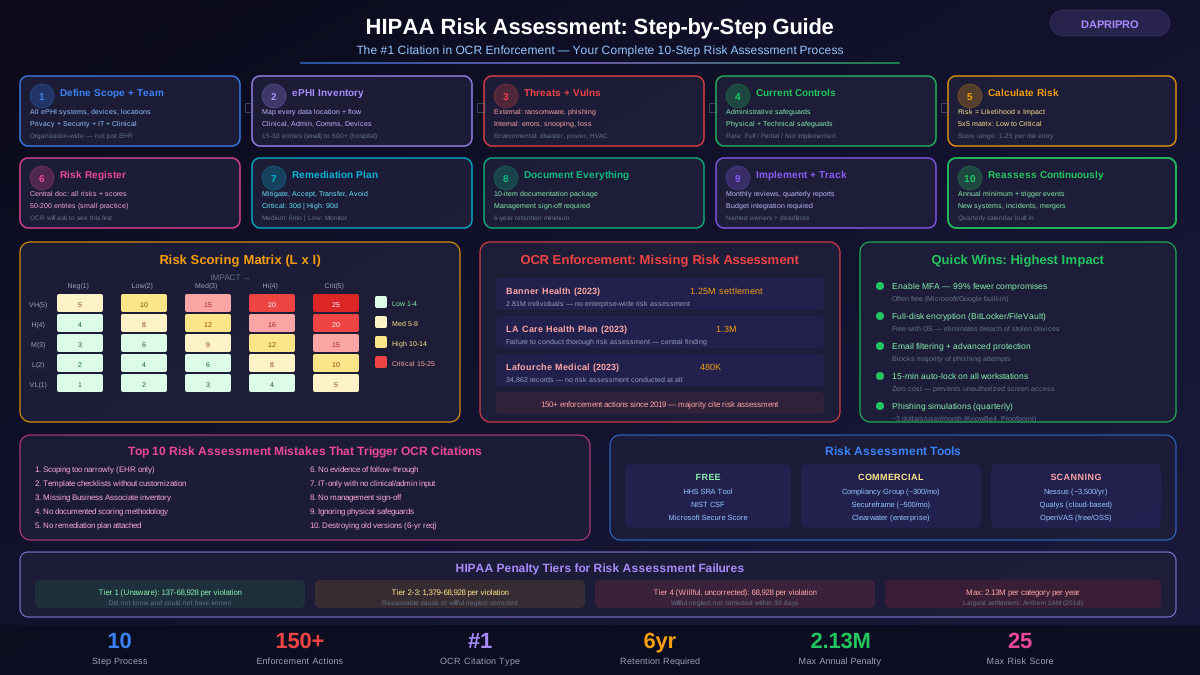
This is not step 1 because it is listed first in the regulations. It is step 1 because over 70 percent of OCR enforcement actions cite failure to conduct or maintain an adequate risk assessment. If OCR auditors find anything wrong with your risk assessment, every other finding gets amplified. If your risk assessment is solid, auditors often view other gaps more leniently because you demonstrate awareness and a plan to address them.
What OCR actually evaluates in your risk assessment
OCR evaluates your risk assessment against the requirements in 45 CFR 164.308(a)(1)(ii)(A). They specifically look for: identification of all systems that create, receive, maintain, or transmit ePHI; reasonably anticipated threats and vulnerabilities for each system; current security measures in place; the likelihood and impact of potential threats; and the resulting risk level for each identified threat-vulnerability pair. Your risk assessment must be specific to your organization. Generic templates downloaded from the internet with your name inserted will not pass scrutiny. OCR has explicitly rejected boilerplate risk assessments in enforcement actions, most notably in the Cardionet settlement where the organization's generic assessment missed critical vulnerabilities.
Tools and methodology
The HHS Security Risk Assessment Tool (SRA Tool) is free and aligns directly with OCR expectations. It walks through each Security Rule requirement and generates documentation in a format auditors recognize. For larger organizations, consider NIST SP 800-30 methodology — OCR has stated that NIST frameworks are an acceptable approach. Commercial tools like HIPAA One, Compliancy Group, and Clearwater Compliance provide more structured workflows and audit trail documentation. Whichever tool you use, the assessment must be reviewed and updated at minimum annually, and whenever there are significant changes to your environment — new systems, new locations, mergers, or changes in the threat landscape.
Common risk assessment failures
The most common audit failures in this area include: conducting a risk assessment once and never updating it; limiting the scope to the EHR system while ignoring email, fax, paper records, medical devices, and mobile devices; failing to include threats from insiders (workforce members); not documenting remediation plans for identified risks; and completing the assessment as a checklist without actual analysis. OCR wants to see that you thought about your specific risks, not that you checked boxes.
Step 2: Build a Complete, Current Policy and Procedure Library
HIPAA requires documented policies and procedures for every applicable standard and implementation specification. Under 45 CFR 164.316(b), policies must be maintained for 6 years from the date of creation or the date when they were last in effect, whichever is later. OCR auditors will request your complete policy library and verify that policies exist for each audited area.
Essential policies OCR expects to see
At minimum, your policy library should include: access management and authorization policy; audit controls and monitoring policy; workstation use and security policy; device and media controls policy; transmission security policy; integrity controls policy; person or entity authentication policy; incident response and breach notification policy; data backup and disaster recovery policy; facility access controls policy; information access management policy; security awareness and training policy; sanctions policy; workforce clearance procedures; business associate management policy; complaint handling procedures; patient rights policies (access, amendment, accounting of disclosures); minimum necessary standard policy; and de-identification procedures.
Each policy must include the effective date, review date, approval authority, scope of applicability, and version history. OCR auditors look for evidence that policies are living documents — meaning they have been reviewed, updated for regulatory changes, and adapted to organizational changes. A policy library last updated in 2021 with no documented reviews is a significant finding.
Policy implementation evidence
Having written policies is necessary but not sufficient. OCR evaluates whether policies are actually implemented. This means documentation showing that workforce members have been trained on relevant policies, that procedures described in policies are followed in practice, and that deviations are identified and addressed. For on-site audits, auditors will observe procedures and interview staff to verify that policies reflect reality. If your access management policy says passwords expire every 90 days but your Active Directory group policy shows 180 days, that is a finding.
Step 3: Organize Documentation for 6-Year Retention
Documentation is both your best defense and the most common weakness OCR identifies. The 6-year retention requirement under 45 CFR 164.530(j) applies to policies, procedures, communications, actions, activities, and designations that HIPAA requires to be documented. In practice, this means you need an organized, retrievable archive that covers the current period plus the previous 6 years.
Building your audit evidence binder
Organize your documentation into the following categories, each with a clear table of contents and chronological ordering:
Risk management documentation: Current risk assessment, all previous risk assessments (6 years), risk management plans with remediation timelines, evidence of remediation completion (screenshots, change logs, purchase orders), and management sign-off on accepted risks.
Policy documentation: Current version of all policies, version history logs showing review and update dates, approval records (signed by designated authority), and retired versions covering the 6-year window.
Training documentation: Training plans and curriculum, attendance records with dates and signatures, assessment results, materials used for each training session, role-based training documentation, new hire training completion records, and remediation records for staff who failed assessments.
Technical safeguard evidence: Access control configurations (user lists, role assignments, privilege levels), audit log samples and review records, encryption implementation evidence, network diagrams, vulnerability scan results and remediation, penetration test reports, and patch management logs.
Incident and breach documentation: Incident response records for all security incidents, breach risk assessments (the 4-factor analysis per 45 CFR 164.402), notification records (individual, HHS, and media if applicable), post-incident remediation evidence, and breach log maintained under 45 CFR 164.408.
Business associate documentation: Complete BAA inventory, copies of all current BAAs, due diligence records for each business associate, termination documentation for former associates, and incident reports from business associates.
The 10-business-day challenge
When OCR sends a data request for a desk audit, you typically have 10 business days to compile and submit everything. Organizations that have documentation scattered across departments, stored in individual email accounts, or maintained in formats that require conversion have reported needing 200+ hours of emergency compilation effort. Organizations with a maintained audit-ready binder report needing 8-16 hours. The preparation difference is enormous and directly impacts audit outcomes — rushed submissions have gaps that auditors notice.
Step 4: Verify Business Associate Compliance
Business associate management has been a top OCR audit focus area since the Omnibus Rule extended HIPAA requirements directly to business associates in 2013. OCR specifically looks for evidence that your organization takes an active role in business associate oversight — not just signing BAAs and filing them away.
Building your BAA inventory
Create a comprehensive inventory of every entity that creates, receives, maintains, or transmits PHI on your behalf. This includes obvious entities like EHR vendors, clearinghouses, and IT managed services providers, but also less obvious ones: shredding companies, cloud storage providers, email encryption services, billing services, transcription services, answering services, patient portal vendors, data analytics companies, and even some law firms (if they receive PHI in connection with legal services). A common audit finding is missing BAAs for entities that clearly handle PHI. For example, if your organization uses a cloud-based scheduling system that stores patient names and appointment types, that vendor needs a BAA.
BAA content requirements
Under 45 CFR 164.504(e), every BAA must include specific provisions: description of the permitted uses and disclosures of PHI; prohibition on unauthorized use or disclosure; safeguards requirements; reporting obligations for unauthorized disclosures; sub-contractor requirements (flow-down provisions); patient access rights support; return or destruction of PHI at termination; HHS access for compliance verification; and breach notification obligations. Review every BAA in your inventory against these requirements. BAAs drafted before the Omnibus Rule (before 2013) are almost certainly missing required provisions and need to be updated.
Due diligence documentation
OCR has increasingly emphasized that covered entities have a duty to conduct due diligence on business associates, not just sign BAAs. Document your due diligence process: how you evaluate a business associate's security capabilities before engagement, what questions you ask about their compliance program, whether you request evidence of their own risk assessment and safeguards, and how you handle situations where a business associate cannot demonstrate adequate security. For existing associates, maintain records of annual compliance verification — even a simple annual questionnaire requesting updated security certification demonstrates diligence.
Step 5: Implement and Test Technical Safeguards
The Security Rule requires administrative, physical, and technical safeguards. Technical safeguards are often where OCR finds the most objective, verifiable findings because they can be tested and measured. Your audit preparation must include evidence that technical safeguards are not only implemented but functioning correctly.
Access controls — 45 CFR 164.312(a)
Implement and document unique user identification (every person accessing ePHI has a unique ID — no shared logins), emergency access procedures (documented process for accessing ePHI during emergencies), automatic logoff (workstations lock after a defined period of inactivity — industry standard is 15 minutes or less for clinical workstations), and encryption and decryption of ePHI at rest. For audit evidence, export your current user list, role assignments, access levels, and last login dates. Identify and disable any accounts for terminated employees — this is one of the most common and easily detectable findings. Also document any shared accounts or generic logins and your plan to eliminate them, or if they are justified (certain medical devices require shared credentials), document the compensating controls.
Audit controls — 45 CFR 164.312(b)
Implement mechanisms to record and examine activity in systems containing ePHI. This means audit logging must be enabled on your EHR, email system, file servers, databases, network devices, and any other system that touches ePHI. But logging alone is insufficient — OCR looks for evidence of log review. Establish a documented schedule for log review (daily for critical systems, weekly for others), designate who reviews logs, document what they look for (failed logins, after-hours access, large data exports, privilege escalation), and retain review records showing date, reviewer, findings, and actions taken.
Transmission security — 45 CFR 164.312(e)
All ePHI transmitted electronically must be protected against unauthorized interception. Document your encryption standards for data in transit: TLS 1.2 or higher for all web-based transmissions, encrypted email for external PHI transmission (standard SMTP is not encrypted), VPN or encrypted connections for remote access, and SFTP or equivalent for file transfers. Collect evidence showing current encryption configurations — TLS certificate details, VPN configuration summaries, and email encryption gateway settings.
Integrity controls — 45 CFR 164.312(c)
Implement mechanisms to protect ePHI from improper alteration or destruction. This includes database integrity verification, file integrity monitoring for critical systems, backup integrity verification (test restores), and checksums or digital signatures for transmitted data. Document your integrity controls and provide evidence of their testing.
Step 6: Validate Physical Safeguards
Physical safeguards apply to the physical protection of electronic information systems and the buildings and equipment that house them. For on-site audits especially, physical safeguards are directly observable — and deficiencies are immediately apparent to auditors walking through your facility.
Facility access controls — 45 CFR 164.310(a)
Document and implement contingency operations (physical access during emergencies), facility security plan (policies and procedures for safeguarding the facility from unauthorized physical access, tampering, and theft), access control and validation procedures (who has keys, badges, codes — and how assignment is tracked), and maintenance records for physical access control systems. Critical areas that auditors inspect: server rooms (locked, access logged, environmental controls), workstation areas (screen positioning, privacy screens in public areas), medical records storage (locked when unattended), fax machines (located in secure areas, not public hallways), and printers (in secure areas or using pull-printing that requires authentication).
Workstation and device security
Under 45 CFR 164.310(b)-(d), document policies for workstation use (what functions can be performed on each type of workstation), workstation security (physical safeguards for all workstations accessing ePHI), device and media controls (how hardware and electronic media containing ePHI are disposed of, reused, or moved). Maintain a complete inventory of all devices — workstations, laptops, tablets, smartphones, USB drives, external hard drives, and medical devices — that access or store ePHI. For each device, document: owner/assignee, encryption status, physical security measures, and disposal procedures. Device inventory gaps are among the most frequent audit findings because organizations often lose track of older or shared equipment.
Step 7: Ensure Training Program Compliance
We cover HIPAA training requirements in depth in our HIPAA Security Rule guide and employee training article, but for audit preparation specifically, you need to verify that your training program satisfies both Security Rule (45 CFR 164.308(a)(5)) and Privacy Rule (45 CFR 164.530(b)) training requirements.
What auditors need to see
OCR auditors request specific training documentation: your training policy (defining frequency, topics, and target audience); training materials for each session conducted within the audit period; attendance records with employee names, dates, and signatures or electronic acknowledgments; assessment results showing comprehension; records for new hire training showing timely completion (within a reasonable time after hire); documentation of training updates when policies or procedures change; and records of sanctions applied for training-related violations. The most critical element is completeness. If you have 200 workforce members and your training records show 185 completions, auditors will ask about the other 15. Have documentation ready explaining exceptions (leave of absence, recent hires in the training window) or showing remediation efforts for non-completers.
Role-based training evidence
Auditors increasingly expect evidence that training is tailored to job functions, not one-size-fits-all. Demonstrate that clinical staff receive training on PHI handling in patient care contexts, that IT staff receive technical security training, that billing staff receive training on minimum necessary standards for claims, and that management receives training on their specific oversight responsibilities. Document the curriculum for each training track and maintain records showing which track each workforce member completed.
Step 8: Test Incident Response and Breach Notification Procedures
Your incident response and breach notification procedures must comply with 45 CFR 164.308(a)(6) (security incident procedures) and the Breach Notification Rule (45 CFR 164.400-414). Auditors evaluate not just whether you have written procedures, but whether they work in practice and whether your team can execute them under pressure.
Incident response plan requirements
Your incident response plan must include: roles and responsibilities (who leads response, who makes notification decisions, who communicates with media and affected individuals); incident classification criteria (how you determine severity and whether a breach has occurred); containment procedures for different incident types; evidence preservation procedures; the 4-factor breach risk assessment process (nature and extent of PHI involved, unauthorized person who used or received the PHI, whether PHI was actually acquired or viewed, extent of risk mitigation); notification procedures and timelines (60 days for individuals, annual for HHS if under 500, within 60 days to HHS if 500+, media notification if 500+ in a state); and documentation requirements for each incident.
Tabletop exercises
Conduct tabletop exercises at least annually to test your incident response procedures. Document each exercise including: date and participants, scenario presented, team decisions at each stage, timeline simulation (did the team meet notification deadlines), identified gaps or confusion, and corrective actions. Good scenarios for tabletop exercises include: ransomware attack encrypting the EHR, employee snooping discovered (co-worker accessing celebrity medical records), lost or stolen laptop containing unencrypted ePHI, business associate reports a breach affecting your patients, and phishing attack compromising credentials with access to ePHI. Keep exercise documentation in your audit binder — it demonstrates proactive compliance and helps auditors see that your team has practiced response procedures.
Step 9: Conduct an Annual Mock Audit Using the OCR Protocol
This is the step that separates organizations with minor findings from those with significant enforcement actions. A mock audit simulates the OCR audit process using the same protocol and evaluation criteria that OCR auditors use. Organizations that conduct annual mock audits report over 60 percent fewer negative findings compared to organizations that only prepare reactively.
Using the OCR audit protocol
The OCR audit protocol is publicly available and specifies the exact criteria auditors use. It organizes audit inquiries by regulation (CFR citation), specifies what established performance criteria look like, identifies what audit evidence is needed, and defines how to evaluate compliance. Use this protocol as your mock audit checklist. For each applicable standard, gather the evidence OCR would request, evaluate it against the performance criteria, and document your assessment of compliance or non-compliance. Where gaps exist, create corrective action plans with specific owners, deadlines, and remediation evidence requirements.
Who should conduct the mock audit
For maximum value, the mock audit should be conducted by someone other than the person responsible for the compliance program. Options include: an external HIPAA consultant or auditor (most objective but most expensive — expect 15,000 to 50,000 dollars for a comprehensive mock audit depending on organization size); a qualified internal team member from a different department (IT auditing an HR compliance area, for example); or reciprocal audits with peer organizations (common in health information exchanges and accountable care organizations). Whoever conducts the mock audit must have sufficient HIPAA knowledge to evaluate compliance meaningfully. A well-intentioned but uninformed reviewer will miss significant gaps.
Step 10: Establish Continuous Compliance Monitoring
Audit preparation should not be an event — it should be a continuous state. Organizations that maintain ongoing compliance monitoring convert audit preparation from an emergency exercise into a routine operational function. This is also what OCR wants to see: evidence that compliance is embedded in your operations, not bolted on when needed.
Compliance calendar
Establish a compliance calendar with scheduled activities throughout the year: Monthly — review audit logs, update terminated employee access, review security incident reports, and check BAA status for new vendors. Quarterly — conduct phishing simulations, review and update policies as needed, conduct spot-checks on selected compliance areas (rotate focus each quarter), and review training completion rates. Annually — conduct full risk assessment review and update, perform comprehensive mock audit, review and renew all BAAs, conduct tabletop exercise, and review and update all policies and procedures. As needed — update risk assessment for new systems or significant changes, conduct training when policies change, revise procedures after incidents, and update BAA inventory for new business associate relationships.
Compliance dashboard
Create a simple dashboard that tracks key compliance indicators in real time: risk assessment completion and update status; policy review status (which policies are current vs. overdue for review); training completion percentage by department; open security incidents and their resolution status; BAA inventory status (new, expiring, or missing); audit log review completion; and days since last phishing simulation. This dashboard becomes your evidence of continuous compliance when auditors ask, and it also serves as a management tool for identifying areas that need attention before they become audit findings.
Enforcement Lessons: What OCR Penalizes Most
Studying OCR enforcement patterns reveals clear priorities. Understanding what OCR has penalized in the past helps you focus your preparation on the areas auditors care about most.
Top enforcement areas (by frequency)
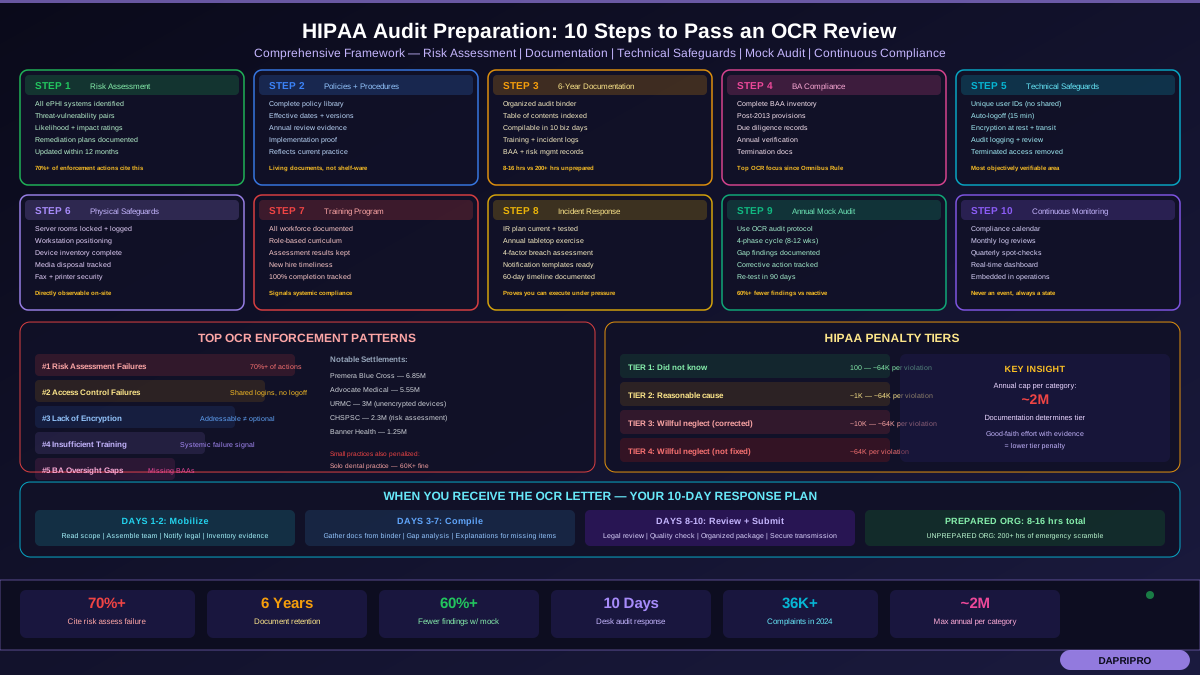
Risk assessment failures dominate enforcement actions. The Premera Blue Cross settlement (6.85 million dollars, 10.4 million affected individuals) specifically cited failure to conduct an adequate risk assessment. Banner Health (1.25 million dollars) was cited for risk assessment inadequacies. CHSPSC (2.3 million dollars) — same finding. If there is one thing you take from this article, let it be this: your risk assessment must be thorough, current, and documented.
Access control failures are the second most common finding. This includes failure to implement unique user identification, lack of automatic logoff, unauthorized access by workforce members (snooping), and failure to terminate access for departed employees. The University of Rochester Medical Center settlement (3 million dollars) involved lost devices without encryption — but the underlying finding was inadequate device and access controls.
Lack of encryption has generated substantial penalties. The Advocate Medical Group settlement (5.55 million dollars) involved unencrypted laptops containing PHI for 4 million patients. While encryption is technically addressable rather than required, OCR has made clear that choosing not to encrypt without implementing an equivalent alternative measure is very difficult to defend.
Insufficient training appears in numerous enforcement actions. OCR has stated that training failures indicate systemic compliance deficiencies. If your staff does not know the rules, they cannot follow them — and OCR holds the organization responsible for that gap.
Business associate oversight failures have increased since the Omnibus Rule. Organizations that cannot produce a complete BAA inventory, or that have BAAs missing required provisions, face findings even without an underlying breach.
Penalty structure
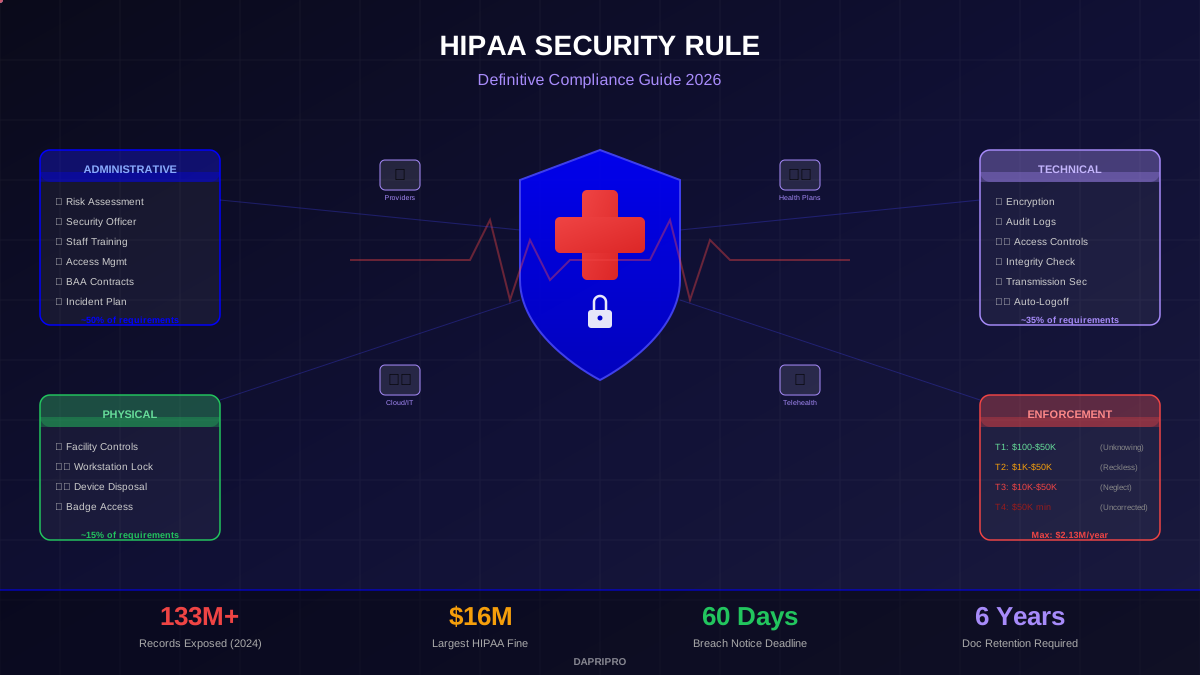
The HIPAA penalty tiers give OCR significant discretion: Tier 1 (did not know and could not have known) — 100 to approximately 64,000 dollars per violation. Tier 2 (reasonable cause, not willful neglect) — approximately 1,000 to 64,000 dollars per violation. Tier 3 (willful neglect, corrected within 30 days) — approximately 10,000 to 64,000 dollars per violation. Tier 4 (willful neglect, not corrected) — approximately 64,000 dollars per violation. The annual cap per violation category is approximately 2 million dollars. The difference between tiers often comes down to documentation. Organizations that can demonstrate awareness, effort, and good-faith compliance — even if not perfect — typically receive lower-tier penalties. Organizations that cannot produce documentation of compliance efforts almost automatically fall into higher tiers.
Day-of-Audit Practical Guidance
If you receive an OCR notification, here is your immediate action plan:
Days 1-2: Read the notification carefully and identify the scope (which rules, which time period). Notify your HIPAA Privacy Officer, Security Officer, and legal counsel. Identify the audit lead and assemble your response team. Review the data request list and inventory what you have immediately available.
Days 3-7: Compile requested documentation from your audit binder. Conduct a gap analysis — what is requested versus what you have. For gaps, create a brief explanation of why documentation is unavailable and what remediation steps are underway. Prepare a clear, organized submission package with table of contents and cross-references to regulation citations.
Days 8-10: Legal counsel reviews all submissions. Quality check that all documents are complete, legible, and properly indexed. Submit via the designated secure method. Maintain a copy of everything submitted with a transmission record.
For on-site audits: prepare staff who may be interviewed (remind them to answer questions honestly, stay in their lane of knowledge, and say they do not know rather than guess); designate a single point of contact for auditor communications; prepare a clean, organized workspace for auditors; and have refreshments available — auditors are people too, and a professional, welcoming environment sets a positive tone.
Common Mistakes That Trigger Audit Findings
Based on published enforcement actions and audit results, these are the most common missteps organizations make:
Treating HIPAA as a one-time project. Organizations that completed a compliance program in 2020 and have not updated it create a 6-year gap that is immediately visible to auditors. Compliance is continuous, not a project with an end date.
Confusing addressable with optional. Addressable implementation specifications still require action — either implement the specification, implement an equivalent alternative, or document why neither is reasonable and accept the risk with documented justification. Simply skipping addressable specifications is a common and serious finding.
Limiting risk assessment scope. Your risk assessment must cover all ePHI, not just your EHR system. This includes email, removable media, mobile devices, fax machines (yes, still), paper records that are digitized, medical devices with network connectivity, cloud services, and business associate systems that store your data.
Having policies without implementation. A binder full of beautiful policies means nothing if staff cannot describe the procedures, if technical controls do not match policy statements, or if no evidence exists that policies were communicated to the workforce.
Ignoring terminated employee access. If an employee left 6 months ago and still has active credentials in your EHR, that is an access control violation that auditors can identify in minutes by comparing your HR termination records against your active user list.
Missing or incomplete BAAs. Every entity that handles PHI needs a BAA, and every BAA must include the required provisions. A common gap is having BAAs with pre-2013 language that does not include breach notification obligations or direct compliance requirements for business associates.
Your Complete Audit Preparation Checklist
Use this checklist to track your audit readiness across all 10 steps:
Step 1 — Risk Assessment: Current risk assessment completed within last 12 months. All ePHI systems identified and included. Threat-vulnerability pairs analyzed with likelihood and impact ratings. Risk management plan documents remediation for identified risks. Evidence of remediation completion for high and critical risks. Management sign-off on accepted risks.
Step 2 — Policies and Procedures: Complete policy library covering all applicable HIPAA requirements. Policies include effective dates, review dates, and version history. Evidence of annual policy review and updates. Policies reflect current organizational practices.
Step 3 — Documentation: 6-year document retention maintained. Organized, indexed audit evidence binder. Documentation can be compiled within 10 business days. Records include training, incidents, policies, risk assessments, and BAAs.
Step 4 — Business Associates: Complete BAA inventory. All BAAs include required provisions (post-Omnibus). Due diligence records for each business associate. Termination documentation for former associates.
Step 5 — Technical Safeguards: Unique user IDs for all ePHI access. Automatic logoff configured (15 minutes or less). Encryption at rest and in transit documented. Audit logging enabled and reviewed on schedule. No active accounts for terminated employees.
Step 6 — Physical Safeguards: Server rooms locked with access logging. Workstation security measures in place. Complete device inventory maintained. Media disposal procedures documented and followed.
Step 7 — Training: Training records for all workforce members. Role-based training curriculum documented. Assessment results maintained. New hire training completion tracked.
Step 8 — Incident Response: Incident response plan documented and current. Tabletop exercise conducted within last 12 months. Breach risk assessment process defined. Notification templates and procedures ready.
Step 9 — Mock Audit: Annual mock audit completed using OCR protocol. Findings documented with corrective action plans. Remediation tracked to completion. Re-testing conducted for high-severity findings.
Step 10 — Continuous Monitoring: Compliance calendar established and followed. Key metrics tracked (training completion, access reviews, log reviews). Compliance dashboard maintained. Quarterly spot-checks documented.
HIPAA audit preparation is not about achieving perfection — it is about demonstrating diligence, documentation, and continuous improvement. OCR does not expect flawless compliance. They expect evidence that you take HIPAA seriously, that you invest resources in compliance, that you identify and address gaps proactively, and that you can produce documentation proving all of the above. Follow these 10 steps, maintain your audit binder, and conduct annual mock audits. When that OCR letter arrives, you will be ready.