Here is a scary fact: hackers do not need to be geniuses to break into your accounts. They just need you to use a bad password. And most people do.
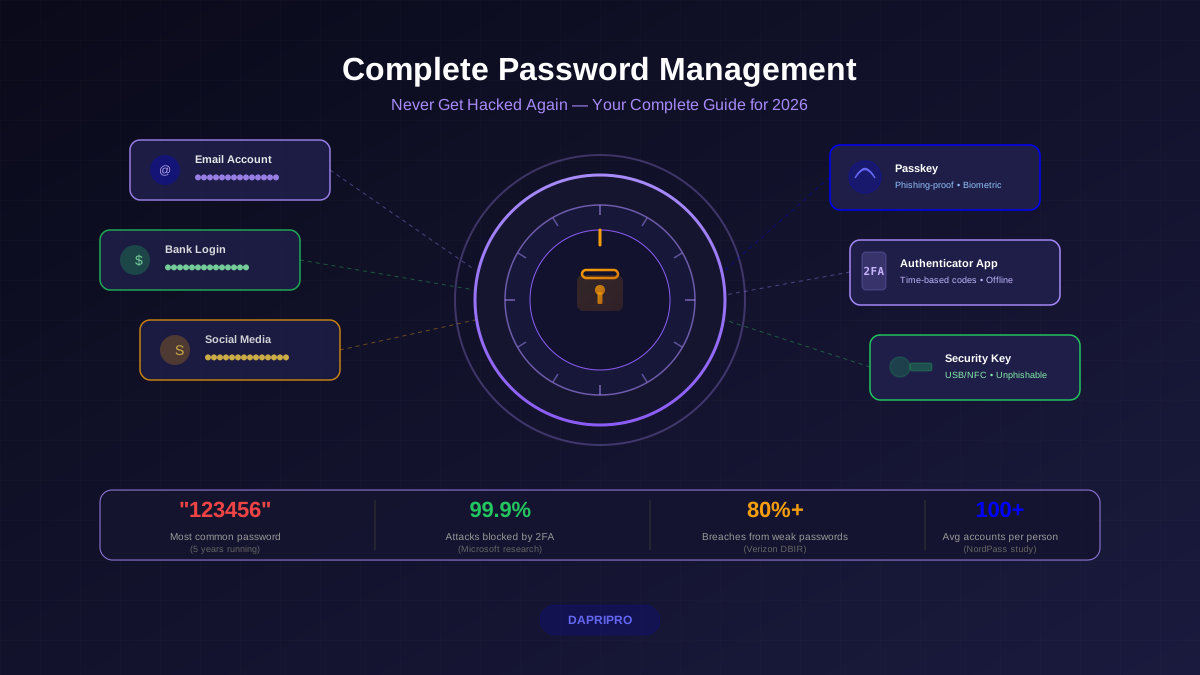
A study from NordPass found that "123456" was the most common password in 2024 — for the fifth year in a row. The second most common? "password." And the third? "123456789." Hackers can crack every single one of these in less than one second.
This guide will teach you how to never be that person. We will cover password managers, two-factor authentication, passkeys, and the simple habits that make your accounts nearly impossible to hack.
Why Passwords Get Stolen (And Why You Should Care)
Think of passwords like house keys. If you use the same key for your house, car, office, and gym locker, a thief who copies one key can open everything. That is exactly what happens with password reuse online.
Attackers steal passwords in four main ways:
- Data breaches. Companies get hacked and their password databases leak online. The website Have I Been Pwned has recorded over 13 billion stolen accounts. If you have used the internet for a few years, your email address is almost certainly in at least one breach.
- Phishing attacks. Fake login pages trick you into typing your password. The fake page looks exactly like the real one, but it sends your password straight to the attacker.
- Credential stuffing. Bots take leaked username-password pairs from one breach and try them on hundreds of other websites. If you reuse passwords, this works automatically.
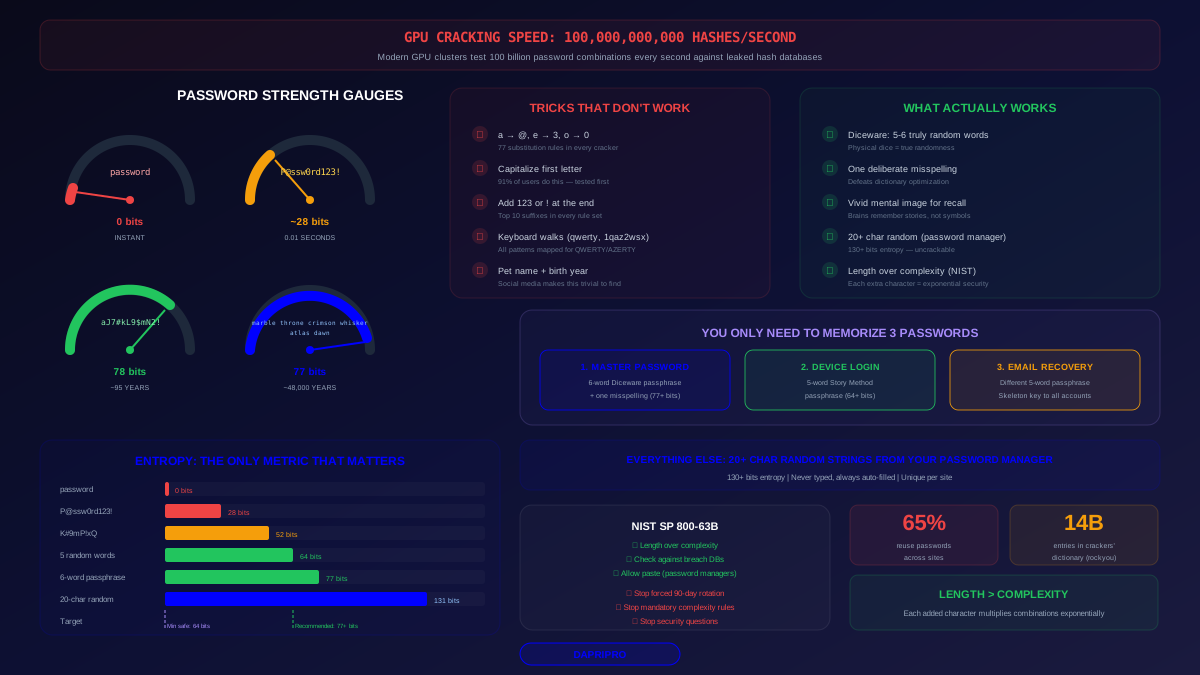
- Brute force. Modern GPUs can guess billions of password combinations per second. Short, simple passwords fall in seconds.
The numbers are alarming: over 80% of hacking-related breaches involve weak or stolen passwords according to the Verizon Data Breach Investigations Report. Your password security is literally the front door to your digital life.
What Makes a Strong Password
Before we talk about tools, let us understand what makes a password strong or weak. It comes down to two things: length and randomness.
Notice something interesting? The passphrase "correct-horse-battery-staple" is easier to remember than "Kj#8mP2x!qW" but takes exponentially longer to crack. Length beats complexity every time.
Here are the rules for strong passwords:
- At least 16 characters. Every extra character multiplies the difficulty by 60-90x depending on character set.
- Truly random. "MyDogSpot2026!" feels random but follows predictable patterns that hackers know to check. Use a password generator instead.
- Unique for every account. If one site gets breached, no other account is affected.
- Never based on personal info. Your kid's name, birthday, pet's name, or anniversary are the first things attackers guess.
But here is the problem: nobody can remember 100+ unique random passwords. That is where password managers come in.
Password Managers: The Tool That Changes Everything
A password manager is like a super-secure digital vault that stores all your passwords. You only need to remember one password — your master password — and the manager handles everything else.
Here is how it works:
- You create one strong master password (or passphrase) that unlocks your vault
- The password manager generates random, unique passwords for every website
- When you visit a website, the manager automatically fills in your login
- All your passwords are encrypted with AES-256 encryption — the same standard used by governments
- Your vault syncs across all your devices (phone, laptop, tablet)
The best part? You never need to think about passwords again. The manager creates them, stores them, and types them for you. You just need to unlock your vault.
Are Password Managers Really Safe?
This is the most common question, and it is fair to ask. You are putting all your eggs in one basket — is that smart?
Yes, because the alternative is worse. Without a password manager, people reuse the same 5-7 passwords everywhere. When one site gets breached, attackers can access dozens of accounts. A password manager's security model is designed so that even if the company's servers are hacked, your encrypted vault cannot be read without your master password.
The 2022 LastPass breach proved this. Attackers stole encrypted vaults, but users with strong master passwords were protected. Users with weak master passwords (like "lastpass123") were not. This is why your master password matters so much.
Best Password Managers in 2026
| Manager | Best For | Free Tier | Price (Premium) | Key Strength |
|---|---|---|---|---|
| Bitwarden | Best overall value | Yes — unlimited passwords | $10/year | Open-source, fully audited |
| 1Password | Families and teams | 14-day trial | $36/year | Best design and Travel Mode |
| Dashlane | All-in-one security | Yes — 25 passwords | $60/year | Built-in VPN and dark web monitoring |
| Proton Pass | Privacy-focused users | Yes — unlimited | $24/year | End-to-end encrypted, Swiss company |
| Apple Passwords | Apple ecosystem users | Free (built-in) | Free | Seamless Apple device integration |
| Google Password Manager | Chrome/Android users | Free (built-in) | Free | Auto-fills across Chrome devices |
Our top recommendation for most people: Bitwarden. It is free, open-source, works on every device and browser, and has been independently audited for security. If you want more polish and family features, 1Password is excellent.
Two-Factor Authentication: Your Safety Net
Two-factor authentication (2FA) adds a second layer of protection beyond your password. Even if someone steals your password, they still cannot get in without the second factor.
Think of it this way: a password is like a house key. 2FA is like a house key PLUS a fingerprint scanner on the door. A thief who copies your key still cannot get in.
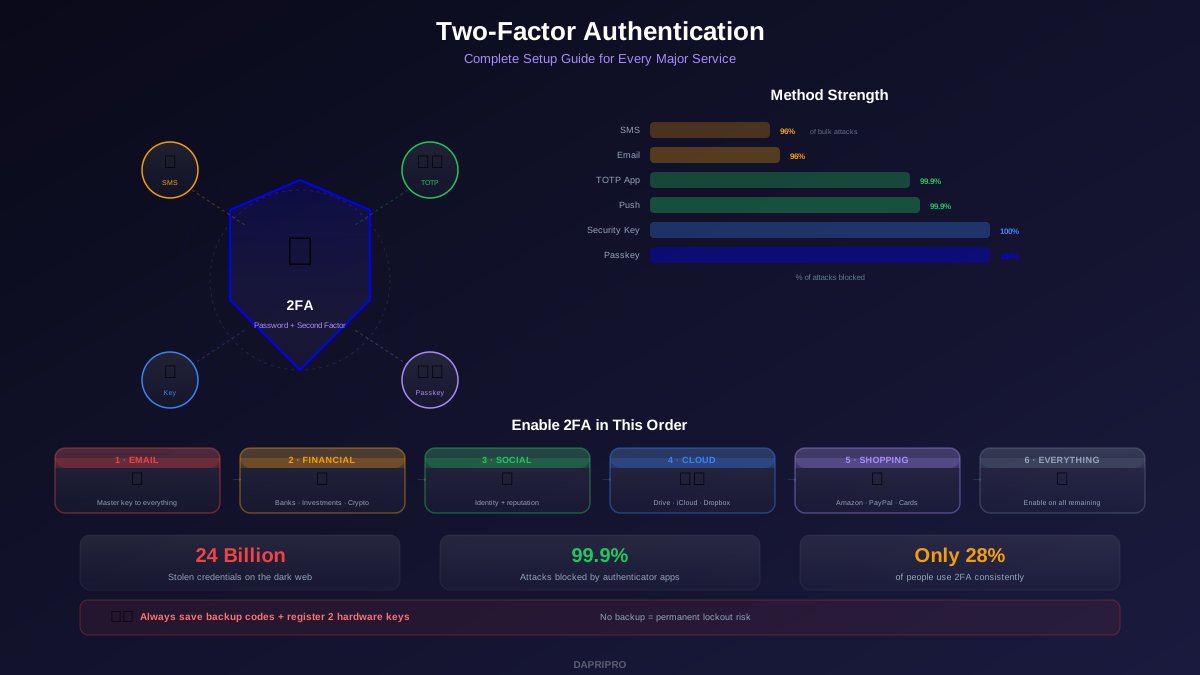
Microsoft reports that 2FA blocks 99.9% of automated attacks. Google found that security keys (the strongest form of 2FA) prevented 100% of targeted attacks in their study.
For a complete setup guide across all major services, see our 2FA setup guide.
Types of 2FA (Ranked from Weakest to Strongest)
| Method | How It Works | Security Level | Recommended? |
|---|---|---|---|
| SMS codes | Text message with a 6-digit code | Fair — vulnerable to SIM swapping | Better than nothing, but upgrade |
| Email codes | Code sent to your email | Fair — compromised if email is hacked | Use only as last resort |
| Authenticator apps | App generates time-based codes (Google Authenticator, Authy) | Good — works offline, not interceptable | Yes — best balance of security and convenience |
| Push notifications | Approve login on your phone (Duo, Microsoft Authenticator) | Good — easy to use, resistant to phishing | Yes — great for enterprise |
| Hardware security keys | Physical USB/NFC key (YubiKey, Google Titan) | Excellent — phishing-proof | Yes — strongest option available |
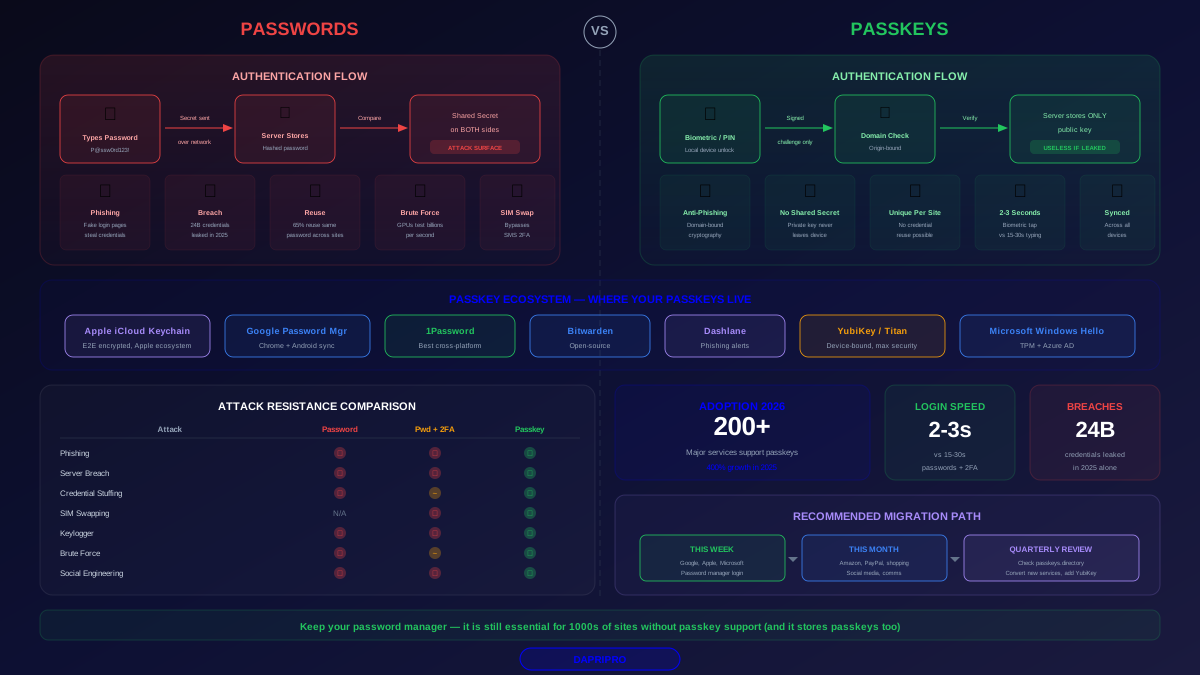
| Passkeys | Biometric or PIN on your device | Excellent — phishing-proof, no code to type | Yes — the future of authentication |
Our recommendation: Use authenticator apps as your default 2FA method. Upgrade to security keys for your most critical accounts (email, banking, password manager). Avoid SMS codes if possible — SIM swapping attacks can intercept them.
Passkeys: The Future of Authentication
Passkeys are the biggest change in authentication since passwords were invented. And yes, they really are as good as people say.
Here is how passkeys work in simple terms:
- When you create a passkey for a website, your device generates a pair of cryptographic keys
- The private key stays on your device (never shared with anyone)
- The public key goes to the website
- When you log in, your device proves it has the private key using your fingerprint, face, or PIN
- The website verifies the proof — you are in
Why are passkeys better than passwords?
- Phishing-proof. A fake website cannot steal your passkey because it is cryptographically tied to the real website's domain. This is huge.
- Nothing to remember. No password to forget. Just use your fingerprint or face.
- Cannot be leaked. Even if a website is breached, attackers only get public keys — which are useless without your device.
- Fast. Logging in takes 2 seconds instead of typing a 20-character password.
Major services that support passkeys in 2026: Google, Apple, Microsoft, Amazon, PayPal, GitHub, Best Buy, eBay, Nintendo, Adobe, and hundreds more. The list grows every month.
To learn more about the differences, check our passkeys vs passwords comparison.
Creating Your Master Password
Your master password is the ONE password you need to memorize. It protects your entire vault, so it needs to be excellent.
The best approach is a passphrase — four or more random words strung together. Here is how to create an unbreakable password you can actually remember:
- Pick 4-6 random words. Use a random word generator, not words you choose yourself. "monkey-sunset-guitar-telescope" is good. "ILoveMyDog2026" is bad.
- Add separators. Use dashes, spaces, or dots between words: "monkey-sunset-guitar-telescope"
- Make it at least 20 characters. Four random words typically gives you 25-30 characters minimum.
- Create a mental image. Picture a monkey watching a sunset while playing guitar through a telescope. Weird mental pictures stick in memory.
- Write it down initially. Yes, really. Store the written copy somewhere physically secure (not under your keyboard). Once muscle memory kicks in after a week, destroy the paper.
"Treat your master password like a toothbrush: choose a good one, do not share it with anyone, and change it if something happens." — Bitwarden security guide
Biometric Authentication: Your Body as a Password
Biometric authentication uses your physical traits — fingerprint, face, iris, or voice — to verify your identity. In 2026, it is becoming the primary way people unlock their devices and accounts.
The key advantage of biometrics: they are convenient AND secure. You cannot forget your fingerprint. Nobody can guess your face. And modern biometric systems are extremely hard to fool.
However, biometrics work best as a complement to other authentication, not a replacement. Here is why:
- You cannot change your fingerprint if it is compromised
- Biometrics can fail (wet fingers, masks, lighting conditions)
- Some systems can be fooled with high-quality photos or molds
The best approach: use biometrics to unlock your device or password manager, but keep a strong master password as your backup.
Audit Your Passwords in 30 Minutes
Already have accounts everywhere but no password manager yet? Here is a quick password audit plan you can do this weekend:
- Minutes 1-5: Download and install Bitwarden (or your preferred manager)
- Minutes 5-10: Create your master passphrase using the method above
- Minutes 10-15: Import saved passwords from your browser (Chrome, Firefox, Safari all have export options)
- Minutes 15-20: Run the password manager's security audit — it will flag reused, weak, and breached passwords
- Minutes 20-30: Fix the 5-10 most critical accounts first (email, banking, social media) with new generated passwords
Then, over the next few weeks, update the rest of your passwords as you log into each site. Let the manager generate new ones and save them.
Common Password Mistakes to Avoid
- Reusing passwords. The number one mistake. If one site is breached, every account with that password is compromised. Period.
- Using personal information. Your dog's name, your birthday, or your street address are not creative — they are the first things attackers check using your social media.
- Storing passwords in browsers without a manager. Browser-saved passwords have weaker encryption than dedicated password managers and can be extracted by malware.
- Skipping 2FA. A strong password without 2FA is still vulnerable to phishing and credential theft. Always layer your defenses.
- Using SMS for 2FA on high-value accounts. SIM swapping attacks can hijack your phone number. Use authenticator apps or security keys instead.
- Sharing passwords via text or email. These messages are stored in plain text. Use your password manager's secure sharing feature instead.
- Never updating after a breach. If a site you use announces a data breach, change that password immediately. Then check Have I Been Pwned for your email.
Take Action Right Now
Do not put this off. Password security is the single most impactful thing you can do to protect yourself online. Here is your action plan:
- Today: Install a password manager (start with Bitwarden — it is free)
- Today: Create a strong master passphrase using the 4-word method
- This week: Enable 2FA on your email, banking, and social media accounts
- This week: Audit and fix your weakest passwords
- This month: Set up passkeys on every service that supports them
- Ongoing: Let your password manager generate unique passwords for every new account
The people who get hacked are not unlucky — they are unprepared. You now know exactly what to do. Take the first step today.