
Every device connected to the internet is constantly being scanned, probed, and tested by attackers. An unprotected computer connected directly to the internet will be discovered by automated scanners within minutes and may be compromised within hours.
That is why firewalls and intrusion detection systems exist — they are the first and most fundamental layer of network security. Firewalls control what traffic is allowed in and out of your network. Intrusion detection systems watch for suspicious activity and known attack patterns.
In this guide, we will break down how these technologies work, which ones you need, and how to set them up properly — whether you are protecting a home network or an enterprise with thousands of users.
What Is a Firewall?
A firewall is a network security device (hardware, software, or both) that monitors incoming and outgoing traffic and decides whether to allow or block it based on a set of rules.
Think of it like a bouncer at a club. The bouncer has a list of rules: must be on the guest list, must have proper ID, no weapons. Every person (data packet) trying to enter gets checked against those rules. If they pass, they get in. If not, they are turned away.
Types of Firewalls
Next-Generation Firewalls (NGFW)
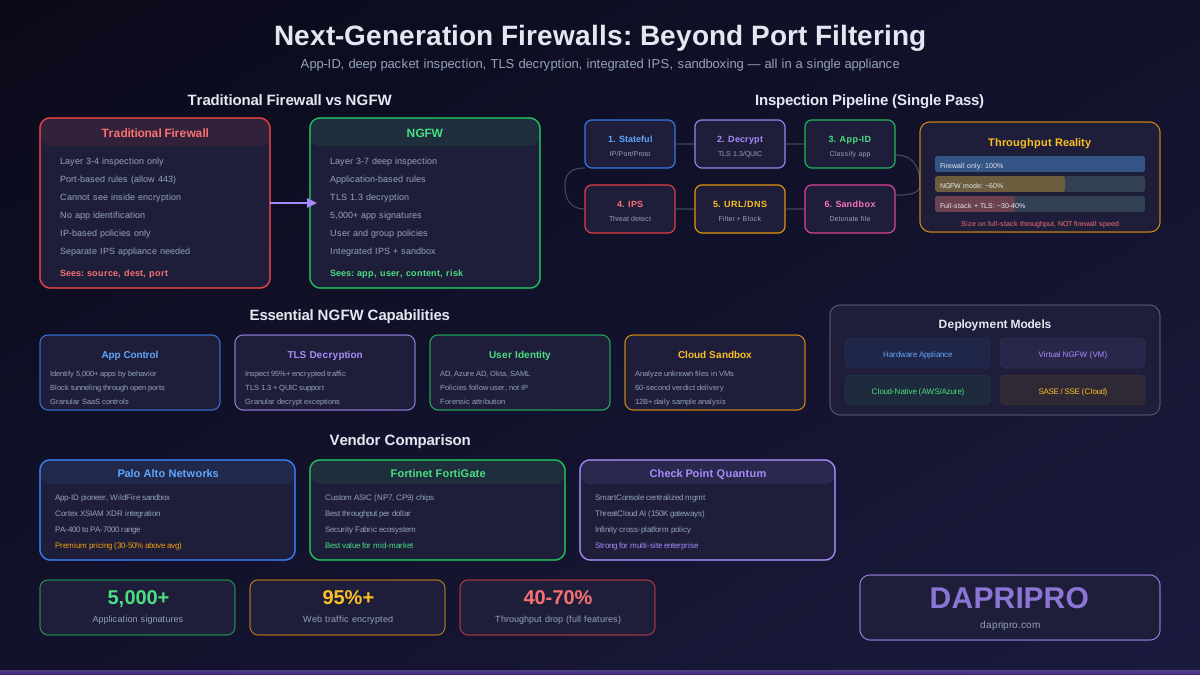
Next-Generation Firewalls are the current standard for enterprise network security. They combine traditional firewall functions with advanced threat prevention capabilities:
- Deep Packet Inspection (DPI) — Examines the actual content of packets, not just headers. Can detect malware, exploits, and policy violations hidden inside normal-looking traffic.
- Application Awareness — Identifies applications regardless of port. Can differentiate between Zoom video calls and BitTorrent downloads even if both use port 443.
- Integrated IPS — Built-in intrusion prevention system that detects and blocks known attack patterns in real time.
- SSL/TLS Inspection — Decrypts encrypted traffic to inspect for threats, then re-encrypts. Critical because over 90% of web traffic is now encrypted.
- Threat Intelligence — Connects to live threat feeds to block newly discovered malicious IPs, domains, and file hashes.
- Sandboxing — Runs suspicious files in an isolated environment to detect zero-day malware before it reaches the network.
Top NGFW Vendors
| Vendor | Product | Strengths | Best For |
|---|---|---|---|
| Palo Alto Networks | PA Series | Best app visibility, WildFire sandboxing | Large enterprise |
| Fortinet | FortiGate | Best price/performance, custom ASIC chips | Mid-market, high throughput |
| Cisco | Firepower / Meraki MX | Integration with Cisco ecosystem | Existing Cisco shops |
| Check Point | Quantum | Strong threat prevention, easy management | Security-first organizations |
Open-Source Firewalls: pfSense and OPNsense
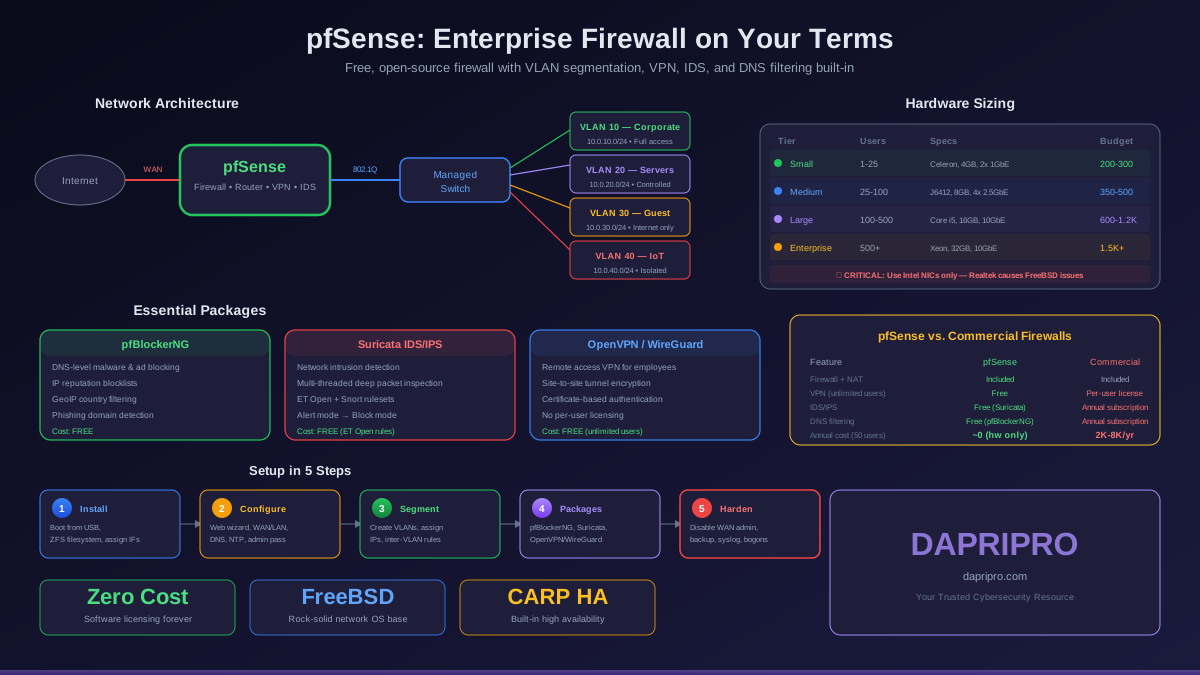
You do not need to spend thousands on a commercial NGFW to get strong network protection. pfSense and OPNsense are free, open-source firewall platforms that run on standard PC hardware and provide enterprise-grade features:
- ✅ Stateful packet inspection
- ✅ VPN server (WireGuard, OpenVPN, IPsec)
- ✅ Intrusion detection/prevention (Snort or Suricata)
- ✅ Traffic shaping and QoS
- ✅ Captive portal for guest networks
- ✅ Real-time traffic monitoring and logging
- ✅ Multi-WAN failover and load balancing
A mini PC with pfSense running on it can protect a small business network for under $200 in hardware costs — with zero licensing fees. For a home lab or small office, this combination provides protection comparable to firewalls costing thousands.
IDS vs. IPS: Detection vs. Prevention
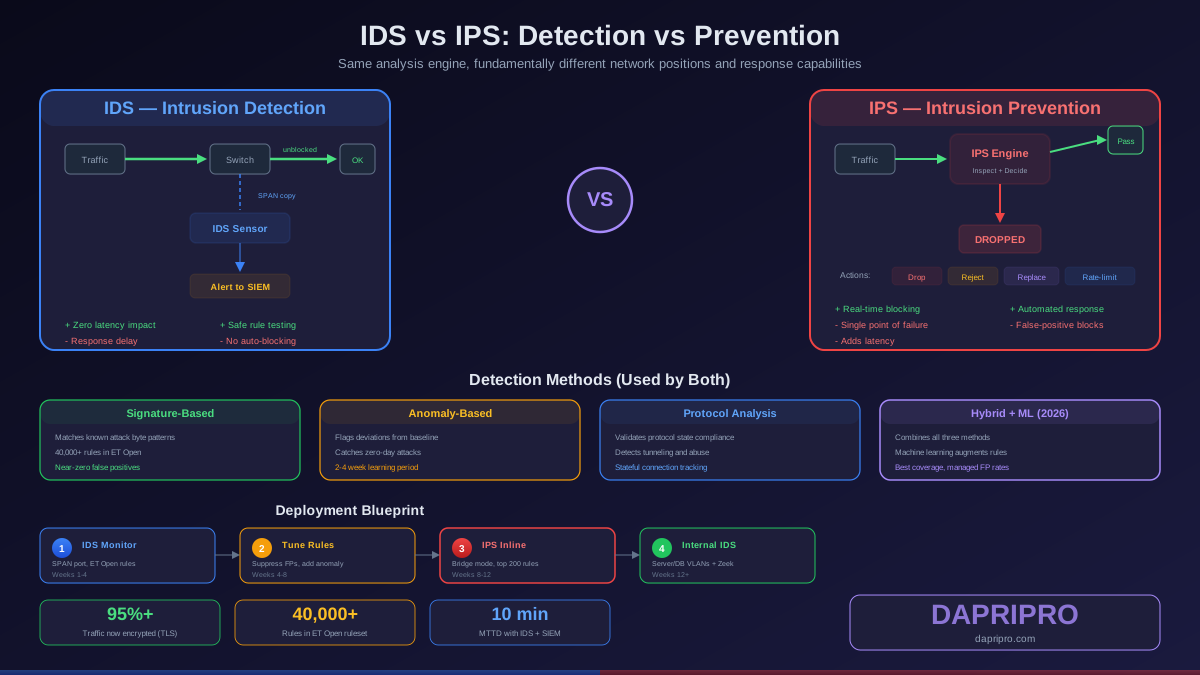
Intrusion Detection Systems (IDS) and Intrusion Prevention Systems (IPS) monitor network traffic for signs of attacks, but they respond differently:
How IDS/IPS Detects Attacks
- Signature-based — Compares traffic against a database of known attack patterns (signatures). Very accurate for known threats but cannot detect new, unknown attacks (zero-days).
- Anomaly-based — Learns what "normal" traffic looks like and flags anything that deviates. Can detect zero-day attacks but generates more false positives.
- Policy-based — Triggers alerts when specific network policies are violated (like outbound connections on unusual ports).
- Behavioral analysis — Uses machine learning to identify suspicious behavior patterns over time.
Snort vs. Suricata: Open-Source IDS/IPS
The two leading open-source IDS/IPS engines are Snort and Suricata:
| Feature | Snort 3 | Suricata |
|---|---|---|
| Multi-threading | Yes (Snort 3) | Yes (native) |
| Performance | Good (improved in v3) | Excellent (built for speed) |
| Rule compatibility | Snort rules | Snort rules + Suricata rules |
| Protocol parsing | Good | Excellent (HTTP, TLS, DNS, SMB) |
| File extraction | Limited | Yes (extract files from traffic) |
| Community | Larger (established 1998) | Growing rapidly |
| Integration | pfSense, Security Onion | pfSense, OPNsense, ELK Stack |
| Best for | Established deployments | New deployments, high throughput |
Both are excellent choices. Suricata generally performs better on modern multi-core hardware, while Snort has decades of community-built rules and documentation.
Web Application Firewalls (WAF)
A Web Application Firewall specifically protects websites and web applications from application-layer attacks that traditional firewalls cannot detect:
- SQL injection — Attackers inserting database commands into web forms
- Cross-site scripting (XSS) — Injecting malicious scripts displayed to other users
- Cross-site request forgery (CSRF) — Tricking users into performing unintended actions
- DDoS mitigation — Filtering malicious traffic during distributed denial-of-service attacks
- Bot protection — Blocking automated attacks, scraping, and credential stuffing
Popular WAF solutions include Cloudflare WAF (cloud-based, easy setup), AWS WAF (for AWS-hosted applications), Imperva (enterprise), and ModSecurity (open source, self-hosted).
Firewall Rule Best Practices
Firewall rules determine what traffic your network allows and blocks. Poorly managed rules are one of the most common causes of security breaches and network issues:
Key Rule Management Principles
- Default deny — Start by blocking everything, then create specific rules to allow only what is needed. Never use "allow all" as your default.
- Principle of least privilege — Only allow the minimum access necessary. Do not open port ranges when a single port will do.
- Document every rule — Include who requested it, why, and when it should expire. Undocumented rules become security debt.
- Regular audits — Review all rules quarterly. Remove rules for decommissioned servers, expired projects, or former employees.
- Avoid "any/any" rules — Rules like "allow any source to any destination on any port" are essentially disabling your firewall.
- Log denied traffic — Your deny logs are valuable security intelligence. They show what attackers are trying to reach.
Firewall for Home Networks
Your home router includes a basic firewall (NAT + SPI), but you can significantly improve your home network security:
- ✅ Change default admin credentials on your router — "admin/admin" is the first thing attackers try
- ✅ Enable your OS firewall — Windows Firewall and macOS Firewall should always be enabled
- ✅ Disable UPnP — Universal Plug and Play automatically opens ports and is frequently exploited
- ✅ Update router firmware — Router vulnerabilities are common targets
- ✅ Consider a dedicated firewall — A mini PC running pfSense gives you enterprise-level protection for around $150-200
- ✅ Use DNS-based filtering — NextDNS or Pi-hole block ads, trackers, and malware at the network level
Build Your Network Defense
Firewalls and intrusion detection systems are the foundation of network security. Whether you are protecting a home network with a consumer router firewall or an enterprise with a Palo Alto NGFW, the principles are the same: control what gets in, monitor what happens inside, and block what should not be there.
Start with the basics — enable your OS firewall, secure your router, and consider an open-source solution like pfSense for more control. As your needs grow, layer in IDS/IPS with Snort or Suricata, and protect web applications with a WAF. The strongest networks use defense in depth — multiple layers of protection working together.