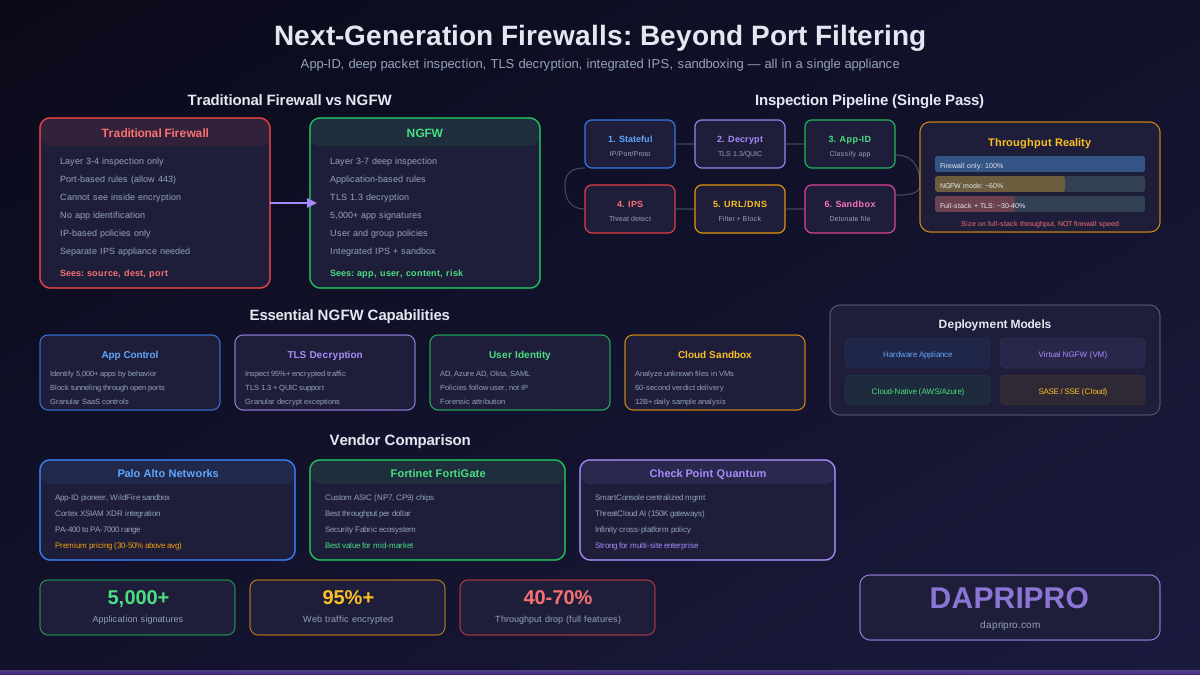
A traditional firewall operates like a bouncer checking IDs at the door — it verifies whether traffic is allowed based on source IP, destination IP, port number, and protocol. Port 443 is open? HTTPS traffic flows through. But that same port 443 can carry legitimate web browsing, a Slack conversation, a cryptocurrency miner phoning home, or a ransomware payload downloading from a compromised CDN. The traditional firewall cannot tell the difference.
A next-generation firewall (NGFW) looks inside the envelope. It identifies the application generating the traffic, inspects the payload for threats, decrypts TLS to see encrypted content, blocks command-and-control callbacks, sandboxes suspicious files, and maps traffic to specific users — all at multi-gigabit speeds. It is not just a firewall with extra features. It is a fundamentally different approach to network security.
This guide explains exactly what each NGFW capability does, why it matters, how to evaluate commercial offerings, and where open-source alternatives fit.
What Makes an NGFW Different from Traditional Firewalls
The Gartner definition of an NGFW requires four capabilities beyond traditional stateful packet inspection: application awareness, integrated IPS, external threat intelligence feeds, and the ability to incorporate future information feeds. In practice, 2026 NGFWs include significantly more than this minimum.
Layer 7 application identification
Traditional firewalls see ports and protocols. An NGFW identifies the actual application by analyzing traffic behavior, signatures in the data stream, and protocol patterns — regardless of the port used. When a user runs BitTorrent over port 443 to bypass a port-based firewall rule, the NGFW identifies it as BitTorrent and applies the correct policy.
Palo Alto Networks pioneered this with App-ID, which uses a four-step process: application protocol detection, decryption (if applicable), application protocol decoding, and application signature matching. Fortinet uses application control profiles with over 5,000 application signatures. Check Point uses Application Control with categorized application libraries.
This matters because modern applications share ports. Hundreds of SaaS applications, messaging tools, file-sharing services, and legitimate business applications all run over HTTPS on port 443. Without application identification, you cannot enforce granular policies like "allow Microsoft Teams but block personal Dropbox" or "permit Salesforce but block unauthorized AI chatbots."
Deep packet inspection (DPI)
While traditional firewalls inspect packet headers only, NGFWs inspect the entire packet payload. The DPI engine reassembles TCP streams, decodes application protocols, and analyzes content against threat signatures, malware patterns, and data loss prevention policies.
DPI enables the NGFW to detect exploit payloads inside legitimate HTTP traffic, identify command-and-control communications embedded in DNS queries, catch data exfiltration patterns in outbound HTTPS, and flag policy violations like credit card numbers being transmitted in clear text.
The processing cost of DPI is significant. Inspecting every byte of every packet requires substantially more CPU and memory than header-only inspection. This is why NGFW throughput with all features enabled drops 40 to 70 percent below the marketing headline number.
Integrated IPS
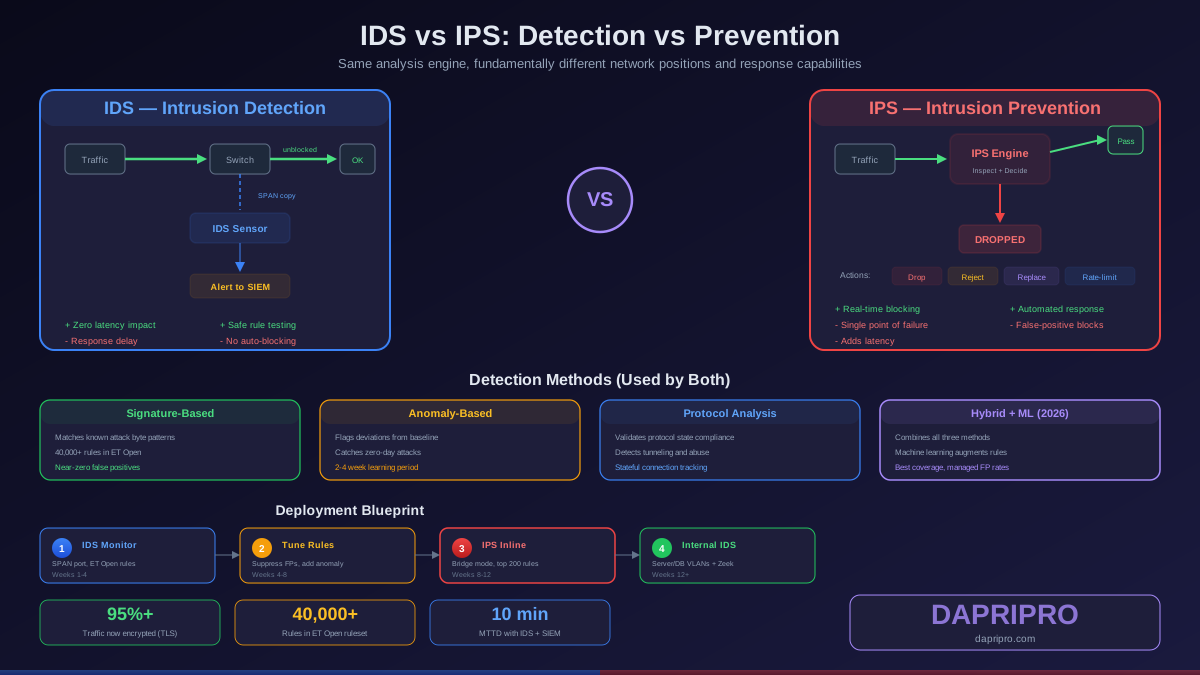
Rather than deploying a separate IPS appliance, NGFWs embed the IPS engine directly into the traffic processing pipeline. The IPS runs its signature and anomaly detection on the same decoded traffic stream used by application identification and DPI, eliminating the overhead of duplicating traffic to a separate device.
Modern NGFW IPS engines go beyond traditional signature matching. Palo Alto uses inline machine learning models that analyze file behavior in real-time without waiting for signature updates. Fortinet combines signature-based detection with AI-powered analysis through FortiGuard services. Check Point uses their ThreatCloud AI, which processes threat intelligence from over 150,000 connected gateways worldwide.
TLS/SSL decryption
Over 95 percent of web traffic is encrypted. Without TLS decryption, every other NGFW feature is blind to the majority of your network traffic. An NGFW performing TLS decryption acts as a trusted intermediary: it terminates the TLS connection from the client, inspects the decrypted content, then re-encrypts and forwards to the destination.
TLS 1.3 decryption introduces specific challenges. The encrypted Server Name Indication (ESNI/ECH) standard hides the destination hostname, complicating URL filtering. QUIC protocol (used by Google services and HTTP/3) uses UDP-based encryption that traditional TLS intercept cannot handle — the NGFW must explicitly support QUIC inspection or block QUIC to force fallback to standard TLS.
Privacy and compliance constraints apply. Many organizations exempt banking, healthcare, and government sites from decryption. Certificate pinning in mobile applications breaks when TLS inspection intercepts the connection. A robust NGFW provides granular decryption policies that exempt specific categories, domains, or user groups.
Essential NGFW Features for 2026
These are the specific capabilities you should evaluate when selecting an NGFW. Missing any of them creates gaps that attackers will exploit.
URL and DNS filtering
URL filtering categorizes websites (gambling, adult, phishing, malware hosting) and blocks access based on policy. DNS filtering extends this to DNS queries — blocking malicious domain lookups before a connection is even established. This stops threats at the earliest possible point and catches malware that uses DNS for command-and-control communication.
Cloud-delivered URL databases provide near-real-time categorization. Palo Alto networks PAN-DB categorizes over 1 billion URLs. Fortinet FortiGuard covers 2 billion web pages with AI-powered classification. Look for a solution that updates categories in minutes (not hours or days) and supports custom URL categories for business-specific needs.
Cloud-delivered sandboxing
When the NGFW encounters an unknown file (not matched by known signatures), it sends the file to a cloud-based sandbox for behavioral analysis. The sandbox executes the file in multiple virtual environments (Windows 10, Windows 11, macOS) and observes what it does: Does it modify registry keys? Does it contact external servers? Does it encrypt files?
Palo Alto WildFire analyzes over 12 billion samples daily and generates prevention signatures within 60 seconds of detection. Fortinet FortiSandbox and Check Point SandBlast provide similar capabilities. The critical metric is time-to-verdict — how quickly the sandbox determines whether a file is malicious and pushes a blocking signature to all connected firewalls.
User identity integration
Traditional firewall rules reference IP addresses. But in modern networks with DHCP, Wi-Fi, and remote access VPN, the same IP address might be used by different people at different times. NGFWs integrate with identity providers (Active Directory, Azure AD, Okta, SAML) to map network traffic to specific users.
This enables user-based policies: "Marketing department can access social media. Engineering cannot." It also provides critical forensic context — when investigating an incident, you know exactly who was behind an IP address at a specific time, not just which device.
Zero trust network access (ZTNA)
Modern NGFWs integrate ZTNA capabilities directly into the firewall platform. Instead of granting broad VPN access to the entire network, ZTNA provides application-specific access based on user identity, device posture, and real-time risk assessment. A contractor on an unmanaged laptop gets access only to the specific project management tool, not the entire corporate network.
IoT device identification
The explosion of IoT devices — IP cameras, smart HVAC systems, medical devices, industrial sensors — creates a massive blind spot for security teams. These devices often run outdated firmware, cannot accept security agents, and communicate using custom protocols. NGFWs with IoT discovery use traffic analysis and behavioral profiling to automatically identify and classify IoT devices, then apply appropriate security policies without requiring agent installation.
The Throughput Reality Check
NGFW vendors advertise throughput numbers that require significant context to evaluate correctly. Here is what the marketing numbers actually mean:
| Throughput Metric | What It Measures | Real-World Relevance |
|---|---|---|
| Firewall throughput | Stateful packet filtering only | Low — nobody runs an NGFW with only basic filtering |
| IPsec VPN throughput | Encrypted tunnel capacity | Relevant only for VPN sizing |
| Threat prevention throughput | IPS + antivirus + anti-spyware | Medium — closer to reality but still optimistic |
| NGFW throughput | App-ID + IPS + logging | Good baseline for sizing |
| Full-stack throughput | Everything enabled including TLS decrypt | This is the number you should use for sizing |
A Palo Alto PA-3400 series advertises 14.5 Gbps firewall throughput but delivers 5.2 Gbps with full threat prevention. A Fortinet FG-200F claims 27 Gbps firewall throughput but achieves 3.5 Gbps with all UTM features enabled. These are not deceptive numbers — they measure different configurations — but buyers who size their deployment on firewall throughput will face performance bottlenecks within months.
How to size correctly
- Measure your actual peak network throughput during the busiest hour (not the average)
- Add 50 percent for growth over the expected appliance lifecycle (3 to 5 years)
- Match this number to the vendor full-stack or NGFW throughput specification — never the firewall throughput
- Request a proof-of-concept evaluation with your actual traffic mix before purchasing
Major NGFW Vendors Compared
The NGFW market is dominated by three vendors — Palo Alto Networks, Fortinet, and Check Point — with several challengers offering compelling alternatives for specific use cases.
Palo Alto Networks
The NGFW pioneer and consistently rated a leader in Gartner Magic Quadrant. Their PA-Series hardware appliances (PA-400 through PA-7000) cover small branch through hyperscale data center. Prisma Access extends NGFW policies to remote users via SASE. Strengths include App-ID accuracy, WildFire sandboxing speed, and Cortex XSIAM integration for XDR. The premium pricing (typically 30 to 50 percent above competitors) reflects the platform depth but makes it challenging for SMB budgets.
Fortinet FortiGate
The price-to-performance leader. Fortinet designs their own ASIC chips (NP7, CP9) specifically for security processing, delivering higher throughput per dollar than any competitor. FortiGate appliances range from the FG-40F (for home offices) through the FG-4800F (for hyperscale). The Fortinet Security Fabric integrates FortiGate with FortiSwitch, FortiAP, FortiClient, and FortiSIEM for end-to-end visibility. Weaknesses include a management interface that many administrators find less intuitive than Palo Alto Panorama, and historical CVEs in FortiOS that required emergency patching.
Check Point
The original firewall vendor, now competing with the Quantum platform. Check Point strength lies in consolidated management through SmartConsole and their Infinity architecture which extends policy across on-premises, cloud, and mobile. ThreatCloud AI provides real-time threat intelligence from 150,000+ connected gateways. Check Point pricing falls between Palo Alto and Fortinet, with a strong channel partner ecosystem. Their market share has declined as Palo Alto and Fortinet have invested more aggressively in platform innovation.
Challengers worth evaluating
Juniper SRX — strong in service provider and high-performance environments with JunOS integration. Cisco Firepower (Secure Firewall) — best for organizations heavily invested in the Cisco ecosystem. Sophos XGS — offers Synchronized Security linking firewall events with endpoint detection, particularly strong in the mid-market. Barracuda CloudGen — cost-effective for multi-site SD-WAN deployments with integrated firewall.
NGFW Deployment Models
How you deploy your NGFW affects latency, management complexity, and failure modes. Choose the model that matches your architecture and risk tolerance.
Hardware appliance (on-premises)
Physical appliances deployed in your data center, branch offices, or colo facilities. Provides the lowest latency and highest control. Best for organizations with existing network infrastructure and technical staff. Requires physical maintenance, firmware updates, and HA pair deployment for redundancy.
Virtual NGFW (private cloud / hypervisor)
Software instances running on VMware ESXi, KVM, Hyper-V, or Nutanix AHV. Same security features as hardware appliances but without ASIC acceleration, resulting in lower throughput for the same CPU allocation. Ideal for virtual data centers, east-west traffic inspection between VMs, and environments where physical appliance deployment is impractical.
Cloud-native NGFW (public cloud)
Purpose-built for AWS, Azure, and GCP. Palo Alto offers Cloud NGFW as a managed service on AWS and Azure. Fortinet offers FortiGate-VM with auto-scaling groups. These integrate with cloud networking constructs (VPC, transit gateways, Azure VWAN) and scale horizontally with cloud workloads.
SASE/SSE (cloud-delivered)
NGFW policy enforcement delivered from global cloud points-of-presence. Palo Alto Prisma Access, Fortinet FortiSASE, and Zscaler ZIA provide firewall-as-a-service for remote users and branch offices. Traffic is routed to the nearest cloud PoP, inspected, and forwarded. Eliminates the need for branch-office hardware but introduces dependency on the cloud provider network.
Designing Effective NGFW Policies
The most powerful NGFW is useless with poorly designed policies. These principles apply regardless of vendor:
Application-based rules, not port-based
Replace "allow TCP 443 outbound" with "allow Microsoft-365, Salesforce, Slack; block all other SSL." This prevents unauthorized applications from tunneling through permitted ports and gives you granular logging of application usage across the organization.
User and group-based policies
Tie policies to Active Directory or identity provider groups, not IP addresses. When a user moves between wired, wireless, and VPN connections, the policies follow the user identity rather than the transient IP address.
Decryption policy hierarchy
Define a clear TLS decryption strategy. Start with decrypting all web traffic, then create precise exceptions: banking and financial services, healthcare portals, government sites, and applications that use certificate pinning. Document every exception with a business justification and review the exception list quarterly.
Security profile stacking
Apply security profiles (antivirus, anti-spyware, vulnerability protection, URL filtering, file blocking, WildFire analysis) to every allow rule. Many administrators create allow rules without attaching security profiles, which permits traffic but does not inspect it — negating the entire purpose of the NGFW.
Logging and alerting strategy
Log all traffic — allowed and denied — at the session level minimum. Enable threat logs for any traffic that triggers IPS signatures. Forward logs to your SIEM in real time. Alert on critical and high-severity threat events immediately. The forensic value of comprehensive logging often justifies the storage costs on its own.
Common NGFW Deployment Mistakes
- Using firewall throughput for sizing — as discussed, this number is meaningless for real-world deployment where you enable all security features
- Skipping TLS decryption — leaving 95 percent of traffic uninspected defeats the purpose of deep packet inspection
- Allow rules without security profiles — an allow rule without antivirus, IPS, and URL filtering profiles attached is just an expensive stateful firewall rule
- No high-availability pair — a single NGFW without HA means a firmware update or hardware failure takes down all network security
- Ignoring certificate management — TLS decryption requires deploying a trusted root CA to all endpoints. Missing devices see certificate errors. Untrusted certificates are a friction point that pushes users to bypass security
- Set-and-forget policies — network environments change constantly. Schedule monthly policy reviews to remove stale rules, update application identifications, and verify that security profiles are attached to all allow rules
- No QUIC/HTTP3 strategy — blocking QUIC protocol on the NGFW forces all Google, Cloudflare, and Meta traffic back to standard TLS where it can be inspected. Without this, an increasing percentage of web traffic bypasses TLS decryption entirely
Where Open-Source Alternatives Fit
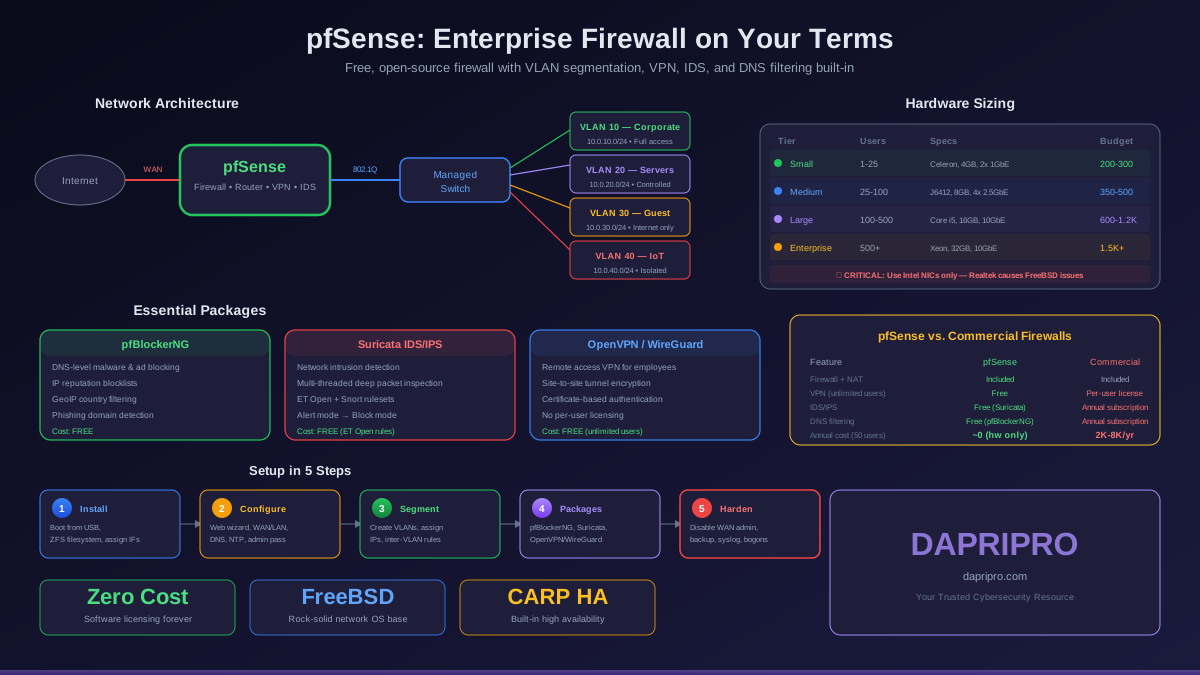
pfSense and OPNsense provide stateful firewall, VPN (OpenVPN, WireGuard, IPsec), basic IDS/IPS via Suricata, and DNS filtering via pfBlockerNG. For small businesses with fewer than 50 users and limited budgets, they deliver 80 percent of the security value at near-zero software cost.
What they lack compared to commercial NGFWs: true Layer 7 application identification (they cannot distinguish Slack from any other HTTPS traffic), cloud-delivered sandboxing, automated threat intelligence updates, TLS 1.3 decryption at scale, user identity integration, IoT device discovery, and centralized multi-site management. These gaps matter significantly for organizations above 100 users or those handling regulated data.
The practical approach: use pfSense or OPNsense for branch offices and small operations. Deploy commercial NGFWs at headquarters, data centers, and internet edge where the additional security capabilities justify the investment. This hybrid approach optimizes cost while maintaining strong security where it matters most.
NGFW Trends Shaping 2026 and Beyond
- AI-powered threat prevention — inline machine learning models that detect novel threats without signature updates. Palo Alto Advanced Threat Prevention and Fortinet FortiGuard AI are early implementations
- SASE convergence — NGFW, SD-WAN, CASB, ZTNA, and SWG merging into single platforms delivered from the cloud. Every major vendor now offers a SASE product
- API-level security — NGFWs adding API discovery and security capabilities as organizations expose more APIs publicly
- Post-quantum cryptography readiness — preparing for quantum-resistant TLS inspection as NIST post-quantum standards begin deployment
- Autonomous policy management — AI-driven policy optimization that identifies unused rules, suggests rule consolidation, and automatically adjusts policies based on observed traffic patterns
Making Your NGFW Decision
An NGFW is the single most impactful security investment for any network. It replaces standalone firewall, IPS, URL filter, and application control appliances while providing deeper inspection than any of them individually.
Start with the right throughput number — full-stack, not firewall throughput. Enable TLS decryption from day one. Attach security profiles to every rule. Integrate with your identity provider for user-based policies. And test before you buy — every vendor offers proof-of-concept evaluations.
For specific firewall implementations, check our pfSense setup guide or the comprehensive Firewall and IDS section for more deployment strategies.