Your firewall lets traffic through on port 443 because it is allowed. An attacker sends a crafted HTTPS request carrying a SQL injection payload through that open port. The firewall sees legitimate HTTPS traffic and waves it through. This is exactly where intrusion detection and intrusion prevention systems come in — they look inside the traffic your firewall already approved.
But IDS and IPS are not interchangeable terms for the same technology. They operate differently, sit in different network positions, and carry different trade-offs. Choosing the wrong one — or deploying the right one incorrectly — can leave you blind to attacks or crash your production network with false-positive blocks.
This guide breaks down exactly how each works, where to deploy them, how detection methods differ, and how to build an architecture that uses both effectively.
What an IDS Actually Does
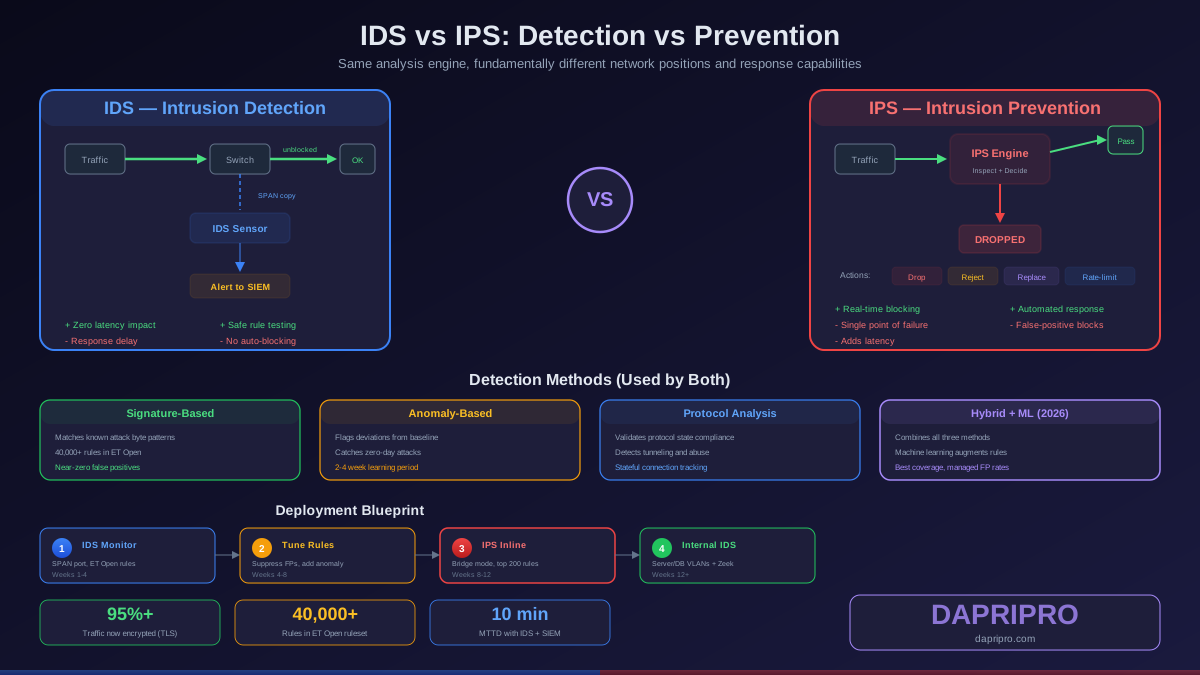
An Intrusion Detection System monitors network traffic by receiving a copy of packets flowing through your network. It sits out-of-band — traffic does not pass through the IDS device. Instead, the IDS receives mirrored traffic via a SPAN port or network TAP and analyzes it against a database of known attack signatures and behavioral baselines.
When the IDS identifies something suspicious, it generates an alert. That is all it does. It never modifies, blocks, or drops a single packet. Think of it as a security camera system: it records everything and flags suspicious activity, but a human needs to respond.
How IDS processes traffic
The IDS engine processes every copied packet through multiple analysis stages. First, the protocol decoder normalizes the packet — reassembling fragmented IP packets, decoding HTTP URL encoding, and handling TCP stream reassembly. This normalization prevents evasion techniques where attackers split malicious content across multiple packets.
Next, the detection engine runs the normalized data through its rule database. Signature-based rules check for exact byte patterns associated with known exploits. For example, a Snort rule might look for the hex string |0d 0a|Content-Type: text/xml followed by SOAP exploitation patterns. If matched, the rule fires and generates an alert with the rule ID, severity, and a human-readable message.
Finally, the logging engine records the alert to a file, database, or SIEM system. Security analysts then triage the alerts, investigate confirmed threats, and manually respond — which could be adding a firewall block rule, isolating a host, or escalating to incident response.
IDS strengths
- Zero network impact — since traffic never flows through the IDS, it cannot cause outages even if it crashes or encounters a processing error
- Full packet capture — IDS can store complete packet captures for forensic analysis, giving investigators the full attack chain
- Safe rule testing — you can deploy experimental or broadly-scoped rules without risking false-positive blocks
- Visibility without risk — perfect for monitoring sensitive segments where availability trumps everything (trading floors, medical devices, ICS/SCADA networks)
IDS limitations
- Detection only — by the time an analyst sees the alert, the attack may have already succeeded
- Response delay — manual investigation creates a gap between detection and containment, often measured in hours or days
- Alert volume — without careful tuning, IDS generates thousands of daily alerts, leading to analyst fatigue and missed real threats
What an IPS Actually Does
An Intrusion Prevention System sits directly in the traffic path — inline, between your firewall and your internal network. Every packet that enters must pass through the IPS engine before reaching its destination. This positioning gives the IPS the power to drop, reject, or modify packets in real time.
When the IPS detects a matching signature or anomalous behavior, it takes immediate action: the malicious packet is dropped before it ever reaches the target system. No analyst intervention needed. The attack is stopped in transit.
How IPS processes traffic
The IPS performs the same protocol decoding and signature matching as an IDS, but with a critical difference: it must do this at wire speed. Every microsecond of processing delay adds network latency, and a stalled IPS means stalled traffic for every connected device.
Modern IPS engines use hardware offloading, FPGA-based pattern matching, and multi-threaded processing to achieve line-rate inspection. Suricata, for example, uses a multi-threaded architecture where capture threads, decode threads, and detection threads run in parallel across CPU cores. This lets it handle 10+ Gbps on commodity hardware while maintaining sub-millisecond latency.
When a rule matches, the IPS applies the configured action. Most rules start in "alert" mode (log only) and get promoted to "drop" mode after verification. Critical actions include:
- Drop — silently discard the packet with no notification to the sender
- Reject — drop the packet and send a TCP RST or ICMP unreachable to the sender
- Replace — modify specific bytes in the packet before forwarding (useful for sanitizing input data)
- Rate-limit — allow the traffic but throttle the sender to prevent resource exhaustion
IPS strengths
- Real-time prevention — attacks are stopped mid-stream before any damage occurs
- Automated response — no human delay between detection and blocking
- Compliance requirement — PCI DSS, HIPAA, and SOC 2 frameworks increasingly require inline prevention, not just detection
- Reduced incident volume — blocked attacks never become incidents, reducing SOC workload
IPS limitations
- Single point of failure — if the IPS device fails and bypass mode is not configured, all traffic stops
- False-positive impact — a bad rule does not just generate an alert, it blocks legitimate business traffic
- Latency overhead — deep packet inspection adds processing delay that affects latency-sensitive applications
- Encrypted traffic blind spot — cannot inspect TLS-encrypted traffic unless combined with SSL/TLS decryption (which introduces its own complexity)
Detection Methods: Signature vs. Anomaly vs. Hybrid
Both IDS and IPS use the same core detection methods. The choice of detection method affects accuracy, false-positive rates, and what types of attacks you can catch.
Signature-based detection
Signature-based detection compares network traffic against a database of known attack patterns. Each signature describes a specific exploit using byte patterns, protocol fields, packet sizes, and traffic sequences. When traffic matches a signature, the system fires an alert or takes a blocking action.
The accuracy is exceptional for known threats — properly written signatures produce near-zero false positives. The Emerging Threats (ET) Open ruleset contains over 40,000 signatures covering everything from exploit kits to command-and-control callbacks. Snort and Suricata both support ET Open rules along with Snort VRT rules (which require a subscription for real-time updates).
The weakness is obvious: signature-based detection cannot catch attacks it has never seen. A zero-day exploit, custom malware, or novel attack technique will pass through undetected until a signature is written and deployed.
Anomaly-based detection
Anomaly-based detection establishes a baseline of "normal" network behavior — packet rates, protocol distributions, connection patterns, payload sizes — and flags deviations. If a database server that normally handles 200 queries per minute suddenly processes 50,000, anomaly detection catches that regardless of whether a signature exists.
This method excels at detecting zero-day attacks, insider threats, data exfiltration, and novel attack techniques. But it requires a learning period (typically 2 to 4 weeks) to build an accurate baseline, and environmental changes like new applications, server migrations, or seasonal traffic shifts cause false positives until the baseline adapts.
Protocol analysis detection
Protocol analysis (also called stateful protocol analysis) tracks the state of network connections and validates that traffic conforms to protocol specifications. It knows, for instance, that an HTTP GET request should not contain binary data in the URL, or that DNS responses should not be larger than what the query requested.
This method is effective against protocol abuse attacks, tunneling attempts, and covert channel communication. It catches attacks that signature detection misses because the attack uses valid-looking payloads that violate protocol state expectations.
Modern hybrid approach
Production deployments in 2026 combine all three methods. Suricata runs signature matching in parallel with protocol anomaly detection and flow analysis. Machine learning models augment rule-based detection by identifying patterns that are too complex to express in traditional signatures. The result is broader coverage with manageable false-positive rates.
Deployment Architecture: Where to Place IDS and IPS
Placement determines what threats you catch and what you miss. Most mature networks deploy multiple sensors in different positions.
Perimeter deployment (north-south traffic)
The most common position is between your firewall and your internal network core. An IPS here stops external attacks before they reach internal systems. Place it after the firewall so the firewall handles volumetric filtering (blocking denied ports and IPs) and the IPS focuses on deep inspection of allowed traffic. This reduces IPS processing load and improves throughput.
Internal deployment (east-west traffic)
Once an attacker breaches the perimeter, they move laterally between internal systems. Perimeter sensors are blind to this movement. Deploy IDS sensors on internal network segments — especially between trust zones — to detect lateral movement, privilege escalation, and internal data exfiltration. IDS is preferred here because blocking legitimate internal traffic due to false positives causes significant business disruption.
DMZ monitoring
Servers in the DMZ (web servers, email gateways, DNS) face constant attack. Deploy IPS inline in front of DMZ servers to block exploitation attempts. Pair it with an IDS sensor behind the DMZ servers to detect successful compromises that the IPS missed.
Cloud and hybrid network deployment
Cloud environments change the deployment model. AWS offers VPC Traffic Mirroring for IDS analysis, Azure provides Network Watcher and built-in IDS/IPS in Azure Firewall Premium, and GCP integrates IDS through Cloud IDS (powered by Palo Alto Networks). For hybrid networks, deploy physical IPS at on-premises ingress points and cloud-native IDS in each VPC or virtual network.
IDS vs IPS Head-to-Head Comparison
Here is the practical breakdown that should drive your deployment decision:
| Criteria | IDS | IPS |
|---|---|---|
| Network position | Out-of-band (passive tap/SPAN) | Inline (traffic passes through) |
| Response capability | Alert only — requires manual action | Automatic block, drop, or reject |
| Failure impact | Alerts stop, traffic unaffected | All traffic stops unless bypass is configured |
| False-positive impact | Extra alerts to investigate | Legitimate traffic blocked |
| Latency overhead | Zero — traffic is only copied | 100-500 microseconds per packet |
| Hardware requirements | Moderate (handles copied traffic) | High (must handle full line-rate traffic) |
| Best placement | Internal segments, monitoring zones | Perimeter, DMZ, critical interfaces |
| Compliance value | Meets detection and monitoring controls | Meets active prevention and blocking controls |
| Rule tuning urgency | Important but not critical | Critical — bad rules break production |
| Ideal use case | Forensics, visibility, compliance | Threat prevention, automated defense |
Rule Tuning: The Process That Makes or Breaks Your Deployment
An out-of-the-box IDS/IPS installation with all rules enabled is worse than useless. The ET Open ruleset contains 40,000+ rules. Enabling all of them on a business network generates 10,000 to 50,000 alerts per day, most of which are irrelevant. Security analysts burn out, real threats get buried, and the entire system becomes untrusted.
Step 1: Start in IDS mode
Even if your end goal is inline IPS blocking, start with IDS monitoring. Run the system for 2 to 4 weeks to collect baseline data. Identify which rules fire most frequently and investigate whether they are true positives or false positives.
Step 2: Enable only relevant rule categories
Do not enable all 40,000+ rules. Start with high-confidence categories: malware command-and-control callbacks, known exploit signatures, and policy violations. Categories like "Games" or "Chat" rules generate noise without security value unless they violate your specific policies.
Step 3: Suppress confirmed false positives
When you confirm a rule is firing on legitimate traffic (for example, a backup tool that triggers a data exfiltration signature), suppress it by source IP, destination IP, or both. Do not disable the rule globally — suppress it only for the specific traffic flow that triggers it.
Step 4: Promote rules to blocking
After 2 to 4 weeks of monitoring, promote high-confidence rules (zero or near-zero false positives) from alert mode to drop mode. Start with categories where false-positive blocking is unlikely: known malware hashes, botnet C2 callbacks, and critical CVE exploits. Track the promoted rules closely for the first week.
Step 5: Continuous tuning cycle
Rule tuning is not a one-time task. New applications, infrastructure changes, and rule updates create new false positives. Schedule monthly tuning sessions where analysts review alert volume trends, investigate new high-frequency rules, and adjust suppressions. Track your signal-to-noise ratio — the percentage of alerts that are true positives — as your primary quality metric. Aim for 80% or higher.
Handling Encrypted Traffic
Over 95% of web traffic is now encrypted with TLS. An IDS/IPS cannot inspect what it cannot see. Without decryption, your detection system is blind to the majority of network traffic.
TLS inspection approaches
SSL/TLS interception (man-in-the-middle decryption) deploys a trusted CA certificate to all endpoints, allowing the IPS to decrypt, inspect, and re-encrypt traffic. This provides full visibility but introduces privacy concerns, certificate management overhead, and breaks certificate pinning for some applications (banking apps, specific SaaS tools).
JA3/JA4 fingerprinting analyzes the TLS handshake parameters (cipher suites, extensions, elliptic curves) to identify the client application without decrypting traffic. Known malware families have unique JA3 fingerprints that remain consistent even as they change domains and IPs. This gives IDS/IPS detection capability against encrypted C2 traffic without breaking encryption.
Encrypted Traffic Analysis (ETA) uses metadata analysis — packet sizes, timing, flow duration, byte distribution — to classify encrypted traffic. Machine learning models can detect malware tunnels, data exfiltration, and C2 communication with 90%+ accuracy using only metadata, with zero decryption required.
Open-Source vs Commercial IDS/IPS Solutions
Your budget and team size determine which category fits best.
Open-source options
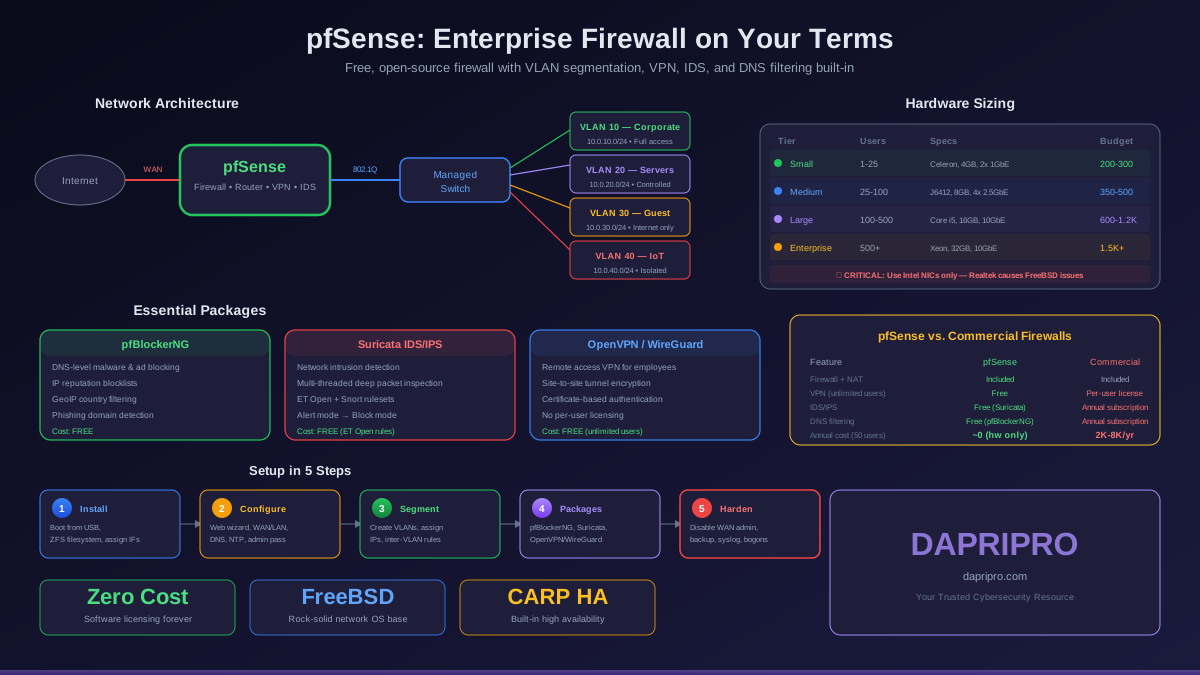
Suricata is the leading open-source option in 2026. Multi-threaded by design, it handles 10+ Gbps on modern hardware, supports IDS and IPS modes simultaneously, includes protocol anomaly detection, file extraction, and TLS/JA3 fingerprinting. The OISF (Open Information Security Foundation) maintains it with consistent updates and an active community.
Snort 3 received a major architecture rewrite that brought multi-threading and improved rule syntax. Backed by Cisco, it benefits from Talos intelligence but the best rulesets require a paid subscription. Historically more widely deployed than Suricata, but new deployments increasingly choose Suricata.
Zeek (formerly Bro) is not a traditional IDS — it is a network analysis framework that generates rich metadata logs from network traffic. Zeek excels at protocol logging, file extraction, and behavioral analysis rather than signature matching. Many organizations run Zeek alongside Suricata: Suricata for signature-based detection and Zeek for metadata analysis and hunting.
Commercial options
Palo Alto Networks Threat Prevention integrates IPS with their NGFW platform, providing unified management, automated threat intelligence feeds, and cloud-delivered signatures. Pricing runs several thousand dollars annually depending on throughput tier.
Cisco Secure IPS (formerly Firepower) leverages Talos threat intelligence — one of the largest commercial threat research teams. Deep integration with Cisco networking infrastructure makes it natural for Cisco-heavy environments.
CrowdSec takes a community-driven approach: a free, open-source IPS that shares blocklists crowdsourced from its user community. Suitable for web-facing infrastructure where community intelligence provides early warning of scanning and exploitation campaigns.
Building Your IDS/IPS Architecture
Here is a practical deployment blueprint for a mid-sized organization:
Phase 1: Perimeter IDS deployment (weeks 1 to 4)
- Deploy Suricata on a dedicated sensor behind your primary firewall
- Configure SPAN port mirroring from the firewall to the sensor
- Enable ET Open rules for malware, exploit, and C2 categories only
- Forward alerts to your SIEM or a dedicated log management platform
- Assign an analyst to review alerts daily and begin tuning
Phase 2: Rule tuning and baseline (weeks 4 to 8)
- Suppress confirmed false positives using source/destination suppressions
- Add protocol anomaly detection for HTTP, DNS, TLS, and SMB
- Enable JA3 fingerprinting for encrypted traffic visibility
- Document your alert baseline: average daily volume, top rule IDs, true-positive ratio
Phase 3: Inline IPS promotion (weeks 8 to 12)
- Move the Suricata sensor inline (bridge mode) between the firewall and core switch
- Configure hardware bypass (fail-open) for fault tolerance
- Promote the top 200 high-confidence rules from alert mode to drop mode
- Monitor closely for the first 2 weeks — be prepared to revert rules that cause issues
Phase 4: Internal visibility (weeks 12+)
- Deploy additional IDS sensors on critical internal segments (server VLAN, database VLAN)
- Add Zeek for network metadata logging and protocol analysis
- Create detection rules for lateral movement (internal port scanning, unusual SMB traffic, RDP brute force)
- Integrate with endpoint detection for correlated alerts
Performance Sizing and Hardware Requirements
Undersized hardware causes dropped packets — and dropped packets mean missed attacks. Size your deployment based on actual network throughput, not advertised speeds.
| Network Speed | Min CPU | Min RAM | Recommended NIC | Rule Capacity |
|---|---|---|---|---|
| 100 Mbps | 2 cores | 4 GB | 1 GbE (any) | 20,000+ rules |
| 1 Gbps | 4 cores | 8 GB | Intel i350 or X550 | 30,000+ rules |
| 5 Gbps | 8 cores | 16 GB | Intel X710 (DPDK) | 40,000+ rules |
| 10 Gbps | 16 cores | 32 GB | Intel XXV710 (AF_PACKET) | 40,000+ (tuned) |
| 40+ Gbps | 32+ cores | 64+ GB | Mellanox ConnectX-6 | Custom ruleset |
For Suricata specifically, allocate 1 CPU core per 1 Gbps of inspected traffic as a baseline, then add 50% headroom for peak loads. Intel NICs with DPDK or AF_PACKET support provide the best capture performance. Avoid Realtek consumer NICs — they drop packets under sustained load.
Common Deployment Mistakes to Avoid
These mistakes turn a security investment into a liability:
- Enabling all rules on day one — this floods analysts with irrelevant alerts and destroys trust in the system before it proves its value
- Deploying IPS inline without a tuning period — untuned rules will block legitimate traffic and cause production outages
- No fail-open bypass — without hardware bypass, an IPS failure stops all network traffic
- Ignoring encrypted traffic — if you cannot inspect TLS traffic, you are missing 95% of your network communications
- Running outdated rules — rules that are months old miss current threats. Automate daily rule updates from ET Open or your commercial feed
- Single sensor placement — one sensor at the perimeter provides zero visibility into lateral movement inside your network
- No log retention — without historical alert data, you cannot perform incident investigations or identify slow-burn attacks
- Skipping SIEM integration — IDS/IPS alerts in isolation lack context. Correlate them with firewall logs, endpoint telemetry, and authentication logs for accurate threat detection
IDS/IPS in the Modern SOC Workflow
IDS/IPS does not operate in isolation. In a mature Security Operations Center, it feeds into a broader detection and response pipeline:
- Collection — IDS/IPS alerts flow to the SIEM alongside firewall logs, endpoint events, authentication logs, and cloud audit trails
- Correlation — the SIEM correlates IDS alerts with other data sources. An IDS alert for "SQL injection attempt" on a web server combined with a successful database login from that same server within 5 minutes becomes a high-priority incident
- Enrichment — threat intelligence platforms add context: Is that source IP a known attacker? Is the destination domain newly registered? Is the detected CVE relevant to your software stack?
- Triage — automated playbooks handle known-good and known-bad scenarios. True-positive blocks get logged. Clear false positives get suppressed. Ambiguous alerts go to human analysts
- Response — confirmed threats trigger response actions: firewall block rules, endpoint isolation, account lockouts, and incident documentation
The goal is reducing mean time to detect (MTTD) and mean time to respond (MTTR). Organizations running IDS/IPS with proper SIEM integration and automated playbooks achieve MTTD under 10 minutes for signature-based detections, compared to the industry average of 197 days for breaches discovered through non-automated means.
Making Your Decision
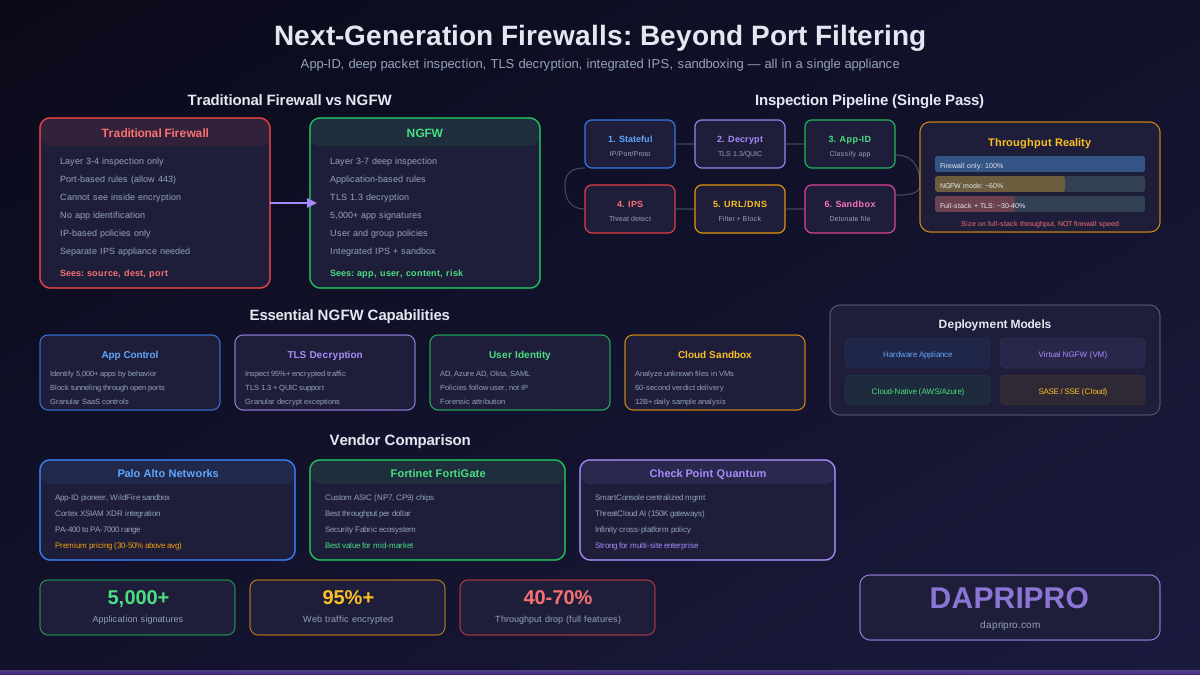
Do not choose between IDS and IPS — use both. Deploy IPS inline at your perimeter and DMZ for automated threat prevention. Deploy IDS sensors on internal segments for visibility and forensic capability. Start every deployment in IDS monitoring mode, tune rules methodically, and promote to IPS blocking only after confirming accuracy.
The technology is mature, the open-source options are production-ready, and the deployment process is well-documented. The real challenge is not the technology — it is the operational discipline to tune rules, review alerts, and continuously adapt as your network evolves.
For tool-specific guidance, see our Snort vs Suricata comparison, or explore the full Firewall and IDS guide for more deployment strategies.