Your screens are locked. The ransom note demands $500,000 in Bitcoin within 72 hours. Employees are calling — nothing works. The CEO is asking how this happened. And right now, the decisions you make in the next few hours will determine whether your company recovers in days or months.
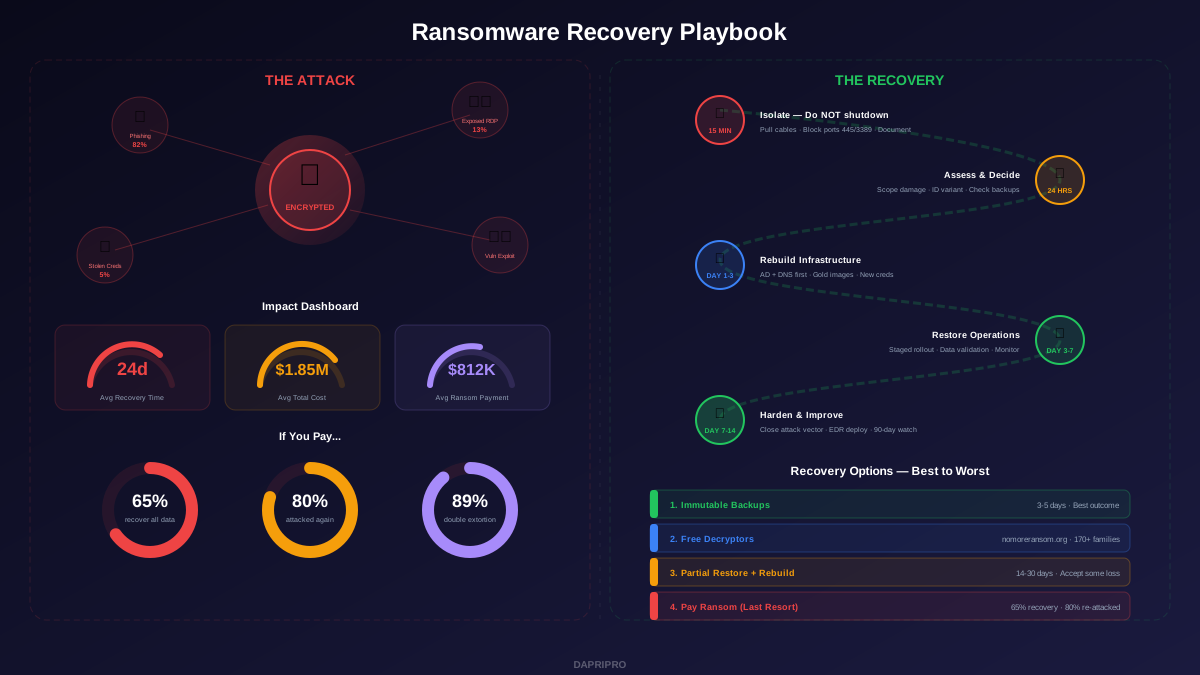
This is not a theoretical exercise. In 2025, ransomware attacks hit one organization every 11 seconds, with the average payment climbing to $812,000 and the average total recovery cost reaching $1.85 million. But payment is not your only option, and it is often not even your best option. This playbook walks through exactly what to do — minute by minute, day by day — to restore operations after a ransomware attack.
The First 15 Minutes: Containment
Speed matters more than precision right now. Every minute of delay means more encrypted files and more lateral movement. Here is your immediate action list:
Isolate — Do NOT Shut Down
This is the most common mistake. When people panic, they reach for the power button. Do not shut down infected machines. Here is why:
- RAM contains forensic evidence — the encryption keys, attacker tools, and process traces that investigators need
- Some ransomware deletes decryption keys on reboot, making recovery permanently impossible
- Shutdown signals can trigger deadman switches that accelerate encryption on other machines
Instead, isolate infected systems:
- Pull the ethernet cable — physically disconnect from the network. This is faster and more reliable than disabling network adapters in the OS
- Disable Wi-Fi — turn off wireless adapters on laptops and mobile devices
- Quarantine at the switch — disable switch ports for affected network segments if you have remote management access
- Block lateral movement — if your firewall allows it, immediately restrict all SMB (port 445), RDP (port 3389), and WMI traffic between network segments
Document Everything
From minute one, someone should be assigned solely to documentation. Photograph the ransom note (every screen will look slightly different and may contain a unique decryption ID). Record timestamps. Note which systems showed symptoms first. This timeline becomes critical for forensics, insurance claims, and law enforcement.
Activate Your Response Team
Call (do not email — your email may be compromised) these people immediately:
- Your cyber insurance carrier's 24/7 claims hotline — they will assign a breach coach who manages everything
- Your incident response retainer firm (if you have one)
- Your CISO or security lead
- General counsel — attorney-client privilege starts protecting your investigation now
- FBI/IC3 (in the US) or your national CERT — the sooner they know, the more they can help
Hours 1-24: Assessment and Decision-Making
Determine the Scope
Before you can recover, you need to know what you are recovering from. Work with your IR team to answer:
- Which systems are encrypted? — build a complete list of every affected server, endpoint, and storage volume
- Which ransomware variant? — upload the ransom note and a sample encrypted file to id-ransomware.malwarehunterteam.com for identification
- Are backups intact? — check your backup systems immediately. Modern ransomware specifically targets backup infrastructure first. Verify immutable copies, air-gapped tapes, and cloud backup accounts
- Was data exfiltrated? — 89% of ransomware attacks in 2025 involve data theft before encryption (double extortion). Check for unusual outbound data transfers in your network logs
- What was the initial access vector? — phishing email, exposed RDP, exploited VPN, compromised credentials? Finding this determines your recovery security posture
The Pay vs. Do Not Pay Decision
This is a business decision that should involve your CEO, general counsel, CISO, and insurance carrier. Here are the facts that should inform it:
| Factor | Pay | Do Not Pay |
|---|---|---|
| Data recovery rate | 65% recover all data; 29% recover more than half | Dependent on backup quality and decryptor availability |
| Re-attack risk | 80% of payers are attacked again within 12 months | Still at risk but not specifically targeted for repeat attacks |
| Time to recovery | After payment: 5-10 days (decryptors are often slow and buggy) | Backup restore: 3-5 days. Full rebuild: 14-30 days |
| Legal risk | OFAC sanctions violations if attacker is on sanctions list | No legal risk from the decision itself |
| Insurance | Most policies cover ransom payments but with sub-limits | Recovery costs are also covered under most policies |
| Ethical consideration | Funds criminal operations and incentivizes future attacks | Does not contribute to the ransomware economy |
If You Must Negotiate
If backups are gone, no decryptor exists, and the business cannot survive prolonged downtime, ransomware negotiation becomes a structured process. Never negotiate directly — use a professional ransomware negotiation firm (Coveware, GroupSense, or your insurance carrier's preferred vendor). Key negotiation realities:
- Initial demands are almost always inflated — professional negotiators typically achieve 40-60% reductions
- Demand proof of decryption first — make the attacker decrypt a test file before any payment discussion
- The 72-hour deadline is artificial — attackers almost always extend it. They want money, not to destroy your data
- Your negotiation firm will run an OFAC check to verify the attacker group is not on the US sanctions list
- Payment is typically via cryptocurrency, arranged through the negotiation firm's established channels
Recovery Options: Best to Worst
Option 1: Restore from Immutable Backups (Best Case)
If you followed the 3-2-1-1-0 rule and your immutable copies are intact, this is your fastest path to recovery:
- Verify backup integrity — do not assume backups are clean. Scan backup files for malware before restoring
- Build clean infrastructure — fresh OS installs from gold images on wiped hardware or new cloud instances
- Restore data only — restore databases, files, and configurations from backup. Never restore entire system images of compromised machines
- Validate before going live — check record counts, hash verification, and user spot-checks before granting access
- Typical timeline — critical systems in 24-48 hours, full recovery in 3-5 days
Option 2: Free Decryption Tools
Before considering payment, check these resources:
- No More Ransom Project (nomoreransom.org) — free decryptors for 170+ ransomware families, developed by Europol, Kaspersky, McAfee, and 188 partners. Has saved victims over $1.5 billion
- ID Ransomware (id-ransomware.malwarehunterteam.com) — upload a ransom note or encrypted file to identify the specific variant and check for available decryptors
- Emsisoft Decryptors — Emsisoft maintains free decryptors for dozens of ransomware families
- Volume Shadow Copies — some ransomware fails to delete Windows Volume Shadow Copies. Run
vssadmin list shadowsfrom an elevated command prompt on affected machines
Option 3: Partial Recovery + Rebuild
When backups are incomplete and no decryptor exists, you rebuild what you can and accept some data loss:
- Restore what you have from partial backups
- Recover cloud-hosted data from SaaS provider versioning (Microsoft 365, Google Workspace typically retain 30-90 days of versions)
- Recreate operational data from external sources (bank statements for financial data, vendor records, customer communications)
- Accept loss of data that cannot be reconstructed and document it for insurance claims
Option 4: Paid Decryption (Last Resort)
If the business decision is to pay, follow this process through your negotiation firm:
- Demand proof of decryption on 2-3 test files
- Negotiate the price (expect 40-60% reduction)
- Verify OFAC compliance (no payments to sanctioned entities)
- Make payment through established cryptocurrency channels
- Receive and test decryptor on isolated systems first
- Decrypt methodically — decryptors are often slow and unreliable, processing at 50-100 GB per hour
- Even after decryption, rebuild systems from clean images and restore only the decrypted data
The Clean Restoration Process
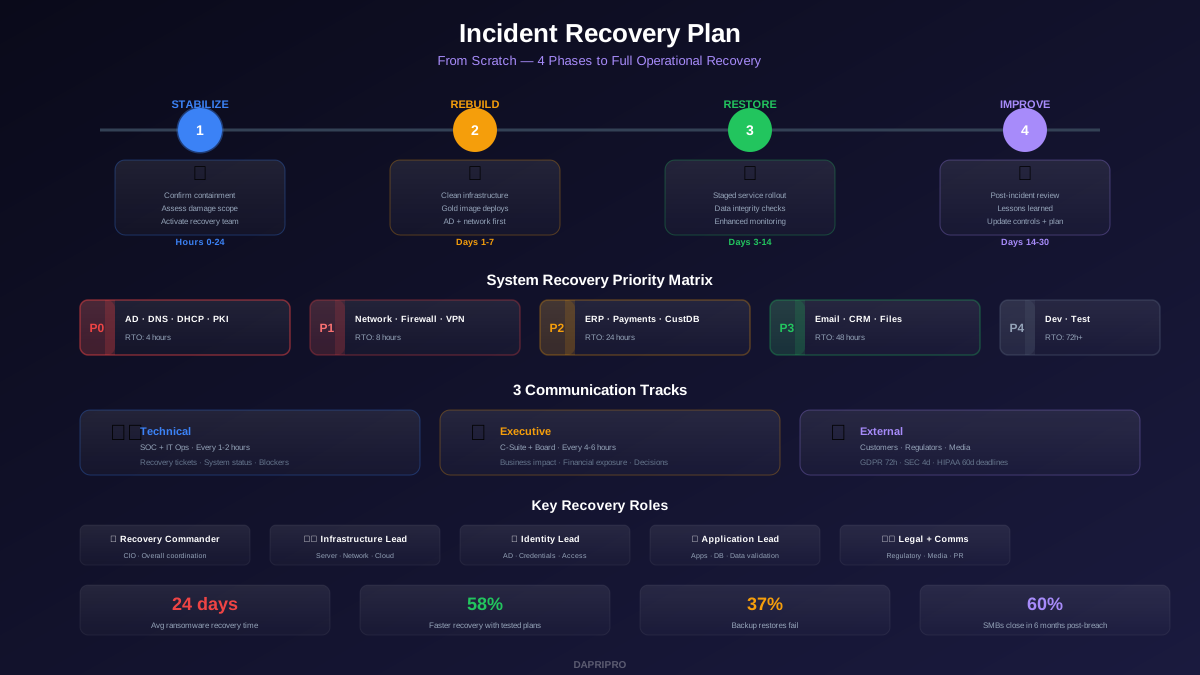
Regardless of which recovery option you use, the restoration process follows the same security-first approach. Never just "clean up" infected systems — you rebuild from trusted sources.
Infrastructure Rebuild Sequence
| Sequence | Systems | Action | Validation |
|---|---|---|---|
| 1 | Active Directory + DNS | Restore or rebuild forest. Reset KRBTGT twice. New admin credentials | Authentication works, no rogue objects |
| 2 | Network + Security | Firewalls from clean config. New VPN certs. Segment networks | No unauthorized access paths |
| 3 | MFA + Identity | Re-enroll all users. Revoke all sessions. New MFA registrations | All access requires fresh MFA |
| 4 | Critical apps + databases | Fresh installs. Restore data from verified backups only | Record counts match, transactions reconcile |
| 5 | Email + collaboration | Clean tenant configuration. Restore mailboxes from backup | Users can send/receive, calendars intact |
| 6 | Endpoints | Wipe and reimage from gold image. Deploy EDR before network access | EDR reporting, no malware detections |
Credential Reset: The Full Scope
After a ransomware attack, assume every credential in your environment is compromised. The reset scope includes:
- All user passwords (force reset at next login)
- All admin and service account passwords
- KRBTGT account password (reset twice with 10+ hour gap to invalidate all Kerberos tickets)
- All API keys and tokens
- All SSH keys
- All certificates (issue new ones from your rebuilt PKI)
- All database connection strings and application secrets
- SaaS admin accounts and integration tokens
Dealing with Double Extortion
In 2026, 89% of ransomware attacks involve data exfiltration before encryption. Even if you recover from backups without paying, the attacker still has your data and threatens to publish it. This is double extortion, and it changes the calculus:
- Paying does not guarantee deletion — you have no way to verify the attacker deleted your data. Historical evidence suggests most attackers retain stolen data regardless of payment
- Legal obligations still apply — if personal data was exfiltrated, you must notify regulators and affected individuals regardless of whether you pay
- Prepare for publication — assume the data will eventually be published. Work with legal and PR to prepare customer communications and regulatory filings
- Monitor dark web — use dark web monitoring services to detect when and if your data appears on leak sites
Post-Recovery Security Hardening
Recovery is not complete when systems come back online — it is complete when you have closed the vulnerabilities that allowed the attack. Do not declare victory until these hardening steps are finished:
Close the Attack Vector
Fix the exact vulnerability that was used for initial access. If it was a phishing email, implement phishing-resistant MFA and advanced email filtering. If it was exposed RDP, shut it down permanently and replace it with a ZTNA solution. If it was an unpatched VPN, patch it and implement continuous vulnerability monitoring.
Implement the Post-Attack Security Baseline
- EDR everywhere — deploy endpoint detection and response on every endpoint before granting network access. CrowdStrike, SentinelOne, or Microsoft Defender for Endpoint with 24/7 SOC monitoring
- Network segmentation — if the attacker moved laterally through a flat network, segment it now. Critical systems should be isolated with strict firewall rules
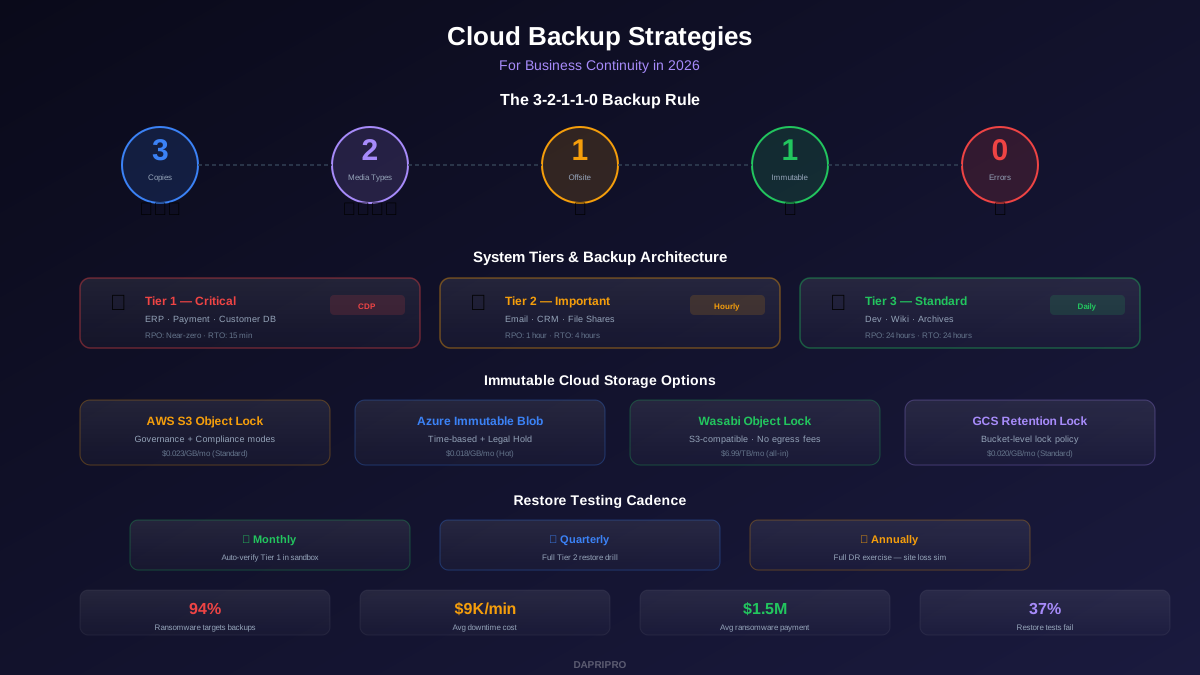
- Immutable backups — if backups were compromised, implement immutable storage (S3 Object Lock, Azure Immutable Blob) with air-gapped copies
- Privileged access management — if the attacker used admin credentials to deploy ransomware (they usually do), implement PAM with just-in-time access
- Enhanced monitoring — increase logging and detection capabilities. The post-recovery window is high-risk for re-compromise
The 90-Day Monitoring Window
For 90 days after recovery, maintain elevated security monitoring:
- 24/7 SOC coverage with reduced alert thresholds
- Weekly threat hunting focused on indicators related to the original attack
- Network traffic analysis looking for C2 callbacks or data exfiltration
- Honeypot accounts and canary files to detect unauthorized access
- Weekly vulnerability scans with immediate remediation of critical findings
Ransomware Recovery: The Numbers That Matter
| Metric | 2025 Average | With Tested Plan |
|---|---|---|
| Time to full recovery | 24 days | 5-7 days |
| Total recovery cost | $1.85 million | $250K-$500K |
| Data loss (when not paying) | 15-30% of data | Under 1% (with 3-2-1-1-0) |
| Ransom payment rate | 29% of victims pay | Under 5% (with backups) |
| Re-compromise within 12 months | 48% (80% of payers) | 12% (with hardening) |
Lessons from Major Ransomware Attacks
- Colonial Pipeline (2021) — paid $4.4M ransom, FBI recovered $2.3M. The decryptor was so slow they primarily recovered from backups anyway. Lesson: even when you pay, backups are often still how you actually recover
- JBS Foods (2021) — paid $11M ransom within days. Business decision based on food supply chain impact. Lesson: the pay/no-pay decision must weigh broader impact beyond the organization itself
- Change Healthcare (2024) — paid $22M ransom, data was still leaked by the affiliate group. Lesson: double extortion payments provide zero guarantee against data publication
- MGM Resorts (2023) — refused to pay, recovered through rebuilding over 10 days. Total cost estimated at $100M. Lesson: not paying is expensive too, but the organization maintained integrity and was not re-targeted
- Maersk/NotPetya (2017) — rebuilt entire infrastructure (45,000 PCs, 4,000 servers) in 10 days. Only survived because one domain controller in Ghana was offline during the attack. Lesson: air-gapped or offline backups are the ultimate insurance policy
Building Ransomware Resilience Before You Need It
The best ransomware recovery is the one you never need to execute. But if you do, these preparations slash recovery time from weeks to days:
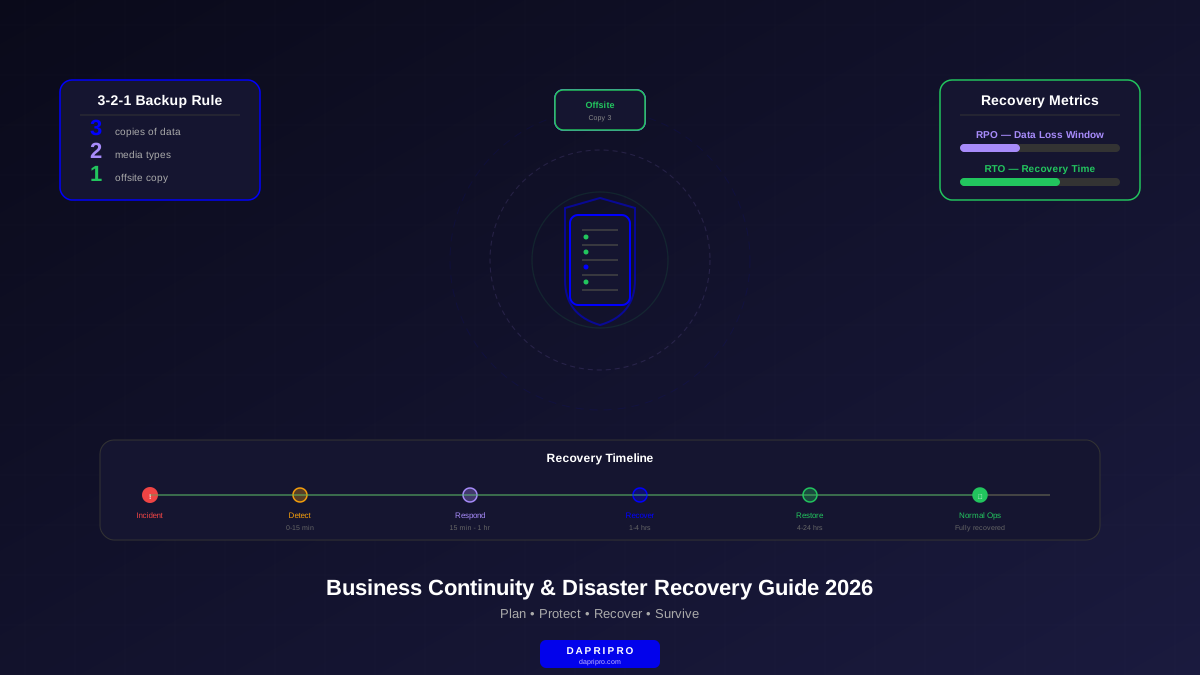
- Implement the 3-2-1-1-0 backup rule — 3 copies, 2 media types, 1 offsite, 1 immutable, 0 errors. Test restores monthly, not annually
- Maintain offline recovery documentation — your recovery plan, network diagrams, admin passwords, and vendor contacts should exist on paper and on an offline USB drive. When everything is encrypted, you need analog access
- Pre-negotiate IR retainers — engaging an incident response firm during a crisis takes days. Have a retainer in place with a 2-hour SLA
- Run ransomware tabletop exercises — quarterly scenarios that walk through the exact decisions covered in this playbook. When the real attack comes, your team will have rehearsed the response
- Segment your network — the difference between one encrypted server and 500 encrypted servers is network segmentation. Flat networks are ransomware's best friend
- Deploy canary files — place honeypot files on file shares that trigger alerts when accessed. These provide early warning that encryption is starting, giving you minutes to contain before it spreads
Ransomware is survivable. The organizations that recover quickly are not the ones with the biggest budgets — they are the ones with tested plans, immutable backups, and teams that have rehearsed the response. Build the plan now, test it quarterly, and when the attack comes, you will execute a playbook instead of making it up as you go.