Why Traditional Backup Strategies Fail in 2026
Most organizations have backups. Very few have backup strategies that actually survive a real disaster. The difference is not about technology — it is about design. Three trends in 2026 have made traditional backup approaches dangerously insufficient:
Ransomware now targets backups first. Modern ransomware groups spend weeks inside your network before detonating. During that dwell time, they identify your backup infrastructure, compromise backup admin credentials, delete shadow copies, and encrypt or corrupt backup repositories. When the ransomware finally triggers, your backups are already gone. This is not theoretical — 94 percent of ransomware attacks in 2025 attempted to compromise backups, and 57 percent succeeded.
Cloud does not mean protected. Organizations assume that data in Microsoft 365, Google Workspace, Salesforce, or AWS is automatically backed up by the provider. It is not. Cloud providers protect infrastructure availability (their responsibility), but your data is your responsibility. A compromised admin account, accidental mass deletion, or malicious insider can destroy years of data that the cloud provider will not recover for you.
Compliance now requires immutability. Regulations including SEC Rule 17a-4, HIPAA, and updated NIST frameworks now require that backup copies be immutable — meaning they cannot be modified or deleted for a defined retention period, even by administrators. Organizations without immutable backups face both security risk and regulatory exposure.
The 3-2-1-1-0 Backup Framework
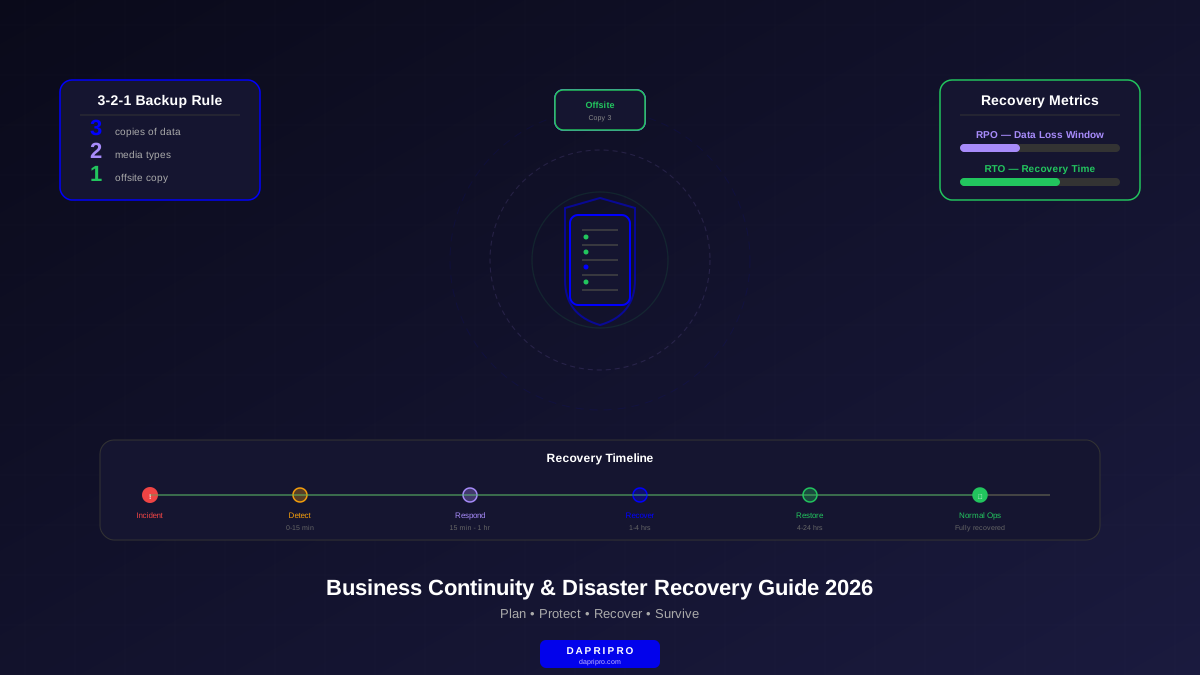
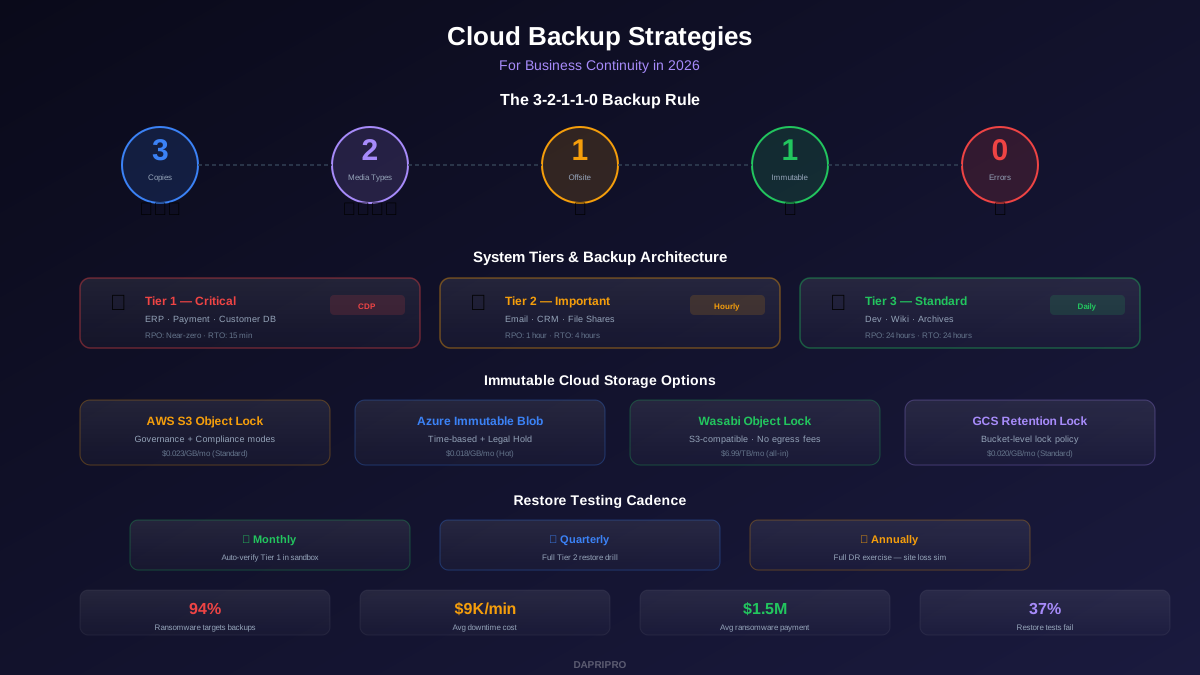
The classic 3-2-1 rule (3 copies, 2 media types, 1 offsite) was a good starting point but is no longer sufficient. The modern 3-2-1-1-0 framework adds the two components that address ransomware and reliability:
| Rule | Requirement | Why It Matters | Implementation Example |
|---|---|---|---|
| 3 copies | Maintain at least 3 copies of your data | Redundancy against single-point failures | Production + local backup + cloud backup |
| 2 media types | Store on at least 2 different media | Protects against media-specific failures | Disk-based NAS + cloud object storage |
| 1 offsite | Keep at least 1 copy offsite | Survives fire, flood, physical destruction | Cloud region in different geography |
| 1 immutable | 1 copy must be immutable or air-gapped | Ransomware cannot delete or encrypt it | S3 Object Lock, immutable blob, tape |
| 0 errors | Automated restore testing with zero errors | Proves backups actually work | Weekly automated restore to sandbox |
RTO and RPO: The Numbers That Drive Every Decision
Before choosing tools or designing architecture, you must define two numbers for each system you protect:
Recovery Time Objective (RTO) is the maximum acceptable time to restore a system after a failure. A 4-hour RTO means the system must be operational within 4 hours of an outage. This drives your restore technology — local snapshots with instant VM recovery for critical systems, cloud restore for less critical ones.
Recovery Point Objective (RPO) is the maximum acceptable data loss measured in time. A 1-hour RPO means you can lose at most 1 hour of data. This drives your backup frequency — continuous replication for near-zero RPO, hourly snapshots for 1-hour RPO, daily backups for 24-hour RPO.
| System Tier | Example Systems | RTO Target | RPO Target | Backup Approach |
|---|---|---|---|---|
| Tier 1 — Critical | ERP, payment processing, customer DB | 15 min - 1 hour | Near-zero | Continuous replication + instant VM recovery |
| Tier 2 — Important | Email, CRM, file shares, HR systems | 4 hours | 1 hour | Hourly snapshots + cloud-based restore |
| Tier 3 — Standard | Dev environments, internal wikis, archives | 24 hours | 24 hours | Daily backups + cold storage restore |
The most common mistake is treating all systems equally. Organizations either over-protect everything (expensive and slow) or under-protect everything (dangerous). Tier your systems, define RTO/RPO per tier, and design your backup architecture to meet those specific numbers.
Immutable Backup Architecture: Your Ransomware Insurance
Immutability means that once data is written, it cannot be changed, deleted, or encrypted for a specified retention period — even by someone with root or admin access. This is the single most important defense against ransomware that targets backups.
How Immutability Works
Cloud-native immutability uses object lock features built into cloud storage platforms:
- AWS S3 Object Lock: Governance mode (admins with special permissions can override) or Compliance mode (no one can delete, not even AWS support, until retention expires). Use Compliance mode for ransomware protection.
- Azure Immutable Blob Storage: Time-based retention policies or legal hold. Once locked in Compliance mode, data cannot be deleted until the retention period expires.
- Google Cloud Storage Retention Locks: Bucket-level retention policies that prevent object deletion. Once a retention policy is locked, it cannot be reduced or removed.
- Wasabi Object Lock: S3-compatible immutability at lower cost ($6.99/TB/month), making it popular for backup-specific storage.
Air-Gapped Copies
Air-gapping takes immutability further by physically or logically disconnecting backup copies from your production network. Even if an attacker completely owns your infrastructure, they cannot reach air-gapped backups because no network path exists.
Modern air-gapping options include offline tape (LTO-9 stores 18TB per tape at under $10/TB), isolated cloud accounts with no network connectivity to your production environment and separate credentials, and dedicated backup appliances with built-in air-gap functionality like Cohesity FortKnox or Rubrik Cloud Vault.
Cloud-to-Cloud Backup: Protecting SaaS Data
The shared responsibility model catches organizations off guard. Here is what your SaaS provider protects versus what you must protect yourself:
| Scenario | Provider Protects? | You Need Backup? |
|---|---|---|
| Their data center has a hardware failure | Yes — built-in redundancy | No |
| A user accidentally deletes files past retention | No — retention limits apply | Yes |
| A compromised admin mass-deletes data | No — that is authorized access | Yes |
| Ransomware encrypts synced files | Partial — version history helps | Yes — for complete recovery |
| You need to restore data from 6 months ago | Usually no — retention expired | Yes |
| Compliance requires 7-year data retention | No — not their responsibility | Yes |
SaaS Backup Solutions Compared
| Solution | Platforms Covered | Backup Frequency | Starting Price | Best For |
|---|---|---|---|---|
| Veeam Backup for M365 | Exchange, SharePoint, OneDrive, Teams | Every 5 min (incremental) | $2.50/user/mo | Enterprise, self-managed |
| Druva | M365, Google Workspace, Salesforce, Slack | Every 4 hours | $4/user/mo | Multi-SaaS environments |
| Backupify (Datto) | M365, Google Workspace | 3x daily | $3/user/mo | MSPs and SMBs |
| Spanning | M365, Google Workspace, Salesforce | Daily | $4/user/mo | Simple setup, good UI |
| AvePoint | M365, Salesforce, Dynamics 365 | Every 4 hours | $3.50/user/mo | Granular restore, compliance |
Backup Testing: The Step Everyone Skips
A backup you have never restored is not a backup — it is a hope. Yet 37 percent of organizations in 2025 reported that their last restore test failed or produced incomplete data. The cost of discovering this during a real disaster is catastrophic.
Testing Cadence
- Monthly: Automated restore verification for Tier 1 critical systems. Spin up VMs from backup in an isolated sandbox, verify data integrity with checksums, confirm applications start and respond to queries. Tear down sandbox automatically after verification.
- Quarterly: Full restore drill for a randomly selected Tier 2 system. Restore the complete system to a test environment and validate full functionality. Time the restore to verify you meet your RTO target.
- Annually: Full disaster recovery exercise simulating a complete site loss. Restore all Tier 1 and Tier 2 systems from backup to a secondary site or cloud region. Validate end-to-end functionality including network connectivity, authentication, and user access.
Cost Analysis: What Cloud Backup Actually Costs
Cloud backup pricing depends on four factors: data volume, retention length, restore frequency, and whether you need immutability. Here is a realistic breakdown for different organization sizes:
| Org Size | Data Volume | Basic Backup | Mid-Tier (Immutable) | Enterprise (Full 3-2-1-1-0) |
|---|---|---|---|---|
| Small (10-50 users) | 1-5 TB | $100-$300/mo | $300-$800/mo | $800-$2,000/mo |
| Mid (50-500 users) | 5-50 TB | $500-$2,000/mo | $2,000-$6,000/mo | $5,000-$15,000/mo |
| Enterprise (500+) | 50-500 TB | $3,000-$10,000/mo | $10,000-$30,000/mo | $25,000-$75,000/mo |
Context matters for evaluating these costs. The average ransomware payment in 2025 was $1.5 million. Average downtime cost is $9,000 per minute. Even the enterprise tier of cloud backup costs less per year than a single hour of downtime for a critical system. Backup is the highest-ROI security investment your organization can make.
Hidden Costs to Watch
Cloud backup has cost traps that catch organizations by surprise. Egress fees are the biggest — restoring data from cloud backup incurs data transfer charges that can be substantial at scale. AWS charges $0.09/GB for egress, meaning a 50TB restore costs $4,500 in transfer fees alone. Some backup vendors like Wasabi and Backblaze B2 include free egress, which can save thousands during a real restore event. API call charges, per-restore fees, and early deletion penalties also add up. Always model a full restore scenario before committing to a vendor.
Designing Your Backup Architecture
A well-designed backup architecture maps each system tier to the appropriate backup technology, storage tier, and testing cadence. Here is a reference architecture for a typical mid-size organization:
Tier 1 critical systems: Continuous data protection (CDP) with near-zero RPO using Zerto or Veeam replication. Primary backup stored on fast NVMe storage for instant VM recovery (RTO under 15 minutes). Secondary copy replicated to a different cloud region with immutable retention. Third copy air-gapped monthly to isolated cloud account or tape.
Tier 2 important systems: Hourly incremental backups with daily full backups using Veeam, Commvault, or Rubrik. Primary copies on cloud object storage (S3, Azure Blob) with 30-day immutable retention. Secondary copies on cold storage (S3 Glacier, Azure Cool) with 1-year retention for compliance.
Tier 3 standard systems: Daily incremental backups with weekly full backups. Stored on cost-optimized cloud storage (Wasabi, Backblaze B2, S3 Glacier Deep Archive). 90-day retention with immutable lock on the most recent 30 days.
SaaS data: Third-party backup for Microsoft 365, Google Workspace, Salesforce, and other SaaS platforms. Minimum daily backup frequency. 1-year retention with point-in-time recovery. Stored independently from production cloud environment to avoid blast radius overlap.
The key design principle is separation of blast radius. Your backup infrastructure must use different credentials, different cloud accounts or subscriptions, and ideally different cloud providers than your production environment. If an attacker compromises your production AWS account, they should not have any path to reach your backup copies in Azure or an isolated AWS account.