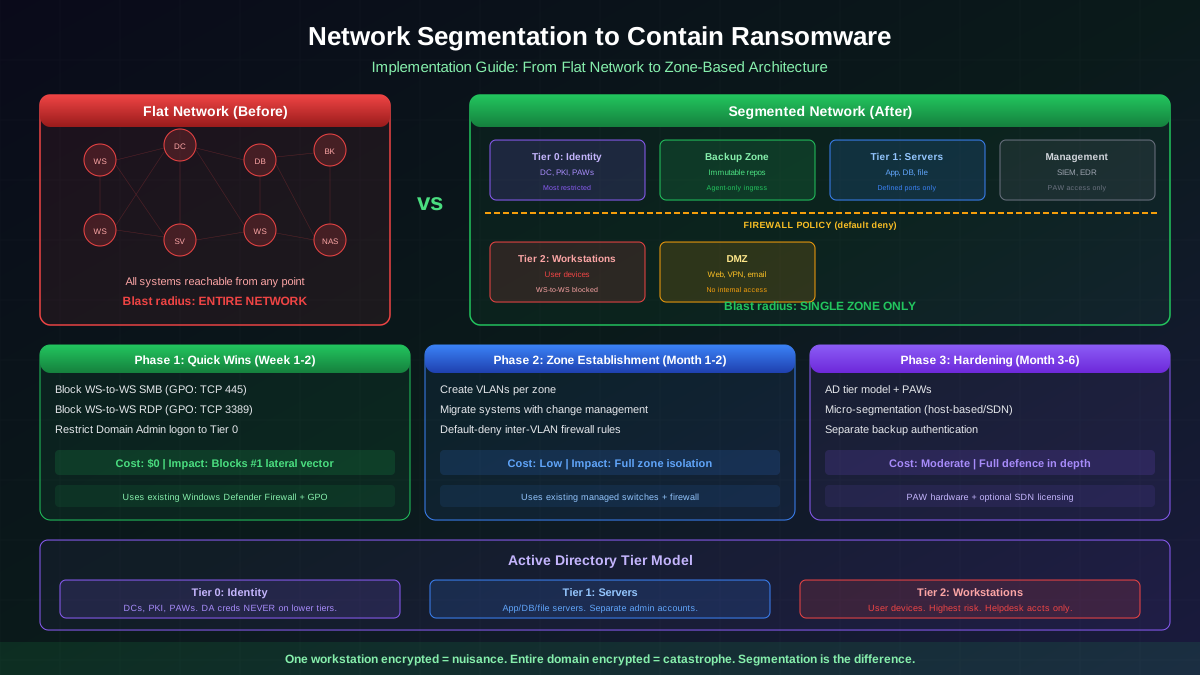
When ransomware compromises a single workstation on a flat network, the attacker immediately has visibility and connectivity to every other system: domain controllers, file servers, database servers, backup repositories, and every other workstation. The entire organisation is one lateral-movement step away from complete encryption.
Network segmentation eliminates this attack path by dividing the network into isolated zones with controlled traffic flows between them. A compromised workstation can no longer reach the backup server because they are on different segments, and the inter-segment firewall denies the connection. The ransomware is contained to a single zone instead of spreading across the entire organisation.
Why Flat Networks Fail Against Ransomware
A flat network is any network where all systems can communicate directly with all other systems without traversing a firewall or access-control enforcement point. This is the default state of most enterprise networks because it is the simplest to build and manage.
The problem is architectural: on a flat network, every system trusts every other system at the network level. The ransomware attack surface is the entire network:
- Workstation-to-workstation spread — ransomware scans the local subnet (and connected subnets) for other systems with open SMB (port 445), RDP (port 3389), or WMI ports. WannaCry and NotPetya achieved devastating spread through direct workstation-to-workstation SMB exploitation.
- Workstation-to-server access — from a compromised workstation, attackers can reach database servers, application servers, and management consoles that should never be accessible from end-user devices.
- Domain controller exposure — on flat networks, workstations can communicate directly with domain controllers on all ports, enabling credential-harvesting attacks (DCSync, Kerberoasting, Golden Ticket).
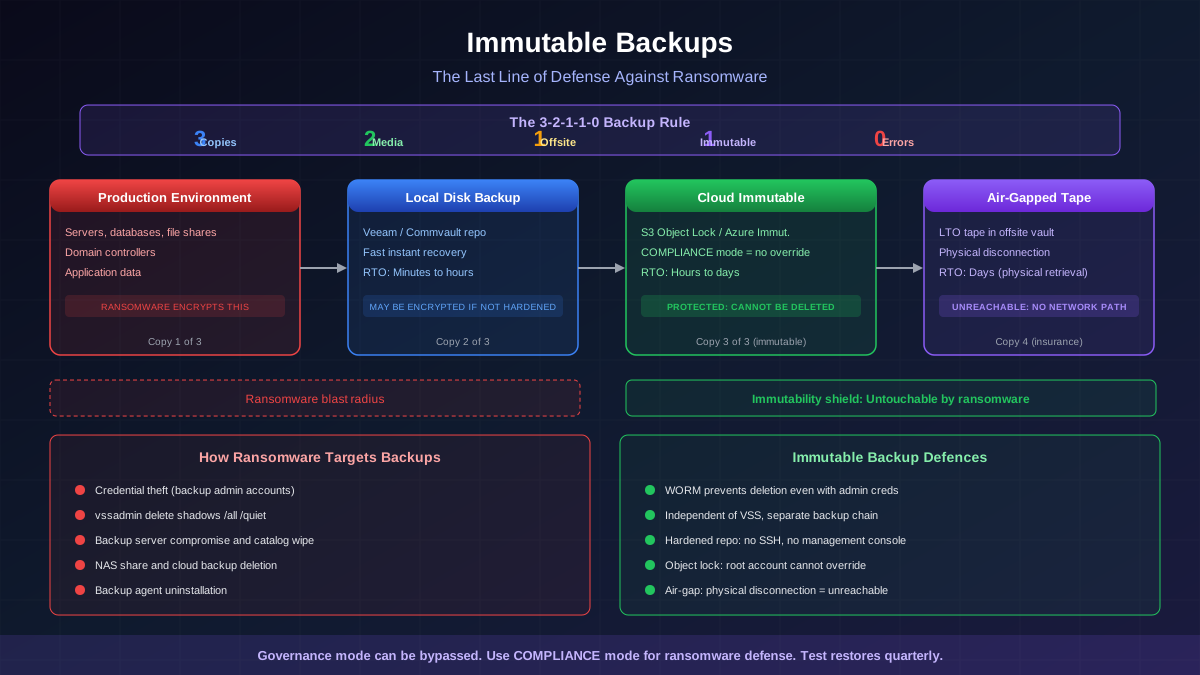
- Backup server accessibility — backup management consoles, repositories, and NAS shares are reachable from any point on the network, allowing attackers to delete or encrypt backups before deploying ransomware.
Segmentation Architecture
Zone-Based Design
Effective segmentation divides the network into zones based on function, trust level, and data sensitivity:
- User workstation zone — end-user devices. Highest risk because users open email, browse the web, and are the primary target for phishing. Workstations should be able to reach only the services they need (file shares, applications, internet proxy) and nothing else.
- Server zone — application servers, file servers, database servers. Should accept connections only from authorised sources on specific ports. Servers should not initiate outbound connections to workstations.
- Identity zone (Tier 0) — domain controllers, ADFS/Azure AD Connect servers, PKI infrastructure, privileged-access workstations. The most critical zone. Must be isolated from all workstation traffic except Kerberos, LDAP, and DNS on defined ports.
- Backup zone — backup servers, repositories, management consoles. Must be on a dedicated segment with strict ingress rules. Only backup agents should be able to communicate with the backup infrastructure.
- Management zone — SIEM, EDR consoles, network-management tools, jump servers. Accessible only from privileged-access workstations (PAWs) on the Tier 0 network.
- DMZ — internet-facing services (web servers, email gateways, VPN concentrators). Isolated from all internal zones with strict firewall rules.
- OT/IoT zone — operational technology and IoT devices. Separated from IT networks with one-way data flows where possible.
VLAN Implementation
VLANs are the foundational building block of network segmentation. Each zone is assigned one or more VLANs, and traffic between VLANs is routed through a firewall or Layer 3 switch with ACLs:
- VLAN design — assign VLANs by zone, not by physical location. A single floor may have devices in the workstation VLAN, the server VLAN (if rack space is shared), and the VoIP VLAN. Use 802.1Q trunking between switches.
- Inter-VLAN routing — route all inter-VLAN traffic through a firewall (preferred) or through a Layer 3 switch with ACLs (acceptable for basic segmentation). Do not use a router with no access controls.
- Default deny — configure firewall rules with a default-deny stance. Only explicitly permit required traffic flows. This is the opposite of the typical enterprise approach where everything is permitted and specific threats are blocked.
Micro-Segmentation
Micro-segmentation extends zone-based segmentation to control traffic between individual hosts within the same zone:
- Host-based firewall policies — Windows Defender Firewall (configured via Group Policy) can block workstation-to-workstation SMB (port 445) and RDP (port 3389) traffic. This is the single highest-impact micro-segmentation control for ransomware defence and requires no hardware purchase.
- Software-defined networking (SDN) — platforms like VMware NSX, Cisco ACI, or Illumio enforce micro-segmentation at the hypervisor or agent level, controlling traffic flows between individual workloads regardless of network topology.
- Identity-based policies — next-generation firewalls (Palo Alto, Fortinet) can enforce policies based on user identity (from Active Directory integration) rather than IP address, enabling more granular and maintainable rules.
Active Directory Tier Model
The AD tier model is a segmentation strategy specifically designed to prevent credential-escalation attacks that ransomware affiliates rely on:
- Tier 0: Identity infrastructure — domain controllers, ADFS, Azure AD Connect, PKI, and the privileged-access workstations (PAWs) used to manage them. Tier 0 credentials (Domain Admins, Enterprise Admins) must NEVER be used on Tier 1 or Tier 2 systems.
- Tier 1: Server infrastructure — application servers, database servers, file servers, and their management tools. Tier 1 admin accounts manage servers but cannot log into domain controllers or workstations.
- Tier 2: Workstations and user devices — end-user desktops, laptops, and mobile devices. Helpdesk accounts that manage workstations cannot be used on servers or domain controllers.
The tier model prevents the most common ransomware credential-escalation path: compromise a workstation, harvest cached domain-admin credentials (if a domain admin has ever logged into that workstation), and use those credentials to access domain controllers and deploy ransomware domain-wide.
Backup Network Isolation
Backup infrastructure requires dedicated segmentation because it is the primary target for ransomware operators seeking to eliminate the victim's recovery options:
- Dedicated backup VLAN — all backup servers, repositories, and management consoles on a separate VLAN with no routing to/from the workstation zone.
- Strict ingress rules — only backup agent traffic (specific ports from specific source IPs) is permitted into the backup zone. No RDP, no SSH, no web management traffic from the general network.
- Out-of-band management — backup server management (Veeam console, Commvault admin, etc.) is accessible only from dedicated management workstations on the management zone, never from standard user workstations.
- Separate authentication — backup infrastructure should use local accounts (not domain accounts) or a separate AD forest. If the production Active Directory is compromised, the backup infrastructure remains accessible with its own independent credentials.
Step-by-Step Implementation
Phase 1: Quick Wins (Week 1-2)
These controls can be implemented immediately with existing infrastructure:
- Block workstation-to-workstation SMB — deploy a Windows Defender Firewall GPO that blocks inbound SMB (TCP 445) on all workstations. Exceptions only for IT management subnets. This eliminates the primary ransomware lateral-movement vector.
- Block workstation-to-workstation RDP — same approach for RDP (TCP 3389). Users should RDP to servers through a jump server, not directly from workstation to workstation.
- Restrict domain-admin logons — configure "Deny log on locally" and "Deny log on through Remote Desktop Services" GPOs to prevent domain-admin accounts from logging into Tier 2 (workstation) systems.
Phase 2: Zone Establishment (Month 1-2)
- Create VLANs for each zone (workstation, server, identity, backup, management, DMZ)
- Migrate systems into appropriate VLANs with careful change management
- Configure inter-VLAN firewall rules starting with a default-deny policy and opening only required traffic flows
- Test and validate that all applications and services function correctly with the new rules
Phase 3: Hardening (Month 3-6)
- Implement the AD tier model — create tiered administrative accounts, deploy PAWs, configure logon restrictions
- Deploy micro-segmentation within zones using host-based firewalls or SDN
- Separate backup authentication from production Active Directory
- Implement network monitoring to detect anomalous traffic patterns that indicate lateral movement
Common Segmentation Mistakes
- Segmenting the network but leaving the backup server on the general server VLAN — backup infrastructure must be on its own dedicated segment. If the server VLAN is compromised, the backup server goes with it.
- Using domain-admin accounts on Tier 2 systems — even with network segmentation, if a domain-admin credential is cached on a compromised workstation, the attacker can use it to authenticate to Tier 0 systems.
- Permitting "any" as the destination in firewall rules — every rule should specify exact destination subnets and ports. Broad rules undermine the segmentation architecture.
- Not segmenting east-west traffic within zones — traditional perimeter firewalls control north-south (internet) traffic but allow unrestricted east-west (internal) traffic. Ransomware spreads east-west.
- Failing to maintain the rules over time — segmentation policies degrade as exceptions accumulate. Schedule quarterly reviews of firewall rules to remove stale exceptions and validate the architecture.
Measuring Segmentation Effectiveness
Validate your segmentation with regular testing:
- Port scanning from each zone — scan from the workstation zone and verify that only permitted ports are reachable on other zones. Any unexpected open ports indicate a rule gap.
- Lateral-movement testing — attempt to move from a workstation to a server, domain controller, and backup server using common ransomware techniques (SMB, RDP, WMI, PsExec). Document what succeeds and what is blocked.
- Purple-team exercises — simulate ransomware propagation in a controlled environment. Measure how many systems the simulated ransomware can reach from an initial compromise point.
- Blast-radius mapping — for any given compromise point, map every system that is reachable. The goal is to minimise this set to only the systems that the compromised system legitimately needs to communicate with.
Effective network segmentation does not prevent the initial compromise. The workstation that receives the phishing email will still be encrypted. But segmentation ensures that the encryption stops there. One workstation is a nuisance. The entire domain is a catastrophe. Segmentation is the architectural difference between the two outcomes.