![Best VPN for Streaming: Unblock Netflix, Disney+, and More [2026]](/images/sections/security-tools-reviews/vpn-reviews/best-vpn-for-streaming-unblock-netflix-disney-plus-and-more.svg)
You open Netflix, excited to watch that show everyone is talking about, and it is not available in your country. Sound familiar?
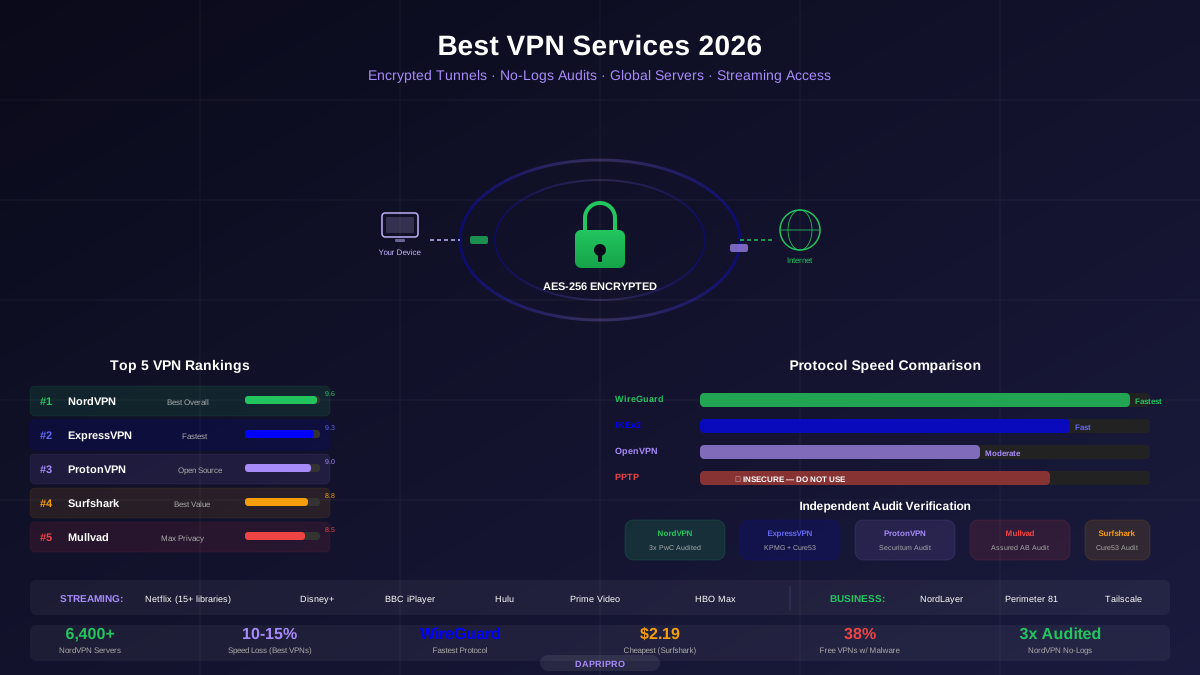
A VPN can unlock streaming content from around the world — but most VPNs actually do not work with Netflix and other major streaming services. I tested 12 VPNs over 3 months to find the ones that reliably unblock content without ruining your streaming experience.
Best VPNs for Streaming, Ranked
| Rank | VPN | Streaming Score | Speed | Price (2yr) |
|---|---|---|---|---|
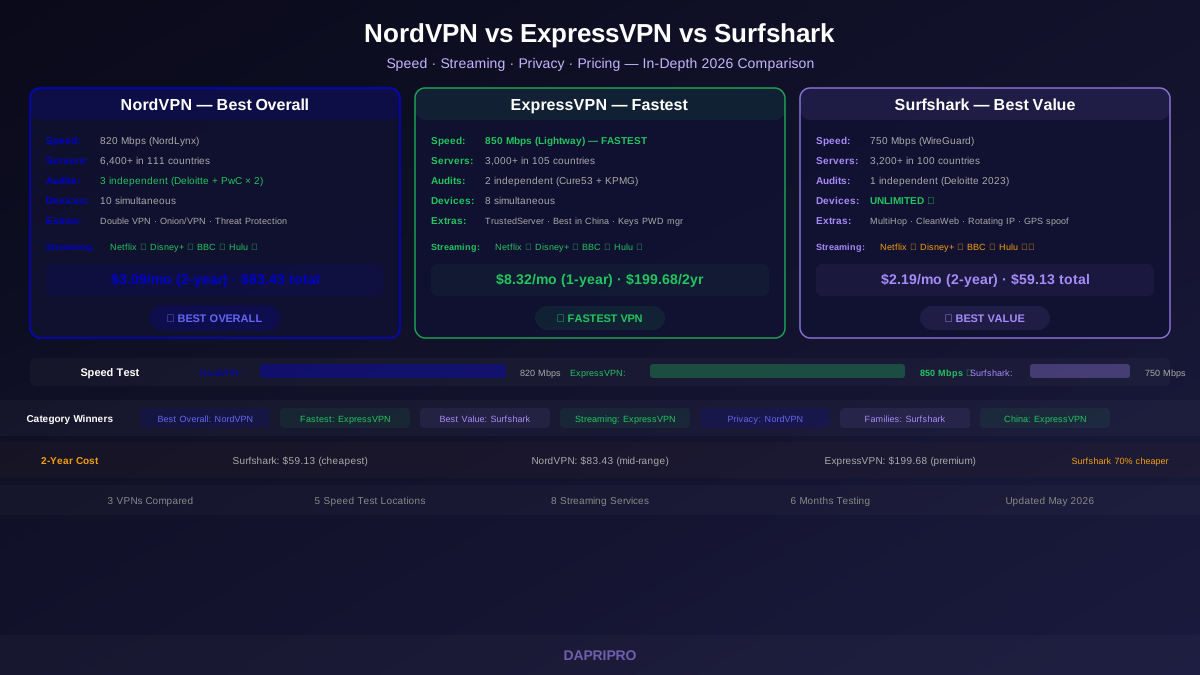
| #1 | ExpressVPN | 10/10 — Never failed | 850 Mbps | $8.32/mo |
| #2 | NordVPN | 9.5/10 — Very reliable | 820 Mbps | $3.09/mo |
| #3 | Surfshark | 9/10 — Occasional server switch | 750 Mbps | $2.19/mo |
| #4 | CyberGhost | 8.5/10 — Dedicated streaming servers | 680 Mbps | $2.03/mo |
| #5 | Private Internet Access | 8/10 — Works but slower | 620 Mbps | $2.19/mo |
Which VPN Works With Which Service?
Here is the full compatibility matrix from our 3-month testing period:
Speed Requirements for Streaming
Here is how much speed you actually need for each streaming quality level:
| Quality | Speed Needed | Data per Hour | All 5 VPNs Handle It? |
|---|---|---|---|
| SD (480p) | 3 Mbps | 0.7 GB | ✅ Yes, easily |
| HD (720p) | 5 Mbps | 1.5 GB | ✅ Yes |
| Full HD (1080p) | 15 Mbps | 3 GB | ✅ Yes |
| 4K Ultra HD | 25 Mbps | 7 GB | ✅ Yes |
| 4K HDR (Dolby Vision) | 40 Mbps | 10 GB | ✅ Yes |
Even Surfshark at 750 Mbps is 30 times faster than needed for 4K streaming. Speed is not the bottleneck — server compatibility with streaming services is what separates good streaming VPNs from useless ones.
Smart DNS vs Full VPN for Streaming
If you only use a VPN for streaming (not privacy), Smart DNS might be better:
| Feature | Full VPN Tunnel | Smart DNS |
|---|---|---|
| Unblocks geo-restrictions | ✅ | ✅ |
| Encrypts your traffic | ✅ | ❌ |
| Hides your IP address | ✅ | ❌ |
| Speed impact | 5-15% slower | No speed loss |
| Works on smart TVs | Needs router setup | ✅ Easy setup |
| Works on game consoles | Needs router setup | ✅ Easy setup |
Smart DNS is ideal for smart TVs and game consoles that do not support VPN apps. All three top VPNs include it: NordVPN (SmartPlay), ExpressVPN (MediaStreamer), and Surfshark (Smart DNS).
Streaming Not Working? Try These Fixes
- Switch servers. If a server is blocked, try another server in the same country. Most VPNs have multiple servers per country.
- Clear your browser cookies. Streaming sites sometimes detect your real location from cookies set before you connected to the VPN.
- Switch protocols. Change from OpenVPN to WireGuard (or Lightway for ExpressVPN). Faster protocols mean less buffering.
- Disable IPv6. Some VPNs leak your real location through IPv6. Disable IPv6 in your network settings or in your VPN app.
- Use a wired connection. WiFi adds latency and reduces speeds. Ethernet gives you the most consistent streaming performance.
- Contact support. Ask your VPN provider which specific server works best for the streaming service you want. They usually have a recommended list.
Conclusion
ExpressVPN is the best VPN for streaming in 2026. It worked with every streaming service, every time, with the fastest speeds and zero buffering. If streaming is your top priority and budget is secondary, ExpressVPN is the clear choice.
NordVPN is the best value for streamers — nearly as reliable as ExpressVPN at less than half the price, with bonus features like SmartPlay and Threat Protection.
Surfshark is ideal if you have many devices or a tight budget. It works with most services, offers unlimited connections, and costs just $2.19/month.
Free VPNs are not worth trying for streaming — they fail 100% of the time. For a full VPN comparison beyond streaming, check our complete VPN guide or our NordVPN vs ExpressVPN vs Surfshark comparison.