Every day, security researchers discover over 450,000 new malware samples. That is more than 5 new malicious programs every second. Antivirus software catches many of them automatically using signatures and behavior rules, but roughly 30-40% slip through. That is where malware analysis comes in.
Malware analysis is the practice of taking a suspicious file apart to understand exactly what it does, how it works, and how to stop it. Think of it like being a detective — instead of examining a crime scene, you are examining a piece of software that was designed to cause harm.
This guide covers everything from basic triage to advanced reverse engineering, with practical tools you can start using today.
The Malware Analysis Lifecycle
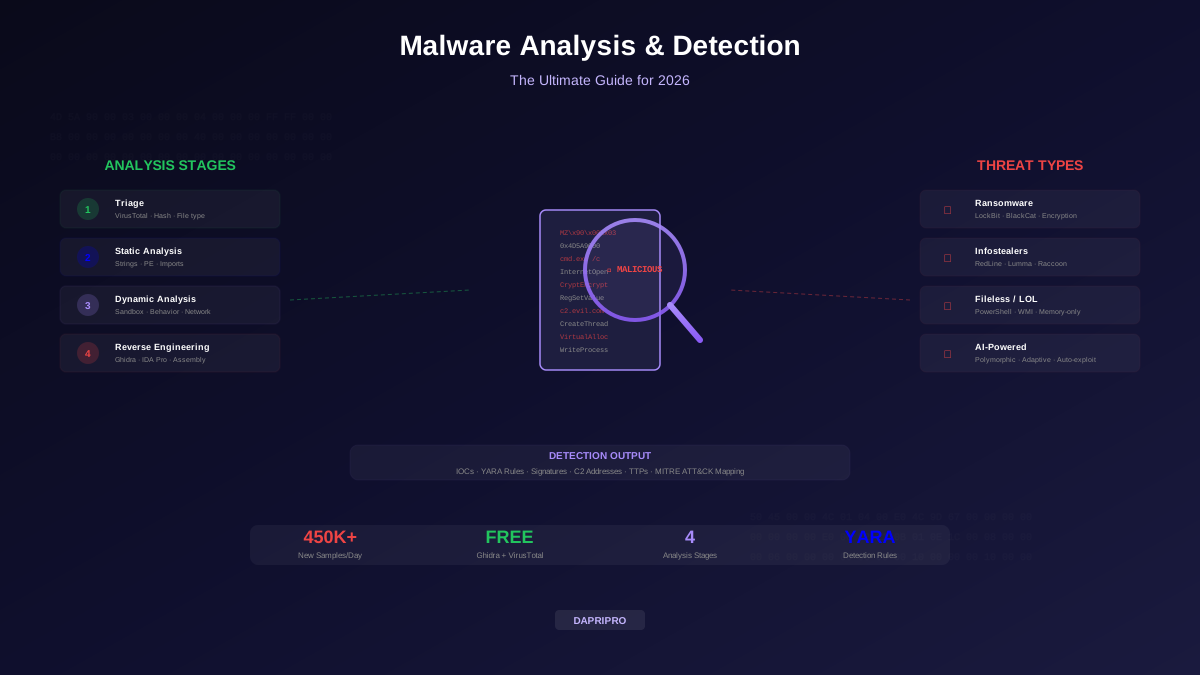
Professional malware analysis follows a structured four-stage lifecycle. Each stage goes deeper, and you only move to the next stage if the previous one did not give you enough answers:
Stage 1: Triage — Is It Malicious?
Triage is the fastest stage. The goal is to answer one question: should I investigate this further?
- Hash lookup — Calculate the file's SHA-256 hash and look it up on VirusTotal. If 30+ antivirus engines flag it, it is almost certainly malicious and probably already well-documented.
- File type verification — Is the file what it claims to be? A "PDF" that is actually a .exe, a Word document with macros, or a .zip containing a .scr file are all red flags.
- Reputation check — Where did this file come from? Email attachment from an unknown sender? Downloaded from a suspicious domain? Found running as an unexpected process?
- YARA rule matching — Run the file against your library of YARA rules. These pattern-matching rules can identify malware families in milliseconds.
Stage 2: Static Analysis — Examining Without Executing
Static analysis examines the malware's code and structure without running it. This is safe because the malware never executes, but it has limits — obfuscated or encrypted malware may hide its true purpose.
- Strings extraction — The
stringscommand pulls readable text from a binary. You might find URLs the malware contacts, registry keys it modifies, file paths it targets, error messages, or even the attacker's username. - PE header analysis — Windows executables (PE files) contain headers that reveal: when the file was compiled, what libraries it imports (networking? encryption? screen capture?), how many sections it has, and whether it is packed (compressed to hide its contents).
- Import table inspection — The imports tell you what the malware CAN do. If it imports
InternetOpenUrl, it contacts the internet. If it importsCryptEncrypt, it encrypts data. If it importsCreateRemoteThread, it injects code into other processes. - Disassembly — Tools like Ghidra and IDA Pro convert the binary machine code back into assembly language that analysts can read and understand.
Stage 3: Dynamic Analysis — Observing Behavior
Dynamic analysis runs the malware in a controlled sandbox environment and watches what it actually does. This reveals behavior that static analysis cannot see:
- Process activity — Does it spawn child processes? Does it inject code into legitimate processes like
explorer.exeorsvchost.exe? - File system changes — Does it create, modify, or delete files? Does it encrypt documents? Does it drop additional malware?
- Registry modifications — Does it add persistence mechanisms (auto-start entries)? Does it disable security software?
- Network communication — Does it contact command-and-control (C2) servers? Does it download additional payloads? Does it exfiltrate data?
Popular sandboxing tools include ANY.RUN (interactive cloud sandbox with a free tier), Cuckoo Sandbox (free, self-hosted), and Joe Sandbox (commercial, very detailed reports). For details on building your own sandbox, see our guide to setting up a malware analysis lab.
Understanding Modern Malware Types
| Malware Type | What It Does | Example | Detection Difficulty |
|---|---|---|---|
| Ransomware | Encrypts files, demands payment | LockBit 4.0, BlackCat | Medium — encryption activity is noisy |
| Infostealers | Steals credentials, cookies, crypto wallets | RedLine, Raccoon, Lumma | High — designed to be stealthy |
| RATs | Remote access for persistent control | AsyncRAT, Quasar, DarkComet | High — mimics legitimate remote access |
| Rootkits | Hides deep in OS kernel | Necurs, ZeroAccess | Very High — kernel-level concealment |
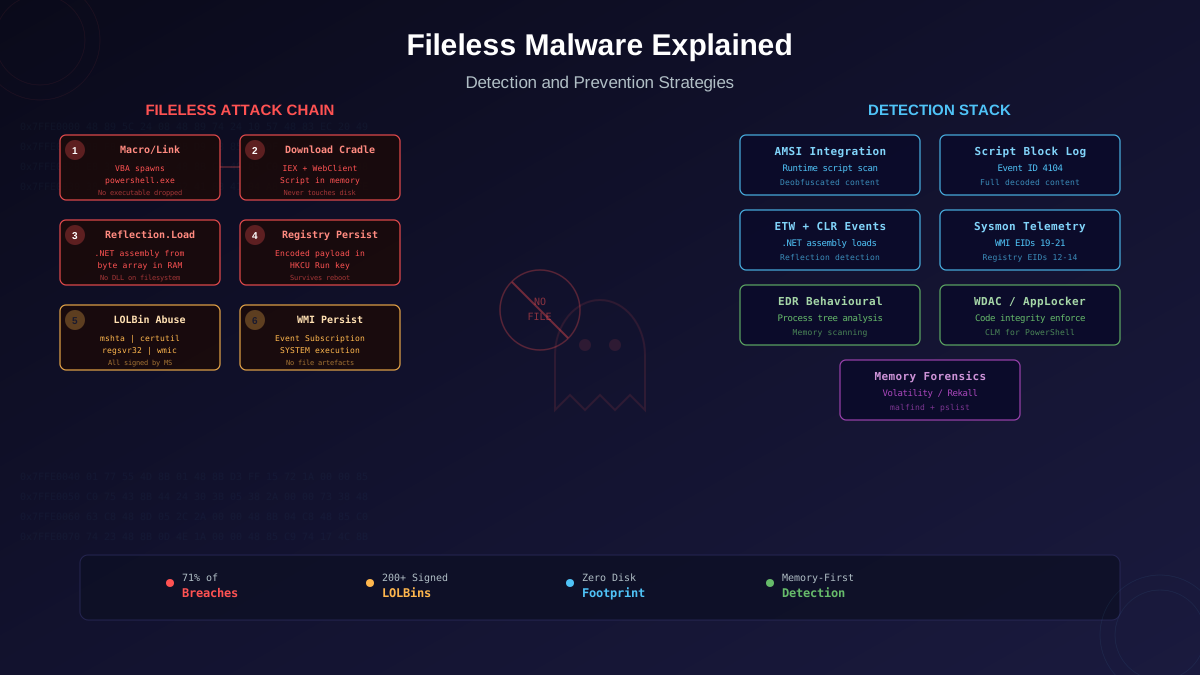
| Fileless | Lives only in memory, no files on disk | PowerShell Empire, Cobalt Strike | Very High — nothing to scan on disk |
| AI-Powered | Uses ML to adapt and evade | Polymorphic AI variants | Extreme — constantly changing |
Malware Detection Tools Comparison
AI-Powered Malware: The Emerging Threat
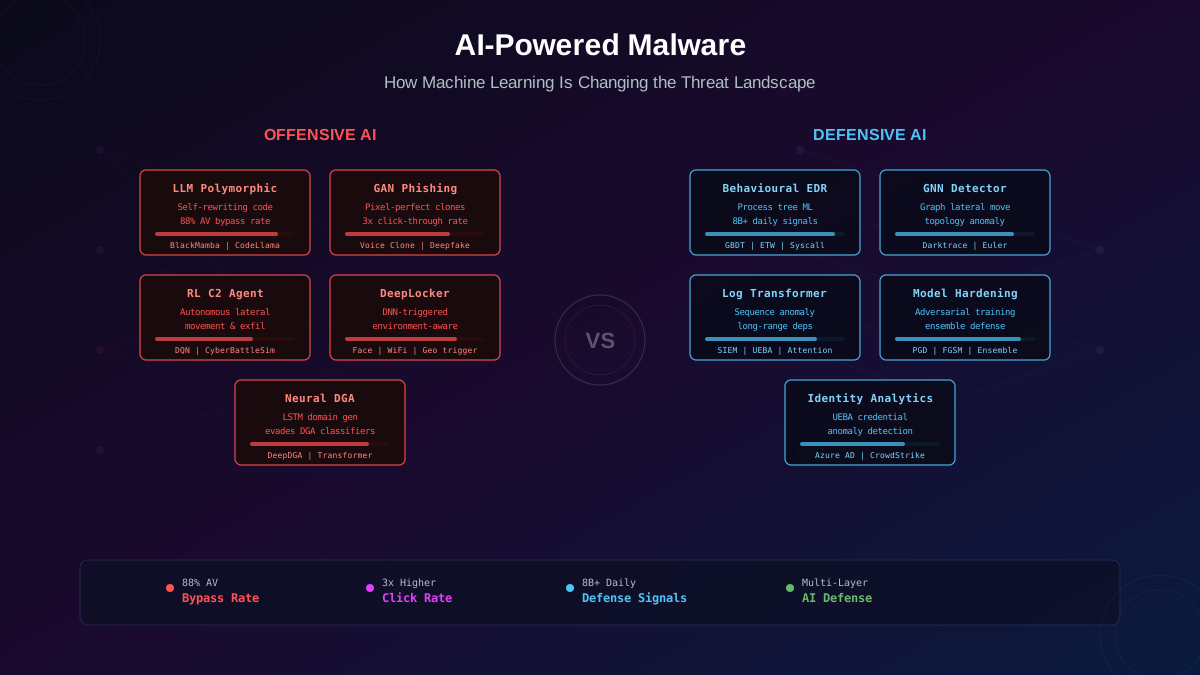
AI-powered malware represents the biggest shift in the threat landscape since ransomware. These threats use machine learning to:
- Evade detection — polymorphic malware that rewrites its own code at each infection, making signature-based detection useless.
- Craft personalized attacks — AI generates phishing emails by scraping a target's LinkedIn, social media, and public posts to create messages that look completely legitimate.
- Adapt in real time — malware that detects sandbox environments and changes its behavior, or that probes a network and automatically selects the most effective exploitation technique.
- Automate attack chains — AI that can autonomously discover vulnerabilities, write exploits, and move laterally through networks without human guidance.
Defending Against AI Malware
Traditional signature-based antivirus cannot stop AI malware because every sample looks different. You need behavior-based detection that watches what programs DO rather than what they look like:
- EDR (Endpoint Detection and Response) — monitors every process, file operation, and network connection on endpoints. CrowdStrike, SentinelOne, and Microsoft Defender for Endpoint use their own AI/ML models to detect suspicious behavioral patterns.
- UEBA (User and Entity Behavior Analytics) — establishes baselines of normal behavior for users and systems, then alerts on deviations. If an account that normally accesses 10 files per day suddenly accesses 10,000, UEBA flags it.
- Network Detection and Response (NDR) — analyzes network traffic for anomalous patterns like unusual data exfiltration, C2 communication, or lateral movement.
Rootkit Detection: Finding Hidden Malware
Rootkits are the most dangerous malware category because they hide at the deepest levels of the operating system — in the kernel, bootloader, or firmware. A rootkit can make itself invisible to the operating system itself, meaning normal security tools and even Task Manager cannot see it.
Rootkit Types by Depth
- Application rootkits — replace or modify standard system utilities. Easiest to detect.
- Kernel rootkits — modify the operating system kernel itself. Can hide processes, files, and network connections from all user-space tools.
- Bootloader rootkits (bootkits) — infect the boot process, loading before the operating system and any security software.
- Firmware rootkits — infect UEFI/BIOS firmware. Survive operating system reinstalls and even hard drive replacements.
Detection requires specialized tools that operate outside the potentially compromised OS: memory forensics tools (Volatility), boot integrity verification (Secure Boot, UEFI scanning), and cross-view detection (comparing what the OS reports vs. raw disk/memory contents).
Top 10 Malware Threats in 2026
For the current threat landscape and specific indicators of compromise, see our detailed breakdown of the top 10 malware threats to watch in 2026. Key trends include:
- Infostealers dominating — RedLine, Lumma, and Raccoon are the most prevalent malware families, targeting browser credentials, crypto wallets, and session cookies.
- Ransomware double/triple extortion — attackers encrypt data, steal it, AND threaten to DDoS your public services until you pay.
- Supply chain malware — compromising legitimate software packages (npm, PyPI, Maven) to distribute malware to thousands of developers.
- Living-off-the-land — using built-in OS tools (PowerShell, WMI, certutil) instead of dropping custom malware, making detection much harder.
Creating YARA Detection Rules
YARA is the pattern-matching language that security researchers use to identify and classify malware. Think of YARA rules like search warrants — they describe exactly what evidence to look for:
A basic YARA rule has three parts: meta (description and author), strings (patterns to search for), and condition (logic combining the string matches). For example, a rule might flag any file that contains both a known C2 server URL AND a specific encryption function name.
Start building your YARA rule library from:
- YARA Rules repository on GitHub — community-maintained collection of rules for common malware families.
- Malpedia — comprehensive malware encyclopedia with associated YARA rules.
- Your own incident response — every time you analyze a new sample, write a YARA rule for it. Your custom rules will catch variants and related samples that public rules miss.
Building Your Analysis Lab
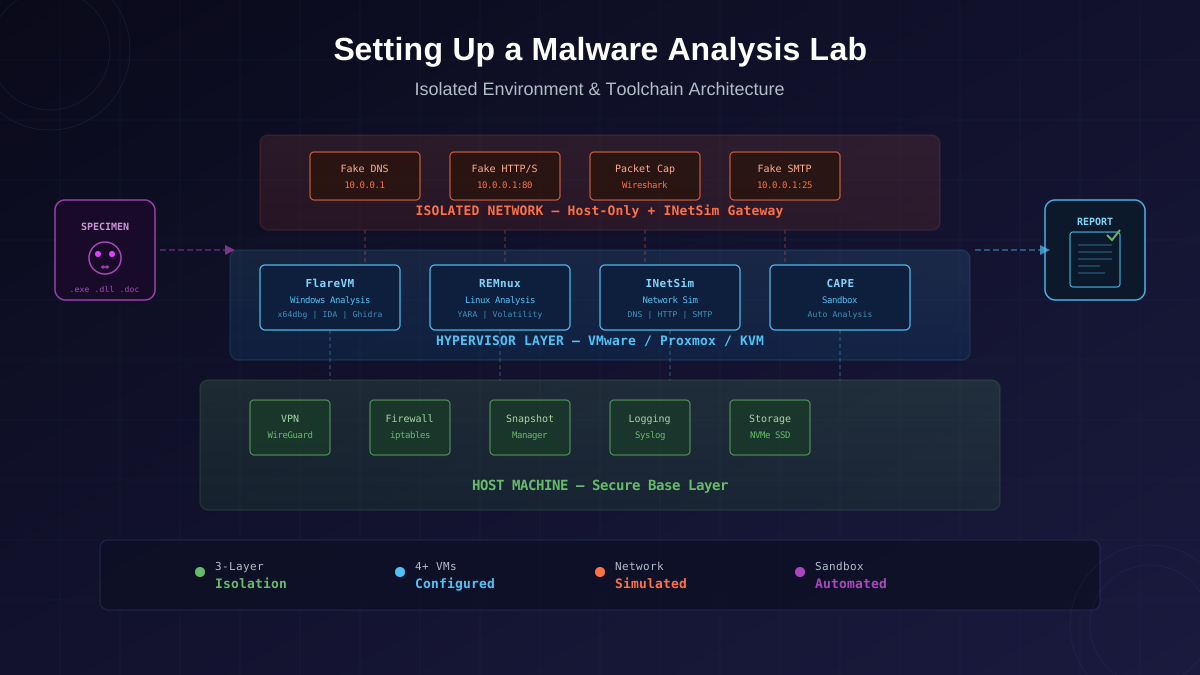
You should NEVER analyze malware on your real computer or work network. Even "dead" samples can contain working exploits. Setting up a proper malware analysis lab is the essential first step:
- Hypervisor — VMware Workstation Pro (now free) or VirtualBox. These create completely isolated virtual machines.
- Analysis VM — Windows 10/11 VM with analysis tools pre-installed. Take a clean snapshot BEFORE analyzing any malware.
- REMnux — Linux distribution specifically built for malware analysis, pre-loaded with 500+ analysis tools.
- Network isolation — Use host-only networking or INetSim to simulate internet services while keeping the malware contained.
- Snapshots — After every analysis session, revert to your clean snapshot. Never continue analyzing on a "dirty" VM.
Start Your Malware Analysis Journey
You do not need expensive tools or years of experience to start analyzing malware. Begin with VirusTotal for triage, learn strings extraction and PE header analysis for static work, and use ANY.RUN's free tier for dynamic analysis. As your skills grow, add Ghidra for reverse engineering and build out your YARA rule library.
The malware landscape evolves daily, but the fundamentals of analysis remain constant: understand what it is, understand what it does, and create detections to catch it and its variants. Every sample you analyze makes you better at spotting the next one.