Every VPN deployment eventually hits the same wall: users complain that video calls are choppy, file downloads crawl, and streaming services buffer endlessly. The IT team checks the VPN concentrator and finds it running at 90 percent capacity because every user's entire internet traffic — Netflix, YouTube, Windows Update, iCloud Photos, and corporate applications — is being funneled through a single chokepoint designed to handle only the corporate traffic. The solution that every VPN administrator reaches for is split tunneling. And the debate that follows is always the same: the network team says split tunneling is necessary, the security team says it is dangerous, and both are correct.
Split tunneling is not inherently good or bad. It is a routing decision with specific trade-offs that depend entirely on your threat model, your compliance requirements, and what your users actually do with their VPN connections. This guide covers the mechanics of how split tunneling works, when it is the right call, when it creates unacceptable risk, and how to configure it properly on every major platform.
How Split Tunneling Works at the Routing Table Level
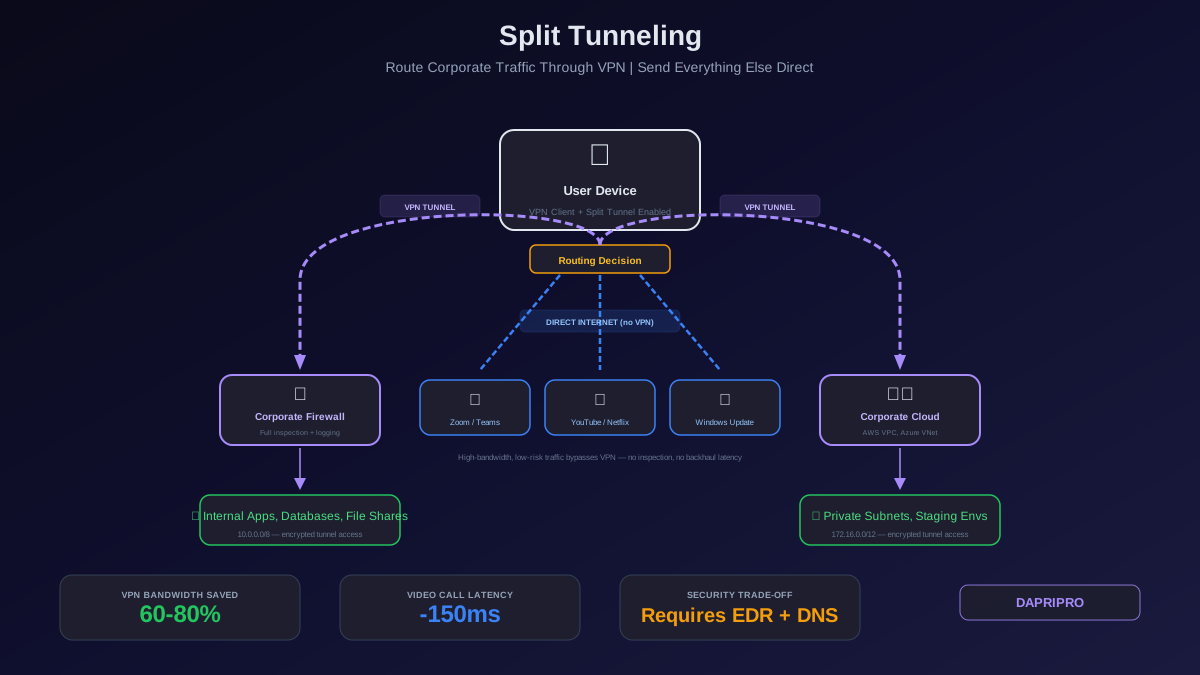
When you connect to a VPN, the VPN client modifies your device's routing table. In a full tunnel configuration, the client adds a default route (0.0.0.0/0) through the VPN tunnel interface — this means every packet leaving your device, regardless of destination, goes into the tunnel. Your device's original default route to the local internet gateway is either removed or given a lower priority metric.
In a split tunnel configuration, the VPN client does not add a default route through the tunnel. Instead, it adds specific routes for corporate network subnets only. For example:
| Destination | Next Hop | Interface | Traffic Path |
|---|---|---|---|
| 10.0.0.0/8 (corporate) | VPN gateway | tun0 (VPN) | Through the VPN tunnel to corporate network |
| 172.16.0.0/12 (corporate) | VPN gateway | tun0 (VPN) | Through the VPN tunnel to corporate network |
| 0.0.0.0/0 (everything else) | Local router (192.168.1.1) | eth0 (LAN) | Directly to the internet via local ISP |
The result: packets destined for corporate IP ranges go through the encrypted VPN tunnel, and packets destined for any other IP address go directly out the user's local internet connection — bypassing the VPN entirely. This is the fundamental routing split that gives the feature its name.
The Three Modes of Split Tunneling
Most VPN platforms support three distinct modes, each with a different security and performance profile:
1. Include-based split tunneling (standard): You define which routes go through the tunnel. Everything else goes directly to the internet. This is the most common mode and provides the biggest performance improvement, but it leaves the most traffic uninspected.
2. Exclude-based split tunneling (inverse): All traffic goes through the tunnel by default. You define specific routes or domains that bypass the tunnel. This is the preferred security-conscious approach because the default is full protection, and only explicitly approved exceptions are excluded.
3. Dynamic split tunneling (FQDN/URL-based): Instead of static IP ranges, the VPN client resolves domain names in real time and dynamically routes traffic based on the resolved IP addresses. When Microsoft Teams resolves to a new IP range, the routing table updates automatically. Cisco AnyConnect and Palo Alto GlobalProtect support this mode.
When Split Tunneling Is the Right Choice
Split tunneling makes sense in specific scenarios where the performance benefit clearly outweighs the security trade-off:
Scenario 1: Video Conferencing Optimization
Real-time communication applications (Zoom, Microsoft Teams, Google Meet, WebEx) are the single biggest driver of split tunneling adoption. These applications generate 2 to 4 Mbps per user of UDP traffic that is extremely sensitive to latency, jitter, and packet loss. Routing this through a VPN tunnel — especially one that backhuals traffic to a central data center — adds 50 to 200 milliseconds of latency and increases jitter by 10 to 50 milliseconds. The result is frozen video, robotic audio, and dropped calls that destroy productivity.
Microsoft's official guidance explicitly recommends excluding Teams media traffic from VPN tunnels. Their documentation provides the specific IP ranges and ports to exclude: UDP ports 3478-3481 to Microsoft's well-documented Teams subnets. This is the most universally safe split tunneling use case because the traffic is already end-to-end encrypted by the application, and Microsoft publishes the destination IP ranges in machine-readable format that can be automatically imported into your VPN configuration.
Scenario 2: VPN Concentrator Capacity Relief
When your VPN concentrator is at 80 percent or higher bandwidth utilization, split tunneling is an immediate relief valve. Streaming services, Windows Update, iCloud, Google Drive personal, and social media typically account for 50 to 70 percent of traffic volume on a full-tunnel VPN. Excluding these from the tunnel instantly recovers that capacity for corporate traffic without purchasing additional hardware. This is a pragmatic decision: a saturated VPN that drops connections and causes timeouts for corporate applications is worse than a split tunnel that lets personal traffic bypass security inspection.
Scenario 3: Cloud-Native Organizations Using SASE/SSE
If your organization has deployed a SASE or SSE platform (Zscaler, Cloudflare One, Netskope), the VPN tunnel is no longer your only security enforcement point. The SASE agent on the endpoint inspects and filters all internet traffic regardless of whether it goes through a VPN tunnel. In this architecture, split tunneling from the VPN is safe because the SASE agent provides the security coverage that the VPN tunnel would have provided. The VPN tunnel is used only for accessing legacy on-prem applications that are not yet migrated to ZTNA.
Scenario 4: Developer Environments
Developers frequently need to access cloud development environments (AWS, Azure, GCP consoles), pull container images from registries (Docker Hub, ECR, GCR), download packages from npm, PyPI, or Maven, and interact with CI/CD pipelines — all while simultaneously needing VPN access to internal code repositories and staging environments. Forcing all this traffic through a VPN tunnel can add significant latency to build and deployment workflows. Split tunneling that routes only internal development traffic through the VPN and lets cloud development traffic go directly is common and generally acceptable if developer endpoints have EDR and DNS security.
When Split Tunneling Creates Unacceptable Risk
There are clear scenarios where split tunneling should not be enabled, regardless of the performance benefit:
Handling Regulated Data
If users access systems containing PCI cardholder data, HIPAA-protected health information, or classified/controlled unclassified information, split tunneling creates a compliance problem. PCI DSS Requirement 1 mandates network segmentation and traffic inspection for systems in the cardholder data environment. If a user's device has a direct, uninspected internet path (via split tunnel) while simultaneously connected to a PCI-scoped system (via VPN), the user's device becomes an in-scope segment boundary that must meet all PCI controls — including DLP, IDS, and centralized logging for the internet-facing path. Full tunnel VPN eliminates this problem by routing all traffic through the centralized inspection stack.
High-Risk Users or Environments
Users who are frequent targets for phishing (executives, finance, HR), users in high-risk geographies where local ISPs may intercept traffic, and users on shared or public networks (coffee shops, hotels, airports) should not use split tunneling. The direct internet path on these connections is more likely to encounter malicious content, man-in-the-middle interception, or DNS hijacking. Full tunnel VPN provides encryption and inspection for all traffic in these environments.
No Endpoint Protection on the Device
Split tunneling assumes the endpoint has compensating security controls for the traffic that bypasses the VPN tunnel. At minimum, this means EDR (CrowdStrike, SentinelOne, Defender for Endpoint), DNS security (Umbrella, NextDNS, Cloudflare Gateway), and an up-to-date operating system with automatic patching. If you cannot verify that these controls are present and active on the device at VPN connection time, do not enable split tunneling. The unprotected internet path on an endpoint without EDR is a direct path for malware to reach your internal network via the VPN tunnel.
Configuring Split Tunneling on Major VPN Platforms
Cisco AnyConnect
AnyConnect supports both standard and dynamic split tunneling. Standard split tunneling uses the split-tunnel-policy and split-tunnel-network-list commands in the group policy configuration on the ASA firewall. Dynamic split tunneling resolves domain names in real time and is configured with the dynamic-split-exclude-domains attribute — this is the recommended approach for Microsoft 365 and Google Workspace traffic.
Key AnyConnect configuration elements:
| Configuration | Command / Setting | Effect |
|---|---|---|
| Enable split tunnel | split-tunnel-policy tunnelspecified | Only listed networks go through the tunnel |
| Inverse split tunnel | split-tunnel-policy excludespecified | All traffic tunneled except listed networks |
| Dynamic exclude | anyconnect-custom-attr dynamic-split-exclude-domains | Domains resolved and excluded in real time |
| DNS handling | split-tunnel-all-dns enable | Send all DNS queries through tunnel even in split mode |
Critical note on DNS: Even when using split tunneling, always send DNS queries through the VPN tunnel. If DNS queries go directly to the user's local DNS resolver, the corporate DNS server cannot enforce internal name resolution, and the security team loses visibility into what domains the user is resolving. Enable split-tunnel-all-dns on AnyConnect to ensure all DNS traffic is tunneled regardless of the split tunnel configuration for data traffic.
Palo Alto GlobalProtect
GlobalProtect configures split tunneling through the portal's agent configuration under the Split Tunnel tab. You specify include and exclude routes as network prefixes, and include and exclude applications by process name. Application-based split tunneling is a powerful GlobalProtect feature — instead of routing by destination IP, you can exclude specific applications (like Teams.exe or zoom.exe) from the tunnel regardless of what IP addresses they connect to. This eliminates the problem of maintaining IP range lists for cloud services that change frequently.
WireGuard
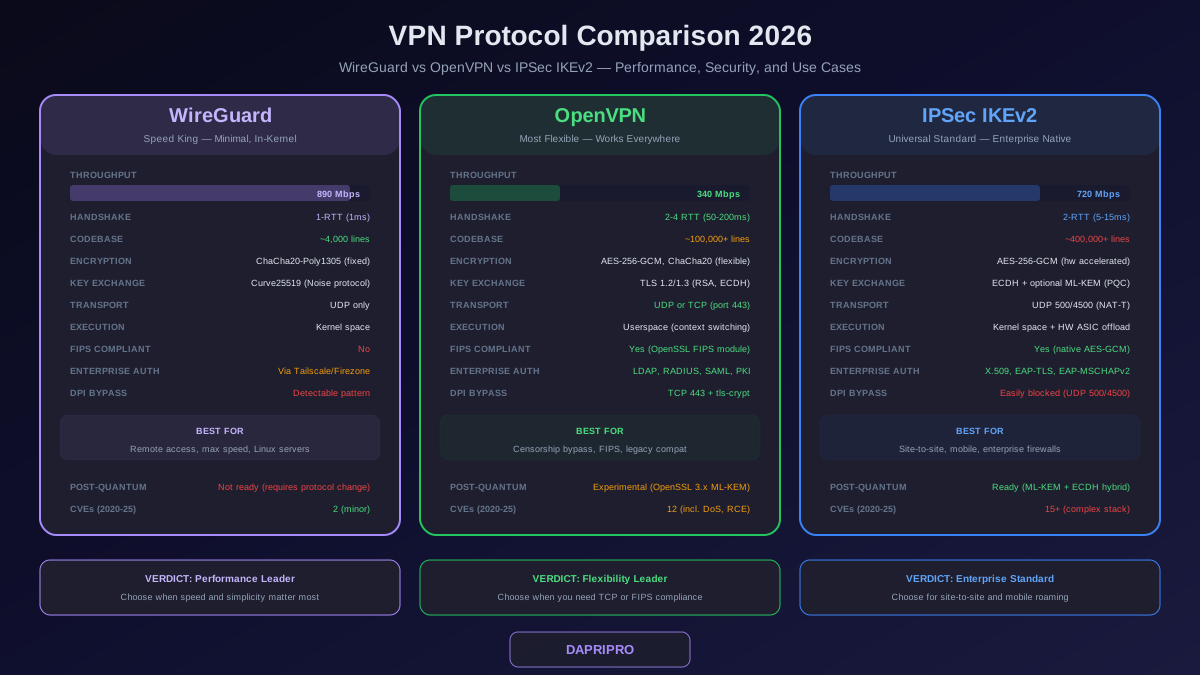
WireGuard handles split tunneling through the AllowedIPs parameter in the peer configuration. This is the most straightforward implementation of any VPN platform:
Full tunnel: AllowedIPs = 0.0.0.0/0, ::/0 — routes all IPv4 and IPv6 traffic through the tunnel.
Split tunnel: AllowedIPs = 10.0.0.0/8, 172.16.0.0/12 — routes only the specified subnets through the tunnel. Everything else goes directly to the internet.
WireGuard does not support FQDN-based split tunneling natively. If you need to exclude cloud services by domain name, you need a wrapper script that resolves the domains, converts them to IP ranges, and updates the AllowedIPs configuration. Tools like wg-dynamic and various community scripts handle this, but it is less elegant than AnyConnect's or GlobalProtect's built-in dynamic split tunneling.
OpenVPN
OpenVPN uses pushed routes from the server to configure split tunneling on client devices. In full tunnel mode, the server pushes redirect-gateway def1, which adds routes that override the default gateway. In split tunnel mode, the server pushes specific routes instead: push "route 10.0.0.0 255.0.0.0" for each corporate subnet. The client's default route remains pointing to the local gateway, and only the pushed routes go through the tunnel.
Security Controls to Deploy Alongside Split Tunneling
If you decide to enable split tunneling, these compensating controls reduce the risk of the uninspected internet path:
1. DNS-Level Security
Even with split tunneling, tunnel all DNS queries through the VPN. This gives the security team visibility into every domain the user resolves, regardless of whether the actual data traffic is tunneled. Additionally, deploy a DNS security service (Cisco Umbrella, Cloudflare Gateway, NextDNS) on the endpoint that blocks known malicious domains, phishing URLs, and command-and-control callbacks. DNS security catches the vast majority of web-based threats before they can deliver a payload.
2. Endpoint Detection and Response (EDR)
EDR is the most critical compensating control for split tunneling. When traffic bypasses the VPN tunnel and corporate firewall, the endpoint's EDR agent becomes the last line of defense. Ensure EDR is installed, running, and checked at VPN connection time. Most modern VPN platforms can verify EDR status as a connection prerequisite — if CrowdStrike or SentinelOne is not running, the VPN client refuses to connect or forces full tunnel mode.
3. Conditional Split Tunneling
Instead of a static split tunneling configuration for all users, implement conditional logic that dynamically selects the tunneling mode based on context. Examples: if the user is on a corporate-managed network (detected by trusted network detection), use split tunneling. If the user is on an unknown or public network, force full tunnel. If the user's device posture score is below threshold (missing patches, EDR not running), force full tunnel. Cisco AnyConnect, Palo Alto GlobalProtect, and Zscaler all support some form of conditional tunneling policies.
4. Micro-Segmentation After VPN
The biggest risk of split tunneling is that a compromised endpoint has both a direct internet path (for receiving malware) and a VPN path to internal resources (for lateral movement). Mitigate this by implementing micro-segmentation on the internal network. Even if an attacker compromises a VPN-connected endpoint, micro-segmentation prevents them from reaching systems outside the user's authorized access scope. Combine this with identity-aware access policies that restrict what internal resources each VPN user can reach.
Testing Your Split Tunneling Configuration
After configuring split tunneling, verify that it works correctly from a user's endpoint:
Step 1: Check the routing table. On Windows, run route print and verify that only corporate subnets route through the VPN tunnel interface. On macOS/Linux, run netstat -rn or ip route show. Confirm that the default route (0.0.0.0/0) points to the local gateway, not the VPN interface (unless you are using inverse split tunneling).
Step 2: Verify traffic paths. Run traceroute (or tracert on Windows) to a corporate IP address — it should traverse the VPN tunnel. Run traceroute to a public site (like 8.8.8.8) — it should go directly through the local gateway without entering the tunnel. If both paths go through the tunnel, split tunneling is not active.
Step 3: Test DNS resolution. Verify that DNS queries are going through the VPN tunnel even though data traffic is split. Use nslookup or dig against internal hostnames and confirm they resolve correctly through the corporate DNS server. If internal names fail to resolve, DNS may be going to the local resolver instead of the VPN DNS server.
Step 4: Validate edge cases. Test what happens when a corporate application uses a CDN with public IP addresses that are outside your defined corporate subnets. Test what happens when a cloud SaaS application's IP range changes (this is common with Microsoft 365 and Google Workspace). If these edge cases are not handled, users will experience intermittent access failures.
Monitoring and Auditing Split Tunneling
The loss of visibility is the primary security concern with split tunneling. Compensate by monitoring these data sources:
VPN connection telemetry: Log which users are connecting with split tunneling enabled, what routes are being pushed, and how much traffic volume is going through the tunnel versus bypassing it. Most VPN platforms provide this data in their management consoles.
EDR telemetry: Since the EDR agent sees all network connections from the endpoint (both tunneled and direct), it provides the visibility that the corporate firewall loses when traffic bypasses the VPN. Correlate EDR network connection logs with VPN session data to build a complete picture of each user's traffic.
DNS logs: If all DNS queries go through the VPN tunnel (as recommended), the corporate DNS server has a complete record of every domain the user resolves — even if the subsequent data connection goes directly to the internet. DNS logs are one of the most valuable security data sources for detecting compromised endpoints, regardless of the tunneling mode.
Split tunneling is a pragmatic engineering decision, not a religious debate. The organizations that get it right are the ones that match the tunneling mode to the user's risk profile, deploy compensating controls on every endpoint, and monitor the direct internet path through EDR and DNS telemetry instead of pretending the blind spot does not exist. Start with inverse split tunneling as your default, exclude only what you must for performance, and treat standard split tunneling as an exception that requires documented justification and additional endpoint controls.
For related guidance, see our articles on VPN and Secure Access and SASE Architecture for the broader network security context.